


 Home
HomeHow to master audio transcription with Rontgen in 2025? A complete guide.
In today's fast-paced digital landscape, converting audio to text efficiently is essential for a wide range of purposes, from content creation to data analysis. Rontgen, a cutting-edge AI writing platform, features a powerful audio transcription tool that delivers adaptable methods for transforming speech into text. This guide details how to configure and use Rontgen's transcription capabilities, harnessing custom agents and AI models for superior results, ensuring a smooth and tailored experience for all your transcription tasks. Mastering audio transcription with Rontgen can dramatically boost your productivity and open up new opportunities within your content workflow.
Key Points
Rontgen provides versatile audio transcription by leveraging custom agents.
A properly configured API key from a language model and transcription provider is mandatory.
You can customize the transcription language and model settings to achieve optimal accuracy.
Transcription post-processing is available using single or chained agents.
Dynamic agent chain processing enables immediate refinements for flawless output.
Rontgen integrates your personalized AI pipeline directly into the transcription process.
Understanding Rontgen's Audio Transcription Feature
What is Rontgen's Audio Transcription?
Rontgen's audio transcription tool is engineered to give users a versatile and effective method for converting speech to text. It uses advanced AI technology to analyze audio files or live recordings and produce precise transcripts. A major advantage of Rontgen is its flexibility, enabling users to personalize the transcription workflow with their own custom agents.
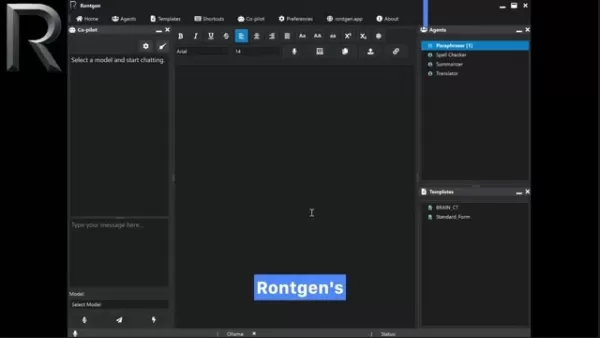
This allows you to adapt the transcription to particular requirements, such as specialized jargon, unique names, or specific formatting guidelines. This versatility supports multiple approaches to convert speech into text, utilizing your own custom agents.
Setting Up Your Transcription Environment
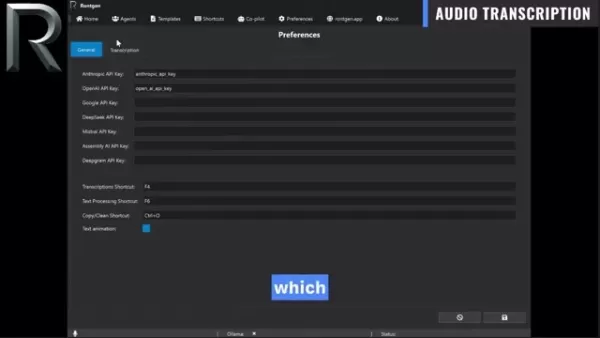
Before starting the transcription process, you must properly configure your environment. This includes acquiring and setting up an API key from a provider that offers both language models and transcription services. Providers like Google and OpenAI supply these combined services. Access the preferences section to input your API key. This is a vital step that permits Rontgen to utilize the necessary AI models for reliable transcription.
API Key Configuration:
- Navigate to the 'Preferences' area in Rontgen.
- Select the 'General' tab.
- Find the API key fields for providers such as Anthropic, OpenAI, Google, and others.
- Input your API keys into the correct fields.
Keep in mind that having the API keys correctly entered in the General tab is critical for the transcription feature to work. Without this, Rontgen cannot access the language models and transcription services required to convert your audio into text.
Configuring Transcription Preferences
The transcription tab in preferences is where you define the specific details for converting audio to text.
This includes choosing the AI model, specifying language settings, and providing guidance prompts for the transcription. The transcription service dropdown menu selects which AI model will handle your audio-to-text conversion.
Configuration Steps:
- Go to the 'Preferences' section.
- Click on the 'Transcription' tab.
- Choose your preferred transcription service from the dropdown list (e.g., OpenAI gpt-40 mini transcribe).
- Set the language field to match your audio's language for precise speech recognition.
- Input any relevant context or directions in the Prompt field to aid the transcription model.
Language Parameter:
- Accurately setting the language field is crucial for correct speech recognition. If your audio is in Spanish, set the language to Spanish ('es').
Prompt Field:
- The prompt field lets you supply context or specific instructions to the transcription model. For instance, for a technical conversation, you might include industry-specific terms or proper nouns.
Temperature Control:
- Temperature adjusts the model's balance between creativity and consistency. For transcription tasks, lower values like 0.2 yield more reliable and precise outcomes, whereas higher values might be useful for creative or irregular speech patterns. Lower settings generate more consistent and accurate results.
Dynamic Post-Processing: The Chain Icon
Leveraging Dynamic Agent Combination
One of Rontgen's most potent features is the capacity to dynamically apply various agent combinations until the output meets your standards. This is accomplished using the Chain icon.
How to Use the Chain Icon:
- Choose agents from the agents window.
- Click the chain button.
- Transcribe the audio, and the text will be automatically processed through your selected agents.
Modify the agent selection, click the chain button once more, and the new selection will be applied to the transcription. This adaptability is extremely powerful, allowing you to record with immediate transcription and then dynamically test different agent combinations to attain the ideal result.
To perform audio transcription, either click the microphone icon for live recording or the upload button for audio files. With the chain icon activated, your customized AI pipeline is seamlessly incorporated into the transcription workflow.
Practical Guide: Three Transcription Options
Option 1: Direct Transcription
Direct transcription converts audio to text without any additional processing. This method provides a verbatim transcript of the spoken content, free from alterations. It is ideal when you need an exact record of the audio. To execute direct transcription, ensure the 'Transcription post-processing' option remains unchecked.
Option 2: Single Agent Processing
Single agent processing employs one custom agent to refine the transcription. You can select a custom agent to handle the transcription. Check the 'Transcription post-processing' box and choose one of your custom agents to route the transcription through that agent for refinement.
Option 3: Agent Chain Processing
Agent chain processing connects multiple agents in sequence to create a multi-stage processing workflow. To construct a processing sequence, hold the 'Control' key while selecting the desired agents. This means your spoken words pass through each custom agent in turn, enabling you to apply multiple transformations—such as spell checking, summarization, or translation—in one integrated step. This is how you embed your personalized AI pipeline directly within the transcription process.
Pros and Cons of Using Rontgen for Audio Transcription
Pros
Flexible transcription choices supported by custom agents.
Dynamic post-processing features for instant modifications.
Seamless integration with various AI models and transcription services.
Customizable settings for peak accuracy and adaptability.
Capability to link multiple agents for sophisticated processing sequences.
Direct integration of a personalized AI pipeline into your transcription workflow.
Cons
Requires setup of API keys from third-party providers.
Finding the best parameter configuration may need some testing and review of provider guides.
Reliance on external AI models means performance can fluctuate.
FAQ
What kind of flexibility does Rontgen's audio transcription offer?
Rontgen provides significant flexibility in audio transcription. Users can employ their own agents and prompts to guide the speech-to-text conversion.
What is a very important thing to do before using audio transcription?
Before initiating any audio transcription, you must have a configured API key from a language model and transcription service provider.
Can the transcription language be modified?
Yes, the transcription language can be adjusted in the Preferences section. You can change the language field to correspond with your audio's language.
What function does the Prompt serve?
The Prompt function enables you to give the transcription model contextual information or specific directives. This assists in incorporating technical vocabulary and proper names.
What are the three transcription options you can utilize?
The three available options are direct transcription, single agent processing, and agent chain processing. Direct transcription is a raw conversion without post-processing. Single agent processing uses one custom agent to refine the transcription. Agent chain processing connects a series of agents to form a multi-stage processing sequence.
Related Questions
How do I choose the right AI model for my transcription needs?
Selecting the appropriate AI model depends on several considerations, including the audio's language, the use of technical terms, and the desired accuracy level. Some models perform better with specific languages or accents, while others are more adept at recognizing specialized terminology. It is advisable to test different models and assess their performance on sample audio files to identify the best match for your requirements. Additionally, refer to the provider's API documentation for specific advice and best practices.
Can I use Rontgen's audio transcription for live events or real-time transcription?
Yes, Rontgen can be used for live events or real-time transcription via the microphone function. Rontgen's integration of personalized AI pipelines with custom agents is particularly effective. This is beneficial if you need to make on-the-fly changes to your transcription workflow.
How does Rontgen handle background noise or audio quality issues?
Rontgen's transcription accuracy can be influenced by audio quality problems or background noise. Therefore, it is best to reduce background noise and employ high-quality recording equipment. You can also use post-processing tools to improve audio clarity before transcribing. Experimenting with different AI models and the prompt field can also help improve outcomes.
Related article
 Apple Smart Glasses Could Debut at WWDC27, Highlighting Privacy Protection
Bloomberg’s Mark Gurman reports that Apple’s smart glasses, codenamed N50, are slated for a WWDC27 debut in June 2027, with a retail launch expected in autumn 2027. Originally targeted for late this year and early 2027, the device’s release has been
Inside Details Exposed About Next-Gen Gemini: Strained Computing Power, Internal Teams Disagreed on Development Priorities and Resource Allocation
Reports indicate that the launch of Google’s highly anticipated next-generation Gemini model has been pushed back. Internal disagreements over development priorities and resource allocation, combined with limited computing capacity and complex approv
OpenAI Dismisses Growth Slowdown Concerns, Says Multiple Business Units Accelerating
In response to external scrutiny regarding decelerating sales growth and missed internal benchmarks, AI leader OpenAI issued a confident statement on Tuesday, April 28. The company clarified that its consumer products and enterprise services are adva
Related Special Topic Recommendations
Data Analysis
Apple Smart Glasses Could Debut at WWDC27, Highlighting Privacy Protection
Bloomberg’s Mark Gurman reports that Apple’s smart glasses, codenamed N50, are slated for a WWDC27 debut in June 2027, with a retail launch expected in autumn 2027. Originally targeted for late this year and early 2027, the device’s release has been
Inside Details Exposed About Next-Gen Gemini: Strained Computing Power, Internal Teams Disagreed on Development Priorities and Resource Allocation
Reports indicate that the launch of Google’s highly anticipated next-generation Gemini model has been pushed back. Internal disagreements over development priorities and resource allocation, combined with limited computing capacity and complex approv
OpenAI Dismisses Growth Slowdown Concerns, Says Multiple Business Units Accelerating
In response to external scrutiny regarding decelerating sales growth and missed internal benchmarks, AI leader OpenAI issued a confident statement on Tuesday, April 28. The company clarified that its consumer products and enterprise services are adva
Related Special Topic Recommendations
Data Analysis
 AI SQL Copilots for Revenue Dashboards, Funnel Analysis, and Product Metrics
2026 Latest Best AI SQL Copilots Ranked Top-Rated! XIX.AI curates a powerful game-changing collection for weekly updated real-world tests. These must-try tools help you generate accurate revenue dashboards, analyze sales funnels, and track product metrics swiftly, boosting productivity massively. Explore now to Discover your perfect tool for data-driven decision making! 238 characters
 9 tools
 xix.ai
Music composition
Best AI Melody Writing Tools for Song Drafts
xix.ai
Music composition
Best AI Melody Writing Tools for Song Drafts
2026 Latest Best Top-Rated AI Melody Writing Tools for Song Drafts! XIX.AI has curated a highly powerful game-changing collection that goes through rigorous real-world tests to deliver the best writing experience. You can find detailed free vs paid comparisons, accurate rankings, and must-try options designed to help you create stunning song drafts effortlessly and boost your creative productivity significantly. Explore now to discover your perfect tool!
8 tools
xix.ai
chatbot
Best AI Conversation Trainer Tools for Interview Practice
2026 Latest Best Top-rated AI Conversation Trainer Tools for Interview Practice are here on XIX.AI! This curated collection features powerful, game-changing tools that go through rigorous real-world tests to deliver accurate feedback. You’ll find a free vs paid comparison and detailed rankings to help you choose the must-try option that boosts your confidence and skills. Explore now to Discover your perfect tool for interview success!
12 tools
xix.ai
Design & Art
Best AI Style Transfer Tools for Creative Experiments
2026 Latest Best Top-rated AI Style Transfer Tools for Creative Experiments! XIX.AI has curated a powerful, game-changing collection of must-try tools that deliver exceptional results through real-world tests and rigorous rankings. These top solutions help creatives boost productivity significantly by accelerating content creation and unlocking endless creative possibilities. Explore now to discover your perfect tool and start creating today!
9 tools
xix.ai
Comic Creation
Best AI Dialogue Bubble Tools for Visual Storytelling
2026 Latest Best Top-Rated AI Dialogue Bubble Tools for Visual Storytelling are here on XIX.AI! This curated collection features powerful, game-changing tools that help creators boost productivity and overcome creative bottlenecks. Get a free vs paid comparison, see real-world tests, and check the latest rankings to find the must-try solutions perfect for crafting engaging visual narratives. Explore now to discover your ideal tool!
10 tools
xix.ai
Meeting Assistant
Top AI Meeting Summary Tools: Track Decisions and Follow-Ups Clearly
2026 Latest Top-Rated Best AI Meeting Summary Tools for Clear Decision Tracking and Effortless Follow-Ups. This curated list showcases powerful, game-changing solutions that boost productivity dramatically by automating meeting notes, identifying key action items, and streamlining team coordination across all projects. Get a free vs paid comparison along with real-world tests and weekly updated rankings to help you find the perfect tool. Explore now to unlock your AI edge!
9 tools
xix.ai

 Comments (3)
0/500
Comments (3)
0/500
![RonaldMitchell]()
Is it just me or does Rontgen's transcription tool actually work? I've tried a bunch of AI transcribers and they all butcher technical terms. Would love to hear if this one handles accents better. 🎤
![EricMartin]()
Finally, a guide that doesn't just hype AI but actually explains the workflow. I've tried Rontgen's transcription and it's surprisingly accurate, though the interface could use some UI tweaks. Anyone else noticed the occasional lag with longer files? 🎧
![NicholasYoung]()
この記事を読んで、Rontgenの音声文字起こし機能が2025年までにどう進化するのか気になりますね。個人的には、多言語対応や専門用語の精度がさらに向上してくれると助かるな。他のAIツールとの差別化ポイントも知りたいです!🎤
In today's fast-paced digital landscape, converting audio to text efficiently is essential for a wide range of purposes, from content creation to data analysis. Rontgen, a cutting-edge AI writing platform, features a powerful audio transcription tool that delivers adaptable methods for transforming speech into text. This guide details how to configure and use Rontgen's transcription capabilities, harnessing custom agents and AI models for superior results, ensuring a smooth and tailored experience for all your transcription tasks. Mastering audio transcription with Rontgen can dramatically boost your productivity and open up new opportunities within your content workflow.
Key Points
Rontgen provides versatile audio transcription by leveraging custom agents.
A properly configured API key from a language model and transcription provider is mandatory.
You can customize the transcription language and model settings to achieve optimal accuracy.
Transcription post-processing is available using single or chained agents.
Dynamic agent chain processing enables immediate refinements for flawless output.
Rontgen integrates your personalized AI pipeline directly into the transcription process.
Understanding Rontgen's Audio Transcription Feature
What is Rontgen's Audio Transcription?
Rontgen's audio transcription tool is engineered to give users a versatile and effective method for converting speech to text. It uses advanced AI technology to analyze audio files or live recordings and produce precise transcripts. A major advantage of Rontgen is its flexibility, enabling users to personalize the transcription workflow with their own custom agents.
This allows you to adapt the transcription to particular requirements, such as specialized jargon, unique names, or specific formatting guidelines. This versatility supports multiple approaches to convert speech into text, utilizing your own custom agents.
Setting Up Your Transcription Environment
Before starting the transcription process, you must properly configure your environment. This includes acquiring and setting up an API key from a provider that offers both language models and transcription services. Providers like Google and OpenAI supply these combined services. Access the preferences section to input your API key. This is a vital step that permits Rontgen to utilize the necessary AI models for reliable transcription.
API Key Configuration:
- Navigate to the 'Preferences' area in Rontgen.
- Select the 'General' tab.
- Find the API key fields for providers such as Anthropic, OpenAI, Google, and others.
- Input your API keys into the correct fields.
Keep in mind that having the API keys correctly entered in the General tab is critical for the transcription feature to work. Without this, Rontgen cannot access the language models and transcription services required to convert your audio into text.
Configuring Transcription Preferences
The transcription tab in preferences is where you define the specific details for converting audio to text.
This includes choosing the AI model, specifying language settings, and providing guidance prompts for the transcription. The transcription service dropdown menu selects which AI model will handle your audio-to-text conversion.
Configuration Steps:
- Go to the 'Preferences' section.
- Click on the 'Transcription' tab.
- Choose your preferred transcription service from the dropdown list (e.g., OpenAI gpt-40 mini transcribe).
- Set the language field to match your audio's language for precise speech recognition.
- Input any relevant context or directions in the Prompt field to aid the transcription model.
Language Parameter:
- Accurately setting the language field is crucial for correct speech recognition. If your audio is in Spanish, set the language to Spanish ('es').
Prompt Field:
- The prompt field lets you supply context or specific instructions to the transcription model. For instance, for a technical conversation, you might include industry-specific terms or proper nouns.
Temperature Control:
- Temperature adjusts the model's balance between creativity and consistency. For transcription tasks, lower values like 0.2 yield more reliable and precise outcomes, whereas higher values might be useful for creative or irregular speech patterns. Lower settings generate more consistent and accurate results.
Dynamic Post-Processing: The Chain Icon
Leveraging Dynamic Agent Combination
One of Rontgen's most potent features is the capacity to dynamically apply various agent combinations until the output meets your standards. This is accomplished using the Chain icon.
How to Use the Chain Icon:
- Choose agents from the agents window.
- Click the chain button.
- Transcribe the audio, and the text will be automatically processed through your selected agents.
Modify the agent selection, click the chain button once more, and the new selection will be applied to the transcription. This adaptability is extremely powerful, allowing you to record with immediate transcription and then dynamically test different agent combinations to attain the ideal result.
To perform audio transcription, either click the microphone icon for live recording or the upload button for audio files. With the chain icon activated, your customized AI pipeline is seamlessly incorporated into the transcription workflow.
Practical Guide: Three Transcription Options
Option 1: Direct Transcription
Direct transcription converts audio to text without any additional processing. This method provides a verbatim transcript of the spoken content, free from alterations. It is ideal when you need an exact record of the audio. To execute direct transcription, ensure the 'Transcription post-processing' option remains unchecked.
Option 2: Single Agent Processing
Single agent processing employs one custom agent to refine the transcription. You can select a custom agent to handle the transcription. Check the 'Transcription post-processing' box and choose one of your custom agents to route the transcription through that agent for refinement.
Option 3: Agent Chain Processing
Agent chain processing connects multiple agents in sequence to create a multi-stage processing workflow. To construct a processing sequence, hold the 'Control' key while selecting the desired agents. This means your spoken words pass through each custom agent in turn, enabling you to apply multiple transformations—such as spell checking, summarization, or translation—in one integrated step. This is how you embed your personalized AI pipeline directly within the transcription process.
Pros and Cons of Using Rontgen for Audio Transcription
Pros
Flexible transcription choices supported by custom agents.
Dynamic post-processing features for instant modifications.
Seamless integration with various AI models and transcription services.
Customizable settings for peak accuracy and adaptability.
Capability to link multiple agents for sophisticated processing sequences.
Direct integration of a personalized AI pipeline into your transcription workflow.
Cons
Requires setup of API keys from third-party providers.
Finding the best parameter configuration may need some testing and review of provider guides.
Reliance on external AI models means performance can fluctuate.
FAQ
What kind of flexibility does Rontgen's audio transcription offer?
Rontgen provides significant flexibility in audio transcription. Users can employ their own agents and prompts to guide the speech-to-text conversion.
What is a very important thing to do before using audio transcription?
Before initiating any audio transcription, you must have a configured API key from a language model and transcription service provider.
Can the transcription language be modified?
Yes, the transcription language can be adjusted in the Preferences section. You can change the language field to correspond with your audio's language.
What function does the Prompt serve?
The Prompt function enables you to give the transcription model contextual information or specific directives. This assists in incorporating technical vocabulary and proper names.
What are the three transcription options you can utilize?
The three available options are direct transcription, single agent processing, and agent chain processing. Direct transcription is a raw conversion without post-processing. Single agent processing uses one custom agent to refine the transcription. Agent chain processing connects a series of agents to form a multi-stage processing sequence.
Related Questions
How do I choose the right AI model for my transcription needs?
Selecting the appropriate AI model depends on several considerations, including the audio's language, the use of technical terms, and the desired accuracy level. Some models perform better with specific languages or accents, while others are more adept at recognizing specialized terminology. It is advisable to test different models and assess their performance on sample audio files to identify the best match for your requirements. Additionally, refer to the provider's API documentation for specific advice and best practices.
Can I use Rontgen's audio transcription for live events or real-time transcription?
Yes, Rontgen can be used for live events or real-time transcription via the microphone function. Rontgen's integration of personalized AI pipelines with custom agents is particularly effective. This is beneficial if you need to make on-the-fly changes to your transcription workflow.
How does Rontgen handle background noise or audio quality issues?
Rontgen's transcription accuracy can be influenced by audio quality problems or background noise. Therefore, it is best to reduce background noise and employ high-quality recording equipment. You can also use post-processing tools to improve audio clarity before transcribing. Experimenting with different AI models and the prompt field can also help improve outcomes.








 Apple Smart Glasses Could Debut at WWDC27, Highlighting Privacy Protection
Bloomberg’s Mark Gurman reports that Apple’s smart glasses, codenamed N50, are slated for a WWDC27 debut in June 2027, with a retail launch expected in autumn 2027. Originally targeted for late this year and early 2027, the device’s release has been
Apple Smart Glasses Could Debut at WWDC27, Highlighting Privacy Protection
Bloomberg’s Mark Gurman reports that Apple’s smart glasses, codenamed N50, are slated for a WWDC27 debut in June 2027, with a retail launch expected in autumn 2027. Originally targeted for late this year and early 2027, the device’s release has been
 Inside Details Exposed About Next-Gen Gemini: Strained Computing Power, Internal Teams Disagreed on Development Priorities and Resource Allocation
Reports indicate that the launch of Google’s highly anticipated next-generation Gemini model has been pushed back. Internal disagreements over development priorities and resource allocation, combined with limited computing capacity and complex approv
Inside Details Exposed About Next-Gen Gemini: Strained Computing Power, Internal Teams Disagreed on Development Priorities and Resource Allocation
Reports indicate that the launch of Google’s highly anticipated next-generation Gemini model has been pushed back. Internal disagreements over development priorities and resource allocation, combined with limited computing capacity and complex approv
 OpenAI Dismisses Growth Slowdown Concerns, Says Multiple Business Units Accelerating
In response to external scrutiny regarding decelerating sales growth and missed internal benchmarks, AI leader OpenAI issued a confident statement on Tuesday, April 28. The company clarified that its consumer products and enterprise services are adva
OpenAI Dismisses Growth Slowdown Concerns, Says Multiple Business Units Accelerating
In response to external scrutiny regarding decelerating sales growth and missed internal benchmarks, AI leader OpenAI issued a confident statement on Tuesday, April 28. The company clarified that its consumer products and enterprise services are adva

2026 Latest Best AI SQL Copilots Ranked Top-Rated! XIX.AI curates a powerful game-changing collection for weekly updated real-world tests. These must-try tools help you generate accurate revenue dashboards, analyze sales funnels, and track product metrics swiftly, boosting productivity massively. Explore now to Discover your perfect tool for data-driven decision making! 238 characters
9 tools
xix.ai

2026 Latest Best Top-Rated AI Melody Writing Tools for Song Drafts! XIX.AI has curated a highly powerful game-changing collection that goes through rigorous real-world tests to deliver the best writing experience. You can find detailed free vs paid comparisons, accurate rankings, and must-try options designed to help you create stunning song drafts effortlessly and boost your creative productivity significantly. Explore now to discover your perfect tool!
8 tools
xix.ai

2026 Latest Best Top-rated AI Conversation Trainer Tools for Interview Practice are here on XIX.AI! This curated collection features powerful, game-changing tools that go through rigorous real-world tests to deliver accurate feedback. You’ll find a free vs paid comparison and detailed rankings to help you choose the must-try option that boosts your confidence and skills. Explore now to Discover your perfect tool for interview success!
12 tools
xix.ai

2026 Latest Best Top-rated AI Style Transfer Tools for Creative Experiments! XIX.AI has curated a powerful, game-changing collection of must-try tools that deliver exceptional results through real-world tests and rigorous rankings. These top solutions help creatives boost productivity significantly by accelerating content creation and unlocking endless creative possibilities. Explore now to discover your perfect tool and start creating today!
9 tools
xix.ai

2026 Latest Best Top-Rated AI Dialogue Bubble Tools for Visual Storytelling are here on XIX.AI! This curated collection features powerful, game-changing tools that help creators boost productivity and overcome creative bottlenecks. Get a free vs paid comparison, see real-world tests, and check the latest rankings to find the must-try solutions perfect for crafting engaging visual narratives. Explore now to discover your ideal tool!
10 tools
xix.ai

2026 Latest Top-Rated Best AI Meeting Summary Tools for Clear Decision Tracking and Effortless Follow-Ups. This curated list showcases powerful, game-changing solutions that boost productivity dramatically by automating meeting notes, identifying key action items, and streamlining team coordination across all projects. Get a free vs paid comparison along with real-world tests and weekly updated rankings to help you find the perfect tool. Explore now to unlock your AI edge!
9 tools
xix.ai

Is it just me or does Rontgen's transcription tool actually work? I've tried a bunch of AI transcribers and they all butcher technical terms. Would love to hear if this one handles accents better. 🎤
Finally, a guide that doesn't just hype AI but actually explains the workflow. I've tried Rontgen's transcription and it's surprisingly accurate, though the interface could use some UI tweaks. Anyone else noticed the occasional lag with longer files? 🎧
この記事を読んで、Rontgenの音声文字起こし機能が2025年までにどう進化するのか気になりますね。個人的には、多言語対応や専門用語の精度がさらに向上してくれると助かるな。他のAIツールとの差別化ポイントも知りたいです!🎤












