


 Home
HomeIs Marey AI the best video creator in 2025? Reviewing its features and ease of use.?
The landscape of AI-generated video is advancing at a remarkable pace. A new competitor, Marey AI, has emerged, asserting its position as the first fully licensed AI video generator. This is a noteworthy claim, as navigating licensing has been a significant obstacle for many AI content creation tools. In this 2025 review, we examine Marey AI's capabilities and compare it to the current industry leader, Google VEO.
Key Points
Marey AI promotes itself as the pioneer in fully licensed AI video generation.
Its operation relies on a database of completely licensed video material.
The platform produces 1080p video clips at 24 frames per second.
Generated clips can be extended to a maximum length of ten seconds.
It also includes specialized functions like Motion Control and Pose Transfer.
Introduction to Marey AI: A New Player in the AI Video Generation Space
What is Marey AI?
Developed by Moonvalley, a subsidiary of Asteria, Marey AI enters the competitive field with a distinctive promise: it is the first AI video generator built upon a foundation of fully licensed video content. This approach allows creators to produce videos with greater confidence regarding potential copyright issues that can arise from models trained on unlicensed data.

This emphasis on proper licensing is a primary factor that distinguishes Marey AI from numerous other platforms.
While Adobe Firefly Video technically debuted its AI video tool in February 2025 using legitimately sourced data, Marey AI is specifically tailored for the film industry and upholds its claim of being first with fully-licensed content. This focus makes it a compelling choice for professional filmmakers and video creators for whom copyright compliance is a top priority.
But the critical questions remain: How does Marey AI perform? And how does it measure up against established leaders like Google VEO? Let's explore a detailed overview to find answers.
Marey AI vs. Google VEO: Setting the Stage for Comparison
Google VEO is widely regarded as the benchmark for quality in AI video generation, making it a natural point of comparison for new tools like Marey AI.

Both platforms empower users to create engaging video content from text prompts or images, yet they differ in several fundamental areas we will examine in depth:
Content Licensing: This is Marey AI's flagship claim. The platform guarantees that all generated content is free from copyright disputes thanks to its licensed training dataset. Google VEO's licensing terms are less publicly defined, which could pose considerations for commercial applications.
Output Quality: The visual quality of the generated video, including resolution, realism, and temporal coherence, is a critical evaluation metric. We will compare the visual fidelity produced by both platforms.
Features: Beyond basic text-to-video conversion, advanced capabilities like motion control, style adaptation, and camera animation greatly expand creative potential.
Pricing: Cost-effectiveness is always a key factor. We will analyze the pricing structures of both platforms to determine which offers better value.
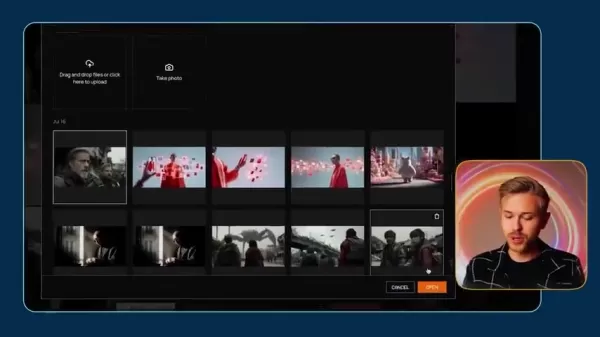
Usability: An intuitive user interface and a smooth workflow are essential for efficient creation. We will assess the user experience provided by both Marey AI and Google VEO.
By evaluating these aspects, we can develop a clearer picture of Marey AI's position, highlighting its advantages, limitations, and overall potential within the AI video market.
Unlocking Creative Potential: A Guide on Using Marey AI
Step 1: Accessing the Moonvalley Platform
The first step to using Marey AI is to navigate to the official Moonvalley website.

Upon reaching the homepage, you will need to complete the sign-in process to begin using the application.
Step 2: Navigating the Feature Set
Marey AI provides a range of functionalities accessible through a straightforward interface. After signing in, click the 'plus' button to start a new project and initiate the creation process.
You will then see a menu of available options and features, which we will explore in this guide.
Step 3: Camera Control Settings
Next, configure your project settings. Several general parameters should be established before finalizing your video.
The default settings often utilize negative prompts to guide the AI toward more realistic outcomes. These can be adjusted according to your preference, along with various other parameters, before initiating the final rendering process.
Understanding Marey AI's Pricing Structure
Marey AI Subscription Plans Overview
Marey AI operates on a tiered subscription model, offering different levels of access and generation credits to suit various user needs:
- Standard: Priced at $14.99 per month, the Standard plan includes 100 monthly credits and allows for the generation of up to 10 videos. This plan is ideal for beginners or those with occasional video needs.
- Plus: At $34.99 per month, the Plus plan offers 250 monthly credits and supports the creation of up to 25 videos. This tier is suitable for users who require more frequent video generation.
- Pro: For $149.99 per month, the Pro plan provides 1,000 monthly credits and allows for the creation of up to 100 videos. This plan is designed for scaling content production.
- Enterprise: The Enterprise plan is customized for businesses with specific, high-volume requirements and features custom pricing.
On average, the cost per video generation is approximately $1.50, varying slightly depending on the chosen subscription tier.
The Verdict: Weighing the Pros and Cons of Marey AI in 2025
Pros
Utilizes a fully licensed dataset for training.
Provides a variety of editing and control options.
Offers flexible and generous subscription tiers.
Cons
Output rendering can be inconsistent.
Inherent limitations exist within the rendering process.
The final video quality is not always top-tier.
The platform lacks transparency in some operational areas.
Exploring Marey AI's Standout Core Features
Motion Transfer - Mimicking Real-World Movement
A particularly notable feature of Marey AI is its capacity to analyze movement patterns from uploaded video clips. After processing the footage, the AI can apply these interpreted motions to the final generated video.

This motion transfer system grants users control over camera dynamics, enabling the creation of tracking shots and other dynamic movements that result in more engaging visuals. This feature adds a significant layer of sophistication and contributes to a greater sense of realistic authenticity in the videos.
Posing with Pose Transfer
Pose Transfer is a fundamental feature that allows the performance or posture of one character to be mapped onto a different character. However, the reliability of this feature can vary, and outcomes may sometimes require adjustment. Despite these inconsistencies, Pose Transfer offers a unique method for creating diverse character animations.
While it may need further refinement, the concept behind Pose Transfer adds a distinctive capability to the platform.
Controlling Camera Movement
Camera movement is a vital storytelling tool, and this is the focus of the trajectory control feature. Camera Control allows a user to upload a base image and then define specific camera movements to achieve a desired cinematic effect.
Although the ability to create custom camera trajectories is innovative, the results are not always predictable and might need fine-tuning to meet expectations. With continued development, Camera Control has the potential to become one of the platform's most valuable tools.
Frequently Asked Questions About Marey AI
Is Marey AI really the first fully licensed AI video generator?
Marey AI markets itself as the first fully licensed AI video generator. Technically, Adobe Firefly launched its AI video tool using legitimately acquired data earlier. It's important to scrutinize such claims independently, as interpretations of "fully licensed" can differ. While Adobe was first to market with legitimately sourced data, Marey AI positions itself specifically for the film industry.
What is the video output like?
Marey AI generates video clips in 1080p resolution at 24 frames per second. These clips can be extended to a maximum duration of ten seconds.
What kind of unique features are available for Marey AI?
Key distinctive features include Motion Control and Pose Transfer. Motion Control analyzes and replicates camera movement from reference videos. Pose Transfer applies the performance or pose of one character to another character within the generated video.
Related Questions about AI Video Generation
What are the main challenges in AI video generation?
AI video generation continues to face several significant challenges. Models need improved comprehension of complex and nuanced prompts.
Cons
Maintaining consistency throughout a video, ensuring characters and objects remain coherent from start to finish, is an ongoing issue. The technology is still computationally intensive, requiring more efficient models. Ethical concerns, including the potential for creating deepfakes and spreading misinformation, must be responsibly addressed. Furthermore, legal questions surrounding copyright and ownership of AI-generated content await clearer resolution.
Related article
 Former OpenAI Researcher Barrett Zoph Returns to Google to Support Gemini Development
Barret Zoph, who previously abruptly left and joined OpenAI due to a disagreement with Thinking Machines Lab CEO Miriam Mularati, has once again changed employers. Alphabet's Google announced that Zoph will return as Vice President of Research, bring
How Recursive Intelligence Raised $335M at $4B Valuation in 4 Months
The co-founders of startup Ricursive Intelligence seemed destined to be co-founders.Anna Goldie, CEO, and Azalia Mirhoseini, CTO, are so well-known in the AI community that they were among those AI engineers who “got those weird emails from Zuckerber
AI race won’t wait, nor will this TechCrunch Disrupt 25% discount
Every founder building in AI right now is asking the same question: Are we moving fast enough, and effectively enough? TechCrunch Disrupt 2026 puts you in the same room as the people wrestling with that existential question at the highest levels. Fro
Related Special Topic Recommendations
Design & Art
Former OpenAI Researcher Barrett Zoph Returns to Google to Support Gemini Development
Barret Zoph, who previously abruptly left and joined OpenAI due to a disagreement with Thinking Machines Lab CEO Miriam Mularati, has once again changed employers. Alphabet's Google announced that Zoph will return as Vice President of Research, bring
How Recursive Intelligence Raised $335M at $4B Valuation in 4 Months
The co-founders of startup Ricursive Intelligence seemed destined to be co-founders.Anna Goldie, CEO, and Azalia Mirhoseini, CTO, are so well-known in the AI community that they were among those AI engineers who “got those weird emails from Zuckerber
AI race won’t wait, nor will this TechCrunch Disrupt 25% discount
Every founder building in AI right now is asking the same question: Are we moving fast enough, and effectively enough? TechCrunch Disrupt 2026 puts you in the same room as the people wrestling with that existential question at the highest levels. Fro
Related Special Topic Recommendations
Design & Art
 Top AI Illustration Tools: Create Editorial Scenes and Cover Art Faster
2026 Latest Top-rated AI Illustration Tools: Our curated list features the best powerfully designed tools for creating stunning editorial scenes and eye-catching cover art quickly. Each option has gone through rigorous real-world tests, offering a free vs paid comparison to help you find the perfect match for your workflow. Try these must-try solutions today to unlock your AI edge and boost your creative productivity. Explore now at XIX.AI.
 10 tools
 xix.ai
Education and Learning
Top AI Tutors for Exam Prep: Practice Math, Science, and English
xix.ai
Education and Learning
Top AI Tutors for Exam Prep: Practice Math, Science, and English
2026 Latest Top-Rated Best AI Tutors for Exam Prep are here on XIX.AI! Our curated list features powerful game-changing tools that offer free vs paid comparison, real-world tests, and weekly updated rankings. They help boost your writing efficiency, simplify complex topic learning, and unlock your academic potential. Explore now to Discover your perfect exam prep tool and Start creating today to Unlock your AI edge!
10 tools
xix.ai
Finance
AI Budget Planning Tools for Personal Money Management
2026 Latest Best Top-Rated AI Budget Planning Tools for Personal Money Management are here on XIX.AI! This curated collection features powerful, game-changing solutions that help you conduct real-world tests, understand spending habits, and create personalized plans to boost productivity. Enjoy a free vs paid comparison along with detailed rankings. Must-try tools designed to simplify money management and unlock your AI edge. Explore now!
11 tools
xix.ai
Health & Wellness
AI Sleep Tracking Assistants: Improve Recovery with Better Bedtime Habits
2026 Latest Best Top-Rated AI Sleep Tracking Assistants curated for ultimate recovery. This fully updated weekly guide features powerful tools that deliver real-world tests, free vs paid comparison, and detailed rankings to help you find the must-try solution that boosts sleep quality and supports better bedtime habits. Explore now at XIX.AI to Unlock your AI edge.
10 tools
xix.ai
Data Analysis
AI SQL Copilots for Product and Revenue Analytics
2026 Latest Best Top-Rated AI SQL Copilots for Product and Revenue Analytics! XIX.AI has curated a powerful, game-changing collection of must-try tools that undergo real-world tests through weekly updated rankings. These tools help users boost productivity significantly by accelerating data analysis, streamlining complex queries, and generating accurate insights to drive smarter business decisions. Explore now to Discover your perfect tool for unlocking your AI edge!
14 tools
xix.ai
Education and Learning
Best AI Homework Helpers That Teach: Learn Concepts, Not Just Answers
2026 Latest Best Top-Rated AI Homework Helpers That Teach Core Concepts Not Just Answers Powerful Tools for Students Must-Try Curated List Weekly Updated Free vs Paid Comparison Real-World Tests Accurate Rankings to Help You Unlock Your Full Learning Potential Explore now to Discover your perfect tool for smarter studying.
10 tools
xix.ai

 Comments (2)
0/500
Comments (2)
0/500
![RobertGreen]()
Interesting claim about being 'fully licensed' – but does that actually make it the best? 🤔 I've seen too many AI tools hype themselves up. Let's see if it delivers real quality or just another overpromised toy.
![BillyAnderson]()
Erstmal komplett lizensiert? Das klingt ja fast zu gut, um wahr zu sein. Bei den ganzen Urheberrechtsdebatten wäre das ein riesiger Pluspunkt. Aber funktioniert das Tool denn auch wirklich intuitiv, oder braucht man dafür ein Studium der Videobearbeitung? Die Vorschau war beeindruckend, aber ich warte lieber auf ein paar mehr echte Nutzerberichte, bevor ich mein Portemonnaie zücke. Die Konkurrenz schläft ja auch nicht! 😅
The landscape of AI-generated video is advancing at a remarkable pace. A new competitor, Marey AI, has emerged, asserting its position as the first fully licensed AI video generator. This is a noteworthy claim, as navigating licensing has been a significant obstacle for many AI content creation tools. In this 2025 review, we examine Marey AI's capabilities and compare it to the current industry leader, Google VEO.
Key Points
Marey AI promotes itself as the pioneer in fully licensed AI video generation.
Its operation relies on a database of completely licensed video material.
The platform produces 1080p video clips at 24 frames per second.
Generated clips can be extended to a maximum length of ten seconds.
It also includes specialized functions like Motion Control and Pose Transfer.
Introduction to Marey AI: A New Player in the AI Video Generation Space
What is Marey AI?
Developed by Moonvalley, a subsidiary of Asteria, Marey AI enters the competitive field with a distinctive promise: it is the first AI video generator built upon a foundation of fully licensed video content. This approach allows creators to produce videos with greater confidence regarding potential copyright issues that can arise from models trained on unlicensed data.
This emphasis on proper licensing is a primary factor that distinguishes Marey AI from numerous other platforms.
While Adobe Firefly Video technically debuted its AI video tool in February 2025 using legitimately sourced data, Marey AI is specifically tailored for the film industry and upholds its claim of being first with fully-licensed content. This focus makes it a compelling choice for professional filmmakers and video creators for whom copyright compliance is a top priority.
But the critical questions remain: How does Marey AI perform? And how does it measure up against established leaders like Google VEO? Let's explore a detailed overview to find answers.
Marey AI vs. Google VEO: Setting the Stage for Comparison
Google VEO is widely regarded as the benchmark for quality in AI video generation, making it a natural point of comparison for new tools like Marey AI.
Both platforms empower users to create engaging video content from text prompts or images, yet they differ in several fundamental areas we will examine in depth:
Content Licensing: This is Marey AI's flagship claim. The platform guarantees that all generated content is free from copyright disputes thanks to its licensed training dataset. Google VEO's licensing terms are less publicly defined, which could pose considerations for commercial applications.
Output Quality: The visual quality of the generated video, including resolution, realism, and temporal coherence, is a critical evaluation metric. We will compare the visual fidelity produced by both platforms.
Features: Beyond basic text-to-video conversion, advanced capabilities like motion control, style adaptation, and camera animation greatly expand creative potential.
Pricing: Cost-effectiveness is always a key factor. We will analyze the pricing structures of both platforms to determine which offers better value.
Usability: An intuitive user interface and a smooth workflow are essential for efficient creation. We will assess the user experience provided by both Marey AI and Google VEO.
By evaluating these aspects, we can develop a clearer picture of Marey AI's position, highlighting its advantages, limitations, and overall potential within the AI video market.
Unlocking Creative Potential: A Guide on Using Marey AI
Step 1: Accessing the Moonvalley Platform
The first step to using Marey AI is to navigate to the official Moonvalley website.
Upon reaching the homepage, you will need to complete the sign-in process to begin using the application.
Step 2: Navigating the Feature Set
Marey AI provides a range of functionalities accessible through a straightforward interface. After signing in, click the 'plus' button to start a new project and initiate the creation process.
You will then see a menu of available options and features, which we will explore in this guide.
Step 3: Camera Control Settings
Next, configure your project settings. Several general parameters should be established before finalizing your video.
The default settings often utilize negative prompts to guide the AI toward more realistic outcomes. These can be adjusted according to your preference, along with various other parameters, before initiating the final rendering process.
Understanding Marey AI's Pricing Structure
Marey AI Subscription Plans Overview
Marey AI operates on a tiered subscription model, offering different levels of access and generation credits to suit various user needs:
- Standard: Priced at $14.99 per month, the Standard plan includes 100 monthly credits and allows for the generation of up to 10 videos. This plan is ideal for beginners or those with occasional video needs.
- Plus: At $34.99 per month, the Plus plan offers 250 monthly credits and supports the creation of up to 25 videos. This tier is suitable for users who require more frequent video generation.
- Pro: For $149.99 per month, the Pro plan provides 1,000 monthly credits and allows for the creation of up to 100 videos. This plan is designed for scaling content production.
- Enterprise: The Enterprise plan is customized for businesses with specific, high-volume requirements and features custom pricing.
On average, the cost per video generation is approximately $1.50, varying slightly depending on the chosen subscription tier.
The Verdict: Weighing the Pros and Cons of Marey AI in 2025
Pros
Utilizes a fully licensed dataset for training.
Provides a variety of editing and control options.
Offers flexible and generous subscription tiers.
Cons
Output rendering can be inconsistent.
Inherent limitations exist within the rendering process.
The final video quality is not always top-tier.
The platform lacks transparency in some operational areas.
Exploring Marey AI's Standout Core Features
Motion Transfer - Mimicking Real-World Movement
A particularly notable feature of Marey AI is its capacity to analyze movement patterns from uploaded video clips. After processing the footage, the AI can apply these interpreted motions to the final generated video.
This motion transfer system grants users control over camera dynamics, enabling the creation of tracking shots and other dynamic movements that result in more engaging visuals. This feature adds a significant layer of sophistication and contributes to a greater sense of realistic authenticity in the videos.
Posing with Pose Transfer
Pose Transfer is a fundamental feature that allows the performance or posture of one character to be mapped onto a different character. However, the reliability of this feature can vary, and outcomes may sometimes require adjustment. Despite these inconsistencies, Pose Transfer offers a unique method for creating diverse character animations.
While it may need further refinement, the concept behind Pose Transfer adds a distinctive capability to the platform.
Controlling Camera Movement
Camera movement is a vital storytelling tool, and this is the focus of the trajectory control feature. Camera Control allows a user to upload a base image and then define specific camera movements to achieve a desired cinematic effect.
Although the ability to create custom camera trajectories is innovative, the results are not always predictable and might need fine-tuning to meet expectations. With continued development, Camera Control has the potential to become one of the platform's most valuable tools.
Frequently Asked Questions About Marey AI
Is Marey AI really the first fully licensed AI video generator?
Marey AI markets itself as the first fully licensed AI video generator. Technically, Adobe Firefly launched its AI video tool using legitimately acquired data earlier. It's important to scrutinize such claims independently, as interpretations of "fully licensed" can differ. While Adobe was first to market with legitimately sourced data, Marey AI positions itself specifically for the film industry.
What is the video output like?
Marey AI generates video clips in 1080p resolution at 24 frames per second. These clips can be extended to a maximum duration of ten seconds.
What kind of unique features are available for Marey AI?
Key distinctive features include Motion Control and Pose Transfer. Motion Control analyzes and replicates camera movement from reference videos. Pose Transfer applies the performance or pose of one character to another character within the generated video.
Related Questions about AI Video Generation
What are the main challenges in AI video generation?
AI video generation continues to face several significant challenges. Models need improved comprehension of complex and nuanced prompts.
Cons
Maintaining consistency throughout a video, ensuring characters and objects remain coherent from start to finish, is an ongoing issue. The technology is still computationally intensive, requiring more efficient models. Ethical concerns, including the potential for creating deepfakes and spreading misinformation, must be responsibly addressed. Furthermore, legal questions surrounding copyright and ownership of AI-generated content await clearer resolution.








 Former OpenAI Researcher Barrett Zoph Returns to Google to Support Gemini Development
Barret Zoph, who previously abruptly left and joined OpenAI due to a disagreement with Thinking Machines Lab CEO Miriam Mularati, has once again changed employers. Alphabet's Google announced that Zoph will return as Vice President of Research, bring
Former OpenAI Researcher Barrett Zoph Returns to Google to Support Gemini Development
Barret Zoph, who previously abruptly left and joined OpenAI due to a disagreement with Thinking Machines Lab CEO Miriam Mularati, has once again changed employers. Alphabet's Google announced that Zoph will return as Vice President of Research, bring
 How Recursive Intelligence Raised $335M at $4B Valuation in 4 Months
The co-founders of startup Ricursive Intelligence seemed destined to be co-founders.Anna Goldie, CEO, and Azalia Mirhoseini, CTO, are so well-known in the AI community that they were among those AI engineers who “got those weird emails from Zuckerber
How Recursive Intelligence Raised $335M at $4B Valuation in 4 Months
The co-founders of startup Ricursive Intelligence seemed destined to be co-founders.Anna Goldie, CEO, and Azalia Mirhoseini, CTO, are so well-known in the AI community that they were among those AI engineers who “got those weird emails from Zuckerber
 AI race won’t wait, nor will this TechCrunch Disrupt 25% discount
Every founder building in AI right now is asking the same question: Are we moving fast enough, and effectively enough? TechCrunch Disrupt 2026 puts you in the same room as the people wrestling with that existential question at the highest levels. Fro
AI race won’t wait, nor will this TechCrunch Disrupt 25% discount
Every founder building in AI right now is asking the same question: Are we moving fast enough, and effectively enough? TechCrunch Disrupt 2026 puts you in the same room as the people wrestling with that existential question at the highest levels. Fro

2026 Latest Top-rated AI Illustration Tools: Our curated list features the best powerfully designed tools for creating stunning editorial scenes and eye-catching cover art quickly. Each option has gone through rigorous real-world tests, offering a free vs paid comparison to help you find the perfect match for your workflow. Try these must-try solutions today to unlock your AI edge and boost your creative productivity. Explore now at XIX.AI.
10 tools
xix.ai

2026 Latest Top-Rated Best AI Tutors for Exam Prep are here on XIX.AI! Our curated list features powerful game-changing tools that offer free vs paid comparison, real-world tests, and weekly updated rankings. They help boost your writing efficiency, simplify complex topic learning, and unlock your academic potential. Explore now to Discover your perfect exam prep tool and Start creating today to Unlock your AI edge!
10 tools
xix.ai

2026 Latest Best Top-Rated AI Budget Planning Tools for Personal Money Management are here on XIX.AI! This curated collection features powerful, game-changing solutions that help you conduct real-world tests, understand spending habits, and create personalized plans to boost productivity. Enjoy a free vs paid comparison along with detailed rankings. Must-try tools designed to simplify money management and unlock your AI edge. Explore now!
11 tools
xix.ai

2026 Latest Best Top-Rated AI Sleep Tracking Assistants curated for ultimate recovery. This fully updated weekly guide features powerful tools that deliver real-world tests, free vs paid comparison, and detailed rankings to help you find the must-try solution that boosts sleep quality and supports better bedtime habits. Explore now at XIX.AI to Unlock your AI edge.
10 tools
xix.ai

2026 Latest Best Top-Rated AI SQL Copilots for Product and Revenue Analytics! XIX.AI has curated a powerful, game-changing collection of must-try tools that undergo real-world tests through weekly updated rankings. These tools help users boost productivity significantly by accelerating data analysis, streamlining complex queries, and generating accurate insights to drive smarter business decisions. Explore now to Discover your perfect tool for unlocking your AI edge!
14 tools
xix.ai

2026 Latest Best Top-Rated AI Homework Helpers That Teach Core Concepts Not Just Answers Powerful Tools for Students Must-Try Curated List Weekly Updated Free vs Paid Comparison Real-World Tests Accurate Rankings to Help You Unlock Your Full Learning Potential Explore now to Discover your perfect tool for smarter studying.
10 tools
xix.ai

Interesting claim about being 'fully licensed' – but does that actually make it the best? 🤔 I've seen too many AI tools hype themselves up. Let's see if it delivers real quality or just another overpromised toy.
Erstmal komplett lizensiert? Das klingt ja fast zu gut, um wahr zu sein. Bei den ganzen Urheberrechtsdebatten wäre das ein riesiger Pluspunkt. Aber funktioniert das Tool denn auch wirklich intuitiv, oder braucht man dafür ein Studium der Videobearbeitung? Die Vorschau war beeindruckend, aber ich warte lieber auf ein paar mehr echte Nutzerberichte, bevor ich mein Portemonnaie zücke. Die Konkurrenz schläft ja auch nicht! 😅












