


 Home
HomeWhat is Leonardo AI? 2025 Beginners Guide to AI Art Generation
Leonardo AI is a robust platform featuring a comprehensive set of tools for AI-powered image generation and editing. This guide details the platform's core functionalities, providing practical advice for newcomers to effectively leverage Leonardo AI for creating compelling AI art. We will explore account registration, interface navigation, the token system, and essential tools like image generation, canvas editing, and universal upscaling.
Key Points
Registering for Leonardo AI is simple, with multiple sign-up options including Apple, Google, Microsoft, or email.
Leonardo AI delivers a full suite of tools for AI-driven image creation and modification.
The complimentary plan includes 150 tokens per day, necessitating strategic token management.
Capabilities such as Image Generation, Realtime Canvas, and the Canvas Editor open up diverse creative avenues.
Users can employ AI prompt generation assistants, like those available through ChatGPT 4.0, for advanced prompting techniques.
Getting Started with Leonardo AI
Signing Up and Initial Setup
To embark on your AI art journey, your first step is to create a Leonardo AI account. The platform offers several convenient registration methods.
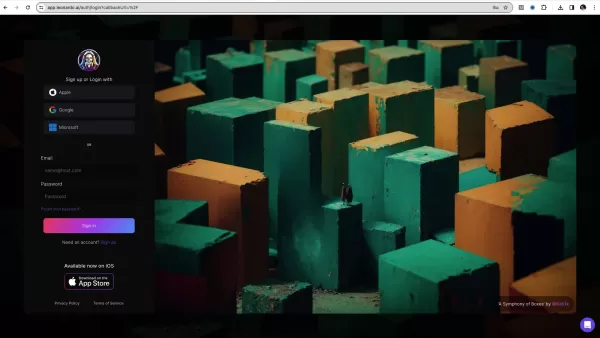
You can sign up using your Apple ID, Google account, or Microsoft account for a streamlined process. Alternatively, you can register with a standard email address and password.
After choosing your preferred method, you'll complete a brief questionnaire. This helps Leonardo AI customize its features and suggestions to align with your creative interests. You will also create a username; choose one that is memorable and relevant to your artistic pursuits.
Once registered, you'll land on Leonardo AI's main homepage. The layout is intuitive, featuring a prominent community feed that displays images from other users. This feed is a great source of inspiration and demonstrates the platform's potential. It is also useful for keyword research to inform your own image creation. Grasping the sign-up and setup process is a fundamental first step for beginners. Reviewing recent community creations is a valuable way to gather inspiration for new projects.
Understanding Leonardo AI's Interface
Efficiently navigating the Leonardo AI interface is crucial for leveraging its features. The main homepage displays a community feed of user-generated work. Above this feed, you'll find six core tools, also accessible from the left sidebar. These include Image Generation, Realtime Canvas, Canvas Editor, Motion, Realtime Generation, and the Universal Upscaler.
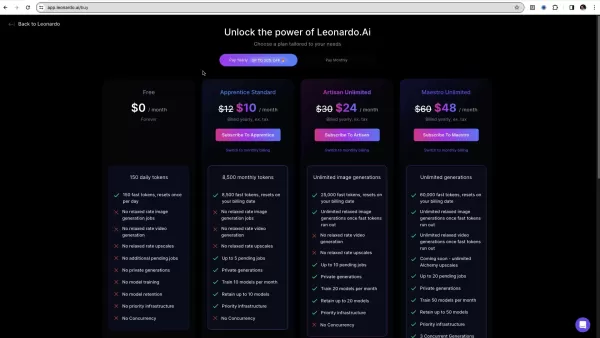
The left sidebar acts as your primary navigation hub, providing access to core functions and settings.
Understanding the token system is essential for managing your creative workflow. Users on the free plan receive 150 tokens daily, requiring thoughtful allocation. Monitor your token balance regularly to avoid interruptions. You can upgrade to premium plans via the "Upgrade" button next to your token count. While the free plan is excellent for exploration, premium plans are crucial for high-volume creation and offer significant advantages for serious artists.
Harnessing Leonardo AI's Image Generation Capabilities
Step-by-Step Guide to Creating AI Art
The Image Generation tool is where your creative ideas materialize. Follow this step-by-step guide to produce your AI art:
Step 1: Access the Image Generation Tool
- From the main homepage, locate and click the "Image Generation" icon. This opens the dedicated interface, where you can adjust various settings and parameters.
Step 2: Crafting Your Prompt
- The text prompt is the core directive for AI image generation. This descriptive text guides Leonardo AI to produce visuals matching your vision.
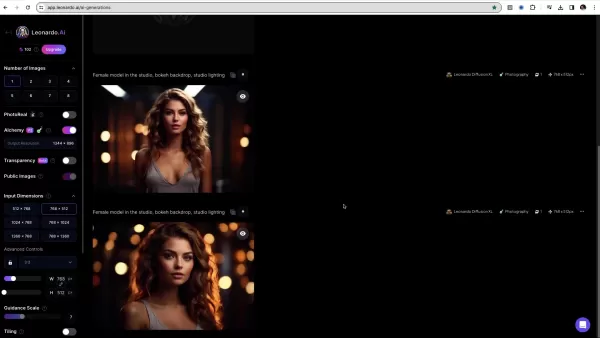
More detailed and specific prompts typically yield better, more accurate results.
Step 3: Refining Your Output
- Use the options in the left sidebar to fine-tune the generation process. These controls let you adjust the number of images, dimensions, resolution, and stylistic elements. Engage the Alchemy toggle for enhanced quality, noting it consumes additional tokens.
Step 4: Selecting an Image Genre
- Use the Dynamic dropdown menu to select your desired output genre. Options range from Anime and Cinematography to Environment, General, and Photography.
Step 5: Add Elements
- Click to add stylistic elements to your image. These are LoRAs (Low-Rank Adaptations) that apply specific artistic styles. This is a highly useful feature for producing unique artwork by blending and reimagining established styles.
Leonardo AI Pricing Structure
Understanding Leonardo AI's Subscription Plans
Leonardo AI offers several subscription tiers to fit different creative needs and budgets. The free plan provides a starting point to explore the platform's capabilities. Paid plans unlock numerous benefits, including advanced features, higher token allowances, and greater image generation capacity.
The available plan tiers are:
- Free: $0/month, 150 daily tokens
- Apprentice: $12/month (billed annually), 8,500 fast tokens
- Artisan: $30/month (billed annually), unlimited image generations
- Maestro: $60/month (billed annually), unlimited image generations
Token management is critical on the free plan due to the daily 150-token limit. Upgrading to a paid plan is highly beneficial for dedicated creators seeking more freedom and resources.
Benefits and Drawbacks of Leonardo AI
Pros
Diverse Tools Suite: Provides a wide array of tools for AI-powered image generation and editing.
Multiple Sign-Up Options: Supports convenient registration via Apple, Google, Microsoft, and email.
User-Friendly Interface: Features an intuitive design that is accessible to both beginners and advanced users.
Free Plan: Offers a generous free tier with daily tokens, allowing users to start creating without an upfront investment.
Community Feed: Includes an inspirational feed showcasing work from other users.
Cons
Limited Daily Tokens: The free plan's 150 daily tokens require careful management and restrict daily output.
Reliance on Textual Prompts: Generating effective images depends on crafting skilled, detailed text prompts.
Alchemy Costs: Using the Alchemy feature can rapidly consume your token balance if not managed carefully.
Key Features of Leonardo AI
Exploring the Key Tools and Capabilities
Leonardo AI boasts a rich set of features and tools designed to empower AI art creation and editing. Notable core features include:
- Image Generation:
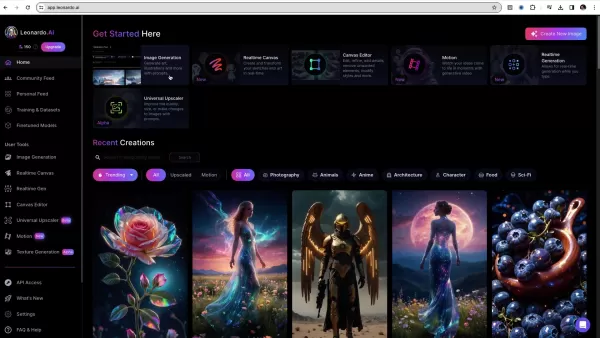
Transform text prompts into stunning visual art using this central tool.
- Realtime Canvas: Instantly transform your sketches into AI-generated artwork, ideal for artists who draw.
- Canvas Editor: Refine, edit, and perfect your generated images by adding details or removing unwanted elements.
- Motion: Animate static images, offering a glimpse into the future of dynamic photography.
- Realtime Generation: Watch AI images generate in real-time as you type your prompts, offering a unique creative experience.
- Universal Upscaler: Enhance image quality, increase resolution, or make nuanced adjustments using prompts. This tool is essential for preparing high-quality images for various applications.
Unlocking Potential: Use Cases for Leonardo AI
How Different Users Can Benefit from Leonardo AI
Leonardo AI's versatility makes it a valuable asset for a wide range of users. Potential applications include:
- Artists and Illustrators: Rapidly generate concept art and variations to streamline workflows and explore new creative directions.
- Game Developers: Efficiently produce custom textures, concept art, and promotional materials within a single ecosystem, saving time and resources.
- Designers and Marketers: Create high-quality visuals for websites, social media, and advertising campaigns to target diverse audiences.
- Educators and Students: Visualize complex concepts, enhance educational presentations, and explore innovative teaching and learning methods.
Frequently Asked Questions
What is Alchemy in Leonardo AI?
The Alchemy toggle is a premium setting that significantly enhances image output quality. While it uses more tokens per image, it is one of the most effective ways to maximize the platform's potential and achieve superior results.
Does Leonardo AI have a mobile app?
Currently, Leonardo AI does not offer a dedicated mobile application. However, the platform is fully accessible and functional via a web browser on both desktop and mobile devices.
What if I don't have ChatGPT 4.0?
Without access to an advanced chatbot, you can improve your prompts by studying trending examples, experimenting with community-shared prompts, or developing your own detailed descriptions through practice.
Where can I find the image generation tool on Leonardo AI?
Access the image generation tool by clicking the "Image Generation" icon from the main homepage. This is the primary tool for creating all your AI artwork.
What if I don't like the images I am generating?
You can refine your results by adjusting variables such as the AI model, using negative prompts to exclude unwanted elements, or modifying your initial prompt for greater clarity.
Related Questions
What other AI image generators exist?
Several other AI image generation platforms are available, each with its own strengths. Notable examples include MidJourney, mage.space, and Stable Diffusion. MidJourney is renowned for its exceptional image quality but operates on a paid subscription model and requires Discord for access, which can be a barrier. Crafting effective prompts is crucial, often requiring specific phrases like "high detail" or "high resolution." Mage.space offers diverse creation options but typically requires an API key and may have less restrictive content filtering. Stable Diffusion is a powerful open-source model that runs locally on a user's PC, offering cost savings but placing the computational burden and responsibility for content filtering on the user.
Related article
 Stripe to Acquire OpenRouter as AI Model Routing Gains Momentum
Stripe has agreed to acquire OpenRouter, an AI model-routing platform that gives developers access to hundreds of models through a single interface. The deal adds model selection and routing to Stripe’s existing work around AI usage and token-based b
Former OpenAI Researcher Barrett Zoph Returns to Google to Support Gemini Development
Barret Zoph, who previously abruptly left and joined OpenAI due to a disagreement with Thinking Machines Lab CEO Miriam Mularati, has once again changed employers. Alphabet's Google announced that Zoph will return as Vice President of Research, bring
How Recursive Intelligence Raised $335M at $4B Valuation in 4 Months
The co-founders of startup Ricursive Intelligence seemed destined to be co-founders.Anna Goldie, CEO, and Azalia Mirhoseini, CTO, are so well-known in the AI community that they were among those AI engineers who “got those weird emails from Zuckerber
Related Special Topic Recommendations
Design & Art
Stripe to Acquire OpenRouter as AI Model Routing Gains Momentum
Stripe has agreed to acquire OpenRouter, an AI model-routing platform that gives developers access to hundreds of models through a single interface. The deal adds model selection and routing to Stripe’s existing work around AI usage and token-based b
Former OpenAI Researcher Barrett Zoph Returns to Google to Support Gemini Development
Barret Zoph, who previously abruptly left and joined OpenAI due to a disagreement with Thinking Machines Lab CEO Miriam Mularati, has once again changed employers. Alphabet's Google announced that Zoph will return as Vice President of Research, bring
How Recursive Intelligence Raised $335M at $4B Valuation in 4 Months
The co-founders of startup Ricursive Intelligence seemed destined to be co-founders.Anna Goldie, CEO, and Azalia Mirhoseini, CTO, are so well-known in the AI community that they were among those AI engineers who “got those weird emails from Zuckerber
Related Special Topic Recommendations
Design & Art
 Top AI Illustration Tools: Create Editorial Scenes and Cover Art Faster
2026 Latest Top-rated AI Illustration Tools: Our curated list features the best powerfully designed tools for creating stunning editorial scenes and eye-catching cover art quickly. Each option has gone through rigorous real-world tests, offering a free vs paid comparison to help you find the perfect match for your workflow. Try these must-try solutions today to unlock your AI edge and boost your creative productivity. Explore now at XIX.AI.
 10 tools
 xix.ai
Education and Learning
Top AI Tutors for Exam Prep: Practice Math, Science, and English
xix.ai
Education and Learning
Top AI Tutors for Exam Prep: Practice Math, Science, and English
2026 Latest Top-Rated Best AI Tutors for Exam Prep are here on XIX.AI! Our curated list features powerful game-changing tools that offer free vs paid comparison, real-world tests, and weekly updated rankings. They help boost your writing efficiency, simplify complex topic learning, and unlock your academic potential. Explore now to Discover your perfect exam prep tool and Start creating today to Unlock your AI edge!
10 tools
xix.ai
Finance
AI Budget Planning Tools for Personal Money Management
2026 Latest Best Top-Rated AI Budget Planning Tools for Personal Money Management are here on XIX.AI! This curated collection features powerful, game-changing solutions that help you conduct real-world tests, understand spending habits, and create personalized plans to boost productivity. Enjoy a free vs paid comparison along with detailed rankings. Must-try tools designed to simplify money management and unlock your AI edge. Explore now!
11 tools
xix.ai
Health & Wellness
AI Sleep Tracking Assistants: Improve Recovery with Better Bedtime Habits
2026 Latest Best Top-Rated AI Sleep Tracking Assistants curated for ultimate recovery. This fully updated weekly guide features powerful tools that deliver real-world tests, free vs paid comparison, and detailed rankings to help you find the must-try solution that boosts sleep quality and supports better bedtime habits. Explore now at XIX.AI to Unlock your AI edge.
10 tools
xix.ai
Data Analysis
AI SQL Copilots for Product and Revenue Analytics
2026 Latest Best Top-Rated AI SQL Copilots for Product and Revenue Analytics! XIX.AI has curated a powerful, game-changing collection of must-try tools that undergo real-world tests through weekly updated rankings. These tools help users boost productivity significantly by accelerating data analysis, streamlining complex queries, and generating accurate insights to drive smarter business decisions. Explore now to Discover your perfect tool for unlocking your AI edge!
14 tools
xix.ai
Education and Learning
Best AI Homework Helpers That Teach: Learn Concepts, Not Just Answers
2026 Latest Best Top-Rated AI Homework Helpers That Teach Core Concepts Not Just Answers Powerful Tools for Students Must-Try Curated List Weekly Updated Free vs Paid Comparison Real-World Tests Accurate Rankings to Help You Unlock Your Full Learning Potential Explore now to Discover your perfect tool for smarter studying.
10 tools
xix.ai

 Comments (1)
0/500
Comments (1)
0/500
![DouglasCarter]()
Не уверен, стоит ли доверять AI-генерации изображений. С одной стороны, технологии впечатляют, с другой — всегда есть риск нарушения авторских прав. Как думаете, насколько этично использовать такие платформы, как Leonardo AI, для коммерческих проектов? 🤔
Leonardo AI is a robust platform featuring a comprehensive set of tools for AI-powered image generation and editing. This guide details the platform's core functionalities, providing practical advice for newcomers to effectively leverage Leonardo AI for creating compelling AI art. We will explore account registration, interface navigation, the token system, and essential tools like image generation, canvas editing, and universal upscaling.
Key Points
Registering for Leonardo AI is simple, with multiple sign-up options including Apple, Google, Microsoft, or email.
Leonardo AI delivers a full suite of tools for AI-driven image creation and modification.
The complimentary plan includes 150 tokens per day, necessitating strategic token management.
Capabilities such as Image Generation, Realtime Canvas, and the Canvas Editor open up diverse creative avenues.
Users can employ AI prompt generation assistants, like those available through ChatGPT 4.0, for advanced prompting techniques.
Getting Started with Leonardo AI
Signing Up and Initial Setup
To embark on your AI art journey, your first step is to create a Leonardo AI account. The platform offers several convenient registration methods.
You can sign up using your Apple ID, Google account, or Microsoft account for a streamlined process. Alternatively, you can register with a standard email address and password.
After choosing your preferred method, you'll complete a brief questionnaire. This helps Leonardo AI customize its features and suggestions to align with your creative interests. You will also create a username; choose one that is memorable and relevant to your artistic pursuits.
Once registered, you'll land on Leonardo AI's main homepage. The layout is intuitive, featuring a prominent community feed that displays images from other users. This feed is a great source of inspiration and demonstrates the platform's potential. It is also useful for keyword research to inform your own image creation. Grasping the sign-up and setup process is a fundamental first step for beginners. Reviewing recent community creations is a valuable way to gather inspiration for new projects.
Understanding Leonardo AI's Interface
Efficiently navigating the Leonardo AI interface is crucial for leveraging its features. The main homepage displays a community feed of user-generated work. Above this feed, you'll find six core tools, also accessible from the left sidebar. These include Image Generation, Realtime Canvas, Canvas Editor, Motion, Realtime Generation, and the Universal Upscaler.
The left sidebar acts as your primary navigation hub, providing access to core functions and settings.
Understanding the token system is essential for managing your creative workflow. Users on the free plan receive 150 tokens daily, requiring thoughtful allocation. Monitor your token balance regularly to avoid interruptions. You can upgrade to premium plans via the "Upgrade" button next to your token count. While the free plan is excellent for exploration, premium plans are crucial for high-volume creation and offer significant advantages for serious artists.
Harnessing Leonardo AI's Image Generation Capabilities
Step-by-Step Guide to Creating AI Art
The Image Generation tool is where your creative ideas materialize. Follow this step-by-step guide to produce your AI art:
Step 1: Access the Image Generation Tool
- From the main homepage, locate and click the "Image Generation" icon. This opens the dedicated interface, where you can adjust various settings and parameters.
Step 2: Crafting Your Prompt
- The text prompt is the core directive for AI image generation. This descriptive text guides Leonardo AI to produce visuals matching your vision.
More detailed and specific prompts typically yield better, more accurate results.
Step 3: Refining Your Output
- Use the options in the left sidebar to fine-tune the generation process. These controls let you adjust the number of images, dimensions, resolution, and stylistic elements. Engage the Alchemy toggle for enhanced quality, noting it consumes additional tokens.
Step 4: Selecting an Image Genre
- Use the Dynamic dropdown menu to select your desired output genre. Options range from Anime and Cinematography to Environment, General, and Photography.
Step 5: Add Elements
- Click to add stylistic elements to your image. These are LoRAs (Low-Rank Adaptations) that apply specific artistic styles. This is a highly useful feature for producing unique artwork by blending and reimagining established styles.
Leonardo AI Pricing Structure
Understanding Leonardo AI's Subscription Plans
Leonardo AI offers several subscription tiers to fit different creative needs and budgets. The free plan provides a starting point to explore the platform's capabilities. Paid plans unlock numerous benefits, including advanced features, higher token allowances, and greater image generation capacity.
The available plan tiers are:
- Free: $0/month, 150 daily tokens
- Apprentice: $12/month (billed annually), 8,500 fast tokens
- Artisan: $30/month (billed annually), unlimited image generations
- Maestro: $60/month (billed annually), unlimited image generations
Token management is critical on the free plan due to the daily 150-token limit. Upgrading to a paid plan is highly beneficial for dedicated creators seeking more freedom and resources.
Benefits and Drawbacks of Leonardo AI
Pros
Diverse Tools Suite: Provides a wide array of tools for AI-powered image generation and editing.
Multiple Sign-Up Options: Supports convenient registration via Apple, Google, Microsoft, and email.
User-Friendly Interface: Features an intuitive design that is accessible to both beginners and advanced users.
Free Plan: Offers a generous free tier with daily tokens, allowing users to start creating without an upfront investment.
Community Feed: Includes an inspirational feed showcasing work from other users.
Cons
Limited Daily Tokens: The free plan's 150 daily tokens require careful management and restrict daily output.
Reliance on Textual Prompts: Generating effective images depends on crafting skilled, detailed text prompts.
Alchemy Costs: Using the Alchemy feature can rapidly consume your token balance if not managed carefully.
Key Features of Leonardo AI
Exploring the Key Tools and Capabilities
Leonardo AI boasts a rich set of features and tools designed to empower AI art creation and editing. Notable core features include:
- Image Generation:
Transform text prompts into stunning visual art using this central tool.
- Realtime Canvas: Instantly transform your sketches into AI-generated artwork, ideal for artists who draw.
- Canvas Editor: Refine, edit, and perfect your generated images by adding details or removing unwanted elements.
- Motion: Animate static images, offering a glimpse into the future of dynamic photography.
- Realtime Generation: Watch AI images generate in real-time as you type your prompts, offering a unique creative experience.
- Universal Upscaler: Enhance image quality, increase resolution, or make nuanced adjustments using prompts. This tool is essential for preparing high-quality images for various applications.
Unlocking Potential: Use Cases for Leonardo AI
How Different Users Can Benefit from Leonardo AI
Leonardo AI's versatility makes it a valuable asset for a wide range of users. Potential applications include:
- Artists and Illustrators: Rapidly generate concept art and variations to streamline workflows and explore new creative directions.
- Game Developers: Efficiently produce custom textures, concept art, and promotional materials within a single ecosystem, saving time and resources.
- Designers and Marketers: Create high-quality visuals for websites, social media, and advertising campaigns to target diverse audiences.
- Educators and Students: Visualize complex concepts, enhance educational presentations, and explore innovative teaching and learning methods.
Frequently Asked Questions
What is Alchemy in Leonardo AI?
The Alchemy toggle is a premium setting that significantly enhances image output quality. While it uses more tokens per image, it is one of the most effective ways to maximize the platform's potential and achieve superior results.
Does Leonardo AI have a mobile app?
Currently, Leonardo AI does not offer a dedicated mobile application. However, the platform is fully accessible and functional via a web browser on both desktop and mobile devices.
What if I don't have ChatGPT 4.0?
Without access to an advanced chatbot, you can improve your prompts by studying trending examples, experimenting with community-shared prompts, or developing your own detailed descriptions through practice.
Where can I find the image generation tool on Leonardo AI?
Access the image generation tool by clicking the "Image Generation" icon from the main homepage. This is the primary tool for creating all your AI artwork.
What if I don't like the images I am generating?
You can refine your results by adjusting variables such as the AI model, using negative prompts to exclude unwanted elements, or modifying your initial prompt for greater clarity.
Related Questions
What other AI image generators exist?
Several other AI image generation platforms are available, each with its own strengths. Notable examples include MidJourney, mage.space, and Stable Diffusion. MidJourney is renowned for its exceptional image quality but operates on a paid subscription model and requires Discord for access, which can be a barrier. Crafting effective prompts is crucial, often requiring specific phrases like "high detail" or "high resolution." Mage.space offers diverse creation options but typically requires an API key and may have less restrictive content filtering. Stable Diffusion is a powerful open-source model that runs locally on a user's PC, offering cost savings but placing the computational burden and responsibility for content filtering on the user.








 Stripe to Acquire OpenRouter as AI Model Routing Gains Momentum
Stripe has agreed to acquire OpenRouter, an AI model-routing platform that gives developers access to hundreds of models through a single interface. The deal adds model selection and routing to Stripe’s existing work around AI usage and token-based b
Stripe to Acquire OpenRouter as AI Model Routing Gains Momentum
Stripe has agreed to acquire OpenRouter, an AI model-routing platform that gives developers access to hundreds of models through a single interface. The deal adds model selection and routing to Stripe’s existing work around AI usage and token-based b
 Former OpenAI Researcher Barrett Zoph Returns to Google to Support Gemini Development
Barret Zoph, who previously abruptly left and joined OpenAI due to a disagreement with Thinking Machines Lab CEO Miriam Mularati, has once again changed employers. Alphabet's Google announced that Zoph will return as Vice President of Research, bring
Former OpenAI Researcher Barrett Zoph Returns to Google to Support Gemini Development
Barret Zoph, who previously abruptly left and joined OpenAI due to a disagreement with Thinking Machines Lab CEO Miriam Mularati, has once again changed employers. Alphabet's Google announced that Zoph will return as Vice President of Research, bring
 How Recursive Intelligence Raised $335M at $4B Valuation in 4 Months
The co-founders of startup Ricursive Intelligence seemed destined to be co-founders.Anna Goldie, CEO, and Azalia Mirhoseini, CTO, are so well-known in the AI community that they were among those AI engineers who “got those weird emails from Zuckerber
How Recursive Intelligence Raised $335M at $4B Valuation in 4 Months
The co-founders of startup Ricursive Intelligence seemed destined to be co-founders.Anna Goldie, CEO, and Azalia Mirhoseini, CTO, are so well-known in the AI community that they were among those AI engineers who “got those weird emails from Zuckerber

2026 Latest Top-rated AI Illustration Tools: Our curated list features the best powerfully designed tools for creating stunning editorial scenes and eye-catching cover art quickly. Each option has gone through rigorous real-world tests, offering a free vs paid comparison to help you find the perfect match for your workflow. Try these must-try solutions today to unlock your AI edge and boost your creative productivity. Explore now at XIX.AI.
10 tools
xix.ai

2026 Latest Top-Rated Best AI Tutors for Exam Prep are here on XIX.AI! Our curated list features powerful game-changing tools that offer free vs paid comparison, real-world tests, and weekly updated rankings. They help boost your writing efficiency, simplify complex topic learning, and unlock your academic potential. Explore now to Discover your perfect exam prep tool and Start creating today to Unlock your AI edge!
10 tools
xix.ai

2026 Latest Best Top-Rated AI Budget Planning Tools for Personal Money Management are here on XIX.AI! This curated collection features powerful, game-changing solutions that help you conduct real-world tests, understand spending habits, and create personalized plans to boost productivity. Enjoy a free vs paid comparison along with detailed rankings. Must-try tools designed to simplify money management and unlock your AI edge. Explore now!
11 tools
xix.ai

2026 Latest Best Top-Rated AI Sleep Tracking Assistants curated for ultimate recovery. This fully updated weekly guide features powerful tools that deliver real-world tests, free vs paid comparison, and detailed rankings to help you find the must-try solution that boosts sleep quality and supports better bedtime habits. Explore now at XIX.AI to Unlock your AI edge.
10 tools
xix.ai

2026 Latest Best Top-Rated AI SQL Copilots for Product and Revenue Analytics! XIX.AI has curated a powerful, game-changing collection of must-try tools that undergo real-world tests through weekly updated rankings. These tools help users boost productivity significantly by accelerating data analysis, streamlining complex queries, and generating accurate insights to drive smarter business decisions. Explore now to Discover your perfect tool for unlocking your AI edge!
14 tools
xix.ai

2026 Latest Best Top-Rated AI Homework Helpers That Teach Core Concepts Not Just Answers Powerful Tools for Students Must-Try Curated List Weekly Updated Free vs Paid Comparison Real-World Tests Accurate Rankings to Help You Unlock Your Full Learning Potential Explore now to Discover your perfect tool for smarter studying.
10 tools
xix.ai

Не уверен, стоит ли доверять AI-генерации изображений. С одной стороны, технологии впечатляют, с другой — всегда есть риск нарушения авторских прав. Как думаете, насколько этично использовать такие платформы, как Leonardo AI, для коммерческих проектов? 🤔












