


 Home
HomeLeadSlide AI eBook Creator Transforms Content Strategy
In today's fast-paced digital world, compelling content is essential, but producing it consistently presents a real hurdle. Lead magnets like eBooks are vital for capturing leads, yet the required time and effort can be daunting. LeadSlide AI eBook Creator solves this by streamlining the eBook creation process, using artificial intelligence to help you generate quality content quickly and efficiently. Whether you're an experienced marketer or just beginning, this tool is designed to transform your content strategy.
Key Points
LeadSlide AI eBook Creator uses AI to rapidly generate eBooks.
The tool is currently in a beta phase, inviting users to contribute to its evolution.
Users can build eBooks from the ground up or refine AI-generated drafts.
LeadSlide simplifies content creation by integrating eBook development with lead generation tools.
User feedback is instrumental for enhancing the tool's features and resolving issues.
Exploring LeadSlide AI eBook Creator
The Promise of AI-Powered Content Creation
LeadSlide AI eBook Creator is built to make eBook creation accessible to all, regardless of writing expertise or available time. By harnessing artificial intelligence, it assists users in developing persuasive lead magnets that attract and engage potential customers. The emphasis is on simplicity and efficiency, freeing you to concentrate on other critical marketing activities. The software enables any user to produce professional marketing documents rapidly.
This minimizes the reliance on multiple plugins and ensures branding remains consistent. LeadSlide's primary goal is to make this process as smooth and impactful as possible.
LeadSlide is being developed using cutting-edge methods, including the integration of its own AI models with technologies like Chat GPT. This integration aims to deliver a more intelligent and comprehensive content generation experience, further simplifying eBook creation.
First Steps: Navigating the Dashboard
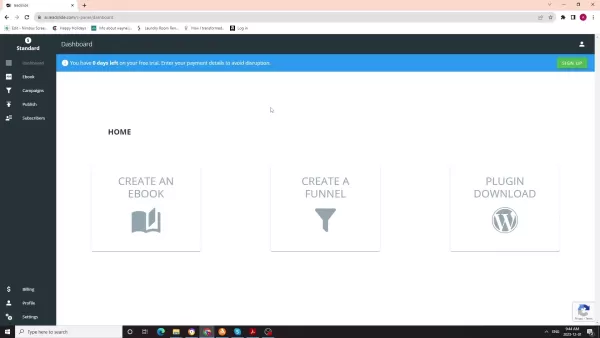
To begin using LeadSlide AI eBook Creator, access the LeadSlide dashboard. This central hub lets you manage all content creation activities, including eBook and funnel creation, plus plugin downloads.
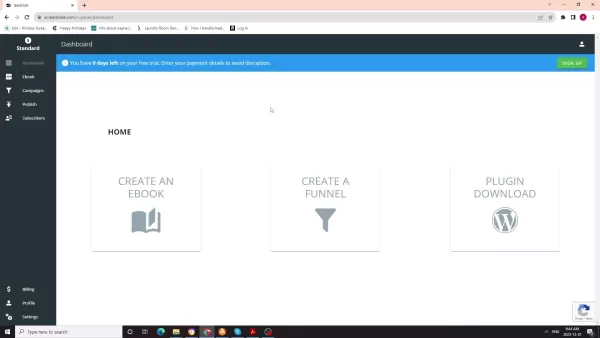
The dashboard is designed for intuitive navigation, with clear options to guide you through the eBook creation workflow.
From the dashboard, you can opt to create an eBook using a template or leverage the AI eBook Creator for a more automated approach. By simply inputting a topic or description, the AI generates relevant content, offering a fast and straightforward way to begin your project.
Using the AI eBook Creator: A Practical Example
Consider a practical example: creating an eBook titled "30-day running plan for sprinters." Inputting this description prompts the AI to generate content on the topic.
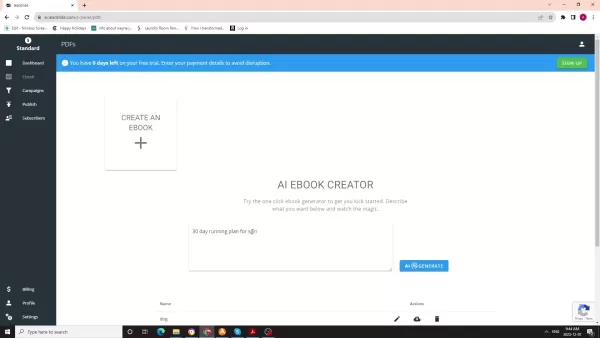
While the beta version may not deliver flawless results every time, it provides a solid foundation that you can edit and polish. The platform manages the initial heavy lifting, then allows you to review and make final adjustments.
This hands-on method ensures the final eBook aligns with your specific objectives and meets your quality standards, all while saving considerable time and effort.
Editing and Refining AI-Generated Content
After the AI generates your eBook's content, the next phase involves review and refinement. LeadSlide offers an intuitive editing interface for modifying text, formatting, and layout. This guarantees the final product reflects your brand identity and meets your standards. The platform also allows for title changes, paragraph edits, and the addition of headers and subheaders for extensive personalization.
Key Editing Capabilities:
- Text Editing: Modify the generated text to improve clarity, accuracy, and tone.
- Formatting: Adjust formatting to enhance readability and visual appeal.
- Layout: Customize the layout to align with your brand guidelines and content structure.
By carefully editing and refining the AI-generated content, you can produce an eBook that authentically represents your expertise and delivers real value to your audience.
LeadSlide AI: An Overview
The platform provides various editing options to fine-tune titles and content, ensuring they match your vision. It also integrates AI tips via a blue button in the top-right corner, offering suggestions to enhance your content. The platform aims to optimize user workflow by seamlessly integrating AI assistance.
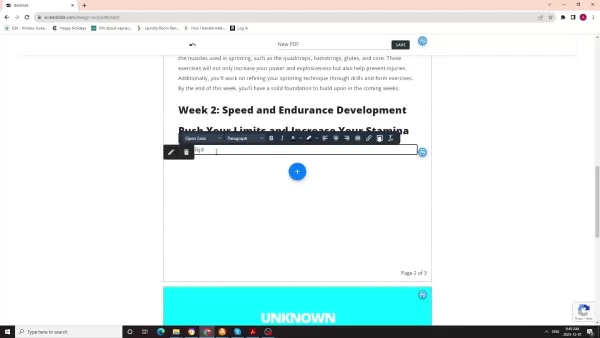
These AI tips deliver valuable guidance, helping you make informed decisions about your eBook's content and structure. By utilizing this AI support, you can create a more effective and engaging lead magnet that resonates with your audience. If the initially generated title isn't suitable, the platform allows you to create new ones, giving you greater control over the final output.
Adding Unique Content
Enhance your eBooks by incorporating unique elements that reflect your brand and expertise. Consider adding custom introductions, relevant case studies, or personal anecdotes that connect with your audience. Integrating these distinctive components helps your eBooks stand out and deliver maximum value.
Unique Content Integration:
- Custom introductions that speak directly to your audience
- Relevant case studies demonstrating real-world applications
- Personal anecdotes that add a human touch to your content
These additions not only provide valuable insights but also strengthen reader engagement, making your eBook more memorable.
Saving and Downloading Your eBook
Once you are satisfied with your eBook's content and formatting, the final step is to save and download it. LeadSlide enables you to save your eBook in multiple formats, including PDF, for easy sharing. The download process is simple: enter a file name, click save, and download your finished product.
With your eBook saved and downloaded, you're ready to deploy it for lead generation. Share it on your website, social media channels, or email campaigns to attract and engage potential customers. The opportunities are vast, and the potential impact on your marketing efforts is significant.
The Beta Advantage: Shaping the Future of LeadSlide
LeadSlide AI eBook Creator is currently in beta, meaning it is under active development and eagerly seeks user feedback. This offers a unique chance for you to influence the tool's future by sharing your thoughts, suggestions, and bug reports. The goal is to build the best platform on the market, and user input is highly valued for identifying issues and improvement areas.
As with any beta software, some bugs may be present. However, the development team actively welcomes feedback and is committed to refining the software into a premier marketing tool. Users can report bugs as they encounter them, directly contributing to LeadSlide's evolution.
LeadSlide AI: Benefits
Saves Time and Resources
A major advantage of LeadSlide AI eBook Creator is its ability to conserve time and resources. Creating an eBook from scratch can take days or weeks, but with AI assistance, you can drastically cut that time. This lets you focus on other priorities like marketing and sales. By automating much of the content creation, LeadSlide helps you allocate resources more effectively, maximizing your return on investment.
Enhances Content Quality
LeadSlide AI eBook Creator helps improve content quality by providing a strong foundational draft and offering improvement suggestions. While AI-generated content might need refinement, it serves as an excellent starting point that you can polish to ensure your eBook is well-written, informative, and engaging.
Provides Scalability
LeadSlide AI eBook Creator allows you to effortlessly scale your content creation to match your marketing strategy's demands. Whether you need one eBook or dozens, the tool facilitates quick and efficient content generation, enabling you to expand your lead generation efforts without compromising quality. This scalability is priceless for businesses aiming to grow and broaden their reach.
Easy Steps: How To Use LeadSlide
Step 1: Sign Up for an Account
Visit the LeadSlide website and register for a free trial account. This grants access to all platform features, including the AI eBook Creator.
Step 2: Navigate to the eBook Creator
From the dashboard, click the "eBook" tab to access the AI eBook Creator. You will see options to create an eBook from a template or use the AI generator.
Step 3: Input Your eBook Topic
Enter a specific topic or description for your eBook. Detailed input helps the AI generate more relevant and targeted content.
Step 4: Generate and Review Content
Click the "Generate" button to initiate AI content creation. Carefully review the generated content to ensure it meets your standards.
Step 5: Edit and Refine
Use the editing interface to adjust text, formatting, and layout. This crucial step ensures the final eBook aligns with your brand and delivers value to your readers.
Step 6: Save and Download
Once satisfied with your eBook, save it and download it in your preferred format. Your eBook is now ready for lead generation activities.
LeadSlide AI: Free vs Paid Plans
Free
LeadSlide AI is currently available as a free beta. This is a limited-time offer, with the potential for future paid plans as the platform evolves.
LeadSlide AI: Pros and Cons
Pros
Streamlined eBook creation process
AI-powered content generation
User-friendly editing interface
Ability to save and download in various formats
Scalable content creation efforts
Ability to quickly generate new content.
Cons
Currently in beta, may have bugs
AI-generated content may require editing
LeadSlide AI: Use Cases
Lead Generation
Create high-quality eBooks to attract and engage potential customers. Offer these eBooks as lead magnets in exchange for contact information to build your email list and generate qualified leads. A primary goal for an eBook is to convert it into a PDF, which can then be offered as a valuable resource to prospects, helping generate leads for your products or services.
Content Marketing
Use eBooks to establish authority in your industry and provide valuable insights to your audience. Distribute your eBooks via your website, social media, and email campaigns to drive traffic and engagement.
Product Launches
Develop eBooks to promote new products and services, offering detailed information and highlighting key benefits. Use eBooks to build excitement and anticipation for your launches.
FAQ
What is LeadSlide AI eBook Creator?
LeadSlide AI eBook Creator is a tool designed to streamline and accelerate the eBook creation process, using artificial intelligence to help you generate content quickly and efficiently.
How does LeadSlide AI eBook Creator work?
The AI eBook Creator allows you to input a topic or description, and the tool generates relevant content based on your input, providing a fast and easy starting point for your eBook.
Is LeadSlide AI eBook Creator currently in beta?
Yes, LeadSlide AI eBook Creator is currently in a beta phase, meaning it is under active development and welcomes user feedback.
Can I edit and refine the AI-generated content?
Yes, LeadSlide provides a user-friendly editing interface that allows you to modify the text, formatting, and layout of your eBook to meet your standards.
What formats can I save my eBook in?
LeadSlide allows you to save your eBook in various formats, including PDF, facilitating easy sharing with your audience.
Related Questions
What is artificial intelligence (AI) and how is it used in content creation?
Artificial intelligence (AI) is a field of computer science focused on creating machines capable of performing tasks that normally require human intelligence. In content creation, AI automates processes like text, image, and video generation. It can also analyze data to provide insights that help content creators make better decisions. Common AI techniques include natural language processing (NLP), machine learning (ML), and deep learning (DL). These technologies enable AI tools to understand and produce human-like text, create realistic visuals, and personalize content for individual users. By leveraging AI, content creators save time and resources while producing high-quality, engaging material that resonates with their target audience. As the technology advances, AI's role in content creation is set to grow, and tools like LeadSlide are helping to realize this future.
What are lead magnets and why are they important for lead generation?
Lead magnets are valuable content pieces offered to potential customers in exchange for their contact information, such as name and email address. They are crucial for lead generation because they attract and engage your target audience, building trust and credibility while capturing qualified leads. Common lead magnets include eBooks, whitepapers, checklists, templates, and free trials. By providing free value, you encourage prospects to share their details, enabling you to follow up and nurture them through the sales funnel. In marketing, securing a customer's email address is incredibly valuable, as this direct connection can convert a prospect into a paying customer.
What are some common mistakes to avoid when creating eBooks for lead generation?
Creating eBooks for lead generation is effective, but it's important to avoid common pitfalls that can reduce their impact. Key mistakes include: Failing to Define Your Target Audience: Before writing, clearly identify your audience and tailor content to their specific needs and interests. A generic eBook that doesn't resonate is unlikely to generate leads. Creating Low-Quality Content: Your eBook must offer valuable, informative, and engaging content that showcases your expertise and builds trust. Avoid thin, poorly written material that fails to deliver. Ignoring Formatting and Design: Readability and visual appeal are critical. Use clear headings, bullet points, and images to break up text. Ensure your eBook has a professional, attractive design. Forgetting a Clear Call to Action: Your eBook should include a clear prompt for the next step, such as visiting your website or contacting sales. Make it easy for readers to take action. By avoiding these errors, you can create eBooks that effectively generate leads and support business growth. LeadSlide helps minimize these risks by automating much of the writing and formatting, allowing you to concentrate on the core ideas and strategy.
Related article
 Stripe to Acquire OpenRouter as AI Model Routing Gains Momentum
Stripe has agreed to acquire OpenRouter, an AI model-routing platform that gives developers access to hundreds of models through a single interface. The deal adds model selection and routing to Stripe’s existing work around AI usage and token-based b
Former OpenAI Researcher Barrett Zoph Returns to Google to Support Gemini Development
Barret Zoph, who previously abruptly left and joined OpenAI due to a disagreement with Thinking Machines Lab CEO Miriam Mularati, has once again changed employers. Alphabet's Google announced that Zoph will return as Vice President of Research, bring
How Recursive Intelligence Raised $335M at $4B Valuation in 4 Months
The co-founders of startup Ricursive Intelligence seemed destined to be co-founders.Anna Goldie, CEO, and Azalia Mirhoseini, CTO, are so well-known in the AI community that they were among those AI engineers who “got those weird emails from Zuckerber
Related Special Topic Recommendations
Design & Art
Stripe to Acquire OpenRouter as AI Model Routing Gains Momentum
Stripe has agreed to acquire OpenRouter, an AI model-routing platform that gives developers access to hundreds of models through a single interface. The deal adds model selection and routing to Stripe’s existing work around AI usage and token-based b
Former OpenAI Researcher Barrett Zoph Returns to Google to Support Gemini Development
Barret Zoph, who previously abruptly left and joined OpenAI due to a disagreement with Thinking Machines Lab CEO Miriam Mularati, has once again changed employers. Alphabet's Google announced that Zoph will return as Vice President of Research, bring
How Recursive Intelligence Raised $335M at $4B Valuation in 4 Months
The co-founders of startup Ricursive Intelligence seemed destined to be co-founders.Anna Goldie, CEO, and Azalia Mirhoseini, CTO, are so well-known in the AI community that they were among those AI engineers who “got those weird emails from Zuckerber
Related Special Topic Recommendations
Design & Art
 Top AI Illustration Tools: Create Editorial Scenes and Cover Art Faster
2026 Latest Top-rated AI Illustration Tools: Our curated list features the best powerfully designed tools for creating stunning editorial scenes and eye-catching cover art quickly. Each option has gone through rigorous real-world tests, offering a free vs paid comparison to help you find the perfect match for your workflow. Try these must-try solutions today to unlock your AI edge and boost your creative productivity. Explore now at XIX.AI.
 10 tools
 xix.ai
Education and Learning
Top AI Tutors for Exam Prep: Practice Math, Science, and English
xix.ai
Education and Learning
Top AI Tutors for Exam Prep: Practice Math, Science, and English
2026 Latest Top-Rated Best AI Tutors for Exam Prep are here on XIX.AI! Our curated list features powerful game-changing tools that offer free vs paid comparison, real-world tests, and weekly updated rankings. They help boost your writing efficiency, simplify complex topic learning, and unlock your academic potential. Explore now to Discover your perfect exam prep tool and Start creating today to Unlock your AI edge!
10 tools
xix.ai
Finance
AI Budget Planning Tools for Personal Money Management
2026 Latest Best Top-Rated AI Budget Planning Tools for Personal Money Management are here on XIX.AI! This curated collection features powerful, game-changing solutions that help you conduct real-world tests, understand spending habits, and create personalized plans to boost productivity. Enjoy a free vs paid comparison along with detailed rankings. Must-try tools designed to simplify money management and unlock your AI edge. Explore now!
11 tools
xix.ai
Health & Wellness
AI Sleep Tracking Assistants: Improve Recovery with Better Bedtime Habits
2026 Latest Best Top-Rated AI Sleep Tracking Assistants curated for ultimate recovery. This fully updated weekly guide features powerful tools that deliver real-world tests, free vs paid comparison, and detailed rankings to help you find the must-try solution that boosts sleep quality and supports better bedtime habits. Explore now at XIX.AI to Unlock your AI edge.
10 tools
xix.ai
Data Analysis
AI SQL Copilots for Product and Revenue Analytics
2026 Latest Best Top-Rated AI SQL Copilots for Product and Revenue Analytics! XIX.AI has curated a powerful, game-changing collection of must-try tools that undergo real-world tests through weekly updated rankings. These tools help users boost productivity significantly by accelerating data analysis, streamlining complex queries, and generating accurate insights to drive smarter business decisions. Explore now to Discover your perfect tool for unlocking your AI edge!
14 tools
xix.ai
Education and Learning
Best AI Homework Helpers That Teach: Learn Concepts, Not Just Answers
2026 Latest Best Top-Rated AI Homework Helpers That Teach Core Concepts Not Just Answers Powerful Tools for Students Must-Try Curated List Weekly Updated Free vs Paid Comparison Real-World Tests Accurate Rankings to Help You Unlock Your Full Learning Potential Explore now to Discover your perfect tool for smarter studying.
10 tools
xix.ai

 Comments (3)
0/500
Comments (3)
0/500
![DanielRodriguez]()
Interesting concept, but I'm a bit skeptical about the quality of AI-generated ebooks. Will they feel generic or actually provide unique insights? 🤔 Also, what happens to all the writers and designers if this takes off? The ethical side of AI replacing creative jobs needs more discussion, not just the convenience factor.
![AvaHill]()
La idea de un creador de eBooks con IA puede ser una solución práctica para negocios pequeños que no tienen recursos para crear contenido de calidad. Si bien la automatización es atractiva, no me convencen los PDFs automatizados como imanes de clientes potenciales. ¿No resultarán demasiado genéricos? Espero que haya opciones de personalización serias antes de considerar probarlo. 🤔
![TerryHernández]()
Hmm, also LeadSlide klingt ja ganz praktisch, aber irgendwie macht mich das auch etwas stutzig. Werden da am Ende nur noch seelenlose AI-Texte produziert? 🤔 Der menschliche Touch in Content geht doch dabei komplett flöten, oder? Finde die Entwicklung echt zwiespältig.
In today's fast-paced digital world, compelling content is essential, but producing it consistently presents a real hurdle. Lead magnets like eBooks are vital for capturing leads, yet the required time and effort can be daunting. LeadSlide AI eBook Creator solves this by streamlining the eBook creation process, using artificial intelligence to help you generate quality content quickly and efficiently. Whether you're an experienced marketer or just beginning, this tool is designed to transform your content strategy.
Key Points
LeadSlide AI eBook Creator uses AI to rapidly generate eBooks.
The tool is currently in a beta phase, inviting users to contribute to its evolution.
Users can build eBooks from the ground up or refine AI-generated drafts.
LeadSlide simplifies content creation by integrating eBook development with lead generation tools.
User feedback is instrumental for enhancing the tool's features and resolving issues.
Exploring LeadSlide AI eBook Creator
The Promise of AI-Powered Content Creation
LeadSlide AI eBook Creator is built to make eBook creation accessible to all, regardless of writing expertise or available time. By harnessing artificial intelligence, it assists users in developing persuasive lead magnets that attract and engage potential customers. The emphasis is on simplicity and efficiency, freeing you to concentrate on other critical marketing activities. The software enables any user to produce professional marketing documents rapidly.
This minimizes the reliance on multiple plugins and ensures branding remains consistent. LeadSlide's primary goal is to make this process as smooth and impactful as possible.
LeadSlide is being developed using cutting-edge methods, including the integration of its own AI models with technologies like Chat GPT. This integration aims to deliver a more intelligent and comprehensive content generation experience, further simplifying eBook creation.
First Steps: Navigating the Dashboard
To begin using LeadSlide AI eBook Creator, access the LeadSlide dashboard. This central hub lets you manage all content creation activities, including eBook and funnel creation, plus plugin downloads.
The dashboard is designed for intuitive navigation, with clear options to guide you through the eBook creation workflow.
From the dashboard, you can opt to create an eBook using a template or leverage the AI eBook Creator for a more automated approach. By simply inputting a topic or description, the AI generates relevant content, offering a fast and straightforward way to begin your project.
Using the AI eBook Creator: A Practical Example
Consider a practical example: creating an eBook titled "30-day running plan for sprinters." Inputting this description prompts the AI to generate content on the topic.
While the beta version may not deliver flawless results every time, it provides a solid foundation that you can edit and polish. The platform manages the initial heavy lifting, then allows you to review and make final adjustments.
This hands-on method ensures the final eBook aligns with your specific objectives and meets your quality standards, all while saving considerable time and effort.
Editing and Refining AI-Generated Content
After the AI generates your eBook's content, the next phase involves review and refinement. LeadSlide offers an intuitive editing interface for modifying text, formatting, and layout. This guarantees the final product reflects your brand identity and meets your standards. The platform also allows for title changes, paragraph edits, and the addition of headers and subheaders for extensive personalization.
Key Editing Capabilities:
- Text Editing: Modify the generated text to improve clarity, accuracy, and tone.
- Formatting: Adjust formatting to enhance readability and visual appeal.
- Layout: Customize the layout to align with your brand guidelines and content structure.
By carefully editing and refining the AI-generated content, you can produce an eBook that authentically represents your expertise and delivers real value to your audience.
LeadSlide AI: An Overview
The platform provides various editing options to fine-tune titles and content, ensuring they match your vision. It also integrates AI tips via a blue button in the top-right corner, offering suggestions to enhance your content. The platform aims to optimize user workflow by seamlessly integrating AI assistance.
These AI tips deliver valuable guidance, helping you make informed decisions about your eBook's content and structure. By utilizing this AI support, you can create a more effective and engaging lead magnet that resonates with your audience. If the initially generated title isn't suitable, the platform allows you to create new ones, giving you greater control over the final output.
Adding Unique Content
Enhance your eBooks by incorporating unique elements that reflect your brand and expertise. Consider adding custom introductions, relevant case studies, or personal anecdotes that connect with your audience. Integrating these distinctive components helps your eBooks stand out and deliver maximum value.
Unique Content Integration:
- Custom introductions that speak directly to your audience
- Relevant case studies demonstrating real-world applications
- Personal anecdotes that add a human touch to your content
These additions not only provide valuable insights but also strengthen reader engagement, making your eBook more memorable.
Saving and Downloading Your eBook
Once you are satisfied with your eBook's content and formatting, the final step is to save and download it. LeadSlide enables you to save your eBook in multiple formats, including PDF, for easy sharing. The download process is simple: enter a file name, click save, and download your finished product.
With your eBook saved and downloaded, you're ready to deploy it for lead generation. Share it on your website, social media channels, or email campaigns to attract and engage potential customers. The opportunities are vast, and the potential impact on your marketing efforts is significant.
The Beta Advantage: Shaping the Future of LeadSlide
LeadSlide AI eBook Creator is currently in beta, meaning it is under active development and eagerly seeks user feedback. This offers a unique chance for you to influence the tool's future by sharing your thoughts, suggestions, and bug reports. The goal is to build the best platform on the market, and user input is highly valued for identifying issues and improvement areas.
As with any beta software, some bugs may be present. However, the development team actively welcomes feedback and is committed to refining the software into a premier marketing tool. Users can report bugs as they encounter them, directly contributing to LeadSlide's evolution.
LeadSlide AI: Benefits
Saves Time and Resources
A major advantage of LeadSlide AI eBook Creator is its ability to conserve time and resources. Creating an eBook from scratch can take days or weeks, but with AI assistance, you can drastically cut that time. This lets you focus on other priorities like marketing and sales. By automating much of the content creation, LeadSlide helps you allocate resources more effectively, maximizing your return on investment.
Enhances Content Quality
LeadSlide AI eBook Creator helps improve content quality by providing a strong foundational draft and offering improvement suggestions. While AI-generated content might need refinement, it serves as an excellent starting point that you can polish to ensure your eBook is well-written, informative, and engaging.
Provides Scalability
LeadSlide AI eBook Creator allows you to effortlessly scale your content creation to match your marketing strategy's demands. Whether you need one eBook or dozens, the tool facilitates quick and efficient content generation, enabling you to expand your lead generation efforts without compromising quality. This scalability is priceless for businesses aiming to grow and broaden their reach.
Easy Steps: How To Use LeadSlide
Step 1: Sign Up for an Account
Visit the LeadSlide website and register for a free trial account. This grants access to all platform features, including the AI eBook Creator.
Step 2: Navigate to the eBook Creator
From the dashboard, click the "eBook" tab to access the AI eBook Creator. You will see options to create an eBook from a template or use the AI generator.
Step 3: Input Your eBook Topic
Enter a specific topic or description for your eBook. Detailed input helps the AI generate more relevant and targeted content.
Step 4: Generate and Review Content
Click the "Generate" button to initiate AI content creation. Carefully review the generated content to ensure it meets your standards.
Step 5: Edit and Refine
Use the editing interface to adjust text, formatting, and layout. This crucial step ensures the final eBook aligns with your brand and delivers value to your readers.
Step 6: Save and Download
Once satisfied with your eBook, save it and download it in your preferred format. Your eBook is now ready for lead generation activities.
LeadSlide AI: Free vs Paid Plans
Free
LeadSlide AI is currently available as a free beta. This is a limited-time offer, with the potential for future paid plans as the platform evolves.
LeadSlide AI: Pros and Cons
Pros
Streamlined eBook creation process
AI-powered content generation
User-friendly editing interface
Ability to save and download in various formats
Scalable content creation efforts
Ability to quickly generate new content.
Cons
Currently in beta, may have bugs
AI-generated content may require editing
LeadSlide AI: Use Cases
Lead Generation
Create high-quality eBooks to attract and engage potential customers. Offer these eBooks as lead magnets in exchange for contact information to build your email list and generate qualified leads. A primary goal for an eBook is to convert it into a PDF, which can then be offered as a valuable resource to prospects, helping generate leads for your products or services.
Content Marketing
Use eBooks to establish authority in your industry and provide valuable insights to your audience. Distribute your eBooks via your website, social media, and email campaigns to drive traffic and engagement.
Product Launches
Develop eBooks to promote new products and services, offering detailed information and highlighting key benefits. Use eBooks to build excitement and anticipation for your launches.
FAQ
What is LeadSlide AI eBook Creator?
LeadSlide AI eBook Creator is a tool designed to streamline and accelerate the eBook creation process, using artificial intelligence to help you generate content quickly and efficiently.
How does LeadSlide AI eBook Creator work?
The AI eBook Creator allows you to input a topic or description, and the tool generates relevant content based on your input, providing a fast and easy starting point for your eBook.
Is LeadSlide AI eBook Creator currently in beta?
Yes, LeadSlide AI eBook Creator is currently in a beta phase, meaning it is under active development and welcomes user feedback.
Can I edit and refine the AI-generated content?
Yes, LeadSlide provides a user-friendly editing interface that allows you to modify the text, formatting, and layout of your eBook to meet your standards.
What formats can I save my eBook in?
LeadSlide allows you to save your eBook in various formats, including PDF, facilitating easy sharing with your audience.
Related Questions
What is artificial intelligence (AI) and how is it used in content creation?
Artificial intelligence (AI) is a field of computer science focused on creating machines capable of performing tasks that normally require human intelligence. In content creation, AI automates processes like text, image, and video generation. It can also analyze data to provide insights that help content creators make better decisions. Common AI techniques include natural language processing (NLP), machine learning (ML), and deep learning (DL). These technologies enable AI tools to understand and produce human-like text, create realistic visuals, and personalize content for individual users. By leveraging AI, content creators save time and resources while producing high-quality, engaging material that resonates with their target audience. As the technology advances, AI's role in content creation is set to grow, and tools like LeadSlide are helping to realize this future.
What are lead magnets and why are they important for lead generation?
Lead magnets are valuable content pieces offered to potential customers in exchange for their contact information, such as name and email address. They are crucial for lead generation because they attract and engage your target audience, building trust and credibility while capturing qualified leads. Common lead magnets include eBooks, whitepapers, checklists, templates, and free trials. By providing free value, you encourage prospects to share their details, enabling you to follow up and nurture them through the sales funnel. In marketing, securing a customer's email address is incredibly valuable, as this direct connection can convert a prospect into a paying customer.
What are some common mistakes to avoid when creating eBooks for lead generation?
Creating eBooks for lead generation is effective, but it's important to avoid common pitfalls that can reduce their impact. Key mistakes include: Failing to Define Your Target Audience: Before writing, clearly identify your audience and tailor content to their specific needs and interests. A generic eBook that doesn't resonate is unlikely to generate leads. Creating Low-Quality Content: Your eBook must offer valuable, informative, and engaging content that showcases your expertise and builds trust. Avoid thin, poorly written material that fails to deliver. Ignoring Formatting and Design: Readability and visual appeal are critical. Use clear headings, bullet points, and images to break up text. Ensure your eBook has a professional, attractive design. Forgetting a Clear Call to Action: Your eBook should include a clear prompt for the next step, such as visiting your website or contacting sales. Make it easy for readers to take action. By avoiding these errors, you can create eBooks that effectively generate leads and support business growth. LeadSlide helps minimize these risks by automating much of the writing and formatting, allowing you to concentrate on the core ideas and strategy.








 Stripe to Acquire OpenRouter as AI Model Routing Gains Momentum
Stripe has agreed to acquire OpenRouter, an AI model-routing platform that gives developers access to hundreds of models through a single interface. The deal adds model selection and routing to Stripe’s existing work around AI usage and token-based b
Stripe to Acquire OpenRouter as AI Model Routing Gains Momentum
Stripe has agreed to acquire OpenRouter, an AI model-routing platform that gives developers access to hundreds of models through a single interface. The deal adds model selection and routing to Stripe’s existing work around AI usage and token-based b
 Former OpenAI Researcher Barrett Zoph Returns to Google to Support Gemini Development
Barret Zoph, who previously abruptly left and joined OpenAI due to a disagreement with Thinking Machines Lab CEO Miriam Mularati, has once again changed employers. Alphabet's Google announced that Zoph will return as Vice President of Research, bring
Former OpenAI Researcher Barrett Zoph Returns to Google to Support Gemini Development
Barret Zoph, who previously abruptly left and joined OpenAI due to a disagreement with Thinking Machines Lab CEO Miriam Mularati, has once again changed employers. Alphabet's Google announced that Zoph will return as Vice President of Research, bring
 How Recursive Intelligence Raised $335M at $4B Valuation in 4 Months
The co-founders of startup Ricursive Intelligence seemed destined to be co-founders.Anna Goldie, CEO, and Azalia Mirhoseini, CTO, are so well-known in the AI community that they were among those AI engineers who “got those weird emails from Zuckerber
How Recursive Intelligence Raised $335M at $4B Valuation in 4 Months
The co-founders of startup Ricursive Intelligence seemed destined to be co-founders.Anna Goldie, CEO, and Azalia Mirhoseini, CTO, are so well-known in the AI community that they were among those AI engineers who “got those weird emails from Zuckerber

2026 Latest Top-rated AI Illustration Tools: Our curated list features the best powerfully designed tools for creating stunning editorial scenes and eye-catching cover art quickly. Each option has gone through rigorous real-world tests, offering a free vs paid comparison to help you find the perfect match for your workflow. Try these must-try solutions today to unlock your AI edge and boost your creative productivity. Explore now at XIX.AI.
10 tools
xix.ai

2026 Latest Top-Rated Best AI Tutors for Exam Prep are here on XIX.AI! Our curated list features powerful game-changing tools that offer free vs paid comparison, real-world tests, and weekly updated rankings. They help boost your writing efficiency, simplify complex topic learning, and unlock your academic potential. Explore now to Discover your perfect exam prep tool and Start creating today to Unlock your AI edge!
10 tools
xix.ai

2026 Latest Best Top-Rated AI Budget Planning Tools for Personal Money Management are here on XIX.AI! This curated collection features powerful, game-changing solutions that help you conduct real-world tests, understand spending habits, and create personalized plans to boost productivity. Enjoy a free vs paid comparison along with detailed rankings. Must-try tools designed to simplify money management and unlock your AI edge. Explore now!
11 tools
xix.ai

2026 Latest Best Top-Rated AI Sleep Tracking Assistants curated for ultimate recovery. This fully updated weekly guide features powerful tools that deliver real-world tests, free vs paid comparison, and detailed rankings to help you find the must-try solution that boosts sleep quality and supports better bedtime habits. Explore now at XIX.AI to Unlock your AI edge.
10 tools
xix.ai

2026 Latest Best Top-Rated AI SQL Copilots for Product and Revenue Analytics! XIX.AI has curated a powerful, game-changing collection of must-try tools that undergo real-world tests through weekly updated rankings. These tools help users boost productivity significantly by accelerating data analysis, streamlining complex queries, and generating accurate insights to drive smarter business decisions. Explore now to Discover your perfect tool for unlocking your AI edge!
14 tools
xix.ai

2026 Latest Best Top-Rated AI Homework Helpers That Teach Core Concepts Not Just Answers Powerful Tools for Students Must-Try Curated List Weekly Updated Free vs Paid Comparison Real-World Tests Accurate Rankings to Help You Unlock Your Full Learning Potential Explore now to Discover your perfect tool for smarter studying.
10 tools
xix.ai

Interesting concept, but I'm a bit skeptical about the quality of AI-generated ebooks. Will they feel generic or actually provide unique insights? 🤔 Also, what happens to all the writers and designers if this takes off? The ethical side of AI replacing creative jobs needs more discussion, not just the convenience factor.
La idea de un creador de eBooks con IA puede ser una solución práctica para negocios pequeños que no tienen recursos para crear contenido de calidad. Si bien la automatización es atractiva, no me convencen los PDFs automatizados como imanes de clientes potenciales. ¿No resultarán demasiado genéricos? Espero que haya opciones de personalización serias antes de considerar probarlo. 🤔
Hmm, also LeadSlide klingt ja ganz praktisch, aber irgendwie macht mich das auch etwas stutzig. Werden da am Ende nur noch seelenlose AI-Texte produziert? 🤔 Der menschliche Touch in Content geht doch dabei komplett flöten, oder? Finde die Entwicklung echt zwiespältig.












