


 Home
HomeAI-Driven 3D Modeling: How Kaedim Transforms Content Creation
In the fast-paced realm of game development and 3D design, creating assets efficiently is crucial. Kaedim 3D harnesses artificial intelligence to convert images and text into high-quality 3D models. This article dives into Kaedim 3D’s features, advantages, and its potential to reshape your 3D content creation process. Learn how Kaedim makes 3D modeling accessible to both experienced professionals and enthusiasts, bridging the gap between ideas and tangible creations.
Key Points
Kaedim 3D leverages AI to craft 3D models from images and text inputs.
The platform provides flexible subscription tiers to meet diverse user needs.
Human artist oversight ensures top-notch model quality.
Models integrate seamlessly with game engines like Unity and Unreal Engine.
Kaedim accelerates 3D asset creation, saving time and costs.
Understanding Kaedim 3D
What is Kaedim 3D?
Kaedim 3D is a cutting-edge platform that uses AI to streamline and speed up 3D model creation. It serves a broad audience, from veteran designers to newcomers, by simplifying the transformation of 2D images and text descriptions into usable 3D assets.

Its strength lies in analyzing visual and textual inputs to produce 3D models that align with user specifications. This technology slashes the time and effort typically needed for 3D modeling, making it an essential tool for game developers, designers, and 3D content creators.
Kaedim 3D blends automation with human artistry through expert review and refinement. This hybrid model ensures that generated assets are both accurate and visually appealing, optimized for their intended purpose. By combining AI efficiency with human creativity, Kaedim delivers high-quality models rapidly.
The platform supports integration with leading tools like Unity, Unreal Engine, and Blender, enabling users to incorporate Kaedim models into their workflows without compatibility issues. Kaedim is a transformative solution for the 3D industry.
How Kaedim 3D Works: A Step-by-Step Guide
Kaedim 3D simplifies 3D model creation through four steps:
- Upload or Describe: Start by uploading an image or providing a detailed text description of the desired object.
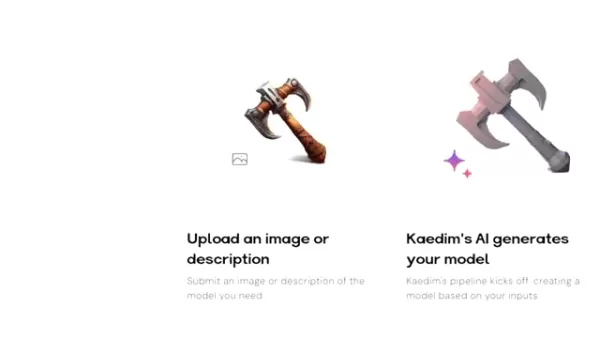
Clear inputs lead to superior model outcomes.
- AI Generation: Kaedim’s AI processes the input and creates a 3D model quickly, delivering an initial version for further work.
- Artist Review and Refinement: A professional artist refines the AI-generated model to ensure precision and visual quality.
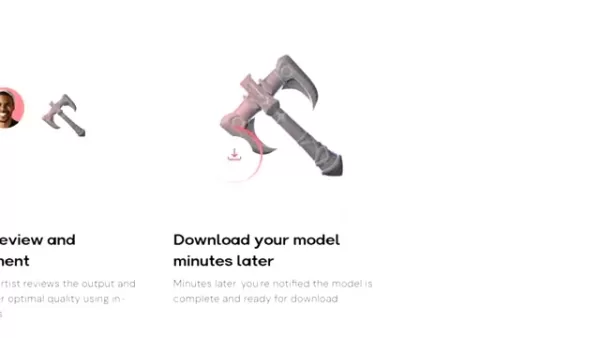
- Download Your Model: Once refined, the model is ready for download, compatible with Blender, Unreal Engine, and Unity.
This efficient workflow reduces the expertise and time needed for 3D modeling, making it accessible to all skill levels. Kaedim empowers both professionals and beginners to create high-quality 3D assets with ease.
Exploring the Asset Page and Editing Tools
Maximizing Kaedim’s Capabilities: Editing Tools and Asset Management
After generating a 3D model, Kaedim’s asset page offers tools for further customization and enhancement.
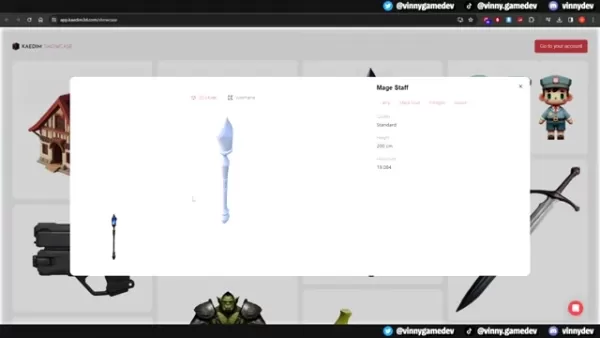
Mastering these tools can significantly improve the quality and functionality of your 3D assets.
The asset page includes features to refine your 3D models:
View Input Image: Access the original reference image used to create the model.
Display Dimensions: Check the model’s exact measurements to ensure it fits your project’s needs.
Show Wireframe: Inspect the model’s underlying structure to evaluate its topology.
Refine Model: Use AI to tweak specific areas of the model by describing desired changes, with edits handled by a professional 3D artist.
UV Unwrap: Adjust UV mapping for accurate texture application.
Apply Color: Add solid colors to alter the model’s appearance.
Automatic Texturing: Streamline texturing with automated application of textures.
Create LoDs: Generate Level of Detail models to optimize performance at different distances.
Merge Models: Combine multiple models into a single asset.
How to Generate a 3D Model with Kaedim
Step-by-Step Guide to Creating Your First Model
Kaedim 3D makes 3D modeling approachable for everyone. Here’s how to get started:
Create an Account: Register for a Kaedim 3D account by clicking ‘Get Started.’
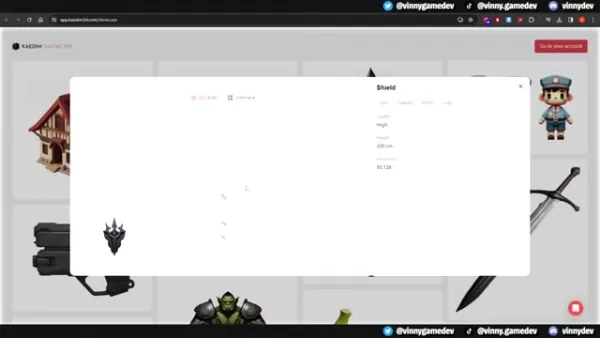
Access the Creation Feature: Log in and go to the ‘Create’ section in the Kaedim interface.
Upload Your Reference Image: Drag and drop an image (PNG, JPG, or other formats) or select one from your device.
Select Generation Settings: Choose Standard, High, or Ultra quality based on the model’s complexity and name your model.
Generate Image (Optional): If you lack a reference image, provide a text prompt to create one.
Generate the Model: Click ‘Generate Image’ to start the 3D model creation process using Kaedim’s AI.
Kaedim 3D Pricing Plans
Selecting the Best Plan for Your Needs
Kaedim 3D offers tiered pricing to suit various project scales and user requirements.
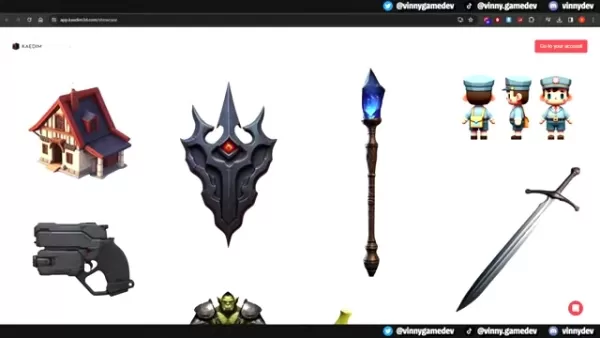
Understanding these plans helps you choose the best option for your goals.
Starter: At $150 per month, this plan includes 10 credits, perfect for solo developers or small teams prototyping ideas.
Indie: Priced at $300 per month with 20 credits, this plan suits independent developers and small studios creating games or art collections.
Studio: At $1000 per month, this plan offers 60 credits and personalized support, ideal for large teams producing high volumes of models.
Kaedim uses a credit-based system, with each model consuming credits based on output quality:
Standard: 1 Credit
High: 2 Credits
Ultra: 4 Credits
A ‘Pay As You Go’ option at $20 per credit allows flexibility without long-term commitment.
Below is a table summarizing the pricing plans:
Plan Price Credits Target User Starter $150/mo 10 Solo developers, small teams (prototyping) Indie $300/mo 20 Independent developers, small studios (art collections) Studio $1000/mo 60 Large teams (high volume of models) Pay as you go $20/credit Varies All users (no commitment necessary)
Higher quality settings increase credit consumption due to enhanced detail and complexity.
Pros and Cons of Using Kaedim 3D
Pros
Fast 3D model creation
Less time and effort than traditional modeling
Accessible to users of all experience levels
Seamless integration with popular game engines and 3D software
Combines AI efficiency with human artistry
Cons
AI may not always deliver flawless results
Credit-based pricing can be expensive for high-volume users
Limited customization compared to traditional methods
Model accuracy depends on input quality
Key Features of Kaedim 3D
AI-Powered Model Generation
Kaedim 3D’s AI engine creates 3D models from images and text, drastically cutting down the time and skill needed for modeling and making it accessible to all.
Artist Review and Refinement
Human artists review and refine AI-generated models to ensure accuracy and aesthetic quality, blending automation with expert craftsmanship.
Integration with Popular Platforms
Kaedim 3D integrates with Unity, Unreal Engine, and Blender, allowing easy incorporation into existing workflows.
This compatibility streamlines project development.
Image and Text Input Support
Users can input images or text descriptions, offering flexibility to create models from existing artwork or creative ideas.
Automatic Texturing
Kaedim’s automated texturing feature simplifies the process, producing visually appealing models efficiently.
This saves time for game developers and designers.
Use Cases for Kaedim 3D
Game Development
Kaedim 3D speeds up asset creation for game developers, producing models for characters, props, environments, and more across various game genres.
Architectural Visualization
Architects and designers can quickly generate 3D models of buildings, interiors, and landscapes for faster design iteration and visualization.
Product Design
Product designers can create 3D models from sketches or images, accelerating prototyping and development cycles.
Art and Illustration
Artists can use Kaedim 3D to craft models for their work, enabling more complex and dynamic creative projects.
FAQ
What file formats does Kaedim 3D support for exporting models?
Kaedim supports FBX, OBJ, and GLB formats for model exports.
Can I use Kaedim 3D for commercial projects?
Yes, Kaedim’s subscription plans permit commercial use of generated models.
Does Kaedim 3D offer a free trial?
Contact Kaedim’s team for inquiries about trials or further details.
How accurate are the AI-generated models?
Model accuracy relies on the quality of input images or descriptions, enhanced by the artist review process for optimal results.
Can I edit the models generated by Kaedim 3D?
Yes, the asset page provides tools for editing and refining models.
Related Questions
How can AI be used to improve game development?
AI enhances game development through procedural content generation, creating dynamic environments, quests, and narratives. It powers realistic NPCs, automates testing, and balances gameplay, with future advancements promising even greater innovation.
What are some alternatives to Kaedim 3D for generating 3D models?
Alternatives include traditional tools like Blender, Maya, and 3ds Max for precise control, or platforms like Sketchfab and TurboSquid for pre-made models. Other AI-driven tools are emerging, each with unique strengths for specific project needs.
How does Kaedim 3D compare to traditional 3D modeling techniques?
Kaedim 3D simplifies modeling with AI, reducing time and skill barriers compared to traditional methods, which offer greater precision but require expertise. The choice depends on project needs, budget, and timeline.
Related article
 Apple Smart Glasses Could Debut at WWDC27, Highlighting Privacy Protection
Bloomberg’s Mark Gurman reports that Apple’s smart glasses, codenamed N50, are slated for a WWDC27 debut in June 2027, with a retail launch expected in autumn 2027. Originally targeted for late this year and early 2027, the device’s release has been
Inside Details Exposed About Next-Gen Gemini: Strained Computing Power, Internal Teams Disagreed on Development Priorities and Resource Allocation
Reports indicate that the launch of Google’s highly anticipated next-generation Gemini model has been pushed back. Internal disagreements over development priorities and resource allocation, combined with limited computing capacity and complex approv
OpenAI Dismisses Growth Slowdown Concerns, Says Multiple Business Units Accelerating
In response to external scrutiny regarding decelerating sales growth and missed internal benchmarks, AI leader OpenAI issued a confident statement on Tuesday, April 28. The company clarified that its consumer products and enterprise services are adva
Related Special Topic Recommendations
Data Analysis
Apple Smart Glasses Could Debut at WWDC27, Highlighting Privacy Protection
Bloomberg’s Mark Gurman reports that Apple’s smart glasses, codenamed N50, are slated for a WWDC27 debut in June 2027, with a retail launch expected in autumn 2027. Originally targeted for late this year and early 2027, the device’s release has been
Inside Details Exposed About Next-Gen Gemini: Strained Computing Power, Internal Teams Disagreed on Development Priorities and Resource Allocation
Reports indicate that the launch of Google’s highly anticipated next-generation Gemini model has been pushed back. Internal disagreements over development priorities and resource allocation, combined with limited computing capacity and complex approv
OpenAI Dismisses Growth Slowdown Concerns, Says Multiple Business Units Accelerating
In response to external scrutiny regarding decelerating sales growth and missed internal benchmarks, AI leader OpenAI issued a confident statement on Tuesday, April 28. The company clarified that its consumer products and enterprise services are adva
Related Special Topic Recommendations
Data Analysis
 AI SQL Copilots for Revenue Dashboards, Funnel Analysis, and Product Metrics
2026 Latest Best AI SQL Copilots Ranked Top-Rated! XIX.AI curates a powerful game-changing collection for weekly updated real-world tests. These must-try tools help you generate accurate revenue dashboards, analyze sales funnels, and track product metrics swiftly, boosting productivity massively. Explore now to Discover your perfect tool for data-driven decision making! 238 characters
 9 tools
 xix.ai
Music composition
Best AI Melody Writing Tools for Song Drafts
xix.ai
Music composition
Best AI Melody Writing Tools for Song Drafts
2026 Latest Best Top-Rated AI Melody Writing Tools for Song Drafts! XIX.AI has curated a highly powerful game-changing collection that goes through rigorous real-world tests to deliver the best writing experience. You can find detailed free vs paid comparisons, accurate rankings, and must-try options designed to help you create stunning song drafts effortlessly and boost your creative productivity significantly. Explore now to discover your perfect tool!
8 tools
xix.ai
chatbot
Best AI Conversation Trainer Tools for Interview Practice
2026 Latest Best Top-rated AI Conversation Trainer Tools for Interview Practice are here on XIX.AI! This curated collection features powerful, game-changing tools that go through rigorous real-world tests to deliver accurate feedback. You’ll find a free vs paid comparison and detailed rankings to help you choose the must-try option that boosts your confidence and skills. Explore now to Discover your perfect tool for interview success!
12 tools
xix.ai
Design & Art
Best AI Style Transfer Tools for Creative Experiments
2026 Latest Best Top-rated AI Style Transfer Tools for Creative Experiments! XIX.AI has curated a powerful, game-changing collection of must-try tools that deliver exceptional results through real-world tests and rigorous rankings. These top solutions help creatives boost productivity significantly by accelerating content creation and unlocking endless creative possibilities. Explore now to discover your perfect tool and start creating today!
9 tools
xix.ai
Comic Creation
Best AI Dialogue Bubble Tools for Visual Storytelling
2026 Latest Best Top-Rated AI Dialogue Bubble Tools for Visual Storytelling are here on XIX.AI! This curated collection features powerful, game-changing tools that help creators boost productivity and overcome creative bottlenecks. Get a free vs paid comparison, see real-world tests, and check the latest rankings to find the must-try solutions perfect for crafting engaging visual narratives. Explore now to discover your ideal tool!
10 tools
xix.ai
Meeting Assistant
Top AI Meeting Summary Tools: Track Decisions and Follow-Ups Clearly
2026 Latest Top-Rated Best AI Meeting Summary Tools for Clear Decision Tracking and Effortless Follow-Ups. This curated list showcases powerful, game-changing solutions that boost productivity dramatically by automating meeting notes, identifying key action items, and streamlining team coordination across all projects. Get a free vs paid comparison along with real-world tests and weekly updated rankings to help you find the perfect tool. Explore now to unlock your AI edge!
9 tools
xix.ai

 Comments (4)
0/500
Comments (4)
0/500
![JeffreyHarris]()
This is pretty cool, but I'm curious about the quality of the models it generates from just an image. Is it production-ready for games, or more for prototyping? Also, the pricing model for these AI tools always makes me nervous... feels like it could get expensive fast if you're doing a lot of assets. Still, anything that speeds up the boring parts of dev is a win in my book! 😅
![FrankAllen]()
This is exactly what I've been looking for! As an indie dev struggling with Blender, the idea of turning concept art directly into models sounds like a magic wand. The speed boost for prototyping would be insane 🚀. Curious about its integration with common engines like Unity/Unreal though. Hope it stays affordable for small studios and doesn't get snapped up by a giant corporation.
![MarkLopez]()
Pas sûr que l'IA puisse capturer l'âme d'un artiste... mais pour les assets basiques, ça semble pratique. C'est l'outil parfait pour les indie devs qui manquent de temps (et d'argent) 😅
![EdwardScott]()
Mind-blowing how Kaedim turns text into 3D models! 😮 Game devs must be thrilled, but I wonder if artists feel threatened by this tech?
In the fast-paced realm of game development and 3D design, creating assets efficiently is crucial. Kaedim 3D harnesses artificial intelligence to convert images and text into high-quality 3D models. This article dives into Kaedim 3D’s features, advantages, and its potential to reshape your 3D content creation process. Learn how Kaedim makes 3D modeling accessible to both experienced professionals and enthusiasts, bridging the gap between ideas and tangible creations.
Key Points
Kaedim 3D leverages AI to craft 3D models from images and text inputs.
The platform provides flexible subscription tiers to meet diverse user needs.
Human artist oversight ensures top-notch model quality.
Models integrate seamlessly with game engines like Unity and Unreal Engine.
Kaedim accelerates 3D asset creation, saving time and costs.
Understanding Kaedim 3D
What is Kaedim 3D?
Kaedim 3D is a cutting-edge platform that uses AI to streamline and speed up 3D model creation. It serves a broad audience, from veteran designers to newcomers, by simplifying the transformation of 2D images and text descriptions into usable 3D assets.
Its strength lies in analyzing visual and textual inputs to produce 3D models that align with user specifications. This technology slashes the time and effort typically needed for 3D modeling, making it an essential tool for game developers, designers, and 3D content creators.
Kaedim 3D blends automation with human artistry through expert review and refinement. This hybrid model ensures that generated assets are both accurate and visually appealing, optimized for their intended purpose. By combining AI efficiency with human creativity, Kaedim delivers high-quality models rapidly.
The platform supports integration with leading tools like Unity, Unreal Engine, and Blender, enabling users to incorporate Kaedim models into their workflows without compatibility issues. Kaedim is a transformative solution for the 3D industry.
How Kaedim 3D Works: A Step-by-Step Guide
Kaedim 3D simplifies 3D model creation through four steps:
- Upload or Describe: Start by uploading an image or providing a detailed text description of the desired object.
Clear inputs lead to superior model outcomes.
- AI Generation: Kaedim’s AI processes the input and creates a 3D model quickly, delivering an initial version for further work.
- Artist Review and Refinement: A professional artist refines the AI-generated model to ensure precision and visual quality.
- Download Your Model: Once refined, the model is ready for download, compatible with Blender, Unreal Engine, and Unity.
This efficient workflow reduces the expertise and time needed for 3D modeling, making it accessible to all skill levels. Kaedim empowers both professionals and beginners to create high-quality 3D assets with ease.
Exploring the Asset Page and Editing Tools
Maximizing Kaedim’s Capabilities: Editing Tools and Asset Management
After generating a 3D model, Kaedim’s asset page offers tools for further customization and enhancement.
Mastering these tools can significantly improve the quality and functionality of your 3D assets.
The asset page includes features to refine your 3D models:
View Input Image: Access the original reference image used to create the model.
Display Dimensions: Check the model’s exact measurements to ensure it fits your project’s needs.
Show Wireframe: Inspect the model’s underlying structure to evaluate its topology.
Refine Model: Use AI to tweak specific areas of the model by describing desired changes, with edits handled by a professional 3D artist.
UV Unwrap: Adjust UV mapping for accurate texture application.
Apply Color: Add solid colors to alter the model’s appearance.
Automatic Texturing: Streamline texturing with automated application of textures.
Create LoDs: Generate Level of Detail models to optimize performance at different distances.
Merge Models: Combine multiple models into a single asset.
How to Generate a 3D Model with Kaedim
Step-by-Step Guide to Creating Your First Model
Kaedim 3D makes 3D modeling approachable for everyone. Here’s how to get started:
Create an Account: Register for a Kaedim 3D account by clicking ‘Get Started.’
Access the Creation Feature: Log in and go to the ‘Create’ section in the Kaedim interface.
Upload Your Reference Image: Drag and drop an image (PNG, JPG, or other formats) or select one from your device.
Select Generation Settings: Choose Standard, High, or Ultra quality based on the model’s complexity and name your model.
Generate Image (Optional): If you lack a reference image, provide a text prompt to create one.
Generate the Model: Click ‘Generate Image’ to start the 3D model creation process using Kaedim’s AI.
Kaedim 3D Pricing Plans
Selecting the Best Plan for Your Needs
Kaedim 3D offers tiered pricing to suit various project scales and user requirements.
Understanding these plans helps you choose the best option for your goals.
Starter: At $150 per month, this plan includes 10 credits, perfect for solo developers or small teams prototyping ideas.
Indie: Priced at $300 per month with 20 credits, this plan suits independent developers and small studios creating games or art collections.
Studio: At $1000 per month, this plan offers 60 credits and personalized support, ideal for large teams producing high volumes of models.
Kaedim uses a credit-based system, with each model consuming credits based on output quality:
Standard: 1 Credit
High: 2 Credits
Ultra: 4 Credits
A ‘Pay As You Go’ option at $20 per credit allows flexibility without long-term commitment.
Below is a table summarizing the pricing plans:
| Plan | Price | Credits | Target User |
|---|---|---|---|
| Starter | $150/mo | 10 | Solo developers, small teams (prototyping) |
| Indie | $300/mo | 20 | Independent developers, small studios (art collections) |
| Studio | $1000/mo | 60 | Large teams (high volume of models) |
| Pay as you go | $20/credit | Varies | All users (no commitment necessary) |
Higher quality settings increase credit consumption due to enhanced detail and complexity.
Pros and Cons of Using Kaedim 3D
Pros
Fast 3D model creation
Less time and effort than traditional modeling
Accessible to users of all experience levels
Seamless integration with popular game engines and 3D software
Combines AI efficiency with human artistry
Cons
AI may not always deliver flawless results
Credit-based pricing can be expensive for high-volume users
Limited customization compared to traditional methods
Model accuracy depends on input quality
Key Features of Kaedim 3D
AI-Powered Model Generation
Kaedim 3D’s AI engine creates 3D models from images and text, drastically cutting down the time and skill needed for modeling and making it accessible to all.
Artist Review and Refinement
Human artists review and refine AI-generated models to ensure accuracy and aesthetic quality, blending automation with expert craftsmanship.
Integration with Popular Platforms
Kaedim 3D integrates with Unity, Unreal Engine, and Blender, allowing easy incorporation into existing workflows.
This compatibility streamlines project development.
Image and Text Input Support
Users can input images or text descriptions, offering flexibility to create models from existing artwork or creative ideas.
Automatic Texturing
Kaedim’s automated texturing feature simplifies the process, producing visually appealing models efficiently.
This saves time for game developers and designers.
Use Cases for Kaedim 3D
Game Development
Kaedim 3D speeds up asset creation for game developers, producing models for characters, props, environments, and more across various game genres.
Architectural Visualization
Architects and designers can quickly generate 3D models of buildings, interiors, and landscapes for faster design iteration and visualization.
Product Design
Product designers can create 3D models from sketches or images, accelerating prototyping and development cycles.
Art and Illustration
Artists can use Kaedim 3D to craft models for their work, enabling more complex and dynamic creative projects.
FAQ
What file formats does Kaedim 3D support for exporting models?
Kaedim supports FBX, OBJ, and GLB formats for model exports.
Can I use Kaedim 3D for commercial projects?
Yes, Kaedim’s subscription plans permit commercial use of generated models.
Does Kaedim 3D offer a free trial?
Contact Kaedim’s team for inquiries about trials or further details.
How accurate are the AI-generated models?
Model accuracy relies on the quality of input images or descriptions, enhanced by the artist review process for optimal results.
Can I edit the models generated by Kaedim 3D?
Yes, the asset page provides tools for editing and refining models.
Related Questions
How can AI be used to improve game development?
AI enhances game development through procedural content generation, creating dynamic environments, quests, and narratives. It powers realistic NPCs, automates testing, and balances gameplay, with future advancements promising even greater innovation.
What are some alternatives to Kaedim 3D for generating 3D models?
Alternatives include traditional tools like Blender, Maya, and 3ds Max for precise control, or platforms like Sketchfab and TurboSquid for pre-made models. Other AI-driven tools are emerging, each with unique strengths for specific project needs.
How does Kaedim 3D compare to traditional 3D modeling techniques?
Kaedim 3D simplifies modeling with AI, reducing time and skill barriers compared to traditional methods, which offer greater precision but require expertise. The choice depends on project needs, budget, and timeline.








 Apple Smart Glasses Could Debut at WWDC27, Highlighting Privacy Protection
Bloomberg’s Mark Gurman reports that Apple’s smart glasses, codenamed N50, are slated for a WWDC27 debut in June 2027, with a retail launch expected in autumn 2027. Originally targeted for late this year and early 2027, the device’s release has been
Apple Smart Glasses Could Debut at WWDC27, Highlighting Privacy Protection
Bloomberg’s Mark Gurman reports that Apple’s smart glasses, codenamed N50, are slated for a WWDC27 debut in June 2027, with a retail launch expected in autumn 2027. Originally targeted for late this year and early 2027, the device’s release has been
 Inside Details Exposed About Next-Gen Gemini: Strained Computing Power, Internal Teams Disagreed on Development Priorities and Resource Allocation
Reports indicate that the launch of Google’s highly anticipated next-generation Gemini model has been pushed back. Internal disagreements over development priorities and resource allocation, combined with limited computing capacity and complex approv
Inside Details Exposed About Next-Gen Gemini: Strained Computing Power, Internal Teams Disagreed on Development Priorities and Resource Allocation
Reports indicate that the launch of Google’s highly anticipated next-generation Gemini model has been pushed back. Internal disagreements over development priorities and resource allocation, combined with limited computing capacity and complex approv
 OpenAI Dismisses Growth Slowdown Concerns, Says Multiple Business Units Accelerating
In response to external scrutiny regarding decelerating sales growth and missed internal benchmarks, AI leader OpenAI issued a confident statement on Tuesday, April 28. The company clarified that its consumer products and enterprise services are adva
OpenAI Dismisses Growth Slowdown Concerns, Says Multiple Business Units Accelerating
In response to external scrutiny regarding decelerating sales growth and missed internal benchmarks, AI leader OpenAI issued a confident statement on Tuesday, April 28. The company clarified that its consumer products and enterprise services are adva

2026 Latest Best AI SQL Copilots Ranked Top-Rated! XIX.AI curates a powerful game-changing collection for weekly updated real-world tests. These must-try tools help you generate accurate revenue dashboards, analyze sales funnels, and track product metrics swiftly, boosting productivity massively. Explore now to Discover your perfect tool for data-driven decision making! 238 characters
9 tools
xix.ai

2026 Latest Best Top-Rated AI Melody Writing Tools for Song Drafts! XIX.AI has curated a highly powerful game-changing collection that goes through rigorous real-world tests to deliver the best writing experience. You can find detailed free vs paid comparisons, accurate rankings, and must-try options designed to help you create stunning song drafts effortlessly and boost your creative productivity significantly. Explore now to discover your perfect tool!
8 tools
xix.ai

2026 Latest Best Top-rated AI Conversation Trainer Tools for Interview Practice are here on XIX.AI! This curated collection features powerful, game-changing tools that go through rigorous real-world tests to deliver accurate feedback. You’ll find a free vs paid comparison and detailed rankings to help you choose the must-try option that boosts your confidence and skills. Explore now to Discover your perfect tool for interview success!
12 tools
xix.ai

2026 Latest Best Top-rated AI Style Transfer Tools for Creative Experiments! XIX.AI has curated a powerful, game-changing collection of must-try tools that deliver exceptional results through real-world tests and rigorous rankings. These top solutions help creatives boost productivity significantly by accelerating content creation and unlocking endless creative possibilities. Explore now to discover your perfect tool and start creating today!
9 tools
xix.ai

2026 Latest Best Top-Rated AI Dialogue Bubble Tools for Visual Storytelling are here on XIX.AI! This curated collection features powerful, game-changing tools that help creators boost productivity and overcome creative bottlenecks. Get a free vs paid comparison, see real-world tests, and check the latest rankings to find the must-try solutions perfect for crafting engaging visual narratives. Explore now to discover your ideal tool!
10 tools
xix.ai

2026 Latest Top-Rated Best AI Meeting Summary Tools for Clear Decision Tracking and Effortless Follow-Ups. This curated list showcases powerful, game-changing solutions that boost productivity dramatically by automating meeting notes, identifying key action items, and streamlining team coordination across all projects. Get a free vs paid comparison along with real-world tests and weekly updated rankings to help you find the perfect tool. Explore now to unlock your AI edge!
9 tools
xix.ai

This is pretty cool, but I'm curious about the quality of the models it generates from just an image. Is it production-ready for games, or more for prototyping? Also, the pricing model for these AI tools always makes me nervous... feels like it could get expensive fast if you're doing a lot of assets. Still, anything that speeds up the boring parts of dev is a win in my book! 😅
This is exactly what I've been looking for! As an indie dev struggling with Blender, the idea of turning concept art directly into models sounds like a magic wand. The speed boost for prototyping would be insane 🚀. Curious about its integration with common engines like Unity/Unreal though. Hope it stays affordable for small studios and doesn't get snapped up by a giant corporation.
Pas sûr que l'IA puisse capturer l'âme d'un artiste... mais pour les assets basiques, ça semble pratique. C'est l'outil parfait pour les indie devs qui manquent de temps (et d'argent) 😅
Mind-blowing how Kaedim turns text into 3D models! 😮 Game devs must be thrilled, but I wonder if artists feel threatened by this tech?












