


 Home
HomeJobs-Scout's AI Editor Simplifies Resume Importing and Editing Efficiently
In today's competitive job market, a polished resume is your ticket to career opportunities. Jobs-Scout's intelligent resume builder provides AI-powered tools to craft targeted resumes that get noticed. Our comprehensive guide demonstrates how to import existing resumes into the editor and customize them for specific positions while preserving your original files.
Key Features
AI-Enhanced Editor: Intelligent tools to strengthen resume content instantly
Seamless Import: Effortlessly bring existing resumes into the editing platform
Version Control: Maintain multiple customized resumes for different applications
Non-Destructive Editing: Original documents remain unchanged during revisions
Smart Optimization: Tailor content to match job descriptions precisely
Professional Formatting: Tools to create visually appealing document layouts
Getting Started with Jobs-Scout Resume Editor
The Intelligent Resume Assistant
Jobs-Scout revolutionizes resume creation with smart technology that analyzes and enhances your professional profile. The platform's intuitive interface makes professional resume building accessible while powerful AI provides real-time suggestions to strengthen content, identify relevant keywords, and improve overall impact.
Whether crafting your first resume or updating an existing one, the editor adapts to your needs. AI capabilities surface valuable insights to highlight your strongest qualifications while maintaining authentic representation of your experience.
Preparing Documents for Upload
Ensure smooth importing by reviewing your resume before upload:
- Verify all professional details are current
- Check file format compatibility (.doc, .docx, PDF)
- Organize content in clear sections
- Review for spelling/grammar errors
Essential Resume Optimization Techniques
AI-Powered Section Enhancement
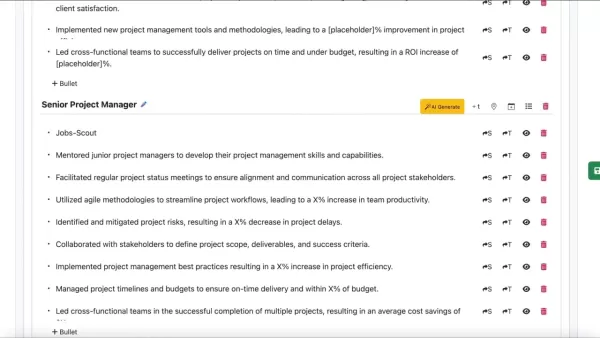
Transform each resume component with intelligent recommendations:
- Professional Summary: Craft compelling opening statements
- Work History: Highlight achievements with impact metrics
- Skills: Prioritize relevant competencies for each application
- Education: Showcase academic credentials effectively
Formatting for Maximum Impact
Apply professional design principles with ease:
- Select clean, modern fonts (11-12pt size)
- Maintain consistent spacing and margins
- Use strategic bullet points to emphasize key points
- Export final versions as PDF to preserve formatting
Step-by-Step Resume Import & Editing
Uploading Your Document
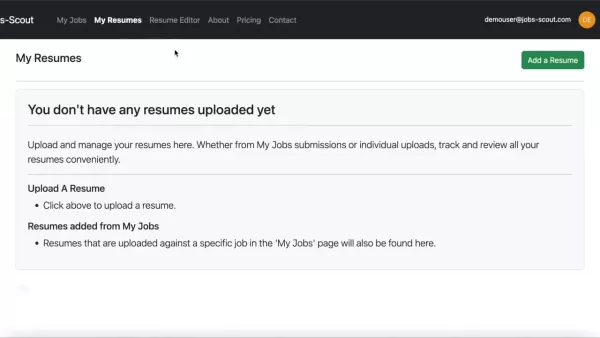
- Log in to your Jobs-Scout account
- Navigate to 'My Resumes' section
- Select 'Add Resume' and choose your file
- Confirm successful upload verification
Advanced Editing Features
Once imported, leverage powerful editing tools:
- Live format preview while editing
- Section reorganization with drag-and-drop
- Conversion between bullet points and title headers
- Version comparison tools
Subscription Options
Plan Comparison
Feature Basic Premium Professional AI Recommendations Limited Full Access Full Access + Expert Review Template Selection Standard Expanded Premium Designs Support Basic Priority Dedicated
Analytical Breakdown
Strengths
- Intelligent content optimization tools
- Effortless version management
- Original document protection
- Industry-specific customization
Considerations
- Format adjustments may be needed post-import
- Advanced features require premium access
- Processing time for complex documents
Common Questions
File Compatibility
The platform accepts .txt, .doc, .docx and PDF formats for seamless uploading.
Version Control
Create unlimited customized versions while preserving original files intact.
Processing Time
Most resumes process within minutes, though complex documents may require additional time.
Professional Tips
Making Your Resume Stand Out
- Quantify achievements with specific metrics
- Use targeted keywords from job descriptions
- Maintain clean, scannable formatting
- Showcase relevant certifications
- Proofread multiple times before submission
Related article
 Stripe to Acquire OpenRouter as AI Model Routing Gains Momentum
Stripe has agreed to acquire OpenRouter, an AI model-routing platform that gives developers access to hundreds of models through a single interface. The deal adds model selection and routing to Stripe’s existing work around AI usage and token-based b
Former OpenAI Researcher Barrett Zoph Returns to Google to Support Gemini Development
Barret Zoph, who previously abruptly left and joined OpenAI due to a disagreement with Thinking Machines Lab CEO Miriam Mularati, has once again changed employers. Alphabet's Google announced that Zoph will return as Vice President of Research, bring
How Recursive Intelligence Raised $335M at $4B Valuation in 4 Months
The co-founders of startup Ricursive Intelligence seemed destined to be co-founders.Anna Goldie, CEO, and Azalia Mirhoseini, CTO, are so well-known in the AI community that they were among those AI engineers who “got those weird emails from Zuckerber
Related Special Topic Recommendations
Design & Art
Stripe to Acquire OpenRouter as AI Model Routing Gains Momentum
Stripe has agreed to acquire OpenRouter, an AI model-routing platform that gives developers access to hundreds of models through a single interface. The deal adds model selection and routing to Stripe’s existing work around AI usage and token-based b
Former OpenAI Researcher Barrett Zoph Returns to Google to Support Gemini Development
Barret Zoph, who previously abruptly left and joined OpenAI due to a disagreement with Thinking Machines Lab CEO Miriam Mularati, has once again changed employers. Alphabet's Google announced that Zoph will return as Vice President of Research, bring
How Recursive Intelligence Raised $335M at $4B Valuation in 4 Months
The co-founders of startup Ricursive Intelligence seemed destined to be co-founders.Anna Goldie, CEO, and Azalia Mirhoseini, CTO, are so well-known in the AI community that they were among those AI engineers who “got those weird emails from Zuckerber
Related Special Topic Recommendations
Design & Art
 Top AI Illustration Tools: Create Editorial Scenes and Cover Art Faster
2026 Latest Top-rated AI Illustration Tools: Our curated list features the best powerfully designed tools for creating stunning editorial scenes and eye-catching cover art quickly. Each option has gone through rigorous real-world tests, offering a free vs paid comparison to help you find the perfect match for your workflow. Try these must-try solutions today to unlock your AI edge and boost your creative productivity. Explore now at XIX.AI.
 10 tools
 xix.ai
Education and Learning
Top AI Tutors for Exam Prep: Practice Math, Science, and English
xix.ai
Education and Learning
Top AI Tutors for Exam Prep: Practice Math, Science, and English
2026 Latest Top-Rated Best AI Tutors for Exam Prep are here on XIX.AI! Our curated list features powerful game-changing tools that offer free vs paid comparison, real-world tests, and weekly updated rankings. They help boost your writing efficiency, simplify complex topic learning, and unlock your academic potential. Explore now to Discover your perfect exam prep tool and Start creating today to Unlock your AI edge!
10 tools
xix.ai
Finance
AI Budget Planning Tools for Personal Money Management
2026 Latest Best Top-Rated AI Budget Planning Tools for Personal Money Management are here on XIX.AI! This curated collection features powerful, game-changing solutions that help you conduct real-world tests, understand spending habits, and create personalized plans to boost productivity. Enjoy a free vs paid comparison along with detailed rankings. Must-try tools designed to simplify money management and unlock your AI edge. Explore now!
11 tools
xix.ai
Health & Wellness
AI Sleep Tracking Assistants: Improve Recovery with Better Bedtime Habits
2026 Latest Best Top-Rated AI Sleep Tracking Assistants curated for ultimate recovery. This fully updated weekly guide features powerful tools that deliver real-world tests, free vs paid comparison, and detailed rankings to help you find the must-try solution that boosts sleep quality and supports better bedtime habits. Explore now at XIX.AI to Unlock your AI edge.
10 tools
xix.ai
Data Analysis
AI SQL Copilots for Product and Revenue Analytics
2026 Latest Best Top-Rated AI SQL Copilots for Product and Revenue Analytics! XIX.AI has curated a powerful, game-changing collection of must-try tools that undergo real-world tests through weekly updated rankings. These tools help users boost productivity significantly by accelerating data analysis, streamlining complex queries, and generating accurate insights to drive smarter business decisions. Explore now to Discover your perfect tool for unlocking your AI edge!
14 tools
xix.ai
Education and Learning
Best AI Homework Helpers That Teach: Learn Concepts, Not Just Answers
2026 Latest Best Top-Rated AI Homework Helpers That Teach Core Concepts Not Just Answers Powerful Tools for Students Must-Try Curated List Weekly Updated Free vs Paid Comparison Real-World Tests Accurate Rankings to Help You Unlock Your Full Learning Potential Explore now to Discover your perfect tool for smarter studying.
10 tools
xix.ai

 Comments (4)
0/500
Comments (4)
0/500
![StephenGreen]()
このAI搭載のレジュメビルダー、すごく便利そう!でもAIが書きすぎると個性が消えそうでちょっと心配…🤔 就活生ってみんな同じような履歴書になりませんか?
![BruceClark]()
このAIレジュメ編集機能、すごく便利そう!でもAIが履歴書を書く時代って、ちょっと怖くない?人間らしさが失われそうで…🤔 就職活動中の友達に教えてあげようかな。
![HarperJones]()
AI 이력서 편집기 신기하네요! 저도 최근에 취업 준비 중인데 PDF에서 내용 추출 기능은 진짜 유용한 것 같아요. 다만 AI가 너무 많은 개인정보를 처리할 때 프라이버시 문제는 없는지 조금 걱정되네요. 🇰🇷 혹시 다른 사람들도 경험이 있는지 궁금해요~
![EmmaTurner]()
このAIレジュメビルダー、便利そうだけど、本当に効果あるのかな😅 最近はAIを使ったサービスが多すぎて、どれを信じていいか分からなくなる。でも、競争の激しい就活市場では、少しでも有利になりたいから試してみようかな。
In today's competitive job market, a polished resume is your ticket to career opportunities. Jobs-Scout's intelligent resume builder provides AI-powered tools to craft targeted resumes that get noticed. Our comprehensive guide demonstrates how to import existing resumes into the editor and customize them for specific positions while preserving your original files.
Key Features
AI-Enhanced Editor: Intelligent tools to strengthen resume content instantly
Seamless Import: Effortlessly bring existing resumes into the editing platform
Version Control: Maintain multiple customized resumes for different applications
Non-Destructive Editing: Original documents remain unchanged during revisions
Smart Optimization: Tailor content to match job descriptions precisely
Professional Formatting: Tools to create visually appealing document layouts
Getting Started with Jobs-Scout Resume Editor
The Intelligent Resume Assistant
Jobs-Scout revolutionizes resume creation with smart technology that analyzes and enhances your professional profile. The platform's intuitive interface makes professional resume building accessible while powerful AI provides real-time suggestions to strengthen content, identify relevant keywords, and improve overall impact.
Whether crafting your first resume or updating an existing one, the editor adapts to your needs. AI capabilities surface valuable insights to highlight your strongest qualifications while maintaining authentic representation of your experience.
Preparing Documents for Upload
Ensure smooth importing by reviewing your resume before upload:
- Verify all professional details are current
- Check file format compatibility (.doc, .docx, PDF)
- Organize content in clear sections
- Review for spelling/grammar errors
Essential Resume Optimization Techniques
AI-Powered Section Enhancement
Transform each resume component with intelligent recommendations:
- Professional Summary: Craft compelling opening statements
- Work History: Highlight achievements with impact metrics
- Skills: Prioritize relevant competencies for each application
- Education: Showcase academic credentials effectively
Formatting for Maximum Impact
Apply professional design principles with ease:
- Select clean, modern fonts (11-12pt size)
- Maintain consistent spacing and margins
- Use strategic bullet points to emphasize key points
- Export final versions as PDF to preserve formatting
Step-by-Step Resume Import & Editing
Uploading Your Document
- Log in to your Jobs-Scout account
- Navigate to 'My Resumes' section
- Select 'Add Resume' and choose your file
- Confirm successful upload verification
Advanced Editing Features
Once imported, leverage powerful editing tools:
- Live format preview while editing
- Section reorganization with drag-and-drop
- Conversion between bullet points and title headers
- Version comparison tools
Subscription Options
Plan Comparison
| Feature | Basic | Premium | Professional |
|---|---|---|---|
| AI Recommendations | Limited | Full Access | Full Access + Expert Review |
| Template Selection | Standard | Expanded | Premium Designs |
| Support | Basic | Priority | Dedicated |
Analytical Breakdown
Strengths
- Intelligent content optimization tools
- Effortless version management
- Original document protection
- Industry-specific customization
Considerations
- Format adjustments may be needed post-import
- Advanced features require premium access
- Processing time for complex documents
Common Questions
File Compatibility
The platform accepts .txt, .doc, .docx and PDF formats for seamless uploading.
Version Control
Create unlimited customized versions while preserving original files intact.
Processing Time
Most resumes process within minutes, though complex documents may require additional time.
Professional Tips
Making Your Resume Stand Out
- Quantify achievements with specific metrics
- Use targeted keywords from job descriptions
- Maintain clean, scannable formatting
- Showcase relevant certifications
- Proofread multiple times before submission








 Stripe to Acquire OpenRouter as AI Model Routing Gains Momentum
Stripe has agreed to acquire OpenRouter, an AI model-routing platform that gives developers access to hundreds of models through a single interface. The deal adds model selection and routing to Stripe’s existing work around AI usage and token-based b
Stripe to Acquire OpenRouter as AI Model Routing Gains Momentum
Stripe has agreed to acquire OpenRouter, an AI model-routing platform that gives developers access to hundreds of models through a single interface. The deal adds model selection and routing to Stripe’s existing work around AI usage and token-based b
 Former OpenAI Researcher Barrett Zoph Returns to Google to Support Gemini Development
Barret Zoph, who previously abruptly left and joined OpenAI due to a disagreement with Thinking Machines Lab CEO Miriam Mularati, has once again changed employers. Alphabet's Google announced that Zoph will return as Vice President of Research, bring
Former OpenAI Researcher Barrett Zoph Returns to Google to Support Gemini Development
Barret Zoph, who previously abruptly left and joined OpenAI due to a disagreement with Thinking Machines Lab CEO Miriam Mularati, has once again changed employers. Alphabet's Google announced that Zoph will return as Vice President of Research, bring
 How Recursive Intelligence Raised $335M at $4B Valuation in 4 Months
The co-founders of startup Ricursive Intelligence seemed destined to be co-founders.Anna Goldie, CEO, and Azalia Mirhoseini, CTO, are so well-known in the AI community that they were among those AI engineers who “got those weird emails from Zuckerber
How Recursive Intelligence Raised $335M at $4B Valuation in 4 Months
The co-founders of startup Ricursive Intelligence seemed destined to be co-founders.Anna Goldie, CEO, and Azalia Mirhoseini, CTO, are so well-known in the AI community that they were among those AI engineers who “got those weird emails from Zuckerber

2026 Latest Top-rated AI Illustration Tools: Our curated list features the best powerfully designed tools for creating stunning editorial scenes and eye-catching cover art quickly. Each option has gone through rigorous real-world tests, offering a free vs paid comparison to help you find the perfect match for your workflow. Try these must-try solutions today to unlock your AI edge and boost your creative productivity. Explore now at XIX.AI.
10 tools
xix.ai

2026 Latest Top-Rated Best AI Tutors for Exam Prep are here on XIX.AI! Our curated list features powerful game-changing tools that offer free vs paid comparison, real-world tests, and weekly updated rankings. They help boost your writing efficiency, simplify complex topic learning, and unlock your academic potential. Explore now to Discover your perfect exam prep tool and Start creating today to Unlock your AI edge!
10 tools
xix.ai

2026 Latest Best Top-Rated AI Budget Planning Tools for Personal Money Management are here on XIX.AI! This curated collection features powerful, game-changing solutions that help you conduct real-world tests, understand spending habits, and create personalized plans to boost productivity. Enjoy a free vs paid comparison along with detailed rankings. Must-try tools designed to simplify money management and unlock your AI edge. Explore now!
11 tools
xix.ai

2026 Latest Best Top-Rated AI Sleep Tracking Assistants curated for ultimate recovery. This fully updated weekly guide features powerful tools that deliver real-world tests, free vs paid comparison, and detailed rankings to help you find the must-try solution that boosts sleep quality and supports better bedtime habits. Explore now at XIX.AI to Unlock your AI edge.
10 tools
xix.ai

2026 Latest Best Top-Rated AI SQL Copilots for Product and Revenue Analytics! XIX.AI has curated a powerful, game-changing collection of must-try tools that undergo real-world tests through weekly updated rankings. These tools help users boost productivity significantly by accelerating data analysis, streamlining complex queries, and generating accurate insights to drive smarter business decisions. Explore now to Discover your perfect tool for unlocking your AI edge!
14 tools
xix.ai

2026 Latest Best Top-Rated AI Homework Helpers That Teach Core Concepts Not Just Answers Powerful Tools for Students Must-Try Curated List Weekly Updated Free vs Paid Comparison Real-World Tests Accurate Rankings to Help You Unlock Your Full Learning Potential Explore now to Discover your perfect tool for smarter studying.
10 tools
xix.ai

このAI搭載のレジュメビルダー、すごく便利そう!でもAIが書きすぎると個性が消えそうでちょっと心配…🤔 就活生ってみんな同じような履歴書になりませんか?
このAIレジュメ編集機能、すごく便利そう!でもAIが履歴書を書く時代って、ちょっと怖くない?人間らしさが失われそうで…🤔 就職活動中の友達に教えてあげようかな。
AI 이력서 편집기 신기하네요! 저도 최근에 취업 준비 중인데 PDF에서 내용 추출 기능은 진짜 유용한 것 같아요. 다만 AI가 너무 많은 개인정보를 처리할 때 프라이버시 문제는 없는지 조금 걱정되네요. 🇰🇷 혹시 다른 사람들도 경험이 있는지 궁금해요~
このAIレジュメビルダー、便利そうだけど、本当に効果あるのかな😅 最近はAIを使ったサービスが多すぎて、どれを信じていいか分からなくなる。でも、競争の激しい就活市場では、少しでも有利になりたいから試してみようかな。












