


 Home
HomeHomeDesignAI Unveils Paint Visualizer for Seamless Room Makeovers
Transforming your space is now effortless with HomeDesignAI's Paint Visualizer tool. This cutting-edge feature lets you instantly alter wall colors for interiors and exteriors, enabling you to preview the perfect design before picking up a paintbrush. Whether you're a homeowner, interior designer, realtor, or architect, the Paint Visualizer streamlines the process of selecting the ideal color scheme for any project.
Key Highlights
Color Personalization: Effortlessly adjust wall colors in any space using AI technology.
Preset and Custom Choices: Select from a variety of colors or upload an image for a unique shade.
Lifelike Previews: Experience how colors appear in your space with AI-driven realistic rendering.
Broad Applications: Ideal for homeowners, interior designers, realtors, and architects.
Explore the Capabilities of HomeDesignAI's Paint Visualizer
What is the Paint Visualizer?
HomeDesignAI’s Paint Visualizer is a tool crafted to help users preview various textures and colors for both indoor and outdoor spaces. It simplifies the challenging task of choosing the perfect paint color by offering real-time transformations of your space.
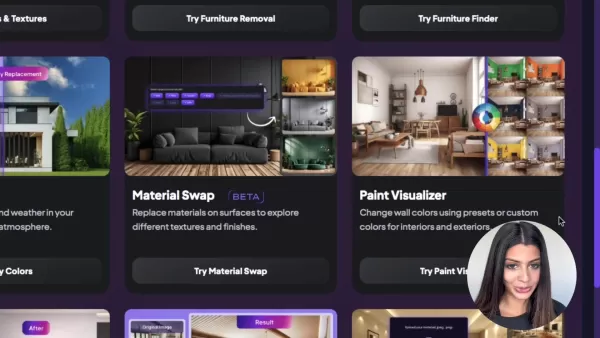
Leveraging advanced AI algorithms, this tool delivers realistic renderings of different color options, empowering you to make informed design choices.
The Paint Visualizer enables you to experiment with textures, colors, and shades for both interior and exterior spaces. Use preset or custom colors to modify wall hues for any design project.
For homeowners, the tool makes it easier to settle on a color palette for renovations. Renovation companies can also use the Visualizer to let clients test various paint colors before applying them to walls.
Among HomeDesignAI’s suite of AI-powered tools, the Paint Visualizer stands out for its ease of use and impact. No more guesswork or reliance on small paint samples—see your entire room transformed before committing. The tool also supports unique textures like shimmer and glass.
Advantages of the Paint Visualizer
Using a paint visualizer revolutionizes how you tackle interior and exterior design projects. Here are the key benefits:
- Cost and Time Efficiency: Preview the final look to avoid expensive errors, reducing the need for sample pots and wasted materials.
- Better Decision-Making: Feel confident in your color choices by seeing how shades interact with your space’s lighting and decor.
- Creative Freedom: Explore bold color combinations and textures without risk.
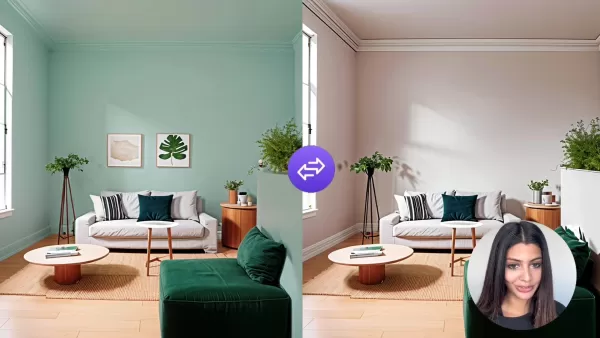
Unleash your imagination and uncover unique design opportunities.
- Improved Collaboration: Share realistic visualizations to clearly convey your design vision to contractors, family, or clients.
- Enhanced Property Appeal: For realtors and homeowners, refreshed visuals can attract buyers and boost property value.
- Texture Customization: Upload desired textures like shimmer, matte, or glass for a tailored look.
With HomeDesignAI’s Paint Visualizer, you can explore design ideas confidently, eliminating common uncertainties.
Core Features of the Paint Visualizer
HomeDesignAI’s Paint Visualizer is equipped with features to make color selection smooth and enjoyable:
Color Customization: Change wall colors in any space with just a few clicks.
Preset Colors: Choose from a broad selection of standard paint colors for quick visualizations.
Custom Colors: Upload your own color samples or use a color picker to pinpoint the perfect shade.
Automatic Detection: The AI identifies and selects walls in your image, simplifying the process.
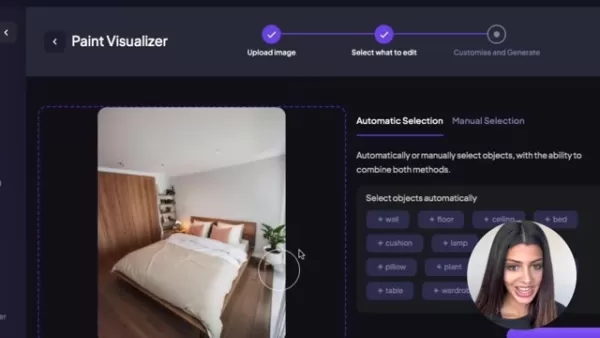
Manual Adjustments: Fine-tune selections with a paintbrush tool for greater precision.
Realistic Rendering: AI accounts for lighting and textures to deliver lifelike color previews.
High-Definition Output: Generate clear, detailed images to showcase your design ideas.
Multiple Design Options: Test various colors and shades for your room with a single click.
Who Can Benefit from the Paint Visualizer?
This versatile tool serves a wide range of users:
Homeowners: Preview wall color changes and plan renovations with confidence.
Interior Designers: Test color schemes to align with client preferences and present compelling design proposals.
Realtors: Enhance property photos with updated colors to attract buyers.
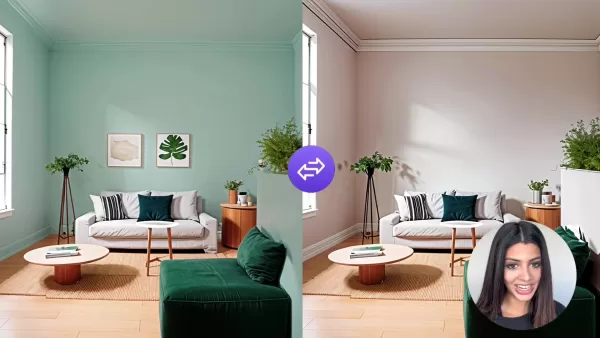
Architects: Visualize buildings in various colors to showcase design concepts to clients.
Paint Retailers: Help customers preview specific colors in their spaces, boosting sales and satisfaction.
Regardless of your role, the Paint Visualizer simplifies design and helps achieve the perfect aesthetic.
Tips for Optimal Results with HomeDesignAI’s Paint Visualizer
Maximizing the Tool’s Potential
Follow these tips to get the most out of HomeDesignAI’s Paint Visualizer:
- Use High-Quality Images: Clear, well-lit images yield more accurate visualizations.
- Test Lighting Variations: Colors can shift under different lighting conditions—preview with both natural and artificial light.
- Match Existing Decor: Select colors that harmonize with your furniture and decor for a cohesive look.
- Explore Boldly: Experiment with unique color combinations risk-free, leveraging multiple design generation for variety.
- Gather Input: Share designs with friends, family, or clients for valuable feedback to refine your choices.
Step-by-Step Guide: Using the Paint Visualizer
Uploading Your Image
Begin by uploading a high-quality image of the space you want to repaint. The tool supports JPEG and PNG formats. Ensure the image is clear and well-lit for optimal results.

Drag and drop the image or select it from your device.
Selecting Areas to Edit
After uploading, choose the areas to repaint. HomeDesignAI offers automatic and manual selection options.
- Automatic Selection: The AI detects walls, floors, and ceilings—click to select the elements you want to change.
- Manual Selection: Use the brush tool to adjust selections for precision, ideal for complex areas.
Choosing Your Paint Color
With areas selected, pick your new paint color. HomeDesignAI offers multiple options:

- Standard Paints: Choose from popular paint colors for quick testing.
- Custom Paints: Use the color picker or input RGB values to find your ideal hue.
- Custom Color Image: Upload an image to match a specific paint color or texture.
Generating and Reviewing Designs
Select up to four designs to generate at once, then click 'Generate New Designs.' HomeDesignAI will create visualizations with your chosen color.
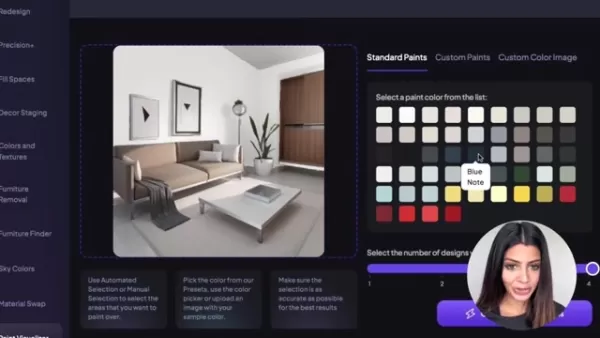
Review the results, save your favorites, and download them for reference or sharing.
Enhancing Resolution
Use HomeDesignAI’s HD button when saving or viewing designs to ensure crisp, high-quality outputs that showcase textures and colors vividly.
HomeDesignAI Pricing
Overview of Subscription Plans
HomeDesignAI offers flexible subscription plans tailored to different needs, providing access to the Paint Visualizer and other AI tools, including unlimited design generations and high-resolution outputs:
- Free Plan: Limited access to basic features, ideal for exploring the platform.
- Pro Plan: More design generations, high-resolution outputs, and priority support for dedicated users.
- Business Plan: Unlimited generations, team collaboration, and dedicated account management for professional firms.
Pricing Structure: Subscriptions and Credits
Pricing may evolve with platform updates, but here’s a snapshot of the current structure:
Plan Name Monthly Price Annual Price Design Generations Key Features Free $0 $0 Limited Basic AI Tools, Watermarked Outputs Pro $29 $299 Unlimited High-Resolution Outputs, Priority Support, Most AI Tools Enterprise Contact Sales Contact Sales Unlimited Team Collaboration, Dedicated Account Manager, Custom AI Solutions, Full Access to All Tools
Pros and Cons of the Paint Visualizer
Pros
Lifelike AI Rendering: Preview colors as they’ll appear in your space.
Cost and Time Savings: Avoid painting errors with pre-visualization.
Intuitive Interface: Easy for beginners and professionals alike.
Versatile Use: Perfect for homeowners, designers, and real estate professionals.
Texture Variety: Upload custom textures for unique designs.
Cons
Image Quality Reliance: Results depend on the quality of uploaded images.
Subscription Costs: Full access requires a paid plan.
AI Limitations: Some details may not be perfectly captured.
Real-World Applications of the Paint Visualizer
Home Renovation Projects
Homeowners can explore color schemes risk-free before starting renovations. Upload a photo of your living room to test warm beige or bold blue, ensuring confident decisions without multiple sample pots.
Interior Design Consultations
Interior designers can elevate client consultations by showcasing lifelike renderings of spaces with varied color schemes. This reduces miscommunication, enhances presentations, and leads to more successful projects.
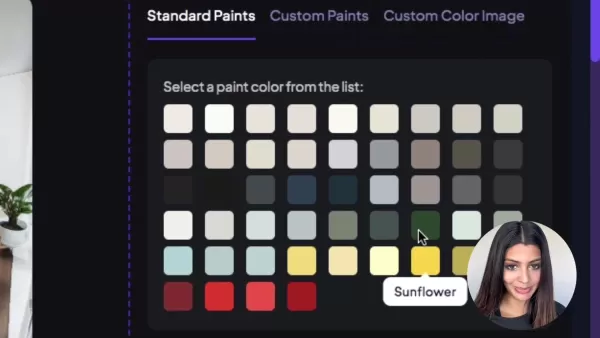
The multiple design generation feature streamlines the process.
Real Estate Listings
Realtors can enhance listings by updating property photos with modern color schemes, making spaces more appealing to buyers and helping them envision the potential of kitchens, bathrooms, or living rooms.
Architectural Design Presentations
Architects can create compelling presentations by visualizing buildings in various colors and lighting, engaging clients and bringing design concepts to life.
Frequently Asked Questions
How accurate is the color visualization?
The AI-driven color visualization is highly accurate, though results depend on image quality and lighting. Use clear, well-lit images for the best outcomes.
Can I use the Paint Visualizer on mobile devices?
Yes, HomeDesignAI is responsive and accessible via web browsers on both desktop and mobile devices.
What image formats are supported?
The Paint Visualizer supports JPEG and PNG formats for seamless uploading and visualization.
Do I need an account to use the Paint Visualizer?
Basic features are available without an account, but creating one unlocks full access to HomeDesignAI’s tools and features with a paid subscription.
Can I share my visualized designs?
Yes, save and share your designs via email, social media, or other platforms after downloading them.
Related Questions
What other AI-powered tools does HomeDesignAI offer?
HomeDesignAI provides a robust suite of AI-driven design tools, including:
- Furniture Removal: Clear furniture from images for a fresh design canvas.
- Furniture Finder: Identify and source furniture from images or designs.
- Material Swap: Experiment with different surface textures and finishes.
- Decor Staging: Virtually place furniture and decor for realistic staging.
- Sky Colors: Adjust sky color and weather in images for the desired ambiance.
Combined with the Paint Visualizer, these tools make HomeDesignAI a versatile platform for all design needs.
Related article
 Anthropic Expands Claude AI Coding Tools to Japan in Push for Overseas Growth
Anthropic, a prominent U.S. artificial intelligence firm, is intensifying its global outreach. On Wednesday, the company hosted a major developer gathering, "Code with Claude," in Tokyo, drawing close to 500 software engineers. This initiative seeks
India’s Software Giant Cuts Hiring, Promises No Layoffs as AI Agents Scale Up
As artificial intelligence reshapes traditional labor-intensive business models, Tata Consultancy Services (TCS), a premier Indian software outsourcing firm, has unveiled its strategic response. During Tuesday’s annual general meeting, the chairman o
China Locks AI Models During Gaokam to Block Instant Homework Help
With the 2026 Gaokao fast approaching, rumors regarding the suspension of AI tools during the exam period have ignited intense online debate. In response to public concern, major AI platforms and educational apps have clarified their stance: rather t
Related Special Topic Recommendations
Design & Art
Anthropic Expands Claude AI Coding Tools to Japan in Push for Overseas Growth
Anthropic, a prominent U.S. artificial intelligence firm, is intensifying its global outreach. On Wednesday, the company hosted a major developer gathering, "Code with Claude," in Tokyo, drawing close to 500 software engineers. This initiative seeks
India’s Software Giant Cuts Hiring, Promises No Layoffs as AI Agents Scale Up
As artificial intelligence reshapes traditional labor-intensive business models, Tata Consultancy Services (TCS), a premier Indian software outsourcing firm, has unveiled its strategic response. During Tuesday’s annual general meeting, the chairman o
China Locks AI Models During Gaokam to Block Instant Homework Help
With the 2026 Gaokao fast approaching, rumors regarding the suspension of AI tools during the exam period have ignited intense online debate. In response to public concern, major AI platforms and educational apps have clarified their stance: rather t
Related Special Topic Recommendations
Design & Art
 Best AI Style Transfer Tools for Creative Experiments
2026 Latest Best Top-rated AI Style Transfer Tools for Creative Experiments! XIX.AI has curated a powerful, game-changing collection of must-try tools that deliver exceptional results through real-world tests and rigorous rankings. These top solutions help creatives boost productivity significantly by accelerating content creation and unlocking endless creative possibilities. Explore now to discover your perfect tool and start creating today!
 9 tools
 xix.ai
Comic Creation
Best AI Dialogue Bubble Tools for Visual Storytelling
xix.ai
Comic Creation
Best AI Dialogue Bubble Tools for Visual Storytelling
2026 Latest Best Top-Rated AI Dialogue Bubble Tools for Visual Storytelling are here on XIX.AI! This curated collection features powerful, game-changing tools that help creators boost productivity and overcome creative bottlenecks. Get a free vs paid comparison, see real-world tests, and check the latest rankings to find the must-try solutions perfect for crafting engaging visual narratives. Explore now to discover your ideal tool!
10 tools
xix.ai
Meeting Assistant
Top AI Meeting Summary Tools: Track Decisions and Follow-Ups Clearly
2026 Latest Top-Rated Best AI Meeting Summary Tools for Clear Decision Tracking and Effortless Follow-Ups. This curated list showcases powerful, game-changing solutions that boost productivity dramatically by automating meeting notes, identifying key action items, and streamlining team coordination across all projects. Get a free vs paid comparison along with real-world tests and weekly updated rankings to help you find the perfect tool. Explore now to unlock your AI edge!
9 tools
xix.ai
Data Analysis
Best AI Data Cleaning Tools: Fix Missing Values and Duplicates Fast
2026 Latest Best Top-rated AI Data Cleaning Tools for quick fixing of missing values and duplicates. This curated list showcases powerful, game-changing solutions that boost productivity significantly. Each option has undergone rigorous real-world tests to ensure reliability. Get a free vs paid comparison and discover the must-try tool that fits your needs best. Explore now at XIX.AI to Unlock your AI edge.
11 tools
xix.ai
Design & Art
Best AI Creative Ideation Tools for Artists: Break Through Visual Blocks
2026 Latest Best Top-Rated AI Creative Ideation Tools for Artists are curated by XIX.AI to help creators break through visual blocks and boost creativity instantly. These powerful game-changing tools offer real-world tests, detailed free vs paid comparison, and weekly updated rankings. Discover your perfect tool to accelerate content creation and unlock your AI edge today. Explore now!
14 tools
xix.ai
Music composition
AI Beat Makers for TikTok Background Tracks, Reels Audio, and Creator Promo Music
2026 Latest Best AI Beat Makers for TikTok Background Tracks, Reels Audio, and Creator Promo Music! XIX.AI has curated a top-rated list of powerful game-changing tools that go through real-world tests to deliver flawless music for every content need. You’ll find detailed free vs paid comparison data, weekly updated rankings, and must-try options to help you boost creativity and productivity. Explore now to discover your perfect tool!
11 tools
xix.ai

 Comments (6)
0/500
Comments (6)
0/500
![KeithHarris]()
Finally a tool that doesn't require me to actually paint! 😂 Just wish it could also simulate the smell of fresh paint — that'd be the ultimate reality check.
![CharlesRoberts]()
Ce genre d'outil est vraiment pratique pour les bricoleurs comme moi ! J'ai hâte de tester différentes teintes sur mon salon avant de prendre une décision. Par contre, j'espère que l'appli est bien calibrée pour éviter les mauvaises surprises de rendu couleur une fois le pot ouvert 😅 Dommage qu'on ne puisse pas encore simuler les textures, ce serait un vrai plus !
![WillSmith]()
Finally, a tool that actually makes sense! As someone who's painted a wall only to hate it later 😅, this could save so much time and money. But does the AI-generated preview account for how lighting changes throughout the day? That's often where 'perfect' colors go wrong.
![PaulTaylor]()
¡Qué herramienta más útil para renovar la casa sin gastar un peso en muestras de pintura! 🤯 Aunque me pregunto si los colores en pantalla coinciden con la realidad... tendré que probarlo antes de comprometerme con ese azul turquesa para el baño 😅
![RoyMitchell]()
This Paint Visualizer sounds like a game-changer for home makeovers! I love how you can just swap wall colors instantly—makes me wanna redecorate my entire apartment. 😍 Anyone tried it yet? How realistic are the previews?
![BruceGonzalez]()
This Paint Visualizer is a game-changer! I tried it on my living room photo, and seeing bold colors pop in real-time was so cool. It’s like having a design genie—wish it could pick my furniture too! 😄
Transforming your space is now effortless with HomeDesignAI's Paint Visualizer tool. This cutting-edge feature lets you instantly alter wall colors for interiors and exteriors, enabling you to preview the perfect design before picking up a paintbrush. Whether you're a homeowner, interior designer, realtor, or architect, the Paint Visualizer streamlines the process of selecting the ideal color scheme for any project.
Key Highlights
Color Personalization: Effortlessly adjust wall colors in any space using AI technology.
Preset and Custom Choices: Select from a variety of colors or upload an image for a unique shade.
Lifelike Previews: Experience how colors appear in your space with AI-driven realistic rendering.
Broad Applications: Ideal for homeowners, interior designers, realtors, and architects.
Explore the Capabilities of HomeDesignAI's Paint Visualizer
What is the Paint Visualizer?
HomeDesignAI’s Paint Visualizer is a tool crafted to help users preview various textures and colors for both indoor and outdoor spaces. It simplifies the challenging task of choosing the perfect paint color by offering real-time transformations of your space.
Leveraging advanced AI algorithms, this tool delivers realistic renderings of different color options, empowering you to make informed design choices.
The Paint Visualizer enables you to experiment with textures, colors, and shades for both interior and exterior spaces. Use preset or custom colors to modify wall hues for any design project.
For homeowners, the tool makes it easier to settle on a color palette for renovations. Renovation companies can also use the Visualizer to let clients test various paint colors before applying them to walls.
Among HomeDesignAI’s suite of AI-powered tools, the Paint Visualizer stands out for its ease of use and impact. No more guesswork or reliance on small paint samples—see your entire room transformed before committing. The tool also supports unique textures like shimmer and glass.
Advantages of the Paint Visualizer
Using a paint visualizer revolutionizes how you tackle interior and exterior design projects. Here are the key benefits:
- Cost and Time Efficiency: Preview the final look to avoid expensive errors, reducing the need for sample pots and wasted materials.
- Better Decision-Making: Feel confident in your color choices by seeing how shades interact with your space’s lighting and decor.
- Creative Freedom: Explore bold color combinations and textures without risk.
Unleash your imagination and uncover unique design opportunities.
- Improved Collaboration: Share realistic visualizations to clearly convey your design vision to contractors, family, or clients.
- Enhanced Property Appeal: For realtors and homeowners, refreshed visuals can attract buyers and boost property value.
- Texture Customization: Upload desired textures like shimmer, matte, or glass for a tailored look.
With HomeDesignAI’s Paint Visualizer, you can explore design ideas confidently, eliminating common uncertainties.
Core Features of the Paint Visualizer
HomeDesignAI’s Paint Visualizer is equipped with features to make color selection smooth and enjoyable:
Color Customization: Change wall colors in any space with just a few clicks.
Preset Colors: Choose from a broad selection of standard paint colors for quick visualizations.
Custom Colors: Upload your own color samples or use a color picker to pinpoint the perfect shade.
Automatic Detection: The AI identifies and selects walls in your image, simplifying the process.
Manual Adjustments: Fine-tune selections with a paintbrush tool for greater precision.
Realistic Rendering: AI accounts for lighting and textures to deliver lifelike color previews.
High-Definition Output: Generate clear, detailed images to showcase your design ideas.
Multiple Design Options: Test various colors and shades for your room with a single click.
Who Can Benefit from the Paint Visualizer?
This versatile tool serves a wide range of users:
Homeowners: Preview wall color changes and plan renovations with confidence.
Interior Designers: Test color schemes to align with client preferences and present compelling design proposals.
Realtors: Enhance property photos with updated colors to attract buyers.
Architects: Visualize buildings in various colors to showcase design concepts to clients.
Paint Retailers: Help customers preview specific colors in their spaces, boosting sales and satisfaction.
Regardless of your role, the Paint Visualizer simplifies design and helps achieve the perfect aesthetic.
Tips for Optimal Results with HomeDesignAI’s Paint Visualizer
Maximizing the Tool’s Potential
Follow these tips to get the most out of HomeDesignAI’s Paint Visualizer:
- Use High-Quality Images: Clear, well-lit images yield more accurate visualizations.
- Test Lighting Variations: Colors can shift under different lighting conditions—preview with both natural and artificial light.
- Match Existing Decor: Select colors that harmonize with your furniture and decor for a cohesive look.
- Explore Boldly: Experiment with unique color combinations risk-free, leveraging multiple design generation for variety.
- Gather Input: Share designs with friends, family, or clients for valuable feedback to refine your choices.
Step-by-Step Guide: Using the Paint Visualizer
Uploading Your Image
Begin by uploading a high-quality image of the space you want to repaint. The tool supports JPEG and PNG formats. Ensure the image is clear and well-lit for optimal results.
Drag and drop the image or select it from your device.
Selecting Areas to Edit
After uploading, choose the areas to repaint. HomeDesignAI offers automatic and manual selection options.
- Automatic Selection: The AI detects walls, floors, and ceilings—click to select the elements you want to change.
- Manual Selection: Use the brush tool to adjust selections for precision, ideal for complex areas.
Choosing Your Paint Color
With areas selected, pick your new paint color. HomeDesignAI offers multiple options:
- Standard Paints: Choose from popular paint colors for quick testing.
- Custom Paints: Use the color picker or input RGB values to find your ideal hue.
- Custom Color Image: Upload an image to match a specific paint color or texture.
Generating and Reviewing Designs
Select up to four designs to generate at once, then click 'Generate New Designs.' HomeDesignAI will create visualizations with your chosen color.
Review the results, save your favorites, and download them for reference or sharing.
Enhancing Resolution
Use HomeDesignAI’s HD button when saving or viewing designs to ensure crisp, high-quality outputs that showcase textures and colors vividly.
HomeDesignAI Pricing
Overview of Subscription Plans
HomeDesignAI offers flexible subscription plans tailored to different needs, providing access to the Paint Visualizer and other AI tools, including unlimited design generations and high-resolution outputs:
- Free Plan: Limited access to basic features, ideal for exploring the platform.
- Pro Plan: More design generations, high-resolution outputs, and priority support for dedicated users.
- Business Plan: Unlimited generations, team collaboration, and dedicated account management for professional firms.
Pricing Structure: Subscriptions and Credits
Pricing may evolve with platform updates, but here’s a snapshot of the current structure:
| Plan Name | Monthly Price | Annual Price | Design Generations | Key Features |
|---|---|---|---|---|
| Free | $0 | $0 | Limited | Basic AI Tools, Watermarked Outputs |
| Pro | $29 | $299 | Unlimited | High-Resolution Outputs, Priority Support, Most AI Tools |
| Enterprise | Contact Sales | Contact Sales | Unlimited | Team Collaboration, Dedicated Account Manager, Custom AI Solutions, Full Access to All Tools |
Pros and Cons of the Paint Visualizer
Pros
Lifelike AI Rendering: Preview colors as they’ll appear in your space.
Cost and Time Savings: Avoid painting errors with pre-visualization.
Intuitive Interface: Easy for beginners and professionals alike.
Versatile Use: Perfect for homeowners, designers, and real estate professionals.
Texture Variety: Upload custom textures for unique designs.
Cons
Image Quality Reliance: Results depend on the quality of uploaded images.
Subscription Costs: Full access requires a paid plan.
AI Limitations: Some details may not be perfectly captured.
Real-World Applications of the Paint Visualizer
Home Renovation Projects
Homeowners can explore color schemes risk-free before starting renovations. Upload a photo of your living room to test warm beige or bold blue, ensuring confident decisions without multiple sample pots.
Interior Design Consultations
Interior designers can elevate client consultations by showcasing lifelike renderings of spaces with varied color schemes. This reduces miscommunication, enhances presentations, and leads to more successful projects.
The multiple design generation feature streamlines the process.
Real Estate Listings
Realtors can enhance listings by updating property photos with modern color schemes, making spaces more appealing to buyers and helping them envision the potential of kitchens, bathrooms, or living rooms.
Architectural Design Presentations
Architects can create compelling presentations by visualizing buildings in various colors and lighting, engaging clients and bringing design concepts to life.
Frequently Asked Questions
How accurate is the color visualization?
The AI-driven color visualization is highly accurate, though results depend on image quality and lighting. Use clear, well-lit images for the best outcomes.
Can I use the Paint Visualizer on mobile devices?
Yes, HomeDesignAI is responsive and accessible via web browsers on both desktop and mobile devices.
What image formats are supported?
The Paint Visualizer supports JPEG and PNG formats for seamless uploading and visualization.
Do I need an account to use the Paint Visualizer?
Basic features are available without an account, but creating one unlocks full access to HomeDesignAI’s tools and features with a paid subscription.
Can I share my visualized designs?
Yes, save and share your designs via email, social media, or other platforms after downloading them.
Related Questions
What other AI-powered tools does HomeDesignAI offer?
HomeDesignAI provides a robust suite of AI-driven design tools, including:
- Furniture Removal: Clear furniture from images for a fresh design canvas.
- Furniture Finder: Identify and source furniture from images or designs.
- Material Swap: Experiment with different surface textures and finishes.
- Decor Staging: Virtually place furniture and decor for realistic staging.
- Sky Colors: Adjust sky color and weather in images for the desired ambiance.








 Anthropic Expands Claude AI Coding Tools to Japan in Push for Overseas Growth
Anthropic, a prominent U.S. artificial intelligence firm, is intensifying its global outreach. On Wednesday, the company hosted a major developer gathering, "Code with Claude," in Tokyo, drawing close to 500 software engineers. This initiative seeks
Anthropic Expands Claude AI Coding Tools to Japan in Push for Overseas Growth
Anthropic, a prominent U.S. artificial intelligence firm, is intensifying its global outreach. On Wednesday, the company hosted a major developer gathering, "Code with Claude," in Tokyo, drawing close to 500 software engineers. This initiative seeks
 India’s Software Giant Cuts Hiring, Promises No Layoffs as AI Agents Scale Up
As artificial intelligence reshapes traditional labor-intensive business models, Tata Consultancy Services (TCS), a premier Indian software outsourcing firm, has unveiled its strategic response. During Tuesday’s annual general meeting, the chairman o
India’s Software Giant Cuts Hiring, Promises No Layoffs as AI Agents Scale Up
As artificial intelligence reshapes traditional labor-intensive business models, Tata Consultancy Services (TCS), a premier Indian software outsourcing firm, has unveiled its strategic response. During Tuesday’s annual general meeting, the chairman o
 China Locks AI Models During Gaokam to Block Instant Homework Help
With the 2026 Gaokao fast approaching, rumors regarding the suspension of AI tools during the exam period have ignited intense online debate. In response to public concern, major AI platforms and educational apps have clarified their stance: rather t
China Locks AI Models During Gaokam to Block Instant Homework Help
With the 2026 Gaokao fast approaching, rumors regarding the suspension of AI tools during the exam period have ignited intense online debate. In response to public concern, major AI platforms and educational apps have clarified their stance: rather t

2026 Latest Best Top-rated AI Style Transfer Tools for Creative Experiments! XIX.AI has curated a powerful, game-changing collection of must-try tools that deliver exceptional results through real-world tests and rigorous rankings. These top solutions help creatives boost productivity significantly by accelerating content creation and unlocking endless creative possibilities. Explore now to discover your perfect tool and start creating today!
9 tools
xix.ai

2026 Latest Best Top-Rated AI Dialogue Bubble Tools for Visual Storytelling are here on XIX.AI! This curated collection features powerful, game-changing tools that help creators boost productivity and overcome creative bottlenecks. Get a free vs paid comparison, see real-world tests, and check the latest rankings to find the must-try solutions perfect for crafting engaging visual narratives. Explore now to discover your ideal tool!
10 tools
xix.ai

2026 Latest Top-Rated Best AI Meeting Summary Tools for Clear Decision Tracking and Effortless Follow-Ups. This curated list showcases powerful, game-changing solutions that boost productivity dramatically by automating meeting notes, identifying key action items, and streamlining team coordination across all projects. Get a free vs paid comparison along with real-world tests and weekly updated rankings to help you find the perfect tool. Explore now to unlock your AI edge!
9 tools
xix.ai

2026 Latest Best Top-rated AI Data Cleaning Tools for quick fixing of missing values and duplicates. This curated list showcases powerful, game-changing solutions that boost productivity significantly. Each option has undergone rigorous real-world tests to ensure reliability. Get a free vs paid comparison and discover the must-try tool that fits your needs best. Explore now at XIX.AI to Unlock your AI edge.
11 tools
xix.ai

2026 Latest Best Top-Rated AI Creative Ideation Tools for Artists are curated by XIX.AI to help creators break through visual blocks and boost creativity instantly. These powerful game-changing tools offer real-world tests, detailed free vs paid comparison, and weekly updated rankings. Discover your perfect tool to accelerate content creation and unlock your AI edge today. Explore now!
14 tools
xix.ai

2026 Latest Best AI Beat Makers for TikTok Background Tracks, Reels Audio, and Creator Promo Music! XIX.AI has curated a top-rated list of powerful game-changing tools that go through real-world tests to deliver flawless music for every content need. You’ll find detailed free vs paid comparison data, weekly updated rankings, and must-try options to help you boost creativity and productivity. Explore now to discover your perfect tool!
11 tools
xix.ai

Finally a tool that doesn't require me to actually paint! 😂 Just wish it could also simulate the smell of fresh paint — that'd be the ultimate reality check.
Ce genre d'outil est vraiment pratique pour les bricoleurs comme moi ! J'ai hâte de tester différentes teintes sur mon salon avant de prendre une décision. Par contre, j'espère que l'appli est bien calibrée pour éviter les mauvaises surprises de rendu couleur une fois le pot ouvert 😅 Dommage qu'on ne puisse pas encore simuler les textures, ce serait un vrai plus !
Finally, a tool that actually makes sense! As someone who's painted a wall only to hate it later 😅, this could save so much time and money. But does the AI-generated preview account for how lighting changes throughout the day? That's often where 'perfect' colors go wrong.
¡Qué herramienta más útil para renovar la casa sin gastar un peso en muestras de pintura! 🤯 Aunque me pregunto si los colores en pantalla coinciden con la realidad... tendré que probarlo antes de comprometerme con ese azul turquesa para el baño 😅
This Paint Visualizer sounds like a game-changer for home makeovers! I love how you can just swap wall colors instantly—makes me wanna redecorate my entire apartment. 😍 Anyone tried it yet? How realistic are the previews?
This Paint Visualizer is a game-changer! I tried it on my living room photo, and seeing bold colors pop in real-time was so cool. It’s like having a design genie—wish it could pick my furniture too! 😄












