


 Home
HomeHitPaw Photo Enhancer Uses AI to Maximize Image Quality
In today's digital world, high-quality images are essential. Whether you're a professional photographer or just looking to improve your personal photos, the right tools can significantly elevate your results. HitPaw Photo Enhancer is an AI-powered tool that upscales, denoises, and colorizes your photos, enhancing their clarity and detail to bring them to life. This article explores its features, benefits, and practical uses, demonstrating how to maximize this innovative photo enhancement software. Learn how HitPaw can transform your images, ensuring they look their absolute best for any purpose.
Key Points
HitPaw Photo Enhancer utilizes artificial intelligence to automatically improve image quality.
The software delivers outstanding upscaling results while preserving quality.
It features a simple, intuitive interface that's easy to use.
HitPaw supports multiple languages to cater to a global audience.
Users can preview all enhancements free of watermarks.
Batch processing enables efficient editing of multiple photos.
The application works fully offline, guaranteeing privacy and user convenience.
It includes four dedicated AI models: General, Denoise, Face, and Colorize.
Introduction to HitPaw Photo Enhancer
What is HitPaw Photo Enhancer?
HitPaw Photo Enhancer is an AI-powered software designed to elevate the quality of your photographs. Its suite of features includes upscaling, denoising, face enhancement, and colorization. Built with a user-friendly design, the tool is accessible to novices and experienced users alike. Unlike many web-based services, HitPaw operates offline, offering a secure and convenient method for image enhancement. Powered by advanced AI algorithms, it can dramatically improve the clarity, detail, and overall visual appeal of your photos. This makes it an invaluable resource for restoring cherished old memories or simply upgrading your digital image collection.
Specializing in AI technology, HitPaw aims to deliver effective tools for everyone. The AI Photo Enhancer is compatible with both Windows and macOS and offers one-click automatic enhancement. It effortlessly reduces blur and removes noise from pictures. Furthermore, it allows you to enlarge and upscale images without any loss in quality.
Key Features of HitPaw Photo Enhancer
HitPaw Photo Enhancer is equipped with a comprehensive set of features to address diverse photo enhancement requirements. These include:
- AI Auto Enhancement: Instantly improves image quality with a single click.
- Superior Upscaling: Increases image resolution while maintaining fine details.
- Denoising: Effectively reduces noise and grain in photographs.
- Face Enhancement: Optimizes facial details in portrait photos.
- Colorization: Adds vibrant, realistic color to black and white images.
- Batch Processing: Allows simultaneous editing of numerous photos.
- Offline Functionality: Operates without an internet connection, ensuring data privacy.
- Multi-Language Support: Available in several languages for users worldwide.
- Preview Without Watermark: Enables users to review changes without any watermark
.
This robust feature set makes HitPaw Photo Enhancer a versatile solution for anyone seeking to improve their photo quality. Whether you're restoring vintage family pictures or polishing images for social media, HitPaw provides the necessary tools.
Maximizing Efficiency with HitPaw Photo Enhancer
Batch Processing for Enhanced Productivity
HitPaw Photo Enhancer excels at handling large volumes of images. The batch processing feature allows you to enhance multiple photos at once, saving significant time and effort. Follow these steps to utilize it effectively:
- Import Multiple Photos: Select and import an entire batch of images into the software, rather than adding them individually.
- Apply Settings: Choose your preferred AI model and configure the settings. These adjustments will apply to all selected photos in the batch.
- Batch Preview: Preview the effects on a few sample images to ensure the settings work well for the entire group.
- Export All: Once satisfied, click export, and HitPaw will automatically process and save all the enhanced photos. This feature is especially beneficial for photographers managing large sets of images from events or professional shoots.
How to Use HitPaw Photo Enhancer
Step-by-Step Guide to Enhancing Your Photos
Using HitPaw Photo Enhancer is a simple process. Follow this step-by-step guide:
Installation: Visit the official HitPaw Photo Enhancer website to download the installer. Run the installer and follow the on-screen instructions to complete setup.

Import Photos: Launch the software and import the photo you wish to enhance.
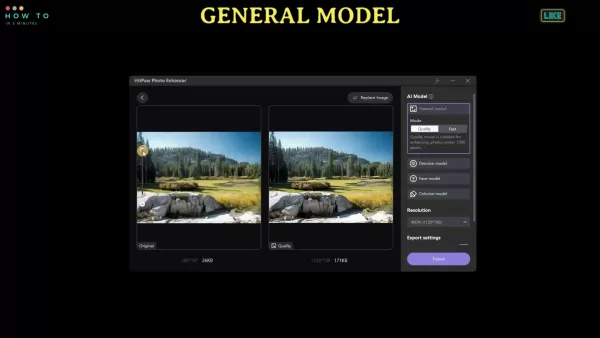
Choose AI Model: Select the most suitable AI model for your task: General, Denoise, Face, or Colorize.
Adjust Settings: Fine-tune parameters like resolution and quality according to your preferences.
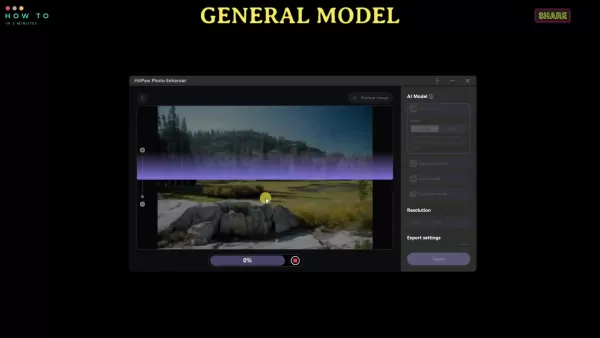
Preview: Click the preview button to compare the original and enhanced versions.
Export: If happy with the result, click export to save your newly enhanced photo. To begin enhancing or upscaling, click the 'Choose file' button. You can also use the built-in sample photos.
Understanding HitPaw Photo Enhancer Pricing
Affordable Options for Every User
HitPaw Photo Enhancer provides flexible pricing plans to accommodate different needs and budgets. A free trial is available with limited features. To access the software's full capabilities, a subscription is required. Here is an overview of the available plans:
Plan Price Features Monthly Plan $17.99 Unlimited access to all AI models and features for one month. Yearly Plan $39.99 Unlimited access to all AI models and features for one year. Lifetime Plan $69.99 One-time payment for lifetime access to all AI models and features.
These options offer great flexibility, letting you choose the plan that best matches your usage patterns and budget. Whether you need a short-term solution or a permanent tool, HitPaw has a suitable plan.
50% Off Discount: The video references a 50% discount available via a link in the description. Check for current promotions to secure savings on your purchase.
Weighing the Pros and Cons of HitPaw Photo Enhancer
Pros
Intuitive, user-friendly interface
Outstanding image upscaling capabilities
Powerful noise reduction
Realistic photo colorization
Fully functional offline mode
Batch processing for improved workflow efficiency
Cons
Requires a subscription for full feature access
Processing speed can be slow for very large images
AI enhancement may not produce perfect results for every single image
Detailed Exploration of HitPaw's Core Features
AI-Powered Enhancement Models
HitPaw Photo Enhancer includes multiple specialized AI models for different enhancement tasks. Here is a closer look at each one:
- General Model: Best for overall image improvement, boosting clarity and detail.
- Denoise Model: Targets and reduces noise in photos taken in low light or with high ISO settings, delivering cleaner results.
- Face Model: Tailored for portraits, it enhances facial details and smooths imperfections.
- Colorize Model: Applies realistic colors to black and white photographs, reviving historical images.
This model is excellent for restoring old photos and making them vibrant.
Frequently Asked Questions About HitPaw Photo Enhancer
Is HitPaw Photo Enhancer free to use?
HitPaw Photo Enhancer offers a free trial with limited features. To unlock all capabilities and AI models, a paid subscription is required.
Does HitPaw Photo Enhancer work offline?
Yes, HitPaw Photo Enhancer functions completely offline, safeguarding your privacy and offering added convenience.
Can I enhance multiple photos at once?
Yes, the software supports batch processing, allowing you to enhance numerous photos at the same time.
What AI models are available in HitPaw Photo Enhancer?
HitPaw Photo Enhancer provides four AI models: the General Model, Denoise Model, Face Model, and Colorize Model.
Is HitPaw Photo Enhancer available for Mac?
Yes, HitPaw Photo Enhancer is compatible with both Windows and macOS operating systems.
Where can I find discount for HitPaw Photo Enhancer?
Discounts may be available on the official HitPaw website, its social media channels, or through partner sites. You can search for terms like "HitPaw coupon" on search engines such as Google.
Related Questions
What are the system requirements for HitPaw Photo Enhancer?
The system requirements for HitPaw Photo Enhancer are as follows: Operating System: Windows 11/10/8/7 (64-bit) or macOS 10.13 and later. Processor: 1 GHz or faster. RAM: 2 GB or more. Disk Space: 200 MB of available storage. Meeting these requirements ensures the software runs smoothly on your computer. For the most current specifications, it's advisable to check the official HitPaw website.
Related article
 Former OpenAI Researcher Barrett Zoph Returns to Google to Support Gemini Development
Barret Zoph, who previously abruptly left and joined OpenAI due to a disagreement with Thinking Machines Lab CEO Miriam Mularati, has once again changed employers. Alphabet's Google announced that Zoph will return as Vice President of Research, bring
How Recursive Intelligence Raised $335M at $4B Valuation in 4 Months
The co-founders of startup Ricursive Intelligence seemed destined to be co-founders.Anna Goldie, CEO, and Azalia Mirhoseini, CTO, are so well-known in the AI community that they were among those AI engineers who “got those weird emails from Zuckerber
AI race won’t wait, nor will this TechCrunch Disrupt 25% discount
Every founder building in AI right now is asking the same question: Are we moving fast enough, and effectively enough? TechCrunch Disrupt 2026 puts you in the same room as the people wrestling with that existential question at the highest levels. Fro
Related Special Topic Recommendations
Design & Art
Former OpenAI Researcher Barrett Zoph Returns to Google to Support Gemini Development
Barret Zoph, who previously abruptly left and joined OpenAI due to a disagreement with Thinking Machines Lab CEO Miriam Mularati, has once again changed employers. Alphabet's Google announced that Zoph will return as Vice President of Research, bring
How Recursive Intelligence Raised $335M at $4B Valuation in 4 Months
The co-founders of startup Ricursive Intelligence seemed destined to be co-founders.Anna Goldie, CEO, and Azalia Mirhoseini, CTO, are so well-known in the AI community that they were among those AI engineers who “got those weird emails from Zuckerber
AI race won’t wait, nor will this TechCrunch Disrupt 25% discount
Every founder building in AI right now is asking the same question: Are we moving fast enough, and effectively enough? TechCrunch Disrupt 2026 puts you in the same room as the people wrestling with that existential question at the highest levels. Fro
Related Special Topic Recommendations
Design & Art
 Top AI Illustration Tools: Create Editorial Scenes and Cover Art Faster
2026 Latest Top-rated AI Illustration Tools: Our curated list features the best powerfully designed tools for creating stunning editorial scenes and eye-catching cover art quickly. Each option has gone through rigorous real-world tests, offering a free vs paid comparison to help you find the perfect match for your workflow. Try these must-try solutions today to unlock your AI edge and boost your creative productivity. Explore now at XIX.AI.
 10 tools
 xix.ai
Education and Learning
Top AI Tutors for Exam Prep: Practice Math, Science, and English
xix.ai
Education and Learning
Top AI Tutors for Exam Prep: Practice Math, Science, and English
2026 Latest Top-Rated Best AI Tutors for Exam Prep are here on XIX.AI! Our curated list features powerful game-changing tools that offer free vs paid comparison, real-world tests, and weekly updated rankings. They help boost your writing efficiency, simplify complex topic learning, and unlock your academic potential. Explore now to Discover your perfect exam prep tool and Start creating today to Unlock your AI edge!
10 tools
xix.ai
Finance
AI Budget Planning Tools for Personal Money Management
2026 Latest Best Top-Rated AI Budget Planning Tools for Personal Money Management are here on XIX.AI! This curated collection features powerful, game-changing solutions that help you conduct real-world tests, understand spending habits, and create personalized plans to boost productivity. Enjoy a free vs paid comparison along with detailed rankings. Must-try tools designed to simplify money management and unlock your AI edge. Explore now!
11 tools
xix.ai
Health & Wellness
AI Sleep Tracking Assistants: Improve Recovery with Better Bedtime Habits
2026 Latest Best Top-Rated AI Sleep Tracking Assistants curated for ultimate recovery. This fully updated weekly guide features powerful tools that deliver real-world tests, free vs paid comparison, and detailed rankings to help you find the must-try solution that boosts sleep quality and supports better bedtime habits. Explore now at XIX.AI to Unlock your AI edge.
10 tools
xix.ai
Data Analysis
AI SQL Copilots for Product and Revenue Analytics
2026 Latest Best Top-Rated AI SQL Copilots for Product and Revenue Analytics! XIX.AI has curated a powerful, game-changing collection of must-try tools that undergo real-world tests through weekly updated rankings. These tools help users boost productivity significantly by accelerating data analysis, streamlining complex queries, and generating accurate insights to drive smarter business decisions. Explore now to Discover your perfect tool for unlocking your AI edge!
14 tools
xix.ai
Education and Learning
Best AI Homework Helpers That Teach: Learn Concepts, Not Just Answers
2026 Latest Best Top-Rated AI Homework Helpers That Teach Core Concepts Not Just Answers Powerful Tools for Students Must-Try Curated List Weekly Updated Free vs Paid Comparison Real-World Tests Accurate Rankings to Help You Unlock Your Full Learning Potential Explore now to Discover your perfect tool for smarter studying.
10 tools
xix.ai

 Comments (1)
0/500
Comments (1)
0/500
![AnthonyGonzalez]()
I've tried a few AI photo enhancers, and HitPaw seems promising. But I'm skeptical about how well it handles low-res images. Anyone tested it on old family photos? 🧐
In today's digital world, high-quality images are essential. Whether you're a professional photographer or just looking to improve your personal photos, the right tools can significantly elevate your results. HitPaw Photo Enhancer is an AI-powered tool that upscales, denoises, and colorizes your photos, enhancing their clarity and detail to bring them to life. This article explores its features, benefits, and practical uses, demonstrating how to maximize this innovative photo enhancement software. Learn how HitPaw can transform your images, ensuring they look their absolute best for any purpose.
Key Points
HitPaw Photo Enhancer utilizes artificial intelligence to automatically improve image quality.
The software delivers outstanding upscaling results while preserving quality.
It features a simple, intuitive interface that's easy to use.
HitPaw supports multiple languages to cater to a global audience.
Users can preview all enhancements free of watermarks.
Batch processing enables efficient editing of multiple photos.
The application works fully offline, guaranteeing privacy and user convenience.
It includes four dedicated AI models: General, Denoise, Face, and Colorize.
Introduction to HitPaw Photo Enhancer
What is HitPaw Photo Enhancer?
HitPaw Photo Enhancer is an AI-powered software designed to elevate the quality of your photographs. Its suite of features includes upscaling, denoising, face enhancement, and colorization. Built with a user-friendly design, the tool is accessible to novices and experienced users alike. Unlike many web-based services, HitPaw operates offline, offering a secure and convenient method for image enhancement. Powered by advanced AI algorithms, it can dramatically improve the clarity, detail, and overall visual appeal of your photos. This makes it an invaluable resource for restoring cherished old memories or simply upgrading your digital image collection.
Specializing in AI technology, HitPaw aims to deliver effective tools for everyone. The AI Photo Enhancer is compatible with both Windows and macOS and offers one-click automatic enhancement. It effortlessly reduces blur and removes noise from pictures. Furthermore, it allows you to enlarge and upscale images without any loss in quality.
Key Features of HitPaw Photo Enhancer
HitPaw Photo Enhancer is equipped with a comprehensive set of features to address diverse photo enhancement requirements. These include:
- AI Auto Enhancement: Instantly improves image quality with a single click.
- Superior Upscaling: Increases image resolution while maintaining fine details.
- Denoising: Effectively reduces noise and grain in photographs.
- Face Enhancement: Optimizes facial details in portrait photos.
- Colorization: Adds vibrant, realistic color to black and white images.
- Batch Processing: Allows simultaneous editing of numerous photos.
- Offline Functionality: Operates without an internet connection, ensuring data privacy.
- Multi-Language Support: Available in several languages for users worldwide.
- Preview Without Watermark: Enables users to review changes without any watermark
.
This robust feature set makes HitPaw Photo Enhancer a versatile solution for anyone seeking to improve their photo quality. Whether you're restoring vintage family pictures or polishing images for social media, HitPaw provides the necessary tools.
Maximizing Efficiency with HitPaw Photo Enhancer
Batch Processing for Enhanced Productivity
HitPaw Photo Enhancer excels at handling large volumes of images. The batch processing feature allows you to enhance multiple photos at once, saving significant time and effort. Follow these steps to utilize it effectively:
- Import Multiple Photos: Select and import an entire batch of images into the software, rather than adding them individually.
- Apply Settings: Choose your preferred AI model and configure the settings. These adjustments will apply to all selected photos in the batch.
- Batch Preview: Preview the effects on a few sample images to ensure the settings work well for the entire group.
- Export All: Once satisfied, click export, and HitPaw will automatically process and save all the enhanced photos. This feature is especially beneficial for photographers managing large sets of images from events or professional shoots.
How to Use HitPaw Photo Enhancer
Step-by-Step Guide to Enhancing Your Photos
Using HitPaw Photo Enhancer is a simple process. Follow this step-by-step guide:
Installation: Visit the official HitPaw Photo Enhancer website to download the installer. Run the installer and follow the on-screen instructions to complete setup.
Import Photos: Launch the software and import the photo you wish to enhance.
Choose AI Model: Select the most suitable AI model for your task: General, Denoise, Face, or Colorize.
Adjust Settings: Fine-tune parameters like resolution and quality according to your preferences.
Preview: Click the preview button to compare the original and enhanced versions.
Export: If happy with the result, click export to save your newly enhanced photo. To begin enhancing or upscaling, click the 'Choose file' button. You can also use the built-in sample photos.
Understanding HitPaw Photo Enhancer Pricing
Affordable Options for Every User
HitPaw Photo Enhancer provides flexible pricing plans to accommodate different needs and budgets. A free trial is available with limited features. To access the software's full capabilities, a subscription is required. Here is an overview of the available plans:
| Plan | Price | Features |
|---|---|---|
| Monthly Plan | $17.99 | Unlimited access to all AI models and features for one month. |
| Yearly Plan | $39.99 | Unlimited access to all AI models and features for one year. |
| Lifetime Plan | $69.99 | One-time payment for lifetime access to all AI models and features. |
These options offer great flexibility, letting you choose the plan that best matches your usage patterns and budget. Whether you need a short-term solution or a permanent tool, HitPaw has a suitable plan.
50% Off Discount: The video references a 50% discount available via a link in the description. Check for current promotions to secure savings on your purchase.
Weighing the Pros and Cons of HitPaw Photo Enhancer
Pros
Intuitive, user-friendly interface
Outstanding image upscaling capabilities
Powerful noise reduction
Realistic photo colorization
Fully functional offline mode
Batch processing for improved workflow efficiency
Cons
Requires a subscription for full feature access
Processing speed can be slow for very large images
AI enhancement may not produce perfect results for every single image
Detailed Exploration of HitPaw's Core Features
AI-Powered Enhancement Models
HitPaw Photo Enhancer includes multiple specialized AI models for different enhancement tasks. Here is a closer look at each one:
- General Model: Best for overall image improvement, boosting clarity and detail.
- Denoise Model: Targets and reduces noise in photos taken in low light or with high ISO settings, delivering cleaner results.
- Face Model: Tailored for portraits, it enhances facial details and smooths imperfections.
- Colorize Model: Applies realistic colors to black and white photographs, reviving historical images.
This model is excellent for restoring old photos and making them vibrant.
Frequently Asked Questions About HitPaw Photo Enhancer
Is HitPaw Photo Enhancer free to use?
HitPaw Photo Enhancer offers a free trial with limited features. To unlock all capabilities and AI models, a paid subscription is required.
Does HitPaw Photo Enhancer work offline?
Yes, HitPaw Photo Enhancer functions completely offline, safeguarding your privacy and offering added convenience.
Can I enhance multiple photos at once?
Yes, the software supports batch processing, allowing you to enhance numerous photos at the same time.
What AI models are available in HitPaw Photo Enhancer?
HitPaw Photo Enhancer provides four AI models: the General Model, Denoise Model, Face Model, and Colorize Model.
Is HitPaw Photo Enhancer available for Mac?
Yes, HitPaw Photo Enhancer is compatible with both Windows and macOS operating systems.
Where can I find discount for HitPaw Photo Enhancer?
Discounts may be available on the official HitPaw website, its social media channels, or through partner sites. You can search for terms like "HitPaw coupon" on search engines such as Google.
Related Questions
What are the system requirements for HitPaw Photo Enhancer?
The system requirements for HitPaw Photo Enhancer are as follows: Operating System: Windows 11/10/8/7 (64-bit) or macOS 10.13 and later. Processor: 1 GHz or faster. RAM: 2 GB or more. Disk Space: 200 MB of available storage. Meeting these requirements ensures the software runs smoothly on your computer. For the most current specifications, it's advisable to check the official HitPaw website.








 Former OpenAI Researcher Barrett Zoph Returns to Google to Support Gemini Development
Barret Zoph, who previously abruptly left and joined OpenAI due to a disagreement with Thinking Machines Lab CEO Miriam Mularati, has once again changed employers. Alphabet's Google announced that Zoph will return as Vice President of Research, bring
Former OpenAI Researcher Barrett Zoph Returns to Google to Support Gemini Development
Barret Zoph, who previously abruptly left and joined OpenAI due to a disagreement with Thinking Machines Lab CEO Miriam Mularati, has once again changed employers. Alphabet's Google announced that Zoph will return as Vice President of Research, bring
 How Recursive Intelligence Raised $335M at $4B Valuation in 4 Months
The co-founders of startup Ricursive Intelligence seemed destined to be co-founders.Anna Goldie, CEO, and Azalia Mirhoseini, CTO, are so well-known in the AI community that they were among those AI engineers who “got those weird emails from Zuckerber
How Recursive Intelligence Raised $335M at $4B Valuation in 4 Months
The co-founders of startup Ricursive Intelligence seemed destined to be co-founders.Anna Goldie, CEO, and Azalia Mirhoseini, CTO, are so well-known in the AI community that they were among those AI engineers who “got those weird emails from Zuckerber
 AI race won’t wait, nor will this TechCrunch Disrupt 25% discount
Every founder building in AI right now is asking the same question: Are we moving fast enough, and effectively enough? TechCrunch Disrupt 2026 puts you in the same room as the people wrestling with that existential question at the highest levels. Fro
AI race won’t wait, nor will this TechCrunch Disrupt 25% discount
Every founder building in AI right now is asking the same question: Are we moving fast enough, and effectively enough? TechCrunch Disrupt 2026 puts you in the same room as the people wrestling with that existential question at the highest levels. Fro

2026 Latest Top-rated AI Illustration Tools: Our curated list features the best powerfully designed tools for creating stunning editorial scenes and eye-catching cover art quickly. Each option has gone through rigorous real-world tests, offering a free vs paid comparison to help you find the perfect match for your workflow. Try these must-try solutions today to unlock your AI edge and boost your creative productivity. Explore now at XIX.AI.
10 tools
xix.ai

2026 Latest Top-Rated Best AI Tutors for Exam Prep are here on XIX.AI! Our curated list features powerful game-changing tools that offer free vs paid comparison, real-world tests, and weekly updated rankings. They help boost your writing efficiency, simplify complex topic learning, and unlock your academic potential. Explore now to Discover your perfect exam prep tool and Start creating today to Unlock your AI edge!
10 tools
xix.ai

2026 Latest Best Top-Rated AI Budget Planning Tools for Personal Money Management are here on XIX.AI! This curated collection features powerful, game-changing solutions that help you conduct real-world tests, understand spending habits, and create personalized plans to boost productivity. Enjoy a free vs paid comparison along with detailed rankings. Must-try tools designed to simplify money management and unlock your AI edge. Explore now!
11 tools
xix.ai

2026 Latest Best Top-Rated AI Sleep Tracking Assistants curated for ultimate recovery. This fully updated weekly guide features powerful tools that deliver real-world tests, free vs paid comparison, and detailed rankings to help you find the must-try solution that boosts sleep quality and supports better bedtime habits. Explore now at XIX.AI to Unlock your AI edge.
10 tools
xix.ai

2026 Latest Best Top-Rated AI SQL Copilots for Product and Revenue Analytics! XIX.AI has curated a powerful, game-changing collection of must-try tools that undergo real-world tests through weekly updated rankings. These tools help users boost productivity significantly by accelerating data analysis, streamlining complex queries, and generating accurate insights to drive smarter business decisions. Explore now to Discover your perfect tool for unlocking your AI edge!
14 tools
xix.ai

2026 Latest Best Top-Rated AI Homework Helpers That Teach Core Concepts Not Just Answers Powerful Tools for Students Must-Try Curated List Weekly Updated Free vs Paid Comparison Real-World Tests Accurate Rankings to Help You Unlock Your Full Learning Potential Explore now to Discover your perfect tool for smarter studying.
10 tools
xix.ai

I've tried a few AI photo enhancers, and HitPaw seems promising. But I'm skeptical about how well it handles low-res images. Anyone tested it on old family photos? 🧐












