


 Home
HomeGenerate Excel Formulas Instantly with AI-Powered Excel Tool
Transform your spreadsheet workflow with GPTExcel - the AI-powered solution that converts natural language descriptions into precise Excel and Google Sheets formulas. This powerful tool eliminates the frustration of manual formula creation, making complex data analysis accessible to users of all skill levels. Whether you're managing budgets, analyzing sales data, or working on academic projects, GPTExcel streamlines your spreadsheet tasks with remarkable efficiency.
Key Benefits
AI-Driven Formulas: Convert plain English instructions into functional spreadsheet formulas instantly.
Dual Platform Support: Works seamlessly with both Microsoft Excel and Google Sheets environments.
Time-Saving Automation: Dramatically reduces formula development time from hours to seconds.
Reduced Errors: Minimizes calculation mistakes common in manual formula creation.
Intuitive Interface: Simple, user-friendly design requires no technical expertise to operate.
GPTExcel Core Features Overview
Revolutionary Formula Generation
At the heart of GPTExcel lies its advanced AI engine that interprets natural language requests and outputs accurate formulas ready for immediate use. The system comprehends a wide range of mathematical, statistical, and logical operations, translating casual descriptions into precise spreadsheet syntax.
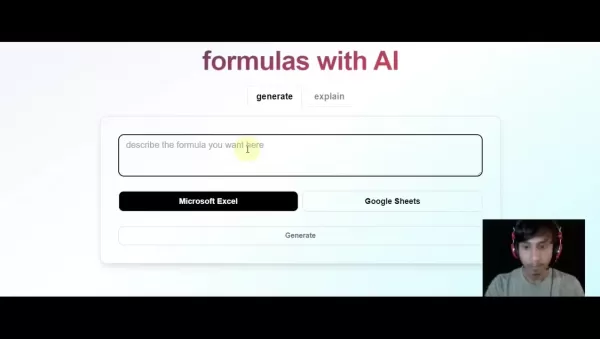
The technology represents a breakthrough in spreadsheet productivity, particularly for professionals who aren't formula experts but need to perform sophisticated data analysis. By removing the technical barrier of formula syntax, GPTExcel empowers users to focus on insights rather than implementation details.
AI-Assisted Learning
Beyond simple formula generation, GPTExcel serves as an educational tool that explains how each component of the generated formula functions. This feature helps users develop their spreadsheet skills while accomplishing immediate tasks, providing both a solution and learning opportunity simultaneously.
Getting Started with GPTExcel
Simple Three-Step Process
- Describe your calculation need in everyday language
- Select your target spreadsheet platform
- Copy the AI-generated formula into your worksheet

The intuitive workflow makes GPTExcel accessible even to spreadsheet beginners, while the ability to handle complex requests appeals to power users looking to optimize their workflow.
Practical Applications
Financial Modeling
Accountants and financial analysts can generate complex valuation formulas, amortization schedules, and scenario analyses with simple descriptions, saving hours of manual formula development while reducing calculation errors.
Business Intelligence
Marketing and sales teams can quickly create performance dashboards, customer segmentation analyses, and campaign ROI calculations without advanced spreadsheet expertise.
Academic Research
Students and researchers can focus on their data analysis rather than formula syntax, using natural language to generate statistical tests, data transformations, and visualization formulas.

Pricing Structure
Flexible Options for Every Need
GPTExcel offers tiered pricing to accommodate different usage levels:
Free Tier: Introductory access with limited generations
Professional: Increased generation limits for regular users
Enterprise: Advanced features for organizational deployment
Advantages and Considerations
Key Benefits
Time Savings: Reduce formula creation time by up to 90%
Error Reduction: AI-generated formulas minimize calculation mistakes
Skill Democratization: Makes advanced analysis accessible to non-experts
Continuous Improvement: Regular updates expand formula capabilities
Limitations
Description Clarity: Precise language yields best results
Connectivity Requirement: Cloud-based service requires internet access
Premium Features: Advanced capabilities require paid plans
Common Questions
Language Support
GPTExcel currently focuses on English descriptions but continues to develop multilingual capabilities to serve global users.
Accuracy Verification
While the AI delivers high accuracy, users should validate critical calculations as with any automated system.
Learning Potential
The formula explanation feature transforms GPTExcel into both a productivity tool and educational resource for spreadsheet skill development.
Related article
 Stripe to Acquire OpenRouter as AI Model Routing Gains Momentum
Stripe has agreed to acquire OpenRouter, an AI model-routing platform that gives developers access to hundreds of models through a single interface. The deal adds model selection and routing to Stripe’s existing work around AI usage and token-based b
Former OpenAI Researcher Barrett Zoph Returns to Google to Support Gemini Development
Barret Zoph, who previously abruptly left and joined OpenAI due to a disagreement with Thinking Machines Lab CEO Miriam Mularati, has once again changed employers. Alphabet's Google announced that Zoph will return as Vice President of Research, bring
How Recursive Intelligence Raised $335M at $4B Valuation in 4 Months
The co-founders of startup Ricursive Intelligence seemed destined to be co-founders.Anna Goldie, CEO, and Azalia Mirhoseini, CTO, are so well-known in the AI community that they were among those AI engineers who “got those weird emails from Zuckerber
Related Special Topic Recommendations
Design & Art
Stripe to Acquire OpenRouter as AI Model Routing Gains Momentum
Stripe has agreed to acquire OpenRouter, an AI model-routing platform that gives developers access to hundreds of models through a single interface. The deal adds model selection and routing to Stripe’s existing work around AI usage and token-based b
Former OpenAI Researcher Barrett Zoph Returns to Google to Support Gemini Development
Barret Zoph, who previously abruptly left and joined OpenAI due to a disagreement with Thinking Machines Lab CEO Miriam Mularati, has once again changed employers. Alphabet's Google announced that Zoph will return as Vice President of Research, bring
How Recursive Intelligence Raised $335M at $4B Valuation in 4 Months
The co-founders of startup Ricursive Intelligence seemed destined to be co-founders.Anna Goldie, CEO, and Azalia Mirhoseini, CTO, are so well-known in the AI community that they were among those AI engineers who “got those weird emails from Zuckerber
Related Special Topic Recommendations
Design & Art
 Top AI Illustration Tools: Create Editorial Scenes and Cover Art Faster
2026 Latest Top-rated AI Illustration Tools: Our curated list features the best powerfully designed tools for creating stunning editorial scenes and eye-catching cover art quickly. Each option has gone through rigorous real-world tests, offering a free vs paid comparison to help you find the perfect match for your workflow. Try these must-try solutions today to unlock your AI edge and boost your creative productivity. Explore now at XIX.AI.
 10 tools
 xix.ai
Education and Learning
Top AI Tutors for Exam Prep: Practice Math, Science, and English
xix.ai
Education and Learning
Top AI Tutors for Exam Prep: Practice Math, Science, and English
2026 Latest Top-Rated Best AI Tutors for Exam Prep are here on XIX.AI! Our curated list features powerful game-changing tools that offer free vs paid comparison, real-world tests, and weekly updated rankings. They help boost your writing efficiency, simplify complex topic learning, and unlock your academic potential. Explore now to Discover your perfect exam prep tool and Start creating today to Unlock your AI edge!
10 tools
xix.ai
Finance
AI Budget Planning Tools for Personal Money Management
2026 Latest Best Top-Rated AI Budget Planning Tools for Personal Money Management are here on XIX.AI! This curated collection features powerful, game-changing solutions that help you conduct real-world tests, understand spending habits, and create personalized plans to boost productivity. Enjoy a free vs paid comparison along with detailed rankings. Must-try tools designed to simplify money management and unlock your AI edge. Explore now!
11 tools
xix.ai
Health & Wellness
AI Sleep Tracking Assistants: Improve Recovery with Better Bedtime Habits
2026 Latest Best Top-Rated AI Sleep Tracking Assistants curated for ultimate recovery. This fully updated weekly guide features powerful tools that deliver real-world tests, free vs paid comparison, and detailed rankings to help you find the must-try solution that boosts sleep quality and supports better bedtime habits. Explore now at XIX.AI to Unlock your AI edge.
10 tools
xix.ai
Data Analysis
AI SQL Copilots for Product and Revenue Analytics
2026 Latest Best Top-Rated AI SQL Copilots for Product and Revenue Analytics! XIX.AI has curated a powerful, game-changing collection of must-try tools that undergo real-world tests through weekly updated rankings. These tools help users boost productivity significantly by accelerating data analysis, streamlining complex queries, and generating accurate insights to drive smarter business decisions. Explore now to Discover your perfect tool for unlocking your AI edge!
14 tools
xix.ai
Education and Learning
Best AI Homework Helpers That Teach: Learn Concepts, Not Just Answers
2026 Latest Best Top-Rated AI Homework Helpers That Teach Core Concepts Not Just Answers Powerful Tools for Students Must-Try Curated List Weekly Updated Free vs Paid Comparison Real-World Tests Accurate Rankings to Help You Unlock Your Full Learning Potential Explore now to Discover your perfect tool for smarter studying.
10 tools
xix.ai

 Comments (15)
0/500
Comments (15)
0/500
![SophiaJones]()
這工具太神了吧!以前寫複雜的Excel公式總是搞不定,現在直接用中文描述需求就能生成,對非程式人員超級友善,效率直接拉滿!💯
![JustinAnderson]()
¡Increíble! Ya no pierdo tiempo buscando la sintaxis correcta. Es como tener un asistente experto en hojas de cálculo. Me ha ahorrado horas de trabajo, ¡brillante!
![RalphHill]()
Que maravilha! Eu sempre demorava uma eternidade para criar fórmulas no Excel. Com essa IA, basta descrever o que quero e pronto. Agilidade pura, recomendo demais!
![LarryHernández]()
Endlich keine Angst mehr vor komplexen Formeln. Das Tool nimmt einem die Arbeit ab und man kann sich auf die Analyse konzentrieren. Sehr praktisch für den Büroalltag.
![WillLopez]()
엑셀 함수 외우느라 고생할 필요 없네요. 자연어로 요청하면 바로 수식을 만들어주니 업무 효율이 확 올라갑니다. 초보자에게도 너무 좋은 도구인 것 같아요!
![HarryPerez]()
Наконец-то инструмент, который не заставляет меня зубрить синтаксис. Просто описываешь задачу, и он делает всё сам. Экономия времени колоссальная, особенно для больших таблиц.
Transform your spreadsheet workflow with GPTExcel - the AI-powered solution that converts natural language descriptions into precise Excel and Google Sheets formulas. This powerful tool eliminates the frustration of manual formula creation, making complex data analysis accessible to users of all skill levels. Whether you're managing budgets, analyzing sales data, or working on academic projects, GPTExcel streamlines your spreadsheet tasks with remarkable efficiency.
Key Benefits
AI-Driven Formulas: Convert plain English instructions into functional spreadsheet formulas instantly.
Dual Platform Support: Works seamlessly with both Microsoft Excel and Google Sheets environments.
Time-Saving Automation: Dramatically reduces formula development time from hours to seconds.
Reduced Errors: Minimizes calculation mistakes common in manual formula creation.
Intuitive Interface: Simple, user-friendly design requires no technical expertise to operate.
GPTExcel Core Features Overview
Revolutionary Formula Generation
At the heart of GPTExcel lies its advanced AI engine that interprets natural language requests and outputs accurate formulas ready for immediate use. The system comprehends a wide range of mathematical, statistical, and logical operations, translating casual descriptions into precise spreadsheet syntax.
The technology represents a breakthrough in spreadsheet productivity, particularly for professionals who aren't formula experts but need to perform sophisticated data analysis. By removing the technical barrier of formula syntax, GPTExcel empowers users to focus on insights rather than implementation details.
AI-Assisted Learning
Beyond simple formula generation, GPTExcel serves as an educational tool that explains how each component of the generated formula functions. This feature helps users develop their spreadsheet skills while accomplishing immediate tasks, providing both a solution and learning opportunity simultaneously.
Getting Started with GPTExcel
Simple Three-Step Process
- Describe your calculation need in everyday language
- Select your target spreadsheet platform
- Copy the AI-generated formula into your worksheet
The intuitive workflow makes GPTExcel accessible even to spreadsheet beginners, while the ability to handle complex requests appeals to power users looking to optimize their workflow.
Practical Applications
Financial Modeling
Accountants and financial analysts can generate complex valuation formulas, amortization schedules, and scenario analyses with simple descriptions, saving hours of manual formula development while reducing calculation errors.
Business Intelligence
Marketing and sales teams can quickly create performance dashboards, customer segmentation analyses, and campaign ROI calculations without advanced spreadsheet expertise.
Academic Research
Students and researchers can focus on their data analysis rather than formula syntax, using natural language to generate statistical tests, data transformations, and visualization formulas.
Pricing Structure
Flexible Options for Every Need
GPTExcel offers tiered pricing to accommodate different usage levels:
Free Tier: Introductory access with limited generations
Professional: Increased generation limits for regular users
Enterprise: Advanced features for organizational deployment
Advantages and Considerations
Key Benefits
Time Savings: Reduce formula creation time by up to 90%
Error Reduction: AI-generated formulas minimize calculation mistakes
Skill Democratization: Makes advanced analysis accessible to non-experts
Continuous Improvement: Regular updates expand formula capabilities
Limitations
Description Clarity: Precise language yields best results
Connectivity Requirement: Cloud-based service requires internet access
Premium Features: Advanced capabilities require paid plans
Common Questions
Language Support
GPTExcel currently focuses on English descriptions but continues to develop multilingual capabilities to serve global users.
Accuracy Verification
While the AI delivers high accuracy, users should validate critical calculations as with any automated system.
Learning Potential
The formula explanation feature transforms GPTExcel into both a productivity tool and educational resource for spreadsheet skill development.








 Stripe to Acquire OpenRouter as AI Model Routing Gains Momentum
Stripe has agreed to acquire OpenRouter, an AI model-routing platform that gives developers access to hundreds of models through a single interface. The deal adds model selection and routing to Stripe’s existing work around AI usage and token-based b
Stripe to Acquire OpenRouter as AI Model Routing Gains Momentum
Stripe has agreed to acquire OpenRouter, an AI model-routing platform that gives developers access to hundreds of models through a single interface. The deal adds model selection and routing to Stripe’s existing work around AI usage and token-based b
 Former OpenAI Researcher Barrett Zoph Returns to Google to Support Gemini Development
Barret Zoph, who previously abruptly left and joined OpenAI due to a disagreement with Thinking Machines Lab CEO Miriam Mularati, has once again changed employers. Alphabet's Google announced that Zoph will return as Vice President of Research, bring
Former OpenAI Researcher Barrett Zoph Returns to Google to Support Gemini Development
Barret Zoph, who previously abruptly left and joined OpenAI due to a disagreement with Thinking Machines Lab CEO Miriam Mularati, has once again changed employers. Alphabet's Google announced that Zoph will return as Vice President of Research, bring
 How Recursive Intelligence Raised $335M at $4B Valuation in 4 Months
The co-founders of startup Ricursive Intelligence seemed destined to be co-founders.Anna Goldie, CEO, and Azalia Mirhoseini, CTO, are so well-known in the AI community that they were among those AI engineers who “got those weird emails from Zuckerber
How Recursive Intelligence Raised $335M at $4B Valuation in 4 Months
The co-founders of startup Ricursive Intelligence seemed destined to be co-founders.Anna Goldie, CEO, and Azalia Mirhoseini, CTO, are so well-known in the AI community that they were among those AI engineers who “got those weird emails from Zuckerber

2026 Latest Top-rated AI Illustration Tools: Our curated list features the best powerfully designed tools for creating stunning editorial scenes and eye-catching cover art quickly. Each option has gone through rigorous real-world tests, offering a free vs paid comparison to help you find the perfect match for your workflow. Try these must-try solutions today to unlock your AI edge and boost your creative productivity. Explore now at XIX.AI.
10 tools
xix.ai

2026 Latest Top-Rated Best AI Tutors for Exam Prep are here on XIX.AI! Our curated list features powerful game-changing tools that offer free vs paid comparison, real-world tests, and weekly updated rankings. They help boost your writing efficiency, simplify complex topic learning, and unlock your academic potential. Explore now to Discover your perfect exam prep tool and Start creating today to Unlock your AI edge!
10 tools
xix.ai

2026 Latest Best Top-Rated AI Budget Planning Tools for Personal Money Management are here on XIX.AI! This curated collection features powerful, game-changing solutions that help you conduct real-world tests, understand spending habits, and create personalized plans to boost productivity. Enjoy a free vs paid comparison along with detailed rankings. Must-try tools designed to simplify money management and unlock your AI edge. Explore now!
11 tools
xix.ai

2026 Latest Best Top-Rated AI Sleep Tracking Assistants curated for ultimate recovery. This fully updated weekly guide features powerful tools that deliver real-world tests, free vs paid comparison, and detailed rankings to help you find the must-try solution that boosts sleep quality and supports better bedtime habits. Explore now at XIX.AI to Unlock your AI edge.
10 tools
xix.ai

2026 Latest Best Top-Rated AI SQL Copilots for Product and Revenue Analytics! XIX.AI has curated a powerful, game-changing collection of must-try tools that undergo real-world tests through weekly updated rankings. These tools help users boost productivity significantly by accelerating data analysis, streamlining complex queries, and generating accurate insights to drive smarter business decisions. Explore now to Discover your perfect tool for unlocking your AI edge!
14 tools
xix.ai

2026 Latest Best Top-Rated AI Homework Helpers That Teach Core Concepts Not Just Answers Powerful Tools for Students Must-Try Curated List Weekly Updated Free vs Paid Comparison Real-World Tests Accurate Rankings to Help You Unlock Your Full Learning Potential Explore now to Discover your perfect tool for smarter studying.
10 tools
xix.ai

這工具太神了吧!以前寫複雜的Excel公式總是搞不定,現在直接用中文描述需求就能生成,對非程式人員超級友善,效率直接拉滿!💯
¡Increíble! Ya no pierdo tiempo buscando la sintaxis correcta. Es como tener un asistente experto en hojas de cálculo. Me ha ahorrado horas de trabajo, ¡brillante!
Que maravilha! Eu sempre demorava uma eternidade para criar fórmulas no Excel. Com essa IA, basta descrever o que quero e pronto. Agilidade pura, recomendo demais!
Endlich keine Angst mehr vor komplexen Formeln. Das Tool nimmt einem die Arbeit ab und man kann sich auf die Analyse konzentrieren. Sehr praktisch für den Büroalltag.
엑셀 함수 외우느라 고생할 필요 없네요. 자연어로 요청하면 바로 수식을 만들어주니 업무 효율이 확 올라갑니다. 초보자에게도 너무 좋은 도구인 것 같아요!
Наконец-то инструмент, который не заставляет меня зубрить синтаксис. Просто описываешь задачу, и он делает всё сам. Экономия времени колоссальная, особенно для больших таблиц.












