


 Home
HomeGoogle's Gemini AI to Automatically Retain User Details for Enhanced Personalization
Google is introducing a new feature for Gemini that enables the AI to retain details from your previous conversations automatically. When activated, the chatbot will store your key information and preferences, using them to tailor its responses to your needs.
This builds on a feature launched last year, which required you to explicitly ask Gemini to remember specific preferences. Now, the assistant will proactively apply this information. For instance, if you previously sought Gemini’s advice on starting a YouTube channel focused on Japanese culture, it may later recommend creating content about sampling Japanese cuisine when you request fresh video ideas.
A recent New York Times piece linked the rollout of ChatGPT’s cross-chat memory feature in April to a rise in accounts of the bot generating unrealistic responses. In response, OpenAI announced it is enhancing its safety systems to identify signs of emotional or psychological distress.
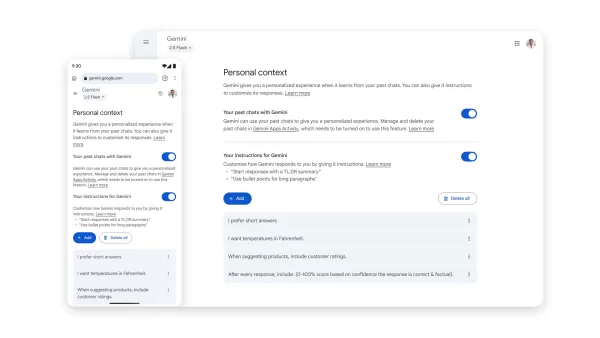
You can disable Gemini’s memory function directly in the app settings. Image: GoogleWhen questioned about potential risks, Google spokesperson Elijah Lawal stated the company continuously strengthens its protective measures. “Developing a personal AI assistant is our priority, and Gemini learning user preferences is central to that,” Lawal explained. “Equally important is providing straightforward controls so users can customize their experience—enabling or disabling the feature at any time.”
Google will activate this setting by default. To turn it off, go to the Gemini app settings, select Personal Context, and toggle off the Your past chats with Gemini option. The update will first reach the Gemini 2.5 Pro model in select markets, followed by wider regions and the Gemini 2.5 Flash model.
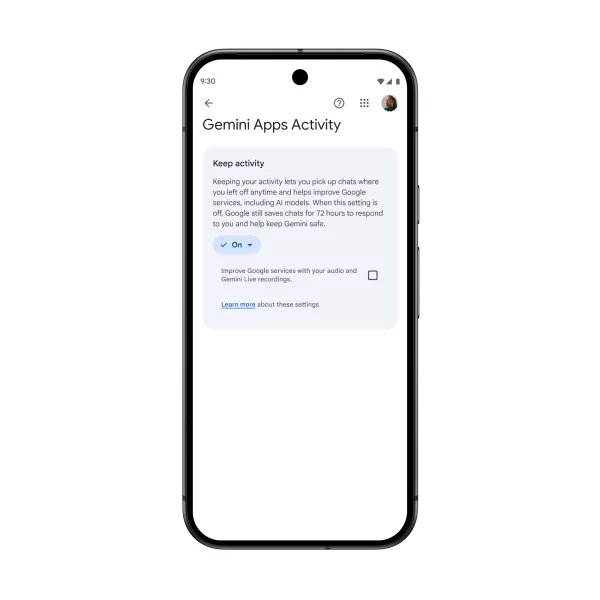
The Keep Activity setting remains deactivated if you previously turned off Gemini Apps Activity. Image: GoogleRelated
- ChatGPT aims to better recognize emotional distress amid concerns over delusional outputs
- Anthropic’s Claude can now retain information from your earlier chats
Google is also updating its privacy settings. Soon, the Gemini Apps Activity setting will be renamed Keep Activity. If enabled, Google will use a sample of your uploaded files and photos in Gemini to enhance its services across the board, starting September 2. If you previously disabled Gemini Apps Activity, Keep Activity will remain off by default.
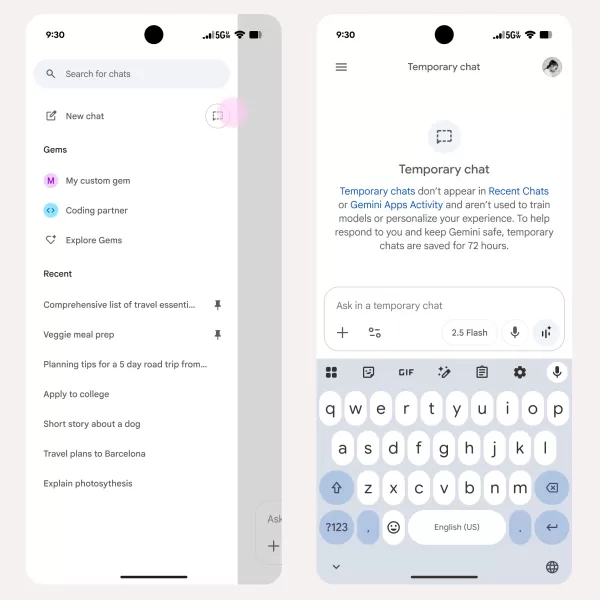
Gemini does not refer to conversations held in temporary chat mode. Image: GoogleFor added privacy, Gemini now offers a temporary chats option. These chats won't appear in your history or Keep Activity, won't shape future responses, and won't be used to train AI models. Google retains them for just 72 hours. This is useful for discussing sensitive topics or preventing Gemini from recalling chat specifics later on.
Related article
 Warner Music acquires AI attribution startup Sureel AI
Warner Music Group (WMG) confirmed on Wednesday that it is acquiring Sureel AI, an artificial intelligence attribution startup. Sureel’s proprietary technology generates “AI DNA” for musical tracks, deconstructing them into constituent elements to tr
Amazon introduces Alexa for Shopping while pushing Rufus to the background
Amazon has launched Alexa for Shopping, merging its Rufus shopping chatbot with Alexa+ across the app, website, and Echo Show devices.The assistant answers product queries, compares items, tracks prices, and supports shopping reminders. It also handl
Microsoft, Azure and AI Tech Combat California Wildfire Risks
Microsoft invests in AI-driven wildfire detection, with Juan Lavista Ferres, CVP and Chief Data Scientist, discussing strategies to mitigate environmental damage.According to NASA, climate change impacts everyone on Earth, manifesting as rising tempe
Related Special Topic Recommendations
Music composition
Warner Music acquires AI attribution startup Sureel AI
Warner Music Group (WMG) confirmed on Wednesday that it is acquiring Sureel AI, an artificial intelligence attribution startup. Sureel’s proprietary technology generates “AI DNA” for musical tracks, deconstructing them into constituent elements to tr
Amazon introduces Alexa for Shopping while pushing Rufus to the background
Amazon has launched Alexa for Shopping, merging its Rufus shopping chatbot with Alexa+ across the app, website, and Echo Show devices.The assistant answers product queries, compares items, tracks prices, and supports shopping reminders. It also handl
Microsoft, Azure and AI Tech Combat California Wildfire Risks
Microsoft invests in AI-driven wildfire detection, with Juan Lavista Ferres, CVP and Chief Data Scientist, discussing strategies to mitigate environmental damage.According to NASA, climate change impacts everyone on Earth, manifesting as rising tempe
Related Special Topic Recommendations
Music composition
 Best AI Melody Writing Tools for Song Drafts
2026 Latest Best Top-Rated AI Melody Writing Tools for Song Drafts! XIX.AI has curated a highly powerful game-changing collection that goes through rigorous real-world tests to deliver the best writing experience. You can find detailed free vs paid comparisons, accurate rankings, and must-try options designed to help you create stunning song drafts effortlessly and boost your creative productivity significantly. Explore now to discover your perfect tool!
 8 tools
 xix.ai
chatbot
Best AI Conversation Trainer Tools for Interview Practice
xix.ai
chatbot
Best AI Conversation Trainer Tools for Interview Practice
2026 Latest Best Top-rated AI Conversation Trainer Tools for Interview Practice are here on XIX.AI! This curated collection features powerful, game-changing tools that go through rigorous real-world tests to deliver accurate feedback. You’ll find a free vs paid comparison and detailed rankings to help you choose the must-try option that boosts your confidence and skills. Explore now to Discover your perfect tool for interview success!
12 tools
xix.ai
Design & Art
Best AI Style Transfer Tools for Creative Experiments
2026 Latest Best Top-rated AI Style Transfer Tools for Creative Experiments! XIX.AI has curated a powerful, game-changing collection of must-try tools that deliver exceptional results through real-world tests and rigorous rankings. These top solutions help creatives boost productivity significantly by accelerating content creation and unlocking endless creative possibilities. Explore now to discover your perfect tool and start creating today!
9 tools
xix.ai
Comic Creation
Best AI Dialogue Bubble Tools for Visual Storytelling
2026 Latest Best Top-Rated AI Dialogue Bubble Tools for Visual Storytelling are here on XIX.AI! This curated collection features powerful, game-changing tools that help creators boost productivity and overcome creative bottlenecks. Get a free vs paid comparison, see real-world tests, and check the latest rankings to find the must-try solutions perfect for crafting engaging visual narratives. Explore now to discover your ideal tool!
10 tools
xix.ai
Meeting Assistant
Top AI Meeting Summary Tools: Track Decisions and Follow-Ups Clearly
2026 Latest Top-Rated Best AI Meeting Summary Tools for Clear Decision Tracking and Effortless Follow-Ups. This curated list showcases powerful, game-changing solutions that boost productivity dramatically by automating meeting notes, identifying key action items, and streamlining team coordination across all projects. Get a free vs paid comparison along with real-world tests and weekly updated rankings to help you find the perfect tool. Explore now to unlock your AI edge!
9 tools
xix.ai
Data Analysis
Best AI Data Cleaning Tools: Fix Missing Values and Duplicates Fast
2026 Latest Best Top-rated AI Data Cleaning Tools for quick fixing of missing values and duplicates. This curated list showcases powerful, game-changing solutions that boost productivity significantly. Each option has undergone rigorous real-world tests to ensure reliability. Get a free vs paid comparison and discover the must-try tool that fits your needs best. Explore now at XIX.AI to Unlock your AI edge.
11 tools
xix.ai

 Comments (2)
0/500
Comments (2)
0/500
![LarryWilliams]()
Mais attendez, c’est un peu flippant comme fonctionnalité non ? Moi personnellement, je ne suis pas trop fan que Google garde en mémoire toutes mes infos sans que je demande explicitement. C’est pratique pour la personnalisation, certes, mais l'aspect vie privée… ça me fait un peu peur 😅 Après, si c’est vraiment bien sécurisé et transparent, pourquoi pas ! Mais je reste méfiant.
![WillLopez]()
This sounds convenient but also low-key terrifying? I just asked Gemini for cupcake recipes last week, and now it'll remember my name and job? The personalization vs. privacy line keeps getting blurrier. 😅 Where exactly is this 'key information' stored and who audits its use? Hope they have an OFF switch that really means OFF.
Google is introducing a new feature for Gemini that enables the AI to retain details from your previous conversations automatically. When activated, the chatbot will store your key information and preferences, using them to tailor its responses to your needs.
This builds on a feature launched last year, which required you to explicitly ask Gemini to remember specific preferences. Now, the assistant will proactively apply this information. For instance, if you previously sought Gemini’s advice on starting a YouTube channel focused on Japanese culture, it may later recommend creating content about sampling Japanese cuisine when you request fresh video ideas.
A recent New York Times piece linked the rollout of ChatGPT’s cross-chat memory feature in April to a rise in accounts of the bot generating unrealistic responses. In response, OpenAI announced it is enhancing its safety systems to identify signs of emotional or psychological distress.
When questioned about potential risks, Google spokesperson Elijah Lawal stated the company continuously strengthens its protective measures. “Developing a personal AI assistant is our priority, and Gemini learning user preferences is central to that,” Lawal explained. “Equally important is providing straightforward controls so users can customize their experience—enabling or disabling the feature at any time.”
Google will activate this setting by default. To turn it off, go to the Gemini app settings, select Personal Context, and toggle off the Your past chats with Gemini option. The update will first reach the Gemini 2.5 Pro model in select markets, followed by wider regions and the Gemini 2.5 Flash model.
Related
- ChatGPT aims to better recognize emotional distress amid concerns over delusional outputs
- Anthropic’s Claude can now retain information from your earlier chats
Google is also updating its privacy settings. Soon, the Gemini Apps Activity setting will be renamed Keep Activity. If enabled, Google will use a sample of your uploaded files and photos in Gemini to enhance its services across the board, starting September 2. If you previously disabled Gemini Apps Activity, Keep Activity will remain off by default.
For added privacy, Gemini now offers a temporary chats option. These chats won't appear in your history or Keep Activity, won't shape future responses, and won't be used to train AI models. Google retains them for just 72 hours. This is useful for discussing sensitive topics or preventing Gemini from recalling chat specifics later on.








 Warner Music acquires AI attribution startup Sureel AI
Warner Music Group (WMG) confirmed on Wednesday that it is acquiring Sureel AI, an artificial intelligence attribution startup. Sureel’s proprietary technology generates “AI DNA” for musical tracks, deconstructing them into constituent elements to tr
Amazon introduces Alexa for Shopping while pushing Rufus to the background
Amazon has launched Alexa for Shopping, merging its Rufus shopping chatbot with Alexa+ across the app, website, and Echo Show devices.The assistant answers product queries, compares items, tracks prices, and supports shopping reminders. It also handl
Warner Music acquires AI attribution startup Sureel AI
Warner Music Group (WMG) confirmed on Wednesday that it is acquiring Sureel AI, an artificial intelligence attribution startup. Sureel’s proprietary technology generates “AI DNA” for musical tracks, deconstructing them into constituent elements to tr
Amazon introduces Alexa for Shopping while pushing Rufus to the background
Amazon has launched Alexa for Shopping, merging its Rufus shopping chatbot with Alexa+ across the app, website, and Echo Show devices.The assistant answers product queries, compares items, tracks prices, and supports shopping reminders. It also handl
 Microsoft, Azure and AI Tech Combat California Wildfire Risks
Microsoft invests in AI-driven wildfire detection, with Juan Lavista Ferres, CVP and Chief Data Scientist, discussing strategies to mitigate environmental damage.According to NASA, climate change impacts everyone on Earth, manifesting as rising tempe
Microsoft, Azure and AI Tech Combat California Wildfire Risks
Microsoft invests in AI-driven wildfire detection, with Juan Lavista Ferres, CVP and Chief Data Scientist, discussing strategies to mitigate environmental damage.According to NASA, climate change impacts everyone on Earth, manifesting as rising tempe

2026 Latest Best Top-Rated AI Melody Writing Tools for Song Drafts! XIX.AI has curated a highly powerful game-changing collection that goes through rigorous real-world tests to deliver the best writing experience. You can find detailed free vs paid comparisons, accurate rankings, and must-try options designed to help you create stunning song drafts effortlessly and boost your creative productivity significantly. Explore now to discover your perfect tool!
8 tools
xix.ai

2026 Latest Best Top-rated AI Conversation Trainer Tools for Interview Practice are here on XIX.AI! This curated collection features powerful, game-changing tools that go through rigorous real-world tests to deliver accurate feedback. You’ll find a free vs paid comparison and detailed rankings to help you choose the must-try option that boosts your confidence and skills. Explore now to Discover your perfect tool for interview success!
12 tools
xix.ai

2026 Latest Best Top-rated AI Style Transfer Tools for Creative Experiments! XIX.AI has curated a powerful, game-changing collection of must-try tools that deliver exceptional results through real-world tests and rigorous rankings. These top solutions help creatives boost productivity significantly by accelerating content creation and unlocking endless creative possibilities. Explore now to discover your perfect tool and start creating today!
9 tools
xix.ai

2026 Latest Best Top-Rated AI Dialogue Bubble Tools for Visual Storytelling are here on XIX.AI! This curated collection features powerful, game-changing tools that help creators boost productivity and overcome creative bottlenecks. Get a free vs paid comparison, see real-world tests, and check the latest rankings to find the must-try solutions perfect for crafting engaging visual narratives. Explore now to discover your ideal tool!
10 tools
xix.ai

2026 Latest Top-Rated Best AI Meeting Summary Tools for Clear Decision Tracking and Effortless Follow-Ups. This curated list showcases powerful, game-changing solutions that boost productivity dramatically by automating meeting notes, identifying key action items, and streamlining team coordination across all projects. Get a free vs paid comparison along with real-world tests and weekly updated rankings to help you find the perfect tool. Explore now to unlock your AI edge!
9 tools
xix.ai

2026 Latest Best Top-rated AI Data Cleaning Tools for quick fixing of missing values and duplicates. This curated list showcases powerful, game-changing solutions that boost productivity significantly. Each option has undergone rigorous real-world tests to ensure reliability. Get a free vs paid comparison and discover the must-try tool that fits your needs best. Explore now at XIX.AI to Unlock your AI edge.
11 tools
xix.ai

Mais attendez, c’est un peu flippant comme fonctionnalité non ? Moi personnellement, je ne suis pas trop fan que Google garde en mémoire toutes mes infos sans que je demande explicitement. C’est pratique pour la personnalisation, certes, mais l'aspect vie privée… ça me fait un peu peur 😅 Après, si c’est vraiment bien sécurisé et transparent, pourquoi pas ! Mais je reste méfiant.
This sounds convenient but also low-key terrifying? I just asked Gemini for cupcake recipes last week, and now it'll remember my name and job? The personalization vs. privacy line keeps getting blurrier. 😅 Where exactly is this 'key information' stored and who audits its use? Hope they have an OFF switch that really means OFF.












