


 Home
HomeHow to build custom AI apps with Glif's no-code workflow in 2025?
Eager to build your own AI-powered applications without any coding? Glif.app provides a unique platform where users can design and share custom AI tools. This innovative website utilizes AI workflows, offering a user-friendly interface to create, personalize, and distribute your inventions. Discover how Glif enables you to craft unique AI apps and become part of a growing creator network.
Key Points
Glif.app enables anyone to build AI applications using intuitive, no-code workflows.
Users can tailor AI apps to meet their specific requirements.
The platform encourages a collaborative community for sharing AI app creations (known as glyphs).
Glif offers 20 complimentary credits each day for generating AI applications.
AI models are employed to refine user prompts, leading to superior image generation.
Glif's interface makes AI app development accessible to all skill levels.
Understanding Glif: AI App Creation Made Simple
What is Glif.app?
Glif.app is a no-code platform built to empower individuals to create their own AI applications.
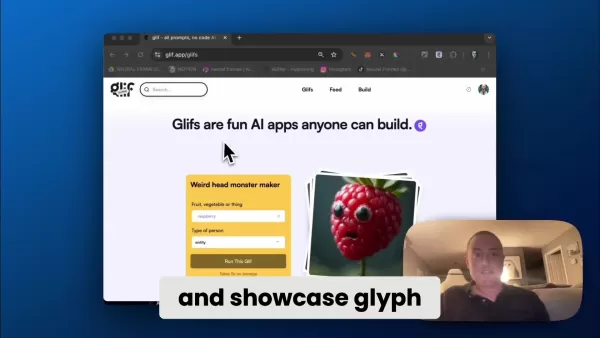
It utilizes AI workflows, enabling users to build custom AI apps, referred to as 'glyphs,' without programming expertise. The platform nurtures a community where creators share their apps, allowing others to use and adapt them, fostering a collaborative space for AI innovation. Glif.app simplifies complex AI development, making it approachable for a wider audience, including artists, educators, and enthusiasts. Its core mission is to democratize AI, ensuring anyone with an idea can realize it, irrespective of technical background.
The website provides various tools and templates, but its true strength lies in its flexibility and ease of use. Whether you aim to generate custom images, craft unique memes, or design personalized characters, Glif supplies the necessary tools. All this is achieved through an intuitive interface that hides technical complexities, letting users concentrate on creativity and vision.
The Power of No-Code AI
The no-code movement is transforming software development, and Glif.app leads this trend in the AI domain. By removing the need for traditional coding, the platform opens AI development to a broader audience. This democratization of AI offers several significant advantages:
- Increased Accessibility: People without technical skills can now build AI apps, encouraging innovation from diverse perspectives.
- Rapid Prototyping: No-code platforms allow for quick iteration and experimentation. Users can swiftly prototype ideas and test concepts without the time and resource investment of traditional coding.
- Enhanced Creativity: By eliminating technical hurdles, users can focus on the creative aspects of AI app development, leading to more inventive solutions.
- Cost-Effectiveness: No-code development can substantially lower costs, making AI accessible to small businesses and independent creators. Glif.app provides a platform for building powerful AI tools without significant expense.
Getting Started with Glif: A Step-by-Step Guide
Navigating the Glif Interface
The Glif interface is crafted to be intuitive and straightforward.
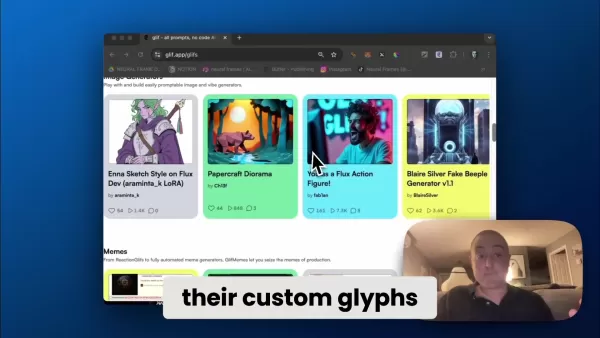
When you visit the site, you'll see a clean layout with easy access to primary features. Key areas include:
- Search Bar: Quickly locate existing glyphs and AI apps made by the community.
- Gifs: Browse a collection of AI apps created and shared by other users. This is an excellent source for inspiration and new ideas.
- Feed: Stay current with the latest activity and creations from the Glif community.
- Build: Access the AI App Builder to create your own custom glyphs. This is where you'll spend most of your development time.
To start creating your AI app, click the 'Build' tab. This leads to the development environment where you design your glyph. The 'Build' interface features a visual workflow editor, letting you connect different AI blocks to construct complex applications.
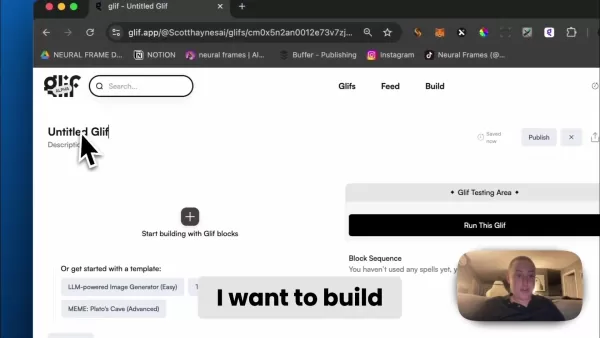
The Build section
- A field labeled 'Untitled Glif' for naming your creation.
- A 'Description' field. Describe your glif's purpose and what users will experience.
- Blocks that can be added, offering various AI-driven tasks to build your glif.
- A Gif Testing Area to trial your glif after creation.
This section is where you construct and evaluate your AI creation.
Building Your First AI App: A Skateboard Deck Designer Example
Let's walk through a practical example: creating a Skateboard Deck Designer. This app will let users input design preferences to generate a custom skateboard deck graphic using AI.
Step 1: Setting Up the Project
Click the 'Build' tab to enter the AI App Builder.
Name your Glif by selecting 'Untitled Glif'. For this example, use 'Skateboard Deck Creator'.
Provide a description.
Step 2: Adding a User Prompt
- To collect user input, add a 'Text Input' block. This lets users enter their design ideas.
- Label this block 'userprompt'.
- Change the default prompt from 'What ice cream flavor do you like?' to 'Describe your ideal skateboard design.'
Step 3: Enhancing the User Prompt
- Add a 'Text Generator (LLM)' block.
- Connect the userprompt block to the Text Generator block by clicking and dragging.
- Select your preferred model. Claude 3.5 is a common choice.
- Craft a prompt to improve the image generation: 'Generate an image of a skateboard deck from a top-down perspective. Ensure the USERPROMPT is a highly detailed graphic covering the entire deck. The background should contrast sharply with the deck to emphasize the design.'
Step 4: Generating the Image
- Add an 'Image Generator' block to your workflow. This block creates an image based on the refined prompt.
- Populate the field by clicking the plus button on the text generator. The AI will automatically use the enhanced prompt here.
Step 5: Testing and Publishing
- Test your AI app. Each run costs 4 credits, and you receive 20 free runs daily.
You've now created your glif! It can be shared with the community for others to use.
How to Use Glif
Running a Gif
Once a Gif is created and published, it's available for anyone to run and generate similar images with different prompts.
Using a Gif is straightforward:
- Find a Gif you wish to use.
- Enter a text prompt describing your desired image. The specifics will vary by Gif.
- Click the 'Run This Gif' button, and the AI model will handle the rest.
Sharing your Gif
Publishing your Gifs lets others use them, with proper attribution to you. Follow these steps:
- Locate the glif in your profile.
- Next to the name and description, click the Publish button.
- Other users can now discover and utilize your Gif. Enjoy!
Evaluating Glif: Weighing the Pros
and Cons
Pros
User-friendly no-code interface.
Community-oriented platform for sharing and collaboration.
Free daily credits for AI app generation.
Customizable AI models.
AI-assisted prompt refinement.
Cons
Functionality is limited compared to custom coding.
Reliance on the platform's predefined AI blocks.
The daily free credit allowance can be restrictive for heavy usage.
Core Features of Glif: Unleashing AI Potential
Key Features
Glif includes a set of features designed to streamline and enhance AI app development:
- No-Code Interface: Glif's visual workflow editor enables AI app creation without coding.
- AI Workflow Blocks: The platform offers pre-built AI blocks (text input, image generation, etc.) that can be linked to build sophisticated applications.
- Community Sharing: Glif promotes a community where users share their AI app creations (glyphs), encouraging collaboration.
- Customizable AI Models: Users can choose from various AI models to power their apps, customizing performance and output.
- Free Credits: Glif provides 20 free credits each day, allowing for cost-free experimentation.
- AI-Powered Prompt Enhancement: The platform uses AI to improve user prompts, resulting in higher-quality image generation.
Exploring the Diverse Use Cases of Glif
Practical Applications
Glif's adaptability suits a wide array of applications:
- Custom Image Generation: Produce unique images for social media, marketing, or personal use.
- Meme Creation: Design personalized memes with AI-generated content.
- Character Design: Develop distinctive characters for games, stories, or animations.
- Educational Tools: Create interactive educational resources using AI.
- Artistic Exploration: Experiment with AI to produce novel art forms and creative expressions.
Frequently Asked Questions About Glif
What is Glif?
Glif is a no-code AI app builder that enables anyone to create custom AI applications without programming. It uses AI workflows, allowing users to build and share their creations within a community.
How much does Glif cost?
Glif has a free tier providing 20 credits per day, sufficient to explore most functions. Paid upgrades are available for higher usage.
What kind of things can I make on Glif?
The possibilities are vast, limited only by your imagination! The Glif community has already demonstrated incredible creativity with meme generators, character creators, and more. If you can conceive it, you can likely build it.
Related Questions on No-Code AI App Development
What other platforms are available for no-code AI?
While Glif offers a distinctive approach, other platforms also support no-code AI app development. These include: Obviously.ai: An automated machine learning platform for business predictions. CreateML: Apple's framework for building custom machine learning models. Lobe: Microsoft's user-friendly tool for training AI models. Each platform has unique strengths for different use cases. Exploring multiple options is recommended to find your ideal fit.
Related article
 Anthropic launches Opus 5
Anthropic unveiled Opus 5 on Friday, the latest iteration of its flagship model. Although smaller than Fable 5, this version offers lower costs and fewer restrictions, making it the preferred choice for most applications.Notably, Opus 5 surpasses Fab
AI Hallucination Nearly Triggers US Military Operation
During the spring, U.S. officials made a startling discovery while military aircraft were already airborne: the intelligence guiding an armed strike against a Chinese vessel was entirely fabricated by an AI chatbot. The operation was called off at th
Nvidia's Les Karpas: Robots Waiting for a ChatGPT Moment at TechCrunch Disrupt 2026
ChatGPT’s November 2022 launch abruptly shifted AI from theoretical hype to everyday utility, fundamentally changing how we interact with large language models.Robotics has long been a subject of discussion and development, yet it lacks that singular
Related Special Topic Recommendations
Design & Art
Anthropic launches Opus 5
Anthropic unveiled Opus 5 on Friday, the latest iteration of its flagship model. Although smaller than Fable 5, this version offers lower costs and fewer restrictions, making it the preferred choice for most applications.Notably, Opus 5 surpasses Fab
AI Hallucination Nearly Triggers US Military Operation
During the spring, U.S. officials made a startling discovery while military aircraft were already airborne: the intelligence guiding an armed strike against a Chinese vessel was entirely fabricated by an AI chatbot. The operation was called off at th
Nvidia's Les Karpas: Robots Waiting for a ChatGPT Moment at TechCrunch Disrupt 2026
ChatGPT’s November 2022 launch abruptly shifted AI from theoretical hype to everyday utility, fundamentally changing how we interact with large language models.Robotics has long been a subject of discussion and development, yet it lacks that singular
Related Special Topic Recommendations
Design & Art
 Top AI Illustration Tools: Create Editorial Scenes and Cover Art Faster
2026 Latest Top-rated AI Illustration Tools: Our curated list features the best powerfully designed tools for creating stunning editorial scenes and eye-catching cover art quickly. Each option has gone through rigorous real-world tests, offering a free vs paid comparison to help you find the perfect match for your workflow. Try these must-try solutions today to unlock your AI edge and boost your creative productivity. Explore now at XIX.AI.
 10 tools
 xix.ai
Education and Learning
Top AI Tutors for Exam Prep: Practice Math, Science, and English
xix.ai
Education and Learning
Top AI Tutors for Exam Prep: Practice Math, Science, and English
2026 Latest Top-Rated Best AI Tutors for Exam Prep are here on XIX.AI! Our curated list features powerful game-changing tools that offer free vs paid comparison, real-world tests, and weekly updated rankings. They help boost your writing efficiency, simplify complex topic learning, and unlock your academic potential. Explore now to Discover your perfect exam prep tool and Start creating today to Unlock your AI edge!
10 tools
xix.ai
Finance
AI Budget Planning Tools for Personal Money Management
2026 Latest Best Top-Rated AI Budget Planning Tools for Personal Money Management are here on XIX.AI! This curated collection features powerful, game-changing solutions that help you conduct real-world tests, understand spending habits, and create personalized plans to boost productivity. Enjoy a free vs paid comparison along with detailed rankings. Must-try tools designed to simplify money management and unlock your AI edge. Explore now!
11 tools
xix.ai
Health & Wellness
AI Sleep Tracking Assistants: Improve Recovery with Better Bedtime Habits
2026 Latest Best Top-Rated AI Sleep Tracking Assistants curated for ultimate recovery. This fully updated weekly guide features powerful tools that deliver real-world tests, free vs paid comparison, and detailed rankings to help you find the must-try solution that boosts sleep quality and supports better bedtime habits. Explore now at XIX.AI to Unlock your AI edge.
10 tools
xix.ai
Data Analysis
AI SQL Copilots for Product and Revenue Analytics
2026 Latest Best Top-Rated AI SQL Copilots for Product and Revenue Analytics! XIX.AI has curated a powerful, game-changing collection of must-try tools that undergo real-world tests through weekly updated rankings. These tools help users boost productivity significantly by accelerating data analysis, streamlining complex queries, and generating accurate insights to drive smarter business decisions. Explore now to Discover your perfect tool for unlocking your AI edge!
14 tools
xix.ai
Education and Learning
Best AI Homework Helpers That Teach: Learn Concepts, Not Just Answers
2026 Latest Best Top-Rated AI Homework Helpers That Teach Core Concepts Not Just Answers Powerful Tools for Students Must-Try Curated List Weekly Updated Free vs Paid Comparison Real-World Tests Accurate Rankings to Help You Unlock Your Full Learning Potential Explore now to Discover your perfect tool for smarter studying.
10 tools
xix.ai

 Comments (1)
0/500
Comments (1)
0/500
![DonaldGonzález]()
Glifって、まったくコード書かずにAIアプリが作れるの?2025年はもうエンジニアじゃなくてもプロトタイプ作れる時代になるんだね。個人的に広告ツールを作ってみようかな。でも、無料プランの制限や将来的な料金上昇がちょっと心配…これって本当にノンプログラマー向け?🤔
Eager to build your own AI-powered applications without any coding? Glif.app provides a unique platform where users can design and share custom AI tools. This innovative website utilizes AI workflows, offering a user-friendly interface to create, personalize, and distribute your inventions. Discover how Glif enables you to craft unique AI apps and become part of a growing creator network.
Key Points
Glif.app enables anyone to build AI applications using intuitive, no-code workflows.
Users can tailor AI apps to meet their specific requirements.
The platform encourages a collaborative community for sharing AI app creations (known as glyphs).
Glif offers 20 complimentary credits each day for generating AI applications.
AI models are employed to refine user prompts, leading to superior image generation.
Glif's interface makes AI app development accessible to all skill levels.
Understanding Glif: AI App Creation Made Simple
What is Glif.app?
Glif.app is a no-code platform built to empower individuals to create their own AI applications.
It utilizes AI workflows, enabling users to build custom AI apps, referred to as 'glyphs,' without programming expertise. The platform nurtures a community where creators share their apps, allowing others to use and adapt them, fostering a collaborative space for AI innovation. Glif.app simplifies complex AI development, making it approachable for a wider audience, including artists, educators, and enthusiasts. Its core mission is to democratize AI, ensuring anyone with an idea can realize it, irrespective of technical background.
The website provides various tools and templates, but its true strength lies in its flexibility and ease of use. Whether you aim to generate custom images, craft unique memes, or design personalized characters, Glif supplies the necessary tools. All this is achieved through an intuitive interface that hides technical complexities, letting users concentrate on creativity and vision.
The Power of No-Code AI
The no-code movement is transforming software development, and Glif.app leads this trend in the AI domain. By removing the need for traditional coding, the platform opens AI development to a broader audience. This democratization of AI offers several significant advantages:
- Increased Accessibility: People without technical skills can now build AI apps, encouraging innovation from diverse perspectives.
- Rapid Prototyping: No-code platforms allow for quick iteration and experimentation. Users can swiftly prototype ideas and test concepts without the time and resource investment of traditional coding.
- Enhanced Creativity: By eliminating technical hurdles, users can focus on the creative aspects of AI app development, leading to more inventive solutions.
- Cost-Effectiveness: No-code development can substantially lower costs, making AI accessible to small businesses and independent creators. Glif.app provides a platform for building powerful AI tools without significant expense.
Getting Started with Glif: A Step-by-Step Guide
Navigating the Glif Interface
The Glif interface is crafted to be intuitive and straightforward.
When you visit the site, you'll see a clean layout with easy access to primary features. Key areas include:
- Search Bar: Quickly locate existing glyphs and AI apps made by the community.
- Gifs: Browse a collection of AI apps created and shared by other users. This is an excellent source for inspiration and new ideas.
- Feed: Stay current with the latest activity and creations from the Glif community.
- Build: Access the AI App Builder to create your own custom glyphs. This is where you'll spend most of your development time.
To start creating your AI app, click the 'Build' tab. This leads to the development environment where you design your glyph. The 'Build' interface features a visual workflow editor, letting you connect different AI blocks to construct complex applications.
The Build section
- A field labeled 'Untitled Glif' for naming your creation.
- A 'Description' field. Describe your glif's purpose and what users will experience.
- Blocks that can be added, offering various AI-driven tasks to build your glif.
- A Gif Testing Area to trial your glif after creation.
This section is where you construct and evaluate your AI creation.
Building Your First AI App: A Skateboard Deck Designer Example
Let's walk through a practical example: creating a Skateboard Deck Designer. This app will let users input design preferences to generate a custom skateboard deck graphic using AI.
Step 1: Setting Up the Project
Click the 'Build' tab to enter the AI App Builder.
Name your Glif by selecting 'Untitled Glif'. For this example, use 'Skateboard Deck Creator'.
Provide a description.
Step 2: Adding a User Prompt
- To collect user input, add a 'Text Input' block. This lets users enter their design ideas.
- Label this block 'userprompt'.
- Change the default prompt from 'What ice cream flavor do you like?' to 'Describe your ideal skateboard design.'
Step 3: Enhancing the User Prompt
- Add a 'Text Generator (LLM)' block.
- Connect the userprompt block to the Text Generator block by clicking and dragging.
- Select your preferred model. Claude 3.5 is a common choice.
- Craft a prompt to improve the image generation: 'Generate an image of a skateboard deck from a top-down perspective. Ensure the USERPROMPT is a highly detailed graphic covering the entire deck. The background should contrast sharply with the deck to emphasize the design.'
Step 4: Generating the Image
- Add an 'Image Generator' block to your workflow. This block creates an image based on the refined prompt.
- Populate the field by clicking the plus button on the text generator. The AI will automatically use the enhanced prompt here.
Step 5: Testing and Publishing
- Test your AI app. Each run costs 4 credits, and you receive 20 free runs daily.
You've now created your glif! It can be shared with the community for others to use.
How to Use Glif
Running a Gif
Once a Gif is created and published, it's available for anyone to run and generate similar images with different prompts.
Using a Gif is straightforward:
- Find a Gif you wish to use.
- Enter a text prompt describing your desired image. The specifics will vary by Gif.
- Click the 'Run This Gif' button, and the AI model will handle the rest.
Sharing your Gif
Publishing your Gifs lets others use them, with proper attribution to you. Follow these steps:
- Locate the glif in your profile.
- Next to the name and description, click the Publish button.
- Other users can now discover and utilize your Gif. Enjoy!
Evaluating Glif: Weighing the Pros
and Cons
Pros
User-friendly no-code interface.
Community-oriented platform for sharing and collaboration.
Free daily credits for AI app generation.
Customizable AI models.
AI-assisted prompt refinement.
Cons
Functionality is limited compared to custom coding.
Reliance on the platform's predefined AI blocks.
The daily free credit allowance can be restrictive for heavy usage.
Core Features of Glif: Unleashing AI Potential
Key Features
Glif includes a set of features designed to streamline and enhance AI app development:
- No-Code Interface: Glif's visual workflow editor enables AI app creation without coding.
- AI Workflow Blocks: The platform offers pre-built AI blocks (text input, image generation, etc.) that can be linked to build sophisticated applications.
- Community Sharing: Glif promotes a community where users share their AI app creations (glyphs), encouraging collaboration.
- Customizable AI Models: Users can choose from various AI models to power their apps, customizing performance and output.
- Free Credits: Glif provides 20 free credits each day, allowing for cost-free experimentation.
- AI-Powered Prompt Enhancement: The platform uses AI to improve user prompts, resulting in higher-quality image generation.
Exploring the Diverse Use Cases of Glif
Practical Applications
Glif's adaptability suits a wide array of applications:
- Custom Image Generation: Produce unique images for social media, marketing, or personal use.
- Meme Creation: Design personalized memes with AI-generated content.
- Character Design: Develop distinctive characters for games, stories, or animations.
- Educational Tools: Create interactive educational resources using AI.
- Artistic Exploration: Experiment with AI to produce novel art forms and creative expressions.
Frequently Asked Questions About Glif
What is Glif?
Glif is a no-code AI app builder that enables anyone to create custom AI applications without programming. It uses AI workflows, allowing users to build and share their creations within a community.
How much does Glif cost?
Glif has a free tier providing 20 credits per day, sufficient to explore most functions. Paid upgrades are available for higher usage.
What kind of things can I make on Glif?
The possibilities are vast, limited only by your imagination! The Glif community has already demonstrated incredible creativity with meme generators, character creators, and more. If you can conceive it, you can likely build it.
Related Questions on No-Code AI App Development
What other platforms are available for no-code AI?
While Glif offers a distinctive approach, other platforms also support no-code AI app development. These include: Obviously.ai: An automated machine learning platform for business predictions. CreateML: Apple's framework for building custom machine learning models. Lobe: Microsoft's user-friendly tool for training AI models. Each platform has unique strengths for different use cases. Exploring multiple options is recommended to find your ideal fit.








 Anthropic launches Opus 5
Anthropic unveiled Opus 5 on Friday, the latest iteration of its flagship model. Although smaller than Fable 5, this version offers lower costs and fewer restrictions, making it the preferred choice for most applications.Notably, Opus 5 surpasses Fab
Anthropic launches Opus 5
Anthropic unveiled Opus 5 on Friday, the latest iteration of its flagship model. Although smaller than Fable 5, this version offers lower costs and fewer restrictions, making it the preferred choice for most applications.Notably, Opus 5 surpasses Fab
 AI Hallucination Nearly Triggers US Military Operation
During the spring, U.S. officials made a startling discovery while military aircraft were already airborne: the intelligence guiding an armed strike against a Chinese vessel was entirely fabricated by an AI chatbot. The operation was called off at th
AI Hallucination Nearly Triggers US Military Operation
During the spring, U.S. officials made a startling discovery while military aircraft were already airborne: the intelligence guiding an armed strike against a Chinese vessel was entirely fabricated by an AI chatbot. The operation was called off at th
 Nvidia's Les Karpas: Robots Waiting for a ChatGPT Moment at TechCrunch Disrupt 2026
ChatGPT’s November 2022 launch abruptly shifted AI from theoretical hype to everyday utility, fundamentally changing how we interact with large language models.Robotics has long been a subject of discussion and development, yet it lacks that singular
Nvidia's Les Karpas: Robots Waiting for a ChatGPT Moment at TechCrunch Disrupt 2026
ChatGPT’s November 2022 launch abruptly shifted AI from theoretical hype to everyday utility, fundamentally changing how we interact with large language models.Robotics has long been a subject of discussion and development, yet it lacks that singular

2026 Latest Top-rated AI Illustration Tools: Our curated list features the best powerfully designed tools for creating stunning editorial scenes and eye-catching cover art quickly. Each option has gone through rigorous real-world tests, offering a free vs paid comparison to help you find the perfect match for your workflow. Try these must-try solutions today to unlock your AI edge and boost your creative productivity. Explore now at XIX.AI.
10 tools
xix.ai

2026 Latest Top-Rated Best AI Tutors for Exam Prep are here on XIX.AI! Our curated list features powerful game-changing tools that offer free vs paid comparison, real-world tests, and weekly updated rankings. They help boost your writing efficiency, simplify complex topic learning, and unlock your academic potential. Explore now to Discover your perfect exam prep tool and Start creating today to Unlock your AI edge!
10 tools
xix.ai

2026 Latest Best Top-Rated AI Budget Planning Tools for Personal Money Management are here on XIX.AI! This curated collection features powerful, game-changing solutions that help you conduct real-world tests, understand spending habits, and create personalized plans to boost productivity. Enjoy a free vs paid comparison along with detailed rankings. Must-try tools designed to simplify money management and unlock your AI edge. Explore now!
11 tools
xix.ai

2026 Latest Best Top-Rated AI Sleep Tracking Assistants curated for ultimate recovery. This fully updated weekly guide features powerful tools that deliver real-world tests, free vs paid comparison, and detailed rankings to help you find the must-try solution that boosts sleep quality and supports better bedtime habits. Explore now at XIX.AI to Unlock your AI edge.
10 tools
xix.ai

2026 Latest Best Top-Rated AI SQL Copilots for Product and Revenue Analytics! XIX.AI has curated a powerful, game-changing collection of must-try tools that undergo real-world tests through weekly updated rankings. These tools help users boost productivity significantly by accelerating data analysis, streamlining complex queries, and generating accurate insights to drive smarter business decisions. Explore now to Discover your perfect tool for unlocking your AI edge!
14 tools
xix.ai

2026 Latest Best Top-Rated AI Homework Helpers That Teach Core Concepts Not Just Answers Powerful Tools for Students Must-Try Curated List Weekly Updated Free vs Paid Comparison Real-World Tests Accurate Rankings to Help You Unlock Your Full Learning Potential Explore now to Discover your perfect tool for smarter studying.
10 tools
xix.ai

Glifって、まったくコード書かずにAIアプリが作れるの?2025年はもうエンジニアじゃなくてもプロトタイプ作れる時代になるんだね。個人的に広告ツールを作ってみようかな。でも、無料プランの制限や将来的な料金上昇がちょっと心配…これって本当にノンプログラマー向け?🤔












