Home
HomeWhat is GitHub Spark AI? A 2025 guide for AI-driven development.
In today's competitive software development landscape, maximizing efficiency and speed is essential. Learn how to harness GitHub Spark AI and Copilot to accelerate your web application development. This tutorial provides a practical walkthrough for constructing, testing, and deploying applications using CI/CD, all managed by intelligent Copilot agents.
Key Points
Develop web applications with GitHub Spark AI, Microsoft's innovative no-code development platform.
Effortlessly deploy your applications directly through GitHub.
Establish automated CI/CD pipelines with integrated testing using GitHub Copilot.
Utilize AI-powered pull request analysis to maintain high code standards.
Combine all elements into a cohesive and streamlined development workflow.
Unlocking the Power of GitHub Spark AI
What is GitHub Spark AI?
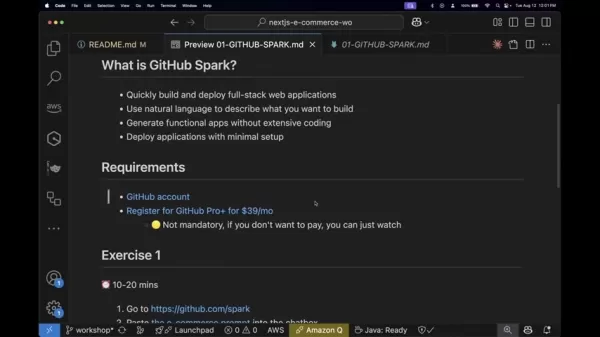
GitHub Spark AI introduces a transformative method for building software, serving as a premier no-code solution from Microsoft. It enables developers of all skill levels to rapidly create and launch full-stack web applications.

The platform's strength is its natural language interface, which lets you describe your application's requirements in everyday language. This advanced understanding dramatically cuts down on manual coding, making development accessible to those with less technical background.
Key Features of GitHub Spark AI:
- Rapid Development & Deployment: Build and launch full-stack applications quickly.
- Natural Language Interface: Define application features using simple descriptions.
- Functional App Generation: Produce working applications without deep coding knowledge.
- Minimal Setup Deployment: Launch your apps with straightforward configuration.
Technologies You Will Master
This comprehensive guide provides practical experience with key technologies that are redefining modern software development:
- GitHub Spark AI: Microsoft's powerful no-code application builder.
- GitHub Actions: Automate and customize development workflows within your repository.
- VS Code with Codespaces: Code in a pre-configured, cloud-based environment via your browser.
- GitHub Copilot: Your AI coding assistant for suggestions, completions, and error detection.
- Playwright: Conduct reliable end-to-end testing for contemporary web applications.
- Copilot Coding Agent: Enhance your coding capabilities with AI-driven support.
Why Embrace AI-Driven Development?
Integrating AI into the software development lifecycle is now a practical reality rather than a distant possibility. Adopting AI-powered methods can substantially increase development speed, minimize manual work, and elevate code quality. This workshop shows you how to:
- Accelerate Development: Use AI to generate code, automate tests, and optimize deployment.
- Improve Code Quality: Apply AI recommendations and reviews to spot issues and ensure consistency.
- Boost Developer Productivity: Automate routine tasks, allowing focus on complex problem-solving.
- AI-Driven Development and Automated Testing
The core objective is integrating AI-powered automated testing, CI/CD, and development methods into your日常工作流. Educating teams on automated testing standards and AI-enhanced development increases efficiency and improves workplace performance.
Orchestrating the Development Symphony: A Modern Software Workflow
Forge Efficiency: A Single Software Development Workflow
Adopting these advanced tools enables teams to establish a cohesive development process. This integrated approach ensures all technologies work together seamlessly, dramatically improving team productivity. You'll be better equipped to deliver high-quality software faster and more accurately, a crucial advantage in today's agile environment.
Benefits of an Integrated Workflow:
- Increased operational efficiency
- Superior software quality
- Reduced development timelines
Quick Start: Get Hands-On with GitHub Spark AI
Initiating the Quick Start Process
Getting started with GitHub Spark AI is simple. A few preparatory steps will prepare you for hands-on experimentation during our session. The process also includes guidance for working with Amazon and Java components:
- Fork the Repository: Create your own copy of the project repository on GitHub to freely experiment.
- Open in Codespaces: Launch the project in GitHub's cloud-based Codespaces environment to avoid local setup.
- Navigate to Current Workshop: Use the terminal to access the correct directory with:
cd workshop/current. - Follow Setup Instructions: Consult the workshop's README for detailed configuration steps and dependencies.
GitHub Spark AI Pro+ Plan
Plan Details and Pricing
A GitHub account is required to begin, along with a GitHub Pro+ subscription for GitHub Spark access. The Pro+ plan includes GitHub Copilot and provides up to 375 Spark messages monthly, with options to purchase more. It supports up to 10 concurrent app-building sessions, unlimited applications, and unlimited manual edits.
The GitHub Spark AI Pro+ plan offers two billing cycles:
Monthly: $39.00 USD per monthAnnually: $390.00 USD Per Year (saving $78.00 annually)
Visit GitHub.com for complete details.
The Power and Pitfalls of AI in Development: Weighing the Advantages and Disadvantages
Pros
Faster development cycles and greater agility.
Optimized workflow processes.
Higher code quality and consistency.
Smart automation and developer support.
Cons
Risk of over-dependence and reduced skill development.
Data security and privacy considerations.
Potential for algorithmic bias and ethical questions.
Subscription costs and vendor lock-in concerns.
Frequently Asked Questions
What is GitHub Spark AI?
GitHub Spark AI is Microsoft's no-code platform for creating and deploying full-stack web applications using natural language descriptions.
What are the key technologies used in this process?
Core technologies are GitHub Spark AI, GitHub Actions, VS Code with Codespaces, GitHub Copilot, Playwright, and the Copilot Coding Agent.
Why should I use AI for software development?
AI accelerates development timelines, enhances code quality, increases developer output, and handles repetitive tasks automatically.
Related Questions
How can I start using GitHub Spark AI?
Begin by creating an account on GitHub.com. Then, subscribe to the GitHub Pro+ plan for $39 monthly. Once registered, visit GitHub.com/spark to access the chat interface for describing your application. The platform will process your description to build the app. The basic steps are: Fork the repository, open it in Codespaces or clone it locally, navigate to the workshop directory, and follow the README setup guide. With GitHub Spark, you can swiftly build and deploy full-stack applications using natural language, generating functional apps with minimal coding and setup.
What if I run into errors?
While setting up the e-commerce application, you may encounter errors. This exercise helps you practice using GitHub Copilot for troubleshooting. To resolve issues: Run the application to identify errors. Open GitHub Copilot chat (Ctrl+Shift+I) and ensure it's in Agent mode for command execution. Select the optimal AI model, then request "Fix this error" and provide the error message for a suggested solution.
Related article
 Meituan Sets Three-Year AI Roadmap to Drive Business Intelligence
With the rapid evolution of internet technology, AI has become a key focus for major companies. Meituan, a leading local life services platform in China, has been investing in AI since 2023 and by 2026 had established three core directions that demon
Canva to go public next year, transitioning to AI-driven design ecosystem
Canva, the design software unicorn, plans to officially launch its IPO process next year, a move that marks the company's entry into a critical capital harvest phase as it pursues an AI transformation.According to The Information, Canva is currently
Hightouch hits $100M ARR with AI-powered marketing tools
In the past, marketers depended on designers and other creative specialists to produce images and videos for personalized online advertising campaigns.In late 2024, seven-year-old startup Hightouch introduced an AI-driven service that enables marketi
Related Special Topic Recommendations
Education and Learning
Meituan Sets Three-Year AI Roadmap to Drive Business Intelligence
With the rapid evolution of internet technology, AI has become a key focus for major companies. Meituan, a leading local life services platform in China, has been investing in AI since 2023 and by 2026 had established three core directions that demon
Canva to go public next year, transitioning to AI-driven design ecosystem
Canva, the design software unicorn, plans to officially launch its IPO process next year, a move that marks the company's entry into a critical capital harvest phase as it pursues an AI transformation.According to The Information, Canva is currently
Hightouch hits $100M ARR with AI-powered marketing tools
In the past, marketers depended on designers and other creative specialists to produce images and videos for personalized online advertising campaigns.In late 2024, seven-year-old startup Hightouch introduced an AI-driven service that enables marketi
Related Special Topic Recommendations
Education and Learning
 Best AI Data Science Mentors: Master SQL, Pandas & Machine Learning Workflows
Discover the 2026 best AI data science mentors to master SQL, Pandas & ML workflows. Explore our top-rated, curated selection at XIX.AI for powerful, game-changing guidance. Compare free vs paid options with real-world insights. Unlock your data science mastery today.
 10 tools
 xix.ai
chatbot
Best AI Flirting & Conversation Trainers: Improve Social Charisma and Confidence in Real-Time
xix.ai
chatbot
Best AI Flirting & Conversation Trainers: Improve Social Charisma and Confidence in Real-Time
Discover the 2026 best AI flirting and conversation trainers on XIX.AI. Our curated, top-rated selection helps you build social charisma and confidence in real-time. Explore must-try, game-changing tools with free vs paid comparisons and weekly updated rankings. Unlock your social edge today.
10 tools
xix.ai
code
Best AI Tools for Automated Unit Testing: Generate Jest, PyTest & JUnit Test Cases in One Click
Discover the 2026 latest top-rated AI tools for automated unit testing. Our curated selection features powerful, game-changing solutions to generate Jest, PyTest & JUnit test cases instantly. Compare free vs paid options with real-world tests and weekly updated rankings on XIX.AI. Unlock your AI edge and boost development productivity today.
10 tools
xix.ai
Data Analysis
Best AI Data Visualization Tools: Auto-Generate Interactive BI Dashboards from Raw Files
Discover the 2026 best AI data visualization tools at XIX.AI. Our curated, top-rated selection helps you auto-generate powerful, interactive BI dashboards from raw files instantly. Compare free vs paid options with real-world tests and weekly updated rankings. Unlock your data's potential today.
10 tools
xix.ai
Social Media
AI Branding Kits for Social Media: Maintain Consistent Brand Visuals Across All Channels
Discover the 2026 best AI branding kits for social media. XIX.AI's curated list features top-rated, game-changing tools to maintain perfectly consistent brand visuals across all channels. Compare free vs paid options with real-world tests. Unlock your brand's visual edge today.
10 tools
xix.ai
chatbot
Best AI Girlfriend Apps & AI Companion Tools for Roleplay (2026 Guide)
Discover the 2026 latest top-rated AI companion tools for immersive roleplay and connection. XIX.AI's curated guide features powerful, game-changing apps with weekly updated rankings, free vs. paid comparisons, and real-world tests. Find your perfect match and unlock meaningful digital companionship today.
10 tools
xix.ai

 Comments (0)
0/500
Comments (0)
0/500
In today's competitive software development landscape, maximizing efficiency and speed is essential. Learn how to harness GitHub Spark AI and Copilot to accelerate your web application development. This tutorial provides a practical walkthrough for constructing, testing, and deploying applications using CI/CD, all managed by intelligent Copilot agents.
Key Points
Develop web applications with GitHub Spark AI, Microsoft's innovative no-code development platform.
Effortlessly deploy your applications directly through GitHub.
Establish automated CI/CD pipelines with integrated testing using GitHub Copilot.
Utilize AI-powered pull request analysis to maintain high code standards.
Combine all elements into a cohesive and streamlined development workflow.
Unlocking the Power of GitHub Spark AI
What is GitHub Spark AI?
GitHub Spark AI introduces a transformative method for building software, serving as a premier no-code solution from Microsoft. It enables developers of all skill levels to rapidly create and launch full-stack web applications.
The platform's strength is its natural language interface, which lets you describe your application's requirements in everyday language. This advanced understanding dramatically cuts down on manual coding, making development accessible to those with less technical background.
Key Features of GitHub Spark AI:
- Rapid Development & Deployment: Build and launch full-stack applications quickly.
- Natural Language Interface: Define application features using simple descriptions.
- Functional App Generation: Produce working applications without deep coding knowledge.
- Minimal Setup Deployment: Launch your apps with straightforward configuration.
Technologies You Will Master
This comprehensive guide provides practical experience with key technologies that are redefining modern software development:
- GitHub Spark AI: Microsoft's powerful no-code application builder.
- GitHub Actions: Automate and customize development workflows within your repository.
- VS Code with Codespaces: Code in a pre-configured, cloud-based environment via your browser.
- GitHub Copilot: Your AI coding assistant for suggestions, completions, and error detection.
- Playwright: Conduct reliable end-to-end testing for contemporary web applications.
- Copilot Coding Agent: Enhance your coding capabilities with AI-driven support.
Why Embrace AI-Driven Development?
Integrating AI into the software development lifecycle is now a practical reality rather than a distant possibility. Adopting AI-powered methods can substantially increase development speed, minimize manual work, and elevate code quality. This workshop shows you how to:
- Accelerate Development: Use AI to generate code, automate tests, and optimize deployment.
- Improve Code Quality: Apply AI recommendations and reviews to spot issues and ensure consistency.
- Boost Developer Productivity: Automate routine tasks, allowing focus on complex problem-solving.
- AI-Driven Development and Automated Testing
The core objective is integrating AI-powered automated testing, CI/CD, and development methods into your日常工作流. Educating teams on automated testing standards and AI-enhanced development increases efficiency and improves workplace performance.
Orchestrating the Development Symphony: A Modern Software Workflow
Forge Efficiency: A Single Software Development Workflow
Adopting these advanced tools enables teams to establish a cohesive development process. This integrated approach ensures all technologies work together seamlessly, dramatically improving team productivity. You'll be better equipped to deliver high-quality software faster and more accurately, a crucial advantage in today's agile environment.
Benefits of an Integrated Workflow:
- Increased operational efficiency
- Superior software quality
- Reduced development timelines
Quick Start: Get Hands-On with GitHub Spark AI
Initiating the Quick Start Process
Getting started with GitHub Spark AI is simple. A few preparatory steps will prepare you for hands-on experimentation during our session. The process also includes guidance for working with Amazon and Java components:
- Fork the Repository: Create your own copy of the project repository on GitHub to freely experiment.
- Open in Codespaces: Launch the project in GitHub's cloud-based Codespaces environment to avoid local setup.
- Navigate to Current Workshop: Use the terminal to access the correct directory with:
cd workshop/current. - Follow Setup Instructions: Consult the workshop's README for detailed configuration steps and dependencies.
GitHub Spark AI Pro+ Plan
Plan Details and Pricing
A GitHub account is required to begin, along with a GitHub Pro+ subscription for GitHub Spark access. The Pro+ plan includes GitHub Copilot and provides up to 375 Spark messages monthly, with options to purchase more. It supports up to 10 concurrent app-building sessions, unlimited applications, and unlimited manual edits.
The GitHub Spark AI Pro+ plan offers two billing cycles:
Monthly: $39.00 USD per monthAnnually: $390.00 USD Per Year (saving $78.00 annually)
Visit GitHub.com for complete details.
The Power and Pitfalls of AI in Development: Weighing the Advantages and Disadvantages
Pros
Faster development cycles and greater agility.
Optimized workflow processes.
Higher code quality and consistency.
Smart automation and developer support.
Cons
Risk of over-dependence and reduced skill development.
Data security and privacy considerations.
Potential for algorithmic bias and ethical questions.
Subscription costs and vendor lock-in concerns.
Frequently Asked Questions
What is GitHub Spark AI?
GitHub Spark AI is Microsoft's no-code platform for creating and deploying full-stack web applications using natural language descriptions.
What are the key technologies used in this process?
Core technologies are GitHub Spark AI, GitHub Actions, VS Code with Codespaces, GitHub Copilot, Playwright, and the Copilot Coding Agent.
Why should I use AI for software development?
AI accelerates development timelines, enhances code quality, increases developer output, and handles repetitive tasks automatically.
Related Questions
How can I start using GitHub Spark AI?
Begin by creating an account on GitHub.com. Then, subscribe to the GitHub Pro+ plan for $39 monthly. Once registered, visit GitHub.com/spark to access the chat interface for describing your application. The platform will process your description to build the app. The basic steps are: Fork the repository, open it in Codespaces or clone it locally, navigate to the workshop directory, and follow the README setup guide. With GitHub Spark, you can swiftly build and deploy full-stack applications using natural language, generating functional apps with minimal coding and setup.
What if I run into errors?
While setting up the e-commerce application, you may encounter errors. This exercise helps you practice using GitHub Copilot for troubleshooting. To resolve issues: Run the application to identify errors. Open GitHub Copilot chat (Ctrl+Shift+I) and ensure it's in Agent mode for command execution. Select the optimal AI model, then request "Fix this error" and provide the error message for a suggested solution.








 Meituan Sets Three-Year AI Roadmap to Drive Business Intelligence
With the rapid evolution of internet technology, AI has become a key focus for major companies. Meituan, a leading local life services platform in China, has been investing in AI since 2023 and by 2026 had established three core directions that demon
Meituan Sets Three-Year AI Roadmap to Drive Business Intelligence
With the rapid evolution of internet technology, AI has become a key focus for major companies. Meituan, a leading local life services platform in China, has been investing in AI since 2023 and by 2026 had established three core directions that demon
 Canva to go public next year, transitioning to AI-driven design ecosystem
Canva, the design software unicorn, plans to officially launch its IPO process next year, a move that marks the company's entry into a critical capital harvest phase as it pursues an AI transformation.According to The Information, Canva is currently
Canva to go public next year, transitioning to AI-driven design ecosystem
Canva, the design software unicorn, plans to officially launch its IPO process next year, a move that marks the company's entry into a critical capital harvest phase as it pursues an AI transformation.According to The Information, Canva is currently
 Hightouch hits $100M ARR with AI-powered marketing tools
In the past, marketers depended on designers and other creative specialists to produce images and videos for personalized online advertising campaigns.In late 2024, seven-year-old startup Hightouch introduced an AI-driven service that enables marketi
Hightouch hits $100M ARR with AI-powered marketing tools
In the past, marketers depended on designers and other creative specialists to produce images and videos for personalized online advertising campaigns.In late 2024, seven-year-old startup Hightouch introduced an AI-driven service that enables marketi

Discover the 2026 best AI data science mentors to master SQL, Pandas & ML workflows. Explore our top-rated, curated selection at XIX.AI for powerful, game-changing guidance. Compare free vs paid options with real-world insights. Unlock your data science mastery today.
10 tools
xix.ai

Discover the 2026 best AI flirting and conversation trainers on XIX.AI. Our curated, top-rated selection helps you build social charisma and confidence in real-time. Explore must-try, game-changing tools with free vs paid comparisons and weekly updated rankings. Unlock your social edge today.
10 tools
xix.ai

Discover the 2026 latest top-rated AI tools for automated unit testing. Our curated selection features powerful, game-changing solutions to generate Jest, PyTest & JUnit test cases instantly. Compare free vs paid options with real-world tests and weekly updated rankings on XIX.AI. Unlock your AI edge and boost development productivity today.
10 tools
xix.ai

Discover the 2026 best AI data visualization tools at XIX.AI. Our curated, top-rated selection helps you auto-generate powerful, interactive BI dashboards from raw files instantly. Compare free vs paid options with real-world tests and weekly updated rankings. Unlock your data's potential today.
10 tools
xix.ai

Discover the 2026 best AI branding kits for social media. XIX.AI's curated list features top-rated, game-changing tools to maintain perfectly consistent brand visuals across all channels. Compare free vs paid options with real-world tests. Unlock your brand's visual edge today.
10 tools
xix.ai

Discover the 2026 latest top-rated AI companion tools for immersive roleplay and connection. XIX.AI's curated guide features powerful, game-changing apps with weekly updated rankings, free vs. paid comparisons, and real-world tests. Find your perfect match and unlock meaningful digital companionship today.
10 tools
xix.ai