


 Home
HomeHow to generate studio-grade music with AI? 2026 ElevenLabs tutorial guide.
Imagine finding the perfect soundtrack for your next video, film, or game just by typing a description. That's the power of ElevenLabs' AI music generation. This groundbreaking technology lets you produce studio-quality music in any genre using simple text prompts. Whether you're a content creator, developer, or global brand, ElevenLabs gives you complete creative control over your audio, making professional music creation accessible and straightforward.
Key Points
ElevenLabs represents a major leap in AI music generation, enabling users to create studio-grade music from text descriptions.
Users can produce music for videos, films, games, and podcasts across numerous genres.
The AI model is developed in collaboration with artists, labels, and publishers, ensuring rights holders are protected.
The platform allows users to tailor their music by adjusting section lengths, incorporating or excluding specific styles, and adding lyrics or voiceovers.
ElevenLabs provides options to download music as MP3 files or create custom audio visualizer videos for social media.
Users can begin with a free plan to explore the capabilities of AI music generation.
Unveiling ElevenLabs' AI Music Generator
The Power of AI in Music Creation
The music creation landscape is transforming rapidly through artificial intelligence integration. Traditionally, composing music required extensive knowledge of music theory, instrument proficiency, and significant time investment. Now, platforms like ElevenLabs are democratizing this process, making it accessible to people with varying levels of musical experience.
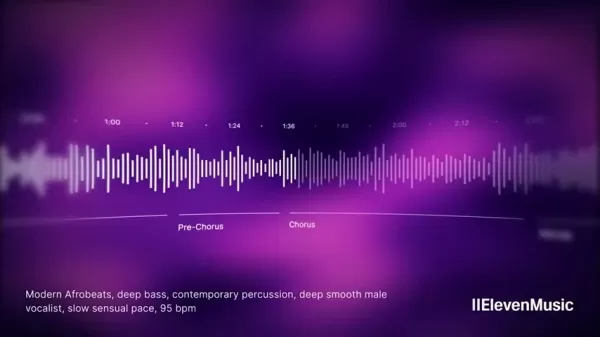
By leveraging advanced AI algorithms, users can convert simple text descriptions into fully realized musical compositions.
This technology creates new opportunities for content creators, filmmakers, game developers, and podcasters who need high-quality, royalty-free music but lack the resources or expertise to produce it themselves. The ability to generate studio-grade music with just a few words revolutionizes creative workflows, empowering individuals to bring their visions to life with the perfect audio backdrop.
Imagine creating an intense orchestral build for a thriller trailer or an upbeat electronic track for a tutorial video—all without touching an instrument. This is the reality that AI music generators like ElevenLabs make possible. By simply describing the desired mood, genre, and instrumentation, users can create custom soundtracks that perfectly complement their content.
How ElevenLabs' AI Music Generator Works
The ElevenLabs AI Music Generator operates using a sophisticated AI model trained on an extensive dataset of musical compositions. This enables the AI to understand relationships between words and musical elements, allowing it to translate text prompts into coherent and engaging musical pieces.
The process is remarkably straightforward:
Describe Your Song: Start by typing a description of the music you want to create in the prompt box. Be as specific as possible, including details about genre, mood, instrumentation, and other relevant characteristics.
Customize Your Preferences: Select your preferred number of variations, duration, and other parameters to fine-tune the music generation process.
Generate Your Music: Click the "Generate" button and let the AI work its magic. Within seconds, ElevenLabs will create a unique musical composition based on your prompt.
Customize and Refine: Once the music is generated, you can further customize it by adjusting section lengths, including or excluding styles, and adding lyrics or voiceovers.
Download and Share: When satisfied with the results, download the music as an MP3 file or create a custom audio visualizer video for social media sharing. The intuitive interface and powerful AI algorithms make the entire process seamless and efficient, even for users without musical experience.
Crafting the Perfect Prompt: Tips and Tricks
The quality of music generated by ElevenLabs largely depends on your prompt quality. For optimal results, consider these tips:
Be Specific: The more detailed you are, the better the AI understands your vision. Include information about genre, mood, tempo, instrumentation, and other relevant characteristics.
Use Descriptive Language: Use vivid and descriptive language to paint a clear picture of your desired music. Instead of "sad music," try "melancholic piano piece with a haunting melody."
Experiment with Styles: Explore different styles and combinations to discover unique and unexpected results. The platform lets you include or exclude specific styles, giving you precise control over the music generation process.
Iterate and Refine: Don't hesitate to experiment with different prompts and settings to achieve your perfect sound. The platform's customization options allow you to fine-tune the music to your exact specifications.
For example, instead of simply typing "Background music," a more effective prompt might be: "Upbeat electronic music for an AI tutorial video. No lyrics. Minimal texture to avoid distracting from voiceover."
This provides the AI with clear instructions, resulting in a more tailored output.
ElevenLabs AI Music Generator: Creative Control & Customization
Fine-Tuning Your AI-Generated Music
Once ElevenLabs generates your music, the real customization begins. You're not limited to the initial output; the platform provides granular control to shape the sound to your exact vision.
Timeline Editing: Adjust section lengths directly on the timeline. Shorten a tension-building segment for quicker impact or extend the climax for more dramatic effect. Remove sections entirely to create a more streamlined composition.
Style Tagging: Refine the overall sound by adding or removing style tags. Want to exclude acoustic elements from your cinematic piece? Done. Looking to inject pop sensibilities? Simply add the tag.
Prompt Box Control: Add layers of specificity by incorporating voiceovers or specific trailer narration. You have the freedom to refine your sound to meet your specific requirements.
Examples of use
Here are several examples demonstrating how you can create specific sounds:
Prompt Expected Result 'Upbeat African music'Danceable, energetic music'Relaxing meditation music'Music to calm and focus you'90s rock music'Music that resembles 90s rock'Tense background music for a thriller movie'Tense, scary music for a movie'Romantic piano music'Music to enjoy your evening with someone'Classic Japanese folk music'Music resembling traditional Japanese music'Video game music'Music resembling traditional Japanese musicA Step-by-Step Guide to Using ElevenLabs' AI Music Generator
Step 1: Describe Your Musical Vision
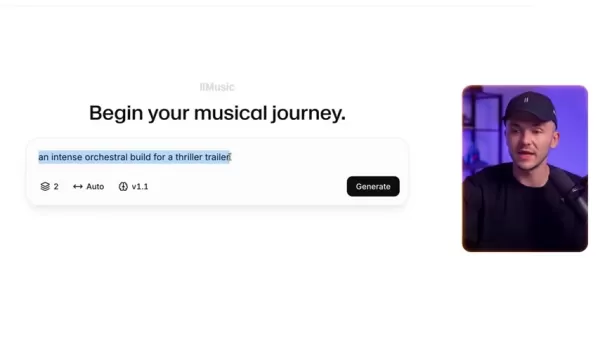
The journey begins with a simple text prompt. In the "Describe your song..."
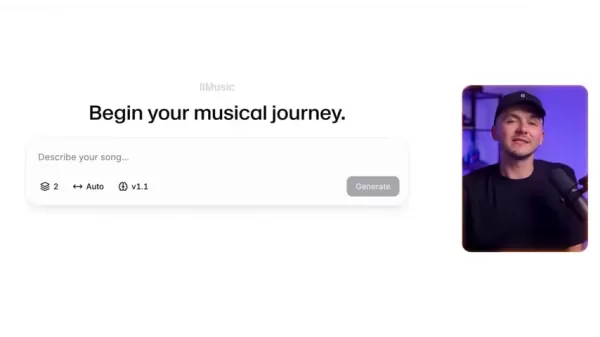
field, articulate the kind of music you envision. The clearer you are, the better the AI understands your needs.
For example, if you're creating a trailer for a thriller movie, an appropriate prompt might be: "An intense orchestral build for a thriller trailer."
Step 2: Customize Generation Settings
After crafting your prompt, customize the music generation settings to further refine the output.
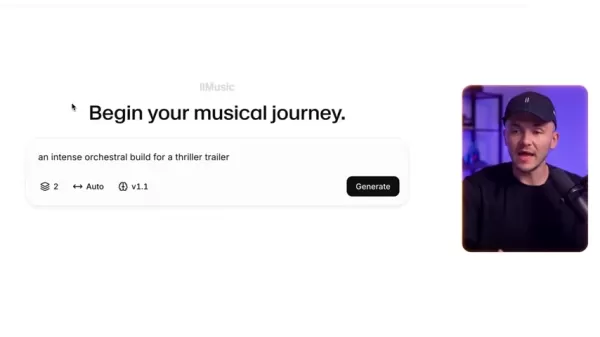
Number of Variants: Choose how many variations you want the AI to generate based on your prompt. This lets you explore different interpretations of your idea and select the best fit.
Duration: Specify your desired track length. Choose from predefined options like 30 seconds, 1 minute, 2 minutes, 3 minutes, or 4 minutes, or select "Auto" to let the AI determine the appropriate length.
For instance, if your trailer is 30 seconds long, select "30s" to generate a track that matches your video duration perfectly.
Step 3: Generate and Preview Your Music
With your prompt and settings configured, click the "Generate" button
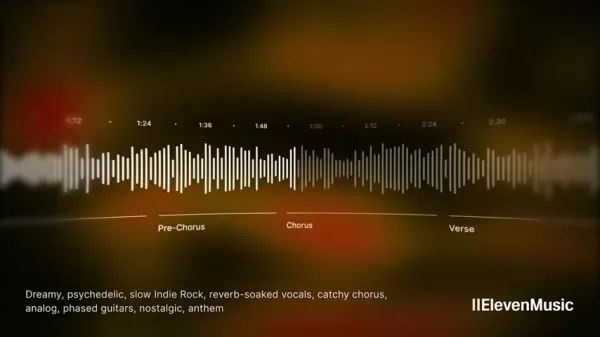
and let the AI work its magic. Within seconds, ElevenLabs will create a unique musical composition based on your input.
Once the song is generated, preview it by clicking the play button at the bottom of the screen. Listen carefully to see if it aligns with your vision. If not, you can always adjust the prompt or settings and generate a new version.
Step 4: Customize and Refine (Optional)
If you're not completely satisfied with the initial output, ElevenLabs offers various customization options to fine-tune your music:
Adjust Section Lengths: Click and drag the edges of each section in the timeline to change its length. This lets you emphasize certain musical parts and create a more dynamic composition.
Remove Sections: If a particular section doesn't work, simply remove it from the timeline. This gives you complete control over the music's structure.
Include/Exclude Styles: Add or remove style tags to influence the overall sound. This allows you to experiment with different genres, moods, and instrumentation.
Add Lyrics/Voiceovers: For added depth, incorporate lyrics or voiceovers into your music track. This creates a more engaging and impactful experience for your audience.
For example, you can even convert a trailer into French and generate the corresponding video.
Step 5: Download and Share Your Creation
Once you're happy with your AI-generated music, it's time to download and share it with the world.
Click the "Download" button to save the music as an MP3 file. You can then use it in your videos, films, games, or podcasts without copyright concerns.
Alternatively, click the "Share" button to create a custom audio visualizer video for social media. ElevenLabs lets you customize the color scheme and song title to create visually appealing videos that showcase your music.
From start to finish, ElevenLabs makes it simple to generate professional-quality music for any project, regardless of your musical background.
ElevenLabs Music Pricing Plans
Overview of Pricing Tiers
ElevenLabs offers several pricing plans to suit different user needs and budgets. These range from a free plan for basic use to comprehensive paid plans for professional creators and businesses. Here's a summary of current offerings:
- Free Plan: Provides limited monthly characters. Ideal for testing the service and generating audio for personal projects.
- Starter Plan: Offers more characters and features for individuals and small teams. Perfect for those needing consistent audio generation for content creation.
- Creator Plan: Designed for serious creators, featuring increased character limits and advanced features. Suitable for professionals requiring regular high-quality audio output.
- Independent Publisher Plan: For more demanding users.
- Growing Business Plan: Tailored for larger businesses needing extensive audio generation capabilities. This plan offers the highest character limits and priority support.
- Enterprise Plan: Custom pricing.
Each plan includes varying credit amounts, which are used for audio generation. Higher-tier plans provide more credits and additional features like superior audio quality, commercial licenses, and priority support.
The Advantages and Disadvantages of Using ElevenLabs
Pros
Easy to use: No musical expertise required. Create music simply by typing text prompts.
Time-saving: Generate studio-quality music in seconds, eliminating traditional composition and recording processes.
Cost-effective: Access royalty-free music without expensive licenses or composer fees.
Customizable: Fine-tune your music by adjusting section lengths, including/excluding styles, and adding lyrics/voiceovers.
Versatile: Create music for various applications including videos, films, games, podcasts, and marketing materials.
Copyright free music: Access royalty-free music without expensive licenses or composer fees.
Cons
Dependence on AI: Music quality depends on the AI model's capabilities, which may not always align with your specific vision.
Limited creativity: While customizable, AI-generated music may lack the unique artistic expression of human composers.
Ethical considerations: Using AI for music creation raises questions about authorship, ownership, and potential impacts on human musicians.
Frequently Asked Questions about ElevenLabs Music
Is ElevenLabs Music really free to get started with?
Yes! The free plan provides enough resources to properly test the platform and understand what this AI software can do. The free plan works best for learning about the AI rather than serious production use. For that level of access, we recommend upgrading to a paid plan.
Can I use ElevenLabs Music generated Music for commercial purposes?
Yes, with a paid plan, you can! ElevenLabs generated music comes with the necessary rights for commercial use. It's an excellent resource for any commercial application.
How can I get started for free?
Getting started is simple! Just follow the first link in the description! That's all it takes—visit the provided link and you're ready to begin!
Related Questions
What types of audio content can I create with ElevenLabs?
ElevenLabs is versatile and can create various audio content types. This includes:Voiceovers for videos: Generate natural-sounding voiceovers for explainer videos, tutorials, marketing materials, and more.Audiobooks: Create engaging audiobooks with realistic character voices and dynamic narration.Podcasts: Enhance your podcasts with AI-generated intros, outros, and segments.Video game characters: Develop unique voices for characters in your video games to enhance the gaming experience.Marketing and advertising materials: Produce high-quality audio ads and promotional content for your business.Accessibility solutions: Convert text to speech to provide accessible content for individuals with visual impairments.
What types of music content can I create with ElevenLabs?
ElevenLabs is versatile and can create various music content types. This includes:Music for videos: You can now create music for short or long videos using AI with just a few words.Music for podcasts: Create perfect soundscapes to set the scene for your audience.Jingles: Create memorable audio jingles that will stick in your customers' minds!
Related article
 Stripe to Acquire OpenRouter as AI Model Routing Gains Momentum
Stripe has agreed to acquire OpenRouter, an AI model-routing platform that gives developers access to hundreds of models through a single interface. The deal adds model selection and routing to Stripe’s existing work around AI usage and token-based b
Former OpenAI Researcher Barrett Zoph Returns to Google to Support Gemini Development
Barret Zoph, who previously abruptly left and joined OpenAI due to a disagreement with Thinking Machines Lab CEO Miriam Mularati, has once again changed employers. Alphabet's Google announced that Zoph will return as Vice President of Research, bring
How Recursive Intelligence Raised $335M at $4B Valuation in 4 Months
The co-founders of startup Ricursive Intelligence seemed destined to be co-founders.Anna Goldie, CEO, and Azalia Mirhoseini, CTO, are so well-known in the AI community that they were among those AI engineers who “got those weird emails from Zuckerber
Related Special Topic Recommendations
Design & Art
Stripe to Acquire OpenRouter as AI Model Routing Gains Momentum
Stripe has agreed to acquire OpenRouter, an AI model-routing platform that gives developers access to hundreds of models through a single interface. The deal adds model selection and routing to Stripe’s existing work around AI usage and token-based b
Former OpenAI Researcher Barrett Zoph Returns to Google to Support Gemini Development
Barret Zoph, who previously abruptly left and joined OpenAI due to a disagreement with Thinking Machines Lab CEO Miriam Mularati, has once again changed employers. Alphabet's Google announced that Zoph will return as Vice President of Research, bring
How Recursive Intelligence Raised $335M at $4B Valuation in 4 Months
The co-founders of startup Ricursive Intelligence seemed destined to be co-founders.Anna Goldie, CEO, and Azalia Mirhoseini, CTO, are so well-known in the AI community that they were among those AI engineers who “got those weird emails from Zuckerber
Related Special Topic Recommendations
Design & Art
 Top AI Illustration Tools: Create Editorial Scenes and Cover Art Faster
2026 Latest Top-rated AI Illustration Tools: Our curated list features the best powerfully designed tools for creating stunning editorial scenes and eye-catching cover art quickly. Each option has gone through rigorous real-world tests, offering a free vs paid comparison to help you find the perfect match for your workflow. Try these must-try solutions today to unlock your AI edge and boost your creative productivity. Explore now at XIX.AI.
 10 tools
 xix.ai
Education and Learning
Top AI Tutors for Exam Prep: Practice Math, Science, and English
xix.ai
Education and Learning
Top AI Tutors for Exam Prep: Practice Math, Science, and English
2026 Latest Top-Rated Best AI Tutors for Exam Prep are here on XIX.AI! Our curated list features powerful game-changing tools that offer free vs paid comparison, real-world tests, and weekly updated rankings. They help boost your writing efficiency, simplify complex topic learning, and unlock your academic potential. Explore now to Discover your perfect exam prep tool and Start creating today to Unlock your AI edge!
10 tools
xix.ai
Finance
AI Budget Planning Tools for Personal Money Management
2026 Latest Best Top-Rated AI Budget Planning Tools for Personal Money Management are here on XIX.AI! This curated collection features powerful, game-changing solutions that help you conduct real-world tests, understand spending habits, and create personalized plans to boost productivity. Enjoy a free vs paid comparison along with detailed rankings. Must-try tools designed to simplify money management and unlock your AI edge. Explore now!
11 tools
xix.ai
Health & Wellness
AI Sleep Tracking Assistants: Improve Recovery with Better Bedtime Habits
2026 Latest Best Top-Rated AI Sleep Tracking Assistants curated for ultimate recovery. This fully updated weekly guide features powerful tools that deliver real-world tests, free vs paid comparison, and detailed rankings to help you find the must-try solution that boosts sleep quality and supports better bedtime habits. Explore now at XIX.AI to Unlock your AI edge.
10 tools
xix.ai
Data Analysis
AI SQL Copilots for Product and Revenue Analytics
2026 Latest Best Top-Rated AI SQL Copilots for Product and Revenue Analytics! XIX.AI has curated a powerful, game-changing collection of must-try tools that undergo real-world tests through weekly updated rankings. These tools help users boost productivity significantly by accelerating data analysis, streamlining complex queries, and generating accurate insights to drive smarter business decisions. Explore now to Discover your perfect tool for unlocking your AI edge!
14 tools
xix.ai
Education and Learning
Best AI Homework Helpers That Teach: Learn Concepts, Not Just Answers
2026 Latest Best Top-Rated AI Homework Helpers That Teach Core Concepts Not Just Answers Powerful Tools for Students Must-Try Curated List Weekly Updated Free vs Paid Comparison Real-World Tests Accurate Rankings to Help You Unlock Your Full Learning Potential Explore now to Discover your perfect tool for smarter studying.
10 tools
xix.ai

 Comments (1)
0/500
Comments (1)
0/500
![PaulSanchez]()
Finally! I've been waiting for something like this. Typing a description to get studio-quality music? That's wild. 😲 Wonder if it can handle complex genres like progressive metal. Also curious about the pricing... Hope it's not too expensive. Great tutorial though!
Imagine finding the perfect soundtrack for your next video, film, or game just by typing a description. That's the power of ElevenLabs' AI music generation. This groundbreaking technology lets you produce studio-quality music in any genre using simple text prompts. Whether you're a content creator, developer, or global brand, ElevenLabs gives you complete creative control over your audio, making professional music creation accessible and straightforward.
Key Points
ElevenLabs represents a major leap in AI music generation, enabling users to create studio-grade music from text descriptions.
Users can produce music for videos, films, games, and podcasts across numerous genres.
The AI model is developed in collaboration with artists, labels, and publishers, ensuring rights holders are protected.
The platform allows users to tailor their music by adjusting section lengths, incorporating or excluding specific styles, and adding lyrics or voiceovers.
ElevenLabs provides options to download music as MP3 files or create custom audio visualizer videos for social media.
Users can begin with a free plan to explore the capabilities of AI music generation.
Unveiling ElevenLabs' AI Music Generator
The Power of AI in Music Creation
The music creation landscape is transforming rapidly through artificial intelligence integration. Traditionally, composing music required extensive knowledge of music theory, instrument proficiency, and significant time investment. Now, platforms like ElevenLabs are democratizing this process, making it accessible to people with varying levels of musical experience.
By leveraging advanced AI algorithms, users can convert simple text descriptions into fully realized musical compositions.
This technology creates new opportunities for content creators, filmmakers, game developers, and podcasters who need high-quality, royalty-free music but lack the resources or expertise to produce it themselves. The ability to generate studio-grade music with just a few words revolutionizes creative workflows, empowering individuals to bring their visions to life with the perfect audio backdrop.
Imagine creating an intense orchestral build for a thriller trailer or an upbeat electronic track for a tutorial video—all without touching an instrument. This is the reality that AI music generators like ElevenLabs make possible. By simply describing the desired mood, genre, and instrumentation, users can create custom soundtracks that perfectly complement their content.
How ElevenLabs' AI Music Generator Works
The ElevenLabs AI Music Generator operates using a sophisticated AI model trained on an extensive dataset of musical compositions. This enables the AI to understand relationships between words and musical elements, allowing it to translate text prompts into coherent and engaging musical pieces.
The process is remarkably straightforward:
Describe Your Song: Start by typing a description of the music you want to create in the prompt box. Be as specific as possible, including details about genre, mood, instrumentation, and other relevant characteristics.
Customize Your Preferences: Select your preferred number of variations, duration, and other parameters to fine-tune the music generation process.
Generate Your Music: Click the "Generate" button and let the AI work its magic. Within seconds, ElevenLabs will create a unique musical composition based on your prompt.
Customize and Refine: Once the music is generated, you can further customize it by adjusting section lengths, including or excluding styles, and adding lyrics or voiceovers.
Download and Share: When satisfied with the results, download the music as an MP3 file or create a custom audio visualizer video for social media sharing. The intuitive interface and powerful AI algorithms make the entire process seamless and efficient, even for users without musical experience.
Crafting the Perfect Prompt: Tips and Tricks
The quality of music generated by ElevenLabs largely depends on your prompt quality. For optimal results, consider these tips:
Be Specific: The more detailed you are, the better the AI understands your vision. Include information about genre, mood, tempo, instrumentation, and other relevant characteristics.
Use Descriptive Language: Use vivid and descriptive language to paint a clear picture of your desired music. Instead of "sad music," try "melancholic piano piece with a haunting melody."
Experiment with Styles: Explore different styles and combinations to discover unique and unexpected results. The platform lets you include or exclude specific styles, giving you precise control over the music generation process.
Iterate and Refine: Don't hesitate to experiment with different prompts and settings to achieve your perfect sound. The platform's customization options allow you to fine-tune the music to your exact specifications.
For example, instead of simply typing "Background music," a more effective prompt might be: "Upbeat electronic music for an AI tutorial video. No lyrics. Minimal texture to avoid distracting from voiceover."
This provides the AI with clear instructions, resulting in a more tailored output.
ElevenLabs AI Music Generator: Creative Control & Customization
Fine-Tuning Your AI-Generated Music
Once ElevenLabs generates your music, the real customization begins. You're not limited to the initial output; the platform provides granular control to shape the sound to your exact vision.
Timeline Editing: Adjust section lengths directly on the timeline. Shorten a tension-building segment for quicker impact or extend the climax for more dramatic effect. Remove sections entirely to create a more streamlined composition.
Style Tagging: Refine the overall sound by adding or removing style tags. Want to exclude acoustic elements from your cinematic piece? Done. Looking to inject pop sensibilities? Simply add the tag.
Prompt Box Control: Add layers of specificity by incorporating voiceovers or specific trailer narration. You have the freedom to refine your sound to meet your specific requirements.
Examples of use
Here are several examples demonstrating how you can create specific sounds:
A Step-by-Step Guide to Using ElevenLabs' AI Music Generator
Step 1: Describe Your Musical Vision
The journey begins with a simple text prompt. In the "Describe your song..."
field, articulate the kind of music you envision. The clearer you are, the better the AI understands your needs.
For example, if you're creating a trailer for a thriller movie, an appropriate prompt might be: "An intense orchestral build for a thriller trailer."
Step 2: Customize Generation Settings
After crafting your prompt, customize the music generation settings to further refine the output.
Number of Variants: Choose how many variations you want the AI to generate based on your prompt. This lets you explore different interpretations of your idea and select the best fit.
Duration: Specify your desired track length. Choose from predefined options like 30 seconds, 1 minute, 2 minutes, 3 minutes, or 4 minutes, or select "Auto" to let the AI determine the appropriate length.
For instance, if your trailer is 30 seconds long, select "30s" to generate a track that matches your video duration perfectly.
Step 3: Generate and Preview Your Music
With your prompt and settings configured, click the "Generate" button
and let the AI work its magic. Within seconds, ElevenLabs will create a unique musical composition based on your input.
Once the song is generated, preview it by clicking the play button at the bottom of the screen. Listen carefully to see if it aligns with your vision. If not, you can always adjust the prompt or settings and generate a new version.
Step 4: Customize and Refine (Optional)
If you're not completely satisfied with the initial output, ElevenLabs offers various customization options to fine-tune your music:
Adjust Section Lengths: Click and drag the edges of each section in the timeline to change its length. This lets you emphasize certain musical parts and create a more dynamic composition.
Remove Sections: If a particular section doesn't work, simply remove it from the timeline. This gives you complete control over the music's structure.
Include/Exclude Styles: Add or remove style tags to influence the overall sound. This allows you to experiment with different genres, moods, and instrumentation.
Add Lyrics/Voiceovers: For added depth, incorporate lyrics or voiceovers into your music track. This creates a more engaging and impactful experience for your audience.
For example, you can even convert a trailer into French and generate the corresponding video.
Step 5: Download and Share Your Creation
Once you're happy with your AI-generated music, it's time to download and share it with the world.
Click the "Download" button to save the music as an MP3 file. You can then use it in your videos, films, games, or podcasts without copyright concerns.
Alternatively, click the "Share" button to create a custom audio visualizer video for social media. ElevenLabs lets you customize the color scheme and song title to create visually appealing videos that showcase your music.
From start to finish, ElevenLabs makes it simple to generate professional-quality music for any project, regardless of your musical background.
ElevenLabs Music Pricing Plans
Overview of Pricing Tiers
ElevenLabs offers several pricing plans to suit different user needs and budgets. These range from a free plan for basic use to comprehensive paid plans for professional creators and businesses. Here's a summary of current offerings:
- Free Plan: Provides limited monthly characters. Ideal for testing the service and generating audio for personal projects.
- Starter Plan: Offers more characters and features for individuals and small teams. Perfect for those needing consistent audio generation for content creation.
- Creator Plan: Designed for serious creators, featuring increased character limits and advanced features. Suitable for professionals requiring regular high-quality audio output.
- Independent Publisher Plan: For more demanding users.
- Growing Business Plan: Tailored for larger businesses needing extensive audio generation capabilities. This plan offers the highest character limits and priority support.
- Enterprise Plan: Custom pricing.
Each plan includes varying credit amounts, which are used for audio generation. Higher-tier plans provide more credits and additional features like superior audio quality, commercial licenses, and priority support.
The Advantages and Disadvantages of Using ElevenLabs
Pros
Easy to use: No musical expertise required. Create music simply by typing text prompts.
Time-saving: Generate studio-quality music in seconds, eliminating traditional composition and recording processes.
Cost-effective: Access royalty-free music without expensive licenses or composer fees.
Customizable: Fine-tune your music by adjusting section lengths, including/excluding styles, and adding lyrics/voiceovers.
Versatile: Create music for various applications including videos, films, games, podcasts, and marketing materials.
Copyright free music: Access royalty-free music without expensive licenses or composer fees.
Cons
Dependence on AI: Music quality depends on the AI model's capabilities, which may not always align with your specific vision.
Limited creativity: While customizable, AI-generated music may lack the unique artistic expression of human composers.
Ethical considerations: Using AI for music creation raises questions about authorship, ownership, and potential impacts on human musicians.
Frequently Asked Questions about ElevenLabs Music
Is ElevenLabs Music really free to get started with?
Yes! The free plan provides enough resources to properly test the platform and understand what this AI software can do. The free plan works best for learning about the AI rather than serious production use. For that level of access, we recommend upgrading to a paid plan.
Can I use ElevenLabs Music generated Music for commercial purposes?
Yes, with a paid plan, you can! ElevenLabs generated music comes with the necessary rights for commercial use. It's an excellent resource for any commercial application.
How can I get started for free?
Getting started is simple! Just follow the first link in the description! That's all it takes—visit the provided link and you're ready to begin!
Related Questions
What types of audio content can I create with ElevenLabs?
ElevenLabs is versatile and can create various audio content types. This includes:Voiceovers for videos: Generate natural-sounding voiceovers for explainer videos, tutorials, marketing materials, and more.Audiobooks: Create engaging audiobooks with realistic character voices and dynamic narration.Podcasts: Enhance your podcasts with AI-generated intros, outros, and segments.Video game characters: Develop unique voices for characters in your video games to enhance the gaming experience.Marketing and advertising materials: Produce high-quality audio ads and promotional content for your business.Accessibility solutions: Convert text to speech to provide accessible content for individuals with visual impairments.
What types of music content can I create with ElevenLabs?
ElevenLabs is versatile and can create various music content types. This includes:Music for videos: You can now create music for short or long videos using AI with just a few words.Music for podcasts: Create perfect soundscapes to set the scene for your audience.Jingles: Create memorable audio jingles that will stick in your customers' minds!








 Stripe to Acquire OpenRouter as AI Model Routing Gains Momentum
Stripe has agreed to acquire OpenRouter, an AI model-routing platform that gives developers access to hundreds of models through a single interface. The deal adds model selection and routing to Stripe’s existing work around AI usage and token-based b
Stripe to Acquire OpenRouter as AI Model Routing Gains Momentum
Stripe has agreed to acquire OpenRouter, an AI model-routing platform that gives developers access to hundreds of models through a single interface. The deal adds model selection and routing to Stripe’s existing work around AI usage and token-based b
 Former OpenAI Researcher Barrett Zoph Returns to Google to Support Gemini Development
Barret Zoph, who previously abruptly left and joined OpenAI due to a disagreement with Thinking Machines Lab CEO Miriam Mularati, has once again changed employers. Alphabet's Google announced that Zoph will return as Vice President of Research, bring
Former OpenAI Researcher Barrett Zoph Returns to Google to Support Gemini Development
Barret Zoph, who previously abruptly left and joined OpenAI due to a disagreement with Thinking Machines Lab CEO Miriam Mularati, has once again changed employers. Alphabet's Google announced that Zoph will return as Vice President of Research, bring
 How Recursive Intelligence Raised $335M at $4B Valuation in 4 Months
The co-founders of startup Ricursive Intelligence seemed destined to be co-founders.Anna Goldie, CEO, and Azalia Mirhoseini, CTO, are so well-known in the AI community that they were among those AI engineers who “got those weird emails from Zuckerber
How Recursive Intelligence Raised $335M at $4B Valuation in 4 Months
The co-founders of startup Ricursive Intelligence seemed destined to be co-founders.Anna Goldie, CEO, and Azalia Mirhoseini, CTO, are so well-known in the AI community that they were among those AI engineers who “got those weird emails from Zuckerber

2026 Latest Top-rated AI Illustration Tools: Our curated list features the best powerfully designed tools for creating stunning editorial scenes and eye-catching cover art quickly. Each option has gone through rigorous real-world tests, offering a free vs paid comparison to help you find the perfect match for your workflow. Try these must-try solutions today to unlock your AI edge and boost your creative productivity. Explore now at XIX.AI.
10 tools
xix.ai

2026 Latest Top-Rated Best AI Tutors for Exam Prep are here on XIX.AI! Our curated list features powerful game-changing tools that offer free vs paid comparison, real-world tests, and weekly updated rankings. They help boost your writing efficiency, simplify complex topic learning, and unlock your academic potential. Explore now to Discover your perfect exam prep tool and Start creating today to Unlock your AI edge!
10 tools
xix.ai

2026 Latest Best Top-Rated AI Budget Planning Tools for Personal Money Management are here on XIX.AI! This curated collection features powerful, game-changing solutions that help you conduct real-world tests, understand spending habits, and create personalized plans to boost productivity. Enjoy a free vs paid comparison along with detailed rankings. Must-try tools designed to simplify money management and unlock your AI edge. Explore now!
11 tools
xix.ai

2026 Latest Best Top-Rated AI Sleep Tracking Assistants curated for ultimate recovery. This fully updated weekly guide features powerful tools that deliver real-world tests, free vs paid comparison, and detailed rankings to help you find the must-try solution that boosts sleep quality and supports better bedtime habits. Explore now at XIX.AI to Unlock your AI edge.
10 tools
xix.ai

2026 Latest Best Top-Rated AI SQL Copilots for Product and Revenue Analytics! XIX.AI has curated a powerful, game-changing collection of must-try tools that undergo real-world tests through weekly updated rankings. These tools help users boost productivity significantly by accelerating data analysis, streamlining complex queries, and generating accurate insights to drive smarter business decisions. Explore now to Discover your perfect tool for unlocking your AI edge!
14 tools
xix.ai

2026 Latest Best Top-Rated AI Homework Helpers That Teach Core Concepts Not Just Answers Powerful Tools for Students Must-Try Curated List Weekly Updated Free vs Paid Comparison Real-World Tests Accurate Rankings to Help You Unlock Your Full Learning Potential Explore now to Discover your perfect tool for smarter studying.
10 tools
xix.ai

Finally! I've been waiting for something like this. Typing a description to get studio-quality music? That's wild. 😲 Wonder if it can handle complex genres like progressive metal. Also curious about the pricing... Hope it's not too expensive. Great tutorial though!












