


 Home
HomeGladia API Revolutionizes Free Speech-to-Text with AI
In today's fast-paced digital world, the ability to transcribe audio into text quickly and accurately is incredibly valuable. From journalists and academics to content creators and casual users, a dependable transcription tool can save significant time and effort. Gladia, a modern, free transcription AI API, provides a powerful solution to meet this need. This comprehensive guide explores Gladia, detailing its features, advantages, and practical applications for your transcription projects.
Key Points
Gladia is a free transcription AI API, making it widely accessible.
It efficiently converts audio to text, saving time and reducing manual effort.
Gladia delivers highly accurate transcriptions, ensuring dependable results.
The user-friendly API is simple to integrate into a variety of applications.
Users receive 10 hours of complimentary transcription each month.
It supports multiple languages, increasing its adaptability for global use.
It's an excellent choice for developers, early-stage startups, and individual users.
Understanding Gladia: The Free Transcription Revolution
What is Gladia?
Fundamentally, Gladia is a free transcription AI API created to give users fast and precise audio-to-text conversion capabilities.
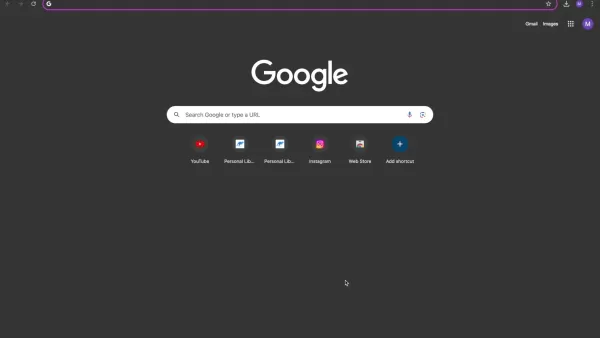
What distinguishes Gladia from other services is its commitment to accessibility. It isn't just another subscription-based tool; Gladia provides a generous free plan, offering developers, early-stage startups, and individuals up to 10 hours of monthly transcription at no cost. This makes it a perfect fit for users who need transcription services but have budget constraints.
Built on advanced artificial intelligence, Gladia's API is designed to learn and enhance its accuracy continuously. Unlike traditional manual transcription, Gladia automates the entire process. The system analyzes the audio, recognizes spoken words, and converts them into written text, dramatically cutting down the time and labor involved in transcription work.
Beyond its free access and AI-driven precision, Gladia stands out for its versatility. It features an intuitive API that integrates seamlessly into diverse applications and workflows. Supporting multiple languages, it serves as a truly international transcription tool. Whether your content is in English, Spanish, French, or other languages, Gladia can transcribe it accurately.
In the upcoming sections, we'll examine Gladia's core functionalities and demonstrate how to use this robust API to boost your productivity and simplify your audio-to-text workflows. Continue reading to discover more about this innovative tool and how you can start benefiting from it immediately.
Tips and Tricks for Optimizing Gladia Transcription
Enhancing Transcription Accuracy
To get the best results from Gladia and ensure accurate transcriptions, consider these practical tips:
- Audio Quality: Use clear audio sources with minimal background noise. High-quality recordings significantly improve transcription accuracy.
- Speaker Clarity: Encourage speakers to enunciate clearly and avoid mumbling. Distinct speech leads to better transcription outcomes.
- Language Selection: Always choose the correct language for your audio. This helps Gladia correctly identify words and improve overall quality.
- Background Noise Reduction: Minimize ambient noise whenever possible. Consider using noise-canceling microphones or audio editing tools to enhance clarity.
- Speaker Diarization: Activate speaker diarization to identify and label different speakers. This feature is especially useful for multi-speaker recordings like meetings or interviews.
- Review and Edit: Always proofread and edit the transcribed text to fix any mistakes. A human review ensures the final transcript is both accurate and polished.
How to Use Gladia: A Step-by-Step Guide
Getting Started with Gladia
Using the Gladia API is simple. Follow these steps to begin:
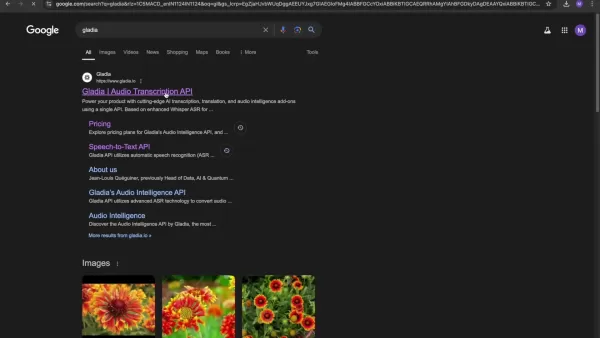
- Sign Up for an Account: Go to the Gladia website and create a free account.
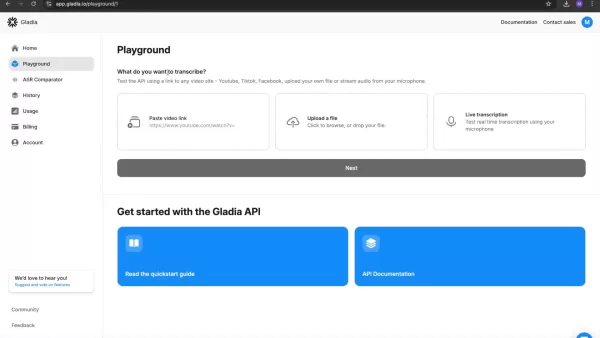
You'll need to provide basic details like your name, email address, and a password.
- Access Your API Key: After signing up, you'll receive a unique API key. This key authenticates your requests to the Gladia API. You can check your current plan status on your account homepage.
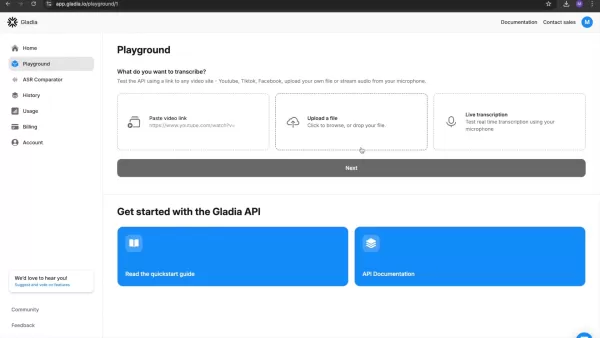
- Navigate to Playground After registration, you'll be taken to the Playground.This interface lets you test video transcription by pasting a video link, uploading a file, or using live transcription via your microphone. Click next to proceed.
- Paste video link Paste your chosen video link into the provided box. Note that you also have the option to upload a file or perform real-time transcription.
- Select Transcribe: Once you've configured your settings, click the Transcribe button in the top-right corner to start the transcription process.
Gladia Pricing: Free and Pro Options
Understanding Gladia's Free and Pro Pricing Models
Gladia offers two main subscription plans: Free and Pro. Each is designed to meet different user needs and transcription volumes. Understanding these options is key to selecting the right plan for your requirements. Let's explore what each plan includes.
Free Plan:The Free Plan is ideal for developers, early-stage startups, and individual users.
It provides:
- $0 per month.
- 10 hours of included transcription each month.
- A suitable option for users with modest transcription needs.
Pro Plan:The Pro Plan is tailored for growing digital companies. Key details include:
- $0.612 per hour for standard transcription.
- An additional $0.144 per hour for live transcription.
Gladia API: Weighing the Pros and Cons
Pros
Free tier offering 10 hours of transcription monthly.
High accuracy powered by advanced AI algorithms.
Multi-language support for international use.
Simple API integration into various platforms.
Includes speaker diarization and word-level timestamps.
A cost-effective solution for small to medium transcription tasks.
Batch transcription for processing multiple files at once.
Cons
The free tier's transcription hours may be insufficient for large projects.
Live transcription incurs extra charges on the Pro plan.
Accuracy can be affected by poor audio quality or background noise.
Integration might require some technical knowledge.
Documentation and community support are less extensive compared to larger platforms.
Key Features of Gladia: A Closer Look
AI-Powered Transcription Accuracy
The cornerstone of Gladia's service is its AI-powered transcription accuracy. The API utilizes sophisticated artificial intelligence to analyze and transcribe audio content precisely, resulting in fewer errors and more trustworthy outcomes. This reduces the time and effort needed for manual corrections.
This AI-driven methodology enables Gladia to learn and evolve, constantly enhancing its performance.
It also allows the API to manage a broad spectrum of audio qualities and accents, delivering consistent and reliable transcriptions regardless of the source.
For professionals or academics who need precise transcriptions, Gladia's AI-powered accuracy is transformative. It offers assurance that the transcribed text faithfully represents the original audio.
Free Tier Accessibility
A standout feature of Gladia is the accessibility of its free tier. It enables users to access transcription services completely free of charge, making it an excellent choice for those on tight budgets or with occasional transcription needs.
The free tier includes a generous 10 hours of transcription per month, which meets the needs of many users. This accessibility distinguishes Gladia, as it opens up AI-powered transcription to a broader audience.
Multi-Language Support
Gladia supports numerous languages, making it a flexible option for users worldwide. The API can accurately transcribe audio in various languages, such as English, Spanish, French, German, and many others.
This multilingual capability ensures users can transcribe content in their preferred language, regardless of location or target audience. It also facilitates smooth communication and collaboration across different regions and cultures.
Whether you're transcribing interviews, meetings, podcasts, or other audio content, Gladia's multi-language support ensures accurate capture of spoken words in your chosen language.
Easy API Integration
Gladia offers straightforward API integration, allowing users to effortlessly incorporate its transcription services into various applications and workflows. The API is designed for ease of use, featuring clear documentation and intuitive endpoints.
This simplicity enables developers to create custom transcription solutions tailored to their specific needs. Whether building a mobile app, web platform, or other software, Gladia's API can be easily integrated to provide seamless audio-to-text conversion.
With Gladia's easy API integration, users can automate transcription tasks and streamline their workflows, conserving time and effort on manual processes.
Speaker Diarization
Speaker diarization is another essential feature provided by Gladia, which identifies and labels individual speakers within an audio recording. This is particularly beneficial for meetings, interviews, and podcasts involving multiple participants. By accurately distinguishing between speakers, Gladia improves the readability and utility of the transcribed text.
This feature helps produce clear, concise transcripts, making it easier to follow discussions and conversations. With speaker diarization, you can quickly determine who said what, resulting in more organized and analyzable transcripts.
Word-Level Timestamps
Gladia's word-level timestamps assign precise timing to each word in the transcription. This functionality allows users to quickly locate specific words or phrases within the audio, making it ideal for video editing, reviewing particular segments, or creating subtitles.
By providing exact timestamps, Gladia helps users efficiently navigate their audio and video content. This feature saves time and enhances productivity, offering greater control over the audio editing and review process.
Batch Transcription
Batch transcription enables users to transcribe multiple files simultaneously, streamlining the processing of large audio datasets. This feature is especially useful for businesses and organizations that regularly need to transcribe many recordings.
By enabling batch processing, Gladia reduces the time and effort required to handle multiple files, boosting productivity and ensuring large volumes of data can be processed swiftly.
Real-World Use Cases: How to Leverage Gladia API
Journalism
In journalism, speed and precision are crucial. The Gladia API is a powerful resource for journalists needing to transcribe interviews, press conferences, and other recordings quickly. Automating transcription saves valuable time, allowing journalists to concentrate on writing and reporting.
Journalists can also use Gladia API to transcribe audio from international sources, thanks to its multi-language support. This capability enables them to access and report on global news without language barriers.
Research
Researchers often handle extensive audio data from interviews, focus groups, and lectures. Gladia API can efficiently transcribe these recordings, simplifying data analysis and insight extraction.
With Gladia API, researchers can automate transcription and focus on interpreting findings, conserving time and resources typically spent on manual transcription.
The API's high accuracy ensures transcribed text accurately reflects the original audio, supporting reliable conclusions.
Content Creation
Content creators, including podcasters, YouTubers, and bloggers, can greatly benefit from Gladia API. Transcribing their audio and video content allows them to create accurate subtitles, closed captions, and transcripts for their audience.
Gladia helps content creators make their work more accessible and engaging. Subtitles and transcripts enhance comprehension, boost viewer engagement, and attract audiences who prefer reading over listening.
Legal Industry
In the legal field, accurate transcription is vital for court proceedings, depositions, and client interviews. Gladia API assists legal professionals in transcribing these recordings efficiently, ensuring all details are captured correctly.
The API's high accuracy and speaker diarization features are particularly valuable for legal transcription. Lawyers can easily identify speakers, making it simpler to review and analyze transcripts.
Education
Educators can use Gladia API to transcribe lectures, webinars, and online courses, making content more accessible to students. Subtitles and transcripts improve comprehension and engagement, aiding effective learning.
Gladia enables educators to provide accessible materials for students with hearing impairments or those who prefer reading. This ensures all students have equal access to educational content.
Business Meetings
Businesses can use Gladia API to transcribe meetings, conference calls, and training sessions. Transcripts help teams track discussions, decisions, and action items, ensuring alignment and accountability.
The API's speaker diarization feature identifies who made specific comments or decisions, simplifying the follow-up process and responsibility assignment.
Frequently Asked Questions About Gladia
What is Gladia?
Gladia is a free transcription AI API designed to convert audio to text quickly and accurately. It offers developers, early-stage startups, and individual users up to 10 hours of free transcription per month.
How accurate is Gladia's transcription?
Gladia employs AI-powered transcription for high accuracy. Its algorithms continually learn and adapt, improving transcription quality over time.
Does Gladia support multiple languages?
Yes, Gladia supports multiple languages, making it a versatile solution for users worldwide. It can accurately transcribe audio in various languages.
How easy is it to integrate Gladia into existing applications?
Gladia offers a user-friendly API for seamless integration into diverse applications and workflows. It comes with clear documentation and intuitive endpoints.
Is speaker diarization supported in Gladia?
Yes, Gladia supports speaker diarization, which identifies and labels individual speakers in recordings. This is particularly helpful for meetings, interviews, and podcasts.
Can I transcribe multiple files at once with Gladia?
Yes, Gladia provides batch transcription, allowing simultaneous processing of multiple files. This feature is efficient for handling large volumes of audio data.
Related Questions About Transcription APIs and Services
What are the benefits of using an AI transcription service?
AI transcription services offer several benefits, including time savings, cost reduction, and improved accuracy. They quickly convert audio to text, freeing up time for other responsibilities.They eliminate the need for manual transcription, cutting labor expenses. AI services often achieve high accuracy rates, ensuring reliable and error-free transcripts.
How does AI transcription compare to human transcription?
AI transcription outperforms human transcription in speed and cost-efficiency, while human transcribers offer superior accuracy for complex audio with nuances and strong accents. AI is ideal for routine tasks and large datasets, whereas human transcription is preferred for critical documents requiring utmost precision.
What industries can benefit from transcription services?
Numerous industries gain from transcription services, including journalism, research, content creation, legal, education, and business. These services are adaptable and can be customized to meet specific sector needs. Whether transcribing interviews, lectures, legal proceedings, or meetings, transcription services optimize workflows and enhance productivity.
How secure are transcription APIs?
The security of transcription APIs varies by provider and their implemented protective measures. Reputable providers use encryption, secure storage, and access controls to ensure data privacy and confidentiality. Users should review a provider's security policies and certifications before using their API.
Can I use transcription APIs for real-time transcription?
Yes, many transcription APIs support real-time transcription, allowing audio to be transcribed as it's recorded. Real-time APIs are useful for live events, broadcasts, and meetings, providing immediate access to transcribed text.
Related article
 Anthropic Expands Claude AI Coding Tools to Japan in Push for Overseas Growth
Anthropic, a prominent U.S. artificial intelligence firm, is intensifying its global outreach. On Wednesday, the company hosted a major developer gathering, "Code with Claude," in Tokyo, drawing close to 500 software engineers. This initiative seeks
India’s Software Giant Cuts Hiring, Promises No Layoffs as AI Agents Scale Up
As artificial intelligence reshapes traditional labor-intensive business models, Tata Consultancy Services (TCS), a premier Indian software outsourcing firm, has unveiled its strategic response. During Tuesday’s annual general meeting, the chairman o
China Locks AI Models During Gaokam to Block Instant Homework Help
With the 2026 Gaokao fast approaching, rumors regarding the suspension of AI tools during the exam period have ignited intense online debate. In response to public concern, major AI platforms and educational apps have clarified their stance: rather t
Related Special Topic Recommendations
Design & Art
Anthropic Expands Claude AI Coding Tools to Japan in Push for Overseas Growth
Anthropic, a prominent U.S. artificial intelligence firm, is intensifying its global outreach. On Wednesday, the company hosted a major developer gathering, "Code with Claude," in Tokyo, drawing close to 500 software engineers. This initiative seeks
India’s Software Giant Cuts Hiring, Promises No Layoffs as AI Agents Scale Up
As artificial intelligence reshapes traditional labor-intensive business models, Tata Consultancy Services (TCS), a premier Indian software outsourcing firm, has unveiled its strategic response. During Tuesday’s annual general meeting, the chairman o
China Locks AI Models During Gaokam to Block Instant Homework Help
With the 2026 Gaokao fast approaching, rumors regarding the suspension of AI tools during the exam period have ignited intense online debate. In response to public concern, major AI platforms and educational apps have clarified their stance: rather t
Related Special Topic Recommendations
Design & Art
 Best AI Style Transfer Tools for Creative Experiments
2026 Latest Best Top-rated AI Style Transfer Tools for Creative Experiments! XIX.AI has curated a powerful, game-changing collection of must-try tools that deliver exceptional results through real-world tests and rigorous rankings. These top solutions help creatives boost productivity significantly by accelerating content creation and unlocking endless creative possibilities. Explore now to discover your perfect tool and start creating today!
 9 tools
 xix.ai
Comic Creation
Best AI Dialogue Bubble Tools for Visual Storytelling
xix.ai
Comic Creation
Best AI Dialogue Bubble Tools for Visual Storytelling
2026 Latest Best Top-Rated AI Dialogue Bubble Tools for Visual Storytelling are here on XIX.AI! This curated collection features powerful, game-changing tools that help creators boost productivity and overcome creative bottlenecks. Get a free vs paid comparison, see real-world tests, and check the latest rankings to find the must-try solutions perfect for crafting engaging visual narratives. Explore now to discover your ideal tool!
10 tools
xix.ai
Meeting Assistant
Top AI Meeting Summary Tools: Track Decisions and Follow-Ups Clearly
2026 Latest Top-Rated Best AI Meeting Summary Tools for Clear Decision Tracking and Effortless Follow-Ups. This curated list showcases powerful, game-changing solutions that boost productivity dramatically by automating meeting notes, identifying key action items, and streamlining team coordination across all projects. Get a free vs paid comparison along with real-world tests and weekly updated rankings to help you find the perfect tool. Explore now to unlock your AI edge!
9 tools
xix.ai
Data Analysis
Best AI Data Cleaning Tools: Fix Missing Values and Duplicates Fast
2026 Latest Best Top-rated AI Data Cleaning Tools for quick fixing of missing values and duplicates. This curated list showcases powerful, game-changing solutions that boost productivity significantly. Each option has undergone rigorous real-world tests to ensure reliability. Get a free vs paid comparison and discover the must-try tool that fits your needs best. Explore now at XIX.AI to Unlock your AI edge.
11 tools
xix.ai
Design & Art
Best AI Creative Ideation Tools for Artists: Break Through Visual Blocks
2026 Latest Best Top-Rated AI Creative Ideation Tools for Artists are curated by XIX.AI to help creators break through visual blocks and boost creativity instantly. These powerful game-changing tools offer real-world tests, detailed free vs paid comparison, and weekly updated rankings. Discover your perfect tool to accelerate content creation and unlock your AI edge today. Explore now!
14 tools
xix.ai
Music composition
AI Beat Makers for TikTok Background Tracks, Reels Audio, and Creator Promo Music
2026 Latest Best AI Beat Makers for TikTok Background Tracks, Reels Audio, and Creator Promo Music! XIX.AI has curated a top-rated list of powerful game-changing tools that go through real-world tests to deliver flawless music for every content need. You’ll find detailed free vs paid comparison data, weekly updated rankings, and must-try options to help you boost creativity and productivity. Explore now to discover your perfect tool!
11 tools
xix.ai

 Comments (1)
0/500
Comments (1)
0/500
![EricPerez]()
I tried Gladia's API and wow, the accuracy is mind-blowing! Finally a tool that actually understands my muffled audio recordings. This could be a game-changer for podcasters like me. 🎙️
In today's fast-paced digital world, the ability to transcribe audio into text quickly and accurately is incredibly valuable. From journalists and academics to content creators and casual users, a dependable transcription tool can save significant time and effort. Gladia, a modern, free transcription AI API, provides a powerful solution to meet this need. This comprehensive guide explores Gladia, detailing its features, advantages, and practical applications for your transcription projects.
Key Points
Gladia is a free transcription AI API, making it widely accessible.
It efficiently converts audio to text, saving time and reducing manual effort.
Gladia delivers highly accurate transcriptions, ensuring dependable results.
The user-friendly API is simple to integrate into a variety of applications.
Users receive 10 hours of complimentary transcription each month.
It supports multiple languages, increasing its adaptability for global use.
It's an excellent choice for developers, early-stage startups, and individual users.
Understanding Gladia: The Free Transcription Revolution
What is Gladia?
Fundamentally, Gladia is a free transcription AI API created to give users fast and precise audio-to-text conversion capabilities.
What distinguishes Gladia from other services is its commitment to accessibility. It isn't just another subscription-based tool; Gladia provides a generous free plan, offering developers, early-stage startups, and individuals up to 10 hours of monthly transcription at no cost. This makes it a perfect fit for users who need transcription services but have budget constraints.
Built on advanced artificial intelligence, Gladia's API is designed to learn and enhance its accuracy continuously. Unlike traditional manual transcription, Gladia automates the entire process. The system analyzes the audio, recognizes spoken words, and converts them into written text, dramatically cutting down the time and labor involved in transcription work.
Beyond its free access and AI-driven precision, Gladia stands out for its versatility. It features an intuitive API that integrates seamlessly into diverse applications and workflows. Supporting multiple languages, it serves as a truly international transcription tool. Whether your content is in English, Spanish, French, or other languages, Gladia can transcribe it accurately.
In the upcoming sections, we'll examine Gladia's core functionalities and demonstrate how to use this robust API to boost your productivity and simplify your audio-to-text workflows. Continue reading to discover more about this innovative tool and how you can start benefiting from it immediately.
Tips and Tricks for Optimizing Gladia Transcription
Enhancing Transcription Accuracy
To get the best results from Gladia and ensure accurate transcriptions, consider these practical tips:
- Audio Quality: Use clear audio sources with minimal background noise. High-quality recordings significantly improve transcription accuracy.
- Speaker Clarity: Encourage speakers to enunciate clearly and avoid mumbling. Distinct speech leads to better transcription outcomes.
- Language Selection: Always choose the correct language for your audio. This helps Gladia correctly identify words and improve overall quality.
- Background Noise Reduction: Minimize ambient noise whenever possible. Consider using noise-canceling microphones or audio editing tools to enhance clarity.
- Speaker Diarization: Activate speaker diarization to identify and label different speakers. This feature is especially useful for multi-speaker recordings like meetings or interviews.
- Review and Edit: Always proofread and edit the transcribed text to fix any mistakes. A human review ensures the final transcript is both accurate and polished.
How to Use Gladia: A Step-by-Step Guide
Getting Started with Gladia
Using the Gladia API is simple. Follow these steps to begin:
- Sign Up for an Account: Go to the Gladia website and create a free account.
You'll need to provide basic details like your name, email address, and a password.
- Access Your API Key: After signing up, you'll receive a unique API key. This key authenticates your requests to the Gladia API. You can check your current plan status on your account homepage.
- Navigate to Playground After registration, you'll be taken to the Playground.This interface lets you test video transcription by pasting a video link, uploading a file, or using live transcription via your microphone. Click next to proceed.
- Paste video link Paste your chosen video link into the provided box. Note that you also have the option to upload a file or perform real-time transcription.
- Select Transcribe: Once you've configured your settings, click the Transcribe button in the top-right corner to start the transcription process.
Gladia Pricing: Free and Pro Options
Understanding Gladia's Free and Pro Pricing Models
Gladia offers two main subscription plans: Free and Pro. Each is designed to meet different user needs and transcription volumes. Understanding these options is key to selecting the right plan for your requirements. Let's explore what each plan includes.
Free Plan:The Free Plan is ideal for developers, early-stage startups, and individual users.
It provides:
- $0 per month.
- 10 hours of included transcription each month.
- A suitable option for users with modest transcription needs.
Pro Plan:The Pro Plan is tailored for growing digital companies. Key details include:
- $0.612 per hour for standard transcription.
- An additional $0.144 per hour for live transcription.
Gladia API: Weighing the Pros and Cons
Pros
Free tier offering 10 hours of transcription monthly.
High accuracy powered by advanced AI algorithms.
Multi-language support for international use.
Simple API integration into various platforms.
Includes speaker diarization and word-level timestamps.
A cost-effective solution for small to medium transcription tasks.
Batch transcription for processing multiple files at once.
Cons
The free tier's transcription hours may be insufficient for large projects.
Live transcription incurs extra charges on the Pro plan.
Accuracy can be affected by poor audio quality or background noise.
Integration might require some technical knowledge.
Documentation and community support are less extensive compared to larger platforms.
Key Features of Gladia: A Closer Look
AI-Powered Transcription Accuracy
The cornerstone of Gladia's service is its AI-powered transcription accuracy. The API utilizes sophisticated artificial intelligence to analyze and transcribe audio content precisely, resulting in fewer errors and more trustworthy outcomes. This reduces the time and effort needed for manual corrections.
This AI-driven methodology enables Gladia to learn and evolve, constantly enhancing its performance.
It also allows the API to manage a broad spectrum of audio qualities and accents, delivering consistent and reliable transcriptions regardless of the source.
For professionals or academics who need precise transcriptions, Gladia's AI-powered accuracy is transformative. It offers assurance that the transcribed text faithfully represents the original audio.
Free Tier Accessibility
A standout feature of Gladia is the accessibility of its free tier. It enables users to access transcription services completely free of charge, making it an excellent choice for those on tight budgets or with occasional transcription needs.
The free tier includes a generous 10 hours of transcription per month, which meets the needs of many users. This accessibility distinguishes Gladia, as it opens up AI-powered transcription to a broader audience.
Multi-Language Support
Gladia supports numerous languages, making it a flexible option for users worldwide. The API can accurately transcribe audio in various languages, such as English, Spanish, French, German, and many others.
This multilingual capability ensures users can transcribe content in their preferred language, regardless of location or target audience. It also facilitates smooth communication and collaboration across different regions and cultures.
Whether you're transcribing interviews, meetings, podcasts, or other audio content, Gladia's multi-language support ensures accurate capture of spoken words in your chosen language.
Easy API Integration
Gladia offers straightforward API integration, allowing users to effortlessly incorporate its transcription services into various applications and workflows. The API is designed for ease of use, featuring clear documentation and intuitive endpoints.
This simplicity enables developers to create custom transcription solutions tailored to their specific needs. Whether building a mobile app, web platform, or other software, Gladia's API can be easily integrated to provide seamless audio-to-text conversion.
With Gladia's easy API integration, users can automate transcription tasks and streamline their workflows, conserving time and effort on manual processes.
Speaker Diarization
Speaker diarization is another essential feature provided by Gladia, which identifies and labels individual speakers within an audio recording. This is particularly beneficial for meetings, interviews, and podcasts involving multiple participants. By accurately distinguishing between speakers, Gladia improves the readability and utility of the transcribed text.
This feature helps produce clear, concise transcripts, making it easier to follow discussions and conversations. With speaker diarization, you can quickly determine who said what, resulting in more organized and analyzable transcripts.
Word-Level Timestamps
Gladia's word-level timestamps assign precise timing to each word in the transcription. This functionality allows users to quickly locate specific words or phrases within the audio, making it ideal for video editing, reviewing particular segments, or creating subtitles.
By providing exact timestamps, Gladia helps users efficiently navigate their audio and video content. This feature saves time and enhances productivity, offering greater control over the audio editing and review process.
Batch Transcription
Batch transcription enables users to transcribe multiple files simultaneously, streamlining the processing of large audio datasets. This feature is especially useful for businesses and organizations that regularly need to transcribe many recordings.
By enabling batch processing, Gladia reduces the time and effort required to handle multiple files, boosting productivity and ensuring large volumes of data can be processed swiftly.
Real-World Use Cases: How to Leverage Gladia API
Journalism
In journalism, speed and precision are crucial. The Gladia API is a powerful resource for journalists needing to transcribe interviews, press conferences, and other recordings quickly. Automating transcription saves valuable time, allowing journalists to concentrate on writing and reporting.
Journalists can also use Gladia API to transcribe audio from international sources, thanks to its multi-language support. This capability enables them to access and report on global news without language barriers.
Research
Researchers often handle extensive audio data from interviews, focus groups, and lectures. Gladia API can efficiently transcribe these recordings, simplifying data analysis and insight extraction.
With Gladia API, researchers can automate transcription and focus on interpreting findings, conserving time and resources typically spent on manual transcription.
The API's high accuracy ensures transcribed text accurately reflects the original audio, supporting reliable conclusions.
Content Creation
Content creators, including podcasters, YouTubers, and bloggers, can greatly benefit from Gladia API. Transcribing their audio and video content allows them to create accurate subtitles, closed captions, and transcripts for their audience.
Gladia helps content creators make their work more accessible and engaging. Subtitles and transcripts enhance comprehension, boost viewer engagement, and attract audiences who prefer reading over listening.
Legal Industry
In the legal field, accurate transcription is vital for court proceedings, depositions, and client interviews. Gladia API assists legal professionals in transcribing these recordings efficiently, ensuring all details are captured correctly.
The API's high accuracy and speaker diarization features are particularly valuable for legal transcription. Lawyers can easily identify speakers, making it simpler to review and analyze transcripts.
Education
Educators can use Gladia API to transcribe lectures, webinars, and online courses, making content more accessible to students. Subtitles and transcripts improve comprehension and engagement, aiding effective learning.
Gladia enables educators to provide accessible materials for students with hearing impairments or those who prefer reading. This ensures all students have equal access to educational content.
Business Meetings
Businesses can use Gladia API to transcribe meetings, conference calls, and training sessions. Transcripts help teams track discussions, decisions, and action items, ensuring alignment and accountability.
The API's speaker diarization feature identifies who made specific comments or decisions, simplifying the follow-up process and responsibility assignment.
Frequently Asked Questions About Gladia
What is Gladia?
Gladia is a free transcription AI API designed to convert audio to text quickly and accurately. It offers developers, early-stage startups, and individual users up to 10 hours of free transcription per month.
How accurate is Gladia's transcription?
Gladia employs AI-powered transcription for high accuracy. Its algorithms continually learn and adapt, improving transcription quality over time.
Does Gladia support multiple languages?
Yes, Gladia supports multiple languages, making it a versatile solution for users worldwide. It can accurately transcribe audio in various languages.
How easy is it to integrate Gladia into existing applications?
Gladia offers a user-friendly API for seamless integration into diverse applications and workflows. It comes with clear documentation and intuitive endpoints.
Is speaker diarization supported in Gladia?
Yes, Gladia supports speaker diarization, which identifies and labels individual speakers in recordings. This is particularly helpful for meetings, interviews, and podcasts.
Can I transcribe multiple files at once with Gladia?
Yes, Gladia provides batch transcription, allowing simultaneous processing of multiple files. This feature is efficient for handling large volumes of audio data.
Related Questions About Transcription APIs and Services
What are the benefits of using an AI transcription service?
AI transcription services offer several benefits, including time savings, cost reduction, and improved accuracy. They quickly convert audio to text, freeing up time for other responsibilities.They eliminate the need for manual transcription, cutting labor expenses. AI services often achieve high accuracy rates, ensuring reliable and error-free transcripts.
How does AI transcription compare to human transcription?
AI transcription outperforms human transcription in speed and cost-efficiency, while human transcribers offer superior accuracy for complex audio with nuances and strong accents. AI is ideal for routine tasks and large datasets, whereas human transcription is preferred for critical documents requiring utmost precision.
What industries can benefit from transcription services?
Numerous industries gain from transcription services, including journalism, research, content creation, legal, education, and business. These services are adaptable and can be customized to meet specific sector needs. Whether transcribing interviews, lectures, legal proceedings, or meetings, transcription services optimize workflows and enhance productivity.
How secure are transcription APIs?
The security of transcription APIs varies by provider and their implemented protective measures. Reputable providers use encryption, secure storage, and access controls to ensure data privacy and confidentiality. Users should review a provider's security policies and certifications before using their API.
Can I use transcription APIs for real-time transcription?
Yes, many transcription APIs support real-time transcription, allowing audio to be transcribed as it's recorded. Real-time APIs are useful for live events, broadcasts, and meetings, providing immediate access to transcribed text.








 Anthropic Expands Claude AI Coding Tools to Japan in Push for Overseas Growth
Anthropic, a prominent U.S. artificial intelligence firm, is intensifying its global outreach. On Wednesday, the company hosted a major developer gathering, "Code with Claude," in Tokyo, drawing close to 500 software engineers. This initiative seeks
Anthropic Expands Claude AI Coding Tools to Japan in Push for Overseas Growth
Anthropic, a prominent U.S. artificial intelligence firm, is intensifying its global outreach. On Wednesday, the company hosted a major developer gathering, "Code with Claude," in Tokyo, drawing close to 500 software engineers. This initiative seeks
 India’s Software Giant Cuts Hiring, Promises No Layoffs as AI Agents Scale Up
As artificial intelligence reshapes traditional labor-intensive business models, Tata Consultancy Services (TCS), a premier Indian software outsourcing firm, has unveiled its strategic response. During Tuesday’s annual general meeting, the chairman o
India’s Software Giant Cuts Hiring, Promises No Layoffs as AI Agents Scale Up
As artificial intelligence reshapes traditional labor-intensive business models, Tata Consultancy Services (TCS), a premier Indian software outsourcing firm, has unveiled its strategic response. During Tuesday’s annual general meeting, the chairman o
 China Locks AI Models During Gaokam to Block Instant Homework Help
With the 2026 Gaokao fast approaching, rumors regarding the suspension of AI tools during the exam period have ignited intense online debate. In response to public concern, major AI platforms and educational apps have clarified their stance: rather t
China Locks AI Models During Gaokam to Block Instant Homework Help
With the 2026 Gaokao fast approaching, rumors regarding the suspension of AI tools during the exam period have ignited intense online debate. In response to public concern, major AI platforms and educational apps have clarified their stance: rather t

2026 Latest Best Top-rated AI Style Transfer Tools for Creative Experiments! XIX.AI has curated a powerful, game-changing collection of must-try tools that deliver exceptional results through real-world tests and rigorous rankings. These top solutions help creatives boost productivity significantly by accelerating content creation and unlocking endless creative possibilities. Explore now to discover your perfect tool and start creating today!
9 tools
xix.ai

2026 Latest Best Top-Rated AI Dialogue Bubble Tools for Visual Storytelling are here on XIX.AI! This curated collection features powerful, game-changing tools that help creators boost productivity and overcome creative bottlenecks. Get a free vs paid comparison, see real-world tests, and check the latest rankings to find the must-try solutions perfect for crafting engaging visual narratives. Explore now to discover your ideal tool!
10 tools
xix.ai

2026 Latest Top-Rated Best AI Meeting Summary Tools for Clear Decision Tracking and Effortless Follow-Ups. This curated list showcases powerful, game-changing solutions that boost productivity dramatically by automating meeting notes, identifying key action items, and streamlining team coordination across all projects. Get a free vs paid comparison along with real-world tests and weekly updated rankings to help you find the perfect tool. Explore now to unlock your AI edge!
9 tools
xix.ai

2026 Latest Best Top-rated AI Data Cleaning Tools for quick fixing of missing values and duplicates. This curated list showcases powerful, game-changing solutions that boost productivity significantly. Each option has undergone rigorous real-world tests to ensure reliability. Get a free vs paid comparison and discover the must-try tool that fits your needs best. Explore now at XIX.AI to Unlock your AI edge.
11 tools
xix.ai

2026 Latest Best Top-Rated AI Creative Ideation Tools for Artists are curated by XIX.AI to help creators break through visual blocks and boost creativity instantly. These powerful game-changing tools offer real-world tests, detailed free vs paid comparison, and weekly updated rankings. Discover your perfect tool to accelerate content creation and unlock your AI edge today. Explore now!
14 tools
xix.ai

2026 Latest Best AI Beat Makers for TikTok Background Tracks, Reels Audio, and Creator Promo Music! XIX.AI has curated a top-rated list of powerful game-changing tools that go through real-world tests to deliver flawless music for every content need. You’ll find detailed free vs paid comparison data, weekly updated rankings, and must-try options to help you boost creativity and productivity. Explore now to discover your perfect tool!
11 tools
xix.ai

I tried Gladia's API and wow, the accuracy is mind-blowing! Finally a tool that actually understands my muffled audio recordings. This could be a game-changer for podcasters like me. 🎙️












