


 Home
HomeUnlock Unlimited AI Voiceovers for Effortless Content Creation - Free & Powerful
Unlocking professional-grade voiceovers through AI doesn't require expensive subscriptions. While many online tools advertise free AI audio generation, most impose frustrating limitations or hidden credit systems. We'll show you how to leverage everyday applications - Microsoft Edge and Blogger - to create unlimited, high-quality AI voiceovers completely free. This innovative approach eliminates costs while delivering professional results for all your content creation needs.
Key Advantages
Create unlimited AI voiceovers without spending a dime
Utilize existing tools already installed on most Windows systems
Avoid restrictive credit systems and artificial usage caps
Produce broadcast-quality narration for diverse projects
Optimize audio capture through simple Windows configuration
The Challenge of Free AI Voice Generation
The Reality of 'Free' AI Voice Services
Most platforms offering free AI text-to-speech conversion enforce strict limitations - whether through character limits, voice restrictions, or mandatory subscriptions after trial periods. These constraints make truly unlimited voice generation virtually impossible through conventional means. Content creators often find themselves facing difficult choices between compromising quality or exceeding budgets.
A Genuine Unlimited Solution: Microsoft Edge + Blogger
The answer lies in combining Microsoft Edge's text-to-speech capabilities with Blogger's publishing platform. This powerful synergy bypasses all artificial restrictions common to commercial services.

Since both tools are freely accessible to Windows users, you'll never encounter paywalls, credit systems, or IP-based restrictions. The method works indefinitely without requiring special accounts or technical expertise.
Perfecting Your Audio Capture Setup
Configuring Windows for Studio-Quality Recording
Following these setup steps ensures your recordings maintain professional audio standards:
- Open Windows Sound Settings via taskbar icon or Settings menu
- Select "Stereo Mix" as your input device (enable in Device Manager if missing)
- Adjust format to 24-bit/48kHz studio quality
- Maximize input volume to 100%
- Disable all audio enhancements for pure signal capture
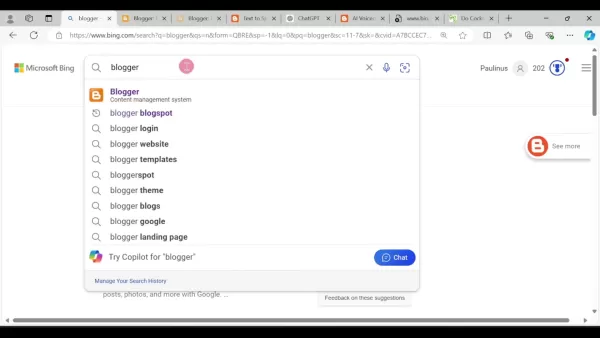
These optimizations eliminate distortion while capturing every nuance of the AI narration.
Creating Your Free AI Voiceovers
Step 1: Setting Up Your Blogger Workspace
- Access Blogger.com using your Google account
- Establish a new blog (name and URL don't affect functionality)
- Create a blank post to serve as your text input canvas
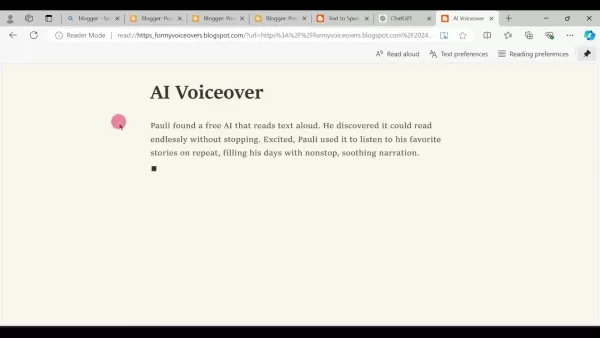
Step 2: Preparing Text for Conversion
- Paste your script into the Blogger post editor
- Publish the post to activate read-aloud functionality
- Modify the URL by adding 'read:' prefix before viewing
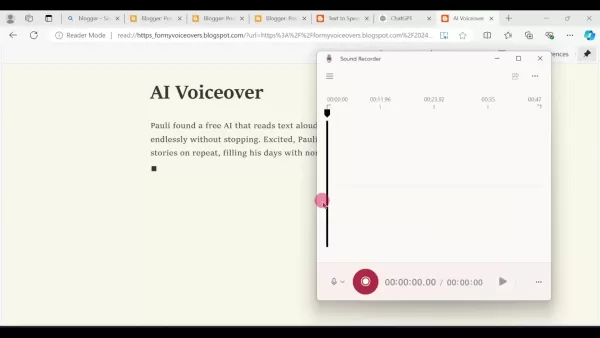
Step 3: Capturing Flawless Audio
- Launch Windows Sound Recorder application
- Enable Do Not Disturb mode to prevent interruptions
- Initiate recording before activating read-aloud
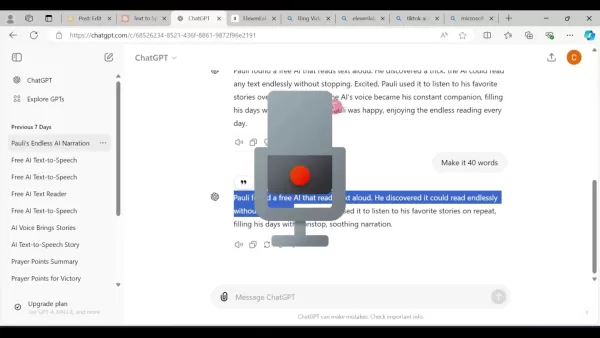
- Highlight text and trigger Edge's read-aloud feature (Alt+F shortcut)
- Stop recording and save as high-quality MP3
Cost Comparison: Free vs Paid Solutions
Financial Benefits of This Method
Unlike commercial services charging per word or minute, this technique imposes no financial constraints.
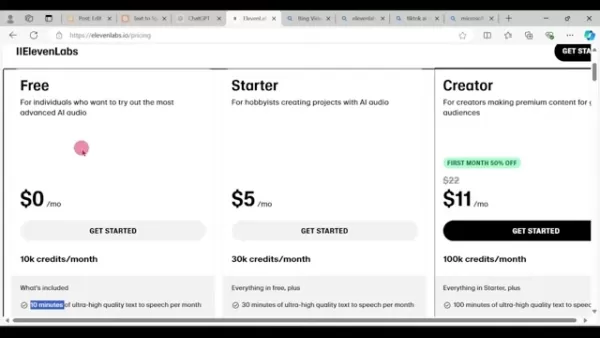
Enterprise platforms like ElevenLabs offer superior voice customization but require ongoing subscriptions. For budget-conscious creators needing unlimited volume, our method provides exceptional value.
Evaluating the Approach
Advantages
Zero cost implementation
Complete removal of usage restrictions
Leverages pre-installed software
Minimal learning curve
Limitations
Basic voice selection options
Lacks advanced voice modulation features
Core Benefits Overview
This method's strongest advantages include:
- Absolute freedom from financial commitments
- Truly unlimited generation capacity
- Uses universally accessible Windows tools
- Delivers broadcast-ready audio quality
- Provides multiple natural voice options
Ideal Applications
Perfect for creators developing:
- YouTube content and video tutorials
- Podcast introductions and narration
- Audiobook prototypes
- E-learning course materials
- Accessibility-focused content
- Social media video voiceovers
Frequently Asked Questions
Are there actual usage limits?
No - the only constraints are your available time and storage space. The method works indefinitely without degradation.
What technical expertise is required?
Basic computer literacy suffices. The process requires no specialized knowledge beyond following our step-by-step guide.
Can businesses use this commercially?
Yes, the audio output carries no usage restrictions for commercial applications.
How extensive are the voice options?
Microsoft Edge offers several natural-sounding voices, though fewer than premium services. Voice customization options are limited.
Is this Windows-exclusive?
Yes, the method specifically relies on Windows-integrated tools unavailable on other operating systems.
Related Considerations
Enhancing Audio Quality
For optimal results:
- Record in acoustically treated environments
- Verify studio-quality audio settings (24-bit/48kHz)
- Experiment with different Edge voices
- Use Audacity for post-production polishing
Legal Implications
While generally safe, consider:
- Copyright compliance when narrating protected content
- Transparency about AI voice usage in public content
- Platform-specific regulations regarding synthetic media
When to Consider Paid Alternatives
Upgrade to premium services if you require:
- Custom voice cloning capabilities
- Advanced emotional inflection controls
- Specialized accent options
- Enterprise-grade API integration
Related article
 Stripe to Acquire OpenRouter as AI Model Routing Gains Momentum
Stripe has agreed to acquire OpenRouter, an AI model-routing platform that gives developers access to hundreds of models through a single interface. The deal adds model selection and routing to Stripe’s existing work around AI usage and token-based b
Former OpenAI Researcher Barrett Zoph Returns to Google to Support Gemini Development
Barret Zoph, who previously abruptly left and joined OpenAI due to a disagreement with Thinking Machines Lab CEO Miriam Mularati, has once again changed employers. Alphabet's Google announced that Zoph will return as Vice President of Research, bring
How Recursive Intelligence Raised $335M at $4B Valuation in 4 Months
The co-founders of startup Ricursive Intelligence seemed destined to be co-founders.Anna Goldie, CEO, and Azalia Mirhoseini, CTO, are so well-known in the AI community that they were among those AI engineers who “got those weird emails from Zuckerber
Related Special Topic Recommendations
Design & Art
Stripe to Acquire OpenRouter as AI Model Routing Gains Momentum
Stripe has agreed to acquire OpenRouter, an AI model-routing platform that gives developers access to hundreds of models through a single interface. The deal adds model selection and routing to Stripe’s existing work around AI usage and token-based b
Former OpenAI Researcher Barrett Zoph Returns to Google to Support Gemini Development
Barret Zoph, who previously abruptly left and joined OpenAI due to a disagreement with Thinking Machines Lab CEO Miriam Mularati, has once again changed employers. Alphabet's Google announced that Zoph will return as Vice President of Research, bring
How Recursive Intelligence Raised $335M at $4B Valuation in 4 Months
The co-founders of startup Ricursive Intelligence seemed destined to be co-founders.Anna Goldie, CEO, and Azalia Mirhoseini, CTO, are so well-known in the AI community that they were among those AI engineers who “got those weird emails from Zuckerber
Related Special Topic Recommendations
Design & Art
 Top AI Illustration Tools: Create Editorial Scenes and Cover Art Faster
2026 Latest Top-rated AI Illustration Tools: Our curated list features the best powerfully designed tools for creating stunning editorial scenes and eye-catching cover art quickly. Each option has gone through rigorous real-world tests, offering a free vs paid comparison to help you find the perfect match for your workflow. Try these must-try solutions today to unlock your AI edge and boost your creative productivity. Explore now at XIX.AI.
 10 tools
 xix.ai
Education and Learning
Top AI Tutors for Exam Prep: Practice Math, Science, and English
xix.ai
Education and Learning
Top AI Tutors for Exam Prep: Practice Math, Science, and English
2026 Latest Top-Rated Best AI Tutors for Exam Prep are here on XIX.AI! Our curated list features powerful game-changing tools that offer free vs paid comparison, real-world tests, and weekly updated rankings. They help boost your writing efficiency, simplify complex topic learning, and unlock your academic potential. Explore now to Discover your perfect exam prep tool and Start creating today to Unlock your AI edge!
10 tools
xix.ai
Finance
AI Budget Planning Tools for Personal Money Management
2026 Latest Best Top-Rated AI Budget Planning Tools for Personal Money Management are here on XIX.AI! This curated collection features powerful, game-changing solutions that help you conduct real-world tests, understand spending habits, and create personalized plans to boost productivity. Enjoy a free vs paid comparison along with detailed rankings. Must-try tools designed to simplify money management and unlock your AI edge. Explore now!
11 tools
xix.ai
Health & Wellness
AI Sleep Tracking Assistants: Improve Recovery with Better Bedtime Habits
2026 Latest Best Top-Rated AI Sleep Tracking Assistants curated for ultimate recovery. This fully updated weekly guide features powerful tools that deliver real-world tests, free vs paid comparison, and detailed rankings to help you find the must-try solution that boosts sleep quality and supports better bedtime habits. Explore now at XIX.AI to Unlock your AI edge.
10 tools
xix.ai
Data Analysis
AI SQL Copilots for Product and Revenue Analytics
2026 Latest Best Top-Rated AI SQL Copilots for Product and Revenue Analytics! XIX.AI has curated a powerful, game-changing collection of must-try tools that undergo real-world tests through weekly updated rankings. These tools help users boost productivity significantly by accelerating data analysis, streamlining complex queries, and generating accurate insights to drive smarter business decisions. Explore now to Discover your perfect tool for unlocking your AI edge!
14 tools
xix.ai
Education and Learning
Best AI Homework Helpers That Teach: Learn Concepts, Not Just Answers
2026 Latest Best Top-Rated AI Homework Helpers That Teach Core Concepts Not Just Answers Powerful Tools for Students Must-Try Curated List Weekly Updated Free vs Paid Comparison Real-World Tests Accurate Rankings to Help You Unlock Your Full Learning Potential Explore now to Discover your perfect tool for smarter studying.
10 tools
xix.ai

 Comments (1)
0/500
Comments (1)
0/500
![GeorgeScott]()
Finally a tool that doesn't hide behind credit systems! 😤 I've been burned by so many 'free' AI voice generators that ask for payment after 2 minutes. This actually sounds promising. Gonna test it out right away.
Unlocking professional-grade voiceovers through AI doesn't require expensive subscriptions. While many online tools advertise free AI audio generation, most impose frustrating limitations or hidden credit systems. We'll show you how to leverage everyday applications - Microsoft Edge and Blogger - to create unlimited, high-quality AI voiceovers completely free. This innovative approach eliminates costs while delivering professional results for all your content creation needs.
Key Advantages
Create unlimited AI voiceovers without spending a dime
Utilize existing tools already installed on most Windows systems
Avoid restrictive credit systems and artificial usage caps
Produce broadcast-quality narration for diverse projects
Optimize audio capture through simple Windows configuration
The Challenge of Free AI Voice Generation
The Reality of 'Free' AI Voice Services
Most platforms offering free AI text-to-speech conversion enforce strict limitations - whether through character limits, voice restrictions, or mandatory subscriptions after trial periods. These constraints make truly unlimited voice generation virtually impossible through conventional means. Content creators often find themselves facing difficult choices between compromising quality or exceeding budgets.
A Genuine Unlimited Solution: Microsoft Edge + Blogger
The answer lies in combining Microsoft Edge's text-to-speech capabilities with Blogger's publishing platform. This powerful synergy bypasses all artificial restrictions common to commercial services.
Since both tools are freely accessible to Windows users, you'll never encounter paywalls, credit systems, or IP-based restrictions. The method works indefinitely without requiring special accounts or technical expertise.
Perfecting Your Audio Capture Setup
Configuring Windows for Studio-Quality Recording
Following these setup steps ensures your recordings maintain professional audio standards:
- Open Windows Sound Settings via taskbar icon or Settings menu
- Select "Stereo Mix" as your input device (enable in Device Manager if missing)
- Adjust format to 24-bit/48kHz studio quality
- Maximize input volume to 100%
- Disable all audio enhancements for pure signal capture
These optimizations eliminate distortion while capturing every nuance of the AI narration.
Creating Your Free AI Voiceovers
Step 1: Setting Up Your Blogger Workspace
- Access Blogger.com using your Google account
- Establish a new blog (name and URL don't affect functionality)
- Create a blank post to serve as your text input canvas
Step 2: Preparing Text for Conversion
- Paste your script into the Blogger post editor
- Publish the post to activate read-aloud functionality
- Modify the URL by adding 'read:' prefix before viewing
Step 3: Capturing Flawless Audio
- Launch Windows Sound Recorder application
- Enable Do Not Disturb mode to prevent interruptions
- Initiate recording before activating read-aloud
- Highlight text and trigger Edge's read-aloud feature (Alt+F shortcut)
- Stop recording and save as high-quality MP3
Cost Comparison: Free vs Paid Solutions
Financial Benefits of This Method
Unlike commercial services charging per word or minute, this technique imposes no financial constraints.
Enterprise platforms like ElevenLabs offer superior voice customization but require ongoing subscriptions. For budget-conscious creators needing unlimited volume, our method provides exceptional value.
Evaluating the Approach
Advantages
Zero cost implementation
Complete removal of usage restrictions
Leverages pre-installed software
Minimal learning curve
Limitations
Basic voice selection options
Lacks advanced voice modulation features
Core Benefits Overview
This method's strongest advantages include:
- Absolute freedom from financial commitments
- Truly unlimited generation capacity
- Uses universally accessible Windows tools
- Delivers broadcast-ready audio quality
- Provides multiple natural voice options
Ideal Applications
Perfect for creators developing:
- YouTube content and video tutorials
- Podcast introductions and narration
- Audiobook prototypes
- E-learning course materials
- Accessibility-focused content
- Social media video voiceovers
Frequently Asked Questions
Are there actual usage limits?
No - the only constraints are your available time and storage space. The method works indefinitely without degradation.
What technical expertise is required?
Basic computer literacy suffices. The process requires no specialized knowledge beyond following our step-by-step guide.
Can businesses use this commercially?
Yes, the audio output carries no usage restrictions for commercial applications.
How extensive are the voice options?
Microsoft Edge offers several natural-sounding voices, though fewer than premium services. Voice customization options are limited.
Is this Windows-exclusive?
Yes, the method specifically relies on Windows-integrated tools unavailable on other operating systems.
Related Considerations
Enhancing Audio Quality
For optimal results:
- Record in acoustically treated environments
- Verify studio-quality audio settings (24-bit/48kHz)
- Experiment with different Edge voices
- Use Audacity for post-production polishing
Legal Implications
While generally safe, consider:
- Copyright compliance when narrating protected content
- Transparency about AI voice usage in public content
- Platform-specific regulations regarding synthetic media
When to Consider Paid Alternatives
Upgrade to premium services if you require:
- Custom voice cloning capabilities
- Advanced emotional inflection controls
- Specialized accent options
- Enterprise-grade API integration








 Stripe to Acquire OpenRouter as AI Model Routing Gains Momentum
Stripe has agreed to acquire OpenRouter, an AI model-routing platform that gives developers access to hundreds of models through a single interface. The deal adds model selection and routing to Stripe’s existing work around AI usage and token-based b
Stripe to Acquire OpenRouter as AI Model Routing Gains Momentum
Stripe has agreed to acquire OpenRouter, an AI model-routing platform that gives developers access to hundreds of models through a single interface. The deal adds model selection and routing to Stripe’s existing work around AI usage and token-based b
 Former OpenAI Researcher Barrett Zoph Returns to Google to Support Gemini Development
Barret Zoph, who previously abruptly left and joined OpenAI due to a disagreement with Thinking Machines Lab CEO Miriam Mularati, has once again changed employers. Alphabet's Google announced that Zoph will return as Vice President of Research, bring
Former OpenAI Researcher Barrett Zoph Returns to Google to Support Gemini Development
Barret Zoph, who previously abruptly left and joined OpenAI due to a disagreement with Thinking Machines Lab CEO Miriam Mularati, has once again changed employers. Alphabet's Google announced that Zoph will return as Vice President of Research, bring
 How Recursive Intelligence Raised $335M at $4B Valuation in 4 Months
The co-founders of startup Ricursive Intelligence seemed destined to be co-founders.Anna Goldie, CEO, and Azalia Mirhoseini, CTO, are so well-known in the AI community that they were among those AI engineers who “got those weird emails from Zuckerber
How Recursive Intelligence Raised $335M at $4B Valuation in 4 Months
The co-founders of startup Ricursive Intelligence seemed destined to be co-founders.Anna Goldie, CEO, and Azalia Mirhoseini, CTO, are so well-known in the AI community that they were among those AI engineers who “got those weird emails from Zuckerber

2026 Latest Top-rated AI Illustration Tools: Our curated list features the best powerfully designed tools for creating stunning editorial scenes and eye-catching cover art quickly. Each option has gone through rigorous real-world tests, offering a free vs paid comparison to help you find the perfect match for your workflow. Try these must-try solutions today to unlock your AI edge and boost your creative productivity. Explore now at XIX.AI.
10 tools
xix.ai

2026 Latest Top-Rated Best AI Tutors for Exam Prep are here on XIX.AI! Our curated list features powerful game-changing tools that offer free vs paid comparison, real-world tests, and weekly updated rankings. They help boost your writing efficiency, simplify complex topic learning, and unlock your academic potential. Explore now to Discover your perfect exam prep tool and Start creating today to Unlock your AI edge!
10 tools
xix.ai

2026 Latest Best Top-Rated AI Budget Planning Tools for Personal Money Management are here on XIX.AI! This curated collection features powerful, game-changing solutions that help you conduct real-world tests, understand spending habits, and create personalized plans to boost productivity. Enjoy a free vs paid comparison along with detailed rankings. Must-try tools designed to simplify money management and unlock your AI edge. Explore now!
11 tools
xix.ai

2026 Latest Best Top-Rated AI Sleep Tracking Assistants curated for ultimate recovery. This fully updated weekly guide features powerful tools that deliver real-world tests, free vs paid comparison, and detailed rankings to help you find the must-try solution that boosts sleep quality and supports better bedtime habits. Explore now at XIX.AI to Unlock your AI edge.
10 tools
xix.ai

2026 Latest Best Top-Rated AI SQL Copilots for Product and Revenue Analytics! XIX.AI has curated a powerful, game-changing collection of must-try tools that undergo real-world tests through weekly updated rankings. These tools help users boost productivity significantly by accelerating data analysis, streamlining complex queries, and generating accurate insights to drive smarter business decisions. Explore now to Discover your perfect tool for unlocking your AI edge!
14 tools
xix.ai

2026 Latest Best Top-Rated AI Homework Helpers That Teach Core Concepts Not Just Answers Powerful Tools for Students Must-Try Curated List Weekly Updated Free vs Paid Comparison Real-World Tests Accurate Rankings to Help You Unlock Your Full Learning Potential Explore now to Discover your perfect tool for smarter studying.
10 tools
xix.ai

Finally a tool that doesn't hide behind credit systems! 😤 I've been burned by so many 'free' AI voice generators that ask for payment after 2 minutes. This actually sounds promising. Gonna test it out right away.












