


 Home
HomeWondershare Filmora 14 Debuts, Enhancing Videos with AI-Powered Audio Effects
Filmora 14 represents a major advancement for editors at any experience level. Featuring an array of groundbreaking tools—most notably the highly anticipated AI Sound Effect Generator—Filmora 14 enables creators to produce engaging content with remarkable ease and speed. This new feature streamlines the addition of high-quality audio, adding depth to your video narratives. Whether you're an experienced editor or just beginning your journey, Filmora 14 has powerful tools for everyone, empowering you to elevate your video projects.
Key Points
Filmora 14 features an AI-powered sound effect generator for effortless audio blending.
Custom sound effects can be created by simply typing a descriptive prompt.
This new tool extends the creative potential established by Filmora 13’s AI music generator.
Filmora 14 streamlines video editing with intuitive tools and AI-powered enhancements.
The software empowers beginners and experts alike to create professional-quality videos with minimal effort.
Filmora 14: Revolutionizing Video Editing with AI
What is Filmora 14?
Filmora 14 is the newest version of Wondershare's widely-used video editing software, crafted to simplify and enrich the video production process. It includes a collection of intuitive tools, AI-driven capabilities, and a straightforward interface suited for both newcomers and seasoned editors. Known for its accessibility and robust features, Filmora continues its tradition in version 14 by making sophisticated editing more attainable and efficient. The core goal is to support creators, letting them concentrate on their artistic ideas rather than technical hurdles.
This release is a substantial upgrade, especially regarding audio. The debut of the AI Sound Effect Generator is transformative, giving users exceptional command over their video's soundscape. By utilizing artificial intelligence, Filmora 14 removes the need to hunt through vast sound libraries or build effects from the ground up. Users can describe the sound they imagine, and the AI produces it within seconds. This capability saves considerable time and unlocks new creative opportunities.
Beyond the AI Sound Effect Generator, Filmora 14 offers numerous upgrades and refinements throughout the application. From polished editing tools to sophisticated color grading features, this version is loaded with options designed to improve your video's quality and impact. Whether you're producing content for YouTube, social platforms, or professional work, Filmora 14 delivers the necessary tools to realize your vision with impressive visuals and immersive sound. Combining power, simplicity, and AI innovation, Filmora 14 is set to be a vital resource for video creators globally.
The AI Sound Effect Generator: A Game-Changer
The standout feature in Filmora 14 is unquestionably the AI Sound Effect Generator. This innovative tool lets users produce custom audio effects just by typing a text description. The AI interprets the input and generates a matching sound, revolutionizing sound design in video editing by offering unmatched convenience and creative flexibility.
The AI Sound Effect Generator in Filmora 14 provides multiple benefits:
- Save Time: Skip lengthy searches in sound libraries or intricate audio editing. Generate the ideal effect in moments.
- Unlimited Creativity: Experiment with countless sound effects, bounded only by your imagination. Describe any sound, and the AI will try to create it.
- Custom Adjustments: Fine-tune the generated sound to fit your specific needs. Modify settings like pitch, volume, and length for the perfect outcome.
- Ease of Use: Professional-grade sound design is now accessible to users of all skill levels, with no prior audio engineering knowledge required.
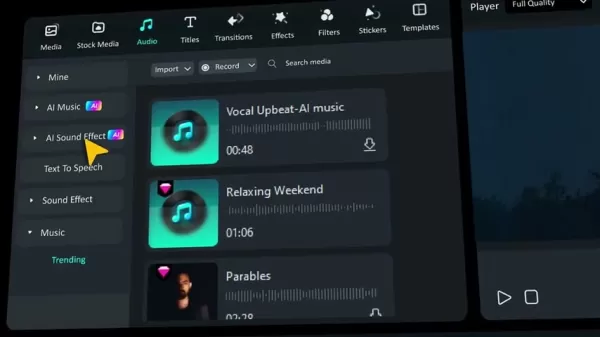
To use the AI Sound Effect Generator, go to the 'Audio' tab in Filmora 14. There, you'll find the AI Sound Effect option. Type your desired effect description—for instance, 'Heavy thunderstorm with rain and distant lightning'—and click 'Generate'. Filmora 14 will then process your request and create a unique sound effect you can preview and add directly to your project. This efficient workflow makes it incredibly simple to enrich your videos with custom, high-fidelity audio.
Building on Filmora 13's AI Music Generator
The AI Sound Effect Generator in Filmora 14 expands on the groundwork laid by its predecessor's AI Music Generator. In Filmora 13, Wondershare introduced a tool for creating custom music tracks by selecting mood, theme, and genre. This feature quickly became popular among creators, providing a fast and simple way to add background scores.
The AI Music Generator in Filmora 13 offers key advantages:
- Tailored Music: Produce music tracks that align perfectly with your video's tone and style.
- Royalty-Free Use: Utilize generated music without copyright concerns.
- Broad Selection: Explore diverse moods, themes, and genres to create varied soundtracks.
- User-Friendly: The tool is simple to operate, even for those without musical training.
Filmora 14 advances this concept by applying AI-powered generation to sound effects. While the music generator focuses on background scores, the sound effect generator allows for specific audio enhancements to support storytelling. Together, these AI audio tools offer a complete solution for video sound design. By providing both music and sound effect generation, Filmora 14 helps creators build truly captivating and immersive viewing experiences.
Exploring Filmora 14's Enhanced Features
Intuitive Interface and Streamlined Workflow
Filmora 14 retains the user-friendly interface that has made the series a favorite among video editors. The layout is logical, with well-arranged panels and clear icons, allowing users to navigate swiftly and find needed tools without confusion. The optimized workflow further improves the editing process, making it easy to import media, edit clips, apply effects, and export the final video.
Key elements of Filmora 14’s intuitive interface include:
- Drag-and-Drop Simplicity: Import files, add transitions, and apply effects with simple drag-and-drop actions.
- Timeline Precision: Control the timing and placement of video and audio clips accurately using the intuitive timeline.
- Adaptable Workspace: Customize the layout to match your personal preferences and workflow style.
- Clear Visual Guidance: Understand each tool's function through distinct visual cues and helpful tooltips.
Filmora 14's streamlined workflow is engineered to reduce the time and effort needed to produce high-quality videos. Every step—from importing assets to final export—is optimized for efficiency, allowing creators to focus on their creative vision without technical distractions.
Advanced Editing Tools and Effects
Filmora 14 provides a comprehensive set of advanced editing tools and effects to boost your video's visual appeal. From basic trimming and cutting to advanced color correction and visual effects, it offers everything required for professional results. The software supports a wide array of video formats, enabling you to work with almost any footage type.
Notable advanced editing tools and effects in Filmora 14 include:
- Color Grading: Adjust your video's color and tone with advanced correction tools. Fix exposure, enhance hues, and establish a consistent visual style.
- Visual Effects: Incorporate striking visual effects from a broad library. Create dynamic transitions, add motion graphics, and elevate your footage's overall look.
- Motion Tracking: Follow objects' movement in your video and apply effects that stay attached. Ideal for adding text, logos, or graphics that track a specific element.
- Audio Editing: Refine your video's sound with advanced audio tools. Remove background noise, balance volume levels, and incorporate sound effects for a polished track.
With Filmora 14's advanced toolkit, you can transform raw clips into compelling videos that capture attention and engage audiences. Whether creating content for YouTube, social media, or professional use, Filmora 14 provides the capabilities to bring your creative ideas to life.
How to Generate AI Sound Effects in Filmora 14
Step-by-Step Guide
Creating AI sound effects in Filmora 14 is a simple process. Follow this step-by-step guide to begin:
Open Filmora 14: Launch the software on your computer.
Start a New Project: Create a new project or open an existing one.
Import Your Media: Bring in the video and audio files you wish to edit.
Go to the Audio Tab: Click the 'Audio' tab within the Filmora 14 interface.
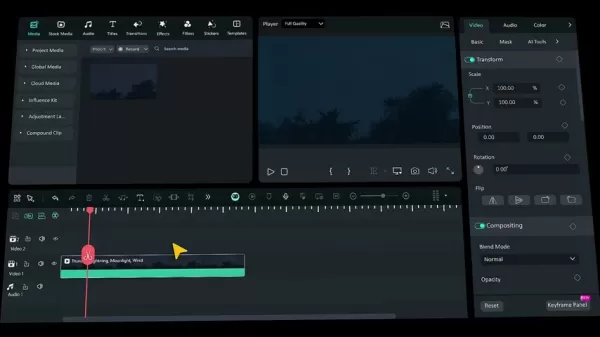
Select AI Sound Effect: In the Audio tab, find and click the 'AI Sound Effect' option.
Enter Your Description: In the text box, type a clear description of the sound effect you want. Being specific yields better results. Examples: 'Spooky Halloween ambiance' or 'Sci-fi laser blast'.
Generate the Effect: Click the 'Generate' button to start the AI creation process.
Preview the Sound: Once generated, listen to the preview to check if it meets your needs.
Add to Your Timeline: Drag and drop the generated sound effect onto your project's timeline.
Edit as Needed: You can further adjust the sound effect directly on the timeline.
By following these steps, you can quickly craft custom sound effects for your videos. Test different prompts to discover the wide range of sounds Filmora 14's AI can produce, allowing you to enhance your storytelling with unique and immersive audio.
Filmora 14 Pricing and Subscription Plans
Subscription Options and Value
Filmora 14 offers flexible pricing to accommodate different user requirements. While exact prices can vary based on promotions and region, Filmora typically provides both subscription-based and perpetual license choices. Here’s a general outline:
- Monthly Subscription: Perfect for short-term projects, granting full access to Filmora 14 for one month.
- Annual Subscription: A cost-effective choice for regular users, providing full access for a full year.
- Perpetual License: A single payment grants lifetime access to Filmora 14, including all updates for that version.
Filmora also offers various plan tiers, such as individual, business, and educational plans, each with different features and benefits. For precise, current pricing, please visit the official Filmora website.
When considering the cost, evaluate the value in terms of features, usability, and time saved. Filmora 14's AI tools, intuitive interface, and comprehensive editing suite make it a valuable investment for video creators at any level.
Filmora 14: Weighing the Pros and Cons
Pros
Straightforward and easy-to-use interface
AI-powered sound effect generator
AI-powered music generator
Advanced editing tools and visual effects
Extensive video format compatibility
Competitive pricing plans
Cons
4K editing may demand a high-performance computer
The free trial version includes certain restrictions
Some advanced features might require initial learning
Filmora 14 Core Features: Elevating Your Video Editing Experience
Key Features for Enhanced Creativity
Filmora 14 is equipped with features aimed at improving your editing workflow and unlocking creative potential. Here are some of its core capabilities:
- AI Sound Effect Generator: Produce custom sound effects by typing a simple prompt, eliminating tedious library searches or complex audio edits.
- AI Music Generator: Create royalty-free background music that fits your video's mood and genre perfectly.
- User-Friendly Interface: Navigate effortlessly thanks to the intuitive layout and clearly organized panels.
- Advanced Editing Suite: Polish your videos with a full range of tools, including color correction, visual effects, and motion tracking.
- Broad Format Support: Work with nearly any video format due to Filmora 14's extensive compatibility.
- Efficient Workflow: Reduce production time with a workflow designed for speed and simplicity.
- Motion Tracking: Easily track moving objects in your video for precise effects.
- Color Correction: Fix exposure problems, enhance colors, and establish a cohesive visual aesthetic.
These core features in Filmora 14 work in tandem to help creators produce impressive videos efficiently. Regardless of your expertise, Filmora 14 supplies the tools needed to execute your creative vision.
Filmora 14 Use Cases: Unleashing Creative Potential Across Industries
Diverse Applications for Filmora 14
Filmora 14 is a versatile editing application suitable for numerous industries and projects. Common use cases include:
- YouTube Content Creation: Develop engaging YouTube videos using Filmora 14's intuitive tools and AI features.
- Social Media Marketing: Produce attention-grabbing videos for platforms like Instagram, Facebook, and TikTok.
- Online Education: Create informative and compelling online courses and tutorials with screen recording and editing functions.
- Corporate Training: Develop professional training videos for staff using advanced editing tools and effects.
- Wedding Videography: Preserve special day memories with elegant templates and smooth transitions.
- Real Estate Marketing: Craft virtual tours and property showcases with video editing and animation features.
- Gaming Videos: Edit and enhance gameplay footage for platforms like Twitch and YouTube using screen recording and effects.
Filmora 14's diverse feature set makes it applicable for a wide spectrum of video creation tasks. Whether you're a professional editor or an enthusiastic hobbyist, Filmora 14 can help bring your concepts to life.
Frequently Asked Questions About Filmora 14
What are the minimum system requirements for Filmora 14?
Minimum system requirements for Filmora 14 usually include a current operating system (Windows 10 or macOS 10.14+), a capable processor (Intel i3 or AMD equivalent), a minimum of 8 GB RAM, and a dedicated graphics card with at least 2 GB VRAM. Adequate storage space is also necessary. For the most detailed and updated specifications, please consult the official Filmora website.
Can I use Filmora 14 for commercial projects?
Yes, Filmora 14 can be used for commercial work. It is crucial, however, to review the specific license terms tied to your subscription or perpetual license to ensure proper compliance. Some licenses may impose restrictions on the nature of commercial projects or revenue generation.
Is there a free trial version of Filmora 14?
Yes, Wondershare usually provides a free trial of Filmora 14 for evaluation before purchase. The trial version may include limitations, such as a watermark on exports or restricted access to certain features. Details are available on the official website.
How often does Wondershare release new versions of Filmora?
Wondershare typically launches new Filmora versions annually. These updates often introduce new features, improvements, and bug fixes. Stay informed via the official Filmora website and social media channels for release announcements.
Does Filmora 14 support 4K video editing?
Yes, Filmora 14 fully supports 4K video editing. You can import, edit, and export 4K footage seamlessly. Note that editing 4K video smoothly may require a more powerful computer system to ensure optimal performance during playback and rendering.
Related Questions About Video Editing and AI
What are the best practices for video editing?
Video editing is a multifaceted craft involving various skills and techniques. Here are some recommended best practices for producing high-quality videos:Plan Your Project: Before editing, outline your video's structure and content with a storyboard or script.Stay Organized: Keep your media files neatly organized for quick access during editing.Select Suitable Software: Choose editing software that matches your needs and skill level. Filmora 14 is an excellent option for beginners and pros alike.Edit in a Focused Space: Work in a quiet environment to maintain concentration and avoid interruptions.Master Keyboard Shortcuts: Learning shortcuts can significantly speed up your editing process.Prioritize Audio Quality: Clear, balanced audio is essential. Ensure your sound is free of noise and well-mixed.Use Transitions Thoughtfully: Employ transitions to connect scenes smoothly, but avoid overusing them as they can become distracting.Export with the Correct Settings: Select the appropriate export format for your video's destination. For YouTube, MP4 with H.264 video and AAC audio codecs is recommended.Seek Feedback: Share your work with others to gain constructive critiques and identify areas for improvement.
How is AI changing the video editing landscape?
Artificial Intelligence is profoundly reshaping video editing by introducing tools and capabilities previously unattainable. Key changes include:Automated Tasks: AI can automate repetitive tasks like trimming clips, syncing audio, and creating basic transitions.Smart Enhancements: AI-driven effects can improve visuals effortlessly, such as by reducing noise, stabilizing shaky footage, or auto-correcting colors.Content Analysis: AI can analyze video content to identify key moments, themes, or objects, aiding in automatic summarization, highlight reels, or search tagging.Personalized Editing: AI can adapt the editing environment to user preferences, suggesting tools, effects, or interface layouts.AI-Generated Audio: As demonstrated in Filmora 14, AI can now generate custom sound effects from text prompts, greatly simplifying audio design.In summary, AI is making video editing more accessible, efficient, and creatively expansive. As the technology evolves, we can anticipate even more innovative developments in the field.
Related article
 Stripe to Acquire OpenRouter as AI Model Routing Gains Momentum
Stripe has agreed to acquire OpenRouter, an AI model-routing platform that gives developers access to hundreds of models through a single interface. The deal adds model selection and routing to Stripe’s existing work around AI usage and token-based b
Former OpenAI Researcher Barrett Zoph Returns to Google to Support Gemini Development
Barret Zoph, who previously abruptly left and joined OpenAI due to a disagreement with Thinking Machines Lab CEO Miriam Mularati, has once again changed employers. Alphabet's Google announced that Zoph will return as Vice President of Research, bring
How Recursive Intelligence Raised $335M at $4B Valuation in 4 Months
The co-founders of startup Ricursive Intelligence seemed destined to be co-founders.Anna Goldie, CEO, and Azalia Mirhoseini, CTO, are so well-known in the AI community that they were among those AI engineers who “got those weird emails from Zuckerber
Related Special Topic Recommendations
Design & Art
Stripe to Acquire OpenRouter as AI Model Routing Gains Momentum
Stripe has agreed to acquire OpenRouter, an AI model-routing platform that gives developers access to hundreds of models through a single interface. The deal adds model selection and routing to Stripe’s existing work around AI usage and token-based b
Former OpenAI Researcher Barrett Zoph Returns to Google to Support Gemini Development
Barret Zoph, who previously abruptly left and joined OpenAI due to a disagreement with Thinking Machines Lab CEO Miriam Mularati, has once again changed employers. Alphabet's Google announced that Zoph will return as Vice President of Research, bring
How Recursive Intelligence Raised $335M at $4B Valuation in 4 Months
The co-founders of startup Ricursive Intelligence seemed destined to be co-founders.Anna Goldie, CEO, and Azalia Mirhoseini, CTO, are so well-known in the AI community that they were among those AI engineers who “got those weird emails from Zuckerber
Related Special Topic Recommendations
Design & Art
 Top AI Illustration Tools: Create Editorial Scenes and Cover Art Faster
2026 Latest Top-rated AI Illustration Tools: Our curated list features the best powerfully designed tools for creating stunning editorial scenes and eye-catching cover art quickly. Each option has gone through rigorous real-world tests, offering a free vs paid comparison to help you find the perfect match for your workflow. Try these must-try solutions today to unlock your AI edge and boost your creative productivity. Explore now at XIX.AI.
 10 tools
 xix.ai
Education and Learning
Top AI Tutors for Exam Prep: Practice Math, Science, and English
xix.ai
Education and Learning
Top AI Tutors for Exam Prep: Practice Math, Science, and English
2026 Latest Top-Rated Best AI Tutors for Exam Prep are here on XIX.AI! Our curated list features powerful game-changing tools that offer free vs paid comparison, real-world tests, and weekly updated rankings. They help boost your writing efficiency, simplify complex topic learning, and unlock your academic potential. Explore now to Discover your perfect exam prep tool and Start creating today to Unlock your AI edge!
10 tools
xix.ai
Finance
AI Budget Planning Tools for Personal Money Management
2026 Latest Best Top-Rated AI Budget Planning Tools for Personal Money Management are here on XIX.AI! This curated collection features powerful, game-changing solutions that help you conduct real-world tests, understand spending habits, and create personalized plans to boost productivity. Enjoy a free vs paid comparison along with detailed rankings. Must-try tools designed to simplify money management and unlock your AI edge. Explore now!
11 tools
xix.ai
Health & Wellness
AI Sleep Tracking Assistants: Improve Recovery with Better Bedtime Habits
2026 Latest Best Top-Rated AI Sleep Tracking Assistants curated for ultimate recovery. This fully updated weekly guide features powerful tools that deliver real-world tests, free vs paid comparison, and detailed rankings to help you find the must-try solution that boosts sleep quality and supports better bedtime habits. Explore now at XIX.AI to Unlock your AI edge.
10 tools
xix.ai
Data Analysis
AI SQL Copilots for Product and Revenue Analytics
2026 Latest Best Top-Rated AI SQL Copilots for Product and Revenue Analytics! XIX.AI has curated a powerful, game-changing collection of must-try tools that undergo real-world tests through weekly updated rankings. These tools help users boost productivity significantly by accelerating data analysis, streamlining complex queries, and generating accurate insights to drive smarter business decisions. Explore now to Discover your perfect tool for unlocking your AI edge!
14 tools
xix.ai
Education and Learning
Best AI Homework Helpers That Teach: Learn Concepts, Not Just Answers
2026 Latest Best Top-Rated AI Homework Helpers That Teach Core Concepts Not Just Answers Powerful Tools for Students Must-Try Curated List Weekly Updated Free vs Paid Comparison Real-World Tests Accurate Rankings to Help You Unlock Your Full Learning Potential Explore now to Discover your perfect tool for smarter studying.
10 tools
xix.ai

 Comments (0)
0/500
Comments (0)
0/500
Filmora 14 represents a major advancement for editors at any experience level. Featuring an array of groundbreaking tools—most notably the highly anticipated AI Sound Effect Generator—Filmora 14 enables creators to produce engaging content with remarkable ease and speed. This new feature streamlines the addition of high-quality audio, adding depth to your video narratives. Whether you're an experienced editor or just beginning your journey, Filmora 14 has powerful tools for everyone, empowering you to elevate your video projects.
Key Points
Filmora 14 features an AI-powered sound effect generator for effortless audio blending.
Custom sound effects can be created by simply typing a descriptive prompt.
This new tool extends the creative potential established by Filmora 13’s AI music generator.
Filmora 14 streamlines video editing with intuitive tools and AI-powered enhancements.
The software empowers beginners and experts alike to create professional-quality videos with minimal effort.
Filmora 14: Revolutionizing Video Editing with AI
What is Filmora 14?
Filmora 14 is the newest version of Wondershare's widely-used video editing software, crafted to simplify and enrich the video production process. It includes a collection of intuitive tools, AI-driven capabilities, and a straightforward interface suited for both newcomers and seasoned editors. Known for its accessibility and robust features, Filmora continues its tradition in version 14 by making sophisticated editing more attainable and efficient. The core goal is to support creators, letting them concentrate on their artistic ideas rather than technical hurdles.
This release is a substantial upgrade, especially regarding audio. The debut of the AI Sound Effect Generator is transformative, giving users exceptional command over their video's soundscape. By utilizing artificial intelligence, Filmora 14 removes the need to hunt through vast sound libraries or build effects from the ground up. Users can describe the sound they imagine, and the AI produces it within seconds. This capability saves considerable time and unlocks new creative opportunities.
Beyond the AI Sound Effect Generator, Filmora 14 offers numerous upgrades and refinements throughout the application. From polished editing tools to sophisticated color grading features, this version is loaded with options designed to improve your video's quality and impact. Whether you're producing content for YouTube, social platforms, or professional work, Filmora 14 delivers the necessary tools to realize your vision with impressive visuals and immersive sound. Combining power, simplicity, and AI innovation, Filmora 14 is set to be a vital resource for video creators globally.
The AI Sound Effect Generator: A Game-Changer
The standout feature in Filmora 14 is unquestionably the AI Sound Effect Generator. This innovative tool lets users produce custom audio effects just by typing a text description. The AI interprets the input and generates a matching sound, revolutionizing sound design in video editing by offering unmatched convenience and creative flexibility.
The AI Sound Effect Generator in Filmora 14 provides multiple benefits:
- Save Time: Skip lengthy searches in sound libraries or intricate audio editing. Generate the ideal effect in moments.
- Unlimited Creativity: Experiment with countless sound effects, bounded only by your imagination. Describe any sound, and the AI will try to create it.
- Custom Adjustments: Fine-tune the generated sound to fit your specific needs. Modify settings like pitch, volume, and length for the perfect outcome.
- Ease of Use: Professional-grade sound design is now accessible to users of all skill levels, with no prior audio engineering knowledge required.
To use the AI Sound Effect Generator, go to the 'Audio' tab in Filmora 14. There, you'll find the AI Sound Effect option. Type your desired effect description—for instance, 'Heavy thunderstorm with rain and distant lightning'—and click 'Generate'. Filmora 14 will then process your request and create a unique sound effect you can preview and add directly to your project. This efficient workflow makes it incredibly simple to enrich your videos with custom, high-fidelity audio.
Building on Filmora 13's AI Music Generator
The AI Sound Effect Generator in Filmora 14 expands on the groundwork laid by its predecessor's AI Music Generator. In Filmora 13, Wondershare introduced a tool for creating custom music tracks by selecting mood, theme, and genre. This feature quickly became popular among creators, providing a fast and simple way to add background scores.
The AI Music Generator in Filmora 13 offers key advantages:
- Tailored Music: Produce music tracks that align perfectly with your video's tone and style.
- Royalty-Free Use: Utilize generated music without copyright concerns.
- Broad Selection: Explore diverse moods, themes, and genres to create varied soundtracks.
- User-Friendly: The tool is simple to operate, even for those without musical training.
Filmora 14 advances this concept by applying AI-powered generation to sound effects. While the music generator focuses on background scores, the sound effect generator allows for specific audio enhancements to support storytelling. Together, these AI audio tools offer a complete solution for video sound design. By providing both music and sound effect generation, Filmora 14 helps creators build truly captivating and immersive viewing experiences.
Exploring Filmora 14's Enhanced Features
Intuitive Interface and Streamlined Workflow
Filmora 14 retains the user-friendly interface that has made the series a favorite among video editors. The layout is logical, with well-arranged panels and clear icons, allowing users to navigate swiftly and find needed tools without confusion. The optimized workflow further improves the editing process, making it easy to import media, edit clips, apply effects, and export the final video.
Key elements of Filmora 14’s intuitive interface include:
- Drag-and-Drop Simplicity: Import files, add transitions, and apply effects with simple drag-and-drop actions.
- Timeline Precision: Control the timing and placement of video and audio clips accurately using the intuitive timeline.
- Adaptable Workspace: Customize the layout to match your personal preferences and workflow style.
- Clear Visual Guidance: Understand each tool's function through distinct visual cues and helpful tooltips.
Filmora 14's streamlined workflow is engineered to reduce the time and effort needed to produce high-quality videos. Every step—from importing assets to final export—is optimized for efficiency, allowing creators to focus on their creative vision without technical distractions.
Advanced Editing Tools and Effects
Filmora 14 provides a comprehensive set of advanced editing tools and effects to boost your video's visual appeal. From basic trimming and cutting to advanced color correction and visual effects, it offers everything required for professional results. The software supports a wide array of video formats, enabling you to work with almost any footage type.
Notable advanced editing tools and effects in Filmora 14 include:
- Color Grading: Adjust your video's color and tone with advanced correction tools. Fix exposure, enhance hues, and establish a consistent visual style.
- Visual Effects: Incorporate striking visual effects from a broad library. Create dynamic transitions, add motion graphics, and elevate your footage's overall look.
- Motion Tracking: Follow objects' movement in your video and apply effects that stay attached. Ideal for adding text, logos, or graphics that track a specific element.
- Audio Editing: Refine your video's sound with advanced audio tools. Remove background noise, balance volume levels, and incorporate sound effects for a polished track.
With Filmora 14's advanced toolkit, you can transform raw clips into compelling videos that capture attention and engage audiences. Whether creating content for YouTube, social media, or professional use, Filmora 14 provides the capabilities to bring your creative ideas to life.
How to Generate AI Sound Effects in Filmora 14
Step-by-Step Guide
Creating AI sound effects in Filmora 14 is a simple process. Follow this step-by-step guide to begin:
Open Filmora 14: Launch the software on your computer.
Start a New Project: Create a new project or open an existing one.
Import Your Media: Bring in the video and audio files you wish to edit.
Go to the Audio Tab: Click the 'Audio' tab within the Filmora 14 interface.
Select AI Sound Effect: In the Audio tab, find and click the 'AI Sound Effect' option.
Enter Your Description: In the text box, type a clear description of the sound effect you want. Being specific yields better results. Examples: 'Spooky Halloween ambiance' or 'Sci-fi laser blast'.
Generate the Effect: Click the 'Generate' button to start the AI creation process.
Preview the Sound: Once generated, listen to the preview to check if it meets your needs.
Add to Your Timeline: Drag and drop the generated sound effect onto your project's timeline.
Edit as Needed: You can further adjust the sound effect directly on the timeline.
By following these steps, you can quickly craft custom sound effects for your videos. Test different prompts to discover the wide range of sounds Filmora 14's AI can produce, allowing you to enhance your storytelling with unique and immersive audio.
Filmora 14 Pricing and Subscription Plans
Subscription Options and Value
Filmora 14 offers flexible pricing to accommodate different user requirements. While exact prices can vary based on promotions and region, Filmora typically provides both subscription-based and perpetual license choices. Here’s a general outline:
- Monthly Subscription: Perfect for short-term projects, granting full access to Filmora 14 for one month.
- Annual Subscription: A cost-effective choice for regular users, providing full access for a full year.
- Perpetual License: A single payment grants lifetime access to Filmora 14, including all updates for that version.
Filmora also offers various plan tiers, such as individual, business, and educational plans, each with different features and benefits. For precise, current pricing, please visit the official Filmora website.
When considering the cost, evaluate the value in terms of features, usability, and time saved. Filmora 14's AI tools, intuitive interface, and comprehensive editing suite make it a valuable investment for video creators at any level.
Filmora 14: Weighing the Pros and Cons
Pros
Straightforward and easy-to-use interface
AI-powered sound effect generator
AI-powered music generator
Advanced editing tools and visual effects
Extensive video format compatibility
Competitive pricing plans
Cons
4K editing may demand a high-performance computer
The free trial version includes certain restrictions
Some advanced features might require initial learning
Filmora 14 Core Features: Elevating Your Video Editing Experience
Key Features for Enhanced Creativity
Filmora 14 is equipped with features aimed at improving your editing workflow and unlocking creative potential. Here are some of its core capabilities:
- AI Sound Effect Generator: Produce custom sound effects by typing a simple prompt, eliminating tedious library searches or complex audio edits.
- AI Music Generator: Create royalty-free background music that fits your video's mood and genre perfectly.
- User-Friendly Interface: Navigate effortlessly thanks to the intuitive layout and clearly organized panels.
- Advanced Editing Suite: Polish your videos with a full range of tools, including color correction, visual effects, and motion tracking.
- Broad Format Support: Work with nearly any video format due to Filmora 14's extensive compatibility.
- Efficient Workflow: Reduce production time with a workflow designed for speed and simplicity.
- Motion Tracking: Easily track moving objects in your video for precise effects.
- Color Correction: Fix exposure problems, enhance colors, and establish a cohesive visual aesthetic.
These core features in Filmora 14 work in tandem to help creators produce impressive videos efficiently. Regardless of your expertise, Filmora 14 supplies the tools needed to execute your creative vision.
Filmora 14 Use Cases: Unleashing Creative Potential Across Industries
Diverse Applications for Filmora 14
Filmora 14 is a versatile editing application suitable for numerous industries and projects. Common use cases include:
- YouTube Content Creation: Develop engaging YouTube videos using Filmora 14's intuitive tools and AI features.
- Social Media Marketing: Produce attention-grabbing videos for platforms like Instagram, Facebook, and TikTok.
- Online Education: Create informative and compelling online courses and tutorials with screen recording and editing functions.
- Corporate Training: Develop professional training videos for staff using advanced editing tools and effects.
- Wedding Videography: Preserve special day memories with elegant templates and smooth transitions.
- Real Estate Marketing: Craft virtual tours and property showcases with video editing and animation features.
- Gaming Videos: Edit and enhance gameplay footage for platforms like Twitch and YouTube using screen recording and effects.
Filmora 14's diverse feature set makes it applicable for a wide spectrum of video creation tasks. Whether you're a professional editor or an enthusiastic hobbyist, Filmora 14 can help bring your concepts to life.
Frequently Asked Questions About Filmora 14
What are the minimum system requirements for Filmora 14?
Minimum system requirements for Filmora 14 usually include a current operating system (Windows 10 or macOS 10.14+), a capable processor (Intel i3 or AMD equivalent), a minimum of 8 GB RAM, and a dedicated graphics card with at least 2 GB VRAM. Adequate storage space is also necessary. For the most detailed and updated specifications, please consult the official Filmora website.
Can I use Filmora 14 for commercial projects?
Yes, Filmora 14 can be used for commercial work. It is crucial, however, to review the specific license terms tied to your subscription or perpetual license to ensure proper compliance. Some licenses may impose restrictions on the nature of commercial projects or revenue generation.
Is there a free trial version of Filmora 14?
Yes, Wondershare usually provides a free trial of Filmora 14 for evaluation before purchase. The trial version may include limitations, such as a watermark on exports or restricted access to certain features. Details are available on the official website.
How often does Wondershare release new versions of Filmora?
Wondershare typically launches new Filmora versions annually. These updates often introduce new features, improvements, and bug fixes. Stay informed via the official Filmora website and social media channels for release announcements.
Does Filmora 14 support 4K video editing?
Yes, Filmora 14 fully supports 4K video editing. You can import, edit, and export 4K footage seamlessly. Note that editing 4K video smoothly may require a more powerful computer system to ensure optimal performance during playback and rendering.
Related Questions About Video Editing and AI
What are the best practices for video editing?
Video editing is a multifaceted craft involving various skills and techniques. Here are some recommended best practices for producing high-quality videos:Plan Your Project: Before editing, outline your video's structure and content with a storyboard or script.Stay Organized: Keep your media files neatly organized for quick access during editing.Select Suitable Software: Choose editing software that matches your needs and skill level. Filmora 14 is an excellent option for beginners and pros alike.Edit in a Focused Space: Work in a quiet environment to maintain concentration and avoid interruptions.Master Keyboard Shortcuts: Learning shortcuts can significantly speed up your editing process.Prioritize Audio Quality: Clear, balanced audio is essential. Ensure your sound is free of noise and well-mixed.Use Transitions Thoughtfully: Employ transitions to connect scenes smoothly, but avoid overusing them as they can become distracting.Export with the Correct Settings: Select the appropriate export format for your video's destination. For YouTube, MP4 with H.264 video and AAC audio codecs is recommended.Seek Feedback: Share your work with others to gain constructive critiques and identify areas for improvement.
How is AI changing the video editing landscape?
Artificial Intelligence is profoundly reshaping video editing by introducing tools and capabilities previously unattainable. Key changes include:Automated Tasks: AI can automate repetitive tasks like trimming clips, syncing audio, and creating basic transitions.Smart Enhancements: AI-driven effects can improve visuals effortlessly, such as by reducing noise, stabilizing shaky footage, or auto-correcting colors.Content Analysis: AI can analyze video content to identify key moments, themes, or objects, aiding in automatic summarization, highlight reels, or search tagging.Personalized Editing: AI can adapt the editing environment to user preferences, suggesting tools, effects, or interface layouts.AI-Generated Audio: As demonstrated in Filmora 14, AI can now generate custom sound effects from text prompts, greatly simplifying audio design.In summary, AI is making video editing more accessible, efficient, and creatively expansive. As the technology evolves, we can anticipate even more innovative developments in the field.








 Stripe to Acquire OpenRouter as AI Model Routing Gains Momentum
Stripe has agreed to acquire OpenRouter, an AI model-routing platform that gives developers access to hundreds of models through a single interface. The deal adds model selection and routing to Stripe’s existing work around AI usage and token-based b
Stripe to Acquire OpenRouter as AI Model Routing Gains Momentum
Stripe has agreed to acquire OpenRouter, an AI model-routing platform that gives developers access to hundreds of models through a single interface. The deal adds model selection and routing to Stripe’s existing work around AI usage and token-based b
 Former OpenAI Researcher Barrett Zoph Returns to Google to Support Gemini Development
Barret Zoph, who previously abruptly left and joined OpenAI due to a disagreement with Thinking Machines Lab CEO Miriam Mularati, has once again changed employers. Alphabet's Google announced that Zoph will return as Vice President of Research, bring
Former OpenAI Researcher Barrett Zoph Returns to Google to Support Gemini Development
Barret Zoph, who previously abruptly left and joined OpenAI due to a disagreement with Thinking Machines Lab CEO Miriam Mularati, has once again changed employers. Alphabet's Google announced that Zoph will return as Vice President of Research, bring
 How Recursive Intelligence Raised $335M at $4B Valuation in 4 Months
The co-founders of startup Ricursive Intelligence seemed destined to be co-founders.Anna Goldie, CEO, and Azalia Mirhoseini, CTO, are so well-known in the AI community that they were among those AI engineers who “got those weird emails from Zuckerber
How Recursive Intelligence Raised $335M at $4B Valuation in 4 Months
The co-founders of startup Ricursive Intelligence seemed destined to be co-founders.Anna Goldie, CEO, and Azalia Mirhoseini, CTO, are so well-known in the AI community that they were among those AI engineers who “got those weird emails from Zuckerber

2026 Latest Top-rated AI Illustration Tools: Our curated list features the best powerfully designed tools for creating stunning editorial scenes and eye-catching cover art quickly. Each option has gone through rigorous real-world tests, offering a free vs paid comparison to help you find the perfect match for your workflow. Try these must-try solutions today to unlock your AI edge and boost your creative productivity. Explore now at XIX.AI.
10 tools
xix.ai

2026 Latest Top-Rated Best AI Tutors for Exam Prep are here on XIX.AI! Our curated list features powerful game-changing tools that offer free vs paid comparison, real-world tests, and weekly updated rankings. They help boost your writing efficiency, simplify complex topic learning, and unlock your academic potential. Explore now to Discover your perfect exam prep tool and Start creating today to Unlock your AI edge!
10 tools
xix.ai

2026 Latest Best Top-Rated AI Budget Planning Tools for Personal Money Management are here on XIX.AI! This curated collection features powerful, game-changing solutions that help you conduct real-world tests, understand spending habits, and create personalized plans to boost productivity. Enjoy a free vs paid comparison along with detailed rankings. Must-try tools designed to simplify money management and unlock your AI edge. Explore now!
11 tools
xix.ai

2026 Latest Best Top-Rated AI Sleep Tracking Assistants curated for ultimate recovery. This fully updated weekly guide features powerful tools that deliver real-world tests, free vs paid comparison, and detailed rankings to help you find the must-try solution that boosts sleep quality and supports better bedtime habits. Explore now at XIX.AI to Unlock your AI edge.
10 tools
xix.ai

2026 Latest Best Top-Rated AI SQL Copilots for Product and Revenue Analytics! XIX.AI has curated a powerful, game-changing collection of must-try tools that undergo real-world tests through weekly updated rankings. These tools help users boost productivity significantly by accelerating data analysis, streamlining complex queries, and generating accurate insights to drive smarter business decisions. Explore now to Discover your perfect tool for unlocking your AI edge!
14 tools
xix.ai

2026 Latest Best Top-Rated AI Homework Helpers That Teach Core Concepts Not Just Answers Powerful Tools for Students Must-Try Curated List Weekly Updated Free vs Paid Comparison Real-World Tests Accurate Rankings to Help You Unlock Your Full Learning Potential Explore now to Discover your perfect tool for smarter studying.
10 tools
xix.ai












