Home
HomeAI-Powered Excel Pivot Tables Streamline Complex Data Analysis
This guide demonstrates how integrating Excel's pivot tables with AI can transform your data analysis workflow. While pivot tables excel at summarizing complex datasets, they have inherent limitations. We provide actionable strategies for handling large datasets efficiently while avoiding common character limit constraints. Discover how AI-powered solutions can complement Excel's functionality to unlock deeper insights.
Key Points
Pivot tables remain indispensable for Excel-powered data aggregation and reporting.
Excel's character constraints can disrupt complex analytical operations.
Strategic use of DAX functions helps circumvent text length barriers.
AI integration elevates data insights beyond conventional spreadsheet capabilities.
Understanding the Power and Limitations of Excel Pivot Tables
What are Pivot Tables and Why Use Them?
Pivot tables represent Excel's most dynamic analytical tool, enabling rapid transformation of raw data into structured reports.

These interactive dashboards allow users to rearrange, filter, and summarize data fields without altering source information. Their true power lies in revealing hidden trends and patterns within complex datasets, making them essential for data-driven decision making across industries.
Common analytical applications include:
- Regional sales performance analysis by product category
- Marketing campaign ROI comparisons
- Demographic-based customer satisfaction metrics
Key advantages cement pivot tables' role in business analytics:
- Instant summarization of million-row datasets
- Visual pattern recognition through dynamic filtering
- Customizable reporting frameworks
- Non-destructive data exploration
- Reduced manual calculation errors
- Accessible analytical capabilities
The Character Limit Challenge in Excel
Despite their versatility, Excel's technical thresholds emerge when processing enterprise-scale datasets or sophisticated formulas. The 32,767-character cell limit frequently disrupts operations involving:
- Multi-field text concatenation
- Complex nested logical statements
- Advanced DAX measure development
These constraints manifest through cryptic error messages when pivot operations exceed system capacities. Strategic approaches become necessary to maintain analytical continuity.
Solutions for Overcoming Excel's Limitations
Leveraging DAX Functions to Bypass Character Limits
The CONCATENATEX DAX function provides an elegant solution to Excel's text constraints.
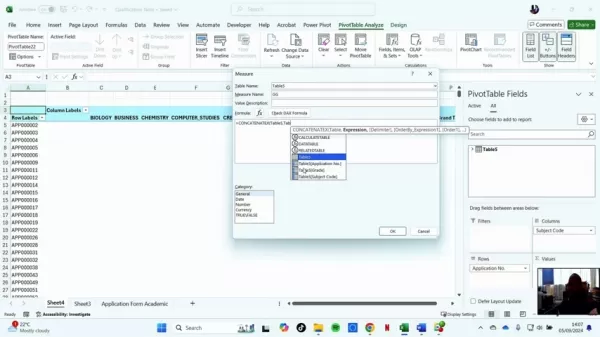
Implementing this advanced function requires activating Power Pivot through Excel's Data tab. The integration unlocks:
- Enterprise-scale text aggregation
- Cross-table reference capabilities
- Formula complexity exceeding standard Excel limits
Combining Excel with AI for Enhanced Data Analysis
Modern analytics increasingly leverage AI integrations to augment Excel's native capabilities:
- Predictive modeling via Azure ML connectors
- Automated anomaly detection through AI plugins
- Natural language processing for formula generation
- Python scripting for advanced statistical analysis
Step-by-Step Guide to Creating a DAX Measure in Power Pivot
Open and Manage Power Pivot
Navigate to Power Pivot via Excel's Data ribbon.
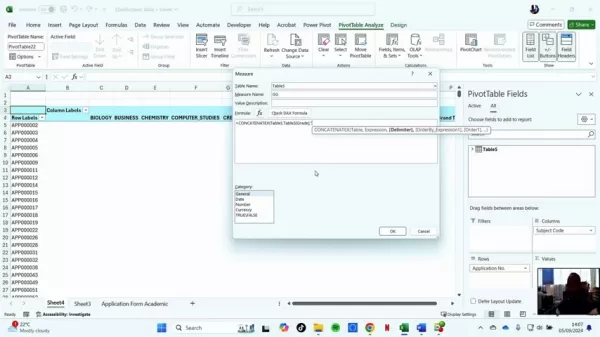
Create a Measure
Access the calculation grid to input specialized DAX formulas.
Use CONCATENATEX to build your formula
Construct your aggregation logic within the DAX formula builder.

Pros and Cons of Using Excel Pivot Tables
Pros
Intuitive user interface
Rapid data summarization
Customizable reporting structures
Cons
Formula complexity limitations
Text aggregation constraints
Performance degradation with oversized datasets
FAQ
Why are pivot tables useful?
Pivot tables enable dynamic data interrogation without programming expertise, transforming raw information into actionable business intelligence through intuitive drag-and-drop functionality.
What is CONCATENATEX?
This advanced DAX function facilitates enterprise-scale text combination operations, overcoming Excel's inherent character constraints through Power Pivot integration.
How can AI be used in Excel for data analysis?
AI expands Excel's analytical horizons through predictive modeling, natural language processing, and automated pattern recognition - transforming spreadsheets into intelligent decision support systems.
Related Questions
What other DAX functions are useful for data analysis in Power Pivot?
Advanced DAX functions like CALCULATE, SUMX, and FILTER enable sophisticated context-aware calculations, iterative computations, and dynamic dataset filtering respectively.
What are the alternatives to pivot tables?
Modern BI platforms like Power BI and Tableau offer enhanced visualization and modeling capabilities, while programming languages like Python provide unlimited analytical flexibility.
Related article
 Physical AI edges closer to factory floors as humanoid robots undergo trials
Humanoid, a British technology company, is set to deploy humanoid robots at factories run by German industrial supplier Schaeffler, according to Reuters.
According to a Humanoid spokesperson, the agreement is expected to bring between 1,000 and 2,000
IBM: Data Silos Remain Major Hurdle for Enterprise AI Adoption
According to IBM's research, the main obstacle to enterprise AI adoption isn't the underlying technology, but the persistent challenge of fractured data ecosystems.Ed Lovely, VP and Chief Data Officer at IBM, identifies data silos as the critical vul
Google unveils challenge to Apple in AI cloud services race
Google has introduced Private AI Compute, a cloud processing system engineered to deliver the privacy of on-device AI through the cloud. This platform promises faster, more capable AI interactions while protecting user data. By integrating Google's m
Related Special Topic Recommendations
writing
Physical AI edges closer to factory floors as humanoid robots undergo trials
Humanoid, a British technology company, is set to deploy humanoid robots at factories run by German industrial supplier Schaeffler, according to Reuters.
According to a Humanoid spokesperson, the agreement is expected to bring between 1,000 and 2,000
IBM: Data Silos Remain Major Hurdle for Enterprise AI Adoption
According to IBM's research, the main obstacle to enterprise AI adoption isn't the underlying technology, but the persistent challenge of fractured data ecosystems.Ed Lovely, VP and Chief Data Officer at IBM, identifies data silos as the critical vul
Google unveils challenge to Apple in AI cloud services race
Google has introduced Private AI Compute, a cloud processing system engineered to deliver the privacy of on-device AI through the cloud. This platform promises faster, more capable AI interactions while protecting user data. By integrating Google's m
Related Special Topic Recommendations
writing
 Best AI Xianxia & Wuxia Assistants: Write Epic Cultivation Progression & Martial Arts Choreography
Discover the 2026 best AI assistants for crafting epic xianxia & wuxia tales. XIX.AI's curated list features top-rated, game-changing tools to master cultivation progression and martial arts choreography. Compare free vs paid options with real-world tests. Unlock your creative potential and start writing today!
 10 tools
 xix.ai
code
AI Mobile App Coding Tools: Generate Cross-Platform Flutter & React Native Code from Prompts
xix.ai
code
AI Mobile App Coding Tools: Generate Cross-Platform Flutter & React Native Code from Prompts
Discover the 2026 best AI mobile app coding tools for Flutter & React Native. Our curated, top-rated list features powerful, game-changing solutions that generate cross-platform code from prompts. Compare free vs paid options with real-world tests. Unlock faster development and build better apps. Explore the rankings on XIX.AI now!
10 tools
xix.ai
code
Best AI Chrome Extension Generators: Create Custom Browser Add-ons with Zero Coding Experience
Discover the 2026 best AI Chrome extension generators on XIX.AI. Our curated list features top-rated, must-try tools that let you create custom browser add-ons with zero coding. Compare free vs paid options, see real-world tests, and unlock your productivity. Explore the latest rankings and find your perfect tool today!
10 tools
xix.ai
Text-to-speech
Best AI Multilingual TTS: Generate Authentic Native-Accent Speech in 50+ Languages
Discover the 2026 best AI multilingual TTS tools for authentic native-accent speech in 50+ languages. Explore our top-rated, curated rankings with free vs paid comparisons and real-world tests. Find your perfect voice tool on XIX.AI and unlock global communication today.
10 tools
xix.ai
Meeting Assistant
Best AI Meeting Automation Tools for Smarter and Faster Collaboration
Discover the 2026 latest top-rated AI meeting automation tools for smarter, faster collaboration. Our curated list features powerful, game-changing solutions to automate notes, summaries, and action items. Compare free vs paid options with real-world tests and weekly updated rankings. Unlock peak team productivity. Explore the best picks now at XIX.AI.
10 tools
xix.ai
Prompt
AI Prompts for Infrastructure-as-Code: Deploy Terraform & Docker Configurations Safely
Discover the 2026 latest top-rated AI prompts for Infrastructure-as-Code. XIX.AI's curated selection helps you safely deploy Terraform & Docker configurations, automate cloud setups, and boost DevOps productivity. Compare free vs paid options with real-world tests. Explore now and unlock your AI edge.
10 tools
xix.ai

 Comments (0)
0/500
Comments (0)
0/500
This guide demonstrates how integrating Excel's pivot tables with AI can transform your data analysis workflow. While pivot tables excel at summarizing complex datasets, they have inherent limitations. We provide actionable strategies for handling large datasets efficiently while avoiding common character limit constraints. Discover how AI-powered solutions can complement Excel's functionality to unlock deeper insights.
Key Points
Pivot tables remain indispensable for Excel-powered data aggregation and reporting.
Excel's character constraints can disrupt complex analytical operations.
Strategic use of DAX functions helps circumvent text length barriers.
AI integration elevates data insights beyond conventional spreadsheet capabilities.
Understanding the Power and Limitations of Excel Pivot Tables
What are Pivot Tables and Why Use Them?
Pivot tables represent Excel's most dynamic analytical tool, enabling rapid transformation of raw data into structured reports.
These interactive dashboards allow users to rearrange, filter, and summarize data fields without altering source information. Their true power lies in revealing hidden trends and patterns within complex datasets, making them essential for data-driven decision making across industries.
Common analytical applications include:
- Regional sales performance analysis by product category
- Marketing campaign ROI comparisons
- Demographic-based customer satisfaction metrics
Key advantages cement pivot tables' role in business analytics:
- Instant summarization of million-row datasets
- Visual pattern recognition through dynamic filtering
- Customizable reporting frameworks
- Non-destructive data exploration
- Reduced manual calculation errors
- Accessible analytical capabilities
The Character Limit Challenge in Excel
Despite their versatility, Excel's technical thresholds emerge when processing enterprise-scale datasets or sophisticated formulas. The 32,767-character cell limit frequently disrupts operations involving:
- Multi-field text concatenation
- Complex nested logical statements
- Advanced DAX measure development
These constraints manifest through cryptic error messages when pivot operations exceed system capacities. Strategic approaches become necessary to maintain analytical continuity.
Solutions for Overcoming Excel's Limitations
Leveraging DAX Functions to Bypass Character Limits
The CONCATENATEX DAX function provides an elegant solution to Excel's text constraints.
Implementing this advanced function requires activating Power Pivot through Excel's Data tab. The integration unlocks:
- Enterprise-scale text aggregation
- Cross-table reference capabilities
- Formula complexity exceeding standard Excel limits
Combining Excel with AI for Enhanced Data Analysis
Modern analytics increasingly leverage AI integrations to augment Excel's native capabilities:
- Predictive modeling via Azure ML connectors
- Automated anomaly detection through AI plugins
- Natural language processing for formula generation
- Python scripting for advanced statistical analysis
Step-by-Step Guide to Creating a DAX Measure in Power Pivot
Open and Manage Power Pivot
Navigate to Power Pivot via Excel's Data ribbon.
Create a Measure
Access the calculation grid to input specialized DAX formulas.
Use CONCATENATEX to build your formula
Construct your aggregation logic within the DAX formula builder.
Pros and Cons of Using Excel Pivot Tables
Pros
Intuitive user interface
Rapid data summarization
Customizable reporting structures
Cons
Formula complexity limitations
Text aggregation constraints
Performance degradation with oversized datasets
FAQ
Why are pivot tables useful?
Pivot tables enable dynamic data interrogation without programming expertise, transforming raw information into actionable business intelligence through intuitive drag-and-drop functionality.
What is CONCATENATEX?
This advanced DAX function facilitates enterprise-scale text combination operations, overcoming Excel's inherent character constraints through Power Pivot integration.
How can AI be used in Excel for data analysis?
AI expands Excel's analytical horizons through predictive modeling, natural language processing, and automated pattern recognition - transforming spreadsheets into intelligent decision support systems.
Related Questions
What other DAX functions are useful for data analysis in Power Pivot?
Advanced DAX functions like CALCULATE, SUMX, and FILTER enable sophisticated context-aware calculations, iterative computations, and dynamic dataset filtering respectively.
What are the alternatives to pivot tables?
Modern BI platforms like Power BI and Tableau offer enhanced visualization and modeling capabilities, while programming languages like Python provide unlimited analytical flexibility.







 Physical AI edges closer to factory floors as humanoid robots undergo trials
Humanoid, a British technology company, is set to deploy humanoid robots at factories run by German industrial supplier Schaeffler, according to Reuters.
According to a Humanoid spokesperson, the agreement is expected to bring between 1,000 and 2,000
Physical AI edges closer to factory floors as humanoid robots undergo trials
Humanoid, a British technology company, is set to deploy humanoid robots at factories run by German industrial supplier Schaeffler, according to Reuters.
According to a Humanoid spokesperson, the agreement is expected to bring between 1,000 and 2,000
 IBM: Data Silos Remain Major Hurdle for Enterprise AI Adoption
According to IBM's research, the main obstacle to enterprise AI adoption isn't the underlying technology, but the persistent challenge of fractured data ecosystems.Ed Lovely, VP and Chief Data Officer at IBM, identifies data silos as the critical vul
IBM: Data Silos Remain Major Hurdle for Enterprise AI Adoption
According to IBM's research, the main obstacle to enterprise AI adoption isn't the underlying technology, but the persistent challenge of fractured data ecosystems.Ed Lovely, VP and Chief Data Officer at IBM, identifies data silos as the critical vul
 Google unveils challenge to Apple in AI cloud services race
Google has introduced Private AI Compute, a cloud processing system engineered to deliver the privacy of on-device AI through the cloud. This platform promises faster, more capable AI interactions while protecting user data. By integrating Google's m
Google unveils challenge to Apple in AI cloud services race
Google has introduced Private AI Compute, a cloud processing system engineered to deliver the privacy of on-device AI through the cloud. This platform promises faster, more capable AI interactions while protecting user data. By integrating Google's m

Discover the 2026 best AI assistants for crafting epic xianxia & wuxia tales. XIX.AI's curated list features top-rated, game-changing tools to master cultivation progression and martial arts choreography. Compare free vs paid options with real-world tests. Unlock your creative potential and start writing today!
10 tools
xix.ai

Discover the 2026 best AI mobile app coding tools for Flutter & React Native. Our curated, top-rated list features powerful, game-changing solutions that generate cross-platform code from prompts. Compare free vs paid options with real-world tests. Unlock faster development and build better apps. Explore the rankings on XIX.AI now!
10 tools
xix.ai

Discover the 2026 best AI Chrome extension generators on XIX.AI. Our curated list features top-rated, must-try tools that let you create custom browser add-ons with zero coding. Compare free vs paid options, see real-world tests, and unlock your productivity. Explore the latest rankings and find your perfect tool today!
10 tools
xix.ai

Discover the 2026 best AI multilingual TTS tools for authentic native-accent speech in 50+ languages. Explore our top-rated, curated rankings with free vs paid comparisons and real-world tests. Find your perfect voice tool on XIX.AI and unlock global communication today.
10 tools
xix.ai

Discover the 2026 latest top-rated AI meeting automation tools for smarter, faster collaboration. Our curated list features powerful, game-changing solutions to automate notes, summaries, and action items. Compare free vs paid options with real-world tests and weekly updated rankings. Unlock peak team productivity. Explore the best picks now at XIX.AI.
10 tools
xix.ai

Discover the 2026 latest top-rated AI prompts for Infrastructure-as-Code. XIX.AI's curated selection helps you safely deploy Terraform & Docker configurations, automate cloud setups, and boost DevOps productivity. Compare free vs paid options with real-world tests. Explore now and unlock your AI edge.
10 tools
xix.ai