


 Home
HomeAI-Powered Tools Boost Voice Clarity for Content Creators
In the digital era, pristine audio is essential for engaging content, whether for podcasts, videos, or professional communication. Conventional methods often fail to deliver, but Artificial Intelligence (AI) is transforming audio enhancement. This article highlights cutting-edge AI tools that elevate voice clarity, minimize background noise, and enhance audio quality, making professional-grade sound achievable without costly gear.
Key Highlights
AI-driven tools vastly improve audio quality, even from simple recordings.
HitPaw Video Enhancer provides AI-powered video upscaling and noise suppression.
Adobe Podcast offers a free, web-based AI audio enhancement solution.
Mobile recordings can reach near-studio quality with these tools.
Knowing each tool’s limitations ensures optimal audio results.
The Emergence of AI in Audio Enhancement
Why Audio Quality Is Crucial
Crystal-clear audio is now a necessity, not a luxury. Whether producing YouTube videos, podcasts, or voice notes, audio clarity significantly affects audience engagement and perception. Poor sound quality can distract or alienate listeners, while crisp audio enhances professionalism and ensures your message resonates. AI-powered audio tools make achieving top-tier sound quality simpler and more accessible, particularly for content creators and podcasters where superior audio is paramount. Clear voice recordings are also vital for professional-grade voice editing.
Traditional vs. AI Audio Enhancement
Conventional audio editing often involves intricate processes and specialized software, demanding time and expertise. In contrast, AI-driven audio enhancement streamlines these tasks by automating complex functions. AI algorithms intelligently detect and eliminate noise, balance sound levels, and boost vocal clarity with minimal effort. This democratizes high-quality audio production, making it accessible to users regardless of technical know-how or budget.
HitPaw vs. Adobe Podcast Comparison
Feature Breakdown
Here’s a comparison to guide your choice of tool:
Feature HitPaw Video Enhancer Adobe Podcast Pricing Subscription-based Free AI Noise Reduction Yes Yes Video Upscaling Yes No Speech Enhancement No Yes Ease of Use Intuitive interface User-friendly design Offline Use Yes No Target Audience Video editors, content creators Podcasters, voiceover professionals
Selecting the Best Tool
Choosing the right AI audio tool depends on your needs. For those enhancing both video and audio and willing to invest in a subscription, HitPaw Video Enhancer is ideal. For voice-focused projects seeking a free, user-friendly option, Adobe Podcast excels. Understanding each tool’s strengths helps you achieve superior audio quality tailored to your project.
Adobe Podcast: Step-by-Step Guide
Step 1: Visit Adobe Podcast
Start by navigating to the Adobe Podcast website. Open your browser and search for “Adobe Podcast” to locate the platform.
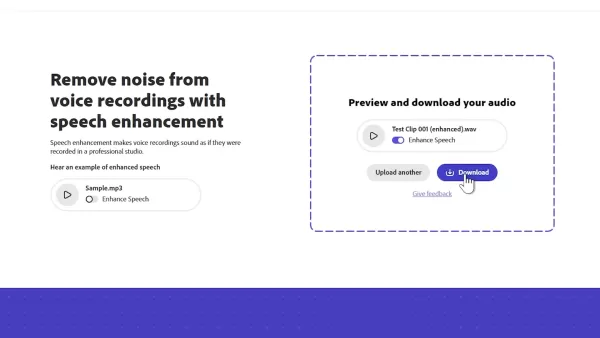
Click the link to begin enhancing your audio. As a fully web-based tool, no software installation is needed.
Step 2: Upload Your Audio File
Next, upload your audio file from your device. Ensure the file meets the platform’s size restrictions for a seamless upload process.
Step 3: Initiate Audio Enhancement
Once uploaded, click the “Enhance” button. Adobe Podcast’s AI will analyze and refine your audio, removing noise and optimizing vocal clarity. Processing time varies based on file size, so please allow a few minutes.
Step 4: Review and Save
After processing, listen to the enhanced audio to confirm it meets your expectations. If satisfied, download the file. If tweaks are needed, adjust accordingly before saving.
Pros and Cons of Free vs. Paid Tools
Pros
Enhanced control over audio settings.
Supports diverse audio file formats.
Batch processing for efficiency.
Access to advanced features like de-essing, compression, and equalization.
Cons
Paid tools often require subscriptions or one-time purchases.
Complex features may demand a learning curve.
Higher system resource requirements.
FAQ
Can these tools support live streaming?
While primarily designed for pre-recorded audio, some tools offer real-time noise reduction. Verify each tool’s features for live streaming compatibility.
Are there file size or duration limits?
Yes, Adobe Podcast caps free plans at 30 minutes, and HitPaw imposes file size and duration limits. Check file compliance to avoid issues.
Can all background noise be removed?
AI noise reduction is powerful but may not eliminate all noise, especially loud or complex sounds, which may require manual editing.
Related Questions
What other AI audio editing tools are available?
Beyond HitPaw Video Enhancer and Adobe Podcast, tools like Krisp, Auphonic, and Descript offer unique audio editing features. Explore these to find the best match for your needs.
How can I optimize my audio recording setup?
Improve recordings by using a quality microphone, recording in a quiet space, employing a pop filter, and positioning the microphone correctly. A solid setup reduces post-processing needs.
Related article
 Stripe to Acquire OpenRouter as AI Model Routing Gains Momentum
Stripe has agreed to acquire OpenRouter, an AI model-routing platform that gives developers access to hundreds of models through a single interface. The deal adds model selection and routing to Stripe’s existing work around AI usage and token-based b
Former OpenAI Researcher Barrett Zoph Returns to Google to Support Gemini Development
Barret Zoph, who previously abruptly left and joined OpenAI due to a disagreement with Thinking Machines Lab CEO Miriam Mularati, has once again changed employers. Alphabet's Google announced that Zoph will return as Vice President of Research, bring
How Recursive Intelligence Raised $335M at $4B Valuation in 4 Months
The co-founders of startup Ricursive Intelligence seemed destined to be co-founders.Anna Goldie, CEO, and Azalia Mirhoseini, CTO, are so well-known in the AI community that they were among those AI engineers who “got those weird emails from Zuckerber
Related Special Topic Recommendations
Design & Art
Stripe to Acquire OpenRouter as AI Model Routing Gains Momentum
Stripe has agreed to acquire OpenRouter, an AI model-routing platform that gives developers access to hundreds of models through a single interface. The deal adds model selection and routing to Stripe’s existing work around AI usage and token-based b
Former OpenAI Researcher Barrett Zoph Returns to Google to Support Gemini Development
Barret Zoph, who previously abruptly left and joined OpenAI due to a disagreement with Thinking Machines Lab CEO Miriam Mularati, has once again changed employers. Alphabet's Google announced that Zoph will return as Vice President of Research, bring
How Recursive Intelligence Raised $335M at $4B Valuation in 4 Months
The co-founders of startup Ricursive Intelligence seemed destined to be co-founders.Anna Goldie, CEO, and Azalia Mirhoseini, CTO, are so well-known in the AI community that they were among those AI engineers who “got those weird emails from Zuckerber
Related Special Topic Recommendations
Design & Art
 Top AI Illustration Tools: Create Editorial Scenes and Cover Art Faster
2026 Latest Top-rated AI Illustration Tools: Our curated list features the best powerfully designed tools for creating stunning editorial scenes and eye-catching cover art quickly. Each option has gone through rigorous real-world tests, offering a free vs paid comparison to help you find the perfect match for your workflow. Try these must-try solutions today to unlock your AI edge and boost your creative productivity. Explore now at XIX.AI.
 10 tools
 xix.ai
Education and Learning
Top AI Tutors for Exam Prep: Practice Math, Science, and English
xix.ai
Education and Learning
Top AI Tutors for Exam Prep: Practice Math, Science, and English
2026 Latest Top-Rated Best AI Tutors for Exam Prep are here on XIX.AI! Our curated list features powerful game-changing tools that offer free vs paid comparison, real-world tests, and weekly updated rankings. They help boost your writing efficiency, simplify complex topic learning, and unlock your academic potential. Explore now to Discover your perfect exam prep tool and Start creating today to Unlock your AI edge!
10 tools
xix.ai
Finance
AI Budget Planning Tools for Personal Money Management
2026 Latest Best Top-Rated AI Budget Planning Tools for Personal Money Management are here on XIX.AI! This curated collection features powerful, game-changing solutions that help you conduct real-world tests, understand spending habits, and create personalized plans to boost productivity. Enjoy a free vs paid comparison along with detailed rankings. Must-try tools designed to simplify money management and unlock your AI edge. Explore now!
11 tools
xix.ai
Health & Wellness
AI Sleep Tracking Assistants: Improve Recovery with Better Bedtime Habits
2026 Latest Best Top-Rated AI Sleep Tracking Assistants curated for ultimate recovery. This fully updated weekly guide features powerful tools that deliver real-world tests, free vs paid comparison, and detailed rankings to help you find the must-try solution that boosts sleep quality and supports better bedtime habits. Explore now at XIX.AI to Unlock your AI edge.
10 tools
xix.ai
Data Analysis
AI SQL Copilots for Product and Revenue Analytics
2026 Latest Best Top-Rated AI SQL Copilots for Product and Revenue Analytics! XIX.AI has curated a powerful, game-changing collection of must-try tools that undergo real-world tests through weekly updated rankings. These tools help users boost productivity significantly by accelerating data analysis, streamlining complex queries, and generating accurate insights to drive smarter business decisions. Explore now to Discover your perfect tool for unlocking your AI edge!
14 tools
xix.ai
Education and Learning
Best AI Homework Helpers That Teach: Learn Concepts, Not Just Answers
2026 Latest Best Top-Rated AI Homework Helpers That Teach Core Concepts Not Just Answers Powerful Tools for Students Must-Try Curated List Weekly Updated Free vs Paid Comparison Real-World Tests Accurate Rankings to Help You Unlock Your Full Learning Potential Explore now to Discover your perfect tool for smarter studying.
10 tools
xix.ai

 Comments (1)
0/500
Comments (1)
0/500
![AndrewHernández]()
As a video creator who has a day job, I really wish AI voice tools could go beyond cleaning up audio and help me balance my script’s technical depth with accessibility. Sometimes I sound too nerdy.
In the digital era, pristine audio is essential for engaging content, whether for podcasts, videos, or professional communication. Conventional methods often fail to deliver, but Artificial Intelligence (AI) is transforming audio enhancement. This article highlights cutting-edge AI tools that elevate voice clarity, minimize background noise, and enhance audio quality, making professional-grade sound achievable without costly gear.
Key Highlights
AI-driven tools vastly improve audio quality, even from simple recordings.
HitPaw Video Enhancer provides AI-powered video upscaling and noise suppression.
Adobe Podcast offers a free, web-based AI audio enhancement solution.
Mobile recordings can reach near-studio quality with these tools.
Knowing each tool’s limitations ensures optimal audio results.
The Emergence of AI in Audio Enhancement
Why Audio Quality Is Crucial
Crystal-clear audio is now a necessity, not a luxury. Whether producing YouTube videos, podcasts, or voice notes, audio clarity significantly affects audience engagement and perception. Poor sound quality can distract or alienate listeners, while crisp audio enhances professionalism and ensures your message resonates. AI-powered audio tools make achieving top-tier sound quality simpler and more accessible, particularly for content creators and podcasters where superior audio is paramount. Clear voice recordings are also vital for professional-grade voice editing.
Traditional vs. AI Audio Enhancement
Conventional audio editing often involves intricate processes and specialized software, demanding time and expertise. In contrast, AI-driven audio enhancement streamlines these tasks by automating complex functions. AI algorithms intelligently detect and eliminate noise, balance sound levels, and boost vocal clarity with minimal effort. This democratizes high-quality audio production, making it accessible to users regardless of technical know-how or budget.
HitPaw vs. Adobe Podcast Comparison
Feature Breakdown
Here’s a comparison to guide your choice of tool:
| Feature | HitPaw Video Enhancer | Adobe Podcast |
|---|---|---|
| Pricing | Subscription-based | Free |
| AI Noise Reduction | Yes | Yes |
| Video Upscaling | Yes | No |
| Speech Enhancement | No | Yes |
| Ease of Use | Intuitive interface | User-friendly design |
| Offline Use | Yes | No |
| Target Audience | Video editors, content creators | Podcasters, voiceover professionals |
Selecting the Best Tool
Choosing the right AI audio tool depends on your needs. For those enhancing both video and audio and willing to invest in a subscription, HitPaw Video Enhancer is ideal. For voice-focused projects seeking a free, user-friendly option, Adobe Podcast excels. Understanding each tool’s strengths helps you achieve superior audio quality tailored to your project.
Adobe Podcast: Step-by-Step Guide
Step 1: Visit Adobe Podcast
Start by navigating to the Adobe Podcast website. Open your browser and search for “Adobe Podcast” to locate the platform.
Click the link to begin enhancing your audio. As a fully web-based tool, no software installation is needed.
Step 2: Upload Your Audio File
Next, upload your audio file from your device. Ensure the file meets the platform’s size restrictions for a seamless upload process.
Step 3: Initiate Audio Enhancement
Once uploaded, click the “Enhance” button. Adobe Podcast’s AI will analyze and refine your audio, removing noise and optimizing vocal clarity. Processing time varies based on file size, so please allow a few minutes.
Step 4: Review and Save
After processing, listen to the enhanced audio to confirm it meets your expectations. If satisfied, download the file. If tweaks are needed, adjust accordingly before saving.
Pros and Cons of Free vs. Paid Tools
Pros
Enhanced control over audio settings.
Supports diverse audio file formats.
Batch processing for efficiency.
Access to advanced features like de-essing, compression, and equalization.
Cons
Paid tools often require subscriptions or one-time purchases.
Complex features may demand a learning curve.
Higher system resource requirements.
FAQ
Can these tools support live streaming?
While primarily designed for pre-recorded audio, some tools offer real-time noise reduction. Verify each tool’s features for live streaming compatibility.
Are there file size or duration limits?
Yes, Adobe Podcast caps free plans at 30 minutes, and HitPaw imposes file size and duration limits. Check file compliance to avoid issues.
Can all background noise be removed?
AI noise reduction is powerful but may not eliminate all noise, especially loud or complex sounds, which may require manual editing.
Related Questions
What other AI audio editing tools are available?
Beyond HitPaw Video Enhancer and Adobe Podcast, tools like Krisp, Auphonic, and Descript offer unique audio editing features. Explore these to find the best match for your needs.
How can I optimize my audio recording setup?
Improve recordings by using a quality microphone, recording in a quiet space, employing a pop filter, and positioning the microphone correctly. A solid setup reduces post-processing needs.








 Stripe to Acquire OpenRouter as AI Model Routing Gains Momentum
Stripe has agreed to acquire OpenRouter, an AI model-routing platform that gives developers access to hundreds of models through a single interface. The deal adds model selection and routing to Stripe’s existing work around AI usage and token-based b
Stripe to Acquire OpenRouter as AI Model Routing Gains Momentum
Stripe has agreed to acquire OpenRouter, an AI model-routing platform that gives developers access to hundreds of models through a single interface. The deal adds model selection and routing to Stripe’s existing work around AI usage and token-based b
 Former OpenAI Researcher Barrett Zoph Returns to Google to Support Gemini Development
Barret Zoph, who previously abruptly left and joined OpenAI due to a disagreement with Thinking Machines Lab CEO Miriam Mularati, has once again changed employers. Alphabet's Google announced that Zoph will return as Vice President of Research, bring
Former OpenAI Researcher Barrett Zoph Returns to Google to Support Gemini Development
Barret Zoph, who previously abruptly left and joined OpenAI due to a disagreement with Thinking Machines Lab CEO Miriam Mularati, has once again changed employers. Alphabet's Google announced that Zoph will return as Vice President of Research, bring
 How Recursive Intelligence Raised $335M at $4B Valuation in 4 Months
The co-founders of startup Ricursive Intelligence seemed destined to be co-founders.Anna Goldie, CEO, and Azalia Mirhoseini, CTO, are so well-known in the AI community that they were among those AI engineers who “got those weird emails from Zuckerber
How Recursive Intelligence Raised $335M at $4B Valuation in 4 Months
The co-founders of startup Ricursive Intelligence seemed destined to be co-founders.Anna Goldie, CEO, and Azalia Mirhoseini, CTO, are so well-known in the AI community that they were among those AI engineers who “got those weird emails from Zuckerber

2026 Latest Top-rated AI Illustration Tools: Our curated list features the best powerfully designed tools for creating stunning editorial scenes and eye-catching cover art quickly. Each option has gone through rigorous real-world tests, offering a free vs paid comparison to help you find the perfect match for your workflow. Try these must-try solutions today to unlock your AI edge and boost your creative productivity. Explore now at XIX.AI.
10 tools
xix.ai

2026 Latest Top-Rated Best AI Tutors for Exam Prep are here on XIX.AI! Our curated list features powerful game-changing tools that offer free vs paid comparison, real-world tests, and weekly updated rankings. They help boost your writing efficiency, simplify complex topic learning, and unlock your academic potential. Explore now to Discover your perfect exam prep tool and Start creating today to Unlock your AI edge!
10 tools
xix.ai

2026 Latest Best Top-Rated AI Budget Planning Tools for Personal Money Management are here on XIX.AI! This curated collection features powerful, game-changing solutions that help you conduct real-world tests, understand spending habits, and create personalized plans to boost productivity. Enjoy a free vs paid comparison along with detailed rankings. Must-try tools designed to simplify money management and unlock your AI edge. Explore now!
11 tools
xix.ai

2026 Latest Best Top-Rated AI Sleep Tracking Assistants curated for ultimate recovery. This fully updated weekly guide features powerful tools that deliver real-world tests, free vs paid comparison, and detailed rankings to help you find the must-try solution that boosts sleep quality and supports better bedtime habits. Explore now at XIX.AI to Unlock your AI edge.
10 tools
xix.ai

2026 Latest Best Top-Rated AI SQL Copilots for Product and Revenue Analytics! XIX.AI has curated a powerful, game-changing collection of must-try tools that undergo real-world tests through weekly updated rankings. These tools help users boost productivity significantly by accelerating data analysis, streamlining complex queries, and generating accurate insights to drive smarter business decisions. Explore now to Discover your perfect tool for unlocking your AI edge!
14 tools
xix.ai

2026 Latest Best Top-Rated AI Homework Helpers That Teach Core Concepts Not Just Answers Powerful Tools for Students Must-Try Curated List Weekly Updated Free vs Paid Comparison Real-World Tests Accurate Rankings to Help You Unlock Your Full Learning Potential Explore now to Discover your perfect tool for smarter studying.
10 tools
xix.ai

As a video creator who has a day job, I really wish AI voice tools could go beyond cleaning up audio and help me balance my script’s technical depth with accessibility. Sometimes I sound too nerdy.












