


 Home
HomeElementor AI Site Planner 2025: An In-Depth Review and Beta Test Overview
In the fast-paced world of web design, achieving efficiency and embracing innovation are paramount. Elementor, a premier WordPress page builder, has launched its AI Site Planner, a tool poised to transform how websites are built. This 2025 review provides a thorough analysis of the beta version of Elementor’s AI Site Planner, examining its core functionalities, key advantages, and potential limitations to help you decide if it aligns with your web design objectives.
Key Points
Elementor's Web Forward event introduced the new Editor V4 and the AI Site Planner.
The AI Site Planner leverages AI prompts to produce sitemaps and wireframes in just a few simple steps.
Website setup is made more efficient by establishing a comprehensive project brief.
Wireframe adjustments are straightforward, and entire page sections can be completely regenerated with a single click.
The integrated sitemap panel simplifies the process of moving and duplicating sections across different pages.
Imported designs are flexible, fully customizable, and typically require minimal troubleshooting.
The AI Site Planner facilitates website planning via an interactive AI Chat or an AI Notetaker feature.
Providing a high-quality brief is crucial for achieving superior outcomes.
Elementor AI Site Planner: A 2025 In-Depth Review
The Web Forward Event: A Glimpse into the Future
Elementor's recent Web Forward event offered a first look at several innovative features, with the new Editor V4 and the AI Site Planner taking center stage. This review provides an impartial, detailed evaluation of the AI Site Planner's beta version.
Elementor's objective is to fundamentally change website construction by using AI prompts that rapidly generate sitemaps and wireframes. It builds upon their foundational AI builder with significant enhancements. The AI Site Planner aims to optimize the preliminary phases of website development, enhancing speed and efficiency for designers and developers. Let's explore how this AI-powered tool performs in a practical setting.
Effortless Setup: Creating a Website Brief
The initial configuration is intuitive and user-centric.
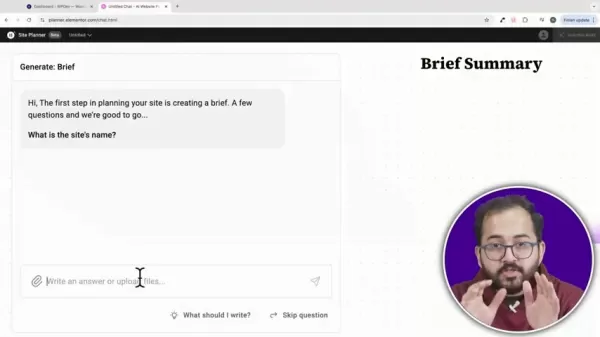
The primary task involves compiling a robust project brief. Users then simply click a button to generate the initial wireframe. This simplicity is a major advantage.
The process begins by developing a website brief. You provide the AI with essential project information, either by direct input or document upload. The objective is to equip the AI with a precise understanding of your project's aims and specifications, enabling it to generate the most suitable sitemap and wireframe. The more detailed and unambiguous your brief is, the more effectively the AI can support you.
Tweaking Wireframes: Regeneration and Customization
A standout feature is the simplicity of making modifications.
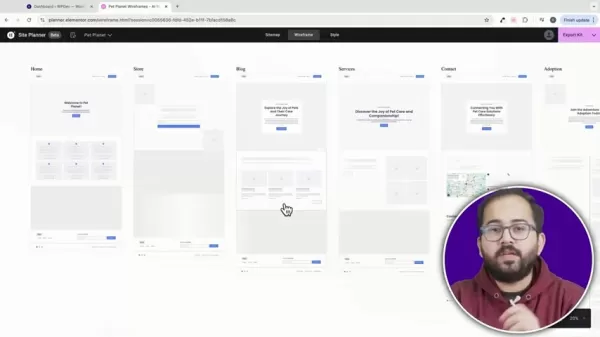
Complete sections can be regenerated instantly, and transferring or copying sections to other pages is effortless using the sitemap panel.
The tool's true strength lies in its adaptability. Once the initial wireframe is created, you can easily customize it to meet your specific requirements. If a section isn't satisfactory, you can regenerate it on the spot. The intuitive sitemap panel makes moving sections between pages for layout experimentation and copying sections for content reuse remarkably simple tasks.
Seamless Importing: Design with Minimal Issues
Design imports are generally smooth, with designs arriving fully customizable and with few complications.
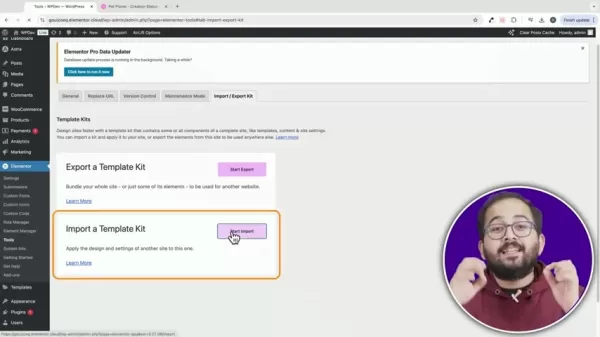
Whether fine-tuning padding or adjusting individual widgets, every element can be precisely calibrated with just a few clicks. The latest Elementor editor transforms the website-building process into a fluid and intuitive experience.
After establishing your site's basic framework, you can import and apply a design kit. Post-import, additional customization is typically needed to apply specific fonts, color palettes, and other branding elements, ensuring the wireframe accurately represents your visual identity.
Getting Started: AI Chat and AI Notetaker
To begin using the AI Site Planner, navigate to the designated website area.
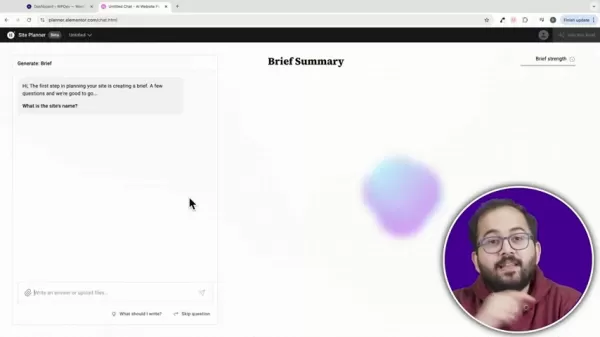
You will be presented with two options: the AI Chat or the AI Notetaker.
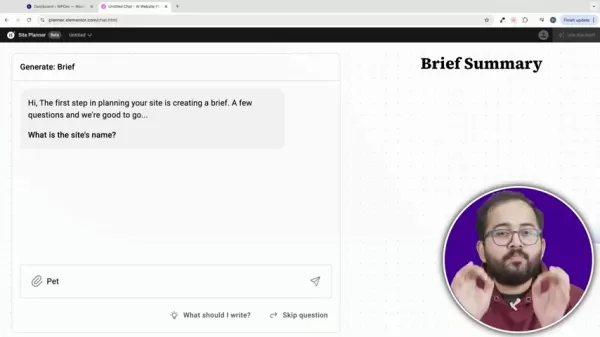
Both interfaces allow you to either answer questions directly or upload a document containing your website specifications. For client projects, you can create a customized questionnaire for them to complete and upload their answers, or utilize the AI Notetaker during a video call to capture a clear and concise project brief.
Please note that the AI Site Planner is currently optimized exclusively for Chrome browsers. The first step is always creating a brief. The AI will prompt you with various questions regarding your site's name, business type, primary objectives, and essential features you wish to incorporate. Clearly define your goals, such as disseminating pet care information or expanding your client base. Also, list the desired website components, like an online store, a blog, or an adoption portal.
Finalizing and Generating the Sitemap
Once you complete the brief, the "Use this brief" button will become available.
The top-right corner displays a quality rating for your brief. Aim for a 'Good' rating or higher, then click the button to initiate sitemap generation.
After finalizing your brief, the AI produces a detailed sitemap. This includes the pages you specified (e.g., Home, Adoption, Contact) alongside suggested sections for each page, such as headers, hero areas, and calls-to-action. The user interface is clean and straightforward, allowing you to regenerate or delete sections as required. You can also drag and drop to reorder sections for an optimal page flow.
Generating the Wireframe
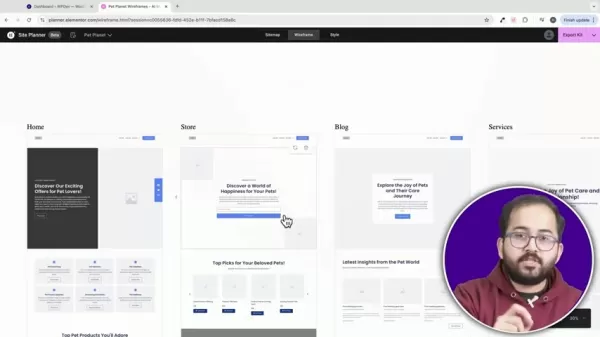
Following sitemap creation, click the wireframe button at the top to generate your site's complete visual layout.
The generation time varies based on the number of pages specified. This is also the ideal point to preview the layout in mobile or tablet view.
All specified pages are now generated. A useful feature is the ability to instantly switch the layout预览 to mobile or tablet formats directly from this interface. If the home page hero section isn't perfect, you can regenerate it for a more suitable design.
Problems Faced When Importing The Zip File
Plugin and Theme Updates
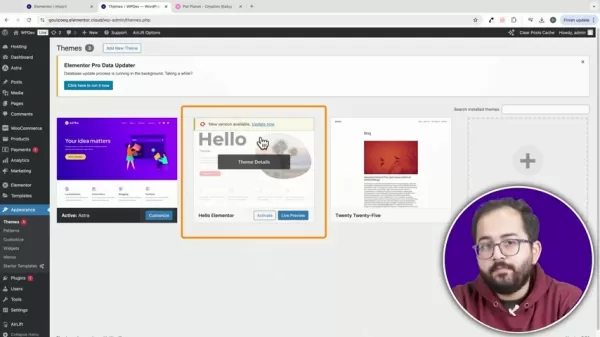
Ensure both the core Elementor and Elementor Pro plugins are updated to the latest versions to prevent compatibility problems. Using only the free version of Elementor might lead to some sections not importing correctly.
The selected theme is critical for success. The Hello theme by Elementor is highly recommended and must be updated to its latest version to avoid potential conflicts. Be aware that compatibility errors can sometimes occur.
Header Import Issues
Even with the Hello theme active, the header section frequently fails to import properly, necessitating manual setup of pages and menu items to ensure correct navigation functionality.
Utilizing a default theme might result in a disorganized layout. To ensure a smooth import, verify that all recommended themes are current and that the necessary plugins are correctly configured.
Getting the most out of your website setup
Using an AI Brief
An AI brief is an effective method to initiate your project setup. Its benefits include considerable time savings and establishing a solid foundation with strategically chosen keywords. Clarity in your brief is essential for the AI to interpret your requirements accurately.
Using Elementor's AI Features
Elementor is increasingly integrating AI to produce high-caliber websites with strong SEO performance.
By strategically applying AI to elements like titles, layouts, and other components, you can substantially improve your site's loading speed and search engine ranking, ultimately driving higher revenue.
Pros and Cons of Elementor's AI Site Planner
Pros
User-Friendly: The AI-driven workflow makes the initial website setup remarkably simple.
Highly Customizable: Wireframes are easily adjustable and can be regenerated as needed.
Time-Saving: Sitemaps and wireframes are produced swiftly, significantly accelerating the planning phase.
Responsive Design: Layouts can be instantly adapted and previewed for mobile and tablet devices.
Cons
Browser Restriction: Currently, full functionality is only guaranteed on the Chrome browser.
Limited Styling Choices: The available style customization options within the planner itself are still being refined.
Theme Dependency: Optimal performance requires using specific themes, primarily the Hello Elementor theme.
Header Import Bugs: Automated header import is often inconsistent and typically requires manual intervention to configure correctly.
FAQ
Which Browsers are Compatible with Elementor AI Site Planner?
The AI Site Planner is currently fine-tuned for optimal performance on Chrome browsers. While functionality on other browsers isn't officially supported, the Elementor development team is expected to broaden compatibility in subsequent releases.
What Theme is Recommended for Optimal Results?
To ensure the best performance and design integrity, using the Hello theme by Elementor is strongly advised. It's engineered for flawless integration with Elementor's features and helps reduce potential compatibility problems.
How can I improve the Quality of the Generated Sitemap?
To enhance the quality of the generated sitemap, provide the AI with a thorough and well-defined website brief. Incorporate specific details about your business model, primary objectives, and key features you intend to implement, as this directly influences the sitemap's accuracy and detail.
Related Questions
How does Elementor's AI Site Planner compare to other AI website builders in 2025?
Amidst a crowded field of AI website builders in 2025, Elementor's AI Site Planner distinguishes itself through its deep integration within the established Elementor environment. In contrast to many standalone AI builders, Elementor provides users with greater creative authority and customization potential. Moreover, the AI Site Planner's focus on generating sitemaps and wireframes specifically aids web designers and developers, optimizing their workflow and conserving significant time. Other AI builders often prioritize complete design automation, which can sometimes restrict creative freedom and adaptability.By concentrating on specific, crucial stages of the website creation process and integrating seamlessly with a leading page builder platform, Elementor's AI Site Planner delivers a balanced solution that marries AI-driven efficiency with human design expertise. We anticipate continued evolution and enhancement of Elementor's AI features as the underlying technology progresses.
Related article
 Anthropic Expands Claude AI Coding Tools to Japan in Push for Overseas Growth
Anthropic, a prominent U.S. artificial intelligence firm, is intensifying its global outreach. On Wednesday, the company hosted a major developer gathering, "Code with Claude," in Tokyo, drawing close to 500 software engineers. This initiative seeks
India’s Software Giant Cuts Hiring, Promises No Layoffs as AI Agents Scale Up
As artificial intelligence reshapes traditional labor-intensive business models, Tata Consultancy Services (TCS), a premier Indian software outsourcing firm, has unveiled its strategic response. During Tuesday’s annual general meeting, the chairman o
China Locks AI Models During Gaokam to Block Instant Homework Help
With the 2026 Gaokao fast approaching, rumors regarding the suspension of AI tools during the exam period have ignited intense online debate. In response to public concern, major AI platforms and educational apps have clarified their stance: rather t
Related Special Topic Recommendations
Design & Art
Anthropic Expands Claude AI Coding Tools to Japan in Push for Overseas Growth
Anthropic, a prominent U.S. artificial intelligence firm, is intensifying its global outreach. On Wednesday, the company hosted a major developer gathering, "Code with Claude," in Tokyo, drawing close to 500 software engineers. This initiative seeks
India’s Software Giant Cuts Hiring, Promises No Layoffs as AI Agents Scale Up
As artificial intelligence reshapes traditional labor-intensive business models, Tata Consultancy Services (TCS), a premier Indian software outsourcing firm, has unveiled its strategic response. During Tuesday’s annual general meeting, the chairman o
China Locks AI Models During Gaokam to Block Instant Homework Help
With the 2026 Gaokao fast approaching, rumors regarding the suspension of AI tools during the exam period have ignited intense online debate. In response to public concern, major AI platforms and educational apps have clarified their stance: rather t
Related Special Topic Recommendations
Design & Art
 Best AI Style Transfer Tools for Creative Experiments
2026 Latest Best Top-rated AI Style Transfer Tools for Creative Experiments! XIX.AI has curated a powerful, game-changing collection of must-try tools that deliver exceptional results through real-world tests and rigorous rankings. These top solutions help creatives boost productivity significantly by accelerating content creation and unlocking endless creative possibilities. Explore now to discover your perfect tool and start creating today!
 9 tools
 xix.ai
Comic Creation
Best AI Dialogue Bubble Tools for Visual Storytelling
xix.ai
Comic Creation
Best AI Dialogue Bubble Tools for Visual Storytelling
2026 Latest Best Top-Rated AI Dialogue Bubble Tools for Visual Storytelling are here on XIX.AI! This curated collection features powerful, game-changing tools that help creators boost productivity and overcome creative bottlenecks. Get a free vs paid comparison, see real-world tests, and check the latest rankings to find the must-try solutions perfect for crafting engaging visual narratives. Explore now to discover your ideal tool!
10 tools
xix.ai
Meeting Assistant
Top AI Meeting Summary Tools: Track Decisions and Follow-Ups Clearly
2026 Latest Top-Rated Best AI Meeting Summary Tools for Clear Decision Tracking and Effortless Follow-Ups. This curated list showcases powerful, game-changing solutions that boost productivity dramatically by automating meeting notes, identifying key action items, and streamlining team coordination across all projects. Get a free vs paid comparison along with real-world tests and weekly updated rankings to help you find the perfect tool. Explore now to unlock your AI edge!
9 tools
xix.ai
Data Analysis
Best AI Data Cleaning Tools: Fix Missing Values and Duplicates Fast
2026 Latest Best Top-rated AI Data Cleaning Tools for quick fixing of missing values and duplicates. This curated list showcases powerful, game-changing solutions that boost productivity significantly. Each option has undergone rigorous real-world tests to ensure reliability. Get a free vs paid comparison and discover the must-try tool that fits your needs best. Explore now at XIX.AI to Unlock your AI edge.
11 tools
xix.ai
Design & Art
Best AI Creative Ideation Tools for Artists: Break Through Visual Blocks
2026 Latest Best Top-Rated AI Creative Ideation Tools for Artists are curated by XIX.AI to help creators break through visual blocks and boost creativity instantly. These powerful game-changing tools offer real-world tests, detailed free vs paid comparison, and weekly updated rankings. Discover your perfect tool to accelerate content creation and unlock your AI edge today. Explore now!
14 tools
xix.ai
Music composition
AI Beat Makers for TikTok Background Tracks, Reels Audio, and Creator Promo Music
2026 Latest Best AI Beat Makers for TikTok Background Tracks, Reels Audio, and Creator Promo Music! XIX.AI has curated a top-rated list of powerful game-changing tools that go through real-world tests to deliver flawless music for every content need. You’ll find detailed free vs paid comparison data, weekly updated rankings, and must-try options to help you boost creativity and productivity. Explore now to discover your perfect tool!
11 tools
xix.ai

 Comments (4)
0/500
Comments (4)
0/500
![RaymondBaker]()
Elementor setzt echt Maßstäbe! 😮 Der AI Site Planner klingt nach einem Game-Changer für alle, die mit WordPress arbeiten. Ich frage mich, ob das Tool auch für absolute Anfänger geeignet ist oder ob man schon Vorkenntnisse braucht. Die Beta-Tests wären spannend zu sehen – hoffentlich wird es nicht zu teuer für kleine Agenturen und Freelancer.
![RoyMartínez]()
Elementor mit KI? Klingt nach einem Gamechanger für WordPress-Entwickler. Aber ich frage mich, ob solche Tools am Ende nicht alle Websites gleich aussehen lassen. Die Beta wäre mal interessant zu testen, vor allem die Usability. Hoffentlich bleibt es bezahlbar und wird nicht nur für große Agenturen zugänglich. 🤔
![DavidLewis]()
As a freelance web designer, I've been testing this beta and it's honestly a game-changer! 😮 The way it automates layout suggestions could cut my project time in half. Though I'm slightly worried about how this might impact junior designers entering the field - will AI tools eventually replace entry-level design roles? Excited but cautious!
![WillLopez]()
Elementor AI 도구 출시 소식이군요. 웹디자인 속도가 빨라지겠네요! 🤔 근데 AI가 점점 디자이너 일자리를 대체하는 것 같아 조금 불안해요. 우리 시대 디자이너들은 어떻게 적응해야 할까요?
In the fast-paced world of web design, achieving efficiency and embracing innovation are paramount. Elementor, a premier WordPress page builder, has launched its AI Site Planner, a tool poised to transform how websites are built. This 2025 review provides a thorough analysis of the beta version of Elementor’s AI Site Planner, examining its core functionalities, key advantages, and potential limitations to help you decide if it aligns with your web design objectives.
Key Points
Elementor's Web Forward event introduced the new Editor V4 and the AI Site Planner.
The AI Site Planner leverages AI prompts to produce sitemaps and wireframes in just a few simple steps.
Website setup is made more efficient by establishing a comprehensive project brief.
Wireframe adjustments are straightforward, and entire page sections can be completely regenerated with a single click.
The integrated sitemap panel simplifies the process of moving and duplicating sections across different pages.
Imported designs are flexible, fully customizable, and typically require minimal troubleshooting.
The AI Site Planner facilitates website planning via an interactive AI Chat or an AI Notetaker feature.
Providing a high-quality brief is crucial for achieving superior outcomes.
Elementor AI Site Planner: A 2025 In-Depth Review
The Web Forward Event: A Glimpse into the Future
Elementor's recent Web Forward event offered a first look at several innovative features, with the new Editor V4 and the AI Site Planner taking center stage. This review provides an impartial, detailed evaluation of the AI Site Planner's beta version.
Elementor's objective is to fundamentally change website construction by using AI prompts that rapidly generate sitemaps and wireframes. It builds upon their foundational AI builder with significant enhancements. The AI Site Planner aims to optimize the preliminary phases of website development, enhancing speed and efficiency for designers and developers. Let's explore how this AI-powered tool performs in a practical setting.
Effortless Setup: Creating a Website Brief
The initial configuration is intuitive and user-centric.
The primary task involves compiling a robust project brief. Users then simply click a button to generate the initial wireframe. This simplicity is a major advantage.
The process begins by developing a website brief. You provide the AI with essential project information, either by direct input or document upload. The objective is to equip the AI with a precise understanding of your project's aims and specifications, enabling it to generate the most suitable sitemap and wireframe. The more detailed and unambiguous your brief is, the more effectively the AI can support you.
Tweaking Wireframes: Regeneration and Customization
A standout feature is the simplicity of making modifications.
Complete sections can be regenerated instantly, and transferring or copying sections to other pages is effortless using the sitemap panel.
The tool's true strength lies in its adaptability. Once the initial wireframe is created, you can easily customize it to meet your specific requirements. If a section isn't satisfactory, you can regenerate it on the spot. The intuitive sitemap panel makes moving sections between pages for layout experimentation and copying sections for content reuse remarkably simple tasks.
Seamless Importing: Design with Minimal Issues
Design imports are generally smooth, with designs arriving fully customizable and with few complications.
Whether fine-tuning padding or adjusting individual widgets, every element can be precisely calibrated with just a few clicks. The latest Elementor editor transforms the website-building process into a fluid and intuitive experience.
After establishing your site's basic framework, you can import and apply a design kit. Post-import, additional customization is typically needed to apply specific fonts, color palettes, and other branding elements, ensuring the wireframe accurately represents your visual identity.
Getting Started: AI Chat and AI Notetaker
To begin using the AI Site Planner, navigate to the designated website area.
You will be presented with two options: the AI Chat or the AI Notetaker.
Both interfaces allow you to either answer questions directly or upload a document containing your website specifications. For client projects, you can create a customized questionnaire for them to complete and upload their answers, or utilize the AI Notetaker during a video call to capture a clear and concise project brief.
Please note that the AI Site Planner is currently optimized exclusively for Chrome browsers. The first step is always creating a brief. The AI will prompt you with various questions regarding your site's name, business type, primary objectives, and essential features you wish to incorporate. Clearly define your goals, such as disseminating pet care information or expanding your client base. Also, list the desired website components, like an online store, a blog, or an adoption portal.
Finalizing and Generating the Sitemap
Once you complete the brief, the "Use this brief" button will become available.
The top-right corner displays a quality rating for your brief. Aim for a 'Good' rating or higher, then click the button to initiate sitemap generation.
After finalizing your brief, the AI produces a detailed sitemap. This includes the pages you specified (e.g., Home, Adoption, Contact) alongside suggested sections for each page, such as headers, hero areas, and calls-to-action. The user interface is clean and straightforward, allowing you to regenerate or delete sections as required. You can also drag and drop to reorder sections for an optimal page flow.
Generating the Wireframe
Following sitemap creation, click the wireframe button at the top to generate your site's complete visual layout.
The generation time varies based on the number of pages specified. This is also the ideal point to preview the layout in mobile or tablet view.
All specified pages are now generated. A useful feature is the ability to instantly switch the layout预览 to mobile or tablet formats directly from this interface. If the home page hero section isn't perfect, you can regenerate it for a more suitable design.
Problems Faced When Importing The Zip File
Plugin and Theme Updates
Ensure both the core Elementor and Elementor Pro plugins are updated to the latest versions to prevent compatibility problems. Using only the free version of Elementor might lead to some sections not importing correctly.
The selected theme is critical for success. The Hello theme by Elementor is highly recommended and must be updated to its latest version to avoid potential conflicts. Be aware that compatibility errors can sometimes occur.
Header Import Issues
Even with the Hello theme active, the header section frequently fails to import properly, necessitating manual setup of pages and menu items to ensure correct navigation functionality.
Utilizing a default theme might result in a disorganized layout. To ensure a smooth import, verify that all recommended themes are current and that the necessary plugins are correctly configured.
Getting the most out of your website setup
Using an AI Brief
An AI brief is an effective method to initiate your project setup. Its benefits include considerable time savings and establishing a solid foundation with strategically chosen keywords. Clarity in your brief is essential for the AI to interpret your requirements accurately.
Using Elementor's AI Features
Elementor is increasingly integrating AI to produce high-caliber websites with strong SEO performance.
By strategically applying AI to elements like titles, layouts, and other components, you can substantially improve your site's loading speed and search engine ranking, ultimately driving higher revenue.
Pros and Cons of Elementor's AI Site Planner
Pros
User-Friendly: The AI-driven workflow makes the initial website setup remarkably simple.
Highly Customizable: Wireframes are easily adjustable and can be regenerated as needed.
Time-Saving: Sitemaps and wireframes are produced swiftly, significantly accelerating the planning phase.
Responsive Design: Layouts can be instantly adapted and previewed for mobile and tablet devices.
Cons
Browser Restriction: Currently, full functionality is only guaranteed on the Chrome browser.
Limited Styling Choices: The available style customization options within the planner itself are still being refined.
Theme Dependency: Optimal performance requires using specific themes, primarily the Hello Elementor theme.
Header Import Bugs: Automated header import is often inconsistent and typically requires manual intervention to configure correctly.
FAQ
Which Browsers are Compatible with Elementor AI Site Planner?
The AI Site Planner is currently fine-tuned for optimal performance on Chrome browsers. While functionality on other browsers isn't officially supported, the Elementor development team is expected to broaden compatibility in subsequent releases.
What Theme is Recommended for Optimal Results?
To ensure the best performance and design integrity, using the Hello theme by Elementor is strongly advised. It's engineered for flawless integration with Elementor's features and helps reduce potential compatibility problems.
How can I improve the Quality of the Generated Sitemap?
To enhance the quality of the generated sitemap, provide the AI with a thorough and well-defined website brief. Incorporate specific details about your business model, primary objectives, and key features you intend to implement, as this directly influences the sitemap's accuracy and detail.
Related Questions
How does Elementor's AI Site Planner compare to other AI website builders in 2025?
Amidst a crowded field of AI website builders in 2025, Elementor's AI Site Planner distinguishes itself through its deep integration within the established Elementor environment. In contrast to many standalone AI builders, Elementor provides users with greater creative authority and customization potential. Moreover, the AI Site Planner's focus on generating sitemaps and wireframes specifically aids web designers and developers, optimizing their workflow and conserving significant time. Other AI builders often prioritize complete design automation, which can sometimes restrict creative freedom and adaptability.By concentrating on specific, crucial stages of the website creation process and integrating seamlessly with a leading page builder platform, Elementor's AI Site Planner delivers a balanced solution that marries AI-driven efficiency with human design expertise. We anticipate continued evolution and enhancement of Elementor's AI features as the underlying technology progresses.








 Anthropic Expands Claude AI Coding Tools to Japan in Push for Overseas Growth
Anthropic, a prominent U.S. artificial intelligence firm, is intensifying its global outreach. On Wednesday, the company hosted a major developer gathering, "Code with Claude," in Tokyo, drawing close to 500 software engineers. This initiative seeks
Anthropic Expands Claude AI Coding Tools to Japan in Push for Overseas Growth
Anthropic, a prominent U.S. artificial intelligence firm, is intensifying its global outreach. On Wednesday, the company hosted a major developer gathering, "Code with Claude," in Tokyo, drawing close to 500 software engineers. This initiative seeks
 India’s Software Giant Cuts Hiring, Promises No Layoffs as AI Agents Scale Up
As artificial intelligence reshapes traditional labor-intensive business models, Tata Consultancy Services (TCS), a premier Indian software outsourcing firm, has unveiled its strategic response. During Tuesday’s annual general meeting, the chairman o
India’s Software Giant Cuts Hiring, Promises No Layoffs as AI Agents Scale Up
As artificial intelligence reshapes traditional labor-intensive business models, Tata Consultancy Services (TCS), a premier Indian software outsourcing firm, has unveiled its strategic response. During Tuesday’s annual general meeting, the chairman o
 China Locks AI Models During Gaokam to Block Instant Homework Help
With the 2026 Gaokao fast approaching, rumors regarding the suspension of AI tools during the exam period have ignited intense online debate. In response to public concern, major AI platforms and educational apps have clarified their stance: rather t
China Locks AI Models During Gaokam to Block Instant Homework Help
With the 2026 Gaokao fast approaching, rumors regarding the suspension of AI tools during the exam period have ignited intense online debate. In response to public concern, major AI platforms and educational apps have clarified their stance: rather t

2026 Latest Best Top-rated AI Style Transfer Tools for Creative Experiments! XIX.AI has curated a powerful, game-changing collection of must-try tools that deliver exceptional results through real-world tests and rigorous rankings. These top solutions help creatives boost productivity significantly by accelerating content creation and unlocking endless creative possibilities. Explore now to discover your perfect tool and start creating today!
9 tools
xix.ai

2026 Latest Best Top-Rated AI Dialogue Bubble Tools for Visual Storytelling are here on XIX.AI! This curated collection features powerful, game-changing tools that help creators boost productivity and overcome creative bottlenecks. Get a free vs paid comparison, see real-world tests, and check the latest rankings to find the must-try solutions perfect for crafting engaging visual narratives. Explore now to discover your ideal tool!
10 tools
xix.ai

2026 Latest Top-Rated Best AI Meeting Summary Tools for Clear Decision Tracking and Effortless Follow-Ups. This curated list showcases powerful, game-changing solutions that boost productivity dramatically by automating meeting notes, identifying key action items, and streamlining team coordination across all projects. Get a free vs paid comparison along with real-world tests and weekly updated rankings to help you find the perfect tool. Explore now to unlock your AI edge!
9 tools
xix.ai

2026 Latest Best Top-rated AI Data Cleaning Tools for quick fixing of missing values and duplicates. This curated list showcases powerful, game-changing solutions that boost productivity significantly. Each option has undergone rigorous real-world tests to ensure reliability. Get a free vs paid comparison and discover the must-try tool that fits your needs best. Explore now at XIX.AI to Unlock your AI edge.
11 tools
xix.ai

2026 Latest Best Top-Rated AI Creative Ideation Tools for Artists are curated by XIX.AI to help creators break through visual blocks and boost creativity instantly. These powerful game-changing tools offer real-world tests, detailed free vs paid comparison, and weekly updated rankings. Discover your perfect tool to accelerate content creation and unlock your AI edge today. Explore now!
14 tools
xix.ai

2026 Latest Best AI Beat Makers for TikTok Background Tracks, Reels Audio, and Creator Promo Music! XIX.AI has curated a top-rated list of powerful game-changing tools that go through real-world tests to deliver flawless music for every content need. You’ll find detailed free vs paid comparison data, weekly updated rankings, and must-try options to help you boost creativity and productivity. Explore now to discover your perfect tool!
11 tools
xix.ai

Elementor setzt echt Maßstäbe! 😮 Der AI Site Planner klingt nach einem Game-Changer für alle, die mit WordPress arbeiten. Ich frage mich, ob das Tool auch für absolute Anfänger geeignet ist oder ob man schon Vorkenntnisse braucht. Die Beta-Tests wären spannend zu sehen – hoffentlich wird es nicht zu teuer für kleine Agenturen und Freelancer.
Elementor mit KI? Klingt nach einem Gamechanger für WordPress-Entwickler. Aber ich frage mich, ob solche Tools am Ende nicht alle Websites gleich aussehen lassen. Die Beta wäre mal interessant zu testen, vor allem die Usability. Hoffentlich bleibt es bezahlbar und wird nicht nur für große Agenturen zugänglich. 🤔
As a freelance web designer, I've been testing this beta and it's honestly a game-changer! 😮 The way it automates layout suggestions could cut my project time in half. Though I'm slightly worried about how this might impact junior designers entering the field - will AI tools eventually replace entry-level design roles? Excited but cautious!
Elementor AI 도구 출시 소식이군요. 웹디자인 속도가 빨라지겠네요! 🤔 근데 AI가 점점 디자이너 일자리를 대체하는 것 같아 조금 불안해요. 우리 시대 디자이너들은 어떻게 적응해야 할까요?












