


 Home
HomeDzine AI Converts 2D Images into 3D Models Effortlessly
In today's digital landscape, compelling visuals are essential. For marketers, designers, and content creators, the power to turn ordinary images into high-impact, professional-grade visuals is a key advantage. Dzine AI stands out as a transformative solution, providing an intuitive and robust platform to convert 2D photos into breathtaking 3D creations. With minimal effort, you can significantly enhance your imagery and captivate your audience. This guide offers a comprehensive look at Dzine AI, examining its core features, practical applications, and how you can leverage it to boost your creative work.
Key Points
Dzine AI converts 2D images into 3D visuals.
The platform features multiple AI-powered tools for editing and design.
Users can sign up for free and receive daily credits to use the tools.
It offers various 3D styles, including realistic rendering and pixel art.
A subscription is needed to remove watermarks from generated images.
An auto-prompt feature helps generate text prompts for your images automatically.
Understanding Dzine AI: Your Gateway to 3D Image Transformation
What is Dzine AI?
Dzine AI is an innovative platform that simplifies converting 2D images into engaging 3D visuals. This AI-powered tool makes 3D design accessible to users of any experience level. Transform standard photos into exceptional visual assets to improve your marketing materials, design projects, and content. The suite includes tools for creating diverse images, applying AI portrait and photo filters, and even changing a subject's clothing. Beyond portraits, you can also generate impressive product visuals. Dzine AI enables you to create stunning imagery with just a few clicks.
First Steps: Getting Started with Dzine AI
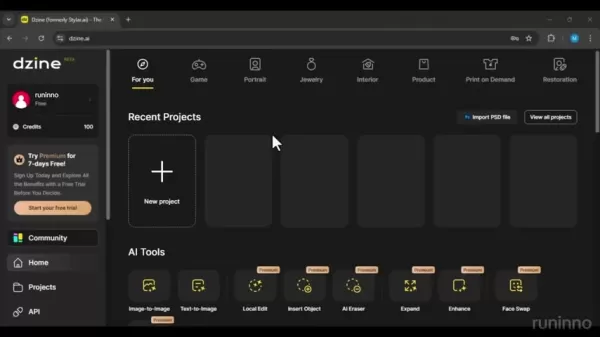
Begin by visiting the Dzine AI website at dzine.ai
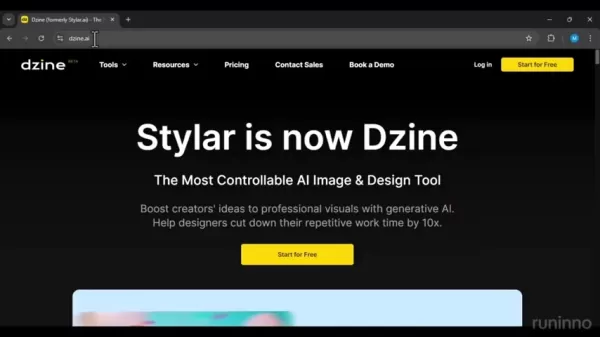
. The homepage presents a clean, intuitive interface highlighting its core offering as 'The Most Controllable AI Image & Design Tool'. Click the 'Start for Free' button to explore its features. You'll be prompted to sign up quickly using your email. After logging in, you'll access a dashboard showcasing various AI Tools, each addressing different image editing and design requirements.
Exploring Dzine AI's Key Tools
Dzine AI provides a comprehensive set of tools

for specific editing and design tasks:
- Image-to-Image: Transforms an image into various styles.
- Text-to-Image: Creates an image from a text description.
- AI Editor: Enables advanced image editing with AI assistance.
- Face Kit: Offers tools for facial enhancements and modifications.
These tools allow extensive image manipulation, unlocking endless creative possibilities.
Diving Deeper: Convert 2D Images to 3D with Dzine AI
Step-by-Step Guide to 2D to 3D Conversion
Follow this process to convert a 2D image into a 3D visual using Dzine AI:
- Start a New Project:
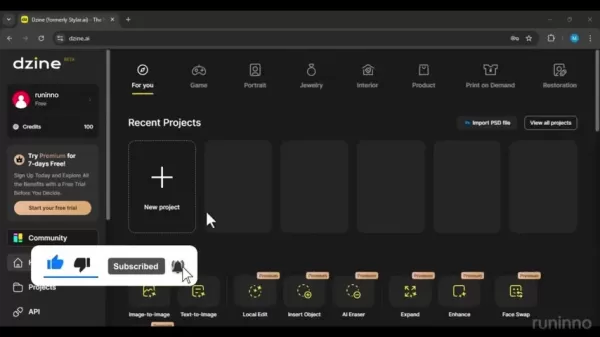
Click the 'New project' button on the dashboard.
- Select Aspect Ratio: Choose your desired aspect ratio. A 1:1 square ratio is common.
- Upload Your Image: Click the upload area to select the 2D image you wish to transform.
- Navigate to Image-to-Image Tool: Select this tool from the menu.
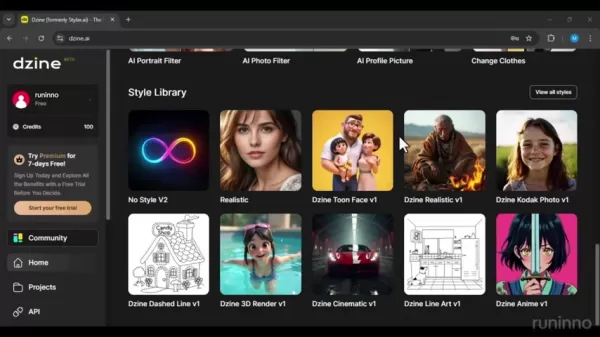
- Choose a 3D Style: Browse available styles like '3D Rendering' or '3D Pixel'
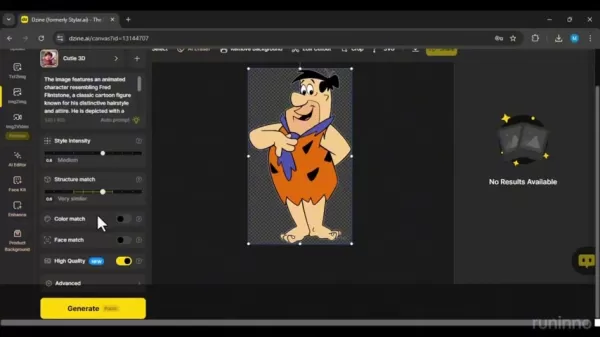
. Pick the one that fits your vision.
- Generate the 3D Image: Click 'Generate' to start the conversion.
- Customize Your Image: Adjust the intensity to your preference. A structure match around 0.6 usually works well. Higher values keep the output closer to the original image.
Dzine AI will then process your image, producing a 3D rendering in your chosen style. You'll receive multiple variations to choose the best match for your project.
Maximizing Results: Tips for Optimal 2D to 3D Conversion
For the best outcomes with Dzine AI's 2D-to-3D conversion, consider these tips:
- Choose High-Quality Source Images: Starting with a high-resolution image typically yields better detail and clarity.
- Experiment with Different Styles: Test various 3D styles to see which complements your image best.
- Adjust the Intensity: Fine-tune customization settings to achieve your preferred look.
- Iterate and Refine: If the initial result isn't perfect, adjust parameters and regenerate until satisfied.
Detailed Walkthrough: Mastering Dzine AI
Exploring Available Tools
Let’s explore the various tools available:
- Text-to-Image: Creates images from a text description
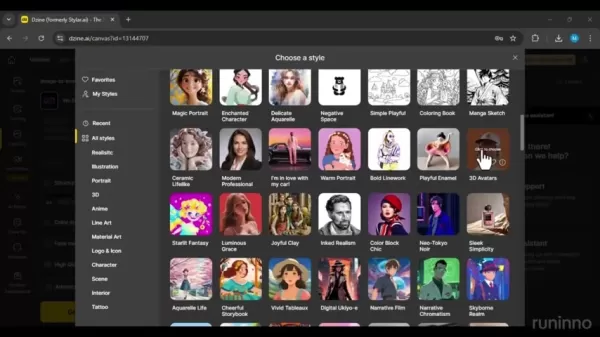
.
- Image-to-Image: Transforms an image into various styles.
- Image-to-Video: Converts an image into a video.
- AI Editor: A premium feature for advanced AI-assisted image editing.
- Face Kit: A premium toolset for facial enhancements and modifications.
- Enhance: Improves image quality and resolution.
- Product Background: Creates professional backgrounds for product shots.
Dzine AI Pricing and Credit System
Understanding Dzine AI's Credit System
Dzine AI uses a credit system
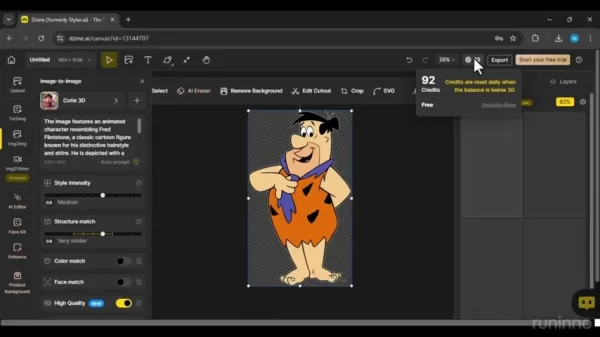
. Free users receive 100 credits upon sign-up. Generating images consumes credits, typically about two per image. After using the initial credits, your account is replenished with 30 credits daily, allowing for regular experimentation. Using these credits is an excellent way to test the platform before considering a paid plan.
Subscription Plans: Unlocking Premium Features
For advanced features and higher-quality outputs, Dzine AI offers subscription plans
. These plans provide extra credits, unlock premium tools like the AI Editor and Face Kit, and remove watermarks.
- Standard Plan: Priced at $10 per month, this plan includes watermark removal, unlimited auto-prompt usage, fast queue credits monthly, and high-resolution exports.
Pros and Cons of Using Dzine AI
Pros
User-Friendly: An intuitive interface makes creating stunning visuals easy for anyone.
Diverse Tools: A wide range of AI-powered tools for image editing and design.
Credit System: Free daily credits let users explore the platform before subscribing.
Automatic Prompts: The auto-prompt tool simplifies image generation.
Cons
Watermarks: Images from the free version include a watermark.
Pricing: Access to the highest quality images requires a payment.
Learning Curve: First-time users may need time to learn the platform.
Subscription Required: A paid plan is necessary to unlock all features.
Unleashing Creativity: Core Features of Dzine AI
The Heart of Dzine AI: AI-Powered Image ConversionDzine AI's core technology uses sophisticated algorithms for seamless 2D-to-3D conversion. The AI analyzes the source image, identifies key features, and intelligently generates a 3D representation based on your selected style. This automated process requires minimal input, making it highly accessible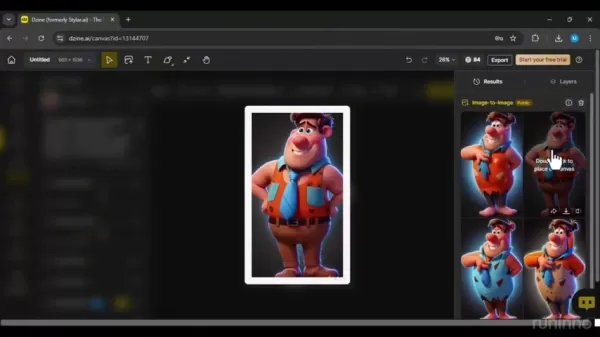
. It's remarkably user-friendly: select a style and click generate. If the result isn't ideal, use the auto-prompt feature to find a better option.
Variety of 3D Styles: Tailoring Your Visuals
Dzine AI offers a diverse range of 3D styles to suit different creative tastes and project needs. From photorealistic renderings to stylized pixel art, you can find the perfect aesthetic. This flexibility helps you create unique visuals aligned with your brand or project vision.
AI Assistance: Simplifying the Design Process
The AI Editor and Face Kit, available with subscriptions, provide intelligent design assistance. These tools can automatically enhance image quality, refine facial features, and suggest improvements, saving time while ensuring professional results. The auto-prompt feature is also highly useful
. It analyzes your image and generates appropriate text prompts, making it easier to create stunning visuals with a single click.
Real-World Applications: How Dzine AI is Transforming Industries
Marketing and Advertising: Capturing Attention with 3D Visuals
In a competitive market, standing out is crucial. Dzine AI helps marketers create eye-catching 3D visuals for campaigns, boosting engagement and conversions. From product showcases to social media ads, it elevates marketing efforts and leaves a lasting impression. The AI background enhancement tool also helps create fresh visual contexts.
E-commerce: Showcasing Products in Stunning Detail
For e-commerce, high-quality visuals are vital for sales. Dzine AI transforms product photos into interactive 3D models, offering customers a more immersive shopping experience. Showcasing products in impressive detail builds trust, increases conversions, and can reduce return rates.
Content Creation: Elevating Your Visual Storytelling
Bloggers, YouTubers, and social media influencers can elevate their storytelling with Dzine AI. By turning ordinary images into captivating 3D visuals, you create more engaging, memorable, and shareable content. This can attract followers, build your brand, and establish visual authority. The AI clothing change feature is also perfect for brands wanting to showcase new apparel without a photoshoot.
Frequently Asked Questions About Dzine AI
Is Dzine AI free to use?
Yes, Dzine AI has a free plan with limited credits and features. A subscription is required for premium tools and watermark removal.
How many credits do I get with the free plan?
Free users get 100 credits upon sign-up, with a daily replenishment of 30 credits.
What is the pricing of the subscription plans?
The Standard Plan costs $10 per month.
Can I use Dzine AI for commercial purposes?
Commercial use is generally permitted with a subscription. Please refer to the platform's Terms of Service for specific details.
Is there a watermark on images generated with the free plan?
Yes, images from the free plan include a Dzine AI watermark. Removing it requires a subscription.
Explore more About 3D Rendering Tools
What are the benefits of using a 3D rendering tool?
The key benefits of using a 3D rendering tool include: Cost-effective: Produces photorealistic images without physical prototypes, reducing marketing costs. Time-saving: Significantly speeds up the creation of marketing materials and allows for quick design changes. Versatile: Suitable for animations, 360° views, augmented reality, and various marketing applications. Photorealistic: Generates high-quality, realistic images for a consistent brand identity. Effective: Enhances customer engagement by helping potential buyers connect with products. Flexible: Offers extensive creative and technical possibilities, enabling exploration of multiple design options. Easy feedback: Simplifies the feedback process from all project stakeholders. Consistent quality: Maintains a uniform visual standard across all product presentations. Engaging experience: Creates compelling visual experiences that resonate with the audience.
Related article
 Stripe to Acquire OpenRouter as AI Model Routing Gains Momentum
Stripe has agreed to acquire OpenRouter, an AI model-routing platform that gives developers access to hundreds of models through a single interface. The deal adds model selection and routing to Stripe’s existing work around AI usage and token-based b
Former OpenAI Researcher Barrett Zoph Returns to Google to Support Gemini Development
Barret Zoph, who previously abruptly left and joined OpenAI due to a disagreement with Thinking Machines Lab CEO Miriam Mularati, has once again changed employers. Alphabet's Google announced that Zoph will return as Vice President of Research, bring
How Recursive Intelligence Raised $335M at $4B Valuation in 4 Months
The co-founders of startup Ricursive Intelligence seemed destined to be co-founders.Anna Goldie, CEO, and Azalia Mirhoseini, CTO, are so well-known in the AI community that they were among those AI engineers who “got those weird emails from Zuckerber
Related Special Topic Recommendations
Design & Art
Stripe to Acquire OpenRouter as AI Model Routing Gains Momentum
Stripe has agreed to acquire OpenRouter, an AI model-routing platform that gives developers access to hundreds of models through a single interface. The deal adds model selection and routing to Stripe’s existing work around AI usage and token-based b
Former OpenAI Researcher Barrett Zoph Returns to Google to Support Gemini Development
Barret Zoph, who previously abruptly left and joined OpenAI due to a disagreement with Thinking Machines Lab CEO Miriam Mularati, has once again changed employers. Alphabet's Google announced that Zoph will return as Vice President of Research, bring
How Recursive Intelligence Raised $335M at $4B Valuation in 4 Months
The co-founders of startup Ricursive Intelligence seemed destined to be co-founders.Anna Goldie, CEO, and Azalia Mirhoseini, CTO, are so well-known in the AI community that they were among those AI engineers who “got those weird emails from Zuckerber
Related Special Topic Recommendations
Design & Art
 Top AI Illustration Tools: Create Editorial Scenes and Cover Art Faster
2026 Latest Top-rated AI Illustration Tools: Our curated list features the best powerfully designed tools for creating stunning editorial scenes and eye-catching cover art quickly. Each option has gone through rigorous real-world tests, offering a free vs paid comparison to help you find the perfect match for your workflow. Try these must-try solutions today to unlock your AI edge and boost your creative productivity. Explore now at XIX.AI.
 10 tools
 xix.ai
Education and Learning
Top AI Tutors for Exam Prep: Practice Math, Science, and English
xix.ai
Education and Learning
Top AI Tutors for Exam Prep: Practice Math, Science, and English
2026 Latest Top-Rated Best AI Tutors for Exam Prep are here on XIX.AI! Our curated list features powerful game-changing tools that offer free vs paid comparison, real-world tests, and weekly updated rankings. They help boost your writing efficiency, simplify complex topic learning, and unlock your academic potential. Explore now to Discover your perfect exam prep tool and Start creating today to Unlock your AI edge!
10 tools
xix.ai
Finance
AI Budget Planning Tools for Personal Money Management
2026 Latest Best Top-Rated AI Budget Planning Tools for Personal Money Management are here on XIX.AI! This curated collection features powerful, game-changing solutions that help you conduct real-world tests, understand spending habits, and create personalized plans to boost productivity. Enjoy a free vs paid comparison along with detailed rankings. Must-try tools designed to simplify money management and unlock your AI edge. Explore now!
11 tools
xix.ai
Health & Wellness
AI Sleep Tracking Assistants: Improve Recovery with Better Bedtime Habits
2026 Latest Best Top-Rated AI Sleep Tracking Assistants curated for ultimate recovery. This fully updated weekly guide features powerful tools that deliver real-world tests, free vs paid comparison, and detailed rankings to help you find the must-try solution that boosts sleep quality and supports better bedtime habits. Explore now at XIX.AI to Unlock your AI edge.
10 tools
xix.ai
Data Analysis
AI SQL Copilots for Product and Revenue Analytics
2026 Latest Best Top-Rated AI SQL Copilots for Product and Revenue Analytics! XIX.AI has curated a powerful, game-changing collection of must-try tools that undergo real-world tests through weekly updated rankings. These tools help users boost productivity significantly by accelerating data analysis, streamlining complex queries, and generating accurate insights to drive smarter business decisions. Explore now to Discover your perfect tool for unlocking your AI edge!
14 tools
xix.ai
Education and Learning
Best AI Homework Helpers That Teach: Learn Concepts, Not Just Answers
2026 Latest Best Top-Rated AI Homework Helpers That Teach Core Concepts Not Just Answers Powerful Tools for Students Must-Try Curated List Weekly Updated Free vs Paid Comparison Real-World Tests Accurate Rankings to Help You Unlock Your Full Learning Potential Explore now to Discover your perfect tool for smarter studying.
10 tools
xix.ai

 Comments (1)
0/500
Comments (1)
0/500
![GeorgeWilliams]()
Wait, so Dzine AI can turn a flat picture into a 3D model without any manual tweaking? That’s either witchcraft or some seriously talented machine learning. I’m curious how it handles complex textures though—will it mess up my cat’s fur? 😅
In today's digital landscape, compelling visuals are essential. For marketers, designers, and content creators, the power to turn ordinary images into high-impact, professional-grade visuals is a key advantage. Dzine AI stands out as a transformative solution, providing an intuitive and robust platform to convert 2D photos into breathtaking 3D creations. With minimal effort, you can significantly enhance your imagery and captivate your audience. This guide offers a comprehensive look at Dzine AI, examining its core features, practical applications, and how you can leverage it to boost your creative work.
Key Points
Dzine AI converts 2D images into 3D visuals.
The platform features multiple AI-powered tools for editing and design.
Users can sign up for free and receive daily credits to use the tools.
It offers various 3D styles, including realistic rendering and pixel art.
A subscription is needed to remove watermarks from generated images.
An auto-prompt feature helps generate text prompts for your images automatically.
Understanding Dzine AI: Your Gateway to 3D Image Transformation
What is Dzine AI?
Dzine AI is an innovative platform that simplifies converting 2D images into engaging 3D visuals. This AI-powered tool makes 3D design accessible to users of any experience level. Transform standard photos into exceptional visual assets to improve your marketing materials, design projects, and content. The suite includes tools for creating diverse images, applying AI portrait and photo filters, and even changing a subject's clothing. Beyond portraits, you can also generate impressive product visuals. Dzine AI enables you to create stunning imagery with just a few clicks.
First Steps: Getting Started with Dzine AI
Begin by visiting the Dzine AI website at dzine.ai
. The homepage presents a clean, intuitive interface highlighting its core offering as 'The Most Controllable AI Image & Design Tool'. Click the 'Start for Free' button to explore its features. You'll be prompted to sign up quickly using your email. After logging in, you'll access a dashboard showcasing various AI Tools, each addressing different image editing and design requirements.
Exploring Dzine AI's Key Tools
Dzine AI provides a comprehensive set of tools
for specific editing and design tasks:
- Image-to-Image: Transforms an image into various styles.
- Text-to-Image: Creates an image from a text description.
- AI Editor: Enables advanced image editing with AI assistance.
- Face Kit: Offers tools for facial enhancements and modifications.
These tools allow extensive image manipulation, unlocking endless creative possibilities.
Diving Deeper: Convert 2D Images to 3D with Dzine AI
Step-by-Step Guide to 2D to 3D Conversion
Follow this process to convert a 2D image into a 3D visual using Dzine AI:
- Start a New Project:
Click the 'New project' button on the dashboard.
- Select Aspect Ratio: Choose your desired aspect ratio. A 1:1 square ratio is common.
- Upload Your Image: Click the upload area to select the 2D image you wish to transform.
- Navigate to Image-to-Image Tool: Select this tool from the menu.
- Choose a 3D Style: Browse available styles like '3D Rendering' or '3D Pixel'
. Pick the one that fits your vision.
- Generate the 3D Image: Click 'Generate' to start the conversion.
- Customize Your Image: Adjust the intensity to your preference. A structure match around 0.6 usually works well. Higher values keep the output closer to the original image.
Dzine AI will then process your image, producing a 3D rendering in your chosen style. You'll receive multiple variations to choose the best match for your project.
Maximizing Results: Tips for Optimal 2D to 3D Conversion
For the best outcomes with Dzine AI's 2D-to-3D conversion, consider these tips:
- Choose High-Quality Source Images: Starting with a high-resolution image typically yields better detail and clarity.
- Experiment with Different Styles: Test various 3D styles to see which complements your image best.
- Adjust the Intensity: Fine-tune customization settings to achieve your preferred look.
- Iterate and Refine: If the initial result isn't perfect, adjust parameters and regenerate until satisfied.
Detailed Walkthrough: Mastering Dzine AI
Exploring Available Tools
Let’s explore the various tools available:
- Text-to-Image: Creates images from a text description
.
- Image-to-Image: Transforms an image into various styles.
- Image-to-Video: Converts an image into a video.
- AI Editor: A premium feature for advanced AI-assisted image editing.
- Face Kit: A premium toolset for facial enhancements and modifications.
- Enhance: Improves image quality and resolution.
- Product Background: Creates professional backgrounds for product shots.
Dzine AI Pricing and Credit System
Understanding Dzine AI's Credit System
Dzine AI uses a credit system
. Free users receive 100 credits upon sign-up. Generating images consumes credits, typically about two per image. After using the initial credits, your account is replenished with 30 credits daily, allowing for regular experimentation. Using these credits is an excellent way to test the platform before considering a paid plan.
Subscription Plans: Unlocking Premium Features
For advanced features and higher-quality outputs, Dzine AI offers subscription plans
. These plans provide extra credits, unlock premium tools like the AI Editor and Face Kit, and remove watermarks.
- Standard Plan: Priced at $10 per month, this plan includes watermark removal, unlimited auto-prompt usage, fast queue credits monthly, and high-resolution exports.
Pros and Cons of Using Dzine AI
Pros
User-Friendly: An intuitive interface makes creating stunning visuals easy for anyone.
Diverse Tools: A wide range of AI-powered tools for image editing and design.
Credit System: Free daily credits let users explore the platform before subscribing.
Automatic Prompts: The auto-prompt tool simplifies image generation.
Cons
Watermarks: Images from the free version include a watermark.
Pricing: Access to the highest quality images requires a payment.
Learning Curve: First-time users may need time to learn the platform.
Subscription Required: A paid plan is necessary to unlock all features.
Unleashing Creativity: Core Features of Dzine AI
The Heart of Dzine AI: AI-Powered Image ConversionDzine AI's core technology uses sophisticated algorithms for seamless 2D-to-3D conversion. The AI analyzes the source image, identifies key features, and intelligently generates a 3D representation based on your selected style. This automated process requires minimal input, making it highly accessible
. It's remarkably user-friendly: select a style and click generate. If the result isn't ideal, use the auto-prompt feature to find a better option.
Variety of 3D Styles: Tailoring Your Visuals
Dzine AI offers a diverse range of 3D styles to suit different creative tastes and project needs. From photorealistic renderings to stylized pixel art, you can find the perfect aesthetic. This flexibility helps you create unique visuals aligned with your brand or project vision.
AI Assistance: Simplifying the Design Process
The AI Editor and Face Kit, available with subscriptions, provide intelligent design assistance. These tools can automatically enhance image quality, refine facial features, and suggest improvements, saving time while ensuring professional results. The auto-prompt feature is also highly useful
. It analyzes your image and generates appropriate text prompts, making it easier to create stunning visuals with a single click.
Real-World Applications: How Dzine AI is Transforming Industries
Marketing and Advertising: Capturing Attention with 3D Visuals
In a competitive market, standing out is crucial. Dzine AI helps marketers create eye-catching 3D visuals for campaigns, boosting engagement and conversions. From product showcases to social media ads, it elevates marketing efforts and leaves a lasting impression. The AI background enhancement tool also helps create fresh visual contexts.
E-commerce: Showcasing Products in Stunning Detail
For e-commerce, high-quality visuals are vital for sales. Dzine AI transforms product photos into interactive 3D models, offering customers a more immersive shopping experience. Showcasing products in impressive detail builds trust, increases conversions, and can reduce return rates.
Content Creation: Elevating Your Visual Storytelling
Bloggers, YouTubers, and social media influencers can elevate their storytelling with Dzine AI. By turning ordinary images into captivating 3D visuals, you create more engaging, memorable, and shareable content. This can attract followers, build your brand, and establish visual authority. The AI clothing change feature is also perfect for brands wanting to showcase new apparel without a photoshoot.
Frequently Asked Questions About Dzine AI
Is Dzine AI free to use?
Yes, Dzine AI has a free plan with limited credits and features. A subscription is required for premium tools and watermark removal.
How many credits do I get with the free plan?
Free users get 100 credits upon sign-up, with a daily replenishment of 30 credits.
What is the pricing of the subscription plans?
The Standard Plan costs $10 per month.
Can I use Dzine AI for commercial purposes?
Commercial use is generally permitted with a subscription. Please refer to the platform's Terms of Service for specific details.
Is there a watermark on images generated with the free plan?
Yes, images from the free plan include a Dzine AI watermark. Removing it requires a subscription.
Explore more About 3D Rendering Tools
What are the benefits of using a 3D rendering tool?
The key benefits of using a 3D rendering tool include: Cost-effective: Produces photorealistic images without physical prototypes, reducing marketing costs. Time-saving: Significantly speeds up the creation of marketing materials and allows for quick design changes. Versatile: Suitable for animations, 360° views, augmented reality, and various marketing applications. Photorealistic: Generates high-quality, realistic images for a consistent brand identity. Effective: Enhances customer engagement by helping potential buyers connect with products. Flexible: Offers extensive creative and technical possibilities, enabling exploration of multiple design options. Easy feedback: Simplifies the feedback process from all project stakeholders. Consistent quality: Maintains a uniform visual standard across all product presentations. Engaging experience: Creates compelling visual experiences that resonate with the audience.








 Stripe to Acquire OpenRouter as AI Model Routing Gains Momentum
Stripe has agreed to acquire OpenRouter, an AI model-routing platform that gives developers access to hundreds of models through a single interface. The deal adds model selection and routing to Stripe’s existing work around AI usage and token-based b
Stripe to Acquire OpenRouter as AI Model Routing Gains Momentum
Stripe has agreed to acquire OpenRouter, an AI model-routing platform that gives developers access to hundreds of models through a single interface. The deal adds model selection and routing to Stripe’s existing work around AI usage and token-based b
 Former OpenAI Researcher Barrett Zoph Returns to Google to Support Gemini Development
Barret Zoph, who previously abruptly left and joined OpenAI due to a disagreement with Thinking Machines Lab CEO Miriam Mularati, has once again changed employers. Alphabet's Google announced that Zoph will return as Vice President of Research, bring
Former OpenAI Researcher Barrett Zoph Returns to Google to Support Gemini Development
Barret Zoph, who previously abruptly left and joined OpenAI due to a disagreement with Thinking Machines Lab CEO Miriam Mularati, has once again changed employers. Alphabet's Google announced that Zoph will return as Vice President of Research, bring
 How Recursive Intelligence Raised $335M at $4B Valuation in 4 Months
The co-founders of startup Ricursive Intelligence seemed destined to be co-founders.Anna Goldie, CEO, and Azalia Mirhoseini, CTO, are so well-known in the AI community that they were among those AI engineers who “got those weird emails from Zuckerber
How Recursive Intelligence Raised $335M at $4B Valuation in 4 Months
The co-founders of startup Ricursive Intelligence seemed destined to be co-founders.Anna Goldie, CEO, and Azalia Mirhoseini, CTO, are so well-known in the AI community that they were among those AI engineers who “got those weird emails from Zuckerber

2026 Latest Top-rated AI Illustration Tools: Our curated list features the best powerfully designed tools for creating stunning editorial scenes and eye-catching cover art quickly. Each option has gone through rigorous real-world tests, offering a free vs paid comparison to help you find the perfect match for your workflow. Try these must-try solutions today to unlock your AI edge and boost your creative productivity. Explore now at XIX.AI.
10 tools
xix.ai

2026 Latest Top-Rated Best AI Tutors for Exam Prep are here on XIX.AI! Our curated list features powerful game-changing tools that offer free vs paid comparison, real-world tests, and weekly updated rankings. They help boost your writing efficiency, simplify complex topic learning, and unlock your academic potential. Explore now to Discover your perfect exam prep tool and Start creating today to Unlock your AI edge!
10 tools
xix.ai

2026 Latest Best Top-Rated AI Budget Planning Tools for Personal Money Management are here on XIX.AI! This curated collection features powerful, game-changing solutions that help you conduct real-world tests, understand spending habits, and create personalized plans to boost productivity. Enjoy a free vs paid comparison along with detailed rankings. Must-try tools designed to simplify money management and unlock your AI edge. Explore now!
11 tools
xix.ai

2026 Latest Best Top-Rated AI Sleep Tracking Assistants curated for ultimate recovery. This fully updated weekly guide features powerful tools that deliver real-world tests, free vs paid comparison, and detailed rankings to help you find the must-try solution that boosts sleep quality and supports better bedtime habits. Explore now at XIX.AI to Unlock your AI edge.
10 tools
xix.ai

2026 Latest Best Top-Rated AI SQL Copilots for Product and Revenue Analytics! XIX.AI has curated a powerful, game-changing collection of must-try tools that undergo real-world tests through weekly updated rankings. These tools help users boost productivity significantly by accelerating data analysis, streamlining complex queries, and generating accurate insights to drive smarter business decisions. Explore now to Discover your perfect tool for unlocking your AI edge!
14 tools
xix.ai

2026 Latest Best Top-Rated AI Homework Helpers That Teach Core Concepts Not Just Answers Powerful Tools for Students Must-Try Curated List Weekly Updated Free vs Paid Comparison Real-World Tests Accurate Rankings to Help You Unlock Your Full Learning Potential Explore now to Discover your perfect tool for smarter studying.
10 tools
xix.ai

Wait, so Dzine AI can turn a flat picture into a 3D model without any manual tweaking? That’s either witchcraft or some seriously talented machine learning. I’m curious how it handles complex textures though—will it mess up my cat’s fur? 😅












