


 Home
HomeHow to create a voice AI assistant with Python and ChatGPT in 2026?
This tutorial guides you through building your own AI voice assistant with Python and ChatGPT. It walks you through project setup, essential libraries, virtual environments, and provides detailed code examples. Whether you're an experienced developer or a beginner, you'll learn how to create an AI assistant that understands voice commands and uses ChatGPT to generate intelligent responses.
Key Points
Learn how to set up a virtual environment for your Python AI assistant project.
Discover the installation and use of key libraries like SpeechRecognition, pyttsx3, and OpenAI.
Understand the fundamentals of writing functions for voice recognition, text processing, and speech synthesis.
Build a personalized, voice-controlled AI assistant.
Explore methods for handling various user commands and generating responses via ChatGPT.
Building a Voice-Controlled AI Assistant
Core Code Structure and Functions
After setting up your environment, you can write the Python code to power your AI assistant. This involves creating functions for voice recognition, text processing, and speech synthesis. The process for each function is detailed below:
Import Necessary Libraries:
- Start by importing the required libraries into your Python script
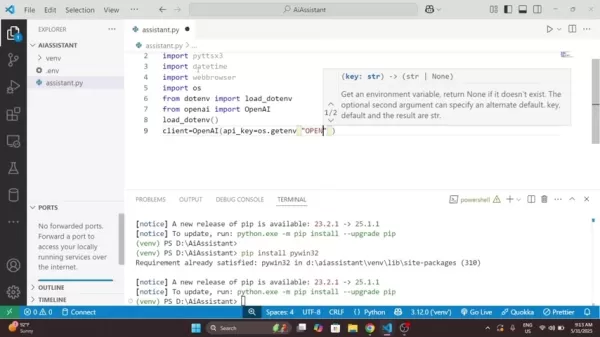
. This gives you access to the functionalities needed for your AI assistant:
import speech_recognition as srimport pyttsx3import datetimeimport webbrowserimport osfrom dotenv import load_dotenvfrom openai import OpenAI
Set Up the Text-to-Speech Engine:
- Initialize the pyttsx3 engine for text-to-speech conversion:
engine = pyttsx3.init()
This initializes the text-to-speech engine, which converts text responses into spoken audio.
Create a Speak Function:
- Define a function to handle text-to-speech conversion:
def speak(text):print(f"Assistant: {text}")engine.say(text)engine.runAndWait()
This speak function takes a text string as input and uses pyttsx3 to convert it to speech. The text is also printed to the console for debugging and monitoring.
Define a Listen Function:
- Create a function that captures microphone audio and converts it to text using the
SpeechRecognition library:def listen():recognizer = sr.Recognizer()with sr.Microphone() as source:print("Listening...")recognizer.adjust_for_ambient_noise(source)audio = recognizer.listen(source)
try:command = recognizer.recognize_google(audio)print(f"You said: {command}")except sr.UnknownValueError:speak("Sorry, I didn't catch that")return ""except sr.RequestError as e:speak("Speech service is not working")return ""
return command.lower()
The `listen` function configures a speech recognizer and microphone, listens for audio input, and uses Google's speech recognition to transcribe it into text. It handles exceptions like unrecognized speech or service unavailability.
Chat with ChatGPT Function:
- Integrate with the OpenAI API to get responses from ChatGPT. Define a function that takes a question and returns the AI's answer:
def chat_with_gpt(question):load_dotenv()client = OpenAI(api_key=os.getenv('OPENAI_API_KEY'),)
try:response = client.chat.completions.create(model="gpt-3.5-turbo",messages=[{"role": "user","content": question,}],)answer = response.choices[0].message.contentreturn answerexcept Exception as e:print(f"ChatGpt Error {e}")return "I couldn't get a response from ChatGpt"
This function calls the OpenAI API, sends the user's question, and receives a response from ChatGPT. It handles exceptions and extracts the relevant text from the API response, leveraging ChatGPT for intelligent, contextual replies.
Run Assistant Function : This is the main function and starting point of the application.
def run_assistant():speak("Hello! I'm your AI assistant, What can I do for you?")while True:command = listen()if "time" in command:now = datetime.datetime.now().strftime("%H:%M %p")speak(f"The time is: {now}")elif "open youtube" in command:speak("Opening YouTube")webbrowser.open("https://www.youtube.com")elif "open google" in command:speak("Opening google")webbrowser.open("https://www.google.com")elif "stop" in command or "exit" in command:speak("Good Bye Friend!")breakelif command:answer = chat_with_gpt(command)speak(answer)
Running The Program :
if __name__ == '__main__': run_assistant()
Running this code starts the program, which begins listening for your commands.
Customizing Your AI Assistant
Customizing the Code for Specific Tasks
To truly personalize your AI assistant, consider these customizations:
Extending Functionality: Add more elif command statements to handle additional tasks like:
- Opening specific websites or applications.
- Setting reminders.
- Controlling smart home devices.
Personalizing Responses: Customize the assistant's responses to your preferences. Modify the speak function to use different voices, tones, or greetings.
Implementing Context Awareness: Enhance the assistant's memory and awareness by storing conversation history and user preferences. This enables more relevant and personalized responses based on context.
Adding More Error Handling: Implement error handling for other scenarios like network issues or API rate limits. Useful error messages help manage problems effectively.
Creating a More Engaging Personality: Experiment with coding techniques to make your AI more conversational. Add functions to respond to emotions or interact more naturally. Consider your own personality traits to create engaging conversations and potentially add security measures.
How to use Your AI voice assistant
Key Aspects
Here's how users can interact with your new voice assistant 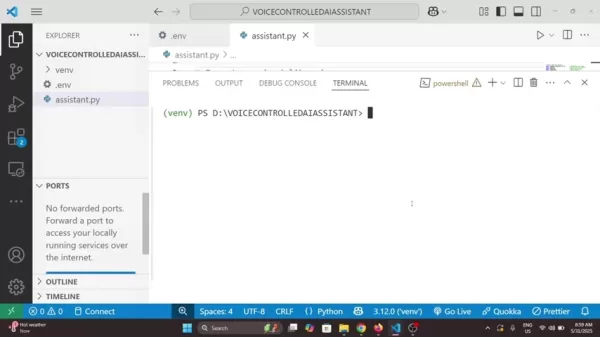
:
Start a new voice assistant. Create a new folder for your files and name it something memorable.
Begin the program. Type 'python assistent.py' to start the program.
Engage in conversation. Use appropriate commands for the assistant to perform tasks like looking up information, telling jokes, and more.
Useful Markdown Tables For Improved Structure and Readability
Tables can neatly organize information and improve readability. Here's an example for comparing different Voice Assistants:
Comparison of Voice Assistants
Feature Custom AI Assistant Alexa Google Assistant CustomizationHighMediumMediumPrivacyHighMediumMediumTask AutomationLimitedHighHighIntegrationLimitedExtensiveExtensiveDevelopment EffortHighN/AN/ABuilding a Custom Voice-Controlled AI Assistant: Weighing the Pros
and Cons
Pros
Tailor the AI assistant's responses and functionality to your exact needs.
Complete data ownership and processing control, reducing reliance on external services.
Improves programming skills and understanding of AI and natural language processing.
Cons
Requires coding, testing, and debugging, which can be time-intensive.
Managing library dependencies and compatibility can be complex.
Needs regular updates and revisions to keep pace with technological changes.
FAQ
What are the key libraries needed to build this voice-controlled AI assistant?
The essential libraries are SpeechRecognition (for voice input), pyttsx3 (for text-to-speech), OpenAI (for ChatGPT access), and python-dotenv (for managing environment variables like the OpenAI API key).
How do I activate the virtual environment in my project?
The activation command varies by OS: use 'venvScriptsactivate' for Windows and 'source venv/bin/activate' for macOS/Linux.
How can I customize my AI assistant?
Extend functionality by adding more elif command statements for new tasks, personalize responses, implement context awareness with conversation history and user preferences, add error handling, and create a more engaging personality.
Related Questions
What can be done to resolve the 'AttributeError: Could not find PyAudio; check installation' error?
In Python, you might encounter an 'AttributeError: Could not find PyAudio; check installation' error during speech recognition development. This error, common in speech recognition projects, indicates a problem with the PyAudio library installation. PyAudio is essential for capturing and playing audio in Python applications. To fix this, verify the library's installation and ensure proper setup for speech recognition tasks.Ensure PyAudio is installed: First, confirm that the PyAudio library is correctly installed. The basic step involves using pip, Python's package installer. Open your command line or terminal and run:pip install PyAudio
Consider Using a Conda Environment:
Conda can manage Python environments and library installations.Create a new environment with:conda create -n myenv python=3.xconda activate myenvconda install -c conda-forge pyaudioUpdate pip: Sometimes an outdated pip causes issues. Update pip using:pip install --upgrade pipThese steps should help resolve this common problem.
Related article
 Florida sues OpenAI, Sam Altman over violent incidents
Florida’s Attorney General filed a first-of-its-kind state lawsuit against OpenAI and CEO Sam Altman on Monday, alleging the company’s ChatGPT is linked to multiple violent incidents.The complaint argues that OpenAI prioritized winning “the AI arms r
OpenAI unveils advanced voice models for more natural real-time conversations
OpenAI has launched new conversational models, GPT-Live-1 and GPT-Live-1 mini, designed to sound more natural and manage turn-taking more effectively. These full-duplex models can speak and listen simultaneously, allowing users to interrupt naturally
OpenAI unveils GPT-5.6, the newest addition to its model family
OpenAI launched its latest model family on Thursday, introducing powerful new options into an increasingly competitive AI landscape.GPT-5.6 comes in three variants: Sol (designed as the primary workhorse), Terra (a mid-range option), and Luna (the bu
Related Special Topic Recommendations
Prompt
Florida sues OpenAI, Sam Altman over violent incidents
Florida’s Attorney General filed a first-of-its-kind state lawsuit against OpenAI and CEO Sam Altman on Monday, alleging the company’s ChatGPT is linked to multiple violent incidents.The complaint argues that OpenAI prioritized winning “the AI arms r
OpenAI unveils advanced voice models for more natural real-time conversations
OpenAI has launched new conversational models, GPT-Live-1 and GPT-Live-1 mini, designed to sound more natural and manage turn-taking more effectively. These full-duplex models can speak and listen simultaneously, allowing users to interrupt naturally
OpenAI unveils GPT-5.6, the newest addition to its model family
OpenAI launched its latest model family on Thursday, introducing powerful new options into an increasingly competitive AI landscape.GPT-5.6 comes in three variants: Sol (designed as the primary workhorse), Terra (a mid-range option), and Luna (the bu
Related Special Topic Recommendations
Prompt
 Best AI Prompt Libraries for ChatGPT Workflows
2026 Latest Best Top-Rated AI Prompt Libraries for optimizing all types of ChatGPT workflows. XIX.AI has curated a powerful, game-changing collection that goes through rigorous real-world tests to ensure top performance. You can find detailed free vs paid comparisons and expert rankings to help you choose the must-try tools that boost your productivity and unlock your AI edge. Explore now!
 11 tools
 xix.ai
Education and Learning
AI Quiz Builder Platforms for Teachers, Tutors, and Cohort-Based Learning Programs
xix.ai
Education and Learning
AI Quiz Builder Platforms for Teachers, Tutors, and Cohort-Based Learning Programs
2026 Latest Best AI Quiz Builder Platforms for Teachers, Tutors, and Cohort-Based Learning Programs! XIX.AI has curated a top-rated list of powerful game-changing tools that go through real-world tests to deliver accurate rankings. These must-try platforms help boost writing efficiency, streamline content creation, and simplify quiz design across all learning scenarios. Explore now to discover your perfect tool for unlocking your AI edge in teaching!
13 tools
xix.ai
code
AI Pull Request Review Tools for GitHub Teams Handling Refactors, Bugs, and Security Gaps
2026 Latest Best AI Pull Request Review Tools for GitHub Teams are here on XIX.AI! This top-rated curated list showcases powerful game-changing solutions that streamline refactoring, bug fixing, and security gap detection across all team workflows. Enjoy a free vs paid comparison along with real-world tests and detailed rankings to help you find the perfect tool that boosts productivity significantly. Explore now to unlock your AI edge!
12 tools
xix.ai
Text-to-speech
Best AI Text to Speech Tools for Natural Voiceovers
2026 Latest Best Top-rated AI Text to Speech Tools for Natural Voiceovers are here on XIX.AI! This curated list features powerful, game-changing options that deliver crystal-clear voices for every use case, backed by real-world tests and weekly updated rankings. Get a free vs paid comparison to find the must-try solution that boosts your productivity instantly. Explore now to Unlock your AI edge!
11 tools
xix.ai
Comic Creation
Manga AI Background Generators for Serialized Chapters, Covers, and Promo Art
2026 Latest Best Manga AI Background Generators Ranked Top-Rated! This curated collection showcases powerful game-changing tools perfect for creating high-quality chapter backgrounds, book covers, and promotional art. Every option has undergone rigorous real-world tests to ensure reliability. Get a free vs paid comparison along with detailed insights. Explore now to discover your perfect tool and unlock your AI edge in manga creation.
6 tools
xix.ai
Image editing
AI Object Removal Editors: Clean Up Portraits, Travel, and Product Shots
2026 Latest Best Top-rated AI Object Removal Editors for portraits travel product shots! XIX.AI curates a powerful game-changing collection regularly updated with weekly rankings. These tools offer real-world tests to help you quickly remove unwanted elements, boost content quality, and save tons of time without compromising results. Must-try for anyone aiming to unlock their AI creation edge. Explore now!
10 tools
xix.ai

 Comments (0)
0/500
Comments (0)
0/500
This tutorial guides you through building your own AI voice assistant with Python and ChatGPT. It walks you through project setup, essential libraries, virtual environments, and provides detailed code examples. Whether you're an experienced developer or a beginner, you'll learn how to create an AI assistant that understands voice commands and uses ChatGPT to generate intelligent responses.
Key Points
Learn how to set up a virtual environment for your Python AI assistant project.
Discover the installation and use of key libraries like SpeechRecognition, pyttsx3, and OpenAI.
Understand the fundamentals of writing functions for voice recognition, text processing, and speech synthesis.
Build a personalized, voice-controlled AI assistant.
Explore methods for handling various user commands and generating responses via ChatGPT.
Building a Voice-Controlled AI Assistant
Core Code Structure and Functions
After setting up your environment, you can write the Python code to power your AI assistant. This involves creating functions for voice recognition, text processing, and speech synthesis. The process for each function is detailed below:
Import Necessary Libraries:
- Start by importing the required libraries into your Python script
. This gives you access to the functionalities needed for your AI assistant:
import speech_recognition as srimport pyttsx3import datetimeimport webbrowserimport osfrom dotenv import load_dotenvfrom openai import OpenAI
- Start by importing the required libraries into your Python script
Set Up the Text-to-Speech Engine:
- Initialize the pyttsx3 engine for text-to-speech conversion:
engine = pyttsx3.init()This initializes the text-to-speech engine, which converts text responses into spoken audio.
- Initialize the pyttsx3 engine for text-to-speech conversion:
Create a Speak Function:
- Define a function to handle text-to-speech conversion:
def speak(text):print(f"Assistant: {text}")engine.say(text)engine.runAndWait()This
speakfunction takes a text string as input and uses pyttsx3 to convert it to speech. The text is also printed to the console for debugging and monitoring.
- Define a function to handle text-to-speech conversion:
Define a Listen Function:
- Create a function that captures microphone audio and converts it to text using the
SpeechRecognitionlibrary:def listen():recognizer = sr.Recognizer()with sr.Microphone() as source:print("Listening...")recognizer.adjust_for_ambient_noise(source)audio = recognizer.listen(source)
try:command = recognizer.recognize_google(audio)print(f"You said: {command}")except sr.UnknownValueError:speak("Sorry, I didn't catch that")return ""except sr.RequestError as e:speak("Speech service is not working")return ""
return command.lower()
The `listen` function configures a speech recognizer and microphone, listens for audio input, and uses Google's speech recognition to transcribe it into text. It handles exceptions like unrecognized speech or service unavailability.- Create a function that captures microphone audio and converts it to text using the
Chat with ChatGPT Function:
- Integrate with the OpenAI API to get responses from ChatGPT. Define a function that takes a question and returns the AI's answer:
def chat_with_gpt(question):load_dotenv()client = OpenAI(api_key=os.getenv('OPENAI_API_KEY'),)
try:response = client.chat.completions.create(model="gpt-3.5-turbo",messages=[{"role": "user","content": question,}],)answer = response.choices[0].message.contentreturn answerexcept Exception as e:print(f"ChatGpt Error {e}")return "I couldn't get a response from ChatGpt"
This function calls the OpenAI API, sends the user's question, and receives a response from ChatGPT. It handles exceptions and extracts the relevant text from the API response, leveraging ChatGPT for intelligent, contextual replies.- Integrate with the OpenAI API to get responses from ChatGPT. Define a function that takes a question and returns the AI's answer:
Run Assistant Function : This is the main function and starting point of the application.
def run_assistant():speak("Hello! I'm your AI assistant, What can I do for you?")while True:command = listen()if "time" in command:now = datetime.datetime.now().strftime("%H:%M %p")speak(f"The time is: {now}")elif "open youtube" in command:speak("Opening YouTube")webbrowser.open("https://www.youtube.com")elif "open google" in command:speak("Opening google")webbrowser.open("https://www.google.com")elif "stop" in command or "exit" in command:speak("Good Bye Friend!")breakelif command:answer = chat_with_gpt(command)speak(answer)Running The Program :
if __name__ == '__main__': run_assistant()
Running this code starts the program, which begins listening for your commands.
Customizing Your AI Assistant
Customizing the Code for Specific Tasks
To truly personalize your AI assistant, consider these customizations:
Extending Functionality: Add more elif command statements to handle additional tasks like:
- Opening specific websites or applications.
- Setting reminders.
- Controlling smart home devices.
Personalizing Responses: Customize the assistant's responses to your preferences. Modify the speak function to use different voices, tones, or greetings.
Implementing Context Awareness: Enhance the assistant's memory and awareness by storing conversation history and user preferences. This enables more relevant and personalized responses based on context.
Adding More Error Handling: Implement error handling for other scenarios like network issues or API rate limits. Useful error messages help manage problems effectively.
Creating a More Engaging Personality: Experiment with coding techniques to make your AI more conversational. Add functions to respond to emotions or interact more naturally. Consider your own personality traits to create engaging conversations and potentially add security measures.
How to use Your AI voice assistant
Key Aspects
Here's how users can interact with your new voice assistant
:
Start a new voice assistant. Create a new folder for your files and name it something memorable.
Begin the program. Type 'python assistent.py' to start the program.
Engage in conversation. Use appropriate commands for the assistant to perform tasks like looking up information, telling jokes, and more.
Useful Markdown Tables For Improved Structure and Readability
Tables can neatly organize information and improve readability. Here's an example for comparing different Voice Assistants:
Comparison of Voice Assistants
Building a Custom Voice-Controlled AI Assistant: Weighing the Pros
and Cons
Pros
Tailor the AI assistant's responses and functionality to your exact needs.
Complete data ownership and processing control, reducing reliance on external services.
Improves programming skills and understanding of AI and natural language processing.
Cons
Requires coding, testing, and debugging, which can be time-intensive.
Managing library dependencies and compatibility can be complex.
Needs regular updates and revisions to keep pace with technological changes.
FAQ
What are the key libraries needed to build this voice-controlled AI assistant?
The essential libraries are SpeechRecognition (for voice input), pyttsx3 (for text-to-speech), OpenAI (for ChatGPT access), and python-dotenv (for managing environment variables like the OpenAI API key).
How do I activate the virtual environment in my project?
The activation command varies by OS: use 'venvScriptsactivate' for Windows and 'source venv/bin/activate' for macOS/Linux.
How can I customize my AI assistant?
Extend functionality by adding more elif command statements for new tasks, personalize responses, implement context awareness with conversation history and user preferences, add error handling, and create a more engaging personality.
Related Questions
What can be done to resolve the 'AttributeError: Could not find PyAudio; check installation' error?
In Python, you might encounter an 'AttributeError: Could not find PyAudio; check installation' error during speech recognition development. This error, common in speech recognition projects, indicates a problem with the PyAudio library installation. PyAudio is essential for capturing and playing audio in Python applications. To fix this, verify the library's installation and ensure proper setup for speech recognition tasks.Ensure PyAudio is installed: First, confirm that the PyAudio library is correctly installed. The basic step involves using pip, Python's package installer. Open your command line or terminal and run:pip install PyAudio
Consider Using a Conda Environment:
Conda can manage Python environments and library installations.Create a new environment with:conda create -n myenv python=3.xconda activate myenvconda install -c conda-forge pyaudioUpdate pip: Sometimes an outdated pip causes issues. Update pip using:pip install --upgrade pipThese steps should help resolve this common problem.








 Florida sues OpenAI, Sam Altman over violent incidents
Florida’s Attorney General filed a first-of-its-kind state lawsuit against OpenAI and CEO Sam Altman on Monday, alleging the company’s ChatGPT is linked to multiple violent incidents.The complaint argues that OpenAI prioritized winning “the AI arms r
Florida sues OpenAI, Sam Altman over violent incidents
Florida’s Attorney General filed a first-of-its-kind state lawsuit against OpenAI and CEO Sam Altman on Monday, alleging the company’s ChatGPT is linked to multiple violent incidents.The complaint argues that OpenAI prioritized winning “the AI arms r
 OpenAI unveils advanced voice models for more natural real-time conversations
OpenAI has launched new conversational models, GPT-Live-1 and GPT-Live-1 mini, designed to sound more natural and manage turn-taking more effectively. These full-duplex models can speak and listen simultaneously, allowing users to interrupt naturally
OpenAI unveils advanced voice models for more natural real-time conversations
OpenAI has launched new conversational models, GPT-Live-1 and GPT-Live-1 mini, designed to sound more natural and manage turn-taking more effectively. These full-duplex models can speak and listen simultaneously, allowing users to interrupt naturally
 OpenAI unveils GPT-5.6, the newest addition to its model family
OpenAI launched its latest model family on Thursday, introducing powerful new options into an increasingly competitive AI landscape.GPT-5.6 comes in three variants: Sol (designed as the primary workhorse), Terra (a mid-range option), and Luna (the bu
OpenAI unveils GPT-5.6, the newest addition to its model family
OpenAI launched its latest model family on Thursday, introducing powerful new options into an increasingly competitive AI landscape.GPT-5.6 comes in three variants: Sol (designed as the primary workhorse), Terra (a mid-range option), and Luna (the bu
2026 Latest Best Top-Rated AI Prompt Libraries for optimizing all types of ChatGPT workflows. XIX.AI has curated a powerful, game-changing collection that goes through rigorous real-world tests to ensure top performance. You can find detailed free vs paid comparisons and expert rankings to help you choose the must-try tools that boost your productivity and unlock your AI edge. Explore now!
11 tools
xix.ai
2026 Latest Best AI Quiz Builder Platforms for Teachers, Tutors, and Cohort-Based Learning Programs! XIX.AI has curated a top-rated list of powerful game-changing tools that go through real-world tests to deliver accurate rankings. These must-try platforms help boost writing efficiency, streamline content creation, and simplify quiz design across all learning scenarios. Explore now to discover your perfect tool for unlocking your AI edge in teaching!
13 tools
xix.ai
2026 Latest Best AI Pull Request Review Tools for GitHub Teams are here on XIX.AI! This top-rated curated list showcases powerful game-changing solutions that streamline refactoring, bug fixing, and security gap detection across all team workflows. Enjoy a free vs paid comparison along with real-world tests and detailed rankings to help you find the perfect tool that boosts productivity significantly. Explore now to unlock your AI edge!
12 tools
xix.ai
2026 Latest Best Top-rated AI Text to Speech Tools for Natural Voiceovers are here on XIX.AI! This curated list features powerful, game-changing options that deliver crystal-clear voices for every use case, backed by real-world tests and weekly updated rankings. Get a free vs paid comparison to find the must-try solution that boosts your productivity instantly. Explore now to Unlock your AI edge!
11 tools
xix.ai

2026 Latest Best Manga AI Background Generators Ranked Top-Rated! This curated collection showcases powerful game-changing tools perfect for creating high-quality chapter backgrounds, book covers, and promotional art. Every option has undergone rigorous real-world tests to ensure reliability. Get a free vs paid comparison along with detailed insights. Explore now to discover your perfect tool and unlock your AI edge in manga creation.
6 tools
xix.ai

2026 Latest Best Top-rated AI Object Removal Editors for portraits travel product shots! XIX.AI curates a powerful game-changing collection regularly updated with weekly rankings. These tools offer real-world tests to help you quickly remove unwanted elements, boost content quality, and save tons of time without compromising results. Must-try for anyone aiming to unlock their AI creation edge. Explore now!
10 tools
xix.ai












