


 Home
Home
Which AI tools like ReadKiddz create viral videos in 2025? Step-by-step guide for unique content
In today's digital world, artificial intelligence (AI) has made content creation accessible to everyone. AI video tools empower creators to produce compelling videos with ease. Yet, with so much competition, success hinges on crafting truly unique and engaging content that has the power to go viral. This guide explores a creative approach using ReadKiddz AI, a platform designed to produce captivating, kid-friendly videos that stand out.
Key Points
AI is transforming video creation, making it more accessible than ever.
Unique, high-quality content is essential to cut through the noise.
ReadKiddz AI specializes in creating children's books and animated videos.
Its custom drawing tools and AI filters help you achieve a distinctive visual style.
Generating scene-specific images and assembling them into video clips simplifies the production process.
Integrated text-to-speech tools add professional narration, boosting accessibility and story appeal.
Kid-focused content, like baby podcasts and animal adventures, consistently trends well online.
Creating viral-worthy children's videos with AI assistance.
A step-by-step method for developing a children's book using AI.
Essential strategies for crafting engaging videos with AI tools.
The Rise of AI in Content Creation
Democratization of Video Creation
Artificial Intelligence has empowered a new generation of content creators.

Intuitive tools now simplify complex video production tasks, making them achievable without deep technical expertise or large budgets. From automated editing and scriptwriting to AI voiceovers, these features drastically reduce the time and effort needed to create professional-looking videos.
However, this accessibility has led to a crowded marketplace. To truly succeed, creators must go beyond generic content. The key is to develop videos that connect deeply with specific audiences and offer a fresh perspective. Unique ideas paired with polished execution are vital for gaining visibility and attracting viewers. Focusing on niche topics—such as educational baby podcasts, mysterious Bigfoot vlogs, or animated animal stories—can provide that novel edge audiences crave.
Why Unique Content Matters for Going Viral
In the current digital ecosystem, both platform algorithms and viewers reward content that breaks the mold. Videos that tap into emerging trends, offer innovative angles, or deliver unexpected entertainment are far more likely to capture attention and be shared widely. Achieving viral potential requires a keen understanding of your audience, spotting untapped niches, and skillfully using AI tools to bring your creative vision to life.
Viral videos often strike a perfect balance between relatability and novelty, making them highly shareable across different communities. By focusing on content that evokes emotion, provides genuine value, or presents a new take on a familiar topic, creators can significantly boost their chances of success and build a dedicated following.
ReadKiddz AI: A Creative Solution for Kid-Friendly Content
Overview of ReadKiddz AI
ReadKiddz AI is a versatile platform built specifically for creating engaging media for children,
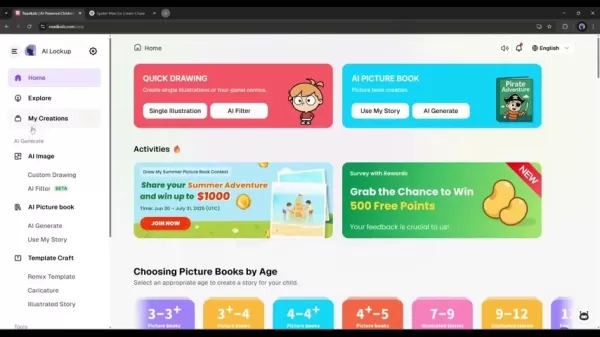
focusing on animated videos and illustrated storybooks. It leverages AI to streamline the entire creative workflow, from generating unique characters and plots to producing high-quality visuals and audio. With ReadKiddz AI, you can efficiently produce content tailored to young, discerning audiences.
A major strength of the platform is its user-friendly interface, which welcomes both seasoned creators and complete beginners. Its suite of tools handles the technical complexities, allowing you to concentrate on your storytelling and artistic direction. Essentially, ReadKiddz AI serves as a comprehensive hub for generating diverse, publish-ready children's media.
Custom Drawing and AI Filters: Enhancing Visual Appeal
ReadKiddz AI includes a custom drawing feature that lets you create consistent character images in various styles using simple text descriptions. This is invaluable for maintaining a cohesive visual identity across multiple videos or books. By describing your desired character or scene, the AI generates corresponding imagery, saving considerable time on manual illustration.
AI filters further amplify visual appeal by transforming realistic photos into charming cartoon visuals or applying different artistic styles. This ability to generate multiple aesthetic versions of a single character or scene ensures every piece of content has its own unique charm. Simply set an image style, enter your descriptive prompts, and let ReadKiddz AI create.
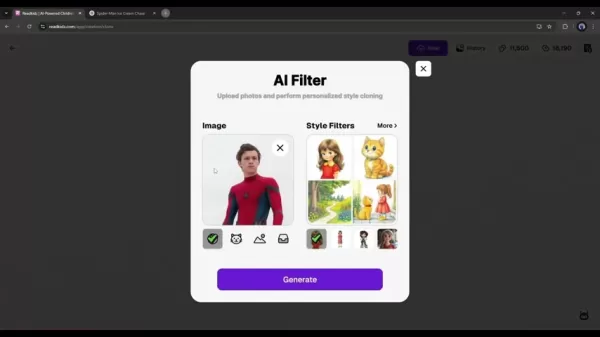
You can generate a wide array of images to attract and captivate a broader audience.
Step-by-Step Guide: Creating a Kid-Friendly Animated Video with ReadKiddz AI
Step 1: Account Creation and Interface Overview
Start by signing up for an account on the ReadKiddz AI platform. Visit their website to begin your free trial. Once logged in, take a moment to explore the intuitive interface, which includes dedicated sections for image generation, style selection, and project management.
Step 2: Generating Images Using the Custom Drawing Tool
Head to the AI image tool and select the custom drawing option. This function allows you to build a library of consistent character assets using text prompts. Start a new project, choose your preferred artistic style, and input detailed descriptions. The AI will then provide several image options based on your input.
Step 3: Applying AI Filters for Unique Visuals
Use the AI filter feature to give realistic images a cartoon-like makeover. Upload your reference image, select a filter style, and refine the output until it matches your creative vision for each character or scene.
Step 4: Generating Scene Images
Utilize the scene generation tool to create custom backgrounds that fit your story. Describe the setting and any specific elements you want to include. This tool is key to building a visually rich and连贯的 narrative world.
Step 5: Creating Video Clips
With your scene images ready, use the video generation option to animate each image into a short clip. Arrange these clips in a logical sequence to build your story. You can further refine each clip using the available editing options.
Step 6: Generating Voiceovers
Employ a text-to-speech AI tool to create a professional voiceover. Input the script for each scene, select a voice that fits the character and tone, and generate the audio files. Using distinct voices for different characters adds depth to your story.
Step 7: Assembling the Video
Import your video clips and voiceover files into a video editor like CapCut. Synchronize the audio with the corresponding visuals and add transitions, text, or effects as needed. Finally, export your completed video for sharing on social platforms.
For longer projects, use the storyboard tool to plan your scenes and maintain a smooth narrative flow. The entire process offers a rewarding way to bring your creative ideas to life.
Pricing
Affordable Subscriptions
ReadKiddz AI offers tiered subscription plans to suit different needs and budgets, ranging from basic packages for individual creators to more robust options for teams and businesses.
With competitive pricing and flexible terms, ReadKiddz AI provides a cost-effective solution for producing high-quality, kid-friendly content at scale. Visit their website to compare all available plans and select the one that aligns with your goals.
ReadKiddz AI Pros
and Cons
Pros
Intuitive and easy-to-navigate interface.
AI automates time-consuming tasks efficiently.
Creates unique and consistent character imagery.
Offers multi-language support for global reach.
Provides reliable and helpful customer service.
Cons
May require some trial and error to master.
Human creativity and oversight remain crucial.
Output quality is heavily influenced by prompt detail.
Entry-level plans may lack features needed by professionals.
A wider variety of templates could enhance creativity.
Core Features of ReadKiddz AI
Key Features
ReadKiddz AI's effectiveness stems from a robust feature set designed to simplify and elevate content creation:
- AI-Driven Story Generation: Automatically creates engaging narrative frameworks.
- Character Image Customization: Generates unique, stylistically consistent characters from text prompts.
- Visual Effects: Applies diverse artistic styles to both images and animations.
- Text-to-Speech Support: Integrates voiceover creation to bring stories to life.
- Export Options: Supports multiple formats for easy sharing across platforms.
- One-Click Publishing: Enables direct sharing to platforms like YouTube and Facebook.
- AI Picture Book: Helps craft illustrated children's books ready for publishing.
- AI Image: Combines custom drawing prompts with AI for unique visual creation.
Diverse Use Cases for ReadKiddz AI
Use Cases
While ideal for children's books and videos, ReadKiddz AI's applications extend to various creative and professional scenarios.
- Educational Videos: Producing captivating learning materials for young students.
- Animated Storybooks: Creating customizable digital books with AI-generated art.
- Marketing Materials: Developing promotional content for businesses targeting families and children.
- Personal Projects: Crafting personalized stories and videos as gifts or family keepsakes.
- Content Marketers: Generating fresh, innovative ideas and assets for marketing campaigns.
Frequently Asked Questions
Is ReadKiddz AI suitable for beginners?
Absolutely. ReadKiddz AI is designed with an intuitive interface and guided workflows, making it accessible for creators at all skill levels. The platform offers ample support to ensure a smooth and enjoyable content creation journey.
Can I create content in different languages?
Yes, the platform supports multiple languages, allowing you to produce content for a global audience. This feature helps you connect with and engage viewers from diverse cultural backgrounds.
What kind of support does ReadKiddz AI offer?
ReadKiddz AI provides extensive support through detailed tutorials, comprehensive user guides, and responsive customer service. Whether you have a usage question or need technical help, their team is ready to assist. They also offer affiliate and academic programs for specialized users.
Related Questions
How can I ensure my videos go viral?
Crafting a viral video involves strategic planning. Begin by researching trending topics or identifying gaps in your target niche. Focus on content that sparks emotion, delivers clear value, or provides a unique twist on common themes. Optimize for sharing with eye-catching thumbnails, compelling titles, and clear calls-to-action encouraging viewers to share. Experiment with formats and distribution channels, and leverage relevant trending hashtags to increase discoverability.
What are the best practices for creating engaging children's content?
Successful children's content is engaging, age-appropriate, and often educational. Use bright, colorful visuals, clear and simple language, and relatable characters. Weave in strong storytelling elements and consider interactive features to make the experience fun and memorable. Always review AI-generated content carefully to ensure it's suitable and free of inappropriate material.
How does AI enhance the quality of videos and books?
AI improves quality by automating routine tasks, accelerating creative workflows, and enhancing the final product. It can generate realistic narration, design unique characters, and adapt content for different audiences. By handling these elements, AI allows creators to focus on big-picture storytelling, resulting in more polished and resonant videos and books.
Related article
 Stripe to Acquire OpenRouter as AI Model Routing Gains Momentum
Stripe has agreed to acquire OpenRouter, an AI model-routing platform that gives developers access to hundreds of models through a single interface. The deal adds model selection and routing to Stripe’s existing work around AI usage and token-based b
Former OpenAI Researcher Barrett Zoph Returns to Google to Support Gemini Development
Barret Zoph, who previously abruptly left and joined OpenAI due to a disagreement with Thinking Machines Lab CEO Miriam Mularati, has once again changed employers. Alphabet's Google announced that Zoph will return as Vice President of Research, bring
How Recursive Intelligence Raised $335M at $4B Valuation in 4 Months
The co-founders of startup Ricursive Intelligence seemed destined to be co-founders.Anna Goldie, CEO, and Azalia Mirhoseini, CTO, are so well-known in the AI community that they were among those AI engineers who “got those weird emails from Zuckerber
Related Special Topic Recommendations
Design & Art
Stripe to Acquire OpenRouter as AI Model Routing Gains Momentum
Stripe has agreed to acquire OpenRouter, an AI model-routing platform that gives developers access to hundreds of models through a single interface. The deal adds model selection and routing to Stripe’s existing work around AI usage and token-based b
Former OpenAI Researcher Barrett Zoph Returns to Google to Support Gemini Development
Barret Zoph, who previously abruptly left and joined OpenAI due to a disagreement with Thinking Machines Lab CEO Miriam Mularati, has once again changed employers. Alphabet's Google announced that Zoph will return as Vice President of Research, bring
How Recursive Intelligence Raised $335M at $4B Valuation in 4 Months
The co-founders of startup Ricursive Intelligence seemed destined to be co-founders.Anna Goldie, CEO, and Azalia Mirhoseini, CTO, are so well-known in the AI community that they were among those AI engineers who “got those weird emails from Zuckerber
Related Special Topic Recommendations
Design & Art
 Top AI Illustration Tools: Create Editorial Scenes and Cover Art Faster
2026 Latest Top-rated AI Illustration Tools: Our curated list features the best powerfully designed tools for creating stunning editorial scenes and eye-catching cover art quickly. Each option has gone through rigorous real-world tests, offering a free vs paid comparison to help you find the perfect match for your workflow. Try these must-try solutions today to unlock your AI edge and boost your creative productivity. Explore now at XIX.AI.
 10 tools
 xix.ai
Education and Learning
Top AI Tutors for Exam Prep: Practice Math, Science, and English
xix.ai
Education and Learning
Top AI Tutors for Exam Prep: Practice Math, Science, and English
2026 Latest Top-Rated Best AI Tutors for Exam Prep are here on XIX.AI! Our curated list features powerful game-changing tools that offer free vs paid comparison, real-world tests, and weekly updated rankings. They help boost your writing efficiency, simplify complex topic learning, and unlock your academic potential. Explore now to Discover your perfect exam prep tool and Start creating today to Unlock your AI edge!
10 tools
xix.ai
Finance
AI Budget Planning Tools for Personal Money Management
2026 Latest Best Top-Rated AI Budget Planning Tools for Personal Money Management are here on XIX.AI! This curated collection features powerful, game-changing solutions that help you conduct real-world tests, understand spending habits, and create personalized plans to boost productivity. Enjoy a free vs paid comparison along with detailed rankings. Must-try tools designed to simplify money management and unlock your AI edge. Explore now!
11 tools
xix.ai
Health & Wellness
AI Sleep Tracking Assistants: Improve Recovery with Better Bedtime Habits
2026 Latest Best Top-Rated AI Sleep Tracking Assistants curated for ultimate recovery. This fully updated weekly guide features powerful tools that deliver real-world tests, free vs paid comparison, and detailed rankings to help you find the must-try solution that boosts sleep quality and supports better bedtime habits. Explore now at XIX.AI to Unlock your AI edge.
10 tools
xix.ai
Data Analysis
AI SQL Copilots for Product and Revenue Analytics
2026 Latest Best Top-Rated AI SQL Copilots for Product and Revenue Analytics! XIX.AI has curated a powerful, game-changing collection of must-try tools that undergo real-world tests through weekly updated rankings. These tools help users boost productivity significantly by accelerating data analysis, streamlining complex queries, and generating accurate insights to drive smarter business decisions. Explore now to Discover your perfect tool for unlocking your AI edge!
14 tools
xix.ai
Education and Learning
Best AI Homework Helpers That Teach: Learn Concepts, Not Just Answers
2026 Latest Best Top-Rated AI Homework Helpers That Teach Core Concepts Not Just Answers Powerful Tools for Students Must-Try Curated List Weekly Updated Free vs Paid Comparison Real-World Tests Accurate Rankings to Help You Unlock Your Full Learning Potential Explore now to Discover your perfect tool for smarter studying.
10 tools
xix.ai

 Comments (1)
0/500
Comments (1)
0/500
![GeorgeMiller]()
¿Alguien más se siente abrumado por la cantidad de herramientas de IA que salen cada semana? Este artículo es útil, pero me pregunto si en 2025 la clave no será tanto la herramienta, sino la historia que cuentes. 🤔 ¿Qué opinan?
In today's digital world, artificial intelligence (AI) has made content creation accessible to everyone. AI video tools empower creators to produce compelling videos with ease. Yet, with so much competition, success hinges on crafting truly unique and engaging content that has the power to go viral. This guide explores a creative approach using ReadKiddz AI, a platform designed to produce captivating, kid-friendly videos that stand out.
Key Points
AI is transforming video creation, making it more accessible than ever.
Unique, high-quality content is essential to cut through the noise.
ReadKiddz AI specializes in creating children's books and animated videos.
Its custom drawing tools and AI filters help you achieve a distinctive visual style.
Generating scene-specific images and assembling them into video clips simplifies the production process.
Integrated text-to-speech tools add professional narration, boosting accessibility and story appeal.
Kid-focused content, like baby podcasts and animal adventures, consistently trends well online.
Creating viral-worthy children's videos with AI assistance.
A step-by-step method for developing a children's book using AI.
Essential strategies for crafting engaging videos with AI tools.
The Rise of AI in Content Creation
Democratization of Video Creation
Artificial Intelligence has empowered a new generation of content creators.
Intuitive tools now simplify complex video production tasks, making them achievable without deep technical expertise or large budgets. From automated editing and scriptwriting to AI voiceovers, these features drastically reduce the time and effort needed to create professional-looking videos.
However, this accessibility has led to a crowded marketplace. To truly succeed, creators must go beyond generic content. The key is to develop videos that connect deeply with specific audiences and offer a fresh perspective. Unique ideas paired with polished execution are vital for gaining visibility and attracting viewers. Focusing on niche topics—such as educational baby podcasts, mysterious Bigfoot vlogs, or animated animal stories—can provide that novel edge audiences crave.
Why Unique Content Matters for Going Viral
In the current digital ecosystem, both platform algorithms and viewers reward content that breaks the mold. Videos that tap into emerging trends, offer innovative angles, or deliver unexpected entertainment are far more likely to capture attention and be shared widely. Achieving viral potential requires a keen understanding of your audience, spotting untapped niches, and skillfully using AI tools to bring your creative vision to life.
Viral videos often strike a perfect balance between relatability and novelty, making them highly shareable across different communities. By focusing on content that evokes emotion, provides genuine value, or presents a new take on a familiar topic, creators can significantly boost their chances of success and build a dedicated following.
ReadKiddz AI: A Creative Solution for Kid-Friendly Content
Overview of ReadKiddz AI
ReadKiddz AI is a versatile platform built specifically for creating engaging media for children,
focusing on animated videos and illustrated storybooks. It leverages AI to streamline the entire creative workflow, from generating unique characters and plots to producing high-quality visuals and audio. With ReadKiddz AI, you can efficiently produce content tailored to young, discerning audiences.
A major strength of the platform is its user-friendly interface, which welcomes both seasoned creators and complete beginners. Its suite of tools handles the technical complexities, allowing you to concentrate on your storytelling and artistic direction. Essentially, ReadKiddz AI serves as a comprehensive hub for generating diverse, publish-ready children's media.
Custom Drawing and AI Filters: Enhancing Visual Appeal
ReadKiddz AI includes a custom drawing feature that lets you create consistent character images in various styles using simple text descriptions. This is invaluable for maintaining a cohesive visual identity across multiple videos or books. By describing your desired character or scene, the AI generates corresponding imagery, saving considerable time on manual illustration.
AI filters further amplify visual appeal by transforming realistic photos into charming cartoon visuals or applying different artistic styles. This ability to generate multiple aesthetic versions of a single character or scene ensures every piece of content has its own unique charm. Simply set an image style, enter your descriptive prompts, and let ReadKiddz AI create.
You can generate a wide array of images to attract and captivate a broader audience.
Step-by-Step Guide: Creating a Kid-Friendly Animated Video with ReadKiddz AI
Step 1: Account Creation and Interface Overview
Start by signing up for an account on the ReadKiddz AI platform. Visit their website to begin your free trial. Once logged in, take a moment to explore the intuitive interface, which includes dedicated sections for image generation, style selection, and project management.
Step 2: Generating Images Using the Custom Drawing Tool
Head to the AI image tool and select the custom drawing option. This function allows you to build a library of consistent character assets using text prompts. Start a new project, choose your preferred artistic style, and input detailed descriptions. The AI will then provide several image options based on your input.
Step 3: Applying AI Filters for Unique Visuals
Use the AI filter feature to give realistic images a cartoon-like makeover. Upload your reference image, select a filter style, and refine the output until it matches your creative vision for each character or scene.
Step 4: Generating Scene Images
Utilize the scene generation tool to create custom backgrounds that fit your story. Describe the setting and any specific elements you want to include. This tool is key to building a visually rich and连贯的 narrative world.
Step 5: Creating Video Clips
With your scene images ready, use the video generation option to animate each image into a short clip. Arrange these clips in a logical sequence to build your story. You can further refine each clip using the available editing options.
Step 6: Generating Voiceovers
Employ a text-to-speech AI tool to create a professional voiceover. Input the script for each scene, select a voice that fits the character and tone, and generate the audio files. Using distinct voices for different characters adds depth to your story.
Step 7: Assembling the Video
Import your video clips and voiceover files into a video editor like CapCut. Synchronize the audio with the corresponding visuals and add transitions, text, or effects as needed. Finally, export your completed video for sharing on social platforms.
For longer projects, use the storyboard tool to plan your scenes and maintain a smooth narrative flow. The entire process offers a rewarding way to bring your creative ideas to life.
Pricing
Affordable Subscriptions
ReadKiddz AI offers tiered subscription plans to suit different needs and budgets, ranging from basic packages for individual creators to more robust options for teams and businesses.
With competitive pricing and flexible terms, ReadKiddz AI provides a cost-effective solution for producing high-quality, kid-friendly content at scale. Visit their website to compare all available plans and select the one that aligns with your goals.
ReadKiddz AI Pros
and Cons
Pros
Intuitive and easy-to-navigate interface.
AI automates time-consuming tasks efficiently.
Creates unique and consistent character imagery.
Offers multi-language support for global reach.
Provides reliable and helpful customer service.
Cons
May require some trial and error to master.
Human creativity and oversight remain crucial.
Output quality is heavily influenced by prompt detail.
Entry-level plans may lack features needed by professionals.
A wider variety of templates could enhance creativity.
Core Features of ReadKiddz AI
Key Features
ReadKiddz AI's effectiveness stems from a robust feature set designed to simplify and elevate content creation:
- AI-Driven Story Generation: Automatically creates engaging narrative frameworks.
- Character Image Customization: Generates unique, stylistically consistent characters from text prompts.
- Visual Effects: Applies diverse artistic styles to both images and animations.
- Text-to-Speech Support: Integrates voiceover creation to bring stories to life.
- Export Options: Supports multiple formats for easy sharing across platforms.
- One-Click Publishing: Enables direct sharing to platforms like YouTube and Facebook.
- AI Picture Book: Helps craft illustrated children's books ready for publishing.
- AI Image: Combines custom drawing prompts with AI for unique visual creation.
Diverse Use Cases for ReadKiddz AI
Use Cases
While ideal for children's books and videos, ReadKiddz AI's applications extend to various creative and professional scenarios.
- Educational Videos: Producing captivating learning materials for young students.
- Animated Storybooks: Creating customizable digital books with AI-generated art.
- Marketing Materials: Developing promotional content for businesses targeting families and children.
- Personal Projects: Crafting personalized stories and videos as gifts or family keepsakes.
- Content Marketers: Generating fresh, innovative ideas and assets for marketing campaigns.
Frequently Asked Questions
Is ReadKiddz AI suitable for beginners?
Absolutely. ReadKiddz AI is designed with an intuitive interface and guided workflows, making it accessible for creators at all skill levels. The platform offers ample support to ensure a smooth and enjoyable content creation journey.
Can I create content in different languages?
Yes, the platform supports multiple languages, allowing you to produce content for a global audience. This feature helps you connect with and engage viewers from diverse cultural backgrounds.
What kind of support does ReadKiddz AI offer?
ReadKiddz AI provides extensive support through detailed tutorials, comprehensive user guides, and responsive customer service. Whether you have a usage question or need technical help, their team is ready to assist. They also offer affiliate and academic programs for specialized users.
Related Questions
How can I ensure my videos go viral?
Crafting a viral video involves strategic planning. Begin by researching trending topics or identifying gaps in your target niche. Focus on content that sparks emotion, delivers clear value, or provides a unique twist on common themes. Optimize for sharing with eye-catching thumbnails, compelling titles, and clear calls-to-action encouraging viewers to share. Experiment with formats and distribution channels, and leverage relevant trending hashtags to increase discoverability.
What are the best practices for creating engaging children's content?
Successful children's content is engaging, age-appropriate, and often educational. Use bright, colorful visuals, clear and simple language, and relatable characters. Weave in strong storytelling elements and consider interactive features to make the experience fun and memorable. Always review AI-generated content carefully to ensure it's suitable and free of inappropriate material.
How does AI enhance the quality of videos and books?
AI improves quality by automating routine tasks, accelerating creative workflows, and enhancing the final product. It can generate realistic narration, design unique characters, and adapt content for different audiences. By handling these elements, AI allows creators to focus on big-picture storytelling, resulting in more polished and resonant videos and books.








 Stripe to Acquire OpenRouter as AI Model Routing Gains Momentum
Stripe has agreed to acquire OpenRouter, an AI model-routing platform that gives developers access to hundreds of models through a single interface. The deal adds model selection and routing to Stripe’s existing work around AI usage and token-based b
Stripe to Acquire OpenRouter as AI Model Routing Gains Momentum
Stripe has agreed to acquire OpenRouter, an AI model-routing platform that gives developers access to hundreds of models through a single interface. The deal adds model selection and routing to Stripe’s existing work around AI usage and token-based b
 Former OpenAI Researcher Barrett Zoph Returns to Google to Support Gemini Development
Barret Zoph, who previously abruptly left and joined OpenAI due to a disagreement with Thinking Machines Lab CEO Miriam Mularati, has once again changed employers. Alphabet's Google announced that Zoph will return as Vice President of Research, bring
Former OpenAI Researcher Barrett Zoph Returns to Google to Support Gemini Development
Barret Zoph, who previously abruptly left and joined OpenAI due to a disagreement with Thinking Machines Lab CEO Miriam Mularati, has once again changed employers. Alphabet's Google announced that Zoph will return as Vice President of Research, bring
 How Recursive Intelligence Raised $335M at $4B Valuation in 4 Months
The co-founders of startup Ricursive Intelligence seemed destined to be co-founders.Anna Goldie, CEO, and Azalia Mirhoseini, CTO, are so well-known in the AI community that they were among those AI engineers who “got those weird emails from Zuckerber
How Recursive Intelligence Raised $335M at $4B Valuation in 4 Months
The co-founders of startup Ricursive Intelligence seemed destined to be co-founders.Anna Goldie, CEO, and Azalia Mirhoseini, CTO, are so well-known in the AI community that they were among those AI engineers who “got those weird emails from Zuckerber

2026 Latest Top-rated AI Illustration Tools: Our curated list features the best powerfully designed tools for creating stunning editorial scenes and eye-catching cover art quickly. Each option has gone through rigorous real-world tests, offering a free vs paid comparison to help you find the perfect match for your workflow. Try these must-try solutions today to unlock your AI edge and boost your creative productivity. Explore now at XIX.AI.
10 tools
xix.ai

2026 Latest Top-Rated Best AI Tutors for Exam Prep are here on XIX.AI! Our curated list features powerful game-changing tools that offer free vs paid comparison, real-world tests, and weekly updated rankings. They help boost your writing efficiency, simplify complex topic learning, and unlock your academic potential. Explore now to Discover your perfect exam prep tool and Start creating today to Unlock your AI edge!
10 tools
xix.ai

2026 Latest Best Top-Rated AI Budget Planning Tools for Personal Money Management are here on XIX.AI! This curated collection features powerful, game-changing solutions that help you conduct real-world tests, understand spending habits, and create personalized plans to boost productivity. Enjoy a free vs paid comparison along with detailed rankings. Must-try tools designed to simplify money management and unlock your AI edge. Explore now!
11 tools
xix.ai

2026 Latest Best Top-Rated AI Sleep Tracking Assistants curated for ultimate recovery. This fully updated weekly guide features powerful tools that deliver real-world tests, free vs paid comparison, and detailed rankings to help you find the must-try solution that boosts sleep quality and supports better bedtime habits. Explore now at XIX.AI to Unlock your AI edge.
10 tools
xix.ai

2026 Latest Best Top-Rated AI SQL Copilots for Product and Revenue Analytics! XIX.AI has curated a powerful, game-changing collection of must-try tools that undergo real-world tests through weekly updated rankings. These tools help users boost productivity significantly by accelerating data analysis, streamlining complex queries, and generating accurate insights to drive smarter business decisions. Explore now to Discover your perfect tool for unlocking your AI edge!
14 tools
xix.ai

2026 Latest Best Top-Rated AI Homework Helpers That Teach Core Concepts Not Just Answers Powerful Tools for Students Must-Try Curated List Weekly Updated Free vs Paid Comparison Real-World Tests Accurate Rankings to Help You Unlock Your Full Learning Potential Explore now to Discover your perfect tool for smarter studying.
10 tools
xix.ai

¿Alguien más se siente abrumado por la cantidad de herramientas de IA que salen cada semana? Este artículo es útil, pero me pregunto si en 2025 la clave no será tanto la herramienta, sino la historia que cuentes. 🤔 ¿Qué opinan?












