


 Home
HomeHow to create viral AI photo and video edits for Instagram in 2025?
Want to create captivating, trend-driven videos for Instagram? Have you noticed those popular AI-generated videos that are gaining huge traction and followers? This tutorial will walk you through creating similar stunning visuals using Google Gemini, with no advanced editing skills required. Let's get started and make some viral-worthy content!
Key Points
Learn how to generate AI-powered images using Google Gemini.
Discover the process of converting a standard photo into a striking 3D-style image.
Turn your AI-generated images into engaging video content.
Access sources for ready-to-use prompts to streamline your creative workflow.
Grow your Instagram following and views by leveraging trending content formats.
Creating Trending Instagram Content with AI
Why AI Photo and Video Editing is Trending
Viral Instagram videos are a powerful tool for increasing your profile's visibility, attracting followers, and boosting engagement. Many creators are using this trend to expand their online presence. A key strategy for achieving this growth is to harness AI for producing unique and attention-grabbing content.
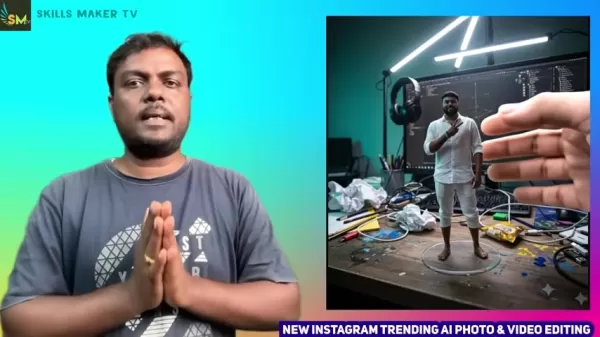
The secret lies in using tools that make the editing process straightforward and accessible to all, regardless of prior experience. Google Gemini stands out as an excellent tool for this purpose.
Introduction to Google Gemini for AI Editing
Google Gemini is a versatile AI tool designed to help you produce impressive images and videos effortlessly. It's ideal for creators who want to tap into the latest trends without investing hours in complex software. By utilizing its AI capabilities, Gemini removes technical barriers, letting you concentrate on creativity.
Creating an AI Image with Google Gemini
The first step to making a trending AI video is to create a base image with Google Gemini. Follow these steps:
Install Google Gemini: Visit the Google Play Store, search for "Google Gemini," and install the app on your phone.
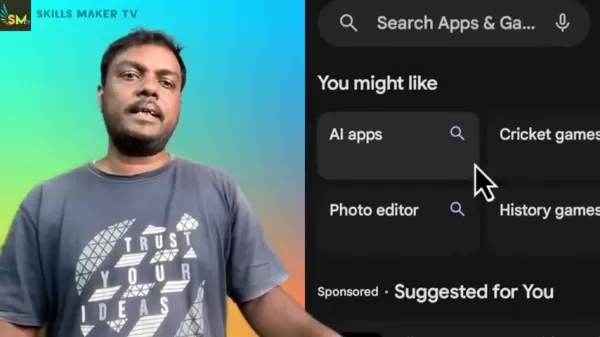
Open Gemini: Launch the Google Gemini app after installation.
Navigate to Image Creation: Find and select the "Create Image" option inside the app to generate an image from a text prompt.
Add an Image: Tap the plus icon (+) and choose a photo from your gallery that you wish to transform.
Describe your Image: You'll need to provide a descriptive prompt to guide the AI. This is how you communicate your creative vision to the tool.
Understanding Prompts and Fine-Tuning Your Edits
Why Prompts Matter
Prompts are the instructions you give to the AI. The quality of your prompt directly influences the result. A vague prompt often leads to unpredictable outputs, while a clear, detailed one helps the AI generate exactly what you imagine. Mastering prompt writing is therefore essential.
For example, the prompt used is: a human hand picking up the 3D model, but this 3D model should be like statue. If you leave out "should be like statue," the model might appear animated, which may not be your intended effect. This demonstrates how specific details in your prompt are critical.
Leveraging Telegram Channels for Creative Inspiration
Telegram channels focused on AI prompts are fantastic resources for inspiration. They offer a constant flow of ideas, helping you explore innovative ways to use AI in your projects. By joining these communities, you can stay updated on trends and consistently produce fresh content. These channels are hubs where users exchange and discuss prompts, giving you a wide array of options for transforming your media. Many prompts are tailored for social platforms like Instagram and TikTok, ensuring the content is optimized for maximum impact.
Step-by-Step Guide: Transforming Your Photo
Step 1: Finding the Right Prompt
The prompt is the foundation for your desired image. An effective prompt clearly conveys your vision to the AI. You can use existing prompts or craft your own.
For inspiration, consider joining a Telegram channel dedicated to AI prompts. These channels share numerous prompts you can use directly. Simply copy a prompt and paste it into Gemini's description field. A basic yet effective prompt is included in this tutorial's description.
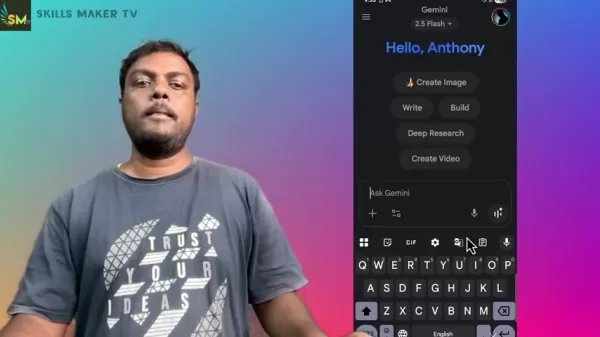
Step 2: Applying the Prompt to your Image
Enter the Prompt: Paste or type your chosen prompt into the description box in Google Gemini.
Generate the Image: After entering the prompt, tap the "OK" or send button.
Review the Generated Image: Gemini will create an image based on your prompt. Examine it to see if it matches your expectations.
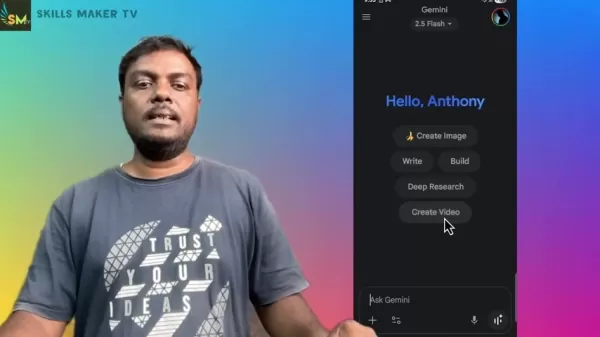
Save the Image: If you're happy with the result, long-press the image and select "Save" to download it to your device.
Step 3: Converting the Image into a Video
With your AI-generated image ready, the next step is to turn it into a video.
Start a New Chat: Close the previous chat window in Gemini and begin a new one.
Select Create Video: Find and tap on the "Create Video" option.
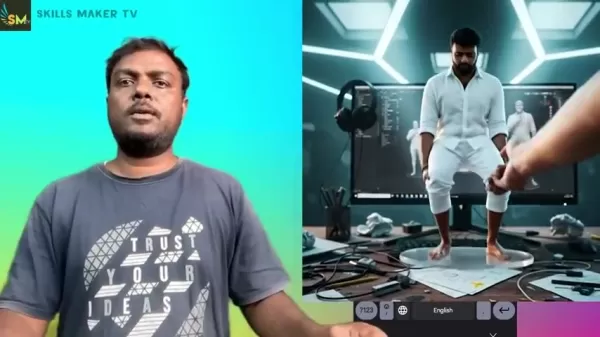
Add the Image: Tap the plus icon (+) and select the AI-generated image from your gallery.
Provide a Video Prompt: Describe the action you want in the video. A prompt like "a human hand picking up the 3D model, but the 3D model should be like statue" can produce the static 3D effect popular in trending Instagram videos.
Generate the Video: Tap the send button and allow Gemini a few minutes to process and generate the video.
Download the Video: Once the video is complete, download it to your device.
Google Gemini for Instagram Edits: A Balanced View
Pros
User-Friendly Interface: Intuitive and easy to use for beginners.
AI-Powered Creativity: Handles complex editing tasks effortlessly.
Cost-Effective: A free alternative to expensive editing software.
Quick Results: Produces images and videos within minutes.
Trending Content: Enables creation of visuals aligned with current trends.
Cons
Dependency on AI: Creative output is guided by AI algorithms.
Prompt Accuracy: Outcomes depend heavily on prompt quality.
Internet Requirement: Requires a stable internet connection to function.
Limited Customization: May lack advanced, granular editing controls.
Privacy Considerations: Users should be aware of Google's data policies.
Frequently Asked Questions
What is Google Gemini?
Google Gemini is an AI-driven tool that simplifies the creation of images and videos. It's designed to be user-friendly and accessible to creators at any skill level.
How do I install Google Gemini?
You can install Google Gemini directly from the Google Play Store on your Android device.
Where can I find AI prompts for Google Gemini?
AI prompts are available on dedicated Telegram channels for AI art. You can also craft your own based on your goals. A simple, effective example prompt is provided earlier in this guide.
How long does it take to generate a video using Google Gemini?
Video generation usually takes one to two minutes. The app will process your request after you submit the image and prompt.
Why is my 3D model moving in the video?
To keep the 3D model stationary, ensure your video prompt includes the phrase "should be like statue." This instructs the AI to render a static object.
Related Questions
How can I increase my Instagram followers?
Producing viral content is an excellent strategy for gaining Instagram followers. Using trending AI edits helps create content that appeals to a broad audience. Consistent posting of engaging material and strategic use of relevant hashtags also boosts visibility. Engaging with your audience and participating in community discussions further helps build a loyal following.
What other AI tools can I use for content creation?
Beyond Google Gemini, several other AI tools are great for content creation. Popular options include DALL-E 2, Midjourney for image generation, and RunwayML for video editing. Each tool has unique features and strengths. Exploring different platforms allows you to find the best fit for your specific creative projects. Since these tools are frequently updated, reviewing their latest capabilities is recommended before deciding.
How important are hashtags for Instagram videos?
Hashtags are vital for improving the discoverability of your Instagram videos. Relevant hashtags help your content reach a larger, targeted audience. Research popular and niche-specific hashtags within your field and include them in your captions. However, overloading with hashtags can seem spammy. A strategic mix of broad and specific tags is typically most effective. Periodically refreshing your hashtag strategy based on trends keeps your content relevant and easier to find.
Related article
 Anthropic Expands Claude AI Coding Tools to Japan in Push for Overseas Growth
Anthropic, a prominent U.S. artificial intelligence firm, is intensifying its global outreach. On Wednesday, the company hosted a major developer gathering, "Code with Claude," in Tokyo, drawing close to 500 software engineers. This initiative seeks
India’s Software Giant Cuts Hiring, Promises No Layoffs as AI Agents Scale Up
As artificial intelligence reshapes traditional labor-intensive business models, Tata Consultancy Services (TCS), a premier Indian software outsourcing firm, has unveiled its strategic response. During Tuesday’s annual general meeting, the chairman o
China Locks AI Models During Gaokam to Block Instant Homework Help
With the 2026 Gaokao fast approaching, rumors regarding the suspension of AI tools during the exam period have ignited intense online debate. In response to public concern, major AI platforms and educational apps have clarified their stance: rather t
Related Special Topic Recommendations
Design & Art
Anthropic Expands Claude AI Coding Tools to Japan in Push for Overseas Growth
Anthropic, a prominent U.S. artificial intelligence firm, is intensifying its global outreach. On Wednesday, the company hosted a major developer gathering, "Code with Claude," in Tokyo, drawing close to 500 software engineers. This initiative seeks
India’s Software Giant Cuts Hiring, Promises No Layoffs as AI Agents Scale Up
As artificial intelligence reshapes traditional labor-intensive business models, Tata Consultancy Services (TCS), a premier Indian software outsourcing firm, has unveiled its strategic response. During Tuesday’s annual general meeting, the chairman o
China Locks AI Models During Gaokam to Block Instant Homework Help
With the 2026 Gaokao fast approaching, rumors regarding the suspension of AI tools during the exam period have ignited intense online debate. In response to public concern, major AI platforms and educational apps have clarified their stance: rather t
Related Special Topic Recommendations
Design & Art
 Best AI Style Transfer Tools for Creative Experiments
2026 Latest Best Top-rated AI Style Transfer Tools for Creative Experiments! XIX.AI has curated a powerful, game-changing collection of must-try tools that deliver exceptional results through real-world tests and rigorous rankings. These top solutions help creatives boost productivity significantly by accelerating content creation and unlocking endless creative possibilities. Explore now to discover your perfect tool and start creating today!
 9 tools
 xix.ai
Comic Creation
Best AI Dialogue Bubble Tools for Visual Storytelling
xix.ai
Comic Creation
Best AI Dialogue Bubble Tools for Visual Storytelling
2026 Latest Best Top-Rated AI Dialogue Bubble Tools for Visual Storytelling are here on XIX.AI! This curated collection features powerful, game-changing tools that help creators boost productivity and overcome creative bottlenecks. Get a free vs paid comparison, see real-world tests, and check the latest rankings to find the must-try solutions perfect for crafting engaging visual narratives. Explore now to discover your ideal tool!
10 tools
xix.ai
Meeting Assistant
Top AI Meeting Summary Tools: Track Decisions and Follow-Ups Clearly
2026 Latest Top-Rated Best AI Meeting Summary Tools for Clear Decision Tracking and Effortless Follow-Ups. This curated list showcases powerful, game-changing solutions that boost productivity dramatically by automating meeting notes, identifying key action items, and streamlining team coordination across all projects. Get a free vs paid comparison along with real-world tests and weekly updated rankings to help you find the perfect tool. Explore now to unlock your AI edge!
9 tools
xix.ai
Data Analysis
Best AI Data Cleaning Tools: Fix Missing Values and Duplicates Fast
2026 Latest Best Top-rated AI Data Cleaning Tools for quick fixing of missing values and duplicates. This curated list showcases powerful, game-changing solutions that boost productivity significantly. Each option has undergone rigorous real-world tests to ensure reliability. Get a free vs paid comparison and discover the must-try tool that fits your needs best. Explore now at XIX.AI to Unlock your AI edge.
11 tools
xix.ai
Design & Art
Best AI Creative Ideation Tools for Artists: Break Through Visual Blocks
2026 Latest Best Top-Rated AI Creative Ideation Tools for Artists are curated by XIX.AI to help creators break through visual blocks and boost creativity instantly. These powerful game-changing tools offer real-world tests, detailed free vs paid comparison, and weekly updated rankings. Discover your perfect tool to accelerate content creation and unlock your AI edge today. Explore now!
14 tools
xix.ai
Music composition
AI Beat Makers for TikTok Background Tracks, Reels Audio, and Creator Promo Music
2026 Latest Best AI Beat Makers for TikTok Background Tracks, Reels Audio, and Creator Promo Music! XIX.AI has curated a top-rated list of powerful game-changing tools that go through real-world tests to deliver flawless music for every content need. You’ll find detailed free vs paid comparison data, weekly updated rankings, and must-try options to help you boost creativity and productivity. Explore now to discover your perfect tool!
11 tools
xix.ai

 Comments (0)
0/500
Comments (0)
0/500
Want to create captivating, trend-driven videos for Instagram? Have you noticed those popular AI-generated videos that are gaining huge traction and followers? This tutorial will walk you through creating similar stunning visuals using Google Gemini, with no advanced editing skills required. Let's get started and make some viral-worthy content!
Key Points
Learn how to generate AI-powered images using Google Gemini.
Discover the process of converting a standard photo into a striking 3D-style image.
Turn your AI-generated images into engaging video content.
Access sources for ready-to-use prompts to streamline your creative workflow.
Grow your Instagram following and views by leveraging trending content formats.
Creating Trending Instagram Content with AI
Why AI Photo and Video Editing is Trending
Viral Instagram videos are a powerful tool for increasing your profile's visibility, attracting followers, and boosting engagement. Many creators are using this trend to expand their online presence. A key strategy for achieving this growth is to harness AI for producing unique and attention-grabbing content.
The secret lies in using tools that make the editing process straightforward and accessible to all, regardless of prior experience. Google Gemini stands out as an excellent tool for this purpose.
Introduction to Google Gemini for AI Editing
Google Gemini is a versatile AI tool designed to help you produce impressive images and videos effortlessly. It's ideal for creators who want to tap into the latest trends without investing hours in complex software. By utilizing its AI capabilities, Gemini removes technical barriers, letting you concentrate on creativity.
Creating an AI Image with Google Gemini
The first step to making a trending AI video is to create a base image with Google Gemini. Follow these steps:
Install Google Gemini: Visit the Google Play Store, search for "Google Gemini," and install the app on your phone.
Open Gemini: Launch the Google Gemini app after installation.
Navigate to Image Creation: Find and select the "Create Image" option inside the app to generate an image from a text prompt.
Add an Image: Tap the plus icon (+) and choose a photo from your gallery that you wish to transform.
Describe your Image: You'll need to provide a descriptive prompt to guide the AI. This is how you communicate your creative vision to the tool.
Understanding Prompts and Fine-Tuning Your Edits
Why Prompts Matter
Prompts are the instructions you give to the AI. The quality of your prompt directly influences the result. A vague prompt often leads to unpredictable outputs, while a clear, detailed one helps the AI generate exactly what you imagine. Mastering prompt writing is therefore essential.
For example, the prompt used is: a human hand picking up the 3D model, but this 3D model should be like statue. If you leave out "should be like statue," the model might appear animated, which may not be your intended effect. This demonstrates how specific details in your prompt are critical.
Leveraging Telegram Channels for Creative Inspiration
Telegram channels focused on AI prompts are fantastic resources for inspiration. They offer a constant flow of ideas, helping you explore innovative ways to use AI in your projects. By joining these communities, you can stay updated on trends and consistently produce fresh content. These channels are hubs where users exchange and discuss prompts, giving you a wide array of options for transforming your media. Many prompts are tailored for social platforms like Instagram and TikTok, ensuring the content is optimized for maximum impact.
Step-by-Step Guide: Transforming Your Photo
Step 1: Finding the Right Prompt
The prompt is the foundation for your desired image. An effective prompt clearly conveys your vision to the AI. You can use existing prompts or craft your own.
For inspiration, consider joining a Telegram channel dedicated to AI prompts. These channels share numerous prompts you can use directly. Simply copy a prompt and paste it into Gemini's description field. A basic yet effective prompt is included in this tutorial's description.
Step 2: Applying the Prompt to your Image
Enter the Prompt: Paste or type your chosen prompt into the description box in Google Gemini.
Generate the Image: After entering the prompt, tap the "OK" or send button.
Review the Generated Image: Gemini will create an image based on your prompt. Examine it to see if it matches your expectations.
Save the Image: If you're happy with the result, long-press the image and select "Save" to download it to your device.
Step 3: Converting the Image into a Video
With your AI-generated image ready, the next step is to turn it into a video.
Start a New Chat: Close the previous chat window in Gemini and begin a new one.
Select Create Video: Find and tap on the "Create Video" option.
Add the Image: Tap the plus icon (+) and select the AI-generated image from your gallery.
Provide a Video Prompt: Describe the action you want in the video. A prompt like "a human hand picking up the 3D model, but the 3D model should be like statue" can produce the static 3D effect popular in trending Instagram videos.
Generate the Video: Tap the send button and allow Gemini a few minutes to process and generate the video.
Download the Video: Once the video is complete, download it to your device.
Google Gemini for Instagram Edits: A Balanced View
Pros
User-Friendly Interface: Intuitive and easy to use for beginners.
AI-Powered Creativity: Handles complex editing tasks effortlessly.
Cost-Effective: A free alternative to expensive editing software.
Quick Results: Produces images and videos within minutes.
Trending Content: Enables creation of visuals aligned with current trends.
Cons
Dependency on AI: Creative output is guided by AI algorithms.
Prompt Accuracy: Outcomes depend heavily on prompt quality.
Internet Requirement: Requires a stable internet connection to function.
Limited Customization: May lack advanced, granular editing controls.
Privacy Considerations: Users should be aware of Google's data policies.
Frequently Asked Questions
What is Google Gemini?
Google Gemini is an AI-driven tool that simplifies the creation of images and videos. It's designed to be user-friendly and accessible to creators at any skill level.
How do I install Google Gemini?
You can install Google Gemini directly from the Google Play Store on your Android device.
Where can I find AI prompts for Google Gemini?
AI prompts are available on dedicated Telegram channels for AI art. You can also craft your own based on your goals. A simple, effective example prompt is provided earlier in this guide.
How long does it take to generate a video using Google Gemini?
Video generation usually takes one to two minutes. The app will process your request after you submit the image and prompt.
Why is my 3D model moving in the video?
To keep the 3D model stationary, ensure your video prompt includes the phrase "should be like statue." This instructs the AI to render a static object.
Related Questions
How can I increase my Instagram followers?
Producing viral content is an excellent strategy for gaining Instagram followers. Using trending AI edits helps create content that appeals to a broad audience. Consistent posting of engaging material and strategic use of relevant hashtags also boosts visibility. Engaging with your audience and participating in community discussions further helps build a loyal following.
What other AI tools can I use for content creation?
Beyond Google Gemini, several other AI tools are great for content creation. Popular options include DALL-E 2, Midjourney for image generation, and RunwayML for video editing. Each tool has unique features and strengths. Exploring different platforms allows you to find the best fit for your specific creative projects. Since these tools are frequently updated, reviewing their latest capabilities is recommended before deciding.
How important are hashtags for Instagram videos?
Hashtags are vital for improving the discoverability of your Instagram videos. Relevant hashtags help your content reach a larger, targeted audience. Research popular and niche-specific hashtags within your field and include them in your captions. However, overloading with hashtags can seem spammy. A strategic mix of broad and specific tags is typically most effective. Periodically refreshing your hashtag strategy based on trends keeps your content relevant and easier to find.








 Anthropic Expands Claude AI Coding Tools to Japan in Push for Overseas Growth
Anthropic, a prominent U.S. artificial intelligence firm, is intensifying its global outreach. On Wednesday, the company hosted a major developer gathering, "Code with Claude," in Tokyo, drawing close to 500 software engineers. This initiative seeks
Anthropic Expands Claude AI Coding Tools to Japan in Push for Overseas Growth
Anthropic, a prominent U.S. artificial intelligence firm, is intensifying its global outreach. On Wednesday, the company hosted a major developer gathering, "Code with Claude," in Tokyo, drawing close to 500 software engineers. This initiative seeks
 India’s Software Giant Cuts Hiring, Promises No Layoffs as AI Agents Scale Up
As artificial intelligence reshapes traditional labor-intensive business models, Tata Consultancy Services (TCS), a premier Indian software outsourcing firm, has unveiled its strategic response. During Tuesday’s annual general meeting, the chairman o
India’s Software Giant Cuts Hiring, Promises No Layoffs as AI Agents Scale Up
As artificial intelligence reshapes traditional labor-intensive business models, Tata Consultancy Services (TCS), a premier Indian software outsourcing firm, has unveiled its strategic response. During Tuesday’s annual general meeting, the chairman o
 China Locks AI Models During Gaokam to Block Instant Homework Help
With the 2026 Gaokao fast approaching, rumors regarding the suspension of AI tools during the exam period have ignited intense online debate. In response to public concern, major AI platforms and educational apps have clarified their stance: rather t
China Locks AI Models During Gaokam to Block Instant Homework Help
With the 2026 Gaokao fast approaching, rumors regarding the suspension of AI tools during the exam period have ignited intense online debate. In response to public concern, major AI platforms and educational apps have clarified their stance: rather t

2026 Latest Best Top-rated AI Style Transfer Tools for Creative Experiments! XIX.AI has curated a powerful, game-changing collection of must-try tools that deliver exceptional results through real-world tests and rigorous rankings. These top solutions help creatives boost productivity significantly by accelerating content creation and unlocking endless creative possibilities. Explore now to discover your perfect tool and start creating today!
9 tools
xix.ai

2026 Latest Best Top-Rated AI Dialogue Bubble Tools for Visual Storytelling are here on XIX.AI! This curated collection features powerful, game-changing tools that help creators boost productivity and overcome creative bottlenecks. Get a free vs paid comparison, see real-world tests, and check the latest rankings to find the must-try solutions perfect for crafting engaging visual narratives. Explore now to discover your ideal tool!
10 tools
xix.ai

2026 Latest Top-Rated Best AI Meeting Summary Tools for Clear Decision Tracking and Effortless Follow-Ups. This curated list showcases powerful, game-changing solutions that boost productivity dramatically by automating meeting notes, identifying key action items, and streamlining team coordination across all projects. Get a free vs paid comparison along with real-world tests and weekly updated rankings to help you find the perfect tool. Explore now to unlock your AI edge!
9 tools
xix.ai

2026 Latest Best Top-rated AI Data Cleaning Tools for quick fixing of missing values and duplicates. This curated list showcases powerful, game-changing solutions that boost productivity significantly. Each option has undergone rigorous real-world tests to ensure reliability. Get a free vs paid comparison and discover the must-try tool that fits your needs best. Explore now at XIX.AI to Unlock your AI edge.
11 tools
xix.ai

2026 Latest Best Top-Rated AI Creative Ideation Tools for Artists are curated by XIX.AI to help creators break through visual blocks and boost creativity instantly. These powerful game-changing tools offer real-world tests, detailed free vs paid comparison, and weekly updated rankings. Discover your perfect tool to accelerate content creation and unlock your AI edge today. Explore now!
14 tools
xix.ai

2026 Latest Best AI Beat Makers for TikTok Background Tracks, Reels Audio, and Creator Promo Music! XIX.AI has curated a top-rated list of powerful game-changing tools that go through real-world tests to deliver flawless music for every content need. You’ll find detailed free vs paid comparison data, weekly updated rankings, and must-try options to help you boost creativity and productivity. Explore now to discover your perfect tool!
11 tools
xix.ai












