


 Home
HomeMidjourney V6 Tutorial: How to Create AI Album Art
In today's music industry, visual presentation is more crucial than ever. A captivating album cover can determine whether a song gets noticed or fades into the background. While hiring a professional artist is the preferred choice, it's often not a practical option for independent musicians. This guide explores how to use Midjourney AI V6 to design professional-grade album artwork on a limited budget, including tips for enhancing the final output with free tools like GIMP.
Key Takeaways
Learn to generate compelling album artwork using Midjourney AI V6.
Understand the essentials of getting started with Midjourney, including subscription plans.
Develop the skill of writing effective prompts to achieve your desired visual results.
Review sample album covers created with Midjourney.
Discover techniques for polishing AI-generated artwork using free editing software like GIMP.
Prepare your album art to attract more attention from music blogs and playlist curators.
Unlocking AI-Powered Album Art Creation
The Musician's Dilemma: Art on a Budget
For artists releasing new music, album art plays a vital role. An engaging cover sparks curiosity and can result in more streams, downloads, and a growing fan base. However, many up-and-coming and independent musicians work with limited financial resources. Commissioning a talented artist for custom work represents a major investment, often comparable to costs for audio mastering or other crucial promotional efforts.
This situation forces many musicians to seek affordable alternatives. AI image generation has become a formidable solution, making high-quality visuals accessible to all and serving as a creative resource for artists with budgetary constraints.
This article details how musicians can harness the capabilities of Midjourney AI V6 to produce attention-grabbing album covers. We'll walk through the entire process, from setting up a Midjourney account and formulating powerful prompts to presenting real-life examples and refining your AI art with free software.
Getting Started with Midjourney: Subscriptions and Discord
Your first step toward creating AI-powered album art is to sign up for a Midjourney subscription.
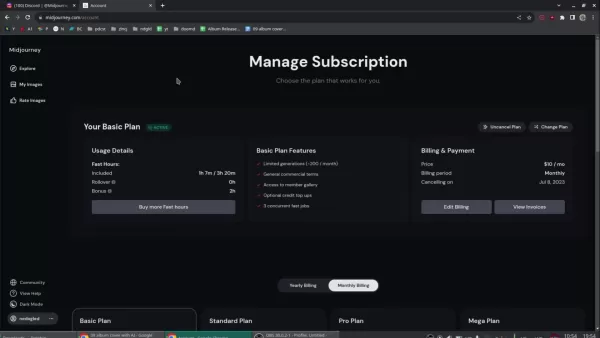
Although free trials might be offered periodically, a paid subscription provides greater functionality and image creation capacity. Here is an outline of the common subscription tiers:
Plan Price (Monthly) Features Image Generations (Approx.) Basic Plan $10 Limited generations, Access to member gallery, 3 concurrent fast jobs ~200 Standard Plan $30 Unlimited relaxed generations, Access to member gallery, Optional credit top-ups, 3 concurrent fast jobs Unlimited Pro Plan $60 Unlimited fast generations, Stealth image generation, Optional credit top-ups, 12 concurrent fast jobs Unlimited Mega Plan $120 Unlimited relaxed generations, Stealth image generation, Optional credit top-ups, 12 concurrent fast jobs Unlimited
The Basic Plan is typically adequate for creating album art, offering sufficient generations to test and refine concepts. If you expect to generate a larger volume of images or require stealth generation, consider the Standard Plan or higher. The Basic Plan provides approximately 200 image generations, which is usually enough to design a cover for your album release. The Mega Plan includes more simultaneous fast jobs.
Midjourney functions mainly via Discord. After subscribing, you'll receive access to the Midjourney Discord server, where you communicate with the AI bot using text commands. This interface may seem overwhelming initially, but sending direct messages to the Midjourney bot is a more streamlined approach. The public channels can become quite congested, making direct messaging preferable. All your image creation takes place within Discord. Both a Discord account and a Midjourney subscription are required to generate AI album covers.
Understanding Midjourney's Terms of Service
Before you start generating images, it's crucial to review Midjourney's Terms of Service (TOS).
This document specifies your rights and obligations concerning the images you produce. You can find the TOS in the documentation section of the Midjourney website. Familiarizing yourself with these terms ensures you use the platform in accordance with its rules and helps prevent potential copyright complications.
Key points to consider include commercial use rights, ownership of generated images, and limitations on acceptable content. Midjourney maintains the right to suspend or terminate your access to its services at any time, and automated tools for accessing its servers are prohibited.
Navigating Discord: Settings and Image Generation
Upon joining the Midjourney Discord server, you'll see multiple channels. Notable channels include announcements for new features and updates, and community channels where users share their creations and prompts.
However, to generate images, you will need a Discord account.
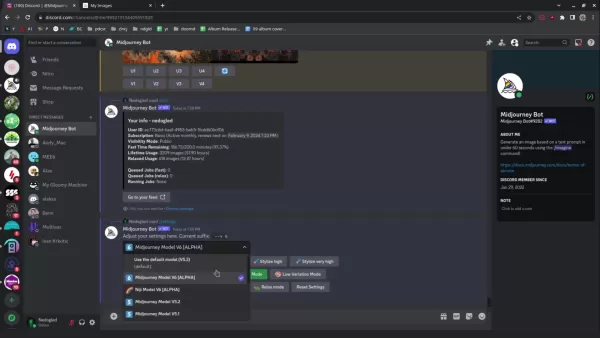
To create images, type the /imagine command in a direct message to the Midjourney bot. This instructs the AI to produce images according to your text description. Using the /info command displays your remaining credit balance, providing an overview of your account status. Before generating images, execute the /settings command. This reveals all configurable options. You should be utilizing the Midjourney Model V6. Selecting the appropriate models is essential for producing the highest quality album art.
Crafting Powerful Prompts for Visualizing Your Music
The Art of the Prompt
The secret to producing effective AI art lies in composing detailed and imaginative prompts. Consider the prompt as a set of directions for the AI, steering it toward your intended visual concept. The more precise and descriptive your prompt, the closer the results will align with your vision. Rather than entering a generic phrase like 'album cover,' try using more descriptive examples such as:
- 'Album cover featuring a psychedelic landscape with swirling colors and a dreamy ambiance'
- 'Album cover with a dark fantasy theme, gothic architecture, a raven, and a haunting melodic feel'
- 'Minimalist album cover design incorporating geometric shapes and vibrant colors'
- 'Album cover ideas inspired by nature'
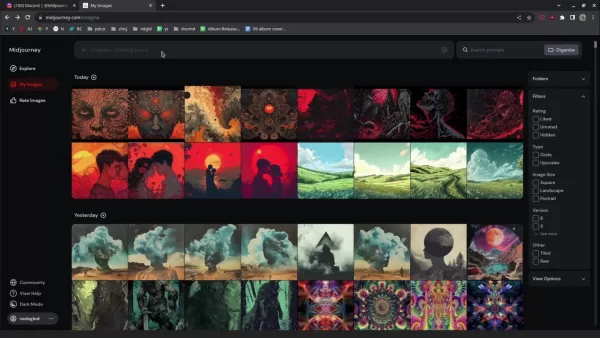
Incorporating aspects like artistic style, color schemes, and mood indicators can further improve your images. Here are additional prompts and the artwork they yielded:
- 'Hand-sketched psychedelic nature scene'
- 'Symmetric fractal psychedelic pattern'
Test various word combinations and phrases to determine what resonates with your artistic vision. With continued use of Midjourney, you'll gain a deeper insight into how the AI processes different prompts, enabling you to generate more reliable and expected outcomes.
Spicing Up Your Creations with GIMP
The power of GIMP
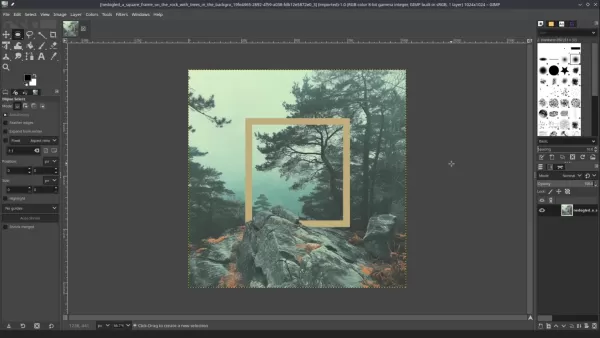
After generating your album artwork with Midjourney, the next step is to refine it using a photo editor. While Adobe Photoshop is widely used, free options like GIMP provide robust editing features suitable for musicians with limited funds. GIMP, the GNU Image Manipulation Program, enables you to improve your AI-generated art, adding personal elements and raising it to a professional standard.
Follow these steps in GIMP:
- Upscale the image: To ensure high image quality, increase the resolution. Navigate to Image>Scale Image. Resize to approximately 3000x3000 pixels. Set the interpolation method to NoHalo for sharper details.
- Adjust Shadows and highlights: The goal is to enhance contrast. Access this via Colors>Shadow Highlights
Midjourney V6 for Album Art: Pros and Cons
Pros
An affordable substitute for hiring human artists.
Makes high-quality visuals accessible to independent musicians.
Facilitates quick brainstorming and testing of various artistic styles.
Offers a creative platform for artists without formal design training.
Cons
The resulting art may not possess the distinctive character and emotional resonance of work created by humans.
Overdependence on AI could hinder the growth of conventional design abilities.
The output quality is closely tied to how clear and detailed your prompts are.
It's important to be aware of the legal aspects associated with AI-generated artwork.
Frequently Asked Questions
Can I use Midjourney-generated art for commercial purposes?
Commercial usage rights are determined by your specific Midjourney subscription package. Consult the Terms of Service for comprehensive details.
What if I can't find the perfect image generation with my initial prompts?
Persistent experimentation is essential! Try different prompts, create variations, and remix existing images until you reach your ideal result.
Is Midjourney the only AI image generator for album art?
No, other AI systems such as DALL-E 2 and Stable Diffusion are also viable options for creating album artwork.
Related Questions
Can AI replace human artists?
AI technologies like Midjourney provide a valuable creative asset for image generation, but they are not a replacement for human artists. AI tools are designed to augment human capabilities and accelerate the artistic process. They are effective for producing a wide range of concepts that might not have been originally conceived. These tools broaden creative horizons but cannot replicate the expertise inherent to a human artist.
Related article
 Anthropic Expands Claude AI Coding Tools to Japan in Push for Overseas Growth
Anthropic, a prominent U.S. artificial intelligence firm, is intensifying its global outreach. On Wednesday, the company hosted a major developer gathering, "Code with Claude," in Tokyo, drawing close to 500 software engineers. This initiative seeks
India’s Software Giant Cuts Hiring, Promises No Layoffs as AI Agents Scale Up
As artificial intelligence reshapes traditional labor-intensive business models, Tata Consultancy Services (TCS), a premier Indian software outsourcing firm, has unveiled its strategic response. During Tuesday’s annual general meeting, the chairman o
China Locks AI Models During Gaokam to Block Instant Homework Help
With the 2026 Gaokao fast approaching, rumors regarding the suspension of AI tools during the exam period have ignited intense online debate. In response to public concern, major AI platforms and educational apps have clarified their stance: rather t
Related Special Topic Recommendations
Design & Art
Anthropic Expands Claude AI Coding Tools to Japan in Push for Overseas Growth
Anthropic, a prominent U.S. artificial intelligence firm, is intensifying its global outreach. On Wednesday, the company hosted a major developer gathering, "Code with Claude," in Tokyo, drawing close to 500 software engineers. This initiative seeks
India’s Software Giant Cuts Hiring, Promises No Layoffs as AI Agents Scale Up
As artificial intelligence reshapes traditional labor-intensive business models, Tata Consultancy Services (TCS), a premier Indian software outsourcing firm, has unveiled its strategic response. During Tuesday’s annual general meeting, the chairman o
China Locks AI Models During Gaokam to Block Instant Homework Help
With the 2026 Gaokao fast approaching, rumors regarding the suspension of AI tools during the exam period have ignited intense online debate. In response to public concern, major AI platforms and educational apps have clarified their stance: rather t
Related Special Topic Recommendations
Design & Art
 Best AI Style Transfer Tools for Creative Experiments
2026 Latest Best Top-rated AI Style Transfer Tools for Creative Experiments! XIX.AI has curated a powerful, game-changing collection of must-try tools that deliver exceptional results through real-world tests and rigorous rankings. These top solutions help creatives boost productivity significantly by accelerating content creation and unlocking endless creative possibilities. Explore now to discover your perfect tool and start creating today!
 9 tools
 xix.ai
Comic Creation
Best AI Dialogue Bubble Tools for Visual Storytelling
xix.ai
Comic Creation
Best AI Dialogue Bubble Tools for Visual Storytelling
2026 Latest Best Top-Rated AI Dialogue Bubble Tools for Visual Storytelling are here on XIX.AI! This curated collection features powerful, game-changing tools that help creators boost productivity and overcome creative bottlenecks. Get a free vs paid comparison, see real-world tests, and check the latest rankings to find the must-try solutions perfect for crafting engaging visual narratives. Explore now to discover your ideal tool!
10 tools
xix.ai
Meeting Assistant
Top AI Meeting Summary Tools: Track Decisions and Follow-Ups Clearly
2026 Latest Top-Rated Best AI Meeting Summary Tools for Clear Decision Tracking and Effortless Follow-Ups. This curated list showcases powerful, game-changing solutions that boost productivity dramatically by automating meeting notes, identifying key action items, and streamlining team coordination across all projects. Get a free vs paid comparison along with real-world tests and weekly updated rankings to help you find the perfect tool. Explore now to unlock your AI edge!
9 tools
xix.ai
Data Analysis
Best AI Data Cleaning Tools: Fix Missing Values and Duplicates Fast
2026 Latest Best Top-rated AI Data Cleaning Tools for quick fixing of missing values and duplicates. This curated list showcases powerful, game-changing solutions that boost productivity significantly. Each option has undergone rigorous real-world tests to ensure reliability. Get a free vs paid comparison and discover the must-try tool that fits your needs best. Explore now at XIX.AI to Unlock your AI edge.
11 tools
xix.ai
Design & Art
Best AI Creative Ideation Tools for Artists: Break Through Visual Blocks
2026 Latest Best Top-Rated AI Creative Ideation Tools for Artists are curated by XIX.AI to help creators break through visual blocks and boost creativity instantly. These powerful game-changing tools offer real-world tests, detailed free vs paid comparison, and weekly updated rankings. Discover your perfect tool to accelerate content creation and unlock your AI edge today. Explore now!
14 tools
xix.ai
Music composition
AI Beat Makers for TikTok Background Tracks, Reels Audio, and Creator Promo Music
2026 Latest Best AI Beat Makers for TikTok Background Tracks, Reels Audio, and Creator Promo Music! XIX.AI has curated a top-rated list of powerful game-changing tools that go through real-world tests to deliver flawless music for every content need. You’ll find detailed free vs paid comparison data, weekly updated rankings, and must-try options to help you boost creativity and productivity. Explore now to discover your perfect tool!
11 tools
xix.ai

 Comments (1)
0/500
Comments (1)
0/500
![WilliamYoung]()
Die vorgestellten Aspekte in diesem Tutorial finde ich super hilfreich! Ich habe selbst schon lange mit KI generierten Bildern für Musikalben gespielt, aber die Tipps zu konkreten Prompts und Stil-Consistency waren mir neu. Da steckt echt Potenzial drin, um unabhängiger von teuren Design-Dienstleistern zu werden. Manchmal zweifel ich aber, ob das vielleicht doch langweilige Visuals fördert, wenn alle die gleichen Tools nutzen... Die Vorher-/Nachher-Beispiele waren sehr aufschlussreich! 😊
In today's music industry, visual presentation is more crucial than ever. A captivating album cover can determine whether a song gets noticed or fades into the background. While hiring a professional artist is the preferred choice, it's often not a practical option for independent musicians. This guide explores how to use Midjourney AI V6 to design professional-grade album artwork on a limited budget, including tips for enhancing the final output with free tools like GIMP.
Key Takeaways
Learn to generate compelling album artwork using Midjourney AI V6.
Understand the essentials of getting started with Midjourney, including subscription plans.
Develop the skill of writing effective prompts to achieve your desired visual results.
Review sample album covers created with Midjourney.
Discover techniques for polishing AI-generated artwork using free editing software like GIMP.
Prepare your album art to attract more attention from music blogs and playlist curators.
Unlocking AI-Powered Album Art Creation
The Musician's Dilemma: Art on a Budget
For artists releasing new music, album art plays a vital role. An engaging cover sparks curiosity and can result in more streams, downloads, and a growing fan base. However, many up-and-coming and independent musicians work with limited financial resources. Commissioning a talented artist for custom work represents a major investment, often comparable to costs for audio mastering or other crucial promotional efforts.
This situation forces many musicians to seek affordable alternatives. AI image generation has become a formidable solution, making high-quality visuals accessible to all and serving as a creative resource for artists with budgetary constraints.
This article details how musicians can harness the capabilities of Midjourney AI V6 to produce attention-grabbing album covers. We'll walk through the entire process, from setting up a Midjourney account and formulating powerful prompts to presenting real-life examples and refining your AI art with free software.
Getting Started with Midjourney: Subscriptions and Discord
Your first step toward creating AI-powered album art is to sign up for a Midjourney subscription.
Although free trials might be offered periodically, a paid subscription provides greater functionality and image creation capacity. Here is an outline of the common subscription tiers:
| Plan | Price (Monthly) | Features | Image Generations (Approx.) |
|---|---|---|---|
| Basic Plan | $10 | Limited generations, Access to member gallery, 3 concurrent fast jobs | ~200 |
| Standard Plan | $30 | Unlimited relaxed generations, Access to member gallery, Optional credit top-ups, 3 concurrent fast jobs | Unlimited |
| Pro Plan | $60 | Unlimited fast generations, Stealth image generation, Optional credit top-ups, 12 concurrent fast jobs | Unlimited |
| Mega Plan | $120 | Unlimited relaxed generations, Stealth image generation, Optional credit top-ups, 12 concurrent fast jobs | Unlimited |
The Basic Plan is typically adequate for creating album art, offering sufficient generations to test and refine concepts. If you expect to generate a larger volume of images or require stealth generation, consider the Standard Plan or higher. The Basic Plan provides approximately 200 image generations, which is usually enough to design a cover for your album release. The Mega Plan includes more simultaneous fast jobs.
Midjourney functions mainly via Discord. After subscribing, you'll receive access to the Midjourney Discord server, where you communicate with the AI bot using text commands. This interface may seem overwhelming initially, but sending direct messages to the Midjourney bot is a more streamlined approach. The public channels can become quite congested, making direct messaging preferable. All your image creation takes place within Discord. Both a Discord account and a Midjourney subscription are required to generate AI album covers.
Understanding Midjourney's Terms of Service
Before you start generating images, it's crucial to review Midjourney's Terms of Service (TOS).
This document specifies your rights and obligations concerning the images you produce. You can find the TOS in the documentation section of the Midjourney website. Familiarizing yourself with these terms ensures you use the platform in accordance with its rules and helps prevent potential copyright complications.
Key points to consider include commercial use rights, ownership of generated images, and limitations on acceptable content. Midjourney maintains the right to suspend or terminate your access to its services at any time, and automated tools for accessing its servers are prohibited.
Navigating Discord: Settings and Image Generation
Upon joining the Midjourney Discord server, you'll see multiple channels. Notable channels include announcements for new features and updates, and community channels where users share their creations and prompts.
However, to generate images, you will need a Discord account.
To create images, type the /imagine command in a direct message to the Midjourney bot. This instructs the AI to produce images according to your text description. Using the /info command displays your remaining credit balance, providing an overview of your account status. Before generating images, execute the /settings command. This reveals all configurable options. You should be utilizing the Midjourney Model V6. Selecting the appropriate models is essential for producing the highest quality album art.
Crafting Powerful Prompts for Visualizing Your Music
The Art of the Prompt
The secret to producing effective AI art lies in composing detailed and imaginative prompts. Consider the prompt as a set of directions for the AI, steering it toward your intended visual concept. The more precise and descriptive your prompt, the closer the results will align with your vision. Rather than entering a generic phrase like 'album cover,' try using more descriptive examples such as:
- 'Album cover featuring a psychedelic landscape with swirling colors and a dreamy ambiance'
- 'Album cover with a dark fantasy theme, gothic architecture, a raven, and a haunting melodic feel'
- 'Minimalist album cover design incorporating geometric shapes and vibrant colors'
- 'Album cover ideas inspired by nature'
Incorporating aspects like artistic style, color schemes, and mood indicators can further improve your images. Here are additional prompts and the artwork they yielded:
- 'Hand-sketched psychedelic nature scene'
- 'Symmetric fractal psychedelic pattern'
Test various word combinations and phrases to determine what resonates with your artistic vision. With continued use of Midjourney, you'll gain a deeper insight into how the AI processes different prompts, enabling you to generate more reliable and expected outcomes.
Spicing Up Your Creations with GIMP
The power of GIMP
After generating your album artwork with Midjourney, the next step is to refine it using a photo editor. While Adobe Photoshop is widely used, free options like GIMP provide robust editing features suitable for musicians with limited funds. GIMP, the GNU Image Manipulation Program, enables you to improve your AI-generated art, adding personal elements and raising it to a professional standard.
Follow these steps in GIMP:
- Upscale the image: To ensure high image quality, increase the resolution. Navigate to Image>Scale Image. Resize to approximately 3000x3000 pixels. Set the interpolation method to NoHalo for sharper details.
- Adjust Shadows and highlights: The goal is to enhance contrast. Access this via Colors>Shadow Highlights
Midjourney V6 for Album Art: Pros and Cons
Pros
An affordable substitute for hiring human artists.
Makes high-quality visuals accessible to independent musicians.
Facilitates quick brainstorming and testing of various artistic styles.
Offers a creative platform for artists without formal design training.
Cons
The resulting art may not possess the distinctive character and emotional resonance of work created by humans.
Overdependence on AI could hinder the growth of conventional design abilities.
The output quality is closely tied to how clear and detailed your prompts are.
It's important to be aware of the legal aspects associated with AI-generated artwork.
Frequently Asked Questions
Can I use Midjourney-generated art for commercial purposes?
Commercial usage rights are determined by your specific Midjourney subscription package. Consult the Terms of Service for comprehensive details.
What if I can't find the perfect image generation with my initial prompts?
Persistent experimentation is essential! Try different prompts, create variations, and remix existing images until you reach your ideal result.
Is Midjourney the only AI image generator for album art?
No, other AI systems such as DALL-E 2 and Stable Diffusion are also viable options for creating album artwork.
Related Questions
Can AI replace human artists?
AI technologies like Midjourney provide a valuable creative asset for image generation, but they are not a replacement for human artists. AI tools are designed to augment human capabilities and accelerate the artistic process. They are effective for producing a wide range of concepts that might not have been originally conceived. These tools broaden creative horizons but cannot replicate the expertise inherent to a human artist.








 Anthropic Expands Claude AI Coding Tools to Japan in Push for Overseas Growth
Anthropic, a prominent U.S. artificial intelligence firm, is intensifying its global outreach. On Wednesday, the company hosted a major developer gathering, "Code with Claude," in Tokyo, drawing close to 500 software engineers. This initiative seeks
Anthropic Expands Claude AI Coding Tools to Japan in Push for Overseas Growth
Anthropic, a prominent U.S. artificial intelligence firm, is intensifying its global outreach. On Wednesday, the company hosted a major developer gathering, "Code with Claude," in Tokyo, drawing close to 500 software engineers. This initiative seeks
 India’s Software Giant Cuts Hiring, Promises No Layoffs as AI Agents Scale Up
As artificial intelligence reshapes traditional labor-intensive business models, Tata Consultancy Services (TCS), a premier Indian software outsourcing firm, has unveiled its strategic response. During Tuesday’s annual general meeting, the chairman o
India’s Software Giant Cuts Hiring, Promises No Layoffs as AI Agents Scale Up
As artificial intelligence reshapes traditional labor-intensive business models, Tata Consultancy Services (TCS), a premier Indian software outsourcing firm, has unveiled its strategic response. During Tuesday’s annual general meeting, the chairman o
 China Locks AI Models During Gaokam to Block Instant Homework Help
With the 2026 Gaokao fast approaching, rumors regarding the suspension of AI tools during the exam period have ignited intense online debate. In response to public concern, major AI platforms and educational apps have clarified their stance: rather t
China Locks AI Models During Gaokam to Block Instant Homework Help
With the 2026 Gaokao fast approaching, rumors regarding the suspension of AI tools during the exam period have ignited intense online debate. In response to public concern, major AI platforms and educational apps have clarified their stance: rather t

2026 Latest Best Top-rated AI Style Transfer Tools for Creative Experiments! XIX.AI has curated a powerful, game-changing collection of must-try tools that deliver exceptional results through real-world tests and rigorous rankings. These top solutions help creatives boost productivity significantly by accelerating content creation and unlocking endless creative possibilities. Explore now to discover your perfect tool and start creating today!
9 tools
xix.ai

2026 Latest Best Top-Rated AI Dialogue Bubble Tools for Visual Storytelling are here on XIX.AI! This curated collection features powerful, game-changing tools that help creators boost productivity and overcome creative bottlenecks. Get a free vs paid comparison, see real-world tests, and check the latest rankings to find the must-try solutions perfect for crafting engaging visual narratives. Explore now to discover your ideal tool!
10 tools
xix.ai

2026 Latest Top-Rated Best AI Meeting Summary Tools for Clear Decision Tracking and Effortless Follow-Ups. This curated list showcases powerful, game-changing solutions that boost productivity dramatically by automating meeting notes, identifying key action items, and streamlining team coordination across all projects. Get a free vs paid comparison along with real-world tests and weekly updated rankings to help you find the perfect tool. Explore now to unlock your AI edge!
9 tools
xix.ai

2026 Latest Best Top-rated AI Data Cleaning Tools for quick fixing of missing values and duplicates. This curated list showcases powerful, game-changing solutions that boost productivity significantly. Each option has undergone rigorous real-world tests to ensure reliability. Get a free vs paid comparison and discover the must-try tool that fits your needs best. Explore now at XIX.AI to Unlock your AI edge.
11 tools
xix.ai

2026 Latest Best Top-Rated AI Creative Ideation Tools for Artists are curated by XIX.AI to help creators break through visual blocks and boost creativity instantly. These powerful game-changing tools offer real-world tests, detailed free vs paid comparison, and weekly updated rankings. Discover your perfect tool to accelerate content creation and unlock your AI edge today. Explore now!
14 tools
xix.ai

2026 Latest Best AI Beat Makers for TikTok Background Tracks, Reels Audio, and Creator Promo Music! XIX.AI has curated a top-rated list of powerful game-changing tools that go through real-world tests to deliver flawless music for every content need. You’ll find detailed free vs paid comparison data, weekly updated rankings, and must-try options to help you boost creativity and productivity. Explore now to discover your perfect tool!
11 tools
xix.ai

Die vorgestellten Aspekte in diesem Tutorial finde ich super hilfreich! Ich habe selbst schon lange mit KI generierten Bildern für Musikalben gespielt, aber die Tipps zu konkreten Prompts und Stil-Consistency waren mir neu. Da steckt echt Potenzial drin, um unabhängiger von teuren Design-Dienstleistern zu werden. Manchmal zweifel ich aber, ob das vielleicht doch langweilige Visuals fördert, wenn alle die gleichen Tools nutzen... Die Vorher-/Nachher-Beispiele waren sehr aufschlussreich! 😊












