


 Home
HomeMonetize Facebook Engagement with AI-Generated Images
Discover how to generate income on Facebook by crafting compelling AI-generated visuals. By leveraging the right tools and approaches, you can produce an endless stream of images, build a substantial following, and turn your content into revenue. This guide equips you with the practical know-how and resources to create stunning graphics and optimize your earning potential, all completely free of charge. Turn your creative spark into a profitable endeavor!
Key Points
Produce AI images at no cost using readily available online platforms.
Monetize your efforts by sharing these creations on dedicated Facebook pages.
Harness the power of tools such as Bing AI Image Creator and Leonardo.AI.
Enhance your Facebook posts with targeted hashtags and compelling descriptions.
Enroll in a comprehensive Facebook monetization course to boost your income potential.
Generating AI Images for Facebook
The Potential of AI-Generated Content
In the current online world, compelling visuals are key, and AI-generated images have emerged as a powerful method for creating engaging Facebook content. A growing number of creators are embracing this trend, producing attention-grabbing graphics and using them to build significant revenue streams.
These images offer both visual impact and remarkable cost efficiency. Unlike conventional photography or graphic design, AI image generation demands very little in terms of resources and can be done entirely without payment, enabling you to create a limitless supply of unique artwork.
The core of success involves utilizing specialized AI platforms and learning how to tailor your content for Facebook's platform. By developing captivating imagery and combining it with effective tactics, you can grow a loyal audience and explore multiple income avenues. This guide offers a clear, step-by-step method for producing AI images and monetizing them successfully on Facebook. Let's explore the process in detail.
Tools for Free AI Image Creation
Producing high-quality AI imagery is more straightforward than it seems, thanks to several accessible web-based tools. These platforms provide intuitive interfaces and sophisticated AI models that can bring your creative concepts to life. Here are two of the most widely used options to begin with:
- Bing AI Image Creator: This tool is built directly into Microsoft's Bing search engine. It is free to use and generates images from text descriptions. Simply type a detailed prompt of the scene you envision, and the AI will produce original visuals based on your input.
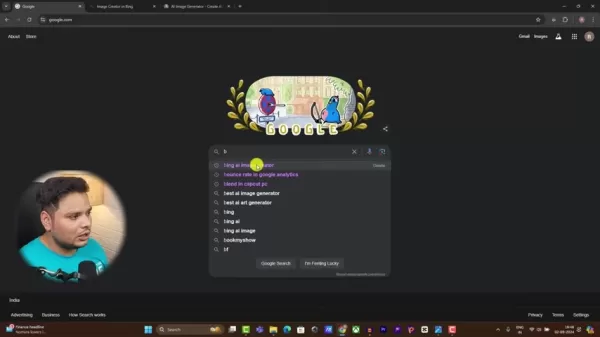
Its straightforward design makes it easy for beginners and those new to AI technology.
- Leonardo.AI: This platform provides a robust suite of features for generating a wide variety of AI art. It offers both free and premium tiers, with the free plan allowing a daily allowance of image generations.
These tools make professional-level image creation accessible, empowering you to produce visuals that capture interest and connect with your Facebook audience.
Step-by-Step Guide to Using Bing AI Image Creator
Follow this detailed process to create AI images with Bing AI Image Creator:
- Access Bing AI Image Creator: Launch your internet browser, navigate to Google or Bing, and search for "Bing AI Image Creator." Click on the top result from the official website.
- Sign Up/Log In: New users will need to register. Returning users can simply log in. You’ll need a free Microsoft account to continue. The sign-up process requires basic information like an email address and a name, similar to creating a standard email account.
- Enter Your Text Prompt: After signing in, locate the main text input field. Here, you will write a detailed description of the image you want the AI to generate.
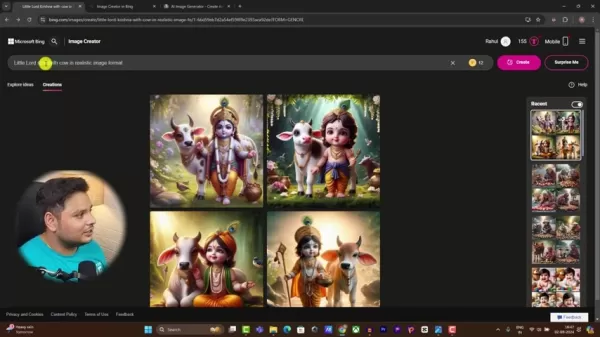
For example, you could try a prompt like "A photorealistic depiction of young Lord Krishna with a cow."
Related article
 Stripe to Acquire OpenRouter as AI Model Routing Gains Momentum
Stripe has agreed to acquire OpenRouter, an AI model-routing platform that gives developers access to hundreds of models through a single interface. The deal adds model selection and routing to Stripe’s existing work around AI usage and token-based b
Former OpenAI Researcher Barrett Zoph Returns to Google to Support Gemini Development
Barret Zoph, who previously abruptly left and joined OpenAI due to a disagreement with Thinking Machines Lab CEO Miriam Mularati, has once again changed employers. Alphabet's Google announced that Zoph will return as Vice President of Research, bring
How Recursive Intelligence Raised $335M at $4B Valuation in 4 Months
The co-founders of startup Ricursive Intelligence seemed destined to be co-founders.Anna Goldie, CEO, and Azalia Mirhoseini, CTO, are so well-known in the AI community that they were among those AI engineers who “got those weird emails from Zuckerber
Related Special Topic Recommendations
Design & Art
Stripe to Acquire OpenRouter as AI Model Routing Gains Momentum
Stripe has agreed to acquire OpenRouter, an AI model-routing platform that gives developers access to hundreds of models through a single interface. The deal adds model selection and routing to Stripe’s existing work around AI usage and token-based b
Former OpenAI Researcher Barrett Zoph Returns to Google to Support Gemini Development
Barret Zoph, who previously abruptly left and joined OpenAI due to a disagreement with Thinking Machines Lab CEO Miriam Mularati, has once again changed employers. Alphabet's Google announced that Zoph will return as Vice President of Research, bring
How Recursive Intelligence Raised $335M at $4B Valuation in 4 Months
The co-founders of startup Ricursive Intelligence seemed destined to be co-founders.Anna Goldie, CEO, and Azalia Mirhoseini, CTO, are so well-known in the AI community that they were among those AI engineers who “got those weird emails from Zuckerber
Related Special Topic Recommendations
Design & Art
 Top AI Illustration Tools: Create Editorial Scenes and Cover Art Faster
2026 Latest Top-rated AI Illustration Tools: Our curated list features the best powerfully designed tools for creating stunning editorial scenes and eye-catching cover art quickly. Each option has gone through rigorous real-world tests, offering a free vs paid comparison to help you find the perfect match for your workflow. Try these must-try solutions today to unlock your AI edge and boost your creative productivity. Explore now at XIX.AI.
 10 tools
 xix.ai
Education and Learning
Top AI Tutors for Exam Prep: Practice Math, Science, and English
xix.ai
Education and Learning
Top AI Tutors for Exam Prep: Practice Math, Science, and English
2026 Latest Top-Rated Best AI Tutors for Exam Prep are here on XIX.AI! Our curated list features powerful game-changing tools that offer free vs paid comparison, real-world tests, and weekly updated rankings. They help boost your writing efficiency, simplify complex topic learning, and unlock your academic potential. Explore now to Discover your perfect exam prep tool and Start creating today to Unlock your AI edge!
10 tools
xix.ai
Finance
AI Budget Planning Tools for Personal Money Management
2026 Latest Best Top-Rated AI Budget Planning Tools for Personal Money Management are here on XIX.AI! This curated collection features powerful, game-changing solutions that help you conduct real-world tests, understand spending habits, and create personalized plans to boost productivity. Enjoy a free vs paid comparison along with detailed rankings. Must-try tools designed to simplify money management and unlock your AI edge. Explore now!
11 tools
xix.ai
Health & Wellness
AI Sleep Tracking Assistants: Improve Recovery with Better Bedtime Habits
2026 Latest Best Top-Rated AI Sleep Tracking Assistants curated for ultimate recovery. This fully updated weekly guide features powerful tools that deliver real-world tests, free vs paid comparison, and detailed rankings to help you find the must-try solution that boosts sleep quality and supports better bedtime habits. Explore now at XIX.AI to Unlock your AI edge.
10 tools
xix.ai
Data Analysis
AI SQL Copilots for Product and Revenue Analytics
2026 Latest Best Top-Rated AI SQL Copilots for Product and Revenue Analytics! XIX.AI has curated a powerful, game-changing collection of must-try tools that undergo real-world tests through weekly updated rankings. These tools help users boost productivity significantly by accelerating data analysis, streamlining complex queries, and generating accurate insights to drive smarter business decisions. Explore now to Discover your perfect tool for unlocking your AI edge!
14 tools
xix.ai
Education and Learning
Best AI Homework Helpers That Teach: Learn Concepts, Not Just Answers
2026 Latest Best Top-Rated AI Homework Helpers That Teach Core Concepts Not Just Answers Powerful Tools for Students Must-Try Curated List Weekly Updated Free vs Paid Comparison Real-World Tests Accurate Rankings to Help You Unlock Your Full Learning Potential Explore now to Discover your perfect tool for smarter studying.
10 tools
xix.ai

 Comments (2)
0/500
Comments (2)
0/500
![JosephScott]()
Using AI to pump out Facebook images is basically a gold rush now. I tried it and honestly, the engagement feels hollow—people scroll past without really connecting. Is this the future of content or just digital spam? Still, if you can monetize it, who am I to complain?
![JuanAdams]()
C'est intéressant mais ça va pas saturer Facebook d'images génériques ? J'ai déjà vu tellement de comptes qui postent des visuels IA... Est-ce que ça marche vraiment à long terme ? 😅
Discover how to generate income on Facebook by crafting compelling AI-generated visuals. By leveraging the right tools and approaches, you can produce an endless stream of images, build a substantial following, and turn your content into revenue. This guide equips you with the practical know-how and resources to create stunning graphics and optimize your earning potential, all completely free of charge. Turn your creative spark into a profitable endeavor!
Key Points
Produce AI images at no cost using readily available online platforms.
Monetize your efforts by sharing these creations on dedicated Facebook pages.
Harness the power of tools such as Bing AI Image Creator and Leonardo.AI.
Enhance your Facebook posts with targeted hashtags and compelling descriptions.
Enroll in a comprehensive Facebook monetization course to boost your income potential.
Generating AI Images for Facebook
The Potential of AI-Generated Content
In the current online world, compelling visuals are key, and AI-generated images have emerged as a powerful method for creating engaging Facebook content. A growing number of creators are embracing this trend, producing attention-grabbing graphics and using them to build significant revenue streams.
These images offer both visual impact and remarkable cost efficiency. Unlike conventional photography or graphic design, AI image generation demands very little in terms of resources and can be done entirely without payment, enabling you to create a limitless supply of unique artwork.
The core of success involves utilizing specialized AI platforms and learning how to tailor your content for Facebook's platform. By developing captivating imagery and combining it with effective tactics, you can grow a loyal audience and explore multiple income avenues. This guide offers a clear, step-by-step method for producing AI images and monetizing them successfully on Facebook. Let's explore the process in detail.
Tools for Free AI Image Creation
Producing high-quality AI imagery is more straightforward than it seems, thanks to several accessible web-based tools. These platforms provide intuitive interfaces and sophisticated AI models that can bring your creative concepts to life. Here are two of the most widely used options to begin with:
- Bing AI Image Creator: This tool is built directly into Microsoft's Bing search engine. It is free to use and generates images from text descriptions. Simply type a detailed prompt of the scene you envision, and the AI will produce original visuals based on your input.
Its straightforward design makes it easy for beginners and those new to AI technology.
- Leonardo.AI: This platform provides a robust suite of features for generating a wide variety of AI art. It offers both free and premium tiers, with the free plan allowing a daily allowance of image generations.
These tools make professional-level image creation accessible, empowering you to produce visuals that capture interest and connect with your Facebook audience.
Step-by-Step Guide to Using Bing AI Image Creator
Follow this detailed process to create AI images with Bing AI Image Creator:
- Access Bing AI Image Creator: Launch your internet browser, navigate to Google or Bing, and search for "Bing AI Image Creator." Click on the top result from the official website.
- Sign Up/Log In: New users will need to register. Returning users can simply log in. You’ll need a free Microsoft account to continue. The sign-up process requires basic information like an email address and a name, similar to creating a standard email account.
- Enter Your Text Prompt: After signing in, locate the main text input field. Here, you will write a detailed description of the image you want the AI to generate.
For example, you could try a prompt like "A photorealistic depiction of young Lord Krishna with a cow."








 Stripe to Acquire OpenRouter as AI Model Routing Gains Momentum
Stripe has agreed to acquire OpenRouter, an AI model-routing platform that gives developers access to hundreds of models through a single interface. The deal adds model selection and routing to Stripe’s existing work around AI usage and token-based b
Stripe to Acquire OpenRouter as AI Model Routing Gains Momentum
Stripe has agreed to acquire OpenRouter, an AI model-routing platform that gives developers access to hundreds of models through a single interface. The deal adds model selection and routing to Stripe’s existing work around AI usage and token-based b
 Former OpenAI Researcher Barrett Zoph Returns to Google to Support Gemini Development
Barret Zoph, who previously abruptly left and joined OpenAI due to a disagreement with Thinking Machines Lab CEO Miriam Mularati, has once again changed employers. Alphabet's Google announced that Zoph will return as Vice President of Research, bring
Former OpenAI Researcher Barrett Zoph Returns to Google to Support Gemini Development
Barret Zoph, who previously abruptly left and joined OpenAI due to a disagreement with Thinking Machines Lab CEO Miriam Mularati, has once again changed employers. Alphabet's Google announced that Zoph will return as Vice President of Research, bring
 How Recursive Intelligence Raised $335M at $4B Valuation in 4 Months
The co-founders of startup Ricursive Intelligence seemed destined to be co-founders.Anna Goldie, CEO, and Azalia Mirhoseini, CTO, are so well-known in the AI community that they were among those AI engineers who “got those weird emails from Zuckerber
How Recursive Intelligence Raised $335M at $4B Valuation in 4 Months
The co-founders of startup Ricursive Intelligence seemed destined to be co-founders.Anna Goldie, CEO, and Azalia Mirhoseini, CTO, are so well-known in the AI community that they were among those AI engineers who “got those weird emails from Zuckerber

2026 Latest Top-rated AI Illustration Tools: Our curated list features the best powerfully designed tools for creating stunning editorial scenes and eye-catching cover art quickly. Each option has gone through rigorous real-world tests, offering a free vs paid comparison to help you find the perfect match for your workflow. Try these must-try solutions today to unlock your AI edge and boost your creative productivity. Explore now at XIX.AI.
10 tools
xix.ai

2026 Latest Top-Rated Best AI Tutors for Exam Prep are here on XIX.AI! Our curated list features powerful game-changing tools that offer free vs paid comparison, real-world tests, and weekly updated rankings. They help boost your writing efficiency, simplify complex topic learning, and unlock your academic potential. Explore now to Discover your perfect exam prep tool and Start creating today to Unlock your AI edge!
10 tools
xix.ai

2026 Latest Best Top-Rated AI Budget Planning Tools for Personal Money Management are here on XIX.AI! This curated collection features powerful, game-changing solutions that help you conduct real-world tests, understand spending habits, and create personalized plans to boost productivity. Enjoy a free vs paid comparison along with detailed rankings. Must-try tools designed to simplify money management and unlock your AI edge. Explore now!
11 tools
xix.ai

2026 Latest Best Top-Rated AI Sleep Tracking Assistants curated for ultimate recovery. This fully updated weekly guide features powerful tools that deliver real-world tests, free vs paid comparison, and detailed rankings to help you find the must-try solution that boosts sleep quality and supports better bedtime habits. Explore now at XIX.AI to Unlock your AI edge.
10 tools
xix.ai

2026 Latest Best Top-Rated AI SQL Copilots for Product and Revenue Analytics! XIX.AI has curated a powerful, game-changing collection of must-try tools that undergo real-world tests through weekly updated rankings. These tools help users boost productivity significantly by accelerating data analysis, streamlining complex queries, and generating accurate insights to drive smarter business decisions. Explore now to Discover your perfect tool for unlocking your AI edge!
14 tools
xix.ai

2026 Latest Best Top-Rated AI Homework Helpers That Teach Core Concepts Not Just Answers Powerful Tools for Students Must-Try Curated List Weekly Updated Free vs Paid Comparison Real-World Tests Accurate Rankings to Help You Unlock Your Full Learning Potential Explore now to Discover your perfect tool for smarter studying.
10 tools
xix.ai

Using AI to pump out Facebook images is basically a gold rush now. I tried it and honestly, the engagement feels hollow—people scroll past without really connecting. Is this the future of content or just digital spam? Still, if you can monetize it, who am I to complain?
C'est intéressant mais ça va pas saturer Facebook d'images génériques ? J'ai déjà vu tellement de comptes qui postent des visuels IA... Est-ce que ça marche vraiment à long terme ? 😅












