


 Home
HomeAI-Powered Minecraft Texture Packs Bring Creativity to New Heights
Turn your Minecraft world into a laugh-out-loud experience! Picture every block and item transformed with quirky AI-generated textures. Learn how to craft hilarious custom texture packs using beginner-friendly AI tools that'll keep your gameplay endlessly entertaining. Discover Minecraft's wild and whimsical side today!
Key Points
Unlock the creative power of AI image generation for Minecraft textures.
Master AI pixel art generators to produce one-of-a-kind textures.
Compare different AI tools and methods for maximum hilarity.
Learn step-by-step how to implement textures in Minecraft resource packs.
Solve common problems like transparency in AI-generated textures.
Get inspired by real-world examples of AI textures in action.
Unleashing AI for Minecraft Texture Creation
The Rise of AI-Powered Texture Packs
Minecraft thrives on personalization, and texture packs offer some of the best customization options. With today's accessible AI tools, anyone can create outrageously funny texture packs. These generators turn text prompts into pixel-perfect art, delivering endlessly surprising in-game visuals. The magic lies in AI's ability to combine familiarity with absurdity - imagine diamond swords that look like rubber chickens or creepers wearing sunglasses.
The process celebrates creative chaos rather than perfection. Current AI tools require patience and experimentation, delivering sometimes unpredictable but often hilarious results. While AI won't replace human artists anytime soon, it's perfect for sparking wild ideas and handling repetitive aspects of texture creation.
Choosing the Right AI Pixel Art Generator
Selecting an AI generator for Minecraft requires special considerations. Look for tools offering precise controls over pixel density, color restrictions, and output resolution matching Minecraft's signature blocky aesthetic (typically 16x16 or 32x32 pixels).
- Aipixelartgenerator.com:
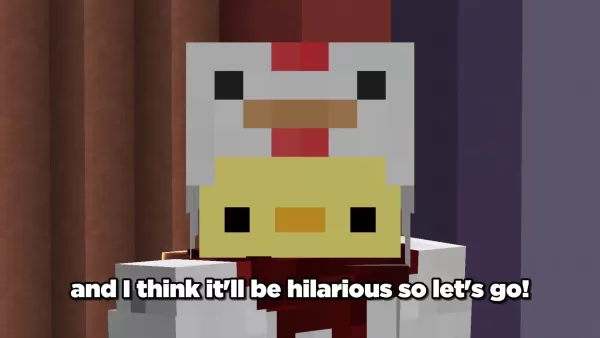
The creator's preferred tool featured in our demonstration
- Bing Copilot/Designer: Excellent for generating Minecraft-style weapons and tools
Note that transparency support varies - some generators require post-processing in image editors. Combining multiple AI tools often yields best results by compensating for individual weaknesses.
Crafting Your Vision: Prompt Engineering for Hilarious Textures
Success with AI generators depends on crafting effective text prompts. Be specific yet creative - "1920s gangster-style diamond sword" yields funnier results than generic requests. Mix unexpected elements ("taco-shaped pickaxe") or exaggerate features ("glow-in-the-dark ultra sparkly emerald").
Sample prompts and outcomes:
AI Prompt Results cartoonish diamond sword with googly eyes Playful sword resembling toy with exaggerated features steampunk golden apple mechanical design Apple with gears and brass detailing neon pink wool with purple polka dots Bright pink block with chaotic dot pattern
Pro tips for optimal results:
- Layer descriptive details gradually
- Embrace surreal combinations
- Generate multiple variations
- Refine prompts through experimentation
Texture Pack Implementation
Integrating AI-Generated Images into Minecraft
After generating your textures, implementation follows straightforward steps:
- Navigate to your Minecraft resource pack folder
- Create appropriate subfolders: 'assets/minecraft/textures'
- Name files precisely to match Minecraft's conventions
- Include essential pack.mcmeta file
Texture files must use exact naming (diamond_sword.png, wool_blue.png) and proper folder structure (items/, blocks/) for game recognition.
Troubleshooting Common Issues
Common integration challenges include:
- Transparency problems solved with image editors
- Resolution mismatches requiring resizing
- File naming errors preventing loading
- Resource pack conflict resolution
Always maintain proper folder structure and naming conventions while verifying texture dimensions match Minecraft standards.
How to Use AI for Texture Pack Creation
Generate a Diamond Sword Texture Pack
The complete creation process:
- Select AI generator matching your creative vision
- Iterate through prompt variations
- Edit images as needed (transparency, sizing)
- Implement following structured folder system
Advantages and Disadvantages of AI Texture Pack Creation
Pros
Unlimited creative possibilities beyond manual limitations
Rapid prototyping and concept generation
Accessibility for creators lacking traditional art skills
Consistent quality across large texture sets
Cons
Occasional artistic inconsistency between textures
Technical limitations like transparency handling
Potential ethical considerations regarding originality
Possible copyright restrictions on commercial use
FAQ
Can I use AI-generated textures in commercial Minecraft resource packs?
Commercial usage rights vary by AI platform - always review terms of service. Some generators allow unrestricted use, while others prohibit commercial applications.
What image resolution should I use for my AI-generated Minecraft textures?
Standard resolutions are 16x16 or 32x32 pixels for optimal quality. Higher resolutions may require manual adjustment for proper in-game display.
Are there any copyright concerns with using AI-generated textures?
Legal frameworks continue evolving regarding AI art ownership. Generally, creators maintain rights to output from prompts they design, though platform-specific policies may apply.
Why aren't my textures showing up in-game?
Common culprits include incorrect file naming, folder structure errors, or resource pack conflicts requiring priority adjustment.
Related Questions
What other applications of AI can be used in Minecraft?
Beyond textures, AI assists with terrain generation, automated builds, gameplay analysis, and even companion mob behaviors through modding.
Are there existing Minecraft texture packs generated by AI?
While few packs advertise complete AI generation, many incorporate AI elements creatively alongside traditional artwork.
Related article
 Inside Details Exposed About Next-Gen Gemini: Strained Computing Power, Internal Teams Disagreed on Development Priorities and Resource Allocation
Reports indicate that the launch of Google’s highly anticipated next-generation Gemini model has been pushed back. Internal disagreements over development priorities and resource allocation, combined with limited computing capacity and complex approv
OpenAI Dismisses Growth Slowdown Concerns, Says Multiple Business Units Accelerating
In response to external scrutiny regarding decelerating sales growth and missed internal benchmarks, AI leader OpenAI issued a confident statement on Tuesday, April 28. The company clarified that its consumer products and enterprise services are adva
Alibaba Super Cup: Qwen3.8-Max Debuts with Boosted Coding and Office Tools
Alibaba has officially unveiled Qwen3.8-Max, a next-generation foundation large model boasting 2.4 trillion parameters. This significant AI advancement delivers substantial performance gains in core areas like coding and professional office tasks, sh
Related Special Topic Recommendations
Music composition
Inside Details Exposed About Next-Gen Gemini: Strained Computing Power, Internal Teams Disagreed on Development Priorities and Resource Allocation
Reports indicate that the launch of Google’s highly anticipated next-generation Gemini model has been pushed back. Internal disagreements over development priorities and resource allocation, combined with limited computing capacity and complex approv
OpenAI Dismisses Growth Slowdown Concerns, Says Multiple Business Units Accelerating
In response to external scrutiny regarding decelerating sales growth and missed internal benchmarks, AI leader OpenAI issued a confident statement on Tuesday, April 28. The company clarified that its consumer products and enterprise services are adva
Alibaba Super Cup: Qwen3.8-Max Debuts with Boosted Coding and Office Tools
Alibaba has officially unveiled Qwen3.8-Max, a next-generation foundation large model boasting 2.4 trillion parameters. This significant AI advancement delivers substantial performance gains in core areas like coding and professional office tasks, sh
Related Special Topic Recommendations
Music composition
 Best AI Melody Writing Tools for Song Drafts
2026 Latest Best Top-Rated AI Melody Writing Tools for Song Drafts! XIX.AI has curated a highly powerful game-changing collection that goes through rigorous real-world tests to deliver the best writing experience. You can find detailed free vs paid comparisons, accurate rankings, and must-try options designed to help you create stunning song drafts effortlessly and boost your creative productivity significantly. Explore now to discover your perfect tool!
 8 tools
 xix.ai
chatbot
Best AI Conversation Trainer Tools for Interview Practice
xix.ai
chatbot
Best AI Conversation Trainer Tools for Interview Practice
2026 Latest Best Top-rated AI Conversation Trainer Tools for Interview Practice are here on XIX.AI! This curated collection features powerful, game-changing tools that go through rigorous real-world tests to deliver accurate feedback. You’ll find a free vs paid comparison and detailed rankings to help you choose the must-try option that boosts your confidence and skills. Explore now to Discover your perfect tool for interview success!
12 tools
xix.ai
Design & Art
Best AI Style Transfer Tools for Creative Experiments
2026 Latest Best Top-rated AI Style Transfer Tools for Creative Experiments! XIX.AI has curated a powerful, game-changing collection of must-try tools that deliver exceptional results through real-world tests and rigorous rankings. These top solutions help creatives boost productivity significantly by accelerating content creation and unlocking endless creative possibilities. Explore now to discover your perfect tool and start creating today!
9 tools
xix.ai
Comic Creation
Best AI Dialogue Bubble Tools for Visual Storytelling
2026 Latest Best Top-Rated AI Dialogue Bubble Tools for Visual Storytelling are here on XIX.AI! This curated collection features powerful, game-changing tools that help creators boost productivity and overcome creative bottlenecks. Get a free vs paid comparison, see real-world tests, and check the latest rankings to find the must-try solutions perfect for crafting engaging visual narratives. Explore now to discover your ideal tool!
10 tools
xix.ai
Meeting Assistant
Top AI Meeting Summary Tools: Track Decisions and Follow-Ups Clearly
2026 Latest Top-Rated Best AI Meeting Summary Tools for Clear Decision Tracking and Effortless Follow-Ups. This curated list showcases powerful, game-changing solutions that boost productivity dramatically by automating meeting notes, identifying key action items, and streamlining team coordination across all projects. Get a free vs paid comparison along with real-world tests and weekly updated rankings to help you find the perfect tool. Explore now to unlock your AI edge!
9 tools
xix.ai
Data Analysis
Best AI Data Cleaning Tools: Fix Missing Values and Duplicates Fast
2026 Latest Best Top-rated AI Data Cleaning Tools for quick fixing of missing values and duplicates. This curated list showcases powerful, game-changing solutions that boost productivity significantly. Each option has undergone rigorous real-world tests to ensure reliability. Get a free vs paid comparison and discover the must-try tool that fits your needs best. Explore now at XIX.AI to Unlock your AI edge.
11 tools
xix.ai

 Comments (4)
0/500
Comments (4)
0/500
![SophiaCampbell]()
Haha, this is brilliant! I never thought AI could turn Minecraft into such a comedy goldmine. The idea of quirky textures is genius, but I'm a bit worried about the AI taking over creative control. Still, can't wait to try it out! 😂
![WalterGonzález]()
This is such a fun idea! Using AI to make silly texture packs for Minecraft sounds like a perfect weekend project. I wonder if the tools mentioned are actually easy for beginners, or if there's a steep learning curve. Either way, it's a creative twist on modding.
![AlbertWilson]()
Okay, this is the kind of tech mashup I never knew I needed! Using AI for texture packs sounds like it could be a game-changer for the modding community. Makes me wonder how this will work with existing big texture mods... seems super fun for custom servers though! Def gonna look up those beginner tools, weekend project initiated 😂
![ScottMartinez]()
Haha, die Idee mit KI-Texturpacks ist ja mal genial! 😂 Kann mir vorstellen wie witzig das aussieht wenn plötzlich alle Blöcke Grimassen schneiden. Aber mal ehrlich, ist das nicht irgendwann langweilig wenn alles nur noch „quirky“ ist? Vielleicht sollte man sowas lieber dosiert einsetzen.
Turn your Minecraft world into a laugh-out-loud experience! Picture every block and item transformed with quirky AI-generated textures. Learn how to craft hilarious custom texture packs using beginner-friendly AI tools that'll keep your gameplay endlessly entertaining. Discover Minecraft's wild and whimsical side today!
Key Points
Unlock the creative power of AI image generation for Minecraft textures.
Master AI pixel art generators to produce one-of-a-kind textures.
Compare different AI tools and methods for maximum hilarity.
Learn step-by-step how to implement textures in Minecraft resource packs.
Solve common problems like transparency in AI-generated textures.
Get inspired by real-world examples of AI textures in action.
Unleashing AI for Minecraft Texture Creation
The Rise of AI-Powered Texture Packs
Minecraft thrives on personalization, and texture packs offer some of the best customization options. With today's accessible AI tools, anyone can create outrageously funny texture packs. These generators turn text prompts into pixel-perfect art, delivering endlessly surprising in-game visuals. The magic lies in AI's ability to combine familiarity with absurdity - imagine diamond swords that look like rubber chickens or creepers wearing sunglasses.
The process celebrates creative chaos rather than perfection. Current AI tools require patience and experimentation, delivering sometimes unpredictable but often hilarious results. While AI won't replace human artists anytime soon, it's perfect for sparking wild ideas and handling repetitive aspects of texture creation.
Choosing the Right AI Pixel Art Generator
Selecting an AI generator for Minecraft requires special considerations. Look for tools offering precise controls over pixel density, color restrictions, and output resolution matching Minecraft's signature blocky aesthetic (typically 16x16 or 32x32 pixels).
- Aipixelartgenerator.com:
The creator's preferred tool featured in our demonstration
- Bing Copilot/Designer: Excellent for generating Minecraft-style weapons and tools
Note that transparency support varies - some generators require post-processing in image editors. Combining multiple AI tools often yields best results by compensating for individual weaknesses.
Crafting Your Vision: Prompt Engineering for Hilarious Textures
Success with AI generators depends on crafting effective text prompts. Be specific yet creative - "1920s gangster-style diamond sword" yields funnier results than generic requests. Mix unexpected elements ("taco-shaped pickaxe") or exaggerate features ("glow-in-the-dark ultra sparkly emerald").
Sample prompts and outcomes:
| AI Prompt | Results |
|---|---|
| cartoonish diamond sword with googly eyes | Playful sword resembling toy with exaggerated features |
| steampunk golden apple mechanical design | Apple with gears and brass detailing |
| neon pink wool with purple polka dots | Bright pink block with chaotic dot pattern |
Pro tips for optimal results:
- Layer descriptive details gradually
- Embrace surreal combinations
- Generate multiple variations
- Refine prompts through experimentation
Texture Pack Implementation
Integrating AI-Generated Images into Minecraft
After generating your textures, implementation follows straightforward steps:
- Navigate to your Minecraft resource pack folder
- Create appropriate subfolders: 'assets/minecraft/textures'
- Name files precisely to match Minecraft's conventions
- Include essential pack.mcmeta file
Texture files must use exact naming (diamond_sword.png, wool_blue.png) and proper folder structure (items/, blocks/) for game recognition.
Troubleshooting Common Issues
Common integration challenges include:
- Transparency problems solved with image editors
- Resolution mismatches requiring resizing
- File naming errors preventing loading
- Resource pack conflict resolution
Always maintain proper folder structure and naming conventions while verifying texture dimensions match Minecraft standards.
How to Use AI for Texture Pack Creation
Generate a Diamond Sword Texture Pack
The complete creation process:
- Select AI generator matching your creative vision
- Iterate through prompt variations
- Edit images as needed (transparency, sizing)
- Implement following structured folder system
Advantages and Disadvantages of AI Texture Pack Creation
Pros
Unlimited creative possibilities beyond manual limitations
Rapid prototyping and concept generation
Accessibility for creators lacking traditional art skills
Consistent quality across large texture sets
Cons
Occasional artistic inconsistency between textures
Technical limitations like transparency handling
Potential ethical considerations regarding originality
Possible copyright restrictions on commercial use
FAQ
Can I use AI-generated textures in commercial Minecraft resource packs?
Commercial usage rights vary by AI platform - always review terms of service. Some generators allow unrestricted use, while others prohibit commercial applications.
What image resolution should I use for my AI-generated Minecraft textures?
Standard resolutions are 16x16 or 32x32 pixels for optimal quality. Higher resolutions may require manual adjustment for proper in-game display.
Are there any copyright concerns with using AI-generated textures?
Legal frameworks continue evolving regarding AI art ownership. Generally, creators maintain rights to output from prompts they design, though platform-specific policies may apply.
Why aren't my textures showing up in-game?
Common culprits include incorrect file naming, folder structure errors, or resource pack conflicts requiring priority adjustment.
Related Questions
What other applications of AI can be used in Minecraft?
Beyond textures, AI assists with terrain generation, automated builds, gameplay analysis, and even companion mob behaviors through modding.
Are there existing Minecraft texture packs generated by AI?
While few packs advertise complete AI generation, many incorporate AI elements creatively alongside traditional artwork.








 Inside Details Exposed About Next-Gen Gemini: Strained Computing Power, Internal Teams Disagreed on Development Priorities and Resource Allocation
Reports indicate that the launch of Google’s highly anticipated next-generation Gemini model has been pushed back. Internal disagreements over development priorities and resource allocation, combined with limited computing capacity and complex approv
Inside Details Exposed About Next-Gen Gemini: Strained Computing Power, Internal Teams Disagreed on Development Priorities and Resource Allocation
Reports indicate that the launch of Google’s highly anticipated next-generation Gemini model has been pushed back. Internal disagreements over development priorities and resource allocation, combined with limited computing capacity and complex approv
 OpenAI Dismisses Growth Slowdown Concerns, Says Multiple Business Units Accelerating
In response to external scrutiny regarding decelerating sales growth and missed internal benchmarks, AI leader OpenAI issued a confident statement on Tuesday, April 28. The company clarified that its consumer products and enterprise services are adva
OpenAI Dismisses Growth Slowdown Concerns, Says Multiple Business Units Accelerating
In response to external scrutiny regarding decelerating sales growth and missed internal benchmarks, AI leader OpenAI issued a confident statement on Tuesday, April 28. The company clarified that its consumer products and enterprise services are adva
 Alibaba Super Cup: Qwen3.8-Max Debuts with Boosted Coding and Office Tools
Alibaba has officially unveiled Qwen3.8-Max, a next-generation foundation large model boasting 2.4 trillion parameters. This significant AI advancement delivers substantial performance gains in core areas like coding and professional office tasks, sh
Alibaba Super Cup: Qwen3.8-Max Debuts with Boosted Coding and Office Tools
Alibaba has officially unveiled Qwen3.8-Max, a next-generation foundation large model boasting 2.4 trillion parameters. This significant AI advancement delivers substantial performance gains in core areas like coding and professional office tasks, sh

2026 Latest Best Top-Rated AI Melody Writing Tools for Song Drafts! XIX.AI has curated a highly powerful game-changing collection that goes through rigorous real-world tests to deliver the best writing experience. You can find detailed free vs paid comparisons, accurate rankings, and must-try options designed to help you create stunning song drafts effortlessly and boost your creative productivity significantly. Explore now to discover your perfect tool!
8 tools
xix.ai

2026 Latest Best Top-rated AI Conversation Trainer Tools for Interview Practice are here on XIX.AI! This curated collection features powerful, game-changing tools that go through rigorous real-world tests to deliver accurate feedback. You’ll find a free vs paid comparison and detailed rankings to help you choose the must-try option that boosts your confidence and skills. Explore now to Discover your perfect tool for interview success!
12 tools
xix.ai

2026 Latest Best Top-rated AI Style Transfer Tools for Creative Experiments! XIX.AI has curated a powerful, game-changing collection of must-try tools that deliver exceptional results through real-world tests and rigorous rankings. These top solutions help creatives boost productivity significantly by accelerating content creation and unlocking endless creative possibilities. Explore now to discover your perfect tool and start creating today!
9 tools
xix.ai

2026 Latest Best Top-Rated AI Dialogue Bubble Tools for Visual Storytelling are here on XIX.AI! This curated collection features powerful, game-changing tools that help creators boost productivity and overcome creative bottlenecks. Get a free vs paid comparison, see real-world tests, and check the latest rankings to find the must-try solutions perfect for crafting engaging visual narratives. Explore now to discover your ideal tool!
10 tools
xix.ai

2026 Latest Top-Rated Best AI Meeting Summary Tools for Clear Decision Tracking and Effortless Follow-Ups. This curated list showcases powerful, game-changing solutions that boost productivity dramatically by automating meeting notes, identifying key action items, and streamlining team coordination across all projects. Get a free vs paid comparison along with real-world tests and weekly updated rankings to help you find the perfect tool. Explore now to unlock your AI edge!
9 tools
xix.ai

2026 Latest Best Top-rated AI Data Cleaning Tools for quick fixing of missing values and duplicates. This curated list showcases powerful, game-changing solutions that boost productivity significantly. Each option has undergone rigorous real-world tests to ensure reliability. Get a free vs paid comparison and discover the must-try tool that fits your needs best. Explore now at XIX.AI to Unlock your AI edge.
11 tools
xix.ai

Haha, this is brilliant! I never thought AI could turn Minecraft into such a comedy goldmine. The idea of quirky textures is genius, but I'm a bit worried about the AI taking over creative control. Still, can't wait to try it out! 😂
This is such a fun idea! Using AI to make silly texture packs for Minecraft sounds like a perfect weekend project. I wonder if the tools mentioned are actually easy for beginners, or if there's a steep learning curve. Either way, it's a creative twist on modding.
Okay, this is the kind of tech mashup I never knew I needed! Using AI for texture packs sounds like it could be a game-changer for the modding community. Makes me wonder how this will work with existing big texture mods... seems super fun for custom servers though! Def gonna look up those beginner tools, weekend project initiated 😂
Haha, die Idee mit KI-Texturpacks ist ja mal genial! 😂 Kann mir vorstellen wie witzig das aussieht wenn plötzlich alle Blöcke Grimassen schneiden. Aber mal ehrlich, ist das nicht irgendwann langweilig wenn alles nur noch „quirky“ ist? Vielleicht sollte man sowas lieber dosiert einsetzen.












