


 Home
HomeKling 1.5: Your Comprehensive Guide to Creating Epic AI Videos
The era of captivating AI video creation is here, and it's more accessible than ever thanks to groundbreaking platforms. Kling 1.5 stands out as a leading tool, empowering anyone to craft dynamic, action-packed scenes with remarkable ease. This guide explores the world of AI video creation using Kling 1.5. We'll cover essential workflows, effective prompting strategies, and advanced features like lip-syncing to help you produce stunning visual content. Let's dive in and unlock the full creative potential of Kling 1.5 for your projects.
Key Points
Kling 1.5 simplifies the process of creating epic AI videos.
Its image-to-video function offers superior style control compared to text-to-video.
High-quality reference images are essential for achieving your desired video style.
Using camera angle prompts (like close-up or bird's-eye view) enhances cinematic storytelling.
AI voice generation and lip-syncing add personality and realism to characters.
Upscaling videos to 4K or higher resolution maximizes their visual impact.
Video editing software is crucial for combining clips, music, and sound effects into a final piece.
Unlocking the Power of AI Video Creation with Kling 1.5
Kling 1.5: A Game Changer in AI Video Generation
The field of AI video generation is evolving rapidly, with new platforms launching frequently. Kling 1.5 has established itself as a top contender by pushing the boundaries of dynamic motion and complex scene creation. Its image-to-video functionality provides granular control over visual style, appealing to creators with specific aesthetic goals. While other platforms exist, Kling 1.5 offers a unique blend of accessibility and advanced features.
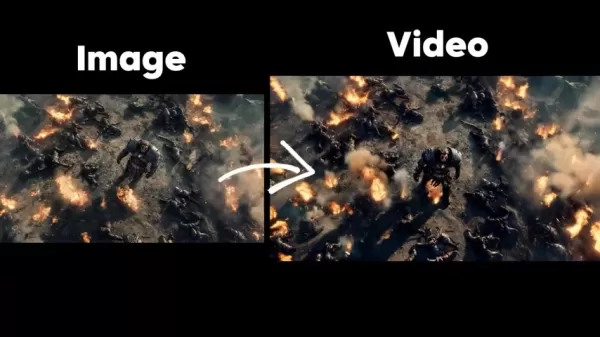
Understanding the key difference between text-to-video and image-to-video is crucial. Text-to-video is a starting point for generating content from written descriptions, but results can be unpredictable and struggle with visual consistency across scenes. The real power for cinematic storytelling lies in using meticulously crafted, high-quality reference images. The image-to-video approach lets you upload these images to achieve more controlled and high-quality results.
Kling’s interface is designed for intuitive use. Creators can easily navigate the platform, upload assets, and adjust parameters. This user-friendly design welcomes both experienced video editors and complete beginners.
The Importance of High-Quality Reference Images
In AI video generation, the quality of your reference image directly dictates the quality of your final video.
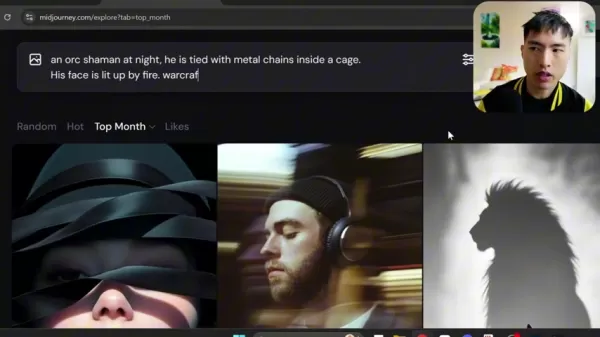
Think of these images as the blueprint that guides the AI. A blurry or poorly composed image will lead to a lackluster video, while a crisp, well-defined image empowers the AI to produce stunning visuals. This foundational step is often overlooked but is critical for success.
The process starts with carefully selecting or creating your reference images. Platforms like Midjourney are excellent for generating these initial visuals. These images should then be upscaled to the highest detail possible before being uploaded to Kling 1.5.
Here are the key considerations for creating effective reference images:
- Visual Style: Your image must embody the desired aesthetic, whether it's a fantasy epic, cyberpunk thriller, or realistic documentary. It clearly communicates the style to the AI.
- Composition: Pay close attention to how elements are arranged within the frame. The placement of characters, objects, and background details shapes the video's visual appeal.
- Lighting and Color: Lighting and color palette are critical for setting the mood and tone. Choose images with lighting and colors that support the story you want to tell.
Mastering Prompt Engineering for AI Video Generation
Prompt engineering is the art of crafting precise, descriptive instructions for AI models to generate the desired output. For AI video, well-engineered prompts are essential for guiding the AI to match your creative vision. Effective prompting also saves significant time and resources.
Let's break down the key components to include in your prompts for maximum effectiveness:
Subject: Clearly define the video's focal point—a character, object, location, or concept. Greater specificity leads to better AI understanding.
Action: Describe the action occurring in the scene. What are the characters doing? Use vivid language to paint a clear picture.
Camera Angle: Explicitly state the camera angle to control the video's framing and perspective. Options range from intimate close-ups to expansive wide shots. Consider these camera angles for your prompts:
- Close-up Shots: Excellent for highlighting facial details and conveying emotion.
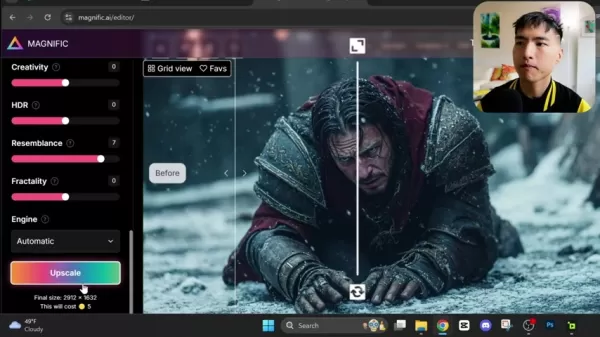
- High Angle Shots: Can make a subject appear smaller or more vulnerable.
- Low Angle Shots: Impart a sense of power and intimidation to the subject.
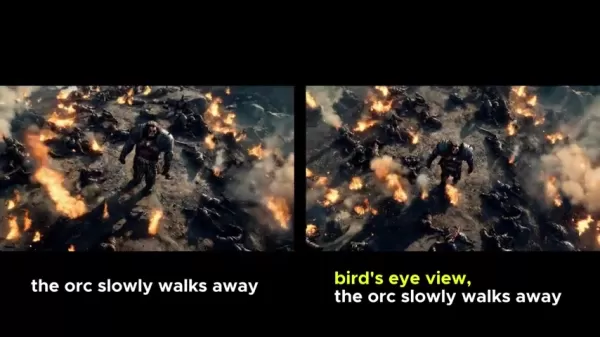
- Bird's Eye View: Effectively shows the vast scale of an environment or event.
- Lighting and Mood: Describe the lighting atmosphere and emotional tone. Use terms like "golden hour glow," "moonlit suspense," or "harsh dramatic shadows."
- Style and Artistic Influences: Reference specific artistic styles to guide the AI's visual approach, e.g., "in the style of Studio Ghibli," "film noir aesthetic," or "Impressionist painting."
Enhancing Your Videos with AI Voices and Lip-Sync
Adding AI Voices: Bringing Characters to Life
Integrating realistic and expressive AI voices is one of the most impactful ways to elevate your videos. Services like Eleven Labs offer a wide variety of AI-generated voices
, allowing you to customize characteristics like age, gender, and accent to fit your characters. It's important to test different voices to find one that truly gives personality to your scenes.
Note that AI voices can sometimes sound flat. To add variety and expression, incorporate punctuation like exclamation points, commas, and ellipses into your voiceover script. Once you have your audio file, you can proceed to add it to your video and explore lip-syncing.
After generating the voiceover, the next step is to seamlessly integrate it into your video timeline.
Lip-Syncing: Achieving Believable Character Performances
Lip-syncing adds a crucial layer of realism, significantly boosting the believability of AI-generated characters. Kling includes a lip-sync feature available for each generated video.
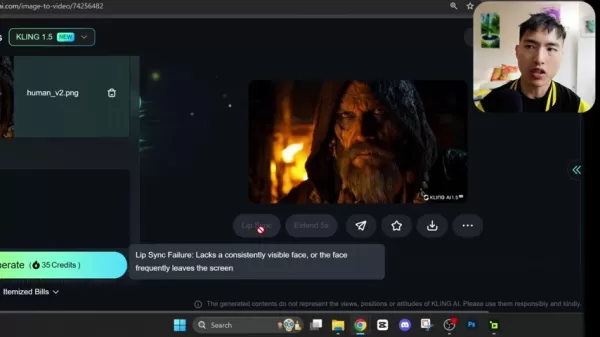
This feature synchronizes mouth movements with uploaded audio for human characters, though it is not designed for animals or non-humanoid figures.
For optimal lip-sync results, ensure the character's face is clearly visible and unobstructed by elements like facial hair. This attention to detail is necessary for professional-looking videos.
Step-by-Step Guide to Create Stunning AI Videos
Step 1: Login to Kling
Begin by navigating to the Kling website and logging into your account. On the homepage, browse the trending videos for inspiration. When ready, proceed to the AI video generation workspace to start your project.
Step 2: Generate your Image
On the creation page, select the "Image to Video" option from the two main choices. Upload your prepared reference image. After the upload is complete, click 'Generate' and allow the AI to create your video clips. As you develop your project, consider adding a voiceover to achieve the intended narrative effect.

Kling AI Pricing
Subscription Plans and Credit System
Access to Kling AI typically operates on a credit system, where generating videos consumes credits. New users often receive a number of free credits upon sign-up, with the option to purchase additional packs. Subscription plans may offer benefits like higher monthly credit allowances, faster generation speeds, or access to premium features such as advanced upscaling.
Kling 1.5 Pros and Cons
Pros
An intuitive, user-friendly interface suitable for beginners and experts alike.
Image-to-video functionality provides superior control over visual style and consistency.
Built-in lip-syncing capabilities significantly enhance character realism.
Capable of producing high-definition video output.
Enables cinematic storytelling through explicit camera angle control.
Cons
AI-generated voices can lack genuine emotional depth, making engaging narration a challenge.
Final video quality is heavily dependent on the quality of the input reference image.
Creating or sourcing the perfect reference image can sometimes be difficult.
Frequently Asked Questions About Kling 1.5
What distinguishes Kling 1.5 from other AI video generation platforms?
Kling 1.5 distinguishes itself through its balance of ease of use and powerful features. Its image-to-video approach provides far greater control over visual style and consistency than standard text-to-video tools, making it ideal for cinematic projects. Furthermore, its native ability to generate high-definition video from the start ensures high-quality output.
How can I improve the visual quality of my Kling 1.5 videos?
The most important step is to begin with high-resolution, detailed reference images. Upscaling these images before uploading them to Kling can further enhance the sharpness and detail in your final video. Tools like Topaz Video AI are excellent for upscaling footage post-generation. Experiment to find the workflow that works best for your needs.
What are some effective prompting techniques for AI video generation?
Craft detailed prompts that clearly specify the subject, action, camera angle, lighting, and artistic style. Including relevant keywords and references to specific visual styles (e.g., "cinematic," "anime style") helps guide the AI more accurately toward your creative vision. Better prompts directly lead to better video results.
Related Questions
What are some other trending AI video generation platforms?
The AI video creation landscape is dynamic, with new tools like Runway ML and Pika Labs continually emerging. However, among current options, Kling 1.5 remains a leading choice for its advanced handling of dynamic motion and complex scenes. Its granular image-to-video control makes it a favorite for creators pursuing a specific and consistent visual aesthetic.
Related article
 Anthropic Expands Claude AI Coding Tools to Japan in Push for Overseas Growth
Anthropic, a prominent U.S. artificial intelligence firm, is intensifying its global outreach. On Wednesday, the company hosted a major developer gathering, "Code with Claude," in Tokyo, drawing close to 500 software engineers. This initiative seeks
India’s Software Giant Cuts Hiring, Promises No Layoffs as AI Agents Scale Up
As artificial intelligence reshapes traditional labor-intensive business models, Tata Consultancy Services (TCS), a premier Indian software outsourcing firm, has unveiled its strategic response. During Tuesday’s annual general meeting, the chairman o
China Locks AI Models During Gaokam to Block Instant Homework Help
With the 2026 Gaokao fast approaching, rumors regarding the suspension of AI tools during the exam period have ignited intense online debate. In response to public concern, major AI platforms and educational apps have clarified their stance: rather t
Related Special Topic Recommendations
Design & Art
Anthropic Expands Claude AI Coding Tools to Japan in Push for Overseas Growth
Anthropic, a prominent U.S. artificial intelligence firm, is intensifying its global outreach. On Wednesday, the company hosted a major developer gathering, "Code with Claude," in Tokyo, drawing close to 500 software engineers. This initiative seeks
India’s Software Giant Cuts Hiring, Promises No Layoffs as AI Agents Scale Up
As artificial intelligence reshapes traditional labor-intensive business models, Tata Consultancy Services (TCS), a premier Indian software outsourcing firm, has unveiled its strategic response. During Tuesday’s annual general meeting, the chairman o
China Locks AI Models During Gaokam to Block Instant Homework Help
With the 2026 Gaokao fast approaching, rumors regarding the suspension of AI tools during the exam period have ignited intense online debate. In response to public concern, major AI platforms and educational apps have clarified their stance: rather t
Related Special Topic Recommendations
Design & Art
 Best AI Style Transfer Tools for Creative Experiments
2026 Latest Best Top-rated AI Style Transfer Tools for Creative Experiments! XIX.AI has curated a powerful, game-changing collection of must-try tools that deliver exceptional results through real-world tests and rigorous rankings. These top solutions help creatives boost productivity significantly by accelerating content creation and unlocking endless creative possibilities. Explore now to discover your perfect tool and start creating today!
 9 tools
 xix.ai
Comic Creation
Best AI Dialogue Bubble Tools for Visual Storytelling
xix.ai
Comic Creation
Best AI Dialogue Bubble Tools for Visual Storytelling
2026 Latest Best Top-Rated AI Dialogue Bubble Tools for Visual Storytelling are here on XIX.AI! This curated collection features powerful, game-changing tools that help creators boost productivity and overcome creative bottlenecks. Get a free vs paid comparison, see real-world tests, and check the latest rankings to find the must-try solutions perfect for crafting engaging visual narratives. Explore now to discover your ideal tool!
10 tools
xix.ai
Meeting Assistant
Top AI Meeting Summary Tools: Track Decisions and Follow-Ups Clearly
2026 Latest Top-Rated Best AI Meeting Summary Tools for Clear Decision Tracking and Effortless Follow-Ups. This curated list showcases powerful, game-changing solutions that boost productivity dramatically by automating meeting notes, identifying key action items, and streamlining team coordination across all projects. Get a free vs paid comparison along with real-world tests and weekly updated rankings to help you find the perfect tool. Explore now to unlock your AI edge!
9 tools
xix.ai
Data Analysis
Best AI Data Cleaning Tools: Fix Missing Values and Duplicates Fast
2026 Latest Best Top-rated AI Data Cleaning Tools for quick fixing of missing values and duplicates. This curated list showcases powerful, game-changing solutions that boost productivity significantly. Each option has undergone rigorous real-world tests to ensure reliability. Get a free vs paid comparison and discover the must-try tool that fits your needs best. Explore now at XIX.AI to Unlock your AI edge.
11 tools
xix.ai
Design & Art
Best AI Creative Ideation Tools for Artists: Break Through Visual Blocks
2026 Latest Best Top-Rated AI Creative Ideation Tools for Artists are curated by XIX.AI to help creators break through visual blocks and boost creativity instantly. These powerful game-changing tools offer real-world tests, detailed free vs paid comparison, and weekly updated rankings. Discover your perfect tool to accelerate content creation and unlock your AI edge today. Explore now!
14 tools
xix.ai
Music composition
AI Beat Makers for TikTok Background Tracks, Reels Audio, and Creator Promo Music
2026 Latest Best AI Beat Makers for TikTok Background Tracks, Reels Audio, and Creator Promo Music! XIX.AI has curated a top-rated list of powerful game-changing tools that go through real-world tests to deliver flawless music for every content need. You’ll find detailed free vs paid comparison data, weekly updated rankings, and must-try options to help you boost creativity and productivity. Explore now to discover your perfect tool!
11 tools
xix.ai

 Comments (2)
0/500
Comments (2)
0/500
![GaryWalker]()
この記事を読んで、AI動画作成の進化に驚きました。Kling 1.5でこんなに簡単に動画が作れるなんて、プロのクリエイターでなくても表現の幅が広がりますね。でも、これで誰でも高品質なコンテンツを作れるようになったら、市場はもっと混雑するのかな?ちょっと心配にもなります。とにかく、試してみたいです!🎬
![WillieCarter]()
Kling 1.5 semble prometteur, mais je me demande toujours si ces outils vont réellement démocratiser la création vidéo ou simplement inonder le web de contenus génériques 🤔. On dirait que tout le monde va bientôt pouvoir faire ses petits films d'action... mais est-ce que ça va vraiment avoir de l'âme ? C'est un peu inquiétant pour les créateurs traditionnels, non ?
The era of captivating AI video creation is here, and it's more accessible than ever thanks to groundbreaking platforms. Kling 1.5 stands out as a leading tool, empowering anyone to craft dynamic, action-packed scenes with remarkable ease. This guide explores the world of AI video creation using Kling 1.5. We'll cover essential workflows, effective prompting strategies, and advanced features like lip-syncing to help you produce stunning visual content. Let's dive in and unlock the full creative potential of Kling 1.5 for your projects.
Key Points
Kling 1.5 simplifies the process of creating epic AI videos.
Its image-to-video function offers superior style control compared to text-to-video.
High-quality reference images are essential for achieving your desired video style.
Using camera angle prompts (like close-up or bird's-eye view) enhances cinematic storytelling.
AI voice generation and lip-syncing add personality and realism to characters.
Upscaling videos to 4K or higher resolution maximizes their visual impact.
Video editing software is crucial for combining clips, music, and sound effects into a final piece.
Unlocking the Power of AI Video Creation with Kling 1.5
Kling 1.5: A Game Changer in AI Video Generation
The field of AI video generation is evolving rapidly, with new platforms launching frequently. Kling 1.5 has established itself as a top contender by pushing the boundaries of dynamic motion and complex scene creation. Its image-to-video functionality provides granular control over visual style, appealing to creators with specific aesthetic goals. While other platforms exist, Kling 1.5 offers a unique blend of accessibility and advanced features.
Understanding the key difference between text-to-video and image-to-video is crucial. Text-to-video is a starting point for generating content from written descriptions, but results can be unpredictable and struggle with visual consistency across scenes. The real power for cinematic storytelling lies in using meticulously crafted, high-quality reference images. The image-to-video approach lets you upload these images to achieve more controlled and high-quality results.
Kling’s interface is designed for intuitive use. Creators can easily navigate the platform, upload assets, and adjust parameters. This user-friendly design welcomes both experienced video editors and complete beginners.
The Importance of High-Quality Reference Images
In AI video generation, the quality of your reference image directly dictates the quality of your final video.
Think of these images as the blueprint that guides the AI. A blurry or poorly composed image will lead to a lackluster video, while a crisp, well-defined image empowers the AI to produce stunning visuals. This foundational step is often overlooked but is critical for success.
The process starts with carefully selecting or creating your reference images. Platforms like Midjourney are excellent for generating these initial visuals. These images should then be upscaled to the highest detail possible before being uploaded to Kling 1.5.
Here are the key considerations for creating effective reference images:
- Visual Style: Your image must embody the desired aesthetic, whether it's a fantasy epic, cyberpunk thriller, or realistic documentary. It clearly communicates the style to the AI.
- Composition: Pay close attention to how elements are arranged within the frame. The placement of characters, objects, and background details shapes the video's visual appeal.
- Lighting and Color: Lighting and color palette are critical for setting the mood and tone. Choose images with lighting and colors that support the story you want to tell.
Mastering Prompt Engineering for AI Video Generation
Prompt engineering is the art of crafting precise, descriptive instructions for AI models to generate the desired output. For AI video, well-engineered prompts are essential for guiding the AI to match your creative vision. Effective prompting also saves significant time and resources.
Let's break down the key components to include in your prompts for maximum effectiveness:
Subject: Clearly define the video's focal point—a character, object, location, or concept. Greater specificity leads to better AI understanding.
Action: Describe the action occurring in the scene. What are the characters doing? Use vivid language to paint a clear picture.
Camera Angle: Explicitly state the camera angle to control the video's framing and perspective. Options range from intimate close-ups to expansive wide shots. Consider these camera angles for your prompts:
- Close-up Shots: Excellent for highlighting facial details and conveying emotion.
- Close-up Shots: Excellent for highlighting facial details and conveying emotion.
- High Angle Shots: Can make a subject appear smaller or more vulnerable.
- Low Angle Shots: Impart a sense of power and intimidation to the subject.
- Bird's Eye View: Effectively shows the vast scale of an environment or event.
- Lighting and Mood: Describe the lighting atmosphere and emotional tone. Use terms like "golden hour glow," "moonlit suspense," or "harsh dramatic shadows."
- Style and Artistic Influences: Reference specific artistic styles to guide the AI's visual approach, e.g., "in the style of Studio Ghibli," "film noir aesthetic," or "Impressionist painting."
Enhancing Your Videos with AI Voices and Lip-Sync
Adding AI Voices: Bringing Characters to Life
Integrating realistic and expressive AI voices is one of the most impactful ways to elevate your videos. Services like Eleven Labs offer a wide variety of AI-generated voices
, allowing you to customize characteristics like age, gender, and accent to fit your characters. It's important to test different voices to find one that truly gives personality to your scenes.
Note that AI voices can sometimes sound flat. To add variety and expression, incorporate punctuation like exclamation points, commas, and ellipses into your voiceover script. Once you have your audio file, you can proceed to add it to your video and explore lip-syncing.
After generating the voiceover, the next step is to seamlessly integrate it into your video timeline.
Lip-Syncing: Achieving Believable Character Performances
Lip-syncing adds a crucial layer of realism, significantly boosting the believability of AI-generated characters. Kling includes a lip-sync feature available for each generated video.
This feature synchronizes mouth movements with uploaded audio for human characters, though it is not designed for animals or non-humanoid figures.
For optimal lip-sync results, ensure the character's face is clearly visible and unobstructed by elements like facial hair. This attention to detail is necessary for professional-looking videos.
Step-by-Step Guide to Create Stunning AI Videos
Step 1: Login to Kling
Begin by navigating to the Kling website and logging into your account. On the homepage, browse the trending videos for inspiration. When ready, proceed to the AI video generation workspace to start your project.
Step 2: Generate your Image
On the creation page, select the "Image to Video" option from the two main choices. Upload your prepared reference image. After the upload is complete, click 'Generate' and allow the AI to create your video clips. As you develop your project, consider adding a voiceover to achieve the intended narrative effect.
Kling AI Pricing
Subscription Plans and Credit System
Access to Kling AI typically operates on a credit system, where generating videos consumes credits. New users often receive a number of free credits upon sign-up, with the option to purchase additional packs. Subscription plans may offer benefits like higher monthly credit allowances, faster generation speeds, or access to premium features such as advanced upscaling.
Kling 1.5 Pros and Cons
Pros
An intuitive, user-friendly interface suitable for beginners and experts alike.
Image-to-video functionality provides superior control over visual style and consistency.
Built-in lip-syncing capabilities significantly enhance character realism.
Capable of producing high-definition video output.
Enables cinematic storytelling through explicit camera angle control.
Cons
AI-generated voices can lack genuine emotional depth, making engaging narration a challenge.
Final video quality is heavily dependent on the quality of the input reference image.
Creating or sourcing the perfect reference image can sometimes be difficult.
Frequently Asked Questions About Kling 1.5
What distinguishes Kling 1.5 from other AI video generation platforms?
Kling 1.5 distinguishes itself through its balance of ease of use and powerful features. Its image-to-video approach provides far greater control over visual style and consistency than standard text-to-video tools, making it ideal for cinematic projects. Furthermore, its native ability to generate high-definition video from the start ensures high-quality output.
How can I improve the visual quality of my Kling 1.5 videos?
The most important step is to begin with high-resolution, detailed reference images. Upscaling these images before uploading them to Kling can further enhance the sharpness and detail in your final video. Tools like Topaz Video AI are excellent for upscaling footage post-generation. Experiment to find the workflow that works best for your needs.
What are some effective prompting techniques for AI video generation?
Craft detailed prompts that clearly specify the subject, action, camera angle, lighting, and artistic style. Including relevant keywords and references to specific visual styles (e.g., "cinematic," "anime style") helps guide the AI more accurately toward your creative vision. Better prompts directly lead to better video results.
Related Questions
What are some other trending AI video generation platforms?
The AI video creation landscape is dynamic, with new tools like Runway ML and Pika Labs continually emerging. However, among current options, Kling 1.5 remains a leading choice for its advanced handling of dynamic motion and complex scenes. Its granular image-to-video control makes it a favorite for creators pursuing a specific and consistent visual aesthetic.








 Anthropic Expands Claude AI Coding Tools to Japan in Push for Overseas Growth
Anthropic, a prominent U.S. artificial intelligence firm, is intensifying its global outreach. On Wednesday, the company hosted a major developer gathering, "Code with Claude," in Tokyo, drawing close to 500 software engineers. This initiative seeks
Anthropic Expands Claude AI Coding Tools to Japan in Push for Overseas Growth
Anthropic, a prominent U.S. artificial intelligence firm, is intensifying its global outreach. On Wednesday, the company hosted a major developer gathering, "Code with Claude," in Tokyo, drawing close to 500 software engineers. This initiative seeks
 India’s Software Giant Cuts Hiring, Promises No Layoffs as AI Agents Scale Up
As artificial intelligence reshapes traditional labor-intensive business models, Tata Consultancy Services (TCS), a premier Indian software outsourcing firm, has unveiled its strategic response. During Tuesday’s annual general meeting, the chairman o
India’s Software Giant Cuts Hiring, Promises No Layoffs as AI Agents Scale Up
As artificial intelligence reshapes traditional labor-intensive business models, Tata Consultancy Services (TCS), a premier Indian software outsourcing firm, has unveiled its strategic response. During Tuesday’s annual general meeting, the chairman o
 China Locks AI Models During Gaokam to Block Instant Homework Help
With the 2026 Gaokao fast approaching, rumors regarding the suspension of AI tools during the exam period have ignited intense online debate. In response to public concern, major AI platforms and educational apps have clarified their stance: rather t
China Locks AI Models During Gaokam to Block Instant Homework Help
With the 2026 Gaokao fast approaching, rumors regarding the suspension of AI tools during the exam period have ignited intense online debate. In response to public concern, major AI platforms and educational apps have clarified their stance: rather t

2026 Latest Best Top-rated AI Style Transfer Tools for Creative Experiments! XIX.AI has curated a powerful, game-changing collection of must-try tools that deliver exceptional results through real-world tests and rigorous rankings. These top solutions help creatives boost productivity significantly by accelerating content creation and unlocking endless creative possibilities. Explore now to discover your perfect tool and start creating today!
9 tools
xix.ai

2026 Latest Best Top-Rated AI Dialogue Bubble Tools for Visual Storytelling are here on XIX.AI! This curated collection features powerful, game-changing tools that help creators boost productivity and overcome creative bottlenecks. Get a free vs paid comparison, see real-world tests, and check the latest rankings to find the must-try solutions perfect for crafting engaging visual narratives. Explore now to discover your ideal tool!
10 tools
xix.ai

2026 Latest Top-Rated Best AI Meeting Summary Tools for Clear Decision Tracking and Effortless Follow-Ups. This curated list showcases powerful, game-changing solutions that boost productivity dramatically by automating meeting notes, identifying key action items, and streamlining team coordination across all projects. Get a free vs paid comparison along with real-world tests and weekly updated rankings to help you find the perfect tool. Explore now to unlock your AI edge!
9 tools
xix.ai

2026 Latest Best Top-rated AI Data Cleaning Tools for quick fixing of missing values and duplicates. This curated list showcases powerful, game-changing solutions that boost productivity significantly. Each option has undergone rigorous real-world tests to ensure reliability. Get a free vs paid comparison and discover the must-try tool that fits your needs best. Explore now at XIX.AI to Unlock your AI edge.
11 tools
xix.ai

2026 Latest Best Top-Rated AI Creative Ideation Tools for Artists are curated by XIX.AI to help creators break through visual blocks and boost creativity instantly. These powerful game-changing tools offer real-world tests, detailed free vs paid comparison, and weekly updated rankings. Discover your perfect tool to accelerate content creation and unlock your AI edge today. Explore now!
14 tools
xix.ai

2026 Latest Best AI Beat Makers for TikTok Background Tracks, Reels Audio, and Creator Promo Music! XIX.AI has curated a top-rated list of powerful game-changing tools that go through real-world tests to deliver flawless music for every content need. You’ll find detailed free vs paid comparison data, weekly updated rankings, and must-try options to help you boost creativity and productivity. Explore now to discover your perfect tool!
11 tools
xix.ai

この記事を読んで、AI動画作成の進化に驚きました。Kling 1.5でこんなに簡単に動画が作れるなんて、プロのクリエイターでなくても表現の幅が広がりますね。でも、これで誰でも高品質なコンテンツを作れるようになったら、市場はもっと混雑するのかな?ちょっと心配にもなります。とにかく、試してみたいです!🎬
Kling 1.5 semble prometteur, mais je me demande toujours si ces outils vont réellement démocratiser la création vidéo ou simplement inonder le web de contenus génériques 🤔. On dirait que tout le monde va bientôt pouvoir faire ses petits films d'action... mais est-ce que ça va vraiment avoir de l'âme ? C'est un peu inquiétant pour les créateurs traditionnels, non ?












