


 Home
HomeAI-Powered Rubric Creation: A Guide for Educators Using BoodleBox
Developing rubrics is a vital yet time-intensive task for teachers. A well-crafted rubric clarifies expectations for students and ensures fair evaluations. This guide explores how Artificial Intelligence (AI), particularly through BoodleBox, streamlines and accelerates rubric creation, enabling educators to deliver clear, unbiased feedback efficiently.
Key Takeaways
AI drastically cuts down time needed to craft custom rubrics.
BoodleBox combines multiple AI models to simplify rubric development.
Providing context in AI prompts leads to more precise and effective rubrics.
Tools like Perplexity enhance rubrics by integrating web-based best practices.
Attaching assignment documents to AI chats adds critical context for rubric creation.
Rubric templates automate score calculations and streamline grading.
The Role of AI in Rubric Development
Why Rubrics Matter in Education
Rubrics are essential tools for teachers, setting clear expectations for students and guiding them toward success. They also make grading more consistent and impartial.

Rubrics save time, standardize grading, and reduce bias. This guide highlights how AI enhances rubric creation.
Without rubrics, grading risks subjectivity, causing inconsistencies and student dissatisfaction. AI enables educators to produce detailed, targeted rubrics quickly and accurately, ensuring students know exactly what’s required for top performance.
Benefits of AI in Rubric Creation
AI is revolutionizing education, including rubric development. AI tools analyze assignment needs, incorporate best practices, and create thorough rubrics in less time than manual methods.
This frees teachers to focus on instruction rather than administrative tasks.
AI tools also minimize grading bias by emphasizing specific criteria over subjective judgments. With proper context, AI ensures rubrics are fair, transparent, and aligned with learning goals.
Step-by-Step: Crafting Rubrics with BoodleBox
Meet BoodleBox
BoodleBox is a cutting-edge platform that unifies multiple AI models in one chat interface, simplifying tasks for educators looking to optimize their workflow.

BoodleBox enables seamless interaction with various AI models in a single chat window.
With pre-trained bots and document attachment features, BoodleBox is perfect for creating tailored rubrics. This guide walks you through the process to ensure optimal student feedback.
Method 1: Basic Rubric Creation with GPT-4o Bot
Using BoodleBox’s GPT-4o bot is a fast, simple way to generate a basic rubric based on the AI’s knowledge.
Steps to follow:
Start a New Chat: In BoodleBox, click the 'New' chat button in the top-left corner or press Ctrl+B to open a new chat window.
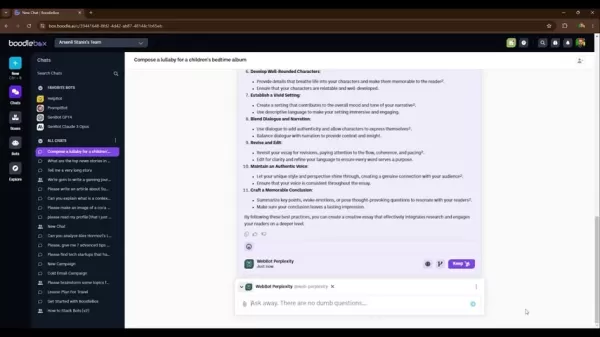
Tag the GPT-4o Bot: Type '@gpt4o' in the chat to address the GPT-4o bot directly.
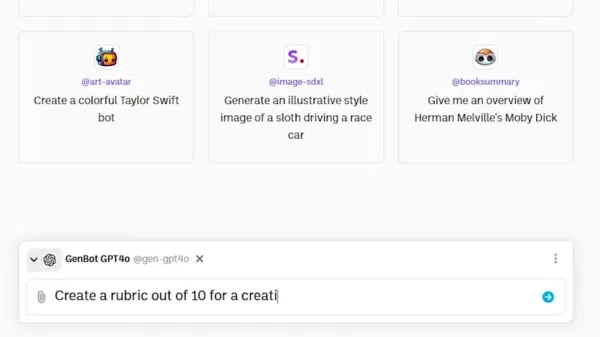
Input Your Prompt: Enter a clear, concise prompt with assignment details. For example, 'Generate a 10-point rubric for a Creative Writing assignment on social media’s impact, designed for English majors using recent research.'
Check the Rubric: The GPT-4o bot will produce a rubric based on your prompt. Review it to confirm it meets your needs, expecting coverage of content, creativity, structure, language, and mechanics.
This method is ideal for quick rubric creation but may lack depth for complex assignments. Explore the methods below for more customized results.
Method 2: Enriching Rubrics with Web Insights
For a more robust rubric, incorporate web-based best practices using BoodleBox’s Perplexity bot, which gathers online context for richer, more effective rubrics.
Steps to follow:
Leverage Web Insights: Use the Perplexity bot to enhance rubric quality with online research.

Tag Perplexity Bot: In the same chat, type '@web-perplexity' to engage the Perplexity bot.
Create Your Prompt: Request research on best practices for the assignment type. For example, 'Search for best practices in writing research-based creative essays.'
Review Perplexity’s Results: Perplexity will list web-sourced best practices. Select elements to include in your rubric.
Revise with GPT-4o: Tag '@gpt4o' again and ask it to refine the rubric using Perplexity’s findings. For example, 'Revise the previous rubric to include these best practices, keeping it on a 10-point scale with the same structure.'
This approach ensures rubrics are detailed, incorporating academic writing style and research-specific criteria aligned with current standards.
Method 3: Customizing with a Pre-trained Bot
For highly tailored rubrics, use a pre-trained bot like WriteBot Essay to refine rubrics based on specialized expertise.
Steps to follow:
Engage a Pre-trained Bot: Use a bot like WriteBot Essay to enhance rubric quality.
Tag WriteBot Essay: Type '@write-essay' in your BoodleBox chat to summon the WriteBot Essay bot.
Request Rubric Enhancement: Ask the bot to improve the existing rubric. For example, 'Can you refine this rubric further?'
Respond to Bot Queries: Answer WriteBot Essay’s questions to clarify your needs, guiding the bot to refine the rubric.
Review the Updated Rubric: Check the bot’s revised rubric to ensure it aligns with your assignment’s goals.
This method produces rubrics finely tuned to assignment objectives, emphasizing research, creativity, and clarity.
Method 4: Deep Context with Attached Documents
For the most customized rubrics, attach relevant documents to the BoodleBox chat, giving the AI comprehensive assignment details for highly specific rubrics.
Steps to follow:
Add Document Context: Attach documents to provide deeper context for rubric creation.
Upload Documents: Click the 'Knowledge' icon in BoodleBox’s top-right corner to upload files like essay guides, past work, or textbook excerpts.
Tag GPT-4o Bot: Type '@gpt4o' to address the GPT-4o bot.
Instruct the Bot: Direct the bot to use the attached document. For example, 'Create a rubric using the attached essay writing guide to improve it.'
This method leverages detailed information to produce precise rubrics tailored to your assignment’s needs.
Maximizing Your AI-Generated Rubric
Using a Rubric Template
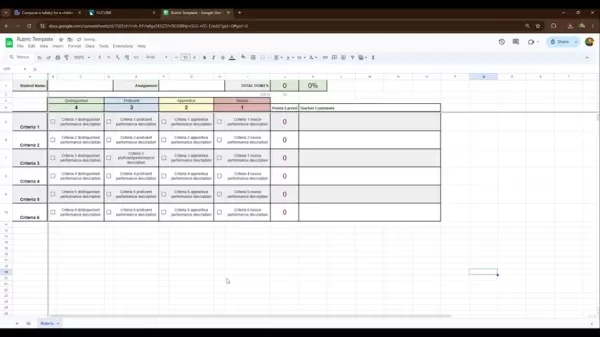
After creating your rubric, integrate it into a template for ease of use. The Google Sheets rubric template by Read, linked in the description, auto-calculates scores, saving time.
Steps to use it:
Copy and Paste: Transfer your AI-generated rubric into the Google Sheets template’s relevant sections.
Adjust Categories: Tailor rubric categories to fit your assignment’s specific needs.
Enter Student Data: Input student performance data, and the template will compute total scores and final grades.
This template streamlines grading, ensuring timely and consistent student feedback.
Grading with Your AI Rubric
With your rubric in a practical template, use it to evaluate student work fairly and effectively:
Review Assignment: Revisit the assignment to understand the rubric’s key criteria.
Assess Each Criterion: Score each student’s work based on the rubric’s criteria.
Offer Feedback: Provide constructive feedback, explaining scores and suggesting improvements.
Use Template Calculations: Let the Read Google Sheets template calculate totals for accuracy and efficiency.
Tips for Better Rubrics
To optimize AI-generated rubrics, consider these strategies:
Specificity: Use precise criteria to clarify expectations for students.
Balance: Ensure all key assignment aspects are covered without overemphasizing one area.
Clarity: Write in simple, clear language for student comprehension.
Peer Feedback: Seek input from colleagues to refine your rubric before use.
These steps create fair, effective rubrics aligned with teaching objectives.
Pros and Cons of AI-Generated Rubrics
Advantages
Saves significant time in rubric creation.
Enhances grading fairness and objectivity.
Incorporates web-based best practices.
Customizes rubrics to specific assignment needs.
Clarifies expectations for students.
Drawbacks
Requires effort to provide AI with sufficient context.
May need revisions to ensure accuracy.
Risks bias if AI prompts or training are inadequate.
Relies on technology and internet access.
FAQs on AI and Rubrics
Which AI tools excel at rubric creation?
BoodleBox, integrating GPT-4o and Perplexity, is ideal. Other AI writing assistants and educational platforms also support rubric generation.
How do I give AI enough context for rubrics?
Use detailed prompts, attach relevant documents, and leverage pre-trained bots like WriteBot Essay for tailored results.
Can AI rubrics replace human judgment?
AI rubrics enhance grading but shouldn’t replace human oversight. Review and tweak them to align with teaching goals.
How do I mitigate bias in AI rubrics?
Inspect rubrics for bias, revise criteria to ensure fairness, and align with learning outcomes.
Related Questions
What are other ways to create rubrics?
Beyond AI, collaborative rubric design with teachers ensures alignment with curriculum standards. Student-involved rubric creation fosters deeper understanding of criteria, boosting critical thinking and ownership of learning. These methods create inclusive, fair assessments tailored to diverse student needs and educational goals.
Related article
 Stripe to Acquire OpenRouter as AI Model Routing Gains Momentum
Stripe has agreed to acquire OpenRouter, an AI model-routing platform that gives developers access to hundreds of models through a single interface. The deal adds model selection and routing to Stripe’s existing work around AI usage and token-based b
Former OpenAI Researcher Barrett Zoph Returns to Google to Support Gemini Development
Barret Zoph, who previously abruptly left and joined OpenAI due to a disagreement with Thinking Machines Lab CEO Miriam Mularati, has once again changed employers. Alphabet's Google announced that Zoph will return as Vice President of Research, bring
How Recursive Intelligence Raised $335M at $4B Valuation in 4 Months
The co-founders of startup Ricursive Intelligence seemed destined to be co-founders.Anna Goldie, CEO, and Azalia Mirhoseini, CTO, are so well-known in the AI community that they were among those AI engineers who “got those weird emails from Zuckerber
Related Special Topic Recommendations
Design & Art
Stripe to Acquire OpenRouter as AI Model Routing Gains Momentum
Stripe has agreed to acquire OpenRouter, an AI model-routing platform that gives developers access to hundreds of models through a single interface. The deal adds model selection and routing to Stripe’s existing work around AI usage and token-based b
Former OpenAI Researcher Barrett Zoph Returns to Google to Support Gemini Development
Barret Zoph, who previously abruptly left and joined OpenAI due to a disagreement with Thinking Machines Lab CEO Miriam Mularati, has once again changed employers. Alphabet's Google announced that Zoph will return as Vice President of Research, bring
How Recursive Intelligence Raised $335M at $4B Valuation in 4 Months
The co-founders of startup Ricursive Intelligence seemed destined to be co-founders.Anna Goldie, CEO, and Azalia Mirhoseini, CTO, are so well-known in the AI community that they were among those AI engineers who “got those weird emails from Zuckerber
Related Special Topic Recommendations
Design & Art
 Top AI Illustration Tools: Create Editorial Scenes and Cover Art Faster
2026 Latest Top-rated AI Illustration Tools: Our curated list features the best powerfully designed tools for creating stunning editorial scenes and eye-catching cover art quickly. Each option has gone through rigorous real-world tests, offering a free vs paid comparison to help you find the perfect match for your workflow. Try these must-try solutions today to unlock your AI edge and boost your creative productivity. Explore now at XIX.AI.
 10 tools
 xix.ai
Education and Learning
Top AI Tutors for Exam Prep: Practice Math, Science, and English
xix.ai
Education and Learning
Top AI Tutors for Exam Prep: Practice Math, Science, and English
2026 Latest Top-Rated Best AI Tutors for Exam Prep are here on XIX.AI! Our curated list features powerful game-changing tools that offer free vs paid comparison, real-world tests, and weekly updated rankings. They help boost your writing efficiency, simplify complex topic learning, and unlock your academic potential. Explore now to Discover your perfect exam prep tool and Start creating today to Unlock your AI edge!
10 tools
xix.ai
Finance
AI Budget Planning Tools for Personal Money Management
2026 Latest Best Top-Rated AI Budget Planning Tools for Personal Money Management are here on XIX.AI! This curated collection features powerful, game-changing solutions that help you conduct real-world tests, understand spending habits, and create personalized plans to boost productivity. Enjoy a free vs paid comparison along with detailed rankings. Must-try tools designed to simplify money management and unlock your AI edge. Explore now!
11 tools
xix.ai
Health & Wellness
AI Sleep Tracking Assistants: Improve Recovery with Better Bedtime Habits
2026 Latest Best Top-Rated AI Sleep Tracking Assistants curated for ultimate recovery. This fully updated weekly guide features powerful tools that deliver real-world tests, free vs paid comparison, and detailed rankings to help you find the must-try solution that boosts sleep quality and supports better bedtime habits. Explore now at XIX.AI to Unlock your AI edge.
10 tools
xix.ai
Data Analysis
AI SQL Copilots for Product and Revenue Analytics
2026 Latest Best Top-Rated AI SQL Copilots for Product and Revenue Analytics! XIX.AI has curated a powerful, game-changing collection of must-try tools that undergo real-world tests through weekly updated rankings. These tools help users boost productivity significantly by accelerating data analysis, streamlining complex queries, and generating accurate insights to drive smarter business decisions. Explore now to Discover your perfect tool for unlocking your AI edge!
14 tools
xix.ai
Education and Learning
Best AI Homework Helpers That Teach: Learn Concepts, Not Just Answers
2026 Latest Best Top-Rated AI Homework Helpers That Teach Core Concepts Not Just Answers Powerful Tools for Students Must-Try Curated List Weekly Updated Free vs Paid Comparison Real-World Tests Accurate Rankings to Help You Unlock Your Full Learning Potential Explore now to Discover your perfect tool for smarter studying.
10 tools
xix.ai

 Comments (2)
0/500
Comments (2)
0/500
![PaulGonzalez]()
Schon wieder so ein Leitfaden! 😄 Ich wünschte, das KI-System könnte auch die tatsächliche Bewertung automatisieren. Wann kommt die App, die mir die ganzen Hausaufgaben direkt korrigiert? Das wäre der echte Zeitsparer.
![WillCarter]()
AI для создания рубрик — интересная тема, но меня беспокоят этические риски. Не приведёт ли автоматизация к стандартизации обучения и потере индивидуального подхода? 🤔 Как учителя будут сохранять креативность в таких условиях?
Developing rubrics is a vital yet time-intensive task for teachers. A well-crafted rubric clarifies expectations for students and ensures fair evaluations. This guide explores how Artificial Intelligence (AI), particularly through BoodleBox, streamlines and accelerates rubric creation, enabling educators to deliver clear, unbiased feedback efficiently.
Key Takeaways
AI drastically cuts down time needed to craft custom rubrics.
BoodleBox combines multiple AI models to simplify rubric development.
Providing context in AI prompts leads to more precise and effective rubrics.
Tools like Perplexity enhance rubrics by integrating web-based best practices.
Attaching assignment documents to AI chats adds critical context for rubric creation.
Rubric templates automate score calculations and streamline grading.
The Role of AI in Rubric Development
Why Rubrics Matter in Education
Rubrics are essential tools for teachers, setting clear expectations for students and guiding them toward success. They also make grading more consistent and impartial.
Rubrics save time, standardize grading, and reduce bias. This guide highlights how AI enhances rubric creation.
Without rubrics, grading risks subjectivity, causing inconsistencies and student dissatisfaction. AI enables educators to produce detailed, targeted rubrics quickly and accurately, ensuring students know exactly what’s required for top performance.
Benefits of AI in Rubric Creation
AI is revolutionizing education, including rubric development. AI tools analyze assignment needs, incorporate best practices, and create thorough rubrics in less time than manual methods.
This frees teachers to focus on instruction rather than administrative tasks.
AI tools also minimize grading bias by emphasizing specific criteria over subjective judgments. With proper context, AI ensures rubrics are fair, transparent, and aligned with learning goals.
Step-by-Step: Crafting Rubrics with BoodleBox
Meet BoodleBox
BoodleBox is a cutting-edge platform that unifies multiple AI models in one chat interface, simplifying tasks for educators looking to optimize their workflow.
BoodleBox enables seamless interaction with various AI models in a single chat window.
With pre-trained bots and document attachment features, BoodleBox is perfect for creating tailored rubrics. This guide walks you through the process to ensure optimal student feedback.
Method 1: Basic Rubric Creation with GPT-4o Bot
Using BoodleBox’s GPT-4o bot is a fast, simple way to generate a basic rubric based on the AI’s knowledge.
Steps to follow:
Start a New Chat: In BoodleBox, click the 'New' chat button in the top-left corner or press Ctrl+B to open a new chat window.
Tag the GPT-4o Bot: Type '@gpt4o' in the chat to address the GPT-4o bot directly.
Input Your Prompt: Enter a clear, concise prompt with assignment details. For example, 'Generate a 10-point rubric for a Creative Writing assignment on social media’s impact, designed for English majors using recent research.'
Check the Rubric: The GPT-4o bot will produce a rubric based on your prompt. Review it to confirm it meets your needs, expecting coverage of content, creativity, structure, language, and mechanics.
This method is ideal for quick rubric creation but may lack depth for complex assignments. Explore the methods below for more customized results.
Method 2: Enriching Rubrics with Web Insights
For a more robust rubric, incorporate web-based best practices using BoodleBox’s Perplexity bot, which gathers online context for richer, more effective rubrics.
Steps to follow:
Leverage Web Insights: Use the Perplexity bot to enhance rubric quality with online research.
Tag Perplexity Bot: In the same chat, type '@web-perplexity' to engage the Perplexity bot.
Create Your Prompt: Request research on best practices for the assignment type. For example, 'Search for best practices in writing research-based creative essays.'
Review Perplexity’s Results: Perplexity will list web-sourced best practices. Select elements to include in your rubric.
Revise with GPT-4o: Tag '@gpt4o' again and ask it to refine the rubric using Perplexity’s findings. For example, 'Revise the previous rubric to include these best practices, keeping it on a 10-point scale with the same structure.'
This approach ensures rubrics are detailed, incorporating academic writing style and research-specific criteria aligned with current standards.
Method 3: Customizing with a Pre-trained Bot
For highly tailored rubrics, use a pre-trained bot like WriteBot Essay to refine rubrics based on specialized expertise.
Steps to follow:
Engage a Pre-trained Bot: Use a bot like WriteBot Essay to enhance rubric quality.
Tag WriteBot Essay: Type '@write-essay' in your BoodleBox chat to summon the WriteBot Essay bot.
Request Rubric Enhancement: Ask the bot to improve the existing rubric. For example, 'Can you refine this rubric further?'
Respond to Bot Queries: Answer WriteBot Essay’s questions to clarify your needs, guiding the bot to refine the rubric.
Review the Updated Rubric: Check the bot’s revised rubric to ensure it aligns with your assignment’s goals.
This method produces rubrics finely tuned to assignment objectives, emphasizing research, creativity, and clarity.
Method 4: Deep Context with Attached Documents
For the most customized rubrics, attach relevant documents to the BoodleBox chat, giving the AI comprehensive assignment details for highly specific rubrics.
Steps to follow:
Add Document Context: Attach documents to provide deeper context for rubric creation.
Upload Documents: Click the 'Knowledge' icon in BoodleBox’s top-right corner to upload files like essay guides, past work, or textbook excerpts.
Tag GPT-4o Bot: Type '@gpt4o' to address the GPT-4o bot.
Instruct the Bot: Direct the bot to use the attached document. For example, 'Create a rubric using the attached essay writing guide to improve it.'
This method leverages detailed information to produce precise rubrics tailored to your assignment’s needs.
Maximizing Your AI-Generated Rubric
Using a Rubric Template
After creating your rubric, integrate it into a template for ease of use. The Google Sheets rubric template by Read, linked in the description, auto-calculates scores, saving time.
Steps to use it:
Copy and Paste: Transfer your AI-generated rubric into the Google Sheets template’s relevant sections.
Adjust Categories: Tailor rubric categories to fit your assignment’s specific needs.
Enter Student Data: Input student performance data, and the template will compute total scores and final grades.
This template streamlines grading, ensuring timely and consistent student feedback.
Grading with Your AI Rubric
With your rubric in a practical template, use it to evaluate student work fairly and effectively:
Review Assignment: Revisit the assignment to understand the rubric’s key criteria.
Assess Each Criterion: Score each student’s work based on the rubric’s criteria.
Offer Feedback: Provide constructive feedback, explaining scores and suggesting improvements.
Use Template Calculations: Let the Read Google Sheets template calculate totals for accuracy and efficiency.
Tips for Better Rubrics
To optimize AI-generated rubrics, consider these strategies:
Specificity: Use precise criteria to clarify expectations for students.
Balance: Ensure all key assignment aspects are covered without overemphasizing one area.
Clarity: Write in simple, clear language for student comprehension.
Peer Feedback: Seek input from colleagues to refine your rubric before use.
These steps create fair, effective rubrics aligned with teaching objectives.
Pros and Cons of AI-Generated Rubrics
Advantages
Saves significant time in rubric creation.
Enhances grading fairness and objectivity.
Incorporates web-based best practices.
Customizes rubrics to specific assignment needs.
Clarifies expectations for students.
Drawbacks
Requires effort to provide AI with sufficient context.
May need revisions to ensure accuracy.
Risks bias if AI prompts or training are inadequate.
Relies on technology and internet access.
FAQs on AI and Rubrics
Which AI tools excel at rubric creation?
BoodleBox, integrating GPT-4o and Perplexity, is ideal. Other AI writing assistants and educational platforms also support rubric generation.
How do I give AI enough context for rubrics?
Use detailed prompts, attach relevant documents, and leverage pre-trained bots like WriteBot Essay for tailored results.
Can AI rubrics replace human judgment?
AI rubrics enhance grading but shouldn’t replace human oversight. Review and tweak them to align with teaching goals.
How do I mitigate bias in AI rubrics?
Inspect rubrics for bias, revise criteria to ensure fairness, and align with learning outcomes.
Related Questions
What are other ways to create rubrics?
Beyond AI, collaborative rubric design with teachers ensures alignment with curriculum standards. Student-involved rubric creation fosters deeper understanding of criteria, boosting critical thinking and ownership of learning. These methods create inclusive, fair assessments tailored to diverse student needs and educational goals.








 Stripe to Acquire OpenRouter as AI Model Routing Gains Momentum
Stripe has agreed to acquire OpenRouter, an AI model-routing platform that gives developers access to hundreds of models through a single interface. The deal adds model selection and routing to Stripe’s existing work around AI usage and token-based b
Stripe to Acquire OpenRouter as AI Model Routing Gains Momentum
Stripe has agreed to acquire OpenRouter, an AI model-routing platform that gives developers access to hundreds of models through a single interface. The deal adds model selection and routing to Stripe’s existing work around AI usage and token-based b
 Former OpenAI Researcher Barrett Zoph Returns to Google to Support Gemini Development
Barret Zoph, who previously abruptly left and joined OpenAI due to a disagreement with Thinking Machines Lab CEO Miriam Mularati, has once again changed employers. Alphabet's Google announced that Zoph will return as Vice President of Research, bring
Former OpenAI Researcher Barrett Zoph Returns to Google to Support Gemini Development
Barret Zoph, who previously abruptly left and joined OpenAI due to a disagreement with Thinking Machines Lab CEO Miriam Mularati, has once again changed employers. Alphabet's Google announced that Zoph will return as Vice President of Research, bring
 How Recursive Intelligence Raised $335M at $4B Valuation in 4 Months
The co-founders of startup Ricursive Intelligence seemed destined to be co-founders.Anna Goldie, CEO, and Azalia Mirhoseini, CTO, are so well-known in the AI community that they were among those AI engineers who “got those weird emails from Zuckerber
How Recursive Intelligence Raised $335M at $4B Valuation in 4 Months
The co-founders of startup Ricursive Intelligence seemed destined to be co-founders.Anna Goldie, CEO, and Azalia Mirhoseini, CTO, are so well-known in the AI community that they were among those AI engineers who “got those weird emails from Zuckerber

2026 Latest Top-rated AI Illustration Tools: Our curated list features the best powerfully designed tools for creating stunning editorial scenes and eye-catching cover art quickly. Each option has gone through rigorous real-world tests, offering a free vs paid comparison to help you find the perfect match for your workflow. Try these must-try solutions today to unlock your AI edge and boost your creative productivity. Explore now at XIX.AI.
10 tools
xix.ai

2026 Latest Top-Rated Best AI Tutors for Exam Prep are here on XIX.AI! Our curated list features powerful game-changing tools that offer free vs paid comparison, real-world tests, and weekly updated rankings. They help boost your writing efficiency, simplify complex topic learning, and unlock your academic potential. Explore now to Discover your perfect exam prep tool and Start creating today to Unlock your AI edge!
10 tools
xix.ai

2026 Latest Best Top-Rated AI Budget Planning Tools for Personal Money Management are here on XIX.AI! This curated collection features powerful, game-changing solutions that help you conduct real-world tests, understand spending habits, and create personalized plans to boost productivity. Enjoy a free vs paid comparison along with detailed rankings. Must-try tools designed to simplify money management and unlock your AI edge. Explore now!
11 tools
xix.ai

2026 Latest Best Top-Rated AI Sleep Tracking Assistants curated for ultimate recovery. This fully updated weekly guide features powerful tools that deliver real-world tests, free vs paid comparison, and detailed rankings to help you find the must-try solution that boosts sleep quality and supports better bedtime habits. Explore now at XIX.AI to Unlock your AI edge.
10 tools
xix.ai

2026 Latest Best Top-Rated AI SQL Copilots for Product and Revenue Analytics! XIX.AI has curated a powerful, game-changing collection of must-try tools that undergo real-world tests through weekly updated rankings. These tools help users boost productivity significantly by accelerating data analysis, streamlining complex queries, and generating accurate insights to drive smarter business decisions. Explore now to Discover your perfect tool for unlocking your AI edge!
14 tools
xix.ai

2026 Latest Best Top-Rated AI Homework Helpers That Teach Core Concepts Not Just Answers Powerful Tools for Students Must-Try Curated List Weekly Updated Free vs Paid Comparison Real-World Tests Accurate Rankings to Help You Unlock Your Full Learning Potential Explore now to Discover your perfect tool for smarter studying.
10 tools
xix.ai

Schon wieder so ein Leitfaden! 😄 Ich wünschte, das KI-System könnte auch die tatsächliche Bewertung automatisieren. Wann kommt die App, die mir die ganzen Hausaufgaben direkt korrigiert? Das wäre der echte Zeitsparer.
AI для создания рубрик — интересная тема, но меня беспокоят этические риски. Не приведёт ли автоматизация к стандартизации обучения и потере индивидуального подхода? 🤔 Как учителя будут сохранять креативность в таких условиях?












