


 Home
HomeHow to create custom album artwork with ChatGPT in 2025? Quick guide.
Creating standout album artwork is essential for musicians and artists aiming to capture attention in today's digital space. With the help of AI, designing custom visuals is now faster and more accessible. This guide walks you through using ChatGPT to craft unique album covers, focusing on effective prompt strategies, commercial usage rights, and ways to enhance your creative workflow. Skip the high costs of hiring designers and embrace instant, personalized album art!
Key Points
ChatGPT can create custom album artwork within seconds.
Detailed prompts are essential for achieving your desired art style.
You maintain full commercial rights to artwork generated through ChatGPT.
Both free and premium versions of ChatGPT offer identical commercial usage permissions.
Try out various prompts to unlock original and diverse results.
Refining prompts based on initial outputs can greatly enhance the final artwork quality.
Generating Album Artwork with ChatGPT: A Step-by-Step Guide
Crafting the Perfect Prompt for Your Album Artwork
Effective prompt design is the key to producing compelling album artwork using ChatGPT. A well-structured prompt gives ChatGPT the direction needed to generate images that match your artistic vision.
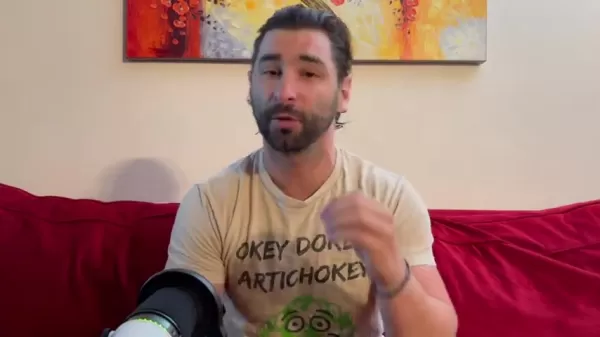
Let's break down the essential components of an effective prompt.
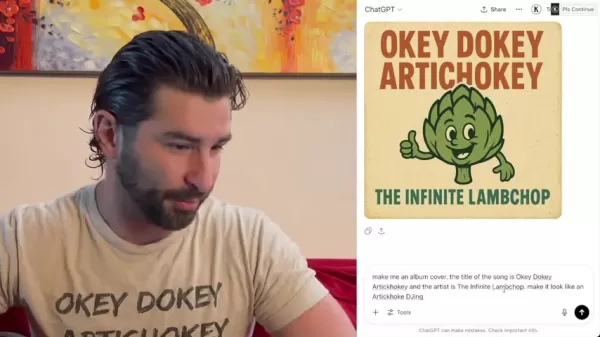
Start by clearly stating your album or song title, artist name, and any specific themes or ideas you want to express. For example:
Make me an album cover. The title of the song is [Song Title]. The artist is [Artist Name].
Also, define the visual style you’re aiming for—whether photorealistic, abstract, vintage-inspired, or something else. Use descriptive language to guide the AI. For instance:
Make me an album cover. The title of the song is 'Okey Dokey Artichokey'. The artist is The Infinite Lambchop. Make it look like an Artichoke DJing.
Supplying precise and detailed instructions increases the chances of receiving high-quality, relevant artwork. Remember, prompt crafting is an iterative process. Feel free to test different prompts and adjust them based on what you get.
Iterating on Your Prompts for Optimal Results
The first draft from ChatGPT might not match your vision perfectly, and that’s okay. Prompt iteration is a vital step for fine-tuning and refining the artwork to fit your style.
Begin by evaluating the initial results. Identify both what works well and what could be improved. Then, adjust your prompt accordingly.
If the colors are too bright, for example, try adding:
Make the colors more muted and pastel-like.
If the composition seems off, you might specify:
Focus on a close-up shot of the [subject] in the center of the frame.
Through repeated tweaking and feedback, you’ll guide ChatGPT toward your ideal result. This experimental and refining approach unlocks the real power of AI for album artwork creation.
Enhancing Your ChatGPT Album Artwork with Additional Tools
Leveraging AI Photo Editors for Enhanced Artwork
Although ChatGPT can produce impressive visuals alone, you can take your artwork further by using AI photo editors. These tools add professional polish and refinement. Typical editing tasks include:
- Upscaling: Boost image resolution without sacrificing clarity.
- Color Correction: Fine-tune color balance and tonal quality.
- Detail Enhancement: Sharpen and add texture to specific areas.
- Background Removal: Isolate key elements by removing distracting backgrounds.
Popular AI-powered editing tools include:
- Adobe Photoshop: Professional-grade software with AI tools.
- Luminar AI: Intuitive editor built around AI automation.
- Remini: Mobile app that uses AI to restore and enhance photos.
By pairing ChatGPT’s creativity with AI editing tools, you can produce album art that truly stands out. Keep in mind, that final tweaks can be tricky without prior graphic design experience. You might also explore other AI tools for creating music videos or lyric visuals.
Pros and Cons of Using ChatGPT for Album Artwork
Pros
Quick and efficient artwork generation.
More affordable than commissioning a designer.
Encourages creative experimentation and freedom.
You retain full commercial rights to all generated artwork.
Simple, prompt-based interface is easy to use.
Cons
Art quality can be inconsistent depending on your prompts.
Often requires multiple revisions to meet expectations.
Limited ability to control fine details.
Possible risk of generating generic or unoriginal designs.
Requires some familiarity with AI image generation basics.
Frequently Asked Questions about ChatGPT Album Artwork
Does the AI Album Art look good?
AI-generated images often look impressive and can improve as you refine your prompts. Even if the initial result isn’t perfect, AI art serves as a solid creative foundation. It gives you a starting point that can be further developed using your preferred design tools.
Can I use a music visualizer?
Absolutely. You can use a music visualizer to animate your album art. Many artists animate their covers with visualizers for platforms like Spotify or Apple Music.
Can I use AI to make album art?
Yes, and it’s highly recommended. AI offers a fast, low-cost way to produce exactly the image you want—all you need is a descriptive text prompt.
What if someone has the same Album Art?
There is a small chance AI might replicate existing imagery. To minimize this, continuously refine your prompts and artwork to ensure originality and uniqueness.
Related Questions
What are the legal implications of using AI-generated album art for commercial purposes?
Legally, using AI-generated album art for commercial purposes is generally straightforward. ChatGPT, along with many other AI image platforms, gives users full commercial rights to the images they create, whether using the free or paid tier. This means you can legally use the generated art for album covers, singles, EPs, or other commercial releases without worrying about copyright claims from OpenAI. However, be sure your prompts don’t reference copyrighted characters, logos, or existing artworks, as this could create legal complications. Although ChatGPT produces original images, it’s still possible—though rare—for results to resemble existing works. To reduce this risk, carefully review your outputs and make adjustments to ensure your art is unique. It’s also wise to keep a record of your prompts and generated images to document your creative process and show your intent to produce original work.
Related article
 Ilya Sutskever Testifies: Ultraman Built OpenAI Network on Lies
Recent court filings reveal that Ilya Sutskever, OpenAI’s former Chief Scientist, testified as a central figure in Elon Musk’s lawsuit against the company. His statements confirmed that the 2023 leadership upheaval was not an impulsive move, but rath
Gemini faces branding challenges, as does the wider AI industry
Google’s Wednesday announcement regarding new Gemini Live voice features makes a valid point: “You shouldn’t have to guess whether a task requires Spark, a Daily Brief, or a quick inbox search.” While Google presents this as a commitment to handling
Claude Adds Multilingual Voice Support, Bringing Real Phone Calls Closer
The voice interaction experience of artificial intelligence is about to undergo a major update. According to the latest news from tech media Android Authority, Anthropic is preparing a significant upgrade for its AI assistant Claude, focusing on brea
Related Special Topic Recommendations
Design & Art
Ilya Sutskever Testifies: Ultraman Built OpenAI Network on Lies
Recent court filings reveal that Ilya Sutskever, OpenAI’s former Chief Scientist, testified as a central figure in Elon Musk’s lawsuit against the company. His statements confirmed that the 2023 leadership upheaval was not an impulsive move, but rath
Gemini faces branding challenges, as does the wider AI industry
Google’s Wednesday announcement regarding new Gemini Live voice features makes a valid point: “You shouldn’t have to guess whether a task requires Spark, a Daily Brief, or a quick inbox search.” While Google presents this as a commitment to handling
Claude Adds Multilingual Voice Support, Bringing Real Phone Calls Closer
The voice interaction experience of artificial intelligence is about to undergo a major update. According to the latest news from tech media Android Authority, Anthropic is preparing a significant upgrade for its AI assistant Claude, focusing on brea
Related Special Topic Recommendations
Design & Art
 Top AI Illustration Tools: Create Editorial Scenes and Cover Art Faster
2026 Latest Top-rated AI Illustration Tools: Our curated list features the best powerfully designed tools for creating stunning editorial scenes and eye-catching cover art quickly. Each option has gone through rigorous real-world tests, offering a free vs paid comparison to help you find the perfect match for your workflow. Try these must-try solutions today to unlock your AI edge and boost your creative productivity. Explore now at XIX.AI.
 10 tools
 xix.ai
Education and Learning
Top AI Tutors for Exam Prep: Practice Math, Science, and English
xix.ai
Education and Learning
Top AI Tutors for Exam Prep: Practice Math, Science, and English
2026 Latest Top-Rated Best AI Tutors for Exam Prep are here on XIX.AI! Our curated list features powerful game-changing tools that offer free vs paid comparison, real-world tests, and weekly updated rankings. They help boost your writing efficiency, simplify complex topic learning, and unlock your academic potential. Explore now to Discover your perfect exam prep tool and Start creating today to Unlock your AI edge!
10 tools
xix.ai
Finance
AI Budget Planning Tools for Personal Money Management
2026 Latest Best Top-Rated AI Budget Planning Tools for Personal Money Management are here on XIX.AI! This curated collection features powerful, game-changing solutions that help you conduct real-world tests, understand spending habits, and create personalized plans to boost productivity. Enjoy a free vs paid comparison along with detailed rankings. Must-try tools designed to simplify money management and unlock your AI edge. Explore now!
11 tools
xix.ai
Health & Wellness
AI Sleep Tracking Assistants: Improve Recovery with Better Bedtime Habits
2026 Latest Best Top-Rated AI Sleep Tracking Assistants curated for ultimate recovery. This fully updated weekly guide features powerful tools that deliver real-world tests, free vs paid comparison, and detailed rankings to help you find the must-try solution that boosts sleep quality and supports better bedtime habits. Explore now at XIX.AI to Unlock your AI edge.
10 tools
xix.ai
Data Analysis
AI SQL Copilots for Product and Revenue Analytics
2026 Latest Best Top-Rated AI SQL Copilots for Product and Revenue Analytics! XIX.AI has curated a powerful, game-changing collection of must-try tools that undergo real-world tests through weekly updated rankings. These tools help users boost productivity significantly by accelerating data analysis, streamlining complex queries, and generating accurate insights to drive smarter business decisions. Explore now to Discover your perfect tool for unlocking your AI edge!
14 tools
xix.ai
Education and Learning
Best AI Homework Helpers That Teach: Learn Concepts, Not Just Answers
2026 Latest Best Top-Rated AI Homework Helpers That Teach Core Concepts Not Just Answers Powerful Tools for Students Must-Try Curated List Weekly Updated Free vs Paid Comparison Real-World Tests Accurate Rankings to Help You Unlock Your Full Learning Potential Explore now to Discover your perfect tool for smarter studying.
10 tools
xix.ai

 Comments (1)
0/500
Comments (1)
0/500
![CharlesScott]()
This is actually pretty clever! I've been messing around with DALL·E for cover art, but using ChatGPT to refine the prompt feels like a cheat code. 🎨 Just hope the results don't end up looking like generic stock imagery though. Anyone tried it yet?
Creating standout album artwork is essential for musicians and artists aiming to capture attention in today's digital space. With the help of AI, designing custom visuals is now faster and more accessible. This guide walks you through using ChatGPT to craft unique album covers, focusing on effective prompt strategies, commercial usage rights, and ways to enhance your creative workflow. Skip the high costs of hiring designers and embrace instant, personalized album art!
Key Points
ChatGPT can create custom album artwork within seconds.
Detailed prompts are essential for achieving your desired art style.
You maintain full commercial rights to artwork generated through ChatGPT.
Both free and premium versions of ChatGPT offer identical commercial usage permissions.
Try out various prompts to unlock original and diverse results.
Refining prompts based on initial outputs can greatly enhance the final artwork quality.
Generating Album Artwork with ChatGPT: A Step-by-Step Guide
Crafting the Perfect Prompt for Your Album Artwork
Effective prompt design is the key to producing compelling album artwork using ChatGPT. A well-structured prompt gives ChatGPT the direction needed to generate images that match your artistic vision.
Let's break down the essential components of an effective prompt.
Start by clearly stating your album or song title, artist name, and any specific themes or ideas you want to express. For example:
Make me an album cover. The title of the song is [Song Title]. The artist is [Artist Name].
Also, define the visual style you’re aiming for—whether photorealistic, abstract, vintage-inspired, or something else. Use descriptive language to guide the AI. For instance:
Make me an album cover. The title of the song is 'Okey Dokey Artichokey'. The artist is The Infinite Lambchop. Make it look like an Artichoke DJing.
Supplying precise and detailed instructions increases the chances of receiving high-quality, relevant artwork. Remember, prompt crafting is an iterative process. Feel free to test different prompts and adjust them based on what you get.
Iterating on Your Prompts for Optimal Results
The first draft from ChatGPT might not match your vision perfectly, and that’s okay. Prompt iteration is a vital step for fine-tuning and refining the artwork to fit your style.
Begin by evaluating the initial results. Identify both what works well and what could be improved. Then, adjust your prompt accordingly.
If the colors are too bright, for example, try adding:
Make the colors more muted and pastel-like.
If the composition seems off, you might specify:
Focus on a close-up shot of the [subject] in the center of the frame.
Through repeated tweaking and feedback, you’ll guide ChatGPT toward your ideal result. This experimental and refining approach unlocks the real power of AI for album artwork creation.
Enhancing Your ChatGPT Album Artwork with Additional Tools
Leveraging AI Photo Editors for Enhanced Artwork
Although ChatGPT can produce impressive visuals alone, you can take your artwork further by using AI photo editors. These tools add professional polish and refinement. Typical editing tasks include:
- Upscaling: Boost image resolution without sacrificing clarity.
- Color Correction: Fine-tune color balance and tonal quality.
- Detail Enhancement: Sharpen and add texture to specific areas.
- Background Removal: Isolate key elements by removing distracting backgrounds.
Popular AI-powered editing tools include:
- Adobe Photoshop: Professional-grade software with AI tools.
- Luminar AI: Intuitive editor built around AI automation.
- Remini: Mobile app that uses AI to restore and enhance photos.
By pairing ChatGPT’s creativity with AI editing tools, you can produce album art that truly stands out. Keep in mind, that final tweaks can be tricky without prior graphic design experience. You might also explore other AI tools for creating music videos or lyric visuals.
Pros and Cons of Using ChatGPT for Album Artwork
Pros
Quick and efficient artwork generation.
More affordable than commissioning a designer.
Encourages creative experimentation and freedom.
You retain full commercial rights to all generated artwork.
Simple, prompt-based interface is easy to use.
Cons
Art quality can be inconsistent depending on your prompts.
Often requires multiple revisions to meet expectations.
Limited ability to control fine details.
Possible risk of generating generic or unoriginal designs.
Requires some familiarity with AI image generation basics.
Frequently Asked Questions about ChatGPT Album Artwork
Does the AI Album Art look good?
AI-generated images often look impressive and can improve as you refine your prompts. Even if the initial result isn’t perfect, AI art serves as a solid creative foundation. It gives you a starting point that can be further developed using your preferred design tools.
Can I use a music visualizer?
Absolutely. You can use a music visualizer to animate your album art. Many artists animate their covers with visualizers for platforms like Spotify or Apple Music.
Can I use AI to make album art?
Yes, and it’s highly recommended. AI offers a fast, low-cost way to produce exactly the image you want—all you need is a descriptive text prompt.
What if someone has the same Album Art?
There is a small chance AI might replicate existing imagery. To minimize this, continuously refine your prompts and artwork to ensure originality and uniqueness.
Related Questions
What are the legal implications of using AI-generated album art for commercial purposes?
Legally, using AI-generated album art for commercial purposes is generally straightforward. ChatGPT, along with many other AI image platforms, gives users full commercial rights to the images they create, whether using the free or paid tier. This means you can legally use the generated art for album covers, singles, EPs, or other commercial releases without worrying about copyright claims from OpenAI. However, be sure your prompts don’t reference copyrighted characters, logos, or existing artworks, as this could create legal complications. Although ChatGPT produces original images, it’s still possible—though rare—for results to resemble existing works. To reduce this risk, carefully review your outputs and make adjustments to ensure your art is unique. It’s also wise to keep a record of your prompts and generated images to document your creative process and show your intent to produce original work.








 Ilya Sutskever Testifies: Ultraman Built OpenAI Network on Lies
Recent court filings reveal that Ilya Sutskever, OpenAI’s former Chief Scientist, testified as a central figure in Elon Musk’s lawsuit against the company. His statements confirmed that the 2023 leadership upheaval was not an impulsive move, but rath
Ilya Sutskever Testifies: Ultraman Built OpenAI Network on Lies
Recent court filings reveal that Ilya Sutskever, OpenAI’s former Chief Scientist, testified as a central figure in Elon Musk’s lawsuit against the company. His statements confirmed that the 2023 leadership upheaval was not an impulsive move, but rath
 Gemini faces branding challenges, as does the wider AI industry
Google’s Wednesday announcement regarding new Gemini Live voice features makes a valid point: “You shouldn’t have to guess whether a task requires Spark, a Daily Brief, or a quick inbox search.” While Google presents this as a commitment to handling
Gemini faces branding challenges, as does the wider AI industry
Google’s Wednesday announcement regarding new Gemini Live voice features makes a valid point: “You shouldn’t have to guess whether a task requires Spark, a Daily Brief, or a quick inbox search.” While Google presents this as a commitment to handling
 Claude Adds Multilingual Voice Support, Bringing Real Phone Calls Closer
The voice interaction experience of artificial intelligence is about to undergo a major update. According to the latest news from tech media Android Authority, Anthropic is preparing a significant upgrade for its AI assistant Claude, focusing on brea
Claude Adds Multilingual Voice Support, Bringing Real Phone Calls Closer
The voice interaction experience of artificial intelligence is about to undergo a major update. According to the latest news from tech media Android Authority, Anthropic is preparing a significant upgrade for its AI assistant Claude, focusing on brea

2026 Latest Top-rated AI Illustration Tools: Our curated list features the best powerfully designed tools for creating stunning editorial scenes and eye-catching cover art quickly. Each option has gone through rigorous real-world tests, offering a free vs paid comparison to help you find the perfect match for your workflow. Try these must-try solutions today to unlock your AI edge and boost your creative productivity. Explore now at XIX.AI.
10 tools
xix.ai

2026 Latest Top-Rated Best AI Tutors for Exam Prep are here on XIX.AI! Our curated list features powerful game-changing tools that offer free vs paid comparison, real-world tests, and weekly updated rankings. They help boost your writing efficiency, simplify complex topic learning, and unlock your academic potential. Explore now to Discover your perfect exam prep tool and Start creating today to Unlock your AI edge!
10 tools
xix.ai

2026 Latest Best Top-Rated AI Budget Planning Tools for Personal Money Management are here on XIX.AI! This curated collection features powerful, game-changing solutions that help you conduct real-world tests, understand spending habits, and create personalized plans to boost productivity. Enjoy a free vs paid comparison along with detailed rankings. Must-try tools designed to simplify money management and unlock your AI edge. Explore now!
11 tools
xix.ai

2026 Latest Best Top-Rated AI Sleep Tracking Assistants curated for ultimate recovery. This fully updated weekly guide features powerful tools that deliver real-world tests, free vs paid comparison, and detailed rankings to help you find the must-try solution that boosts sleep quality and supports better bedtime habits. Explore now at XIX.AI to Unlock your AI edge.
10 tools
xix.ai

2026 Latest Best Top-Rated AI SQL Copilots for Product and Revenue Analytics! XIX.AI has curated a powerful, game-changing collection of must-try tools that undergo real-world tests through weekly updated rankings. These tools help users boost productivity significantly by accelerating data analysis, streamlining complex queries, and generating accurate insights to drive smarter business decisions. Explore now to Discover your perfect tool for unlocking your AI edge!
14 tools
xix.ai

2026 Latest Best Top-Rated AI Homework Helpers That Teach Core Concepts Not Just Answers Powerful Tools for Students Must-Try Curated List Weekly Updated Free vs Paid Comparison Real-World Tests Accurate Rankings to Help You Unlock Your Full Learning Potential Explore now to Discover your perfect tool for smarter studying.
10 tools
xix.ai

This is actually pretty clever! I've been messing around with DALL·E for cover art, but using ChatGPT to refine the prompt feels like a cheat code. 🎨 Just hope the results don't end up looking like generic stock imagery though. Anyone tried it yet?












