


 Home
HomeCreative Fabrica and Canva AI Enable Easy Coloring Book Design
Creating coloring books has become an incredibly popular pursuit for artists, educators, and entrepreneurs. With the rise of AI technology, this process is now more accessible and streamlined. This guide provides a complete walkthrough for crafting unique and captivating coloring books using Creative Fabrica AI and Canva AI. Learn how these tools can simplify your design workflow, unlock your creativity, and help you produce professional-quality coloring books for diverse audiences.
Key Points
Use Creative Fabrica AI to quickly generate one-of-a-kind coloring pages.
Leverage Canva AI for editing and refining your coloring book designs.
Master prompt engineering techniques to achieve your desired coloring book themes.
Discover how to integrate both platforms for a seamless design process.
Explore different applications for coloring books, including educational and commercial uses.
Introduction to AI-Powered Coloring Book Creation
The Rise of AI in Creative Design
Artificial intelligence is transforming countless industries, and creative design is a prime example. AI-powered tools have made professional-grade design accessible to everyone, even those with limited technical expertise. For coloring book creation, AI can generate detailed illustrations, assist with layout, and simplify the entire production process. This enables creators to concentrate on their artistic ideas rather than time-consuming manual work. Creative Fabrica and Canva AI are two leading platforms that offer specialized features for creating coloring books.
Creative Fabrica AI: A Powerful Design Generator
Creative Fabrica is a popular resource for fonts, graphics, and craft projects. Its AI capabilities allow users to generate various forms of artwork, including coloring pages. By entering specific prompts, you can create custom illustrations tailored to your project. The platform provides several AI tools focused on pattern design, image remixing, and sketching. This flexibility makes it a top choice for designers and hobbyists looking to produce a wide array of engaging coloring books.
Creative Fabrica's AI offers an excellent method for creating coloring books, especially when combined with Canva's editing features.
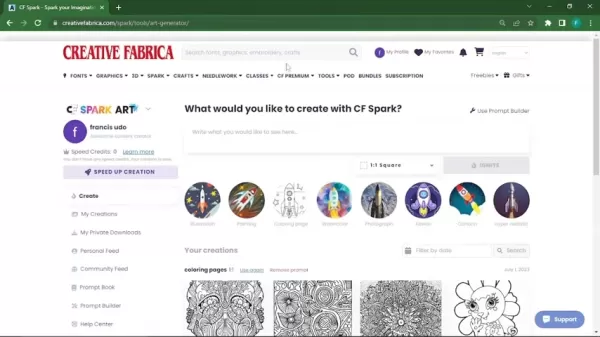
You can switch between CF Spark Art, CF Spark Patterns, and CF Spark Coloring Pages to generate a diverse collection of designs.
Canva AI: An Editing and Enhancement Powerhouse
Canva is a user-friendly graphic design platform known for its simplicity and vast collection of templates and design assets. Its AI features go beyond basic editing, empowering users to refine and improve coloring book layouts, adjust compositions, and create visually stunning pages. Whether you're starting from scratch or working with AI-generated content, Canva provides the tools necessary to polish and complete your coloring book project.
By merging the generative strength of Creative Fabrica with the editing power of Canva, you can produce coloring books efficiently and professionally.
Crafting Compelling Prompts for AI Coloring Pages
Understanding Prompt Engineering
Prompt engineering is a fundamental part of AI-driven design. A well-constructed prompt greatly impacts the quality and relevance of the generated output. The more precise and detailed your prompt, the better the AI can interpret and realize your creative concept.
Consider these components when creating effective prompts:
- Theme: Establish the overall theme for the coloring page (e.g., animals, nature, fantasy).
- Style: Indicate the preferred artistic style (e.g., mandala, cartoon, realistic).
- Subject: Describe the primary subject of the illustration (e.g., lion, fairy, flower).
- Details: Include specific elements or details you want in the design (e.g., butterflies, intricate patterns, certain colors if needed).
- Format: Specify the output format, typically referring to line art or black-and-white illustrations suitable for coloring.
For instance, a sample prompt might be: “Coloring book page featuring a lion's head in a mandala style."
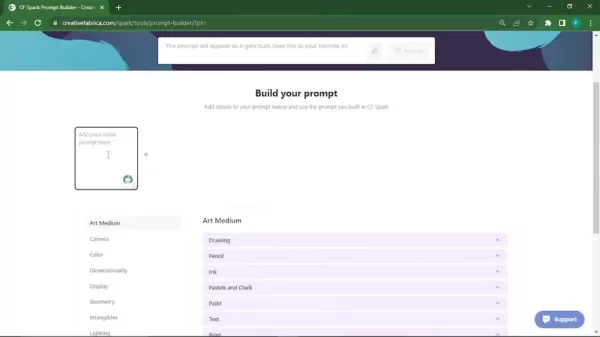
Experiment with various prompts to observe how the AI responds to your ideas. Using prompt builders, such as the one in Creative Fabrica, can help you formulate effective prompts by offering structured choices and recommendations.
Step-by-Step Prompt Engineering Process
Follow this step-by-step approach to prompt engineering for creating high-quality coloring book pages:
- Begin with a basic concept: Start with a general idea of what you want to create. For example, “a coloring page with flowers.”
- Add Style and Format details: Incorporate design and format specifications.
- Refine the Prompt: Evaluate the generated results and adjust the prompt by adding or modifying details until you achieve the desired design.
- Test Various Prompts: Try different prompts to uncover new and exciting design possibilities.
- Utilize Prompt Builders:
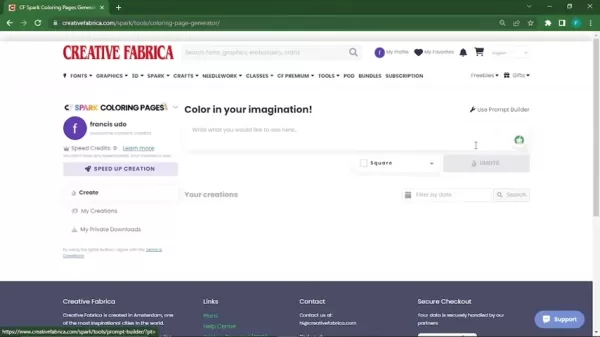
Employ tools like Creative Fabrica's prompt builder to create more organized and effective prompts.
Aspect Ratio and Formats for Coloring Pages
When developing coloring books, it's important to consider the aspect ratio and format of your pages. The aspect ratio defines the image proportions, while the format refers to the file type (e.g., JPG, PNG, SVG).
Common aspect ratios for coloring books include:
- Square (1:1): Ideal for Instagram posts and straightforward designs.
- Portrait (2:3 or 9:16): Perfect for posters, art prints, and social media stories.
- Landscape (16:9): Suitable for social media videos and wide-format art prints.
Your choice of format depends on your intended application. SVG files are excellent for scalability without quality loss, while JPG and PNG formats work well for general purposes. Both Creative Fabrica and Canva support multiple formats, letting you select the best one for your project.
How to Use Creative Fabrica and Canva AI to Create Coloring Books
Step 1: Generating Designs with Creative Fabrica AI
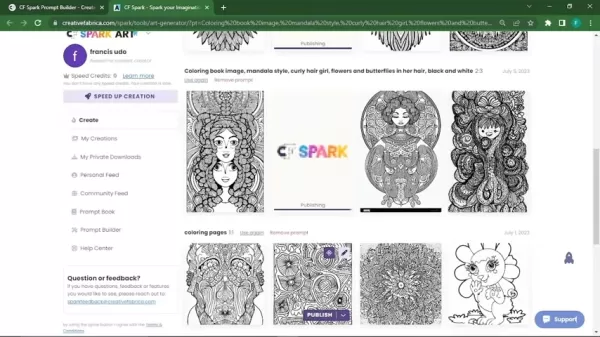
Access Creative Fabrica AI: Go to the Creative Fabrica website and open the AI Art Generator tool.
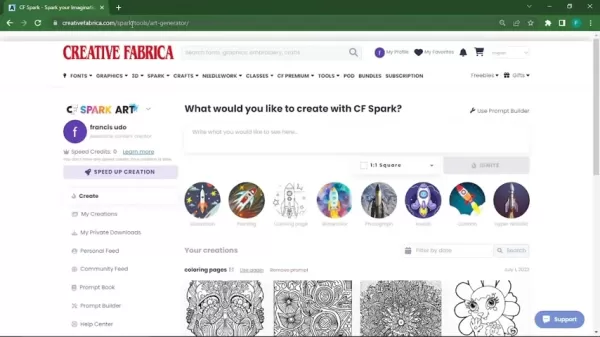
Select Coloring Pages Tool: Within the CF Spark Art section, locate and choose the coloring pages generation tool.
Enter Your Prompt: Use the prompt builder or manually type your crafted prompt into the text field. Creative Fabrica makes it simple to begin generating immediately.
Choose Aspect Ratio: Pick the desired aspect ratio for your coloring page.
Generate the Image: Click the “Ignite” button to create your coloring page. The AI will produce several variations based on your prompt.
Review and Refine: Examine the generated images and select the one that best matches your vision. You can modify or remove prompts if the results aren't satisfactory.
Step 2: Enhance and Customize with Canva AI
- Download Image from Creative Fabrica: After generating your image, download it in your preferred format.
- Open Canva: Launch Canva and start a new design with dimensions appropriate for a coloring book page (e.g., A4 portrait).
- Upload Image to Canva: Upload the image you downloaded from Creative Fabrica.
- Edit and Customize: Use Canva's editing tools to adjust brightness, contrast, and other visual properties to improve the coloring page.
- Add Additional Elements: Include extra design elements from Canva's library, such as borders, patterns, or text, to further personalize your coloring page.
- Utilize Canva AI Tools: Explore Canva's AI-powered features like Magic Eraser or Background Remover to fine-tune specific parts of your design.
Step 3: Iteration with Creative Fabrica’s Imagimix
- Select Spark Creation: Upload your chosen coloring page image.
- Click Generate: Choose your image to begin and click Generate to create similar variations.
- Download for use: Once the AI generates your images, you can download them for your coloring book.
Pricing
Creative Fabrica vs Canva
Creative Fabrica mainly uses a subscription model, with various plans granting access to its extensive library of fonts, graphics, and AI tools. Here's a summary of the pricing structures:
Feature Creative Fabrica Canva Subscription Offers an "All Access" subscription for unlimited access. Provides both free and paid "Pro" subscriptions. AI Usage AI tools are available to subscribers, with access levels varying by plan. AI features are included in Canva Pro, with some usage limits for free users. Commercial Use Includes a commercial license, permitting the use of generated content for business purposes. Commercial use is permitted based on licensing terms; Canva Pro offers more extensive commercial rights. Pricing Range Subscription plans range from $29 to $348 annually, depending on promotions and annual commitments. Free tier available; Canva Pro costs $12.99 per month or $119.99 per year. Team and Enterprise plans have custom pricing.
Advantages and Disadvantages of AI Coloring Book Creation
Pros
Greater Efficiency
Lower Costs
Creative Flexibility
Ease of Use
Cons
Potential Lack of Originality
Over-reliance on AI
Subscription Expenses
Core Features
Creative Fabrica
- AI-Powered Design Generation: Creates graphics from text prompts.
- Extensive Asset Library: Access to a vast collection of fonts, graphics, and design resources.
- Commercial Licensing: Enables the use of designs for numerous business and personal projects.
Canva
- User-Friendly Interface: Design effortlessly with drag-and-drop functionality.
- Vast Template Library: Canva provides numerous templates suitable for coloring books.
- Collaboration Features: Enable team collaboration on projects.
- AI-Driven Enhancements: Improve images with features that boost appeal and vibrancy.
Use Cases
Educational Coloring Books
Coloring books serve as effective educational tools for children. Use Creative Fabrica and Canva to design coloring pages that teach letters, numbers, and other fundamental concepts in a captivating and visually attractive manner. Themes can include animals, nature, historical figures, and scientific topics.
For example, create a coloring book that educates children about marine life and encourages ocean conservation.
Commercial Coloring Books for Adults
Adult coloring books are highly popular for stress relief and creative expression. Use Creative Fabrica's AI to produce detailed mandala designs, nature scenes, and abstract patterns. Then, employ Canva to design a professional layout, add a cover, and prepare the book for publishing on platforms like Amazon KDP or Etsy.
Personalized Coloring Books
Creating personalized coloring books can make for a unique and thoughtful gift. Use AI tools to generate coloring pages based on personal photos, interests, or the recipient's favorite themes. This personal touch makes the coloring book exceptionally special.
FAQ
Can I use the AI-generated content for commercial purposes?
Yes, Creative Fabrica includes a commercial license that allows you to use AI-generated content for business ventures. Canva Pro also provides broad commercial rights, though it's essential to check the specific licensing terms for compliance. Always verify that you have the appropriate commercial rights for your intended use.
Do I need advanced design skills to use these AI tools?
No, both Creative Fabrica AI and Canva AI are built to be intuitive and accessible, even for those with minimal design experience. While prompt engineering and basic editing knowledge are beneficial, the platforms are straightforward and offer ample support.
Are there any limitations to the types of coloring pages I can create?
The creative possibilities are nearly endless. You can design coloring pages with themes covering animals, nature, fantasy, educational content, and abstract art. Experiment with different prompts and styles to discover new creative directions.
Related Questions
How do I ensure that my coloring book stands out in a crowded market?
To distinguish your coloring book in a competitive market, focus on creativity, quality, and strategic marketing. Begin by identifying a unique niche or theme that differentiates your book from others. Consider targeting a specific audience, such as a particular genre, age group, or artistic style. Ensure your coloring pages are high-quality and visually appealing. Here are some additional tips:Marketing: Promote your new book on platforms like Etsy or Amazon.Licensing: Be aware of the permissions granted under your subscription plan.
Related article
 Stripe to Acquire OpenRouter as AI Model Routing Gains Momentum
Stripe has agreed to acquire OpenRouter, an AI model-routing platform that gives developers access to hundreds of models through a single interface. The deal adds model selection and routing to Stripe’s existing work around AI usage and token-based b
Former OpenAI Researcher Barrett Zoph Returns to Google to Support Gemini Development
Barret Zoph, who previously abruptly left and joined OpenAI due to a disagreement with Thinking Machines Lab CEO Miriam Mularati, has once again changed employers. Alphabet's Google announced that Zoph will return as Vice President of Research, bring
How Recursive Intelligence Raised $335M at $4B Valuation in 4 Months
The co-founders of startup Ricursive Intelligence seemed destined to be co-founders.Anna Goldie, CEO, and Azalia Mirhoseini, CTO, are so well-known in the AI community that they were among those AI engineers who “got those weird emails from Zuckerber
Related Special Topic Recommendations
Design & Art
Stripe to Acquire OpenRouter as AI Model Routing Gains Momentum
Stripe has agreed to acquire OpenRouter, an AI model-routing platform that gives developers access to hundreds of models through a single interface. The deal adds model selection and routing to Stripe’s existing work around AI usage and token-based b
Former OpenAI Researcher Barrett Zoph Returns to Google to Support Gemini Development
Barret Zoph, who previously abruptly left and joined OpenAI due to a disagreement with Thinking Machines Lab CEO Miriam Mularati, has once again changed employers. Alphabet's Google announced that Zoph will return as Vice President of Research, bring
How Recursive Intelligence Raised $335M at $4B Valuation in 4 Months
The co-founders of startup Ricursive Intelligence seemed destined to be co-founders.Anna Goldie, CEO, and Azalia Mirhoseini, CTO, are so well-known in the AI community that they were among those AI engineers who “got those weird emails from Zuckerber
Related Special Topic Recommendations
Design & Art
 Top AI Illustration Tools: Create Editorial Scenes and Cover Art Faster
2026 Latest Top-rated AI Illustration Tools: Our curated list features the best powerfully designed tools for creating stunning editorial scenes and eye-catching cover art quickly. Each option has gone through rigorous real-world tests, offering a free vs paid comparison to help you find the perfect match for your workflow. Try these must-try solutions today to unlock your AI edge and boost your creative productivity. Explore now at XIX.AI.
 10 tools
 xix.ai
Education and Learning
Top AI Tutors for Exam Prep: Practice Math, Science, and English
xix.ai
Education and Learning
Top AI Tutors for Exam Prep: Practice Math, Science, and English
2026 Latest Top-Rated Best AI Tutors for Exam Prep are here on XIX.AI! Our curated list features powerful game-changing tools that offer free vs paid comparison, real-world tests, and weekly updated rankings. They help boost your writing efficiency, simplify complex topic learning, and unlock your academic potential. Explore now to Discover your perfect exam prep tool and Start creating today to Unlock your AI edge!
10 tools
xix.ai
Finance
AI Budget Planning Tools for Personal Money Management
2026 Latest Best Top-Rated AI Budget Planning Tools for Personal Money Management are here on XIX.AI! This curated collection features powerful, game-changing solutions that help you conduct real-world tests, understand spending habits, and create personalized plans to boost productivity. Enjoy a free vs paid comparison along with detailed rankings. Must-try tools designed to simplify money management and unlock your AI edge. Explore now!
11 tools
xix.ai
Health & Wellness
AI Sleep Tracking Assistants: Improve Recovery with Better Bedtime Habits
2026 Latest Best Top-Rated AI Sleep Tracking Assistants curated for ultimate recovery. This fully updated weekly guide features powerful tools that deliver real-world tests, free vs paid comparison, and detailed rankings to help you find the must-try solution that boosts sleep quality and supports better bedtime habits. Explore now at XIX.AI to Unlock your AI edge.
10 tools
xix.ai
Data Analysis
AI SQL Copilots for Product and Revenue Analytics
2026 Latest Best Top-Rated AI SQL Copilots for Product and Revenue Analytics! XIX.AI has curated a powerful, game-changing collection of must-try tools that undergo real-world tests through weekly updated rankings. These tools help users boost productivity significantly by accelerating data analysis, streamlining complex queries, and generating accurate insights to drive smarter business decisions. Explore now to Discover your perfect tool for unlocking your AI edge!
14 tools
xix.ai
Education and Learning
Best AI Homework Helpers That Teach: Learn Concepts, Not Just Answers
2026 Latest Best Top-Rated AI Homework Helpers That Teach Core Concepts Not Just Answers Powerful Tools for Students Must-Try Curated List Weekly Updated Free vs Paid Comparison Real-World Tests Accurate Rankings to Help You Unlock Your Full Learning Potential Explore now to Discover your perfect tool for smarter studying.
10 tools
xix.ai

 Comments (1)
0/500
Comments (1)
0/500
![EdwardTaylor]()
カラーリングブックの作成がAIでこんなに簡単になるとは驚きです!クリエイターや教育者にとって夢のようなツールですね。Creative FabricaとCanvaの連携は素晴らしいアイデアだと思います。ただ、著作権やオリジナル性の問題は依然として残りますし、AIが生成した線画のクオリティにばらつきがあるのも気になります。でも、アイデア出しの段階で使えるのは確かに便利。今後、より高度なカスタマイズ機能が登場することを期待しています。🎨✨
Creating coloring books has become an incredibly popular pursuit for artists, educators, and entrepreneurs. With the rise of AI technology, this process is now more accessible and streamlined. This guide provides a complete walkthrough for crafting unique and captivating coloring books using Creative Fabrica AI and Canva AI. Learn how these tools can simplify your design workflow, unlock your creativity, and help you produce professional-quality coloring books for diverse audiences.
Key Points
Use Creative Fabrica AI to quickly generate one-of-a-kind coloring pages.
Leverage Canva AI for editing and refining your coloring book designs.
Master prompt engineering techniques to achieve your desired coloring book themes.
Discover how to integrate both platforms for a seamless design process.
Explore different applications for coloring books, including educational and commercial uses.
Introduction to AI-Powered Coloring Book Creation
The Rise of AI in Creative Design
Artificial intelligence is transforming countless industries, and creative design is a prime example. AI-powered tools have made professional-grade design accessible to everyone, even those with limited technical expertise. For coloring book creation, AI can generate detailed illustrations, assist with layout, and simplify the entire production process. This enables creators to concentrate on their artistic ideas rather than time-consuming manual work. Creative Fabrica and Canva AI are two leading platforms that offer specialized features for creating coloring books.
Creative Fabrica AI: A Powerful Design Generator
Creative Fabrica is a popular resource for fonts, graphics, and craft projects. Its AI capabilities allow users to generate various forms of artwork, including coloring pages. By entering specific prompts, you can create custom illustrations tailored to your project. The platform provides several AI tools focused on pattern design, image remixing, and sketching. This flexibility makes it a top choice for designers and hobbyists looking to produce a wide array of engaging coloring books.
Creative Fabrica's AI offers an excellent method for creating coloring books, especially when combined with Canva's editing features.
You can switch between CF Spark Art, CF Spark Patterns, and CF Spark Coloring Pages to generate a diverse collection of designs.
Canva AI: An Editing and Enhancement Powerhouse
Canva is a user-friendly graphic design platform known for its simplicity and vast collection of templates and design assets. Its AI features go beyond basic editing, empowering users to refine and improve coloring book layouts, adjust compositions, and create visually stunning pages. Whether you're starting from scratch or working with AI-generated content, Canva provides the tools necessary to polish and complete your coloring book project.
By merging the generative strength of Creative Fabrica with the editing power of Canva, you can produce coloring books efficiently and professionally.
Crafting Compelling Prompts for AI Coloring Pages
Understanding Prompt Engineering
Prompt engineering is a fundamental part of AI-driven design. A well-constructed prompt greatly impacts the quality and relevance of the generated output. The more precise and detailed your prompt, the better the AI can interpret and realize your creative concept.
Consider these components when creating effective prompts:
- Theme: Establish the overall theme for the coloring page (e.g., animals, nature, fantasy).
- Style: Indicate the preferred artistic style (e.g., mandala, cartoon, realistic).
- Subject: Describe the primary subject of the illustration (e.g., lion, fairy, flower).
- Details: Include specific elements or details you want in the design (e.g., butterflies, intricate patterns, certain colors if needed).
- Format: Specify the output format, typically referring to line art or black-and-white illustrations suitable for coloring.
For instance, a sample prompt might be: “Coloring book page featuring a lion's head in a mandala style."
Experiment with various prompts to observe how the AI responds to your ideas. Using prompt builders, such as the one in Creative Fabrica, can help you formulate effective prompts by offering structured choices and recommendations.
Step-by-Step Prompt Engineering Process
Follow this step-by-step approach to prompt engineering for creating high-quality coloring book pages:
- Begin with a basic concept: Start with a general idea of what you want to create. For example, “a coloring page with flowers.”
- Add Style and Format details: Incorporate design and format specifications.
- Refine the Prompt: Evaluate the generated results and adjust the prompt by adding or modifying details until you achieve the desired design.
- Test Various Prompts: Try different prompts to uncover new and exciting design possibilities.
- Utilize Prompt Builders:
Employ tools like Creative Fabrica's prompt builder to create more organized and effective prompts.
Aspect Ratio and Formats for Coloring Pages
When developing coloring books, it's important to consider the aspect ratio and format of your pages. The aspect ratio defines the image proportions, while the format refers to the file type (e.g., JPG, PNG, SVG).
Common aspect ratios for coloring books include:
- Square (1:1): Ideal for Instagram posts and straightforward designs.
- Portrait (2:3 or 9:16): Perfect for posters, art prints, and social media stories.
- Landscape (16:9): Suitable for social media videos and wide-format art prints.
Your choice of format depends on your intended application. SVG files are excellent for scalability without quality loss, while JPG and PNG formats work well for general purposes. Both Creative Fabrica and Canva support multiple formats, letting you select the best one for your project.
How to Use Creative Fabrica and Canva AI to Create Coloring Books
Step 1: Generating Designs with Creative Fabrica AI
Access Creative Fabrica AI: Go to the Creative Fabrica website and open the AI Art Generator tool.
Select Coloring Pages Tool: Within the CF Spark Art section, locate and choose the coloring pages generation tool.
Enter Your Prompt: Use the prompt builder or manually type your crafted prompt into the text field. Creative Fabrica makes it simple to begin generating immediately.
Choose Aspect Ratio: Pick the desired aspect ratio for your coloring page.
Generate the Image: Click the “Ignite” button to create your coloring page. The AI will produce several variations based on your prompt.
Review and Refine: Examine the generated images and select the one that best matches your vision. You can modify or remove prompts if the results aren't satisfactory.
Step 2: Enhance and Customize with Canva AI
- Download Image from Creative Fabrica: After generating your image, download it in your preferred format.
- Open Canva: Launch Canva and start a new design with dimensions appropriate for a coloring book page (e.g., A4 portrait).
- Upload Image to Canva: Upload the image you downloaded from Creative Fabrica.
- Edit and Customize: Use Canva's editing tools to adjust brightness, contrast, and other visual properties to improve the coloring page.
- Add Additional Elements: Include extra design elements from Canva's library, such as borders, patterns, or text, to further personalize your coloring page.
- Utilize Canva AI Tools: Explore Canva's AI-powered features like Magic Eraser or Background Remover to fine-tune specific parts of your design.
Step 3: Iteration with Creative Fabrica’s Imagimix
- Select Spark Creation: Upload your chosen coloring page image.
- Click Generate: Choose your image to begin and click Generate to create similar variations.
- Download for use: Once the AI generates your images, you can download them for your coloring book.
Pricing
Creative Fabrica vs Canva
Creative Fabrica mainly uses a subscription model, with various plans granting access to its extensive library of fonts, graphics, and AI tools. Here's a summary of the pricing structures:
| Feature | Creative Fabrica | Canva |
|---|---|---|
| Subscription | Offers an "All Access" subscription for unlimited access. | Provides both free and paid "Pro" subscriptions. |
| AI Usage | AI tools are available to subscribers, with access levels varying by plan. | AI features are included in Canva Pro, with some usage limits for free users. |
| Commercial Use | Includes a commercial license, permitting the use of generated content for business purposes. | Commercial use is permitted based on licensing terms; Canva Pro offers more extensive commercial rights. |
| Pricing Range | Subscription plans range from $29 to $348 annually, depending on promotions and annual commitments. | Free tier available; Canva Pro costs $12.99 per month or $119.99 per year. Team and Enterprise plans have custom pricing. |
Advantages and Disadvantages of AI Coloring Book Creation
Pros
Greater Efficiency
Lower Costs
Creative Flexibility
Ease of Use
Cons
Potential Lack of Originality
Over-reliance on AI
Subscription Expenses
Core Features
Creative Fabrica
- AI-Powered Design Generation: Creates graphics from text prompts.
- Extensive Asset Library: Access to a vast collection of fonts, graphics, and design resources.
- Commercial Licensing: Enables the use of designs for numerous business and personal projects.
Canva
- User-Friendly Interface: Design effortlessly with drag-and-drop functionality.
- Vast Template Library: Canva provides numerous templates suitable for coloring books.
- Collaboration Features: Enable team collaboration on projects.
- AI-Driven Enhancements: Improve images with features that boost appeal and vibrancy.
Use Cases
Educational Coloring Books
Coloring books serve as effective educational tools for children. Use Creative Fabrica and Canva to design coloring pages that teach letters, numbers, and other fundamental concepts in a captivating and visually attractive manner. Themes can include animals, nature, historical figures, and scientific topics.
For example, create a coloring book that educates children about marine life and encourages ocean conservation.
Commercial Coloring Books for Adults
Adult coloring books are highly popular for stress relief and creative expression. Use Creative Fabrica's AI to produce detailed mandala designs, nature scenes, and abstract patterns. Then, employ Canva to design a professional layout, add a cover, and prepare the book for publishing on platforms like Amazon KDP or Etsy.
Personalized Coloring Books
Creating personalized coloring books can make for a unique and thoughtful gift. Use AI tools to generate coloring pages based on personal photos, interests, or the recipient's favorite themes. This personal touch makes the coloring book exceptionally special.
FAQ
Can I use the AI-generated content for commercial purposes?
Yes, Creative Fabrica includes a commercial license that allows you to use AI-generated content for business ventures. Canva Pro also provides broad commercial rights, though it's essential to check the specific licensing terms for compliance. Always verify that you have the appropriate commercial rights for your intended use.
Do I need advanced design skills to use these AI tools?
No, both Creative Fabrica AI and Canva AI are built to be intuitive and accessible, even for those with minimal design experience. While prompt engineering and basic editing knowledge are beneficial, the platforms are straightforward and offer ample support.
Are there any limitations to the types of coloring pages I can create?
The creative possibilities are nearly endless. You can design coloring pages with themes covering animals, nature, fantasy, educational content, and abstract art. Experiment with different prompts and styles to discover new creative directions.
Related Questions
How do I ensure that my coloring book stands out in a crowded market?
To distinguish your coloring book in a competitive market, focus on creativity, quality, and strategic marketing. Begin by identifying a unique niche or theme that differentiates your book from others. Consider targeting a specific audience, such as a particular genre, age group, or artistic style. Ensure your coloring pages are high-quality and visually appealing. Here are some additional tips:Marketing: Promote your new book on platforms like Etsy or Amazon.Licensing: Be aware of the permissions granted under your subscription plan.








 Stripe to Acquire OpenRouter as AI Model Routing Gains Momentum
Stripe has agreed to acquire OpenRouter, an AI model-routing platform that gives developers access to hundreds of models through a single interface. The deal adds model selection and routing to Stripe’s existing work around AI usage and token-based b
Stripe to Acquire OpenRouter as AI Model Routing Gains Momentum
Stripe has agreed to acquire OpenRouter, an AI model-routing platform that gives developers access to hundreds of models through a single interface. The deal adds model selection and routing to Stripe’s existing work around AI usage and token-based b
 Former OpenAI Researcher Barrett Zoph Returns to Google to Support Gemini Development
Barret Zoph, who previously abruptly left and joined OpenAI due to a disagreement with Thinking Machines Lab CEO Miriam Mularati, has once again changed employers. Alphabet's Google announced that Zoph will return as Vice President of Research, bring
Former OpenAI Researcher Barrett Zoph Returns to Google to Support Gemini Development
Barret Zoph, who previously abruptly left and joined OpenAI due to a disagreement with Thinking Machines Lab CEO Miriam Mularati, has once again changed employers. Alphabet's Google announced that Zoph will return as Vice President of Research, bring
 How Recursive Intelligence Raised $335M at $4B Valuation in 4 Months
The co-founders of startup Ricursive Intelligence seemed destined to be co-founders.Anna Goldie, CEO, and Azalia Mirhoseini, CTO, are so well-known in the AI community that they were among those AI engineers who “got those weird emails from Zuckerber
How Recursive Intelligence Raised $335M at $4B Valuation in 4 Months
The co-founders of startup Ricursive Intelligence seemed destined to be co-founders.Anna Goldie, CEO, and Azalia Mirhoseini, CTO, are so well-known in the AI community that they were among those AI engineers who “got those weird emails from Zuckerber

2026 Latest Top-rated AI Illustration Tools: Our curated list features the best powerfully designed tools for creating stunning editorial scenes and eye-catching cover art quickly. Each option has gone through rigorous real-world tests, offering a free vs paid comparison to help you find the perfect match for your workflow. Try these must-try solutions today to unlock your AI edge and boost your creative productivity. Explore now at XIX.AI.
10 tools
xix.ai

2026 Latest Top-Rated Best AI Tutors for Exam Prep are here on XIX.AI! Our curated list features powerful game-changing tools that offer free vs paid comparison, real-world tests, and weekly updated rankings. They help boost your writing efficiency, simplify complex topic learning, and unlock your academic potential. Explore now to Discover your perfect exam prep tool and Start creating today to Unlock your AI edge!
10 tools
xix.ai

2026 Latest Best Top-Rated AI Budget Planning Tools for Personal Money Management are here on XIX.AI! This curated collection features powerful, game-changing solutions that help you conduct real-world tests, understand spending habits, and create personalized plans to boost productivity. Enjoy a free vs paid comparison along with detailed rankings. Must-try tools designed to simplify money management and unlock your AI edge. Explore now!
11 tools
xix.ai

2026 Latest Best Top-Rated AI Sleep Tracking Assistants curated for ultimate recovery. This fully updated weekly guide features powerful tools that deliver real-world tests, free vs paid comparison, and detailed rankings to help you find the must-try solution that boosts sleep quality and supports better bedtime habits. Explore now at XIX.AI to Unlock your AI edge.
10 tools
xix.ai

2026 Latest Best Top-Rated AI SQL Copilots for Product and Revenue Analytics! XIX.AI has curated a powerful, game-changing collection of must-try tools that undergo real-world tests through weekly updated rankings. These tools help users boost productivity significantly by accelerating data analysis, streamlining complex queries, and generating accurate insights to drive smarter business decisions. Explore now to Discover your perfect tool for unlocking your AI edge!
14 tools
xix.ai

2026 Latest Best Top-Rated AI Homework Helpers That Teach Core Concepts Not Just Answers Powerful Tools for Students Must-Try Curated List Weekly Updated Free vs Paid Comparison Real-World Tests Accurate Rankings to Help You Unlock Your Full Learning Potential Explore now to Discover your perfect tool for smarter studying.
10 tools
xix.ai

カラーリングブックの作成がAIでこんなに簡単になるとは驚きです!クリエイターや教育者にとって夢のようなツールですね。Creative FabricaとCanvaの連携は素晴らしいアイデアだと思います。ただ、著作権やオリジナル性の問題は依然として残りますし、AIが生成した線画のクオリティにばらつきがあるのも気になります。でも、アイデア出しの段階で使えるのは確かに便利。今後、より高度なカスタマイズ機能が登場することを期待しています。🎨✨












