


 Home
HomeKreado AI Guide: Creating Full Body AI Videos Step by Step
Thanks to advancements in Artificial Intelligence (AI), producing compelling video content is now more accessible than ever. This comprehensive guide explores how to use Kreado AI for creating full-body avatar videos. Whether you work in marketing, education, or content creation, generating realistic videos with full-body movement can significantly boost your online presence and captivate your audience.
Key Points
Easily learn to create AI-powered full-body videos.
Discover Kreado AI and explore its key features.
Follow step-by-step instructions to produce your own videos.
Tailor your AI avatar to align with your brand identity.
Optimize your video content for maximum audience engagement.
Introduction to AI Video Creation
The Rise of AI in Video Production
AI is transforming video production by offering accessible and cost-effective tools for creating high-quality content. Traditional video production often demands significant resources, including professional gear, actors, and editing skills. AI-driven platforms remove many of these barriers, enabling individuals and businesses to create compelling videos with minimal effort and investment.
Generating videos with realistic full-body avatars adds a new layer to digital content creation. These AI avatars can be customized to represent different personas, delivering messages that resonate with viewers. The full-body aspect increases realism and engagement, making the content more relatable and impactful.

This approach is an excellent way to save time and avoid the costs associated with video sets or actors.
What is Kreado AI?
Kreado AI is an AI-powered platform designed to simplify the creation of digital marketing content. It specializes in producing digital podcast videos that utilize digital human technology. Users can generate videos using AI avatars, text-to-speech synthesis, and customizable backgrounds. The platform makes video creation accessible to everyone, regardless of technical skill or budget.
Key Features of Kreado AI include:
- AI Avatars: A wide selection of customizable avatars with full-body support.
- Text-to-Speech: Convert text into realistic voiceovers in multiple languages.
- Customizable Templates: Pre-designed templates for various applications.
- Easy Editing Tools: A user-friendly interface for video customization and enhancement.
Step-by-Step Guide to Creating Full Body AI Videos with Kreado AI
Accessing Kreado AI
The first step is to access the Kreado AI platform. Since it is a web-based tool, you'll need to use the Google Chrome browser.
- Open Chrome Browser: Launch Chrome on your device.
- Search for Kreado AI: Enter "kreadoai" into the search bar.
- Access the Website: Click the first link that appears. Alternatively, go directly to https://www.kreadoai.com/.
Signing Up and Navigating the Platform
Once on the Kreado AI website, sign up for a free trial to explore its features.
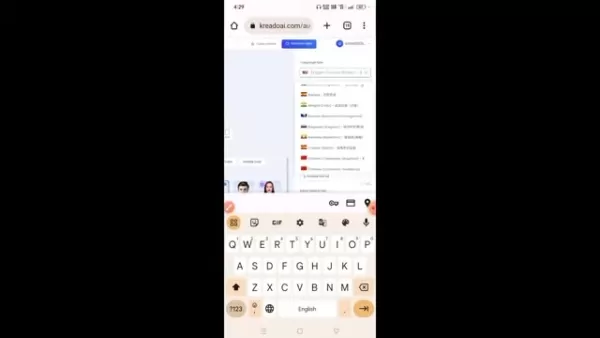
- Start Free Trial: Click the “Free Trial” button to begin registration.
- Email Registration: Provide your email address to sign up, which is required to access all features.
- Confirm Account: Verify your email address using the link sent to your inbox.
After signing up, take time to explore the platform's layout. The dashboard provides access to various AI-powered tools, including:
- Digital Human Video Creation
- AI Copywriting
- AI Text Dubbing
- AI Model
- AI Smart Cutout
Creating Your First AI Video
Now, let's create your first AI video with full-body movement.
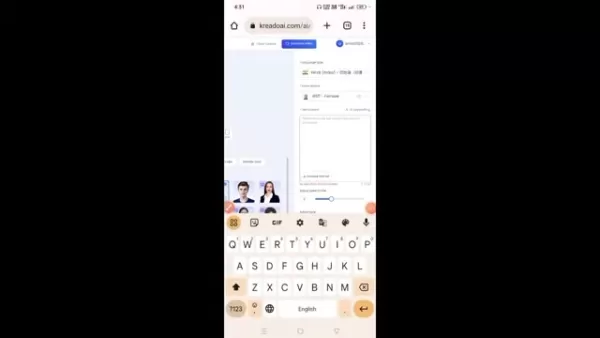
- Start Creating: Click “Start Creating” under the Digital Human Video Creation section.
- Choose a Character: Select an AI character from the library. Kreado AI offers a diverse range of avatars for different use cases. Browse carefully to find the one that best fits your needs.
- Select Character Type: On the right side of the page, choose the language and voice type for your avatar. You can select accents such as Middle Eastern, Indian, or Asian, depending on your target audience.
Customizing Your AI Avatar
Personalization is key to making your videos stand out. Kreado AI allows you to adjust several parameters to create a unique avatar.
Script Input: Enter the script you want the AI avatar to deliver. Keep it clear and concise.
Adjust Speech Rate: Control the avatar’s speaking speed to match your content’s tone. A speed between 9 and 10 is commonly used.
Generate and Review: Click “Audition” to preview the avatar reading your script. This allows you to fine-tune the speech rate and tone before finalizing the video.
Generate and Download Your Video
Once your avatar is customized, generate the final video.
- Generate Video: Click the “Generate Video” button to start the process.
- Wait for Completion: Video generation typically takes 1–2 minutes.
- Download and Share: Once generated, the video will appear on the next page. Click the download button to save it to your device, then share it across your social media channels.
Editing the Generated Video in Kinemaster
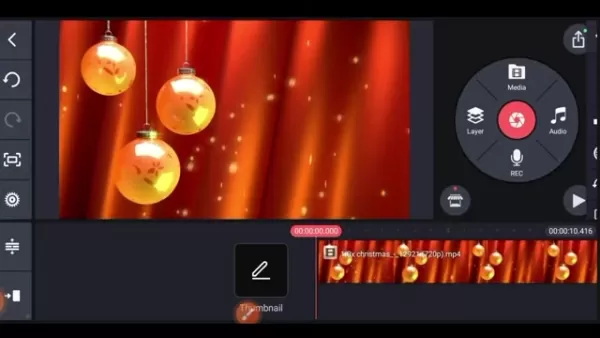
Edit your video in Kinemaster to add effects and remove the green screen.
- Open Kinemaster and start a new project.
- Add a non-green background to your project.
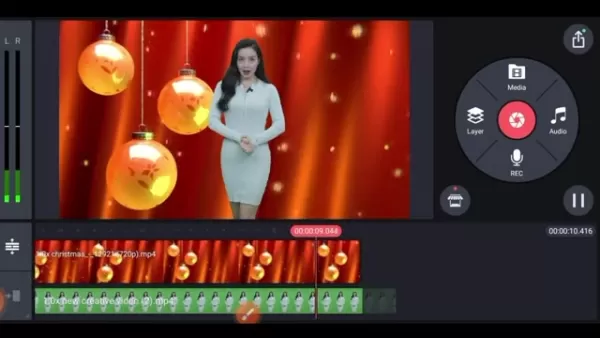
- Import the AI video you downloaded earlier.
- Use the chroma key tool to remove the green screen.
Kreado AI Pricing Plans
Affordable Solutions for Every Creator
Kreado AI offers various pricing plans to suit different needs and budgets. While a free trial is available, a paid plan may be more suitable for extended use. These plans provide a good balance of credits and features. For detailed pricing information, visit https://www.kreadoai.com/pricing.
Pros and Cons of Kreado AI
Pros
User-friendly interface
High-quality AI avatars
Multilingual text-to-speech capability
Customizable templates and backgrounds
Cost-effective solution
Cons
Limited features in the free trial
AI algorithms may lack creative nuance
Requires an internet connection
Some advanced features have a learning curve
Core Features of Kreado AI
Unleashing the Power of AI for Video Creation
Kreado AI excels as a platform for full-body AI video creation, thanks to its robust core features. These tools are designed to simplify and enhance the video production process, helping users create high-quality, engaging content with ease.
AI Avatars with Full Body Support: Choose from a wide range of avatars that feature realistic full-body movements, enhancing engagement.

Text-to-Speech Synthesis: Convert text into natural-sounding speech in multiple languages, eliminating the need for voice actors.
Customizable Templates and Backgrounds: Access a variety of pre-designed templates and backgrounds to create visually appealing videos tailored to your brand.
User-Friendly Editing Tools: Customize your videos using intuitive drag-and-drop tools for a polished final product.
Use Cases for Full Body AI Videos
Diverse Applications Across Industries
Full-body AI videos offer versatile applications across numerous industries. They enhance communication, education, and marketing efforts in various sectors.

- Marketing: Create engaging ads and promotional videos to capture audience attention and drive conversions.
- Education: Develop interactive e-learning modules and training videos with realistic AI instructors to improve knowledge retention.
- Customer Service: Design AI-powered support avatars to handle inquiries and offer personalized assistance.
- Social Media: Produce captivating content for platforms like YouTube, Instagram, and TikTok to grow your online following.
Frequently Asked Questions about Kreado AI
Is Kreado AI really free to use?
Kreado AI offers a free trial that includes access to most core features. For extended use, a paid subscription is required.
Can I use Kreado AI on my mobile phone?
Yes, Kreado AI is accessible on mobile devices via its website.
How do I know if a video is an AI Video?
With the right knowledge and tools, such as those offered by Kreado AI, you can create videos that are difficult to distinguish from those made without AI.
Related Questions on AI Video Creation
What are the limitations of using AI for video creation?
While AI offers many benefits, it also has limitations. AI-generated content may sometimes lack creativity or emotional depth, as algorithms rely on existing patterns and data. Additionally, AI tools might struggle with complex storytelling or cultural nuances, resulting in generic or insensitive content. Combining AI capabilities with human creativity and oversight helps mitigate these issues, ensuring the final output is engaging, relevant, and ethically sound.
Related article
 Former OpenAI Researcher Barrett Zoph Returns to Google to Support Gemini Development
Barret Zoph, who previously abruptly left and joined OpenAI due to a disagreement with Thinking Machines Lab CEO Miriam Mularati, has once again changed employers. Alphabet's Google announced that Zoph will return as Vice President of Research, bring
How Recursive Intelligence Raised $335M at $4B Valuation in 4 Months
The co-founders of startup Ricursive Intelligence seemed destined to be co-founders.Anna Goldie, CEO, and Azalia Mirhoseini, CTO, are so well-known in the AI community that they were among those AI engineers who “got those weird emails from Zuckerber
AI race won’t wait, nor will this TechCrunch Disrupt 25% discount
Every founder building in AI right now is asking the same question: Are we moving fast enough, and effectively enough? TechCrunch Disrupt 2026 puts you in the same room as the people wrestling with that existential question at the highest levels. Fro
Related Special Topic Recommendations
Design & Art
Former OpenAI Researcher Barrett Zoph Returns to Google to Support Gemini Development
Barret Zoph, who previously abruptly left and joined OpenAI due to a disagreement with Thinking Machines Lab CEO Miriam Mularati, has once again changed employers. Alphabet's Google announced that Zoph will return as Vice President of Research, bring
How Recursive Intelligence Raised $335M at $4B Valuation in 4 Months
The co-founders of startup Ricursive Intelligence seemed destined to be co-founders.Anna Goldie, CEO, and Azalia Mirhoseini, CTO, are so well-known in the AI community that they were among those AI engineers who “got those weird emails from Zuckerber
AI race won’t wait, nor will this TechCrunch Disrupt 25% discount
Every founder building in AI right now is asking the same question: Are we moving fast enough, and effectively enough? TechCrunch Disrupt 2026 puts you in the same room as the people wrestling with that existential question at the highest levels. Fro
Related Special Topic Recommendations
Design & Art
 Top AI Illustration Tools: Create Editorial Scenes and Cover Art Faster
2026 Latest Top-rated AI Illustration Tools: Our curated list features the best powerfully designed tools for creating stunning editorial scenes and eye-catching cover art quickly. Each option has gone through rigorous real-world tests, offering a free vs paid comparison to help you find the perfect match for your workflow. Try these must-try solutions today to unlock your AI edge and boost your creative productivity. Explore now at XIX.AI.
 10 tools
 xix.ai
Education and Learning
Top AI Tutors for Exam Prep: Practice Math, Science, and English
xix.ai
Education and Learning
Top AI Tutors for Exam Prep: Practice Math, Science, and English
2026 Latest Top-Rated Best AI Tutors for Exam Prep are here on XIX.AI! Our curated list features powerful game-changing tools that offer free vs paid comparison, real-world tests, and weekly updated rankings. They help boost your writing efficiency, simplify complex topic learning, and unlock your academic potential. Explore now to Discover your perfect exam prep tool and Start creating today to Unlock your AI edge!
10 tools
xix.ai
Finance
AI Budget Planning Tools for Personal Money Management
2026 Latest Best Top-Rated AI Budget Planning Tools for Personal Money Management are here on XIX.AI! This curated collection features powerful, game-changing solutions that help you conduct real-world tests, understand spending habits, and create personalized plans to boost productivity. Enjoy a free vs paid comparison along with detailed rankings. Must-try tools designed to simplify money management and unlock your AI edge. Explore now!
11 tools
xix.ai
Health & Wellness
AI Sleep Tracking Assistants: Improve Recovery with Better Bedtime Habits
2026 Latest Best Top-Rated AI Sleep Tracking Assistants curated for ultimate recovery. This fully updated weekly guide features powerful tools that deliver real-world tests, free vs paid comparison, and detailed rankings to help you find the must-try solution that boosts sleep quality and supports better bedtime habits. Explore now at XIX.AI to Unlock your AI edge.
10 tools
xix.ai
Data Analysis
AI SQL Copilots for Product and Revenue Analytics
2026 Latest Best Top-Rated AI SQL Copilots for Product and Revenue Analytics! XIX.AI has curated a powerful, game-changing collection of must-try tools that undergo real-world tests through weekly updated rankings. These tools help users boost productivity significantly by accelerating data analysis, streamlining complex queries, and generating accurate insights to drive smarter business decisions. Explore now to Discover your perfect tool for unlocking your AI edge!
14 tools
xix.ai
Education and Learning
Best AI Homework Helpers That Teach: Learn Concepts, Not Just Answers
2026 Latest Best Top-Rated AI Homework Helpers That Teach Core Concepts Not Just Answers Powerful Tools for Students Must-Try Curated List Weekly Updated Free vs Paid Comparison Real-World Tests Accurate Rankings to Help You Unlock Your Full Learning Potential Explore now to Discover your perfect tool for smarter studying.
10 tools
xix.ai

 Comments (0)
0/500
Comments (0)
0/500
Thanks to advancements in Artificial Intelligence (AI), producing compelling video content is now more accessible than ever. This comprehensive guide explores how to use Kreado AI for creating full-body avatar videos. Whether you work in marketing, education, or content creation, generating realistic videos with full-body movement can significantly boost your online presence and captivate your audience.
Key Points
Easily learn to create AI-powered full-body videos.
Discover Kreado AI and explore its key features.
Follow step-by-step instructions to produce your own videos.
Tailor your AI avatar to align with your brand identity.
Optimize your video content for maximum audience engagement.
Introduction to AI Video Creation
The Rise of AI in Video Production
AI is transforming video production by offering accessible and cost-effective tools for creating high-quality content. Traditional video production often demands significant resources, including professional gear, actors, and editing skills. AI-driven platforms remove many of these barriers, enabling individuals and businesses to create compelling videos with minimal effort and investment.
Generating videos with realistic full-body avatars adds a new layer to digital content creation. These AI avatars can be customized to represent different personas, delivering messages that resonate with viewers. The full-body aspect increases realism and engagement, making the content more relatable and impactful.
This approach is an excellent way to save time and avoid the costs associated with video sets or actors.
What is Kreado AI?
Kreado AI is an AI-powered platform designed to simplify the creation of digital marketing content. It specializes in producing digital podcast videos that utilize digital human technology. Users can generate videos using AI avatars, text-to-speech synthesis, and customizable backgrounds. The platform makes video creation accessible to everyone, regardless of technical skill or budget.
Key Features of Kreado AI include:
- AI Avatars: A wide selection of customizable avatars with full-body support.
- Text-to-Speech: Convert text into realistic voiceovers in multiple languages.
- Customizable Templates: Pre-designed templates for various applications.
- Easy Editing Tools: A user-friendly interface for video customization and enhancement.
Step-by-Step Guide to Creating Full Body AI Videos with Kreado AI
Accessing Kreado AI
The first step is to access the Kreado AI platform. Since it is a web-based tool, you'll need to use the Google Chrome browser.
- Open Chrome Browser: Launch Chrome on your device.
- Search for Kreado AI: Enter "kreadoai" into the search bar.
- Access the Website: Click the first link that appears. Alternatively, go directly to https://www.kreadoai.com/.
Signing Up and Navigating the Platform
Once on the Kreado AI website, sign up for a free trial to explore its features.
- Start Free Trial: Click the “Free Trial” button to begin registration.
- Email Registration: Provide your email address to sign up, which is required to access all features.
- Confirm Account: Verify your email address using the link sent to your inbox.
After signing up, take time to explore the platform's layout. The dashboard provides access to various AI-powered tools, including:
- Digital Human Video Creation
- AI Copywriting
- AI Text Dubbing
- AI Model
- AI Smart Cutout
Creating Your First AI Video
Now, let's create your first AI video with full-body movement.
- Start Creating: Click “Start Creating” under the Digital Human Video Creation section.
- Choose a Character: Select an AI character from the library. Kreado AI offers a diverse range of avatars for different use cases. Browse carefully to find the one that best fits your needs.
- Select Character Type: On the right side of the page, choose the language and voice type for your avatar. You can select accents such as Middle Eastern, Indian, or Asian, depending on your target audience.
Customizing Your AI Avatar
Personalization is key to making your videos stand out. Kreado AI allows you to adjust several parameters to create a unique avatar.
Script Input: Enter the script you want the AI avatar to deliver. Keep it clear and concise.
Adjust Speech Rate: Control the avatar’s speaking speed to match your content’s tone. A speed between 9 and 10 is commonly used.
Generate and Review: Click “Audition” to preview the avatar reading your script. This allows you to fine-tune the speech rate and tone before finalizing the video.
Generate and Download Your Video
Once your avatar is customized, generate the final video.
- Generate Video: Click the “Generate Video” button to start the process.
- Wait for Completion: Video generation typically takes 1–2 minutes.
- Download and Share: Once generated, the video will appear on the next page. Click the download button to save it to your device, then share it across your social media channels.
Editing the Generated Video in Kinemaster
Edit your video in Kinemaster to add effects and remove the green screen.
- Open Kinemaster and start a new project.
- Add a non-green background to your project.
- Import the AI video you downloaded earlier.
- Use the chroma key tool to remove the green screen.
Kreado AI Pricing Plans
Affordable Solutions for Every Creator
Kreado AI offers various pricing plans to suit different needs and budgets. While a free trial is available, a paid plan may be more suitable for extended use. These plans provide a good balance of credits and features. For detailed pricing information, visit https://www.kreadoai.com/pricing.
Pros and Cons of Kreado AI
Pros
User-friendly interface
High-quality AI avatars
Multilingual text-to-speech capability
Customizable templates and backgrounds
Cost-effective solution
Cons
Limited features in the free trial
AI algorithms may lack creative nuance
Requires an internet connection
Some advanced features have a learning curve
Core Features of Kreado AI
Unleashing the Power of AI for Video Creation
Kreado AI excels as a platform for full-body AI video creation, thanks to its robust core features. These tools are designed to simplify and enhance the video production process, helping users create high-quality, engaging content with ease.
AI Avatars with Full Body Support: Choose from a wide range of avatars that feature realistic full-body movements, enhancing engagement.
Text-to-Speech Synthesis: Convert text into natural-sounding speech in multiple languages, eliminating the need for voice actors.
Customizable Templates and Backgrounds: Access a variety of pre-designed templates and backgrounds to create visually appealing videos tailored to your brand.
User-Friendly Editing Tools: Customize your videos using intuitive drag-and-drop tools for a polished final product.
Use Cases for Full Body AI Videos
Diverse Applications Across Industries
Full-body AI videos offer versatile applications across numerous industries. They enhance communication, education, and marketing efforts in various sectors.
- Marketing: Create engaging ads and promotional videos to capture audience attention and drive conversions.
- Education: Develop interactive e-learning modules and training videos with realistic AI instructors to improve knowledge retention.
- Customer Service: Design AI-powered support avatars to handle inquiries and offer personalized assistance.
- Social Media: Produce captivating content for platforms like YouTube, Instagram, and TikTok to grow your online following.
Frequently Asked Questions about Kreado AI
Is Kreado AI really free to use?
Kreado AI offers a free trial that includes access to most core features. For extended use, a paid subscription is required.
Can I use Kreado AI on my mobile phone?
Yes, Kreado AI is accessible on mobile devices via its website.
How do I know if a video is an AI Video?
With the right knowledge and tools, such as those offered by Kreado AI, you can create videos that are difficult to distinguish from those made without AI.
Related Questions on AI Video Creation
What are the limitations of using AI for video creation?
While AI offers many benefits, it also has limitations. AI-generated content may sometimes lack creativity or emotional depth, as algorithms rely on existing patterns and data. Additionally, AI tools might struggle with complex storytelling or cultural nuances, resulting in generic or insensitive content. Combining AI capabilities with human creativity and oversight helps mitigate these issues, ensuring the final output is engaging, relevant, and ethically sound.








 Former OpenAI Researcher Barrett Zoph Returns to Google to Support Gemini Development
Barret Zoph, who previously abruptly left and joined OpenAI due to a disagreement with Thinking Machines Lab CEO Miriam Mularati, has once again changed employers. Alphabet's Google announced that Zoph will return as Vice President of Research, bring
Former OpenAI Researcher Barrett Zoph Returns to Google to Support Gemini Development
Barret Zoph, who previously abruptly left and joined OpenAI due to a disagreement with Thinking Machines Lab CEO Miriam Mularati, has once again changed employers. Alphabet's Google announced that Zoph will return as Vice President of Research, bring
 How Recursive Intelligence Raised $335M at $4B Valuation in 4 Months
The co-founders of startup Ricursive Intelligence seemed destined to be co-founders.Anna Goldie, CEO, and Azalia Mirhoseini, CTO, are so well-known in the AI community that they were among those AI engineers who “got those weird emails from Zuckerber
How Recursive Intelligence Raised $335M at $4B Valuation in 4 Months
The co-founders of startup Ricursive Intelligence seemed destined to be co-founders.Anna Goldie, CEO, and Azalia Mirhoseini, CTO, are so well-known in the AI community that they were among those AI engineers who “got those weird emails from Zuckerber
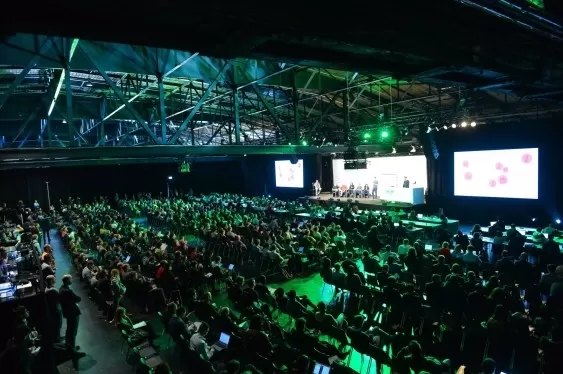 AI race won’t wait, nor will this TechCrunch Disrupt 25% discount
Every founder building in AI right now is asking the same question: Are we moving fast enough, and effectively enough? TechCrunch Disrupt 2026 puts you in the same room as the people wrestling with that existential question at the highest levels. Fro
AI race won’t wait, nor will this TechCrunch Disrupt 25% discount
Every founder building in AI right now is asking the same question: Are we moving fast enough, and effectively enough? TechCrunch Disrupt 2026 puts you in the same room as the people wrestling with that existential question at the highest levels. Fro

2026 Latest Top-rated AI Illustration Tools: Our curated list features the best powerfully designed tools for creating stunning editorial scenes and eye-catching cover art quickly. Each option has gone through rigorous real-world tests, offering a free vs paid comparison to help you find the perfect match for your workflow. Try these must-try solutions today to unlock your AI edge and boost your creative productivity. Explore now at XIX.AI.
10 tools
xix.ai

2026 Latest Top-Rated Best AI Tutors for Exam Prep are here on XIX.AI! Our curated list features powerful game-changing tools that offer free vs paid comparison, real-world tests, and weekly updated rankings. They help boost your writing efficiency, simplify complex topic learning, and unlock your academic potential. Explore now to Discover your perfect exam prep tool and Start creating today to Unlock your AI edge!
10 tools
xix.ai

2026 Latest Best Top-Rated AI Budget Planning Tools for Personal Money Management are here on XIX.AI! This curated collection features powerful, game-changing solutions that help you conduct real-world tests, understand spending habits, and create personalized plans to boost productivity. Enjoy a free vs paid comparison along with detailed rankings. Must-try tools designed to simplify money management and unlock your AI edge. Explore now!
11 tools
xix.ai

2026 Latest Best Top-Rated AI Sleep Tracking Assistants curated for ultimate recovery. This fully updated weekly guide features powerful tools that deliver real-world tests, free vs paid comparison, and detailed rankings to help you find the must-try solution that boosts sleep quality and supports better bedtime habits. Explore now at XIX.AI to Unlock your AI edge.
10 tools
xix.ai

2026 Latest Best Top-Rated AI SQL Copilots for Product and Revenue Analytics! XIX.AI has curated a powerful, game-changing collection of must-try tools that undergo real-world tests through weekly updated rankings. These tools help users boost productivity significantly by accelerating data analysis, streamlining complex queries, and generating accurate insights to drive smarter business decisions. Explore now to Discover your perfect tool for unlocking your AI edge!
14 tools
xix.ai

2026 Latest Best Top-Rated AI Homework Helpers That Teach Core Concepts Not Just Answers Powerful Tools for Students Must-Try Curated List Weekly Updated Free vs Paid Comparison Real-World Tests Accurate Rankings to Help You Unlock Your Full Learning Potential Explore now to Discover your perfect tool for smarter studying.
10 tools
xix.ai












