


 Home
HomeHow to convert Maildir files with Corbett Software in 2026? Step-by-step guide.
In today's digital landscape, efficient email data management is essential. The Maildir format is widely used for storing emails, particularly on Linux systems. Yet, there's often a need to convert these files into more universally accessible formats. Corbett Software's Backup & Restore Wizard provides a streamlined solution, enabling you to convert Maildir files into a variety of email formats, document types, and for direct migration to email servers and clients. This guide explores the capabilities and advantages of this versatile tool, simplifying and enhancing your email management workflow.
Key Points
Easily convert Maildir files to popular email formats such as PST, EML, and MBOX.
Transform Maildir files into document formats like PDF, HTML, and CSV for wider usability.
Migrate Maildir data directly to email services including Gmail and Office 365.
Ensures complete data integrity throughout the conversion, with no loss of information.
An intuitive interface makes the conversion process simple for all users.
Advanced search functionality streamlines email discovery and organization.
Offers multiple preview modes: Content, Message Header, Hex View, and Raw Message.
Extract specific data like email addresses, attachments, and phone numbers from Maildir files.
Understanding Maildir Conversion
What is Maildir and Why Convert It?
Maildir is a standard email storage format commonly used in Linux and Unix environments. While effective in these systems, it isn't always the most practical format for users who need to access their emails across different platforms or applications. Converting Maildir files is important for several key reasons:
- Compatibility: To open emails on Windows or macOS, converting to formats like PST or EML is often necessary.
- Backup and Archiving: Converting emails to PDF or CSV simplifies long-term storage and data backup.
- Migration: When moving to new email providers or cloud services like Gmail or Office 365, you'll need to transfer your Maildir data.

A dependable and efficient conversion tool is vital, and Corbett Software's Backup & Restore Wizard is built to address these exact requirements.
Why Choose Corbett Software's Backup & Restore Wizard for Maildir Conversion?
Corbett Software's Backup & Restore Wizard distinguishes itself as a powerful solution for Maildir conversion, thanks to its extensive features and user-centric design. Here are the key reasons it's an excellent choice:
- Versatility: The software supports a broad array of output formats, ensuring compatibility with numerous email clients and document applications.
- Data Integrity: Preserving your email data is a top priority. The tool guarantees 100% data accuracy during conversion.
- Simplicity: Its straightforward interface makes the conversion process easy, even for those with minimal technical experience.
- Advanced Features: Enhanced search and preview capabilities offer greater control and insight into your email data.
Selecting the right tool saves time and prevents potential data loss, making Corbett Software's solution a wise choice for effective email management.
Step-by-Step Guide to Converting Maildir Files
Installation and Setup
Begin by downloading and installing the Corbett Backup & Restore Wizard.

Follow the on-screen instructions to finish the setup. The installation process is designed to be quick and simple, getting you started promptly.
Opening Maildir Files
Once installed, open the application.
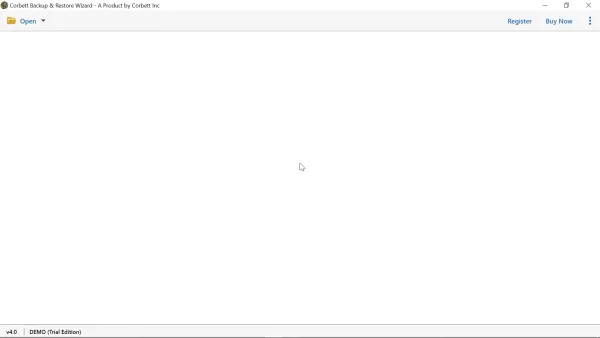
Click the 'Open' tab and choose 'Email Data Files' from the menu. Then, select 'Maildir Files' and navigate to your Maildir folder on your computer. This step is essential for importing your Maildir data into the software.
Previewing and Selecting Folders
After the Maildir folder is loaded, the software will scan the files and folders. You can enable 'Compact View' for a clearer overview of key folders.
Choose the specific folder you need from the list. This lets you preview the contents of your selected Maildir folder before starting the conversion.
Exploring Advanced Preview Options
Click on any email to examine its content. The tool offers several tabs, such as 'Content', 'Message Header', 'Hex View', and 'Raw Message', for in-depth analysis.

Utilize the 'Quick Search' function or the 'Advanced Search' feature to locate particular emails or information within your files.
Exporting Maildir Files
Navigate to the 'Export' tab.

Here, you can pick your preferred output format (e.g., PST, EML, PDF). Select the format that fits your needs. Choose your destination and adjust any advanced settings before saving to convert your Maildir file.
Customizing Export Options
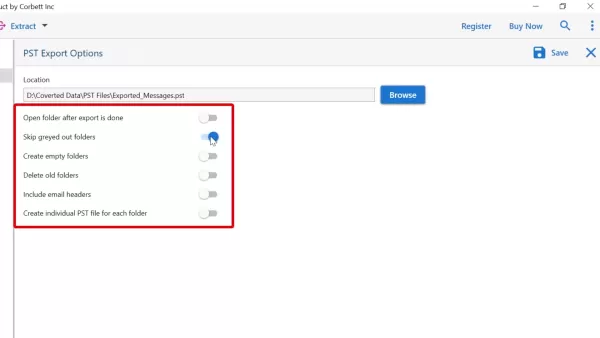
Before finalizing the export, you can tailor the settings. Options include opening the folder after export, skipping greyed-out folders, creating empty folders, and more.
Modify these settings based on your specific requirements.
Saving and Converting
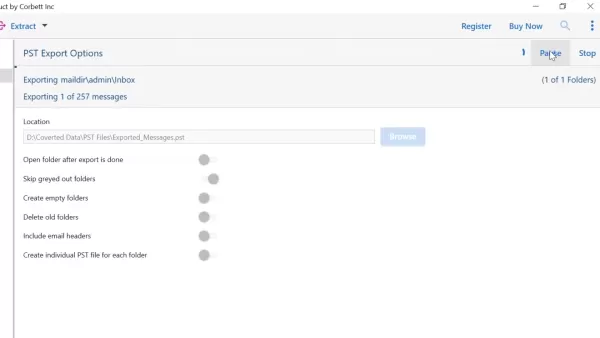
Once you've configured the export settings, click the 'Save' button. The software will begin converting the Maildir files, displaying a real-time progress indicator. If you're using the demo version, a prompt may appear indicating limited functionality. After the conversion finishes, click ‘Open Folder’ to see the results.

The output folder will then show your newly converted files.
Understanding Corbett Software's Pricing
Licensing Options and Benefits
While the demo version offers a preview of the tool's capabilities, purchasing a license unlocks its full potential. A licensed version allows users to convert entire datasets without restrictions.
- Complete Conversion Access: Convert every item from all folders, removing demo version limitations.
- Full Feature Set: Access all advanced search, extraction, and customization features without constraints.
- Priority Support: Receive dedicated assistance to ensure a smooth and effective user experience.
Investing in a license guarantees you have all the necessary tools for comprehensive email management and conversion.
Advantages and Disadvantages
Pros
Supports conversion to a wide range of formats.
Guarantees 100% data integrity during conversion.
User-friendly interface for easy operation.
Advanced search and preview tools.
Direct migration to major email servers.
Multiple export features and customization options.
Ability to extract specific data from emails.
Cons
Demo version has functional limitations.
Full conversion requires a purchased license.
Exploring the Core Features of Corbett Software's Maildir Converter
Versatile Conversion Formats
Corbett Software's Backup & Restore Wizard stands out for its ability to convert Maildir files into numerous formats, ensuring compatibility across different platforms.
This includes:
- Email Formats: PST, EML, and MBOX for smooth integration with common email clients.
- Document Formats: PDF, HTML, CSV, and TEXT for archiving, reporting, and broader accessibility.
This flexibility ensures your email data remains usable in any environment.
Seamless Migration to Email Servers
Migrating Maildir files to email servers is made simple with direct support for:
- Gmail: Effortlessly transfer emails to Google's widely-used service.
- Office 365: Move your Maildir data to Microsoft's enterprise email platform.
- IMAP: Connect to any IMAP-supported email server for flexible migration.
This feature removes the hassle of manual transfers, saving time and ensuring accuracy.
Advanced Search and Preview Capabilities
Manage and locate your emails efficiently with advanced tools:
Quick Search: Instantly find emails using keywords.
Advanced Search: Apply specific filters like name, subject, date, and more for targeted results.
Multiple Preview Options: Examine email details using Content, Message Header, Hex View, and Raw Message views.
These features give you complete control over your email data, making it easy to find and analyze information.
Data Extraction Tools
The software enables extraction of Email Addresses, Attachments, Phone Numbers, and linked Email & Phone Numbers.
Data Integrity and User Experience
Maintaining data integrity is a critical focus for Corbett, ensuring no corruption occurs during the export process.
Real-World Use Cases for Maildir Conversion
Switching Email Providers
When moving from a Linux-based email server to a cloud service like Gmail or Office 365, Corbett Software’s Backup & Restore Wizard facilitates a smooth migration of Maildir files, guaranteeing no data is lost in the transition.
Archiving Email Data
For compliance and record-keeping needs, converting Maildir files to PDF or CSV formats enables straightforward archiving. These formats are perfect for long-term storage and retrieval, ensuring critical information is securely preserved.
Accessing Emails on Multiple Platforms
Users who require access to their emails on both Linux and Windows or macOS systems can convert Maildir files to PST or EML formats. This ensures compatibility with email clients like Microsoft Outlook and Apple Mail, allowing seamless email access across different operating systems.
Email Forensics and Analysis
The advanced search and preview options, including Hex View and Raw Message tabs, make this tool highly valuable for email forensics and analysis. These features enable investigators to scrutinize email headers, content, and routing details for comprehensive examination.
Frequently Asked Questions
What file formats can I convert Maildir files to?
Maildir files can be converted to various email formats like PST, EML, and MBOX, as well as document formats such as PDF, HTML, and CSV. This versatility ensures compatibility with different email clients and document applications.
Can I migrate Maildir files to cloud-based email services?
Yes, the tool supports direct migration of Maildir files to email servers including Gmail, Office 365, and any IMAP-supported server. This streamlines the process of transferring your email data to cloud-based services.
Is my data secure during the conversion process?
Absolutely. Corbett Software's Backup & Restore Wizard maintains 100% data integrity throughout the conversion, ensuring no data loss or corruption. This is a fundamental aspect of the tool, providing confidence during email management tasks.
Is the software easy to use for non-technical users?
Yes, the software features an intuitive interface that simplifies the conversion process, making it accessible even for users with limited technical knowledge. The straightforward design ensures you can manage your email data effectively without a steep learning curve.
What are the advanced search options available?
The tool provides both Quick Search and Advanced Search functions. Quick Search lets you find emails using keywords, while Advanced Search allows you to apply specific criteria like name, subject, and date for precise outcomes. These options improve your ability to manage and locate email data efficiently.
Can I preview email content before converting?
Yes, the software includes multiple preview modes, such as Content, Message Header, Hex View, and Raw Message tabs. These options let you review email content in detail before starting the conversion, giving you full control over your data.
What are the limitations of the demo version?
The demo version of Corbett Software's Backup & Restore Wizard has restricted functionality, permitting conversion of only a limited number of items per folder. To access full conversion capabilities, a license purchase is required.
Related Questions
How do I ensure a smooth migration of Maildir files to a new email server?
For a smooth migration, start by backing up your Maildir files to avoid data loss. Use Corbett Software's Backup & Restore Wizard to directly transfer the files to your new email server, such as Gmail or Office 365. After migration, verify data integrity to confirm all emails and attachments have been successfully moved. Also, double-check that your new email server is properly configured to accept the migrated data.
What are the best practices for archiving Maildir files for long-term storage?
For long-term archiving, convert Maildir files to formats like PDF or CSV using Corbett Software's tool. These formats are ideal because they are easily searchable and can be stored on various media, including external drives and cloud storage. Organize the archived data into folders by date or project to simplify retrieval. Periodically verify the integrity of your archived data to prevent corruption over time.
How can I troubleshoot common issues during Maildir conversion?
If you run into problems during conversion, first check that your Maildir files are not corrupted. Use the preview features in Corbett Software's Backup & Restore Wizard to assess data integrity. If errors occur, try converting smaller batches of files to identify the issue. Verify that your system meets the software's requirements. If problems continue, reach out to Corbett Software's support team for help.
Related article
 Inside Details Exposed About Next-Gen Gemini: Strained Computing Power, Internal Teams Disagreed on Development Priorities and Resource Allocation
Reports indicate that the launch of Google’s highly anticipated next-generation Gemini model has been pushed back. Internal disagreements over development priorities and resource allocation, combined with limited computing capacity and complex approv
OpenAI Dismisses Growth Slowdown Concerns, Says Multiple Business Units Accelerating
In response to external scrutiny regarding decelerating sales growth and missed internal benchmarks, AI leader OpenAI issued a confident statement on Tuesday, April 28. The company clarified that its consumer products and enterprise services are adva
Alibaba Super Cup: Qwen3.8-Max Debuts with Boosted Coding and Office Tools
Alibaba has officially unveiled Qwen3.8-Max, a next-generation foundation large model boasting 2.4 trillion parameters. This significant AI advancement delivers substantial performance gains in core areas like coding and professional office tasks, sh
Related Special Topic Recommendations
Music composition
Inside Details Exposed About Next-Gen Gemini: Strained Computing Power, Internal Teams Disagreed on Development Priorities and Resource Allocation
Reports indicate that the launch of Google’s highly anticipated next-generation Gemini model has been pushed back. Internal disagreements over development priorities and resource allocation, combined with limited computing capacity and complex approv
OpenAI Dismisses Growth Slowdown Concerns, Says Multiple Business Units Accelerating
In response to external scrutiny regarding decelerating sales growth and missed internal benchmarks, AI leader OpenAI issued a confident statement on Tuesday, April 28. The company clarified that its consumer products and enterprise services are adva
Alibaba Super Cup: Qwen3.8-Max Debuts with Boosted Coding and Office Tools
Alibaba has officially unveiled Qwen3.8-Max, a next-generation foundation large model boasting 2.4 trillion parameters. This significant AI advancement delivers substantial performance gains in core areas like coding and professional office tasks, sh
Related Special Topic Recommendations
Music composition
 Best AI Melody Writing Tools for Song Drafts
2026 Latest Best Top-Rated AI Melody Writing Tools for Song Drafts! XIX.AI has curated a highly powerful game-changing collection that goes through rigorous real-world tests to deliver the best writing experience. You can find detailed free vs paid comparisons, accurate rankings, and must-try options designed to help you create stunning song drafts effortlessly and boost your creative productivity significantly. Explore now to discover your perfect tool!
 8 tools
 xix.ai
chatbot
Best AI Conversation Trainer Tools for Interview Practice
xix.ai
chatbot
Best AI Conversation Trainer Tools for Interview Practice
2026 Latest Best Top-rated AI Conversation Trainer Tools for Interview Practice are here on XIX.AI! This curated collection features powerful, game-changing tools that go through rigorous real-world tests to deliver accurate feedback. You’ll find a free vs paid comparison and detailed rankings to help you choose the must-try option that boosts your confidence and skills. Explore now to Discover your perfect tool for interview success!
12 tools
xix.ai
Design & Art
Best AI Style Transfer Tools for Creative Experiments
2026 Latest Best Top-rated AI Style Transfer Tools for Creative Experiments! XIX.AI has curated a powerful, game-changing collection of must-try tools that deliver exceptional results through real-world tests and rigorous rankings. These top solutions help creatives boost productivity significantly by accelerating content creation and unlocking endless creative possibilities. Explore now to discover your perfect tool and start creating today!
9 tools
xix.ai
Comic Creation
Best AI Dialogue Bubble Tools for Visual Storytelling
2026 Latest Best Top-Rated AI Dialogue Bubble Tools for Visual Storytelling are here on XIX.AI! This curated collection features powerful, game-changing tools that help creators boost productivity and overcome creative bottlenecks. Get a free vs paid comparison, see real-world tests, and check the latest rankings to find the must-try solutions perfect for crafting engaging visual narratives. Explore now to discover your ideal tool!
10 tools
xix.ai
Meeting Assistant
Top AI Meeting Summary Tools: Track Decisions and Follow-Ups Clearly
2026 Latest Top-Rated Best AI Meeting Summary Tools for Clear Decision Tracking and Effortless Follow-Ups. This curated list showcases powerful, game-changing solutions that boost productivity dramatically by automating meeting notes, identifying key action items, and streamlining team coordination across all projects. Get a free vs paid comparison along with real-world tests and weekly updated rankings to help you find the perfect tool. Explore now to unlock your AI edge!
9 tools
xix.ai
Data Analysis
Best AI Data Cleaning Tools: Fix Missing Values and Duplicates Fast
2026 Latest Best Top-rated AI Data Cleaning Tools for quick fixing of missing values and duplicates. This curated list showcases powerful, game-changing solutions that boost productivity significantly. Each option has undergone rigorous real-world tests to ensure reliability. Get a free vs paid comparison and discover the must-try tool that fits your needs best. Explore now at XIX.AI to Unlock your AI edge.
11 tools
xix.ai

 Comments (0)
0/500
Comments (0)
0/500
In today's digital landscape, efficient email data management is essential. The Maildir format is widely used for storing emails, particularly on Linux systems. Yet, there's often a need to convert these files into more universally accessible formats. Corbett Software's Backup & Restore Wizard provides a streamlined solution, enabling you to convert Maildir files into a variety of email formats, document types, and for direct migration to email servers and clients. This guide explores the capabilities and advantages of this versatile tool, simplifying and enhancing your email management workflow.
Key Points
Easily convert Maildir files to popular email formats such as PST, EML, and MBOX.
Transform Maildir files into document formats like PDF, HTML, and CSV for wider usability.
Migrate Maildir data directly to email services including Gmail and Office 365.
Ensures complete data integrity throughout the conversion, with no loss of information.
An intuitive interface makes the conversion process simple for all users.
Advanced search functionality streamlines email discovery and organization.
Offers multiple preview modes: Content, Message Header, Hex View, and Raw Message.
Extract specific data like email addresses, attachments, and phone numbers from Maildir files.
Understanding Maildir Conversion
What is Maildir and Why Convert It?
Maildir is a standard email storage format commonly used in Linux and Unix environments. While effective in these systems, it isn't always the most practical format for users who need to access their emails across different platforms or applications. Converting Maildir files is important for several key reasons:
- Compatibility: To open emails on Windows or macOS, converting to formats like PST or EML is often necessary.
- Backup and Archiving: Converting emails to PDF or CSV simplifies long-term storage and data backup.
- Migration: When moving to new email providers or cloud services like Gmail or Office 365, you'll need to transfer your Maildir data.
A dependable and efficient conversion tool is vital, and Corbett Software's Backup & Restore Wizard is built to address these exact requirements.
Why Choose Corbett Software's Backup & Restore Wizard for Maildir Conversion?
Corbett Software's Backup & Restore Wizard distinguishes itself as a powerful solution for Maildir conversion, thanks to its extensive features and user-centric design. Here are the key reasons it's an excellent choice:
- Versatility: The software supports a broad array of output formats, ensuring compatibility with numerous email clients and document applications.
- Data Integrity: Preserving your email data is a top priority. The tool guarantees 100% data accuracy during conversion.
- Simplicity: Its straightforward interface makes the conversion process easy, even for those with minimal technical experience.
- Advanced Features: Enhanced search and preview capabilities offer greater control and insight into your email data.
Selecting the right tool saves time and prevents potential data loss, making Corbett Software's solution a wise choice for effective email management.
Step-by-Step Guide to Converting Maildir Files
Installation and Setup
Begin by downloading and installing the Corbett Backup & Restore Wizard.
Follow the on-screen instructions to finish the setup. The installation process is designed to be quick and simple, getting you started promptly.
Opening Maildir Files
Once installed, open the application.
Click the 'Open' tab and choose 'Email Data Files' from the menu. Then, select 'Maildir Files' and navigate to your Maildir folder on your computer. This step is essential for importing your Maildir data into the software.
Previewing and Selecting Folders
After the Maildir folder is loaded, the software will scan the files and folders. You can enable 'Compact View' for a clearer overview of key folders.
Choose the specific folder you need from the list. This lets you preview the contents of your selected Maildir folder before starting the conversion.
Exploring Advanced Preview Options
Click on any email to examine its content. The tool offers several tabs, such as 'Content', 'Message Header', 'Hex View', and 'Raw Message', for in-depth analysis.
Utilize the 'Quick Search' function or the 'Advanced Search' feature to locate particular emails or information within your files.
Exporting Maildir Files
Navigate to the 'Export' tab.
Here, you can pick your preferred output format (e.g., PST, EML, PDF). Select the format that fits your needs. Choose your destination and adjust any advanced settings before saving to convert your Maildir file.
Customizing Export Options
Before finalizing the export, you can tailor the settings. Options include opening the folder after export, skipping greyed-out folders, creating empty folders, and more.
Modify these settings based on your specific requirements.
Saving and Converting
Once you've configured the export settings, click the 'Save' button. The software will begin converting the Maildir files, displaying a real-time progress indicator. If you're using the demo version, a prompt may appear indicating limited functionality. After the conversion finishes, click ‘Open Folder’ to see the results.
The output folder will then show your newly converted files.
Understanding Corbett Software's Pricing
Licensing Options and Benefits
While the demo version offers a preview of the tool's capabilities, purchasing a license unlocks its full potential. A licensed version allows users to convert entire datasets without restrictions.
- Complete Conversion Access: Convert every item from all folders, removing demo version limitations.
- Full Feature Set: Access all advanced search, extraction, and customization features without constraints.
- Priority Support: Receive dedicated assistance to ensure a smooth and effective user experience.
Investing in a license guarantees you have all the necessary tools for comprehensive email management and conversion.
Advantages and Disadvantages
Pros
Supports conversion to a wide range of formats.
Guarantees 100% data integrity during conversion.
User-friendly interface for easy operation.
Advanced search and preview tools.
Direct migration to major email servers.
Multiple export features and customization options.
Ability to extract specific data from emails.
Cons
Demo version has functional limitations.
Full conversion requires a purchased license.
Exploring the Core Features of Corbett Software's Maildir Converter
Versatile Conversion Formats
Corbett Software's Backup & Restore Wizard stands out for its ability to convert Maildir files into numerous formats, ensuring compatibility across different platforms.
This includes:
- Email Formats: PST, EML, and MBOX for smooth integration with common email clients.
- Document Formats: PDF, HTML, CSV, and TEXT for archiving, reporting, and broader accessibility.
This flexibility ensures your email data remains usable in any environment.
Seamless Migration to Email Servers
Migrating Maildir files to email servers is made simple with direct support for:
- Gmail: Effortlessly transfer emails to Google's widely-used service.
- Office 365: Move your Maildir data to Microsoft's enterprise email platform.
- IMAP: Connect to any IMAP-supported email server for flexible migration.
This feature removes the hassle of manual transfers, saving time and ensuring accuracy.
Advanced Search and Preview Capabilities
Manage and locate your emails efficiently with advanced tools:
Quick Search: Instantly find emails using keywords.
Advanced Search: Apply specific filters like name, subject, date, and more for targeted results.
Multiple Preview Options: Examine email details using Content, Message Header, Hex View, and Raw Message views.
These features give you complete control over your email data, making it easy to find and analyze information.
Data Extraction Tools
The software enables extraction of Email Addresses, Attachments, Phone Numbers, and linked Email & Phone Numbers.
Data Integrity and User Experience
Maintaining data integrity is a critical focus for Corbett, ensuring no corruption occurs during the export process.
Real-World Use Cases for Maildir Conversion
Switching Email Providers
When moving from a Linux-based email server to a cloud service like Gmail or Office 365, Corbett Software’s Backup & Restore Wizard facilitates a smooth migration of Maildir files, guaranteeing no data is lost in the transition.
Archiving Email Data
For compliance and record-keeping needs, converting Maildir files to PDF or CSV formats enables straightforward archiving. These formats are perfect for long-term storage and retrieval, ensuring critical information is securely preserved.
Accessing Emails on Multiple Platforms
Users who require access to their emails on both Linux and Windows or macOS systems can convert Maildir files to PST or EML formats. This ensures compatibility with email clients like Microsoft Outlook and Apple Mail, allowing seamless email access across different operating systems.
Email Forensics and Analysis
The advanced search and preview options, including Hex View and Raw Message tabs, make this tool highly valuable for email forensics and analysis. These features enable investigators to scrutinize email headers, content, and routing details for comprehensive examination.
Frequently Asked Questions
What file formats can I convert Maildir files to?
Maildir files can be converted to various email formats like PST, EML, and MBOX, as well as document formats such as PDF, HTML, and CSV. This versatility ensures compatibility with different email clients and document applications.
Can I migrate Maildir files to cloud-based email services?
Yes, the tool supports direct migration of Maildir files to email servers including Gmail, Office 365, and any IMAP-supported server. This streamlines the process of transferring your email data to cloud-based services.
Is my data secure during the conversion process?
Absolutely. Corbett Software's Backup & Restore Wizard maintains 100% data integrity throughout the conversion, ensuring no data loss or corruption. This is a fundamental aspect of the tool, providing confidence during email management tasks.
Is the software easy to use for non-technical users?
Yes, the software features an intuitive interface that simplifies the conversion process, making it accessible even for users with limited technical knowledge. The straightforward design ensures you can manage your email data effectively without a steep learning curve.
What are the advanced search options available?
The tool provides both Quick Search and Advanced Search functions. Quick Search lets you find emails using keywords, while Advanced Search allows you to apply specific criteria like name, subject, and date for precise outcomes. These options improve your ability to manage and locate email data efficiently.
Can I preview email content before converting?
Yes, the software includes multiple preview modes, such as Content, Message Header, Hex View, and Raw Message tabs. These options let you review email content in detail before starting the conversion, giving you full control over your data.
What are the limitations of the demo version?
The demo version of Corbett Software's Backup & Restore Wizard has restricted functionality, permitting conversion of only a limited number of items per folder. To access full conversion capabilities, a license purchase is required.
Related Questions
How do I ensure a smooth migration of Maildir files to a new email server?
For a smooth migration, start by backing up your Maildir files to avoid data loss. Use Corbett Software's Backup & Restore Wizard to directly transfer the files to your new email server, such as Gmail or Office 365. After migration, verify data integrity to confirm all emails and attachments have been successfully moved. Also, double-check that your new email server is properly configured to accept the migrated data.
What are the best practices for archiving Maildir files for long-term storage?
For long-term archiving, convert Maildir files to formats like PDF or CSV using Corbett Software's tool. These formats are ideal because they are easily searchable and can be stored on various media, including external drives and cloud storage. Organize the archived data into folders by date or project to simplify retrieval. Periodically verify the integrity of your archived data to prevent corruption over time.
How can I troubleshoot common issues during Maildir conversion?
If you run into problems during conversion, first check that your Maildir files are not corrupted. Use the preview features in Corbett Software's Backup & Restore Wizard to assess data integrity. If errors occur, try converting smaller batches of files to identify the issue. Verify that your system meets the software's requirements. If problems continue, reach out to Corbett Software's support team for help.








 Inside Details Exposed About Next-Gen Gemini: Strained Computing Power, Internal Teams Disagreed on Development Priorities and Resource Allocation
Reports indicate that the launch of Google’s highly anticipated next-generation Gemini model has been pushed back. Internal disagreements over development priorities and resource allocation, combined with limited computing capacity and complex approv
Inside Details Exposed About Next-Gen Gemini: Strained Computing Power, Internal Teams Disagreed on Development Priorities and Resource Allocation
Reports indicate that the launch of Google’s highly anticipated next-generation Gemini model has been pushed back. Internal disagreements over development priorities and resource allocation, combined with limited computing capacity and complex approv
 OpenAI Dismisses Growth Slowdown Concerns, Says Multiple Business Units Accelerating
In response to external scrutiny regarding decelerating sales growth and missed internal benchmarks, AI leader OpenAI issued a confident statement on Tuesday, April 28. The company clarified that its consumer products and enterprise services are adva
OpenAI Dismisses Growth Slowdown Concerns, Says Multiple Business Units Accelerating
In response to external scrutiny regarding decelerating sales growth and missed internal benchmarks, AI leader OpenAI issued a confident statement on Tuesday, April 28. The company clarified that its consumer products and enterprise services are adva
 Alibaba Super Cup: Qwen3.8-Max Debuts with Boosted Coding and Office Tools
Alibaba has officially unveiled Qwen3.8-Max, a next-generation foundation large model boasting 2.4 trillion parameters. This significant AI advancement delivers substantial performance gains in core areas like coding and professional office tasks, sh
Alibaba Super Cup: Qwen3.8-Max Debuts with Boosted Coding and Office Tools
Alibaba has officially unveiled Qwen3.8-Max, a next-generation foundation large model boasting 2.4 trillion parameters. This significant AI advancement delivers substantial performance gains in core areas like coding and professional office tasks, sh

2026 Latest Best Top-Rated AI Melody Writing Tools for Song Drafts! XIX.AI has curated a highly powerful game-changing collection that goes through rigorous real-world tests to deliver the best writing experience. You can find detailed free vs paid comparisons, accurate rankings, and must-try options designed to help you create stunning song drafts effortlessly and boost your creative productivity significantly. Explore now to discover your perfect tool!
8 tools
xix.ai

2026 Latest Best Top-rated AI Conversation Trainer Tools for Interview Practice are here on XIX.AI! This curated collection features powerful, game-changing tools that go through rigorous real-world tests to deliver accurate feedback. You’ll find a free vs paid comparison and detailed rankings to help you choose the must-try option that boosts your confidence and skills. Explore now to Discover your perfect tool for interview success!
12 tools
xix.ai

2026 Latest Best Top-rated AI Style Transfer Tools for Creative Experiments! XIX.AI has curated a powerful, game-changing collection of must-try tools that deliver exceptional results through real-world tests and rigorous rankings. These top solutions help creatives boost productivity significantly by accelerating content creation and unlocking endless creative possibilities. Explore now to discover your perfect tool and start creating today!
9 tools
xix.ai

2026 Latest Best Top-Rated AI Dialogue Bubble Tools for Visual Storytelling are here on XIX.AI! This curated collection features powerful, game-changing tools that help creators boost productivity and overcome creative bottlenecks. Get a free vs paid comparison, see real-world tests, and check the latest rankings to find the must-try solutions perfect for crafting engaging visual narratives. Explore now to discover your ideal tool!
10 tools
xix.ai

2026 Latest Top-Rated Best AI Meeting Summary Tools for Clear Decision Tracking and Effortless Follow-Ups. This curated list showcases powerful, game-changing solutions that boost productivity dramatically by automating meeting notes, identifying key action items, and streamlining team coordination across all projects. Get a free vs paid comparison along with real-world tests and weekly updated rankings to help you find the perfect tool. Explore now to unlock your AI edge!
9 tools
xix.ai

2026 Latest Best Top-rated AI Data Cleaning Tools for quick fixing of missing values and duplicates. This curated list showcases powerful, game-changing solutions that boost productivity significantly. Each option has undergone rigorous real-world tests to ensure reliability. Get a free vs paid comparison and discover the must-try tool that fits your needs best. Explore now at XIX.AI to Unlock your AI edge.
11 tools
xix.ai












