


 Home
Home
Claude Code's NO_FLICKER Mode Eliminates Terminal Flashing, Enables One-Command Mouse Control
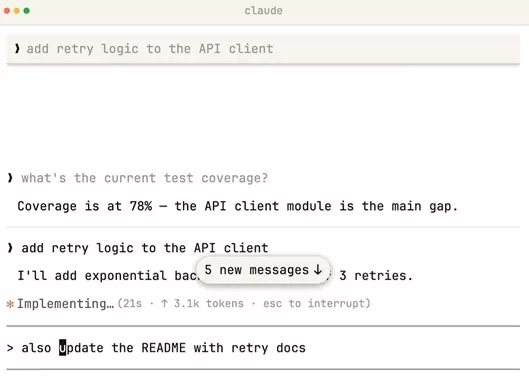
AIbase Report: Claude Code has introduced a new terminal rendering solution — the NO_FLICKER mode, which can be enabled with a single environment variable. This mode uses an experimental new renderer to completely resolve the long-standing issues of terminal flickering and content jumping, and unexpectedly adds full mouse interaction support, significantly boosting developer productivity in the terminal.
Core Improvements: Flicker-Free Rendering and Stable Resource Usage
Traditional terminal rendering often causes screen flickering and content jumping during long conversations or multi-agent operations, with memory and CPU usage steadily increasing as the conversation lengthens. NO_FLICKER mode switches to a backup screen buffer (similar to the full-screen takeover method used by vim or htop), rendering only the currently visible viewport content, delivering a truly flicker-free experience.
User feedback shows that after enabling the mode, long conversations no longer lag, scrolling through history becomes smoother, and resource consumption stabilizes. For developers who use Claude Code for extended code generation and multi-agent collaboration, this is a significant experience upgrade.
Surprising Addition: Terminal Finally Gets Mouse Support
One of the most notable features of NO_FLICKER mode is native support for mouse events, making terminal interactions much closer to graphical interfaces:
Easier Cursor Positioning: Click directly on the input box to move the cursor exactly where you want, without repeatedly pressing arrow keys.Clickable Interactive Elements: Expand or collapse folded tool call results with a click; clicking a URL opens it in the browser, and clicking a file path opens it in your default editor.Smart Selection and Copy: Drag to select text and release to automatically copy it to the clipboard (can be disabled in settings); the mouse wheel provides smooth scrolling through conversation history.Advanced Selection Capabilities: Double-click to select a word, triple-click to select a line. On terminals that support the Kitty keyboard protocol (e.g., Kitty, WezTerm, Ghostty, iTerm2), Ctrl+C in selection mode copies the selection instead of canceling.These mouse features make the terminal experience in Claude Code more intuitive and efficient, especially for tasks that involve frequent prompt editing, output review, or link navigation.
Easy to Enable — Just One Command
Users can experience it immediately by entering the following command in the terminal:
CLAUDE_CODE_NO_FLICKER=1claude
To make it permanent, add CLAUDE_CODE_NO_FLICKER=1 to your shell configuration file (such as ~/.zshrc) or to Claude Code's settings.json. This mode was introduced in version 2.1.88 and is currently experimental. The Anthropic team is collecting user feedback to further refine it.
Notes and Trade-offs
While the new renderer brings major improvements, it comes with some trade-offs: native Cmd+F search may not work directly and must be done using built-in shortcuts (e.g., Ctrl+O then /). Some terminal behaviors need to adapt to the new mechanism. Most internal users prefer this mode, but we recommend developers test it in their actual workflow before deciding to enable it permanently.
Claude Code's latest update reflects Anthropic's ongoing investment in the terminal toolchain, aiming to lower the entry barrier and enhance the experience of AI coding assistants. The developer community has responded positively to the NO_FLICKER mode, recognizing it as an effective solution to the long-standing issue of "terminal flickering."
AIbase Review: For developers who rely heavily on Claude Code, the NO_FLICKER mode is a quality upgrade well worth trying immediately. It not only eliminates visual distractions but also brings mouse interaction to the terminal, subtly narrowing the gap between the command line and modern IDEs. We encourage everyone to give it a try and share their real-world experiences in the community.
Related article
 Inside Details Exposed About Next-Gen Gemini: Strained Computing Power, Internal Teams Disagreed on Development Priorities and Resource Allocation
Reports indicate that the launch of Google’s highly anticipated next-generation Gemini model has been pushed back. Internal disagreements over development priorities and resource allocation, combined with limited computing capacity and complex approv
OpenAI Dismisses Growth Slowdown Concerns, Says Multiple Business Units Accelerating
In response to external scrutiny regarding decelerating sales growth and missed internal benchmarks, AI leader OpenAI issued a confident statement on Tuesday, April 28. The company clarified that its consumer products and enterprise services are adva
Alibaba Super Cup: Qwen3.8-Max Debuts with Boosted Coding and Office Tools
Alibaba has officially unveiled Qwen3.8-Max, a next-generation foundation large model boasting 2.4 trillion parameters. This significant AI advancement delivers substantial performance gains in core areas like coding and professional office tasks, sh
Related Special Topic Recommendations
Music composition
Inside Details Exposed About Next-Gen Gemini: Strained Computing Power, Internal Teams Disagreed on Development Priorities and Resource Allocation
Reports indicate that the launch of Google’s highly anticipated next-generation Gemini model has been pushed back. Internal disagreements over development priorities and resource allocation, combined with limited computing capacity and complex approv
OpenAI Dismisses Growth Slowdown Concerns, Says Multiple Business Units Accelerating
In response to external scrutiny regarding decelerating sales growth and missed internal benchmarks, AI leader OpenAI issued a confident statement on Tuesday, April 28. The company clarified that its consumer products and enterprise services are adva
Alibaba Super Cup: Qwen3.8-Max Debuts with Boosted Coding and Office Tools
Alibaba has officially unveiled Qwen3.8-Max, a next-generation foundation large model boasting 2.4 trillion parameters. This significant AI advancement delivers substantial performance gains in core areas like coding and professional office tasks, sh
Related Special Topic Recommendations
Music composition
 Best AI Melody Writing Tools for Song Drafts
2026 Latest Best Top-Rated AI Melody Writing Tools for Song Drafts! XIX.AI has curated a highly powerful game-changing collection that goes through rigorous real-world tests to deliver the best writing experience. You can find detailed free vs paid comparisons, accurate rankings, and must-try options designed to help you create stunning song drafts effortlessly and boost your creative productivity significantly. Explore now to discover your perfect tool!
 8 tools
 xix.ai
chatbot
Best AI Conversation Trainer Tools for Interview Practice
xix.ai
chatbot
Best AI Conversation Trainer Tools for Interview Practice
2026 Latest Best Top-rated AI Conversation Trainer Tools for Interview Practice are here on XIX.AI! This curated collection features powerful, game-changing tools that go through rigorous real-world tests to deliver accurate feedback. You’ll find a free vs paid comparison and detailed rankings to help you choose the must-try option that boosts your confidence and skills. Explore now to Discover your perfect tool for interview success!
12 tools
xix.ai
Design & Art
Best AI Style Transfer Tools for Creative Experiments
2026 Latest Best Top-rated AI Style Transfer Tools for Creative Experiments! XIX.AI has curated a powerful, game-changing collection of must-try tools that deliver exceptional results through real-world tests and rigorous rankings. These top solutions help creatives boost productivity significantly by accelerating content creation and unlocking endless creative possibilities. Explore now to discover your perfect tool and start creating today!
9 tools
xix.ai
Comic Creation
Best AI Dialogue Bubble Tools for Visual Storytelling
2026 Latest Best Top-Rated AI Dialogue Bubble Tools for Visual Storytelling are here on XIX.AI! This curated collection features powerful, game-changing tools that help creators boost productivity and overcome creative bottlenecks. Get a free vs paid comparison, see real-world tests, and check the latest rankings to find the must-try solutions perfect for crafting engaging visual narratives. Explore now to discover your ideal tool!
10 tools
xix.ai
Meeting Assistant
Top AI Meeting Summary Tools: Track Decisions and Follow-Ups Clearly
2026 Latest Top-Rated Best AI Meeting Summary Tools for Clear Decision Tracking and Effortless Follow-Ups. This curated list showcases powerful, game-changing solutions that boost productivity dramatically by automating meeting notes, identifying key action items, and streamlining team coordination across all projects. Get a free vs paid comparison along with real-world tests and weekly updated rankings to help you find the perfect tool. Explore now to unlock your AI edge!
9 tools
xix.ai
Data Analysis
Best AI Data Cleaning Tools: Fix Missing Values and Duplicates Fast
2026 Latest Best Top-rated AI Data Cleaning Tools for quick fixing of missing values and duplicates. This curated list showcases powerful, game-changing solutions that boost productivity significantly. Each option has undergone rigorous real-world tests to ensure reliability. Get a free vs paid comparison and discover the must-try tool that fits your needs best. Explore now at XIX.AI to Unlock your AI edge.
11 tools
xix.ai

 Comments (0)
0/500
Comments (0)
0/500
AIbase Report: Claude Code has introduced a new terminal rendering solution — the NO_FLICKER mode, which can be enabled with a single environment variable. This mode uses an experimental new renderer to completely resolve the long-standing issues of terminal flickering and content jumping, and unexpectedly adds full mouse interaction support, significantly boosting developer productivity in the terminal.
Core Improvements: Flicker-Free Rendering and Stable Resource Usage
Traditional terminal rendering often causes screen flickering and content jumping during long conversations or multi-agent operations, with memory and CPU usage steadily increasing as the conversation lengthens. NO_FLICKER mode switches to a backup screen buffer (similar to the full-screen takeover method used by vim or htop), rendering only the currently visible viewport content, delivering a truly flicker-free experience.
User feedback shows that after enabling the mode, long conversations no longer lag, scrolling through history becomes smoother, and resource consumption stabilizes. For developers who use Claude Code for extended code generation and multi-agent collaboration, this is a significant experience upgrade.
Surprising Addition: Terminal Finally Gets Mouse Support
One of the most notable features of NO_FLICKER mode is native support for mouse events, making terminal interactions much closer to graphical interfaces:
Easier Cursor Positioning: Click directly on the input box to move the cursor exactly where you want, without repeatedly pressing arrow keys.Clickable Interactive Elements: Expand or collapse folded tool call results with a click; clicking a URL opens it in the browser, and clicking a file path opens it in your default editor.Smart Selection and Copy: Drag to select text and release to automatically copy it to the clipboard (can be disabled in settings); the mouse wheel provides smooth scrolling through conversation history.Advanced Selection Capabilities: Double-click to select a word, triple-click to select a line. On terminals that support the Kitty keyboard protocol (e.g., Kitty, WezTerm, Ghostty, iTerm2), Ctrl+C in selection mode copies the selection instead of canceling.These mouse features make the terminal experience in Claude Code more intuitive and efficient, especially for tasks that involve frequent prompt editing, output review, or link navigation.
Easy to Enable — Just One Command
Users can experience it immediately by entering the following command in the terminal:
CLAUDE_CODE_NO_FLICKER=1claude
To make it permanent, add CLAUDE_CODE_NO_FLICKER=1 to your shell configuration file (such as ~/.zshrc) or to Claude Code's settings.json. This mode was introduced in version 2.1.88 and is currently experimental. The Anthropic team is collecting user feedback to further refine it.
Notes and Trade-offs
While the new renderer brings major improvements, it comes with some trade-offs: native Cmd+F search may not work directly and must be done using built-in shortcuts (e.g., Ctrl+O then /). Some terminal behaviors need to adapt to the new mechanism. Most internal users prefer this mode, but we recommend developers test it in their actual workflow before deciding to enable it permanently.
Claude Code's latest update reflects Anthropic's ongoing investment in the terminal toolchain, aiming to lower the entry barrier and enhance the experience of AI coding assistants. The developer community has responded positively to the NO_FLICKER mode, recognizing it as an effective solution to the long-standing issue of "terminal flickering."
AIbase Review: For developers who rely heavily on Claude Code, the NO_FLICKER mode is a quality upgrade well worth trying immediately. It not only eliminates visual distractions but also brings mouse interaction to the terminal, subtly narrowing the gap between the command line and modern IDEs. We encourage everyone to give it a try and share their real-world experiences in the community.








 Inside Details Exposed About Next-Gen Gemini: Strained Computing Power, Internal Teams Disagreed on Development Priorities and Resource Allocation
Reports indicate that the launch of Google’s highly anticipated next-generation Gemini model has been pushed back. Internal disagreements over development priorities and resource allocation, combined with limited computing capacity and complex approv
Inside Details Exposed About Next-Gen Gemini: Strained Computing Power, Internal Teams Disagreed on Development Priorities and Resource Allocation
Reports indicate that the launch of Google’s highly anticipated next-generation Gemini model has been pushed back. Internal disagreements over development priorities and resource allocation, combined with limited computing capacity and complex approv
 OpenAI Dismisses Growth Slowdown Concerns, Says Multiple Business Units Accelerating
In response to external scrutiny regarding decelerating sales growth and missed internal benchmarks, AI leader OpenAI issued a confident statement on Tuesday, April 28. The company clarified that its consumer products and enterprise services are adva
OpenAI Dismisses Growth Slowdown Concerns, Says Multiple Business Units Accelerating
In response to external scrutiny regarding decelerating sales growth and missed internal benchmarks, AI leader OpenAI issued a confident statement on Tuesday, April 28. The company clarified that its consumer products and enterprise services are adva
 Alibaba Super Cup: Qwen3.8-Max Debuts with Boosted Coding and Office Tools
Alibaba has officially unveiled Qwen3.8-Max, a next-generation foundation large model boasting 2.4 trillion parameters. This significant AI advancement delivers substantial performance gains in core areas like coding and professional office tasks, sh
Alibaba Super Cup: Qwen3.8-Max Debuts with Boosted Coding and Office Tools
Alibaba has officially unveiled Qwen3.8-Max, a next-generation foundation large model boasting 2.4 trillion parameters. This significant AI advancement delivers substantial performance gains in core areas like coding and professional office tasks, sh

2026 Latest Best Top-Rated AI Melody Writing Tools for Song Drafts! XIX.AI has curated a highly powerful game-changing collection that goes through rigorous real-world tests to deliver the best writing experience. You can find detailed free vs paid comparisons, accurate rankings, and must-try options designed to help you create stunning song drafts effortlessly and boost your creative productivity significantly. Explore now to discover your perfect tool!
8 tools
xix.ai

2026 Latest Best Top-rated AI Conversation Trainer Tools for Interview Practice are here on XIX.AI! This curated collection features powerful, game-changing tools that go through rigorous real-world tests to deliver accurate feedback. You’ll find a free vs paid comparison and detailed rankings to help you choose the must-try option that boosts your confidence and skills. Explore now to Discover your perfect tool for interview success!
12 tools
xix.ai

2026 Latest Best Top-rated AI Style Transfer Tools for Creative Experiments! XIX.AI has curated a powerful, game-changing collection of must-try tools that deliver exceptional results through real-world tests and rigorous rankings. These top solutions help creatives boost productivity significantly by accelerating content creation and unlocking endless creative possibilities. Explore now to discover your perfect tool and start creating today!
9 tools
xix.ai

2026 Latest Best Top-Rated AI Dialogue Bubble Tools for Visual Storytelling are here on XIX.AI! This curated collection features powerful, game-changing tools that help creators boost productivity and overcome creative bottlenecks. Get a free vs paid comparison, see real-world tests, and check the latest rankings to find the must-try solutions perfect for crafting engaging visual narratives. Explore now to discover your ideal tool!
10 tools
xix.ai

2026 Latest Top-Rated Best AI Meeting Summary Tools for Clear Decision Tracking and Effortless Follow-Ups. This curated list showcases powerful, game-changing solutions that boost productivity dramatically by automating meeting notes, identifying key action items, and streamlining team coordination across all projects. Get a free vs paid comparison along with real-world tests and weekly updated rankings to help you find the perfect tool. Explore now to unlock your AI edge!
9 tools
xix.ai

2026 Latest Best Top-rated AI Data Cleaning Tools for quick fixing of missing values and duplicates. This curated list showcases powerful, game-changing solutions that boost productivity significantly. Each option has undergone rigorous real-world tests to ensure reliability. Get a free vs paid comparison and discover the must-try tool that fits your needs best. Explore now at XIX.AI to Unlock your AI edge.
11 tools
xix.ai












