


 Home
HomeHow does ChatGPT integrate apps in 2025? A complete guide to enhanced AI.
The latest update to ChatGPT is transforming user interaction with artificial intelligence. By embedding popular applications directly into its interface, OpenAI is crafting a seamless, efficient, and highly versatile user experience. This development enables you to use tools like Canva, Spotify, Figma, Expedia, Booking.com, Coursera, and Zillow natively within a ChatGPT session, streamlining your workflow and enhancing productivity. Let's explore how these integrations function and the benefits they offer.
Key Points
ChatGPT now features built-in support for integration with a variety of everyday applications.
Users can design social media posts using Canva without leaving the ChatGPT environment.
Generate personalized Spotify playlists based on specific tastes directly inside ChatGPT.
Create Figma flowcharts instantly within the ChatGPT interface.
Expedia and Booking.com integrations simplify travel planning.
Zillow integration permits direct property searches from within ChatGPT.
Link your accounts to activate these new features in the ChatGPT web version.
Additional apps, including AllTrails, DoorDash, Khan Academy, and Instacart, will be available soon.
Revolutionizing AI Interaction with Integrated Apps
The Power of Native App Integration in ChatGPT
ChatGPT's most recent update introduces a transformative feature: the capacity to run everyday applications natively within a chat session. This eliminates the need to constantly switch between different platforms to accomplish tasks. You can now utilize the functionality of various applications directly within the AI interface, which significantly enhances productivity and optimizes your workflow.
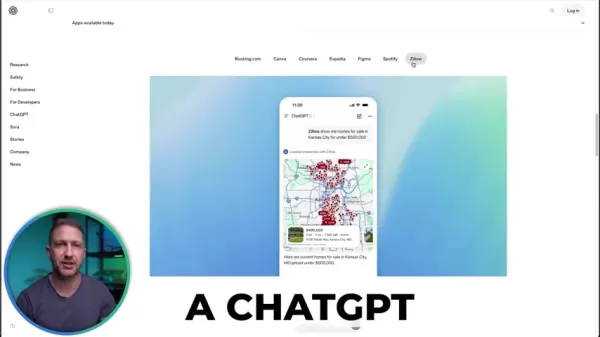
Envision designing a social media graphic, generating a music playlist, or mapping out a flowchart without ever closing your ChatGPT window. This integration establishes ChatGPT as a central command center for diverse tasks, making it an essential tool for both personal and professional use. The native integration guarantees a smooth experience, as the app interfaces are embedded directly within ChatGPT, providing a consistent and intuitive journey. This increases efficiency and minimizes the disruption of navigating multiple platforms.
Unlocking Productivity: Canva, Spotify, and Figma Integrations
The integration of Canva, Spotify, and Figma within ChatGPT unlocks new possibilities for content creation and organization.
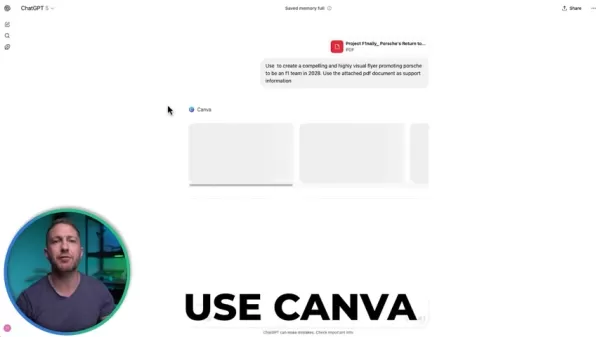
Canva: Need a quick social media graphic? With Canva integrated into ChatGPT, you can produce visually appealing content in moments. Simply instruct ChatGPT to design a post according to your requirements, and it will present you with several options. This efficient process removes the need to open Canva separately, saving you time and effort.
Spotify: Music enthusiasts will appreciate the Spotify integration, which allows you to compile custom playlists suited to your exact mood. Whether you desire a mix of lounge house, chill house, afro beats, or instrumental trance, ChatGPT can generate a playlist for you. You can then preview the selections directly within ChatGPT and make adjustments as needed.
Figma: For designers and project managers, the Figma integration is a significant advancement. You can now produce flowcharts on demand, directly within ChatGPT. Whether you are outlining a project process or designing an organizational chart, this integration offers a seamless method to visualize concepts without switching to Figma. This level of integration elevates ChatGPT into a powerful creative and organizational tool, simplifying the process of bringing ideas to life. By utilizing these apps natively, you reduce context switching and maintain focus, leading to better results in less time. The user-friendly design ensures that even those new to these tools can easily use them within ChatGPT.
Travel and Real Estate Made Easy: Expedia, Booking.com, Coursera, and Zillow
Beyond creative tasks, ChatGPT’s app integrations extend to practical areas like travel planning and real estate, making everyday activities more convenient.
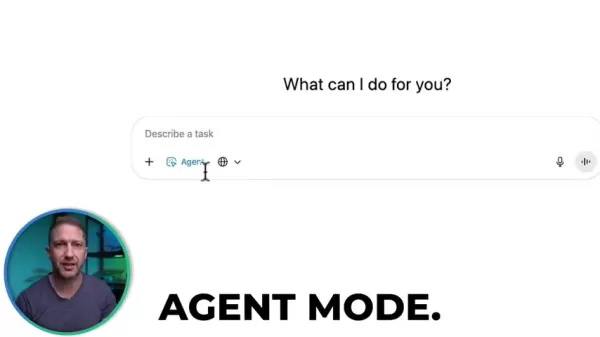
Expedia and Booking.com: Organizing a trip? ChatGPT can now effortlessly search for flights and accommodations via Expedia and Booking.com. Whether you're hunting for the best airfare to Chicago or a hotel in Paris, ChatGPT delivers real-time information and booking options directly within the chat.
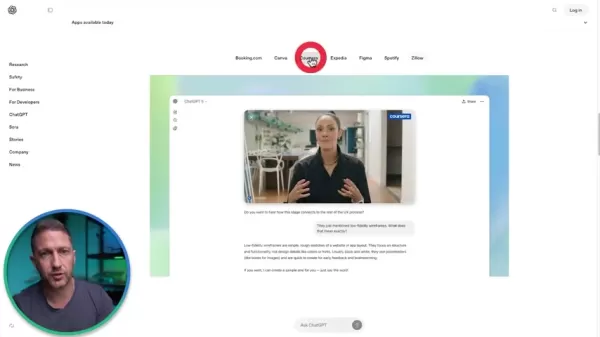
Coursera: Looking to advance your skills? With Coursera integrated, you can find and register for courses without leaving ChatGPT. This integration makes it easy to incorporate learning into your daily routine, enhancing professional development.
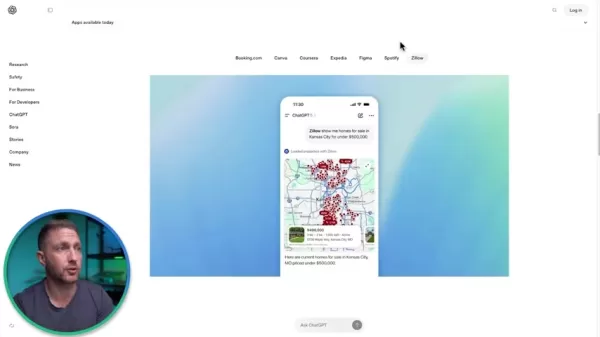
Zillow: Searching for a new home? ChatGPT's integration with Zillow enables you to look up properties directly in the chat. You can explore homes in Kansas City or investigate real estate opportunities in other areas, all within ChatGPT. This makes property research more convenient and efficient, placing essential information at your fingertips.
These integrations transform ChatGPT into a multifaceted assistant, capable of managing a broad spectrum of tasks and delivering information precisely when required. The convenience of having these tools integrated directly streamlines daily activities and helps you achieve more efficiently.
Exploring the User Interface: Connecting and Using Apps
How to Connect Apps Inside ChatGPT
Linking your preferred apps inside ChatGPT is a simple process designed for user convenience. The first step is to navigate to the 'Apps available today' section within the ChatGPT interface. This area displays all the applications available for integration, such as Canva, Spotify, Figma, Expedia, Booking.com, and Zillow.
When you access ChatGPT through a web browser, you will see a prompt inviting you to connect your apps. Please note that this feature is currently available only on the browser version and not on the desktop application.
- Access the Apps & Connectors: Go to settings and click on the Apps & Connectors section.
- Select Your Apps: Choose which applications you wish to connect. You can link them all simultaneously or one at a time.
- Grant Permissions: Each app will request specific data access permissions. Review these requests carefully and approve them if you are comfortable.
- Link Directly Now or Later: You can connect apps immediately when prompted, or you can skip and connect them later when you need to use a specific application.
It is important to understand the difference between apps and connectors in ChatGPT. Apps, like Canva and Spotify, provide a comprehensive, immersive integration, offering the full interface experience within ChatGPT. Connectors, such as those for Gmail or Google Calendar, allow ChatGPT to reference data from these services to answer your questions without embedding the entire app interface.
Connecting apps in advance ensures a seamless experience when you use them, as you will already be logged in and authorized. Alternatively, you can choose to connect apps only when needed, giving you greater control over which services have access to your ChatGPT account. Remember, you can disconnect any app at any time. This user-centric process makes it easy for anyone to enhance their ChatGPT experience with integrated applications.
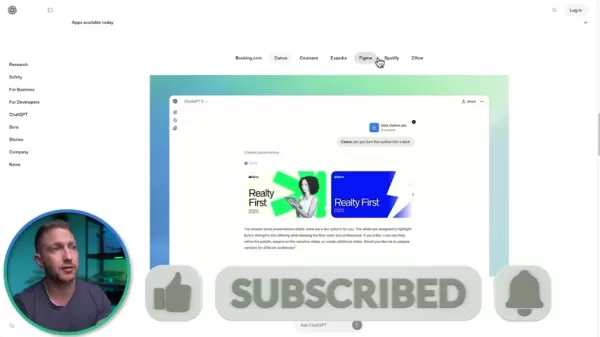
Using Canva within ChatGPT: A Step-by-Step Tutorial
Now that you know how to connect apps, let's go through a practical example: using Canva within ChatGPT to create social media content. This step-by-step guide will walk you through the process.
- Start a New Chat: Open a new chat session in ChatGPT.
- Compose Your Prompt: Type a detailed prompt specifying what you want to create. For example, ‘Use @Canva to create three visually striking social media posts promoting Porsche's entry into F1 in 2028. Use the attached PDF document for reference.’.
- Attach Supporting Documents: Attach any necessary files, like the PDF mentioned, to provide supporting information.
- Initiate Canva: Send the prompt, and ChatGPT will connect to Canva.
Once the design is generated, the final step is to review and refine your content. ChatGPT will present you with several design options based on your instructions. Examine each one to determine which best matches your vision.
You will be able to view each image in detail and use follow-up prompts to request modifications. You can further edit the design in Canva or ask ChatGPT to make changes.
If you want to perform detailed edits, click the “Open in Canva” button. This will open the design directly in Canva, where you can fine-tune it to meet your exact specifications. This seamless integration accelerates content creation, making it faster and more efficient. By following these steps, you can harness the combined power of Canva and ChatGPT to produce engaging social media content quickly.
Generating Spotify Playlists Seamlessly within ChatGPT
Creating a Spotify playlist with ChatGPT is straightforward, allowing you to customize music for any occasion. Here's how it works:
- Initiate a New Chat: Launch a new chat session in ChatGPT.
- Compose Your Prompt: Write a prompt that details the kind of playlist you want. For instance, ‘Create a playlist blending lounge house, chill house, afro beats, and instrumental storytelling trance with no lyrics. Please reference my music preferences.’
- Connect to Spotify: Include ‘@Spotify’ in your message to link ChatGPT to your Spotify account.
ChatGPT will request access and permissions from your Spotify account.
- Review and Refine: ChatGPT will generate a playlist based on your prompt. You can review it within the chat, listen to previews, and provide feedback for adjustments.
The playlist is created inside ChatGPT. Click the provided button to open it in Spotify. (Note: Commercial music playback restrictions may apply in the demo).
ChatGPT will also suggest prompts for refining your selection. This allows for much more precise instructions than standard Spotify playlist creation. With these simple steps, you can generate tailored playlists that match your preferences perfectly, all within the ChatGPT interface, simplifying music curation.
Creating Figma Flowcharts Directly from ChatGPT
For designers and project managers, the ability to generate Figma flowcharts directly from ChatGPT is a major productivity boost. This integration simplifies the visualization of complex processes. Follow these steps to begin:
- Start a New Chat: Open a new chat session in ChatGPT.
- Create the Prompt: Instruct ChatGPT to create a chart using an attached document. For example, ‘Use @figma to create a comprehensive flowchart detailing the steps for building the Porsche F1 team. Use the attached PDF document for support.’
- Link to Figma: ChatGPT will prompt you to connect to Figma to create the charts.
ChatGPT will generate a flowchart and display it on screen. Review the steps to ensure the document was interpreted correctly. You can then open the diagram in Figma.
Within Figma, you can easily rearrange elements and make adjustments, or you can give ChatGPT further instructions for modifications.
By following these steps, you can effortlessly produce flowcharts, mind maps, and other visual diagrams within ChatGPT. This integration optimizes your design and project management workflows, saving significant time and effort.
Shopping Apps are Coming Soon
OpenAI has plans to incorporate shopping applications in the near future.
Here is what is anticipated:
- AllTrails
- DoorDash
- Khan Academy
- Instacart
- Peloton
- OpenTable
- Target
- TheFork
- TripAdvisor
- Uber
Shopping apps will be a valuable addition!
Easy Steps to Link Apps to ChatGPT for Enhanced AI Experiences
Step-by-Step Guide to Connecting Apps
To fully utilize the new app integrations in ChatGPT, linking your accounts is a key step. Here is a detailed guide to help you connect your apps:
- Access the Apps & Connectors Section: Navigate to the 'Apps available today' section in the ChatGPT interface. This area lists all applications that can be integrated.
- Select Your Apps: Browse the list and select the apps you want to connect, such as Canva, Spotify, Figma, Expedia, Booking.com, and Zillow.
- Grant Permissions: Each application will require specific data access permissions. Review these carefully before approving.
- Connect and Authorize: Follow the on-screen prompts to log into the app and authorize ChatGPT to access your account.
By following these steps, you can link your favorite applications to ChatGPT and unlock a new level of AI-assisted functionality.
Understanding ChatGPT's Pricing and Subscription Plans
Overview of ChatGPT Subscription Options
ChatGPT provides several subscription plans to meet different user needs. While the basic version offers core AI capabilities, advanced features and higher usage limits typically require a paid subscription. Understanding the pricing is crucial for selecting the right plan.
Free Plan: This plan offers access to standard AI features and is suitable for casual use.
ChatGPT Plus: Priced at $20 per month, this plan includes:
- Access to GPT-4, the most advanced model
- Availability of plugins, web browsing, and advanced data analysis
- Priority access to new features
- Faster response times
ChatGPT Team: Priced at $25 per month (billed annually), this plan includes:
- GPT-4 and advanced tools for all team members
- Enhanced data and privacy controls
- A shared workspace for team collaboration
- Administrative tools for team management
ChatGPT Enterprise: For pricing, contact sales. This plan offers:
- Unlimited GPT-4 access
- Enterprise-grade security and privacy
- Customization options and dedicated integrations
While the new native app integrations may initially be available to paying subscribers, OpenAI might extend them to free users later. Stay informed by checking OpenAI's latest announcements regarding pricing and feature availability.
Weighing the Benefits and Drawbacks: Pros
and Cons
of ChatGPT App Integrations
Pros
Increased productivity and efficiency
Streamlined workflows and reduced context switching
Seamless access to everyday apps within ChatGPT
Real-time information and data from various sources
Customization and automation capabilities
Cons
Potential privacy and security concerns
Dependency on third-party apps and services
Learning curve for new users
Limited app selection (currently)
Potential for data breaches and misuse
Core Features of ChatGPT with Integrated Apps
Enhanced Productivity and Seamless Workflows
The integration of apps into ChatGPT unlocks a suite of core features aimed at boosting productivity and simplifying workflows. Key highlights include:
- Native App Interfaces: Access application interfaces directly within ChatGPT, reducing the need to switch between different platforms.
- Real-Time Information: Obtain live data from integrated apps like Expedia and Zillow within the chat interface.
- Customization: Tailor AI interactions with specific prompts, leveraging integrated apps to produce highly targeted outputs.
- Automation: Automate repetitive tasks by combining ChatGPT's capabilities with those of connected apps.
- Centralized Hub: Use ChatGPT as a central hub for content creation, project management, travel planning, and more.
Unleashing the Potential: Diverse Use Cases for ChatGPT with Apps
Practical Applications Across Various Domains
The versatility of ChatGPT with integrated apps makes it a powerful tool for numerous scenarios. Here are some practical examples:
- Social Media Management: Create and schedule social media posts using Canva directly from ChatGPT. Ideal for marketers and content creators.
- Music Curation: Generate custom playlists for any event using Spotify, tailored to your preferences. Perfect for music lovers and event organizers.
- Project Planning: Design flowcharts and diagrams using Figma, streamlining project management. Excellent for project managers and designers.
- Travel Planning: Search for flights and hotels, and book trips using Expedia and Booking.com. Great for travelers and vacation planners.
- Real Estate Research: Explore property listings and market data using Zillow. Beneficial for home buyers and real estate agents.
Frequently Asked Questions About ChatGPT App Integrations
Which apps are currently integrated into ChatGPT?
ChatGPT currently supports native integration with Canva, Spotify, Figma, Expedia, Booking.com, Coursera, and Zillow.
Can I use the app integrations on the ChatGPT desktop app?
No, app integrations are currently exclusive to the browser
Related article
 Florida sues OpenAI, Sam Altman over violent incidents
Florida’s Attorney General filed a first-of-its-kind state lawsuit against OpenAI and CEO Sam Altman on Monday, alleging the company’s ChatGPT is linked to multiple violent incidents.The complaint argues that OpenAI prioritized winning “the AI arms r
OpenAI unveils advanced voice models for more natural real-time conversations
OpenAI has launched new conversational models, GPT-Live-1 and GPT-Live-1 mini, designed to sound more natural and manage turn-taking more effectively. These full-duplex models can speak and listen simultaneously, allowing users to interrupt naturally
OpenAI unveils GPT-5.6, the newest addition to its model family
OpenAI launched its latest model family on Thursday, introducing powerful new options into an increasingly competitive AI landscape.GPT-5.6 comes in three variants: Sol (designed as the primary workhorse), Terra (a mid-range option), and Luna (the bu
Related Special Topic Recommendations
chatbot
Florida sues OpenAI, Sam Altman over violent incidents
Florida’s Attorney General filed a first-of-its-kind state lawsuit against OpenAI and CEO Sam Altman on Monday, alleging the company’s ChatGPT is linked to multiple violent incidents.The complaint argues that OpenAI prioritized winning “the AI arms r
OpenAI unveils advanced voice models for more natural real-time conversations
OpenAI has launched new conversational models, GPT-Live-1 and GPT-Live-1 mini, designed to sound more natural and manage turn-taking more effectively. These full-duplex models can speak and listen simultaneously, allowing users to interrupt naturally
OpenAI unveils GPT-5.6, the newest addition to its model family
OpenAI launched its latest model family on Thursday, introducing powerful new options into an increasingly competitive AI landscape.GPT-5.6 comes in three variants: Sol (designed as the primary workhorse), Terra (a mid-range option), and Luna (the bu
Related Special Topic Recommendations
chatbot
 Best AI Roleplay Chat Apps for Language Practice, Interview Prep, and Daily Fluency
2026 Latest Best Top-rated AI Roleplay Chat Apps for Language Practice, Interview Prep, and Daily Fluency! XIX.AI curates a powerful game-changing collection that offers free vs paid comparison, real-world tests, and updated rankings weekly. These must-try tools help you boost writing skills, overcome fluency challenges, and improve communication efficiency across all daily scenarios. Explore now to discover your perfect tool for language growth!
 10 tools
 xix.ai
Music composition
AI Stem Separation Tools for Remix Production, Sampling Prep, and Karaoke Masters
xix.ai
Music composition
AI Stem Separation Tools for Remix Production, Sampling Prep, and Karaoke Masters
2026 Latest Best Top-rated AI Stem Separation Tools Curated for Remix Production, Sampling Prep, and Karaoke Masters. These powerful game-changing tools offer real-world tests to deliver precise audio isolation, boosting productivity significantly. XIX.AI provides a weekly updated free vs paid comparison guide to help you find the must-try solution that suits your needs. Explore now to unlock your AI edge.
8 tools
xix.ai
Data Analysis
AI SQL Copilots for Revenue Dashboards, Funnel Analysis, and Product Metrics
2026 Latest Best AI SQL Copilots Ranked Top-Rated! XIX.AI curates a powerful game-changing collection for weekly updated real-world tests. These must-try tools help you generate accurate revenue dashboards, analyze sales funnels, and track product metrics swiftly, boosting productivity massively. Explore now to Discover your perfect tool for data-driven decision making! 238 characters
9 tools
xix.ai
Music composition
Best AI Melody Writing Tools for Song Drafts
2026 Latest Best Top-Rated AI Melody Writing Tools for Song Drafts! XIX.AI has curated a highly powerful game-changing collection that goes through rigorous real-world tests to deliver the best writing experience. You can find detailed free vs paid comparisons, accurate rankings, and must-try options designed to help you create stunning song drafts effortlessly and boost your creative productivity significantly. Explore now to discover your perfect tool!
8 tools
xix.ai
chatbot
Best AI Conversation Trainer Tools for Interview Practice
2026 Latest Best Top-rated AI Conversation Trainer Tools for Interview Practice are here on XIX.AI! This curated collection features powerful, game-changing tools that go through rigorous real-world tests to deliver accurate feedback. You’ll find a free vs paid comparison and detailed rankings to help you choose the must-try option that boosts your confidence and skills. Explore now to Discover your perfect tool for interview success!
12 tools
xix.ai
Design & Art
Best AI Style Transfer Tools for Creative Experiments
2026 Latest Best Top-rated AI Style Transfer Tools for Creative Experiments! XIX.AI has curated a powerful, game-changing collection of must-try tools that deliver exceptional results through real-world tests and rigorous rankings. These top solutions help creatives boost productivity significantly by accelerating content creation and unlocking endless creative possibilities. Explore now to discover your perfect tool and start creating today!
9 tools
xix.ai

 Comments (4)
0/500
Comments (4)
0/500
![RalphEvans]()
Interesting read! The idea of ChatGPT becoming a central hub for apps in 2025 is both exciting and a bit concerning. On one hand, the convenience is undeniable. On the other, it feels like we're handing over even more control to a single AI platform. Will this lead to a 'walled garden' where OpenAI dictates which apps thrive? 🤔 The competition with other assistants (looking at you, Gemini & Claude) is going to be fierce. Hope they prioritize user privacy and choice in this integration race.
![RyanGonzalez]()
The integrated app ecosystem sounds promising, but privacy and API dependency concerns me. Will we have real control over data sharing between apps and AI? 🤔
![AlbertThomas]()
Чат-боты уже везде? 🤔 Интересно, как это повлияет на приватность, если все приложения будут в одном месте. Может, пора перечитать условия использования...
![JustinHarris]()
This guide's idea of app integration is cool, but will it just create another walled garden? OpenAI already has so much power. I'd love to see more open standards for AI assistants to work with any app I choose, not just the 'popular' ones they pick. 🤔
The latest update to ChatGPT is transforming user interaction with artificial intelligence. By embedding popular applications directly into its interface, OpenAI is crafting a seamless, efficient, and highly versatile user experience. This development enables you to use tools like Canva, Spotify, Figma, Expedia, Booking.com, Coursera, and Zillow natively within a ChatGPT session, streamlining your workflow and enhancing productivity. Let's explore how these integrations function and the benefits they offer.
Key Points
ChatGPT now features built-in support for integration with a variety of everyday applications.
Users can design social media posts using Canva without leaving the ChatGPT environment.
Generate personalized Spotify playlists based on specific tastes directly inside ChatGPT.
Create Figma flowcharts instantly within the ChatGPT interface.
Expedia and Booking.com integrations simplify travel planning.
Zillow integration permits direct property searches from within ChatGPT.
Link your accounts to activate these new features in the ChatGPT web version.
Additional apps, including AllTrails, DoorDash, Khan Academy, and Instacart, will be available soon.
Revolutionizing AI Interaction with Integrated Apps
The Power of Native App Integration in ChatGPT
ChatGPT's most recent update introduces a transformative feature: the capacity to run everyday applications natively within a chat session. This eliminates the need to constantly switch between different platforms to accomplish tasks. You can now utilize the functionality of various applications directly within the AI interface, which significantly enhances productivity and optimizes your workflow.
Envision designing a social media graphic, generating a music playlist, or mapping out a flowchart without ever closing your ChatGPT window. This integration establishes ChatGPT as a central command center for diverse tasks, making it an essential tool for both personal and professional use. The native integration guarantees a smooth experience, as the app interfaces are embedded directly within ChatGPT, providing a consistent and intuitive journey. This increases efficiency and minimizes the disruption of navigating multiple platforms.
Unlocking Productivity: Canva, Spotify, and Figma Integrations
The integration of Canva, Spotify, and Figma within ChatGPT unlocks new possibilities for content creation and organization.
Canva: Need a quick social media graphic? With Canva integrated into ChatGPT, you can produce visually appealing content in moments. Simply instruct ChatGPT to design a post according to your requirements, and it will present you with several options. This efficient process removes the need to open Canva separately, saving you time and effort.
Spotify: Music enthusiasts will appreciate the Spotify integration, which allows you to compile custom playlists suited to your exact mood. Whether you desire a mix of lounge house, chill house, afro beats, or instrumental trance, ChatGPT can generate a playlist for you. You can then preview the selections directly within ChatGPT and make adjustments as needed.
Figma: For designers and project managers, the Figma integration is a significant advancement. You can now produce flowcharts on demand, directly within ChatGPT. Whether you are outlining a project process or designing an organizational chart, this integration offers a seamless method to visualize concepts without switching to Figma. This level of integration elevates ChatGPT into a powerful creative and organizational tool, simplifying the process of bringing ideas to life. By utilizing these apps natively, you reduce context switching and maintain focus, leading to better results in less time. The user-friendly design ensures that even those new to these tools can easily use them within ChatGPT.
Travel and Real Estate Made Easy: Expedia, Booking.com, Coursera, and Zillow
Beyond creative tasks, ChatGPT’s app integrations extend to practical areas like travel planning and real estate, making everyday activities more convenient.
Expedia and Booking.com: Organizing a trip? ChatGPT can now effortlessly search for flights and accommodations via Expedia and Booking.com. Whether you're hunting for the best airfare to Chicago or a hotel in Paris, ChatGPT delivers real-time information and booking options directly within the chat.
Coursera: Looking to advance your skills? With Coursera integrated, you can find and register for courses without leaving ChatGPT. This integration makes it easy to incorporate learning into your daily routine, enhancing professional development.
Zillow: Searching for a new home? ChatGPT's integration with Zillow enables you to look up properties directly in the chat. You can explore homes in Kansas City or investigate real estate opportunities in other areas, all within ChatGPT. This makes property research more convenient and efficient, placing essential information at your fingertips.
These integrations transform ChatGPT into a multifaceted assistant, capable of managing a broad spectrum of tasks and delivering information precisely when required. The convenience of having these tools integrated directly streamlines daily activities and helps you achieve more efficiently.
Exploring the User Interface: Connecting and Using Apps
How to Connect Apps Inside ChatGPT
Linking your preferred apps inside ChatGPT is a simple process designed for user convenience. The first step is to navigate to the 'Apps available today' section within the ChatGPT interface. This area displays all the applications available for integration, such as Canva, Spotify, Figma, Expedia, Booking.com, and Zillow.
When you access ChatGPT through a web browser, you will see a prompt inviting you to connect your apps. Please note that this feature is currently available only on the browser version and not on the desktop application.
- Access the Apps & Connectors: Go to settings and click on the Apps & Connectors section.
- Select Your Apps: Choose which applications you wish to connect. You can link them all simultaneously or one at a time.
- Grant Permissions: Each app will request specific data access permissions. Review these requests carefully and approve them if you are comfortable.
- Link Directly Now or Later: You can connect apps immediately when prompted, or you can skip and connect them later when you need to use a specific application.
It is important to understand the difference between apps and connectors in ChatGPT. Apps, like Canva and Spotify, provide a comprehensive, immersive integration, offering the full interface experience within ChatGPT. Connectors, such as those for Gmail or Google Calendar, allow ChatGPT to reference data from these services to answer your questions without embedding the entire app interface.
Connecting apps in advance ensures a seamless experience when you use them, as you will already be logged in and authorized. Alternatively, you can choose to connect apps only when needed, giving you greater control over which services have access to your ChatGPT account. Remember, you can disconnect any app at any time. This user-centric process makes it easy for anyone to enhance their ChatGPT experience with integrated applications.
Using Canva within ChatGPT: A Step-by-Step Tutorial
Now that you know how to connect apps, let's go through a practical example: using Canva within ChatGPT to create social media content. This step-by-step guide will walk you through the process.
- Start a New Chat: Open a new chat session in ChatGPT.
- Compose Your Prompt: Type a detailed prompt specifying what you want to create. For example, ‘Use @Canva to create three visually striking social media posts promoting Porsche's entry into F1 in 2028. Use the attached PDF document for reference.’.
- Attach Supporting Documents: Attach any necessary files, like the PDF mentioned, to provide supporting information.
- Initiate Canva: Send the prompt, and ChatGPT will connect to Canva.
Once the design is generated, the final step is to review and refine your content. ChatGPT will present you with several design options based on your instructions. Examine each one to determine which best matches your vision.
You will be able to view each image in detail and use follow-up prompts to request modifications. You can further edit the design in Canva or ask ChatGPT to make changes.
If you want to perform detailed edits, click the “Open in Canva” button. This will open the design directly in Canva, where you can fine-tune it to meet your exact specifications. This seamless integration accelerates content creation, making it faster and more efficient. By following these steps, you can harness the combined power of Canva and ChatGPT to produce engaging social media content quickly.
Generating Spotify Playlists Seamlessly within ChatGPT
Creating a Spotify playlist with ChatGPT is straightforward, allowing you to customize music for any occasion. Here's how it works:
- Initiate a New Chat: Launch a new chat session in ChatGPT.
- Compose Your Prompt: Write a prompt that details the kind of playlist you want. For instance, ‘Create a playlist blending lounge house, chill house, afro beats, and instrumental storytelling trance with no lyrics. Please reference my music preferences.’
- Connect to Spotify: Include ‘@Spotify’ in your message to link ChatGPT to your Spotify account.
ChatGPT will request access and permissions from your Spotify account.
- Review and Refine: ChatGPT will generate a playlist based on your prompt. You can review it within the chat, listen to previews, and provide feedback for adjustments.
The playlist is created inside ChatGPT. Click the provided button to open it in Spotify. (Note: Commercial music playback restrictions may apply in the demo).
ChatGPT will also suggest prompts for refining your selection. This allows for much more precise instructions than standard Spotify playlist creation. With these simple steps, you can generate tailored playlists that match your preferences perfectly, all within the ChatGPT interface, simplifying music curation.
Creating Figma Flowcharts Directly from ChatGPT
For designers and project managers, the ability to generate Figma flowcharts directly from ChatGPT is a major productivity boost. This integration simplifies the visualization of complex processes. Follow these steps to begin:
- Start a New Chat: Open a new chat session in ChatGPT.
- Create the Prompt: Instruct ChatGPT to create a chart using an attached document. For example, ‘Use @figma to create a comprehensive flowchart detailing the steps for building the Porsche F1 team. Use the attached PDF document for support.’
- Link to Figma: ChatGPT will prompt you to connect to Figma to create the charts.
ChatGPT will generate a flowchart and display it on screen. Review the steps to ensure the document was interpreted correctly. You can then open the diagram in Figma.
Within Figma, you can easily rearrange elements and make adjustments, or you can give ChatGPT further instructions for modifications.
By following these steps, you can effortlessly produce flowcharts, mind maps, and other visual diagrams within ChatGPT. This integration optimizes your design and project management workflows, saving significant time and effort.
Shopping Apps are Coming Soon
OpenAI has plans to incorporate shopping applications in the near future.
Here is what is anticipated:
- AllTrails
- DoorDash
- Khan Academy
- Instacart
- Peloton
- OpenTable
- Target
- TheFork
- TripAdvisor
- Uber
Shopping apps will be a valuable addition!
Easy Steps to Link Apps to ChatGPT for Enhanced AI Experiences
Step-by-Step Guide to Connecting Apps
To fully utilize the new app integrations in ChatGPT, linking your accounts is a key step. Here is a detailed guide to help you connect your apps:
- Access the Apps & Connectors Section: Navigate to the 'Apps available today' section in the ChatGPT interface. This area lists all applications that can be integrated.
- Select Your Apps: Browse the list and select the apps you want to connect, such as Canva, Spotify, Figma, Expedia, Booking.com, and Zillow.
- Grant Permissions: Each application will require specific data access permissions. Review these carefully before approving.
- Connect and Authorize: Follow the on-screen prompts to log into the app and authorize ChatGPT to access your account.
By following these steps, you can link your favorite applications to ChatGPT and unlock a new level of AI-assisted functionality.
Understanding ChatGPT's Pricing and Subscription Plans
Overview of ChatGPT Subscription Options
ChatGPT provides several subscription plans to meet different user needs. While the basic version offers core AI capabilities, advanced features and higher usage limits typically require a paid subscription. Understanding the pricing is crucial for selecting the right plan.
Free Plan: This plan offers access to standard AI features and is suitable for casual use.
ChatGPT Plus: Priced at $20 per month, this plan includes:
- Access to GPT-4, the most advanced model
- Availability of plugins, web browsing, and advanced data analysis
- Priority access to new features
- Faster response times
ChatGPT Team: Priced at $25 per month (billed annually), this plan includes:
- GPT-4 and advanced tools for all team members
- Enhanced data and privacy controls
- A shared workspace for team collaboration
- Administrative tools for team management
ChatGPT Enterprise: For pricing, contact sales. This plan offers:
- Unlimited GPT-4 access
- Enterprise-grade security and privacy
- Customization options and dedicated integrations
While the new native app integrations may initially be available to paying subscribers, OpenAI might extend them to free users later. Stay informed by checking OpenAI's latest announcements regarding pricing and feature availability.
Weighing the Benefits and Drawbacks: Pros
and Cons
of ChatGPT App Integrations
Pros
Increased productivity and efficiency
Streamlined workflows and reduced context switching
Seamless access to everyday apps within ChatGPT
Real-time information and data from various sources
Customization and automation capabilities
Cons
Potential privacy and security concerns
Dependency on third-party apps and services
Learning curve for new users
Limited app selection (currently)
Potential for data breaches and misuse
Core Features of ChatGPT with Integrated Apps
Enhanced Productivity and Seamless Workflows
The integration of apps into ChatGPT unlocks a suite of core features aimed at boosting productivity and simplifying workflows. Key highlights include:
- Native App Interfaces: Access application interfaces directly within ChatGPT, reducing the need to switch between different platforms.
- Real-Time Information: Obtain live data from integrated apps like Expedia and Zillow within the chat interface.
- Customization: Tailor AI interactions with specific prompts, leveraging integrated apps to produce highly targeted outputs.
- Automation: Automate repetitive tasks by combining ChatGPT's capabilities with those of connected apps.
- Centralized Hub: Use ChatGPT as a central hub for content creation, project management, travel planning, and more.
Unleashing the Potential: Diverse Use Cases for ChatGPT with Apps
Practical Applications Across Various Domains
The versatility of ChatGPT with integrated apps makes it a powerful tool for numerous scenarios. Here are some practical examples:
- Social Media Management: Create and schedule social media posts using Canva directly from ChatGPT. Ideal for marketers and content creators.
- Music Curation: Generate custom playlists for any event using Spotify, tailored to your preferences. Perfect for music lovers and event organizers.
- Project Planning: Design flowcharts and diagrams using Figma, streamlining project management. Excellent for project managers and designers.
- Travel Planning: Search for flights and hotels, and book trips using Expedia and Booking.com. Great for travelers and vacation planners.
- Real Estate Research: Explore property listings and market data using Zillow. Beneficial for home buyers and real estate agents.
Frequently Asked Questions About ChatGPT App Integrations
Which apps are currently integrated into ChatGPT?
ChatGPT currently supports native integration with Canva, Spotify, Figma, Expedia, Booking.com, Coursera, and Zillow.
Can I use the app integrations on the ChatGPT desktop app?
No, app integrations are currently exclusive to the browser








 Florida sues OpenAI, Sam Altman over violent incidents
Florida’s Attorney General filed a first-of-its-kind state lawsuit against OpenAI and CEO Sam Altman on Monday, alleging the company’s ChatGPT is linked to multiple violent incidents.The complaint argues that OpenAI prioritized winning “the AI arms r
Florida sues OpenAI, Sam Altman over violent incidents
Florida’s Attorney General filed a first-of-its-kind state lawsuit against OpenAI and CEO Sam Altman on Monday, alleging the company’s ChatGPT is linked to multiple violent incidents.The complaint argues that OpenAI prioritized winning “the AI arms r
 OpenAI unveils advanced voice models for more natural real-time conversations
OpenAI has launched new conversational models, GPT-Live-1 and GPT-Live-1 mini, designed to sound more natural and manage turn-taking more effectively. These full-duplex models can speak and listen simultaneously, allowing users to interrupt naturally
OpenAI unveils advanced voice models for more natural real-time conversations
OpenAI has launched new conversational models, GPT-Live-1 and GPT-Live-1 mini, designed to sound more natural and manage turn-taking more effectively. These full-duplex models can speak and listen simultaneously, allowing users to interrupt naturally
 OpenAI unveils GPT-5.6, the newest addition to its model family
OpenAI launched its latest model family on Thursday, introducing powerful new options into an increasingly competitive AI landscape.GPT-5.6 comes in three variants: Sol (designed as the primary workhorse), Terra (a mid-range option), and Luna (the bu
OpenAI unveils GPT-5.6, the newest addition to its model family
OpenAI launched its latest model family on Thursday, introducing powerful new options into an increasingly competitive AI landscape.GPT-5.6 comes in three variants: Sol (designed as the primary workhorse), Terra (a mid-range option), and Luna (the bu

2026 Latest Best Top-rated AI Roleplay Chat Apps for Language Practice, Interview Prep, and Daily Fluency! XIX.AI curates a powerful game-changing collection that offers free vs paid comparison, real-world tests, and updated rankings weekly. These must-try tools help you boost writing skills, overcome fluency challenges, and improve communication efficiency across all daily scenarios. Explore now to discover your perfect tool for language growth!
10 tools
xix.ai

2026 Latest Best Top-rated AI Stem Separation Tools Curated for Remix Production, Sampling Prep, and Karaoke Masters. These powerful game-changing tools offer real-world tests to deliver precise audio isolation, boosting productivity significantly. XIX.AI provides a weekly updated free vs paid comparison guide to help you find the must-try solution that suits your needs. Explore now to unlock your AI edge.
8 tools
xix.ai

2026 Latest Best AI SQL Copilots Ranked Top-Rated! XIX.AI curates a powerful game-changing collection for weekly updated real-world tests. These must-try tools help you generate accurate revenue dashboards, analyze sales funnels, and track product metrics swiftly, boosting productivity massively. Explore now to Discover your perfect tool for data-driven decision making! 238 characters
9 tools
xix.ai

2026 Latest Best Top-Rated AI Melody Writing Tools for Song Drafts! XIX.AI has curated a highly powerful game-changing collection that goes through rigorous real-world tests to deliver the best writing experience. You can find detailed free vs paid comparisons, accurate rankings, and must-try options designed to help you create stunning song drafts effortlessly and boost your creative productivity significantly. Explore now to discover your perfect tool!
8 tools
xix.ai

2026 Latest Best Top-rated AI Conversation Trainer Tools for Interview Practice are here on XIX.AI! This curated collection features powerful, game-changing tools that go through rigorous real-world tests to deliver accurate feedback. You’ll find a free vs paid comparison and detailed rankings to help you choose the must-try option that boosts your confidence and skills. Explore now to Discover your perfect tool for interview success!
12 tools
xix.ai

2026 Latest Best Top-rated AI Style Transfer Tools for Creative Experiments! XIX.AI has curated a powerful, game-changing collection of must-try tools that deliver exceptional results through real-world tests and rigorous rankings. These top solutions help creatives boost productivity significantly by accelerating content creation and unlocking endless creative possibilities. Explore now to discover your perfect tool and start creating today!
9 tools
xix.ai

Interesting read! The idea of ChatGPT becoming a central hub for apps in 2025 is both exciting and a bit concerning. On one hand, the convenience is undeniable. On the other, it feels like we're handing over even more control to a single AI platform. Will this lead to a 'walled garden' where OpenAI dictates which apps thrive? 🤔 The competition with other assistants (looking at you, Gemini & Claude) is going to be fierce. Hope they prioritize user privacy and choice in this integration race.
The integrated app ecosystem sounds promising, but privacy and API dependency concerns me. Will we have real control over data sharing between apps and AI? 🤔
Чат-боты уже везде? 🤔 Интересно, как это повлияет на приватность, если все приложения будут в одном месте. Может, пора перечитать условия использования...
This guide's idea of app integration is cool, but will it just create another walled garden? OpenAI already has so much power. I'd love to see more open standards for AI assistants to work with any app I choose, not just the 'popular' ones they pick. 🤔












