


 Home
HomeChatGPT vs. Copilot: Which AI Assistant Best Fits Your Needs?
Artificial intelligence (AI) is revolutionizing industries, and data science is at the forefront of this transformation. Tools like ChatGPT and GitHub Copilot are becoming essential for data professionals. This guide clarifies the differences between them, highlighting their unique strengths to help you decide which tool to use for maximum impact in your data projects.
Key Points
ChatGPT is ideal for brainstorming, project planning, and creating documentation.
GitHub Copilot offers real-time coding support, debugging, and code refactoring.
ChatGPT operates as a standalone application, while GitHub Copilot integrates directly into code editors.
Both tools use OpenAI's language models, but GitHub Copilot is trained on extensive code databases.
Knowing when to use each tool is key to boosting efficiency and driving innovation in data projects.
Understanding AI's Role in Data Projects
The Rise of AI in Data Science
AI is no longer a distant concept—it's a practical tool reshaping how data projects are managed. By automating routine tasks and revealing hidden insights, AI enables data scientists to achieve more in less time. To integrate AI effectively, you need a clear strategy and an understanding of available tools. ChatGPT and GitHub Copilot are leading examples of AI assistants that simplify and enhance the data science workflow.
Why Choose the Right AI Tool?
Selecting the right AI tool is critical for productivity and project success. Using an ill-suited tool can waste time, yield poor results, and cause delays. This guide compares ChatGPT and GitHub Copilot, helping you choose the best tool for various data tasks. Remember, these tools are meant to augment human skills, not replace them. Leverage AI for routine work so you can focus on strategic thinking and creative solutions.
ChatGPT vs. Copilot: Deep Dive
What is ChatGPT?
ChatGPT is an AI developed by OpenAI that understands questions and delivers human-like responses. It uses a generative pre-trained transformer (GPT) model to create new content, making it useful for brainstorming, writing, and research. The "generative" aspect means it produces original text, while "pre-trained" indicates it has learned from vast datasets. The "transformer" architecture allows it to process language quickly and grasp context accurately.
Key features of ChatGPT include:
- Natural Language Understanding: Accurately interprets and responds to diverse prompts.
- Content Generation: Creates original text, from articles and summaries to code.
- Knowledge Retrieval: Accesses and synthesizes information from a broad knowledge base.
ChatGPT's strength lies in generating new content. Unlike a search engine that finds existing articles, ChatGPT helps you create original ideas and materials, fostering creativity and productivity. It is a standalone application powered by a neural network that processes prompts with high contextual accuracy.
What is GitHub Copilot?
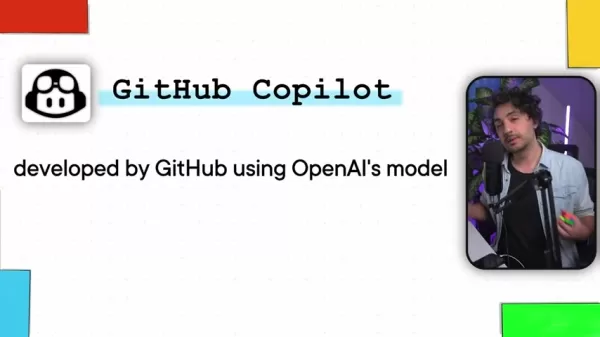
GitHub Copilot is an AI pair programmer developed by GitHub using OpenAI's technology. It provides real-time coding assistance within editors, suggesting completions, spotting bugs, and generating functions from comments. Copilot's model is trained on massive amounts of code from GitHub, enabling it to offer relevant suggestions as you type.
Key features of GitHub Copilot include:
- Code Completion: Suggests snippets and completes lines of code in real time.
- Bug Detection: Identifies potential errors in your code.
- Code Generation: Creates entire functions based on comments and context.
- Integration: Works seamlessly in popular editors like Visual Studio Code.
GitHub Copilot is designed to integrate directly into code editors, providing instant suggestions that improve coding efficiency. It aids in refactoring, debugging, and formatting, making code easier to write, read, and test. The tool uses a language model developed by OpenAI, fine-tuned for software development.
The Core Differences Summarized
Although both ChatGPT and GitHub Copilot use OpenAI's models, they serve different purposes.
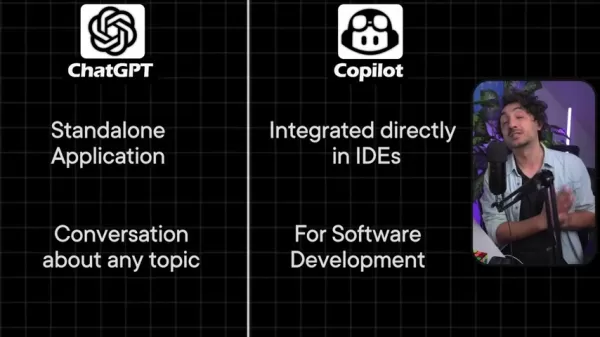
- Standalone vs. Integrated: ChatGPT is a standalone app, while GitHub Copilot works inside code editors.
- Broad vs. Focused: ChatGPT handles general conversations and content creation, whereas GitHub Copilot is specialized for coding.
- Conversation vs. Code Assistance: ChatGPT engages in dialogue, while GitHub Copilot offers real-time coding support.
For a quick comparison, see the table below:
Feature ChatGPT GitHub Copilot Type Standalone Application Integrated Code Editor Assistance Focus General Conversation & Content Generation Software Development Interaction Natural Language Prompts Real-Time Code Suggestions Primary Use Cases Brainstorming, Documentation, Research Code Completion, Debugging, Refactoring
Harnessing the Power of Copilot and ChatGPT in Data Projects
How to Use Copilot
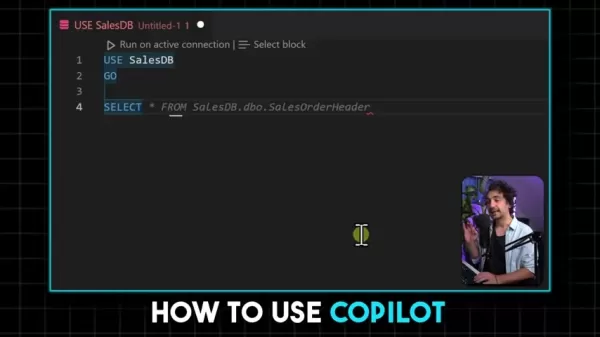
Copilot suggests code or text it predicts you'll need next. These suggestions appear as highlighted "ghost text" and don't alter your code until you accept them. It helps with tasks like debugging, adding inline comments, refactoring, and styling code to improve readability and maintainability.
Overusing Copilot can have downsides. Relying too heavily on AI suggestions may hinder skill development. It's important to cultivate your own understanding to recognize when the AI's suggestions are incorrect or suboptimal.
Pricing
Cost to use ChatGPT and Copilot
ChatGPT is available through a subscription called ChatGPT Plus. GitHub Copilot costs $10 per month or $100 per year.
ChatGPT and Copilot Analysis
Pros
Versatile for general conversation
Effective for brainstorming and generating ideas
Useful for project planning
Helps create documentation
Valuable for research
Facilitates architectural discussion
Cons
Requires a separate application
Has limited context memory
Can produce lengthy responses
Overreliance may impede learning
Use Cases: ChatGPT vs. Copilot
ChatGPT Use Cases
ChatGPT excels in the early stages of projects, such as brainstorming and information gathering. It generates ideas, aids in planning, and provides relevant knowledge. Common use cases include:
- Brainstorming & Idea Generation
- Project Planning
- Learning and Research
- Generating Documentation
- Discussing Architecture
- Exploring Best Practices
- Solving Complex Problems
GitHub Copilot Use Cases
GitHub Copilot is tailored for coding tasks, offering support with debugging, refactoring, and code assistance. Typical applications include:
- Coding Assistance
- Debugging
- Refactoring
- Inline Comments
- Styling and Formatting Code
FAQ
What exactly are ChatGPT and Copilot?
ChatGPT is an AI program by OpenAI that answers questions in a conversational style. It generates new content for tasks like brainstorming and research. GitHub Copilot, developed by GitHub with OpenAI's technology, is an AI pair programmer that integrates into code editors to offer real-time coding suggestions, bug detection, and function generation.
Is Copilot better than ChatGPT?
ChatGPT is better for general conversation and human-like interaction on various topics. GitHub Copilot is superior for software development support, providing coding assistance directly within your editor.
How are the models developed?
Both tools use OpenAI's language model, but GitHub Copilot is additionally trained on a massive repository of code from GitHub.
Related Questions
What other AI tools are helpful for data projects?
Beyond ChatGPT and GitHub Copilot, other AI tools can assist with various aspects of data projects. AI can support tasks such as generating documentation, providing coding help, brainstorming ideas, adding inline comments, debugging, planning projects, conducting research, refactoring code, applying quick fixes, discussing architecture, exploring best practices, styling code, and solving complex problems.
Related article
 Stripe to Acquire OpenRouter as AI Model Routing Gains Momentum
Stripe has agreed to acquire OpenRouter, an AI model-routing platform that gives developers access to hundreds of models through a single interface. The deal adds model selection and routing to Stripe’s existing work around AI usage and token-based b
Former OpenAI Researcher Barrett Zoph Returns to Google to Support Gemini Development
Barret Zoph, who previously abruptly left and joined OpenAI due to a disagreement with Thinking Machines Lab CEO Miriam Mularati, has once again changed employers. Alphabet's Google announced that Zoph will return as Vice President of Research, bring
How Recursive Intelligence Raised $335M at $4B Valuation in 4 Months
The co-founders of startup Ricursive Intelligence seemed destined to be co-founders.Anna Goldie, CEO, and Azalia Mirhoseini, CTO, are so well-known in the AI community that they were among those AI engineers who “got those weird emails from Zuckerber
Related Special Topic Recommendations
Design & Art
Stripe to Acquire OpenRouter as AI Model Routing Gains Momentum
Stripe has agreed to acquire OpenRouter, an AI model-routing platform that gives developers access to hundreds of models through a single interface. The deal adds model selection and routing to Stripe’s existing work around AI usage and token-based b
Former OpenAI Researcher Barrett Zoph Returns to Google to Support Gemini Development
Barret Zoph, who previously abruptly left and joined OpenAI due to a disagreement with Thinking Machines Lab CEO Miriam Mularati, has once again changed employers. Alphabet's Google announced that Zoph will return as Vice President of Research, bring
How Recursive Intelligence Raised $335M at $4B Valuation in 4 Months
The co-founders of startup Ricursive Intelligence seemed destined to be co-founders.Anna Goldie, CEO, and Azalia Mirhoseini, CTO, are so well-known in the AI community that they were among those AI engineers who “got those weird emails from Zuckerber
Related Special Topic Recommendations
Design & Art
 Top AI Illustration Tools: Create Editorial Scenes and Cover Art Faster
2026 Latest Top-rated AI Illustration Tools: Our curated list features the best powerfully designed tools for creating stunning editorial scenes and eye-catching cover art quickly. Each option has gone through rigorous real-world tests, offering a free vs paid comparison to help you find the perfect match for your workflow. Try these must-try solutions today to unlock your AI edge and boost your creative productivity. Explore now at XIX.AI.
 10 tools
 xix.ai
Education and Learning
Top AI Tutors for Exam Prep: Practice Math, Science, and English
xix.ai
Education and Learning
Top AI Tutors for Exam Prep: Practice Math, Science, and English
2026 Latest Top-Rated Best AI Tutors for Exam Prep are here on XIX.AI! Our curated list features powerful game-changing tools that offer free vs paid comparison, real-world tests, and weekly updated rankings. They help boost your writing efficiency, simplify complex topic learning, and unlock your academic potential. Explore now to Discover your perfect exam prep tool and Start creating today to Unlock your AI edge!
10 tools
xix.ai
Finance
AI Budget Planning Tools for Personal Money Management
2026 Latest Best Top-Rated AI Budget Planning Tools for Personal Money Management are here on XIX.AI! This curated collection features powerful, game-changing solutions that help you conduct real-world tests, understand spending habits, and create personalized plans to boost productivity. Enjoy a free vs paid comparison along with detailed rankings. Must-try tools designed to simplify money management and unlock your AI edge. Explore now!
11 tools
xix.ai
Health & Wellness
AI Sleep Tracking Assistants: Improve Recovery with Better Bedtime Habits
2026 Latest Best Top-Rated AI Sleep Tracking Assistants curated for ultimate recovery. This fully updated weekly guide features powerful tools that deliver real-world tests, free vs paid comparison, and detailed rankings to help you find the must-try solution that boosts sleep quality and supports better bedtime habits. Explore now at XIX.AI to Unlock your AI edge.
10 tools
xix.ai
Data Analysis
AI SQL Copilots for Product and Revenue Analytics
2026 Latest Best Top-Rated AI SQL Copilots for Product and Revenue Analytics! XIX.AI has curated a powerful, game-changing collection of must-try tools that undergo real-world tests through weekly updated rankings. These tools help users boost productivity significantly by accelerating data analysis, streamlining complex queries, and generating accurate insights to drive smarter business decisions. Explore now to Discover your perfect tool for unlocking your AI edge!
14 tools
xix.ai
Education and Learning
Best AI Homework Helpers That Teach: Learn Concepts, Not Just Answers
2026 Latest Best Top-Rated AI Homework Helpers That Teach Core Concepts Not Just Answers Powerful Tools for Students Must-Try Curated List Weekly Updated Free vs Paid Comparison Real-World Tests Accurate Rankings to Help You Unlock Your Full Learning Potential Explore now to Discover your perfect tool for smarter studying.
10 tools
xix.ai

 Comments (2)
0/500
Comments (2)
0/500
![PatrickTaylor]()
I just read the comparison, and honestly, Copilot feels more like a co-pilot for coding while ChatGPT is the chatty friend who tries to help with everything. 😅 Both are great, but I'd pick Copilot for code and ChatGPT for brainstorming. What's your take?
![JohnGarcia]()
La comparativa está bien, pero me gustaría más detalle sobre integraciones específicas de datos y notebooks Jupyter. ¿Alguien ha medido la precisión del código generado por cada modelo para análisis exploratorio de datos? 🧐 Aparte de productividad, también preocupa la dependencia que crean estas herramientas... ¡a veces uno olvina cómo codear sin ayuda!
Artificial intelligence (AI) is revolutionizing industries, and data science is at the forefront of this transformation. Tools like ChatGPT and GitHub Copilot are becoming essential for data professionals. This guide clarifies the differences between them, highlighting their unique strengths to help you decide which tool to use for maximum impact in your data projects.
Key Points
ChatGPT is ideal for brainstorming, project planning, and creating documentation.
GitHub Copilot offers real-time coding support, debugging, and code refactoring.
ChatGPT operates as a standalone application, while GitHub Copilot integrates directly into code editors.
Both tools use OpenAI's language models, but GitHub Copilot is trained on extensive code databases.
Knowing when to use each tool is key to boosting efficiency and driving innovation in data projects.
Understanding AI's Role in Data Projects
The Rise of AI in Data Science
AI is no longer a distant concept—it's a practical tool reshaping how data projects are managed. By automating routine tasks and revealing hidden insights, AI enables data scientists to achieve more in less time. To integrate AI effectively, you need a clear strategy and an understanding of available tools. ChatGPT and GitHub Copilot are leading examples of AI assistants that simplify and enhance the data science workflow.
Why Choose the Right AI Tool?
Selecting the right AI tool is critical for productivity and project success. Using an ill-suited tool can waste time, yield poor results, and cause delays. This guide compares ChatGPT and GitHub Copilot, helping you choose the best tool for various data tasks. Remember, these tools are meant to augment human skills, not replace them. Leverage AI for routine work so you can focus on strategic thinking and creative solutions.
ChatGPT vs. Copilot: Deep Dive
What is ChatGPT?
ChatGPT is an AI developed by OpenAI that understands questions and delivers human-like responses. It uses a generative pre-trained transformer (GPT) model to create new content, making it useful for brainstorming, writing, and research. The "generative" aspect means it produces original text, while "pre-trained" indicates it has learned from vast datasets. The "transformer" architecture allows it to process language quickly and grasp context accurately.
Key features of ChatGPT include:
- Natural Language Understanding: Accurately interprets and responds to diverse prompts.
- Content Generation: Creates original text, from articles and summaries to code.
- Knowledge Retrieval: Accesses and synthesizes information from a broad knowledge base.
ChatGPT's strength lies in generating new content. Unlike a search engine that finds existing articles, ChatGPT helps you create original ideas and materials, fostering creativity and productivity. It is a standalone application powered by a neural network that processes prompts with high contextual accuracy.
What is GitHub Copilot?
GitHub Copilot is an AI pair programmer developed by GitHub using OpenAI's technology. It provides real-time coding assistance within editors, suggesting completions, spotting bugs, and generating functions from comments. Copilot's model is trained on massive amounts of code from GitHub, enabling it to offer relevant suggestions as you type.
Key features of GitHub Copilot include:
- Code Completion: Suggests snippets and completes lines of code in real time.
- Bug Detection: Identifies potential errors in your code.
- Code Generation: Creates entire functions based on comments and context.
- Integration: Works seamlessly in popular editors like Visual Studio Code.
GitHub Copilot is designed to integrate directly into code editors, providing instant suggestions that improve coding efficiency. It aids in refactoring, debugging, and formatting, making code easier to write, read, and test. The tool uses a language model developed by OpenAI, fine-tuned for software development.
The Core Differences Summarized
Although both ChatGPT and GitHub Copilot use OpenAI's models, they serve different purposes.
- Standalone vs. Integrated: ChatGPT is a standalone app, while GitHub Copilot works inside code editors.
- Broad vs. Focused: ChatGPT handles general conversations and content creation, whereas GitHub Copilot is specialized for coding.
- Conversation vs. Code Assistance: ChatGPT engages in dialogue, while GitHub Copilot offers real-time coding support.
For a quick comparison, see the table below:
| Feature | ChatGPT | GitHub Copilot |
|---|---|---|
| Type | Standalone Application | Integrated Code Editor Assistance |
| Focus | General Conversation & Content Generation | Software Development |
| Interaction | Natural Language Prompts | Real-Time Code Suggestions |
| Primary Use Cases | Brainstorming, Documentation, Research | Code Completion, Debugging, Refactoring |
Harnessing the Power of Copilot and ChatGPT in Data Projects
How to Use Copilot
Copilot suggests code or text it predicts you'll need next. These suggestions appear as highlighted "ghost text" and don't alter your code until you accept them. It helps with tasks like debugging, adding inline comments, refactoring, and styling code to improve readability and maintainability.
Overusing Copilot can have downsides. Relying too heavily on AI suggestions may hinder skill development. It's important to cultivate your own understanding to recognize when the AI's suggestions are incorrect or suboptimal.
Pricing
Cost to use ChatGPT and Copilot
ChatGPT is available through a subscription called ChatGPT Plus. GitHub Copilot costs $10 per month or $100 per year.
ChatGPT and Copilot Analysis
Pros
Versatile for general conversation
Effective for brainstorming and generating ideas
Useful for project planning
Helps create documentation
Valuable for research
Facilitates architectural discussion
Cons
Requires a separate application
Has limited context memory
Can produce lengthy responses
Overreliance may impede learning
Use Cases: ChatGPT vs. Copilot
ChatGPT Use Cases
ChatGPT excels in the early stages of projects, such as brainstorming and information gathering. It generates ideas, aids in planning, and provides relevant knowledge. Common use cases include:
- Brainstorming & Idea Generation
- Project Planning
- Learning and Research
- Generating Documentation
- Discussing Architecture
- Exploring Best Practices
- Solving Complex Problems
GitHub Copilot Use Cases
GitHub Copilot is tailored for coding tasks, offering support with debugging, refactoring, and code assistance. Typical applications include:
- Coding Assistance
- Debugging
- Refactoring
- Inline Comments
- Styling and Formatting Code
FAQ
What exactly are ChatGPT and Copilot?
ChatGPT is an AI program by OpenAI that answers questions in a conversational style. It generates new content for tasks like brainstorming and research. GitHub Copilot, developed by GitHub with OpenAI's technology, is an AI pair programmer that integrates into code editors to offer real-time coding suggestions, bug detection, and function generation.
Is Copilot better than ChatGPT?
ChatGPT is better for general conversation and human-like interaction on various topics. GitHub Copilot is superior for software development support, providing coding assistance directly within your editor.
How are the models developed?
Both tools use OpenAI's language model, but GitHub Copilot is additionally trained on a massive repository of code from GitHub.
Related Questions
What other AI tools are helpful for data projects?
Beyond ChatGPT and GitHub Copilot, other AI tools can assist with various aspects of data projects. AI can support tasks such as generating documentation, providing coding help, brainstorming ideas, adding inline comments, debugging, planning projects, conducting research, refactoring code, applying quick fixes, discussing architecture, exploring best practices, styling code, and solving complex problems.








 Stripe to Acquire OpenRouter as AI Model Routing Gains Momentum
Stripe has agreed to acquire OpenRouter, an AI model-routing platform that gives developers access to hundreds of models through a single interface. The deal adds model selection and routing to Stripe’s existing work around AI usage and token-based b
Stripe to Acquire OpenRouter as AI Model Routing Gains Momentum
Stripe has agreed to acquire OpenRouter, an AI model-routing platform that gives developers access to hundreds of models through a single interface. The deal adds model selection and routing to Stripe’s existing work around AI usage and token-based b
 Former OpenAI Researcher Barrett Zoph Returns to Google to Support Gemini Development
Barret Zoph, who previously abruptly left and joined OpenAI due to a disagreement with Thinking Machines Lab CEO Miriam Mularati, has once again changed employers. Alphabet's Google announced that Zoph will return as Vice President of Research, bring
Former OpenAI Researcher Barrett Zoph Returns to Google to Support Gemini Development
Barret Zoph, who previously abruptly left and joined OpenAI due to a disagreement with Thinking Machines Lab CEO Miriam Mularati, has once again changed employers. Alphabet's Google announced that Zoph will return as Vice President of Research, bring
 How Recursive Intelligence Raised $335M at $4B Valuation in 4 Months
The co-founders of startup Ricursive Intelligence seemed destined to be co-founders.Anna Goldie, CEO, and Azalia Mirhoseini, CTO, are so well-known in the AI community that they were among those AI engineers who “got those weird emails from Zuckerber
How Recursive Intelligence Raised $335M at $4B Valuation in 4 Months
The co-founders of startup Ricursive Intelligence seemed destined to be co-founders.Anna Goldie, CEO, and Azalia Mirhoseini, CTO, are so well-known in the AI community that they were among those AI engineers who “got those weird emails from Zuckerber

2026 Latest Top-rated AI Illustration Tools: Our curated list features the best powerfully designed tools for creating stunning editorial scenes and eye-catching cover art quickly. Each option has gone through rigorous real-world tests, offering a free vs paid comparison to help you find the perfect match for your workflow. Try these must-try solutions today to unlock your AI edge and boost your creative productivity. Explore now at XIX.AI.
10 tools
xix.ai

2026 Latest Top-Rated Best AI Tutors for Exam Prep are here on XIX.AI! Our curated list features powerful game-changing tools that offer free vs paid comparison, real-world tests, and weekly updated rankings. They help boost your writing efficiency, simplify complex topic learning, and unlock your academic potential. Explore now to Discover your perfect exam prep tool and Start creating today to Unlock your AI edge!
10 tools
xix.ai

2026 Latest Best Top-Rated AI Budget Planning Tools for Personal Money Management are here on XIX.AI! This curated collection features powerful, game-changing solutions that help you conduct real-world tests, understand spending habits, and create personalized plans to boost productivity. Enjoy a free vs paid comparison along with detailed rankings. Must-try tools designed to simplify money management and unlock your AI edge. Explore now!
11 tools
xix.ai

2026 Latest Best Top-Rated AI Sleep Tracking Assistants curated for ultimate recovery. This fully updated weekly guide features powerful tools that deliver real-world tests, free vs paid comparison, and detailed rankings to help you find the must-try solution that boosts sleep quality and supports better bedtime habits. Explore now at XIX.AI to Unlock your AI edge.
10 tools
xix.ai

2026 Latest Best Top-Rated AI SQL Copilots for Product and Revenue Analytics! XIX.AI has curated a powerful, game-changing collection of must-try tools that undergo real-world tests through weekly updated rankings. These tools help users boost productivity significantly by accelerating data analysis, streamlining complex queries, and generating accurate insights to drive smarter business decisions. Explore now to Discover your perfect tool for unlocking your AI edge!
14 tools
xix.ai

2026 Latest Best Top-Rated AI Homework Helpers That Teach Core Concepts Not Just Answers Powerful Tools for Students Must-Try Curated List Weekly Updated Free vs Paid Comparison Real-World Tests Accurate Rankings to Help You Unlock Your Full Learning Potential Explore now to Discover your perfect tool for smarter studying.
10 tools
xix.ai

I just read the comparison, and honestly, Copilot feels more like a co-pilot for coding while ChatGPT is the chatty friend who tries to help with everything. 😅 Both are great, but I'd pick Copilot for code and ChatGPT for brainstorming. What's your take?
La comparativa está bien, pero me gustaría más detalle sobre integraciones específicas de datos y notebooks Jupyter. ¿Alguien ha medido la precisión del código generado por cada modelo para análisis exploratorio de datos? 🧐 Aparte de productividad, también preocupa la dependencia que crean estas herramientas... ¡a veces uno olvina cómo codear sin ayuda!












