


 Home
HomeHow to activate Central Bank of India internet banking in 2026? Step-by-step guide.
Activating internet banking with the Central Bank of India (CBI) provides a simple and efficient way to handle your finances online. This guide offers a clear, step-by-step process for first-time users to activate their CBI internet banking account, ensuring a secure and straightforward setup. We'll walk you through everything from the initial registration to creating transaction passwords, helping you get started with CBI's online banking services.
Key Points
Understanding the requirements for activating CBI internet banking.
Step-by-step guidance for initial registration and login.
How to securely generate a new login password.
Creating a transaction password for safe online payments.
Navigating the CBI internet banking portal and its main features.
Essential security tips to keep your online account protected.
Activating Your Central Bank of India Internet Banking
Initial Setup and Login
To begin activating your Central Bank of India internet banking, go to the official CBI net banking website. The activation involves several security steps. First, make sure you have your CIF number ready, as you will need it during setup. This unique identifier is found on your bank statement.
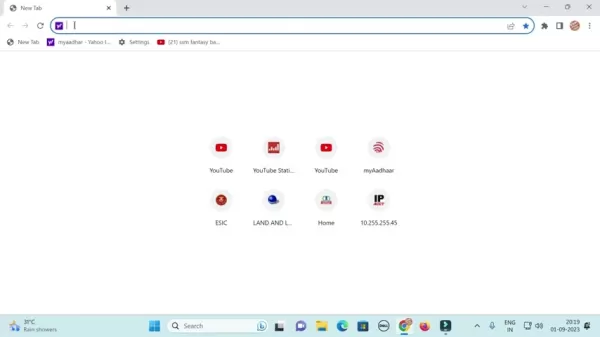
Enter "CBI net banking" into your browser's search bar. Click the official "Central Bank of India Net Banking" link from the search results to open the portal, where you can start the activation process.
Once on the site, find the "Personal Banking" section. If you have a corporate account, select the corporate option. Click "Login." For first-time users, begin registration by clicking "Online Password Generation" or a similar option for new users. Be sure to select the correct account type: personal for individual accounts or corporate for business-related accounts.
A pop-up with helpful information might appear; simply close it by clicking the "X" button and continue. Direct access to this page is also available via a link in the video description. You are now ready to set up your login. Note that the site may require the desktop version for proper display on mobile devices. To enable this, tap the three-dot menu and choose "Desktop site" for a full-screen experience.
Generating Your Login Password
As a new user, you must create a login password. Click "Online Password Generation" or a similar option to start.
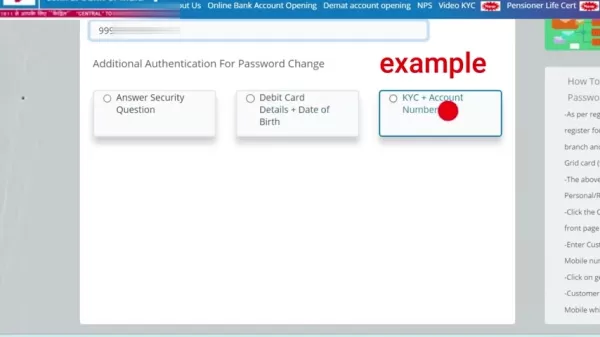
You will be asked to enter your 10-digit CIF number, available on your bank statement. Next, choose a verification method for password creation. Options usually include answering a security question, using debit card details along with your date of birth, or providing KYC (Know Your Customer) details and your account number. Select the method that is most convenient for you.
If you choose the "Debit Card Details + Date of Birth" method, enter the last six digits of your debit card number, the card's expiry month and year, and your date of birth. This method is often the easiest since the information is on your card. After entering the details, click "Submit."
You may need to provide your mobile number. Ensure the number you enter is the one registered with your bank account. Input your valid Central Bank of India-registered mobile number and click "Generate OTP." An OTP (One-Time Password) will be sent to your phone. Enter the OTP, create a new login password, and confirm it. You have now successfully logged in and can access the system.
Generating Transaction Password for Secure Transactions
Although you have a login password, a separate transaction password is required for financial operations. To set this up, go to the "Profile Setting" section on your internet banking dashboard. Look for an option like "Generate Transaction Password" or "Change Transaction Password" and select it.
To generate the transaction password, choose the OTP via SMS option and click generate. You will need to enter the received OTP and create a new transaction password. Note that your login and transaction passwords cannot be the same.
Once you have set your transaction password, you can perform transactions, check your account balance, and more.
FAQ
What do I need to activate CBI internet banking?
You will need your CIF number, debit card details (if using that method), your registered mobile number, and access to that mobile for OTP verification.
What if I don't receive the OTP?
You can select the "Resend OTP" option on the verification page. Double-check that your mobile number is correctly registered with the bank.
Can I use the same password for login and transactions?
For security, it is strongly advised to use different passwords for login and transactions.
How do I reset my internet banking password if I forget it?
Use the "Forgot Password" link on the login page and follow the steps, using available authentication methods such as debit card details or security questions.
Is CBI internet banking secure?
CBI uses multiple security layers, including OTP verification, encryption, and regular security checks, to safeguard your online transactions and personal data.
Related Questions
What are the benefits of using Central Bank of India internet banking?
Central Bank of India (CBI) internet banking offers many advantages, making financial management easier and more efficient. A major benefit is convenience. You can access your account and perform transactions from anywhere with an internet connection, reducing the need to visit a branch. This is ideal for people with busy schedules.Another key advantage is 24/7 availability. Unlike physical banks, internet banking lets you manage your money anytime. You can check balances, view statements, transfer funds, pay bills, and more, all at your convenience.CBI internet banking also provides real-time updates. You can monitor transactions, review account activity, and get instant alerts, helping you stay informed about your finances. This supports better planning and decision-making.Security is a priority for CBI internet banking. The platform uses multiple security features, such as multi-factor authentication, encryption, and secure login processes, to prevent unauthorized access. These steps help keep your financial information and transactions safe.Additionally, internet banking can lead to cost savings. Many online transactions have lower fees compared to in-branch services. You also save on travel time and expenses.Overall, CBI internet banking offers a convenient, accessible, and secure method for managing your finances, giving you greater control and efficiency in your banking activities.
Related article
 Anthropic Expands Claude AI Coding Tools to Japan in Push for Overseas Growth
Anthropic, a prominent U.S. artificial intelligence firm, is intensifying its global outreach. On Wednesday, the company hosted a major developer gathering, "Code with Claude," in Tokyo, drawing close to 500 software engineers. This initiative seeks
India’s Software Giant Cuts Hiring, Promises No Layoffs as AI Agents Scale Up
As artificial intelligence reshapes traditional labor-intensive business models, Tata Consultancy Services (TCS), a premier Indian software outsourcing firm, has unveiled its strategic response. During Tuesday’s annual general meeting, the chairman o
China Locks AI Models During Gaokam to Block Instant Homework Help
With the 2026 Gaokao fast approaching, rumors regarding the suspension of AI tools during the exam period have ignited intense online debate. In response to public concern, major AI platforms and educational apps have clarified their stance: rather t
Related Special Topic Recommendations
Design & Art
Anthropic Expands Claude AI Coding Tools to Japan in Push for Overseas Growth
Anthropic, a prominent U.S. artificial intelligence firm, is intensifying its global outreach. On Wednesday, the company hosted a major developer gathering, "Code with Claude," in Tokyo, drawing close to 500 software engineers. This initiative seeks
India’s Software Giant Cuts Hiring, Promises No Layoffs as AI Agents Scale Up
As artificial intelligence reshapes traditional labor-intensive business models, Tata Consultancy Services (TCS), a premier Indian software outsourcing firm, has unveiled its strategic response. During Tuesday’s annual general meeting, the chairman o
China Locks AI Models During Gaokam to Block Instant Homework Help
With the 2026 Gaokao fast approaching, rumors regarding the suspension of AI tools during the exam period have ignited intense online debate. In response to public concern, major AI platforms and educational apps have clarified their stance: rather t
Related Special Topic Recommendations
Design & Art
 Best AI Style Transfer Tools for Creative Experiments
2026 Latest Best Top-rated AI Style Transfer Tools for Creative Experiments! XIX.AI has curated a powerful, game-changing collection of must-try tools that deliver exceptional results through real-world tests and rigorous rankings. These top solutions help creatives boost productivity significantly by accelerating content creation and unlocking endless creative possibilities. Explore now to discover your perfect tool and start creating today!
 9 tools
 xix.ai
Comic Creation
Best AI Dialogue Bubble Tools for Visual Storytelling
xix.ai
Comic Creation
Best AI Dialogue Bubble Tools for Visual Storytelling
2026 Latest Best Top-Rated AI Dialogue Bubble Tools for Visual Storytelling are here on XIX.AI! This curated collection features powerful, game-changing tools that help creators boost productivity and overcome creative bottlenecks. Get a free vs paid comparison, see real-world tests, and check the latest rankings to find the must-try solutions perfect for crafting engaging visual narratives. Explore now to discover your ideal tool!
10 tools
xix.ai
Meeting Assistant
Top AI Meeting Summary Tools: Track Decisions and Follow-Ups Clearly
2026 Latest Top-Rated Best AI Meeting Summary Tools for Clear Decision Tracking and Effortless Follow-Ups. This curated list showcases powerful, game-changing solutions that boost productivity dramatically by automating meeting notes, identifying key action items, and streamlining team coordination across all projects. Get a free vs paid comparison along with real-world tests and weekly updated rankings to help you find the perfect tool. Explore now to unlock your AI edge!
9 tools
xix.ai
Data Analysis
Best AI Data Cleaning Tools: Fix Missing Values and Duplicates Fast
2026 Latest Best Top-rated AI Data Cleaning Tools for quick fixing of missing values and duplicates. This curated list showcases powerful, game-changing solutions that boost productivity significantly. Each option has undergone rigorous real-world tests to ensure reliability. Get a free vs paid comparison and discover the must-try tool that fits your needs best. Explore now at XIX.AI to Unlock your AI edge.
11 tools
xix.ai
Design & Art
Best AI Creative Ideation Tools for Artists: Break Through Visual Blocks
2026 Latest Best Top-Rated AI Creative Ideation Tools for Artists are curated by XIX.AI to help creators break through visual blocks and boost creativity instantly. These powerful game-changing tools offer real-world tests, detailed free vs paid comparison, and weekly updated rankings. Discover your perfect tool to accelerate content creation and unlock your AI edge today. Explore now!
14 tools
xix.ai
Music composition
AI Beat Makers for TikTok Background Tracks, Reels Audio, and Creator Promo Music
2026 Latest Best AI Beat Makers for TikTok Background Tracks, Reels Audio, and Creator Promo Music! XIX.AI has curated a top-rated list of powerful game-changing tools that go through real-world tests to deliver flawless music for every content need. You’ll find detailed free vs paid comparison data, weekly updated rankings, and must-try options to help you boost creativity and productivity. Explore now to discover your perfect tool!
11 tools
xix.ai

 Comments (1)
0/500
Comments (1)
0/500
![RyanSanchez]()
So you need a step-by-step guide in 2026? Guess banks still can't make it simple... 😅
Activating internet banking with the Central Bank of India (CBI) provides a simple and efficient way to handle your finances online. This guide offers a clear, step-by-step process for first-time users to activate their CBI internet banking account, ensuring a secure and straightforward setup. We'll walk you through everything from the initial registration to creating transaction passwords, helping you get started with CBI's online banking services.
Key Points
Understanding the requirements for activating CBI internet banking.
Step-by-step guidance for initial registration and login.
How to securely generate a new login password.
Creating a transaction password for safe online payments.
Navigating the CBI internet banking portal and its main features.
Essential security tips to keep your online account protected.
Activating Your Central Bank of India Internet Banking
Initial Setup and Login
To begin activating your Central Bank of India internet banking, go to the official CBI net banking website. The activation involves several security steps. First, make sure you have your CIF number ready, as you will need it during setup. This unique identifier is found on your bank statement.
Enter "CBI net banking" into your browser's search bar. Click the official "Central Bank of India Net Banking" link from the search results to open the portal, where you can start the activation process.
Once on the site, find the "Personal Banking" section. If you have a corporate account, select the corporate option. Click "Login." For first-time users, begin registration by clicking "Online Password Generation" or a similar option for new users. Be sure to select the correct account type: personal for individual accounts or corporate for business-related accounts.
A pop-up with helpful information might appear; simply close it by clicking the "X" button and continue. Direct access to this page is also available via a link in the video description. You are now ready to set up your login. Note that the site may require the desktop version for proper display on mobile devices. To enable this, tap the three-dot menu and choose "Desktop site" for a full-screen experience.
Generating Your Login Password
As a new user, you must create a login password. Click "Online Password Generation" or a similar option to start.
You will be asked to enter your 10-digit CIF number, available on your bank statement. Next, choose a verification method for password creation. Options usually include answering a security question, using debit card details along with your date of birth, or providing KYC (Know Your Customer) details and your account number. Select the method that is most convenient for you.
If you choose the "Debit Card Details + Date of Birth" method, enter the last six digits of your debit card number, the card's expiry month and year, and your date of birth. This method is often the easiest since the information is on your card. After entering the details, click "Submit."
You may need to provide your mobile number. Ensure the number you enter is the one registered with your bank account. Input your valid Central Bank of India-registered mobile number and click "Generate OTP." An OTP (One-Time Password) will be sent to your phone. Enter the OTP, create a new login password, and confirm it. You have now successfully logged in and can access the system.
Generating Transaction Password for Secure Transactions
Although you have a login password, a separate transaction password is required for financial operations. To set this up, go to the "Profile Setting" section on your internet banking dashboard. Look for an option like "Generate Transaction Password" or "Change Transaction Password" and select it.
To generate the transaction password, choose the OTP via SMS option and click generate. You will need to enter the received OTP and create a new transaction password. Note that your login and transaction passwords cannot be the same.
Once you have set your transaction password, you can perform transactions, check your account balance, and more.
FAQ
What do I need to activate CBI internet banking?
You will need your CIF number, debit card details (if using that method), your registered mobile number, and access to that mobile for OTP verification.
What if I don't receive the OTP?
You can select the "Resend OTP" option on the verification page. Double-check that your mobile number is correctly registered with the bank.
Can I use the same password for login and transactions?
For security, it is strongly advised to use different passwords for login and transactions.
How do I reset my internet banking password if I forget it?
Use the "Forgot Password" link on the login page and follow the steps, using available authentication methods such as debit card details or security questions.
Is CBI internet banking secure?
CBI uses multiple security layers, including OTP verification, encryption, and regular security checks, to safeguard your online transactions and personal data.
Related Questions
What are the benefits of using Central Bank of India internet banking?
Central Bank of India (CBI) internet banking offers many advantages, making financial management easier and more efficient. A major benefit is convenience. You can access your account and perform transactions from anywhere with an internet connection, reducing the need to visit a branch. This is ideal for people with busy schedules.Another key advantage is 24/7 availability. Unlike physical banks, internet banking lets you manage your money anytime. You can check balances, view statements, transfer funds, pay bills, and more, all at your convenience.CBI internet banking also provides real-time updates. You can monitor transactions, review account activity, and get instant alerts, helping you stay informed about your finances. This supports better planning and decision-making.Security is a priority for CBI internet banking. The platform uses multiple security features, such as multi-factor authentication, encryption, and secure login processes, to prevent unauthorized access. These steps help keep your financial information and transactions safe.Additionally, internet banking can lead to cost savings. Many online transactions have lower fees compared to in-branch services. You also save on travel time and expenses.Overall, CBI internet banking offers a convenient, accessible, and secure method for managing your finances, giving you greater control and efficiency in your banking activities.








 Anthropic Expands Claude AI Coding Tools to Japan in Push for Overseas Growth
Anthropic, a prominent U.S. artificial intelligence firm, is intensifying its global outreach. On Wednesday, the company hosted a major developer gathering, "Code with Claude," in Tokyo, drawing close to 500 software engineers. This initiative seeks
Anthropic Expands Claude AI Coding Tools to Japan in Push for Overseas Growth
Anthropic, a prominent U.S. artificial intelligence firm, is intensifying its global outreach. On Wednesday, the company hosted a major developer gathering, "Code with Claude," in Tokyo, drawing close to 500 software engineers. This initiative seeks
 India’s Software Giant Cuts Hiring, Promises No Layoffs as AI Agents Scale Up
As artificial intelligence reshapes traditional labor-intensive business models, Tata Consultancy Services (TCS), a premier Indian software outsourcing firm, has unveiled its strategic response. During Tuesday’s annual general meeting, the chairman o
India’s Software Giant Cuts Hiring, Promises No Layoffs as AI Agents Scale Up
As artificial intelligence reshapes traditional labor-intensive business models, Tata Consultancy Services (TCS), a premier Indian software outsourcing firm, has unveiled its strategic response. During Tuesday’s annual general meeting, the chairman o
 China Locks AI Models During Gaokam to Block Instant Homework Help
With the 2026 Gaokao fast approaching, rumors regarding the suspension of AI tools during the exam period have ignited intense online debate. In response to public concern, major AI platforms and educational apps have clarified their stance: rather t
China Locks AI Models During Gaokam to Block Instant Homework Help
With the 2026 Gaokao fast approaching, rumors regarding the suspension of AI tools during the exam period have ignited intense online debate. In response to public concern, major AI platforms and educational apps have clarified their stance: rather t

2026 Latest Best Top-rated AI Style Transfer Tools for Creative Experiments! XIX.AI has curated a powerful, game-changing collection of must-try tools that deliver exceptional results through real-world tests and rigorous rankings. These top solutions help creatives boost productivity significantly by accelerating content creation and unlocking endless creative possibilities. Explore now to discover your perfect tool and start creating today!
9 tools
xix.ai

2026 Latest Best Top-Rated AI Dialogue Bubble Tools for Visual Storytelling are here on XIX.AI! This curated collection features powerful, game-changing tools that help creators boost productivity and overcome creative bottlenecks. Get a free vs paid comparison, see real-world tests, and check the latest rankings to find the must-try solutions perfect for crafting engaging visual narratives. Explore now to discover your ideal tool!
10 tools
xix.ai

2026 Latest Top-Rated Best AI Meeting Summary Tools for Clear Decision Tracking and Effortless Follow-Ups. This curated list showcases powerful, game-changing solutions that boost productivity dramatically by automating meeting notes, identifying key action items, and streamlining team coordination across all projects. Get a free vs paid comparison along with real-world tests and weekly updated rankings to help you find the perfect tool. Explore now to unlock your AI edge!
9 tools
xix.ai

2026 Latest Best Top-rated AI Data Cleaning Tools for quick fixing of missing values and duplicates. This curated list showcases powerful, game-changing solutions that boost productivity significantly. Each option has undergone rigorous real-world tests to ensure reliability. Get a free vs paid comparison and discover the must-try tool that fits your needs best. Explore now at XIX.AI to Unlock your AI edge.
11 tools
xix.ai

2026 Latest Best Top-Rated AI Creative Ideation Tools for Artists are curated by XIX.AI to help creators break through visual blocks and boost creativity instantly. These powerful game-changing tools offer real-world tests, detailed free vs paid comparison, and weekly updated rankings. Discover your perfect tool to accelerate content creation and unlock your AI edge today. Explore now!
14 tools
xix.ai

2026 Latest Best AI Beat Makers for TikTok Background Tracks, Reels Audio, and Creator Promo Music! XIX.AI has curated a top-rated list of powerful game-changing tools that go through real-world tests to deliver flawless music for every content need. You’ll find detailed free vs paid comparison data, weekly updated rankings, and must-try options to help you boost creativity and productivity. Explore now to discover your perfect tool!
11 tools
xix.ai

So you need a step-by-step guide in 2026? Guess banks still can't make it simple... 😅












