


 Home
HomeUnlock YouTube Views: Master Thumbnail Design with AI Image Generation
Are you struggling to get views on your YouTube videos? You're not alone. Many new content creators face this exact challenge. This article explores the main reasons your videos might be underperforming and offers practical strategies to increase your YouTube views, with a focus on optimizing thumbnails and harnessing the power of AI image generation.
Key Points for YouTube View Growth
YouTube gives new creators a boost: Take advantage of the initial reach granted to new channels.
Thumbnails and titles are critical: They create the first impression for potential viewers.
AI can be a powerful helper: Use AI tools to create captivating thumbnails and titles.
Analyze your impressions: Understand how YouTube is promoting your videos.
Optimize for mobile: Make sure your thumbnails and titles look great on mobile devices.
Understanding the YouTube View Problem
The Common Complaint: No Views!
The number one frustration for new YouTubers is often, "My videos aren't getting any views!" They believe they're making great content, but it simply doesn't reach an audience. Many suspect that YouTube is working against them

, or ignoring their channel entirely. However, this is rarely true. In fact, the opposite is typically the case.
YouTube wants its creators to succeed. More successful creators mean more content, which keeps users engaged on the platform longer. Focusing on strategies to boost your YouTube views is a powerful way to grow your channel.
Old Channels vs. New Channels
A common perception is that YouTube's algorithm favors newer channels. While not entirely accurate, some evidence supports this idea. Older channels, particularly those around 4-5 years old, may see their organic reach decline over time. Conversely, new channels often receive an initial boost in reach, providing a valuable window to find an audience. The key question is: how do you capitalize on that boost to increase video views and expand your influence?
The Real Problem: You're Missing the Mark
If YouTube provides that initial reach, but your videos still get few views, what's the issue? According to many video marketing experts, the most likely reason for underperformance is a fundamental misunderstanding of what drives clicks: captivating titles and thumbnails. In fact, an estimated 99% of creators don't give proper consideration to the essential elements of thumbnail design! This is a problem most creators can solve themselves with the right knowledge.
Many creators underestimate the importance of the thumbnail and invest little to no time planning it before publishing. The result is low views and poor engagement, as viewers scroll past without clicking. Therefore, dedicate sufficient time in the planning stage to ensure your thumbnails and titles are as strong as they can possibly be.
Title and Thumbnail Power-Ups for YouTube
Key Facets of Titles and Thumbnails
Success on YouTube hinges on two critical elements: Titles and Thumbnails. These are what grab attention and entice viewers to click, representing your first and best opportunity to gain views

. The challenge is that most creators don't know how to craft effective ones, leading to lower view counts than potential allows. Let's solve that problem now.
Titles should tell a story. They need to entice and engage the viewer without giving away the entire video. Your goal is to make viewers curious enough to click and watch to learn more. A great thumbnail and title work together seamlessly to achieve this.
It's also vital to understand these elements as a first impression. Several components must work together to capture attention effectively:
Title Tactics for YouTube Videos
Crafting a compelling title is an art. It requires balancing SEO optimization with viewer intrigue. Aim for concise, engaging, and relevant titles that accurately reflect your video's content. Clearly indicate the topic without revealing everything. A useful approach is to ask yourself: "What title would capture *my* attention if I were searching for this kind of content?"
Thumbnail Success: Tips for Compelling Imagery
Your YouTube thumbnail is where you can truly stand out from the competition and drive more views. Many creators use poor thumbnails and then wonder why their videos underperform. Use this basic checklist:
- High-Quality Images: Using high-resolution images is non-negotiable. Blurry, pixelated thumbnails repel viewers. The standard YouTube thumbnail size is 1280x720 pixels with a 16:9 aspect ratio.
- Visual Storytelling: A strong thumbnail tells a story, conveying the video's core message visually

. What is your video about? Show it in the thumbnail to communicate the idea instantly.
- Emotional Impact: Evoke curiosity, excitement, or intrigue. Images showing faces with strong emotions are highly effective. For example, use an action shot of a person looking intently in a specific direction.
- Branding: Maintain a consistent visual identity to make your content instantly recognizable.
- Keep it Short: Use short, clear phrases that are readable at a glance to make the thumbnail more effective.
- Avoid Excess: Overuse of capital letters and emojis can distract from the main message. Use them sparingly.
Leveraging AI for Stunning YouTube Thumbnails
AI in Thumbnails: The Next Frontier for Content
One of the biggest challenges is consistently generating unique and compelling ideas. The good news is that AI is revolutionizing YouTube thumbnail design
. AI-powered tools now make it quick and easy to generate high-quality images. Numerous tools are available, including text-to-image systems like Midjourney, DALL-E, or Stable Diffusion.
Follow this step-by-step process to leverage AI for your thumbnails:
- Create with AI Prompts: Write a detailed prompt and use a tool like ChatGPT to help brainstorm and structure your ideas.
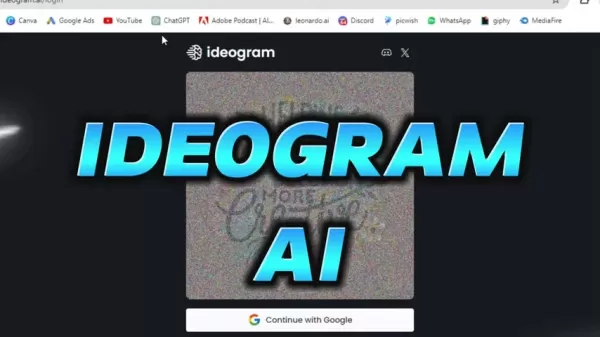
- Generate Your Image with Ideogram: Take your best concept and use it to create an image with Ideogram.AI.
- Refine With Your Face: Use a tool like Remaker.AI to insert yourself into the thumbnail, making you the central focus of your content.
Step-by-step: Create Your Thumbnails With Ideogram
Here's a quick guide to creating an effective prompt
. Consider this example prompt:
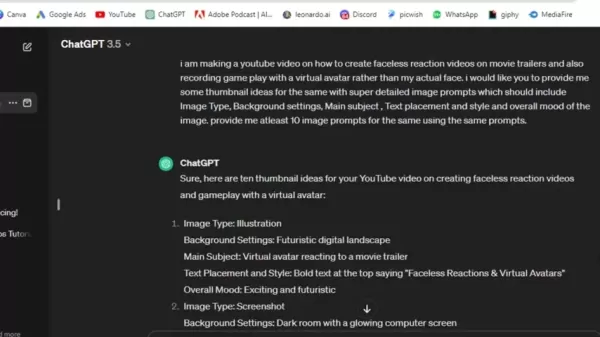
I am making a YouTube video on how to create faceless reaction videos on movie trailers and also Recording gameplay with a virtual avatar rather than my actual face. I would like you to provide me some thumbnail ideas for the same with super detailed image prompts which should include Image Type, Background settings, Main subject , Text placement and style and overall mood of the image. provide me atleast 10 image prompts for the same using the same prompts.
Once you have your AI-generated image, here's how to add yourself using Remaker.AI:
- Upload the original image (from Ideogram.AI).
- Upload the target image (a photo of yourself).
- Add text as needed (Canva is a good option for this).
- Generate the final image.
Ideogram AI: Pricing Information
Cost and Plan Options
Ideogram.ai offers users up to 25 prompts, which can generate up to 100 images. These images can be downloaded, making the system more than adequate for creating thumbnails.
Paid upgrade options are available:
Tier Cost Features Basic $7 USD per month 400 prompts or 1600 images Plus $16 USD per month 1000 prompts or 4000 images
AI-Powered YouTube Thumbnails: Balancing Benefits and Limitations
Pros
Saves time and effort: Generates multiple thumbnail options rapidly.
Offers creative inspiration: Provides a wide range of design ideas and styles.
Affordable or free options: Accessible to creators with different budgets.
Cons
Requires careful prompting: The output quality heavily depends on your text prompts.
May lack unique human touch: Results can sometimes feel generic or impersonal.
Ethical considerations: Always ensure AI-generated content adheres to copyright and ethical guidelines.
Core Features of Ideogram AI
Feature Set
Several reasons make Ideogram.AI a popular choice for AI image creation. Key features include:
- Fast and effective prompt-to-image production
- High-quality image rendering
- A generous free version for generating many images.
- Easy image uploading for seamless integration with tools like Remaker.AI
Why use Ideogram?
Potential benefits for users
Users choose Ideogram for AI generation for various reasons, such as:
- Quickly creating engaging visual content
- Use in both personal and professional projects.
- Generating unique and compelling thumbnails.
Frequently Asked Questions About YouTube Thumbnails
Why are thumbnails so important for YouTube success?
Thumbnails are the first visual impression of your video. A compelling thumbnail grabs attention, communicates the video's topic, and encourages clicks, which directly impacts your view count and channel growth.
Can AI really improve my thumbnail design?
Yes. AI tools can quickly generate creative and eye-catching images, saving significant time and effort. They provide diverse styles and concepts, helping you design thumbnails that appeal to your target audience.
Is YouTube really on my side?
Yes. Even when it feels like the platform is working against you, YouTube's incentive is for creators to succeed. Your success helps them retain the viewers that your content attracts.
Related Questions About YouTube Success
Besides thumbnails, what else can I do to increase my YouTube views?
While thumbnails are vital, also focus on these areas:SEO Optimization: Perform keyword research and strategically use relevant terms in your video titles, descriptions, and tags. Effective YouTube SEO makes it easier for viewers to find your content on and off the platform.Compelling Content: Create videos that provide genuine value, entertain, or solve problems for your target audience. If viewers enjoy your content, they are more likely to subscribe, engage, and share.Audience Engagement: Respond to comments, ask for feedback, and build a community around your channel. One of the best ways to learn is to ask your audience directly what they want to see.
Related article
 Former OpenAI Researcher Barrett Zoph Returns to Google to Support Gemini Development
Barret Zoph, who previously abruptly left and joined OpenAI due to a disagreement with Thinking Machines Lab CEO Miriam Mularati, has once again changed employers. Alphabet's Google announced that Zoph will return as Vice President of Research, bring
How Recursive Intelligence Raised $335M at $4B Valuation in 4 Months
The co-founders of startup Ricursive Intelligence seemed destined to be co-founders.Anna Goldie, CEO, and Azalia Mirhoseini, CTO, are so well-known in the AI community that they were among those AI engineers who “got those weird emails from Zuckerber
AI race won’t wait, nor will this TechCrunch Disrupt 25% discount
Every founder building in AI right now is asking the same question: Are we moving fast enough, and effectively enough? TechCrunch Disrupt 2026 puts you in the same room as the people wrestling with that existential question at the highest levels. Fro
Related Special Topic Recommendations
Design & Art
Former OpenAI Researcher Barrett Zoph Returns to Google to Support Gemini Development
Barret Zoph, who previously abruptly left and joined OpenAI due to a disagreement with Thinking Machines Lab CEO Miriam Mularati, has once again changed employers. Alphabet's Google announced that Zoph will return as Vice President of Research, bring
How Recursive Intelligence Raised $335M at $4B Valuation in 4 Months
The co-founders of startup Ricursive Intelligence seemed destined to be co-founders.Anna Goldie, CEO, and Azalia Mirhoseini, CTO, are so well-known in the AI community that they were among those AI engineers who “got those weird emails from Zuckerber
AI race won’t wait, nor will this TechCrunch Disrupt 25% discount
Every founder building in AI right now is asking the same question: Are we moving fast enough, and effectively enough? TechCrunch Disrupt 2026 puts you in the same room as the people wrestling with that existential question at the highest levels. Fro
Related Special Topic Recommendations
Design & Art
 Top AI Illustration Tools: Create Editorial Scenes and Cover Art Faster
2026 Latest Top-rated AI Illustration Tools: Our curated list features the best powerfully designed tools for creating stunning editorial scenes and eye-catching cover art quickly. Each option has gone through rigorous real-world tests, offering a free vs paid comparison to help you find the perfect match for your workflow. Try these must-try solutions today to unlock your AI edge and boost your creative productivity. Explore now at XIX.AI.
 10 tools
 xix.ai
Education and Learning
Top AI Tutors for Exam Prep: Practice Math, Science, and English
xix.ai
Education and Learning
Top AI Tutors for Exam Prep: Practice Math, Science, and English
2026 Latest Top-Rated Best AI Tutors for Exam Prep are here on XIX.AI! Our curated list features powerful game-changing tools that offer free vs paid comparison, real-world tests, and weekly updated rankings. They help boost your writing efficiency, simplify complex topic learning, and unlock your academic potential. Explore now to Discover your perfect exam prep tool and Start creating today to Unlock your AI edge!
10 tools
xix.ai
Finance
AI Budget Planning Tools for Personal Money Management
2026 Latest Best Top-Rated AI Budget Planning Tools for Personal Money Management are here on XIX.AI! This curated collection features powerful, game-changing solutions that help you conduct real-world tests, understand spending habits, and create personalized plans to boost productivity. Enjoy a free vs paid comparison along with detailed rankings. Must-try tools designed to simplify money management and unlock your AI edge. Explore now!
11 tools
xix.ai
Health & Wellness
AI Sleep Tracking Assistants: Improve Recovery with Better Bedtime Habits
2026 Latest Best Top-Rated AI Sleep Tracking Assistants curated for ultimate recovery. This fully updated weekly guide features powerful tools that deliver real-world tests, free vs paid comparison, and detailed rankings to help you find the must-try solution that boosts sleep quality and supports better bedtime habits. Explore now at XIX.AI to Unlock your AI edge.
10 tools
xix.ai
Data Analysis
AI SQL Copilots for Product and Revenue Analytics
2026 Latest Best Top-Rated AI SQL Copilots for Product and Revenue Analytics! XIX.AI has curated a powerful, game-changing collection of must-try tools that undergo real-world tests through weekly updated rankings. These tools help users boost productivity significantly by accelerating data analysis, streamlining complex queries, and generating accurate insights to drive smarter business decisions. Explore now to Discover your perfect tool for unlocking your AI edge!
14 tools
xix.ai
Education and Learning
Best AI Homework Helpers That Teach: Learn Concepts, Not Just Answers
2026 Latest Best Top-Rated AI Homework Helpers That Teach Core Concepts Not Just Answers Powerful Tools for Students Must-Try Curated List Weekly Updated Free vs Paid Comparison Real-World Tests Accurate Rankings to Help You Unlock Your Full Learning Potential Explore now to Discover your perfect tool for smarter studying.
10 tools
xix.ai

 Comments (0)
0/500
Comments (0)
0/500
Are you struggling to get views on your YouTube videos? You're not alone. Many new content creators face this exact challenge. This article explores the main reasons your videos might be underperforming and offers practical strategies to increase your YouTube views, with a focus on optimizing thumbnails and harnessing the power of AI image generation.
Key Points for YouTube View Growth
YouTube gives new creators a boost: Take advantage of the initial reach granted to new channels.
Thumbnails and titles are critical: They create the first impression for potential viewers.
AI can be a powerful helper: Use AI tools to create captivating thumbnails and titles.
Analyze your impressions: Understand how YouTube is promoting your videos.
Optimize for mobile: Make sure your thumbnails and titles look great on mobile devices.
Understanding the YouTube View Problem
The Common Complaint: No Views!
The number one frustration for new YouTubers is often, "My videos aren't getting any views!" They believe they're making great content, but it simply doesn't reach an audience. Many suspect that YouTube is working against them
, or ignoring their channel entirely. However, this is rarely true. In fact, the opposite is typically the case.
YouTube wants its creators to succeed. More successful creators mean more content, which keeps users engaged on the platform longer. Focusing on strategies to boost your YouTube views is a powerful way to grow your channel.
Old Channels vs. New Channels
A common perception is that YouTube's algorithm favors newer channels. While not entirely accurate, some evidence supports this idea. Older channels, particularly those around 4-5 years old, may see their organic reach decline over time. Conversely, new channels often receive an initial boost in reach, providing a valuable window to find an audience. The key question is: how do you capitalize on that boost to increase video views and expand your influence?
The Real Problem: You're Missing the Mark
If YouTube provides that initial reach, but your videos still get few views, what's the issue? According to many video marketing experts, the most likely reason for underperformance is a fundamental misunderstanding of what drives clicks: captivating titles and thumbnails. In fact, an estimated 99% of creators don't give proper consideration to the essential elements of thumbnail design! This is a problem most creators can solve themselves with the right knowledge.
Many creators underestimate the importance of the thumbnail and invest little to no time planning it before publishing. The result is low views and poor engagement, as viewers scroll past without clicking. Therefore, dedicate sufficient time in the planning stage to ensure your thumbnails and titles are as strong as they can possibly be.
Title and Thumbnail Power-Ups for YouTube
Key Facets of Titles and Thumbnails
Success on YouTube hinges on two critical elements: Titles and Thumbnails. These are what grab attention and entice viewers to click, representing your first and best opportunity to gain views
. The challenge is that most creators don't know how to craft effective ones, leading to lower view counts than potential allows. Let's solve that problem now.
Titles should tell a story. They need to entice and engage the viewer without giving away the entire video. Your goal is to make viewers curious enough to click and watch to learn more. A great thumbnail and title work together seamlessly to achieve this.
It's also vital to understand these elements as a first impression. Several components must work together to capture attention effectively:
Title Tactics for YouTube Videos
Crafting a compelling title is an art. It requires balancing SEO optimization with viewer intrigue. Aim for concise, engaging, and relevant titles that accurately reflect your video's content. Clearly indicate the topic without revealing everything. A useful approach is to ask yourself: "What title would capture *my* attention if I were searching for this kind of content?"
Thumbnail Success: Tips for Compelling Imagery
Your YouTube thumbnail is where you can truly stand out from the competition and drive more views. Many creators use poor thumbnails and then wonder why their videos underperform. Use this basic checklist:
- High-Quality Images: Using high-resolution images is non-negotiable. Blurry, pixelated thumbnails repel viewers. The standard YouTube thumbnail size is 1280x720 pixels with a 16:9 aspect ratio.
- Visual Storytelling: A strong thumbnail tells a story, conveying the video's core message visually
. What is your video about? Show it in the thumbnail to communicate the idea instantly.
- Emotional Impact: Evoke curiosity, excitement, or intrigue. Images showing faces with strong emotions are highly effective. For example, use an action shot of a person looking intently in a specific direction.
- Branding: Maintain a consistent visual identity to make your content instantly recognizable.
- Keep it Short: Use short, clear phrases that are readable at a glance to make the thumbnail more effective.
- Avoid Excess: Overuse of capital letters and emojis can distract from the main message. Use them sparingly.
Leveraging AI for Stunning YouTube Thumbnails
AI in Thumbnails: The Next Frontier for Content
One of the biggest challenges is consistently generating unique and compelling ideas. The good news is that AI is revolutionizing YouTube thumbnail design
. AI-powered tools now make it quick and easy to generate high-quality images. Numerous tools are available, including text-to-image systems like Midjourney, DALL-E, or Stable Diffusion.
Follow this step-by-step process to leverage AI for your thumbnails:
- Create with AI Prompts: Write a detailed prompt and use a tool like ChatGPT to help brainstorm and structure your ideas.
- Generate Your Image with Ideogram: Take your best concept and use it to create an image with Ideogram.AI.
- Refine With Your Face: Use a tool like Remaker.AI to insert yourself into the thumbnail, making you the central focus of your content.
Step-by-step: Create Your Thumbnails With Ideogram
Here's a quick guide to creating an effective prompt
. Consider this example prompt:
I am making a YouTube video on how to create faceless reaction videos on movie trailers and also Recording gameplay with a virtual avatar rather than my actual face. I would like you to provide me some thumbnail ideas for the same with super detailed image prompts which should include Image Type, Background settings, Main subject , Text placement and style and overall mood of the image. provide me atleast 10 image prompts for the same using the same prompts.
Once you have your AI-generated image, here's how to add yourself using Remaker.AI:
- Upload the original image (from Ideogram.AI).
- Upload the target image (a photo of yourself).
- Add text as needed (Canva is a good option for this).
- Generate the final image.
Ideogram AI: Pricing Information
Cost and Plan Options
Ideogram.ai offers users up to 25 prompts, which can generate up to 100 images. These images can be downloaded, making the system more than adequate for creating thumbnails.
Paid upgrade options are available:
| Tier | Cost | Features |
|---|---|---|
| Basic | $7 USD per month | 400 prompts or 1600 images |
| Plus | $16 USD per month | 1000 prompts or 4000 images |
AI-Powered YouTube Thumbnails: Balancing Benefits and Limitations
Pros
Saves time and effort: Generates multiple thumbnail options rapidly.
Offers creative inspiration: Provides a wide range of design ideas and styles.
Affordable or free options: Accessible to creators with different budgets.
Cons
Requires careful prompting: The output quality heavily depends on your text prompts.
May lack unique human touch: Results can sometimes feel generic or impersonal.
Ethical considerations: Always ensure AI-generated content adheres to copyright and ethical guidelines.
Core Features of Ideogram AI
Feature Set
Several reasons make Ideogram.AI a popular choice for AI image creation. Key features include:
- Fast and effective prompt-to-image production
- High-quality image rendering
- A generous free version for generating many images.
- Easy image uploading for seamless integration with tools like Remaker.AI
Why use Ideogram?
Potential benefits for users
Users choose Ideogram for AI generation for various reasons, such as:
- Quickly creating engaging visual content
- Use in both personal and professional projects.
- Generating unique and compelling thumbnails.
Frequently Asked Questions About YouTube Thumbnails
Why are thumbnails so important for YouTube success?
Thumbnails are the first visual impression of your video. A compelling thumbnail grabs attention, communicates the video's topic, and encourages clicks, which directly impacts your view count and channel growth.
Can AI really improve my thumbnail design?
Yes. AI tools can quickly generate creative and eye-catching images, saving significant time and effort. They provide diverse styles and concepts, helping you design thumbnails that appeal to your target audience.
Is YouTube really on my side?
Yes. Even when it feels like the platform is working against you, YouTube's incentive is for creators to succeed. Your success helps them retain the viewers that your content attracts.
Related Questions About YouTube Success
Besides thumbnails, what else can I do to increase my YouTube views?
While thumbnails are vital, also focus on these areas:SEO Optimization: Perform keyword research and strategically use relevant terms in your video titles, descriptions, and tags. Effective YouTube SEO makes it easier for viewers to find your content on and off the platform.Compelling Content: Create videos that provide genuine value, entertain, or solve problems for your target audience. If viewers enjoy your content, they are more likely to subscribe, engage, and share.Audience Engagement: Respond to comments, ask for feedback, and build a community around your channel. One of the best ways to learn is to ask your audience directly what they want to see.








 Former OpenAI Researcher Barrett Zoph Returns to Google to Support Gemini Development
Barret Zoph, who previously abruptly left and joined OpenAI due to a disagreement with Thinking Machines Lab CEO Miriam Mularati, has once again changed employers. Alphabet's Google announced that Zoph will return as Vice President of Research, bring
Former OpenAI Researcher Barrett Zoph Returns to Google to Support Gemini Development
Barret Zoph, who previously abruptly left and joined OpenAI due to a disagreement with Thinking Machines Lab CEO Miriam Mularati, has once again changed employers. Alphabet's Google announced that Zoph will return as Vice President of Research, bring
 How Recursive Intelligence Raised $335M at $4B Valuation in 4 Months
The co-founders of startup Ricursive Intelligence seemed destined to be co-founders.Anna Goldie, CEO, and Azalia Mirhoseini, CTO, are so well-known in the AI community that they were among those AI engineers who “got those weird emails from Zuckerber
How Recursive Intelligence Raised $335M at $4B Valuation in 4 Months
The co-founders of startup Ricursive Intelligence seemed destined to be co-founders.Anna Goldie, CEO, and Azalia Mirhoseini, CTO, are so well-known in the AI community that they were among those AI engineers who “got those weird emails from Zuckerber
 AI race won’t wait, nor will this TechCrunch Disrupt 25% discount
Every founder building in AI right now is asking the same question: Are we moving fast enough, and effectively enough? TechCrunch Disrupt 2026 puts you in the same room as the people wrestling with that existential question at the highest levels. Fro
AI race won’t wait, nor will this TechCrunch Disrupt 25% discount
Every founder building in AI right now is asking the same question: Are we moving fast enough, and effectively enough? TechCrunch Disrupt 2026 puts you in the same room as the people wrestling with that existential question at the highest levels. Fro

2026 Latest Top-rated AI Illustration Tools: Our curated list features the best powerfully designed tools for creating stunning editorial scenes and eye-catching cover art quickly. Each option has gone through rigorous real-world tests, offering a free vs paid comparison to help you find the perfect match for your workflow. Try these must-try solutions today to unlock your AI edge and boost your creative productivity. Explore now at XIX.AI.
10 tools
xix.ai

2026 Latest Top-Rated Best AI Tutors for Exam Prep are here on XIX.AI! Our curated list features powerful game-changing tools that offer free vs paid comparison, real-world tests, and weekly updated rankings. They help boost your writing efficiency, simplify complex topic learning, and unlock your academic potential. Explore now to Discover your perfect exam prep tool and Start creating today to Unlock your AI edge!
10 tools
xix.ai

2026 Latest Best Top-Rated AI Budget Planning Tools for Personal Money Management are here on XIX.AI! This curated collection features powerful, game-changing solutions that help you conduct real-world tests, understand spending habits, and create personalized plans to boost productivity. Enjoy a free vs paid comparison along with detailed rankings. Must-try tools designed to simplify money management and unlock your AI edge. Explore now!
11 tools
xix.ai

2026 Latest Best Top-Rated AI Sleep Tracking Assistants curated for ultimate recovery. This fully updated weekly guide features powerful tools that deliver real-world tests, free vs paid comparison, and detailed rankings to help you find the must-try solution that boosts sleep quality and supports better bedtime habits. Explore now at XIX.AI to Unlock your AI edge.
10 tools
xix.ai

2026 Latest Best Top-Rated AI SQL Copilots for Product and Revenue Analytics! XIX.AI has curated a powerful, game-changing collection of must-try tools that undergo real-world tests through weekly updated rankings. These tools help users boost productivity significantly by accelerating data analysis, streamlining complex queries, and generating accurate insights to drive smarter business decisions. Explore now to Discover your perfect tool for unlocking your AI edge!
14 tools
xix.ai

2026 Latest Best Top-Rated AI Homework Helpers That Teach Core Concepts Not Just Answers Powerful Tools for Students Must-Try Curated List Weekly Updated Free vs Paid Comparison Real-World Tests Accurate Rankings to Help You Unlock Your Full Learning Potential Explore now to Discover your perfect tool for smarter studying.
10 tools
xix.ai












