


 Home
HomeBeyond Siri: iOS 27 Adds Practical AI Features to iPhone
While Siri's AI revamp grabbed headlines at Apple's Worldwide Developers Conference earlier this month, the company's broader AI strategy is emerging through a range of smaller, integrated features across its software.
Instead of requiring users to adopt the revamped AI-powered Siri for all AI benefits, Apple is embedding AI into existing apps and services, emphasizing real-world problem solving. Your iPhone will soon handle tasks like splitting restaurant bills among friends, securing passwords after data breaches, automating workflows, and organizing information with minimal manual effort.
Individually, these features might lack the dramatic impact of a Siri that truly understands personal context and acts on your behalf. Yet together, they paint a vision of AI focused less on conversational bots and more on making Apple's software inherently smarter and more capable.
Beyond Siri's AI, here are the smaller AI features in iOS 27 we're most excited to try. They're currently available in the developer beta, with a public beta arriving soon, ahead of the general release later this fall.
Bill splitting
With iOS 27 arriving later this fall, customers can split restaurant bills using Apple Cash. Powered by Apple Intelligence, simply take or upload a photo of the receipt, and a new option appears to divide the bill with others. Apple Intelligence extracts key details—items ordered, quantities, tip, and total. You select your items from the receipt, then send a request to the group chat for others to do the same. Others can pick their items and quantities, even choosing half (1/2) if sharing with someone. Payment is made with a double-click, just like any other Apple Cash transaction.
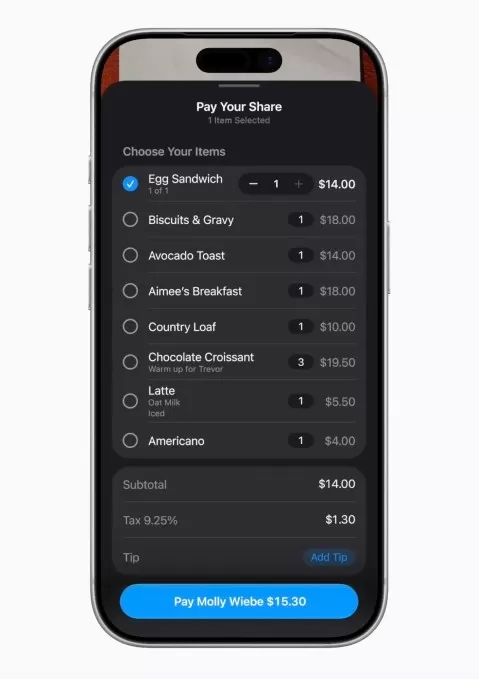
Image credit: Apple
The bill-splitting feature feels intuitive—it appears only when needed and integrates with familiar apps like Messages and Apple Cash. It also intelligently calculates each person's share of tax and tip along with item costs.
Password update
Thanks to password managers—Apple's Passwords app or third-party options like 1Password, Dashlane, or Bitwarden—you've likely created complex, hard-to-guess passwords. But that's no longer sufficient. As countless data breaches have shown, your passwords can still fall into the wrong hands through no fault of your own.
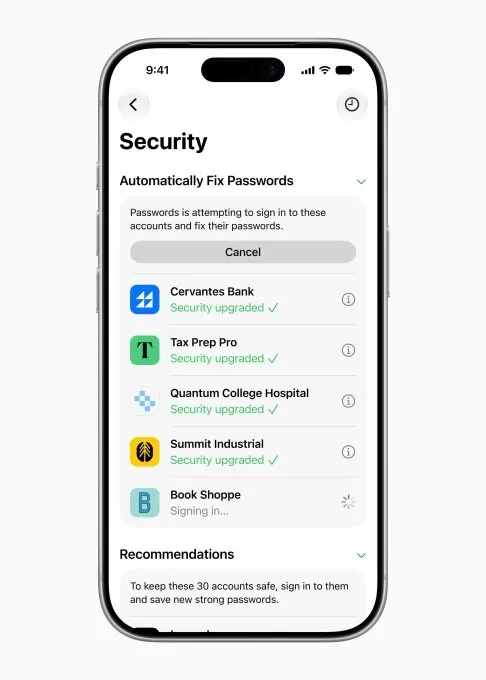
Image credit: Apple
Apple's new password-updating feature uses AI to proactively identify weak or compromised passwords—such as those exposed in data breaches. Rather than requiring manual updates, it securely navigates websites, signs in, and upgrades your passwords to stronger versions.
Messages' one-tap suggestions
If you consider the automatic SMS passcode display above the keyboard one of Apple's best features, you'll appreciate the new one-tap suggestions in iOS 27.
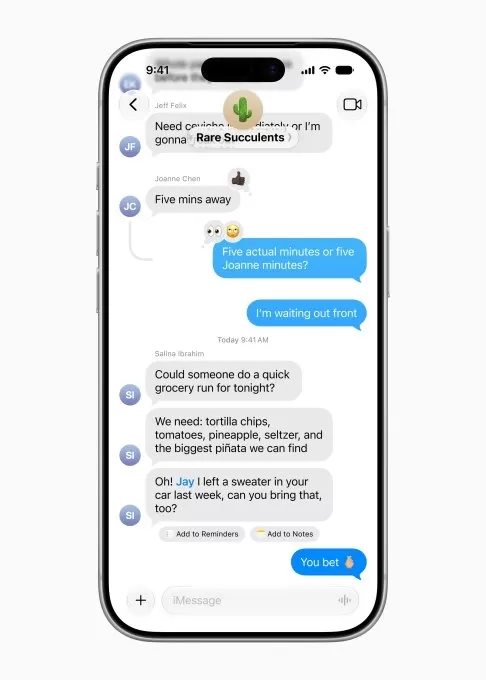
Image credit: Apple
With Apple Intelligence, Messages offers one-tap suggestions based on conversation topics. For example, if a friend texts asking you to bring something to a meetup, a suggestion may ask if you'd like to add it to your reminders. If someone requests photos from an event, Apple Intelligence can recommend relevant photos by understanding keywords, locations, and people in your Photos Library. Planning a dinner or work meeting? Messages can prompt you to add the event to your Calendar. And more.
Once again, the feature appears as a handy tool within your chat, not as an overtly AI-powered addition.
Call context
Another low-profile feature in iOS 27 aims to ease calls with customer service by surfacing key information you might need to share with the representative. For instance, when calling about an airline reservation, Call Context displays your confirmation code right on the call screen.

Image credit: Apple
The feature uses Apple Intelligence to extract information from your Mail emails, processing entirely on-device for privacy. It operates quietly in the background—no need to interact with an AI assistant; the needed details simply appear.
Adding Calendar events
Following third-party apps like Fantastical, Apple now lets you add or edit Calendar events by simply describing them in natural language. Behind the scenes, Apple Intelligence extracts contacts and locations and generates a title for the event. This makes adding events to Apple Calendar easier, without needing to worry about filling specific fields.
Vibe coding Shortcuts
Shortcuts is one of iPhone's most powerful apps, but many users avoid it due to its technical complexity. The app allows you to script tasks, workflows, and automations that simplify your life. However, non-power users often find it frustrating, resorting to online tutorials or Shortcut galleries to find the tools they need.
Screen captureImage credit: Apple
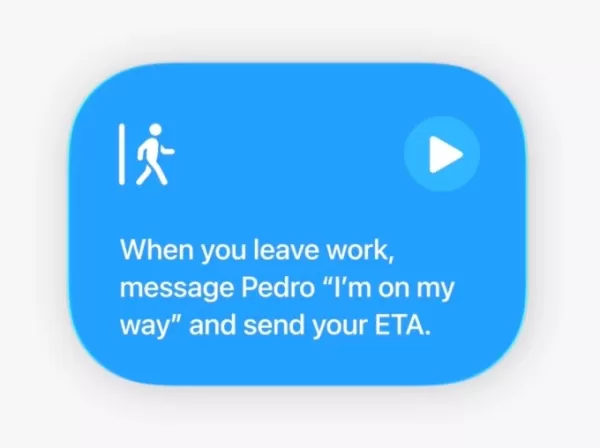
In iOS 27, you can simply describe what you want your iPhone to do. Apple suggests setting your alarm based on next day's calendar events, or having your favorite productivity apps open in a specific layout when you connect a Magic Keyboard to an iPad. But you don't need to get that technical—Shortcuts can handle everyday tasks like automatically texting your partner your ETA when you leave work, or turning on porch lights when your DoorDash order arrives.
Less Home app spam
Smart home users know apps can overwhelm them with many trivial notifications that are actually part of one event. For example, if a partner comes home, opens the smart garage, checks the mail, and enters the house, you might receive a notification for each action—feeling like spam. With Apple Intelligence in iOS 27, the Home app understands how these actions connect and sends a single notification summarizing the overall activity: someone arrived home and closed the garage door.
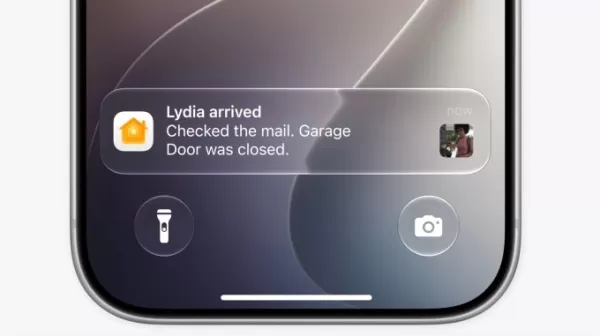
Image credit: Apple
The AI can also help you search for specific clips, like a package delivery or other event. The Home app will highlight noteworthy clips at the top of the screen for review.
Organized tabs in Safari
Another subtle AI feature is Safari's tab organizer. With Apple Intelligence, Safari understands your browsing across sites and groups tabs into relevant topics. For example, if you have multiple tabs open for a trip you're planning, Safari can bundle them into a travel tab group. These groups appear at the top of the browser, above the webpage, for easy access when you resume your research.

Image credit: Apple
Apple emphasizes that the AI behind this respects user privacy, never exposing your browsing data to anyone—including Apple.
Related article
 Warner Music acquires AI attribution startup Sureel AI
Warner Music Group (WMG) confirmed on Wednesday that it is acquiring Sureel AI, an artificial intelligence attribution startup. Sureel’s proprietary technology generates “AI DNA” for musical tracks, deconstructing them into constituent elements to tr
Amazon introduces Alexa for Shopping while pushing Rufus to the background
Amazon has launched Alexa for Shopping, merging its Rufus shopping chatbot with Alexa+ across the app, website, and Echo Show devices.The assistant answers product queries, compares items, tracks prices, and supports shopping reminders. It also handl
Microsoft, Azure and AI Tech Combat California Wildfire Risks
Microsoft invests in AI-driven wildfire detection, with Juan Lavista Ferres, CVP and Chief Data Scientist, discussing strategies to mitigate environmental damage.According to NASA, climate change impacts everyone on Earth, manifesting as rising tempe
Related Special Topic Recommendations
Music composition
Warner Music acquires AI attribution startup Sureel AI
Warner Music Group (WMG) confirmed on Wednesday that it is acquiring Sureel AI, an artificial intelligence attribution startup. Sureel’s proprietary technology generates “AI DNA” for musical tracks, deconstructing them into constituent elements to tr
Amazon introduces Alexa for Shopping while pushing Rufus to the background
Amazon has launched Alexa for Shopping, merging its Rufus shopping chatbot with Alexa+ across the app, website, and Echo Show devices.The assistant answers product queries, compares items, tracks prices, and supports shopping reminders. It also handl
Microsoft, Azure and AI Tech Combat California Wildfire Risks
Microsoft invests in AI-driven wildfire detection, with Juan Lavista Ferres, CVP and Chief Data Scientist, discussing strategies to mitigate environmental damage.According to NASA, climate change impacts everyone on Earth, manifesting as rising tempe
Related Special Topic Recommendations
Music composition
 AI Stem Separation Tools for Remix Production, Sampling Prep, and Karaoke Masters
2026 Latest Best Top-rated AI Stem Separation Tools Curated for Remix Production, Sampling Prep, and Karaoke Masters. These powerful game-changing tools offer real-world tests to deliver precise audio isolation, boosting productivity significantly. XIX.AI provides a weekly updated free vs paid comparison guide to help you find the must-try solution that suits your needs. Explore now to unlock your AI edge.
 8 tools
 xix.ai
Data Analysis
AI SQL Copilots for Revenue Dashboards, Funnel Analysis, and Product Metrics
xix.ai
Data Analysis
AI SQL Copilots for Revenue Dashboards, Funnel Analysis, and Product Metrics
2026 Latest Best AI SQL Copilots Ranked Top-Rated! XIX.AI curates a powerful game-changing collection for weekly updated real-world tests. These must-try tools help you generate accurate revenue dashboards, analyze sales funnels, and track product metrics swiftly, boosting productivity massively. Explore now to Discover your perfect tool for data-driven decision making! 238 characters
9 tools
xix.ai
Music composition
Best AI Melody Writing Tools for Song Drafts
2026 Latest Best Top-Rated AI Melody Writing Tools for Song Drafts! XIX.AI has curated a highly powerful game-changing collection that goes through rigorous real-world tests to deliver the best writing experience. You can find detailed free vs paid comparisons, accurate rankings, and must-try options designed to help you create stunning song drafts effortlessly and boost your creative productivity significantly. Explore now to discover your perfect tool!
8 tools
xix.ai
chatbot
Best AI Conversation Trainer Tools for Interview Practice
2026 Latest Best Top-rated AI Conversation Trainer Tools for Interview Practice are here on XIX.AI! This curated collection features powerful, game-changing tools that go through rigorous real-world tests to deliver accurate feedback. You’ll find a free vs paid comparison and detailed rankings to help you choose the must-try option that boosts your confidence and skills. Explore now to Discover your perfect tool for interview success!
12 tools
xix.ai
Design & Art
Best AI Style Transfer Tools for Creative Experiments
2026 Latest Best Top-rated AI Style Transfer Tools for Creative Experiments! XIX.AI has curated a powerful, game-changing collection of must-try tools that deliver exceptional results through real-world tests and rigorous rankings. These top solutions help creatives boost productivity significantly by accelerating content creation and unlocking endless creative possibilities. Explore now to discover your perfect tool and start creating today!
9 tools
xix.ai
Comic Creation
Best AI Dialogue Bubble Tools for Visual Storytelling
2026 Latest Best Top-Rated AI Dialogue Bubble Tools for Visual Storytelling are here on XIX.AI! This curated collection features powerful, game-changing tools that help creators boost productivity and overcome creative bottlenecks. Get a free vs paid comparison, see real-world tests, and check the latest rankings to find the must-try solutions perfect for crafting engaging visual narratives. Explore now to discover your ideal tool!
10 tools
xix.ai

 Comments (0)
0/500
Comments (0)
0/500
While Siri's AI revamp grabbed headlines at Apple's Worldwide Developers Conference earlier this month, the company's broader AI strategy is emerging through a range of smaller, integrated features across its software.
Instead of requiring users to adopt the revamped AI-powered Siri for all AI benefits, Apple is embedding AI into existing apps and services, emphasizing real-world problem solving. Your iPhone will soon handle tasks like splitting restaurant bills among friends, securing passwords after data breaches, automating workflows, and organizing information with minimal manual effort.
Individually, these features might lack the dramatic impact of a Siri that truly understands personal context and acts on your behalf. Yet together, they paint a vision of AI focused less on conversational bots and more on making Apple's software inherently smarter and more capable.
Beyond Siri's AI, here are the smaller AI features in iOS 27 we're most excited to try. They're currently available in the developer beta, with a public beta arriving soon, ahead of the general release later this fall.
Bill splitting
With iOS 27 arriving later this fall, customers can split restaurant bills using Apple Cash. Powered by Apple Intelligence, simply take or upload a photo of the receipt, and a new option appears to divide the bill with others. Apple Intelligence extracts key details—items ordered, quantities, tip, and total. You select your items from the receipt, then send a request to the group chat for others to do the same. Others can pick their items and quantities, even choosing half (1/2) if sharing with someone. Payment is made with a double-click, just like any other Apple Cash transaction.
Image credit: Apple
The bill-splitting feature feels intuitive—it appears only when needed and integrates with familiar apps like Messages and Apple Cash. It also intelligently calculates each person's share of tax and tip along with item costs.
Password update
Thanks to password managers—Apple's Passwords app or third-party options like 1Password, Dashlane, or Bitwarden—you've likely created complex, hard-to-guess passwords. But that's no longer sufficient. As countless data breaches have shown, your passwords can still fall into the wrong hands through no fault of your own.
Image credit: Apple
Apple's new password-updating feature uses AI to proactively identify weak or compromised passwords—such as those exposed in data breaches. Rather than requiring manual updates, it securely navigates websites, signs in, and upgrades your passwords to stronger versions.
Messages' one-tap suggestions
If you consider the automatic SMS passcode display above the keyboard one of Apple's best features, you'll appreciate the new one-tap suggestions in iOS 27.
Image credit: Apple
With Apple Intelligence, Messages offers one-tap suggestions based on conversation topics. For example, if a friend texts asking you to bring something to a meetup, a suggestion may ask if you'd like to add it to your reminders. If someone requests photos from an event, Apple Intelligence can recommend relevant photos by understanding keywords, locations, and people in your Photos Library. Planning a dinner or work meeting? Messages can prompt you to add the event to your Calendar. And more.
Once again, the feature appears as a handy tool within your chat, not as an overtly AI-powered addition.
Call context
Another low-profile feature in iOS 27 aims to ease calls with customer service by surfacing key information you might need to share with the representative. For instance, when calling about an airline reservation, Call Context displays your confirmation code right on the call screen.
Image credit: Apple
The feature uses Apple Intelligence to extract information from your Mail emails, processing entirely on-device for privacy. It operates quietly in the background—no need to interact with an AI assistant; the needed details simply appear.
Adding Calendar events
Following third-party apps like Fantastical, Apple now lets you add or edit Calendar events by simply describing them in natural language. Behind the scenes, Apple Intelligence extracts contacts and locations and generates a title for the event. This makes adding events to Apple Calendar easier, without needing to worry about filling specific fields.
Vibe coding Shortcuts
Shortcuts is one of iPhone's most powerful apps, but many users avoid it due to its technical complexity. The app allows you to script tasks, workflows, and automations that simplify your life. However, non-power users often find it frustrating, resorting to online tutorials or Shortcut galleries to find the tools they need.
Screen captureImage credit: Apple
In iOS 27, you can simply describe what you want your iPhone to do. Apple suggests setting your alarm based on next day's calendar events, or having your favorite productivity apps open in a specific layout when you connect a Magic Keyboard to an iPad. But you don't need to get that technical—Shortcuts can handle everyday tasks like automatically texting your partner your ETA when you leave work, or turning on porch lights when your DoorDash order arrives.
Less Home app spam
Smart home users know apps can overwhelm them with many trivial notifications that are actually part of one event. For example, if a partner comes home, opens the smart garage, checks the mail, and enters the house, you might receive a notification for each action—feeling like spam. With Apple Intelligence in iOS 27, the Home app understands how these actions connect and sends a single notification summarizing the overall activity: someone arrived home and closed the garage door.
Image credit: Apple
The AI can also help you search for specific clips, like a package delivery or other event. The Home app will highlight noteworthy clips at the top of the screen for review.
Organized tabs in Safari
Another subtle AI feature is Safari's tab organizer. With Apple Intelligence, Safari understands your browsing across sites and groups tabs into relevant topics. For example, if you have multiple tabs open for a trip you're planning, Safari can bundle them into a travel tab group. These groups appear at the top of the browser, above the webpage, for easy access when you resume your research.
Image credit: Apple
Apple emphasizes that the AI behind this respects user privacy, never exposing your browsing data to anyone—including Apple.








 Warner Music acquires AI attribution startup Sureel AI
Warner Music Group (WMG) confirmed on Wednesday that it is acquiring Sureel AI, an artificial intelligence attribution startup. Sureel’s proprietary technology generates “AI DNA” for musical tracks, deconstructing them into constituent elements to tr
Amazon introduces Alexa for Shopping while pushing Rufus to the background
Amazon has launched Alexa for Shopping, merging its Rufus shopping chatbot with Alexa+ across the app, website, and Echo Show devices.The assistant answers product queries, compares items, tracks prices, and supports shopping reminders. It also handl
Warner Music acquires AI attribution startup Sureel AI
Warner Music Group (WMG) confirmed on Wednesday that it is acquiring Sureel AI, an artificial intelligence attribution startup. Sureel’s proprietary technology generates “AI DNA” for musical tracks, deconstructing them into constituent elements to tr
Amazon introduces Alexa for Shopping while pushing Rufus to the background
Amazon has launched Alexa for Shopping, merging its Rufus shopping chatbot with Alexa+ across the app, website, and Echo Show devices.The assistant answers product queries, compares items, tracks prices, and supports shopping reminders. It also handl
 Microsoft, Azure and AI Tech Combat California Wildfire Risks
Microsoft invests in AI-driven wildfire detection, with Juan Lavista Ferres, CVP and Chief Data Scientist, discussing strategies to mitigate environmental damage.According to NASA, climate change impacts everyone on Earth, manifesting as rising tempe
Microsoft, Azure and AI Tech Combat California Wildfire Risks
Microsoft invests in AI-driven wildfire detection, with Juan Lavista Ferres, CVP and Chief Data Scientist, discussing strategies to mitigate environmental damage.According to NASA, climate change impacts everyone on Earth, manifesting as rising tempe

2026 Latest Best Top-rated AI Stem Separation Tools Curated for Remix Production, Sampling Prep, and Karaoke Masters. These powerful game-changing tools offer real-world tests to deliver precise audio isolation, boosting productivity significantly. XIX.AI provides a weekly updated free vs paid comparison guide to help you find the must-try solution that suits your needs. Explore now to unlock your AI edge.
8 tools
xix.ai

2026 Latest Best AI SQL Copilots Ranked Top-Rated! XIX.AI curates a powerful game-changing collection for weekly updated real-world tests. These must-try tools help you generate accurate revenue dashboards, analyze sales funnels, and track product metrics swiftly, boosting productivity massively. Explore now to Discover your perfect tool for data-driven decision making! 238 characters
9 tools
xix.ai

2026 Latest Best Top-Rated AI Melody Writing Tools for Song Drafts! XIX.AI has curated a highly powerful game-changing collection that goes through rigorous real-world tests to deliver the best writing experience. You can find detailed free vs paid comparisons, accurate rankings, and must-try options designed to help you create stunning song drafts effortlessly and boost your creative productivity significantly. Explore now to discover your perfect tool!
8 tools
xix.ai

2026 Latest Best Top-rated AI Conversation Trainer Tools for Interview Practice are here on XIX.AI! This curated collection features powerful, game-changing tools that go through rigorous real-world tests to deliver accurate feedback. You’ll find a free vs paid comparison and detailed rankings to help you choose the must-try option that boosts your confidence and skills. Explore now to Discover your perfect tool for interview success!
12 tools
xix.ai

2026 Latest Best Top-rated AI Style Transfer Tools for Creative Experiments! XIX.AI has curated a powerful, game-changing collection of must-try tools that deliver exceptional results through real-world tests and rigorous rankings. These top solutions help creatives boost productivity significantly by accelerating content creation and unlocking endless creative possibilities. Explore now to discover your perfect tool and start creating today!
9 tools
xix.ai

2026 Latest Best Top-Rated AI Dialogue Bubble Tools for Visual Storytelling are here on XIX.AI! This curated collection features powerful, game-changing tools that help creators boost productivity and overcome creative bottlenecks. Get a free vs paid comparison, see real-world tests, and check the latest rankings to find the must-try solutions perfect for crafting engaging visual narratives. Explore now to discover your ideal tool!
10 tools
xix.ai












