


 Home
HomeHow to automate code reviews with Claude in 2025? A comprehensive step-by-step guide.
In software development, code reviews are a cornerstone practice. They ensure higher code quality, catch potential bugs early, and foster team collaboration. Yet, manual reviews often demand considerable time and resources. Claude, an AI-powered tool, steps in to automate this process, saving valuable time while elevating code standards. This guide offers a comprehensive look at Claude, including its setup process and the tangible benefits it brings to your development workflow.
Key Points
Claude automates code reviews by pinpointing potential issues and recommending enhancements.
Setup involves configuring GitHub Actions and providing a required API key.
Claude provides multiple customization options, such as defining file paths and review guidelines.
Adopting Claude can lead to a marked improvement in code quality and a reduced error rate.
AutomationSTAR Amsterdam 2025 is a premier industry event for test automation experts.
Understanding Automated Code Reviews
The Importance of Code Reviews
Code reviews are a vital phase in the software development lifecycle, delivering several key advantages:
- Improved code quality: Catching bugs and errors early in the development cycle.
- Knowledge sharing: Encouraging collaboration and the transfer of expertise among team members.
- Adherence to standards: Ensuring code follows established coding conventions and best practices.
- Reduced risk: Lowering the chance of introducing security vulnerabilities and flaws.
However, traditional manual reviews present challenges. They consume significant time from senior developers, are susceptible to human oversight, and can lack consistency. Automated solutions like Claude address these pain points by delivering a faster, more uniform, and scalable approach.
What is Claude?
Claude Code Action is a versatile tool designed to automate code reviews directly within GitHub Pull Requests and Issues
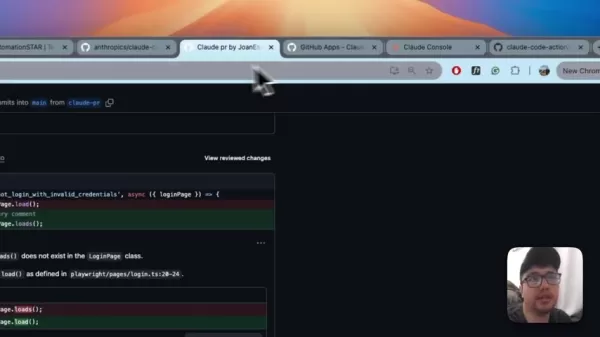
. It uses AI to scrutinize code changes, identify possible problems, and suggest refinements. Claude's feature set includes:
- Intelligent mode detection: Automatically chooses the right execution mode based on the workflow context.
- Interactive Code Assistant: Answers queries about code, architecture, and programming concepts.
- Code review: Analyzes PR changes and proposes improvements.
- Code Implementation: Can automatically implement simple fixes, refactor code, or even add new features.
- PR/Issue integration: Works seamlessly within GitHub comments and PR reviews.
Setting Up Claude for Automated Code Reviews
Prerequisites
Before you begin setting up Claude, make sure you have:
- A GitHub account with administrator access to the target repository.
- An API key from Anthropic to access Claude's AI capabilities.
- A foundational understanding of GitHub Actions.
Configuration Steps
Follow these steps to configure Claude for automated reviews:
- Install the Claude GitHub App: Go to the Claude GitHub App page and install it on your repository
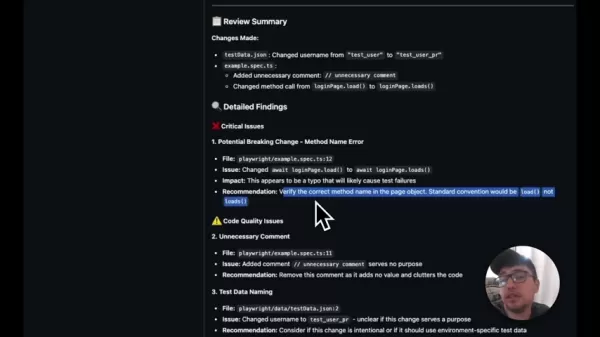
. Grant the app the necessary permissions to access your codebase.
- Configure GitHub Actions: Create a YAML file (for example,
.github/workflows/playwright-pr.yml) in your repository to define the workflow. This file specifies the events that trigger a review and the subsequent actions. - Define the Workflow: In the YAML file, outline the workflow to include steps for running the Claude action. This typically involves:
- Specifying trigger events (e.g.,
pull_request). - Checking out the code using
actions/checkout@v4. - Using the
anthropics/claude-code-action@v1 action. - Providing the Anthropic API key as a repository secret (
secrets.ANTHROPIC_API_KEY). - Configuring the Prompt to direct Claude's analysis.
name: Playwright PR Reviewon:pull_request:types: [opened, synchronize]paths:- 'playwright/**'jobs:playwright-review:runs-on: ubuntu-latestenvironment: pr-actionpermissions:contents: readpull-requests: writeid-token: writesteps:- uses: actions/checkout@v4with:fetch-depth: 1- uses: anthropics/claude-code-action@v1with:anthropic_api_key: ${{ secrets.ANTHROPIC_API_KEY }}track_progress: true # Enables tracking commentsprompt: |REPO: ${{ github.repository }}PR NUMBER: ${{ github.event.pull_request.number }}This PR modifies critical playwright files.Please provide a playwright-focused review with emphasis on:- Playwright best practices- Playwright code quality- Playwright code structure- Playwright code readabilityNote: The PR branch is already checked out.Post detailed playwright findings as PR comments.claude_args: |--allowedTools "mcp_github_inline_comment_create_inline_comment,Bash(gh pr comment:*)"
- Store the Anthropic API Key:Navigate to your GitHub repository's settings, and add a new repository secret containing your Anthropic API Key. This safeguards the key from exposure in your code.
- Commit and Push: Commit the changes to your repository. The GitHub Action will now trigger on new pull requests, providing comments and suggestions automatically.
Customizing Claude's Behavior
You can tailor Claude's behavior through the prompt parameter in the GitHub Actions workflow. This lets you give specific instructions and guidelines for the analysis.
For instance, you can define which file types to review, which coding standards to enforce, and specific focus areas. By default, the GitHub Action for Playwright code concentrates on several improvement areas:
- Playwright best practices
- Playwright code quality
- Playwright code structure
- Playwright code readability
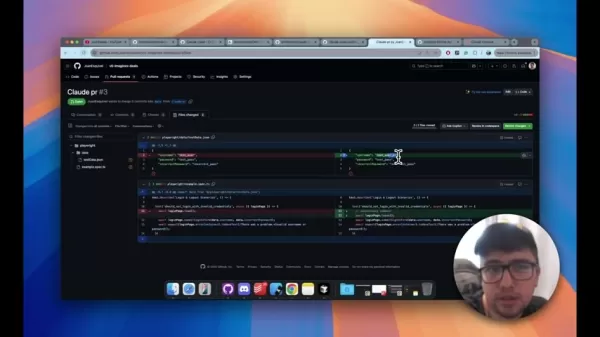
Alternative Setup Solutions
Several automated processes can configure Claude for your workflows. You can install it via the terminal using claude run ./install-github-app, or set up the GitHub application manually.
How to use Claude to Automate Review Changes for Pull Requests
Committing changes to Pull Requests
After creating the workflow, proceed to create and push changes for a pull request. Ensure your changes address critical issues and are suitable for the codebase.
Understanding Claude's Cost
Token Usage and Cost Calculation
Claude processes and analyzes code using a token-based system. Review costs vary based on code complexity, file size, and prompt detail
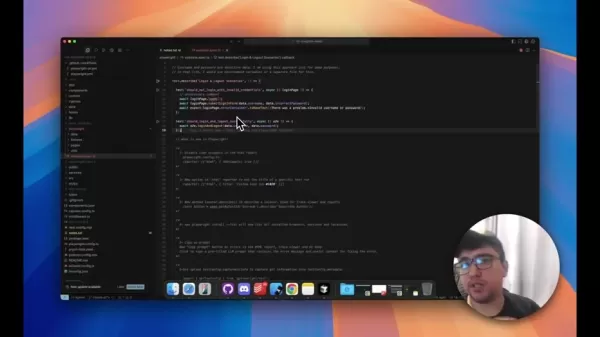
. A thorough review often costs less than 20 cents, and you can view past report expenses in the workflow file.
A minimum balance of $5 is required in your API account to use the Claude GitHub Action.
Evaluating Claude: Weighing the Pros
and Cons
Pros
Integrates seamlessly into existing Git workflows.
Delivers high-quality, AI-driven insights and suggestions.
Reduces the manual effort required for thorough code reviews.
Helps enforce best practices and high coding standards from a project's early stages.
Cons
Being AI-driven, its suggestions may sometimes be inaccurate or inappropriate.
Requires a paid Anthropic API key.
Needs proper initial configuration and setup.
Claude Code Action's Core Features
Benefits and Capabilities
Claude's core features can be summarized as follows:
- Intelligently analyzes code and comments using AI, then provides helpful suggestions to PR contributors.
- Integrates with GitHub comments and pull request actions for a smooth workflow.
- Reviews Pull Request code changes and proposes improvements to boost overall project quality.
Real-World Use Cases for Claude
Improving Codebase Standards and Test Results
Claude AI offers several high-value applications, a few of which are highlighted below.
One key use case is establishing and maintaining a baseline standard for the codebase, ensuring best practices and conventions are upheld in pull requests

. For example, in a demonstration, Claude flagged a change from `load()` to `loads()` as a high-risk issue that would cause a test to fail. This shows how Claude can catch common errors and substandard code before it merges into the main branch.
FAQ
What is the benefit of using Claude for automated code reviews?
Claude provides multiple benefits for automated code review in pull requests, including improved codebase standards, better test outcomes, and consistent, automated feedback and actions.
Related Questions
How does Claude contribute to the AI revolution in code quality?
Code quality is essential for building scalable, reliable systems. However, manual reviews are time-intensive and can be inconsistent. Automated code review accelerates this process and brings uniformity to quality assurance, making it a powerful tool for delivering robust software. By highlighting high-risk changes and areas for improvement, Claude helps developers maintain high standards while contributing to the broader AI-driven evolution in development. Its seamless integration with existing tools like Git is a significant advantage.
Related article
 Stripe to Acquire OpenRouter as AI Model Routing Gains Momentum
Stripe has agreed to acquire OpenRouter, an AI model-routing platform that gives developers access to hundreds of models through a single interface. The deal adds model selection and routing to Stripe’s existing work around AI usage and token-based b
Former OpenAI Researcher Barrett Zoph Returns to Google to Support Gemini Development
Barret Zoph, who previously abruptly left and joined OpenAI due to a disagreement with Thinking Machines Lab CEO Miriam Mularati, has once again changed employers. Alphabet's Google announced that Zoph will return as Vice President of Research, bring
How Recursive Intelligence Raised $335M at $4B Valuation in 4 Months
The co-founders of startup Ricursive Intelligence seemed destined to be co-founders.Anna Goldie, CEO, and Azalia Mirhoseini, CTO, are so well-known in the AI community that they were among those AI engineers who “got those weird emails from Zuckerber
Related Special Topic Recommendations
Design & Art
Stripe to Acquire OpenRouter as AI Model Routing Gains Momentum
Stripe has agreed to acquire OpenRouter, an AI model-routing platform that gives developers access to hundreds of models through a single interface. The deal adds model selection and routing to Stripe’s existing work around AI usage and token-based b
Former OpenAI Researcher Barrett Zoph Returns to Google to Support Gemini Development
Barret Zoph, who previously abruptly left and joined OpenAI due to a disagreement with Thinking Machines Lab CEO Miriam Mularati, has once again changed employers. Alphabet's Google announced that Zoph will return as Vice President of Research, bring
How Recursive Intelligence Raised $335M at $4B Valuation in 4 Months
The co-founders of startup Ricursive Intelligence seemed destined to be co-founders.Anna Goldie, CEO, and Azalia Mirhoseini, CTO, are so well-known in the AI community that they were among those AI engineers who “got those weird emails from Zuckerber
Related Special Topic Recommendations
Design & Art
 Top AI Illustration Tools: Create Editorial Scenes and Cover Art Faster
2026 Latest Top-rated AI Illustration Tools: Our curated list features the best powerfully designed tools for creating stunning editorial scenes and eye-catching cover art quickly. Each option has gone through rigorous real-world tests, offering a free vs paid comparison to help you find the perfect match for your workflow. Try these must-try solutions today to unlock your AI edge and boost your creative productivity. Explore now at XIX.AI.
 10 tools
 xix.ai
Education and Learning
Top AI Tutors for Exam Prep: Practice Math, Science, and English
xix.ai
Education and Learning
Top AI Tutors for Exam Prep: Practice Math, Science, and English
2026 Latest Top-Rated Best AI Tutors for Exam Prep are here on XIX.AI! Our curated list features powerful game-changing tools that offer free vs paid comparison, real-world tests, and weekly updated rankings. They help boost your writing efficiency, simplify complex topic learning, and unlock your academic potential. Explore now to Discover your perfect exam prep tool and Start creating today to Unlock your AI edge!
10 tools
xix.ai
Finance
AI Budget Planning Tools for Personal Money Management
2026 Latest Best Top-Rated AI Budget Planning Tools for Personal Money Management are here on XIX.AI! This curated collection features powerful, game-changing solutions that help you conduct real-world tests, understand spending habits, and create personalized plans to boost productivity. Enjoy a free vs paid comparison along with detailed rankings. Must-try tools designed to simplify money management and unlock your AI edge. Explore now!
11 tools
xix.ai
Health & Wellness
AI Sleep Tracking Assistants: Improve Recovery with Better Bedtime Habits
2026 Latest Best Top-Rated AI Sleep Tracking Assistants curated for ultimate recovery. This fully updated weekly guide features powerful tools that deliver real-world tests, free vs paid comparison, and detailed rankings to help you find the must-try solution that boosts sleep quality and supports better bedtime habits. Explore now at XIX.AI to Unlock your AI edge.
10 tools
xix.ai
Data Analysis
AI SQL Copilots for Product and Revenue Analytics
2026 Latest Best Top-Rated AI SQL Copilots for Product and Revenue Analytics! XIX.AI has curated a powerful, game-changing collection of must-try tools that undergo real-world tests through weekly updated rankings. These tools help users boost productivity significantly by accelerating data analysis, streamlining complex queries, and generating accurate insights to drive smarter business decisions. Explore now to Discover your perfect tool for unlocking your AI edge!
14 tools
xix.ai
Education and Learning
Best AI Homework Helpers That Teach: Learn Concepts, Not Just Answers
2026 Latest Best Top-Rated AI Homework Helpers That Teach Core Concepts Not Just Answers Powerful Tools for Students Must-Try Curated List Weekly Updated Free vs Paid Comparison Real-World Tests Accurate Rankings to Help You Unlock Your Full Learning Potential Explore now to Discover your perfect tool for smarter studying.
10 tools
xix.ai

 Comments (1)
0/500
Comments (1)
0/500
![MarkWilson]()
Finally, someone addresses the pain of manual code reviews! 🤩 Using Claude to automate this in 2025 sounds like a dream for devs drowning in PRs. I'm curious how it handles nuanced logic vs just syntax, but if it saves hours, I'm in. Can't wait to test it out! 🚀💻
In software development, code reviews are a cornerstone practice. They ensure higher code quality, catch potential bugs early, and foster team collaboration. Yet, manual reviews often demand considerable time and resources. Claude, an AI-powered tool, steps in to automate this process, saving valuable time while elevating code standards. This guide offers a comprehensive look at Claude, including its setup process and the tangible benefits it brings to your development workflow.
Key Points
Claude automates code reviews by pinpointing potential issues and recommending enhancements.
Setup involves configuring GitHub Actions and providing a required API key.
Claude provides multiple customization options, such as defining file paths and review guidelines.
Adopting Claude can lead to a marked improvement in code quality and a reduced error rate.
AutomationSTAR Amsterdam 2025 is a premier industry event for test automation experts.
Understanding Automated Code Reviews
The Importance of Code Reviews
Code reviews are a vital phase in the software development lifecycle, delivering several key advantages:
- Improved code quality: Catching bugs and errors early in the development cycle.
- Knowledge sharing: Encouraging collaboration and the transfer of expertise among team members.
- Adherence to standards: Ensuring code follows established coding conventions and best practices.
- Reduced risk: Lowering the chance of introducing security vulnerabilities and flaws.
However, traditional manual reviews present challenges. They consume significant time from senior developers, are susceptible to human oversight, and can lack consistency. Automated solutions like Claude address these pain points by delivering a faster, more uniform, and scalable approach.
What is Claude?
Claude Code Action is a versatile tool designed to automate code reviews directly within GitHub Pull Requests and Issues
. It uses AI to scrutinize code changes, identify possible problems, and suggest refinements. Claude's feature set includes:
- Intelligent mode detection: Automatically chooses the right execution mode based on the workflow context.
- Interactive Code Assistant: Answers queries about code, architecture, and programming concepts.
- Code review: Analyzes PR changes and proposes improvements.
- Code Implementation: Can automatically implement simple fixes, refactor code, or even add new features.
- PR/Issue integration: Works seamlessly within GitHub comments and PR reviews.
Setting Up Claude for Automated Code Reviews
Prerequisites
Before you begin setting up Claude, make sure you have:
- A GitHub account with administrator access to the target repository.
- An API key from Anthropic to access Claude's AI capabilities.
- A foundational understanding of GitHub Actions.
Configuration Steps
Follow these steps to configure Claude for automated reviews:
- Install the Claude GitHub App: Go to the Claude GitHub App page and install it on your repository
. Grant the app the necessary permissions to access your codebase.
- Configure GitHub Actions: Create a YAML file (for example,
.github/workflows/playwright-pr.yml) in your repository to define the workflow. This file specifies the events that trigger a review and the subsequent actions. - Define the Workflow: In the YAML file, outline the workflow to include steps for running the Claude action. This typically involves:
- Specifying trigger events (e.g.,
pull_request). - Checking out the code using
actions/checkout@v4. - Using the
anthropics/claude-code-action@v1action. - Providing the Anthropic API key as a repository secret (
secrets.ANTHROPIC_API_KEY). - Configuring the Prompt to direct Claude's analysis.
- Specifying trigger events (e.g.,
name: Playwright PR Reviewon:pull_request:types: [opened, synchronize]paths:- 'playwright/**'jobs:playwright-review:runs-on: ubuntu-latestenvironment: pr-actionpermissions:contents: readpull-requests: writeid-token: writesteps:- uses: actions/checkout@v4with:fetch-depth: 1- uses: anthropics/claude-code-action@v1with:anthropic_api_key: ${{ secrets.ANTHROPIC_API_KEY }}track_progress: true # Enables tracking commentsprompt: |REPO: ${{ github.repository }}PR NUMBER: ${{ github.event.pull_request.number }}This PR modifies critical playwright files.Please provide a playwright-focused review with emphasis on:- Playwright best practices- Playwright code quality- Playwright code structure- Playwright code readabilityNote: The PR branch is already checked out.Post detailed playwright findings as PR comments.claude_args: |--allowedTools "mcp_github_inline_comment_create_inline_comment,Bash(gh pr comment:*)"
- Store the Anthropic API Key:Navigate to your GitHub repository's settings, and add a new repository secret containing your Anthropic API Key. This safeguards the key from exposure in your code.
- Commit and Push: Commit the changes to your repository. The GitHub Action will now trigger on new pull requests, providing comments and suggestions automatically.
Customizing Claude's Behavior
You can tailor Claude's behavior through the prompt parameter in the GitHub Actions workflow. This lets you give specific instructions and guidelines for the analysis.
For instance, you can define which file types to review, which coding standards to enforce, and specific focus areas. By default, the GitHub Action for Playwright code concentrates on several improvement areas:
- Playwright best practices
- Playwright code quality
- Playwright code structure
- Playwright code readability
Alternative Setup Solutions
Several automated processes can configure Claude for your workflows. You can install it via the terminal using claude run ./install-github-app, or set up the GitHub application manually.
How to use Claude to Automate Review Changes for Pull Requests
Committing changes to Pull Requests
After creating the workflow, proceed to create and push changes for a pull request. Ensure your changes address critical issues and are suitable for the codebase.
Understanding Claude's Cost
Token Usage and Cost Calculation
Claude processes and analyzes code using a token-based system. Review costs vary based on code complexity, file size, and prompt detail
. A thorough review often costs less than 20 cents, and you can view past report expenses in the workflow file.
A minimum balance of $5 is required in your API account to use the Claude GitHub Action.
Evaluating Claude: Weighing the Pros
and Cons
Pros
Integrates seamlessly into existing Git workflows.
Delivers high-quality, AI-driven insights and suggestions.
Reduces the manual effort required for thorough code reviews.
Helps enforce best practices and high coding standards from a project's early stages.
Cons
Being AI-driven, its suggestions may sometimes be inaccurate or inappropriate.
Requires a paid Anthropic API key.
Needs proper initial configuration and setup.
Claude Code Action's Core Features
Benefits and Capabilities
Claude's core features can be summarized as follows:
- Intelligently analyzes code and comments using AI, then provides helpful suggestions to PR contributors.
- Integrates with GitHub comments and pull request actions for a smooth workflow.
- Reviews Pull Request code changes and proposes improvements to boost overall project quality.
Real-World Use Cases for Claude
Improving Codebase Standards and Test Results
Claude AI offers several high-value applications, a few of which are highlighted below.
One key use case is establishing and maintaining a baseline standard for the codebase, ensuring best practices and conventions are upheld in pull requests
. For example, in a demonstration, Claude flagged a change from `load()` to `loads()` as a high-risk issue that would cause a test to fail. This shows how Claude can catch common errors and substandard code before it merges into the main branch.
FAQ
What is the benefit of using Claude for automated code reviews?
Claude provides multiple benefits for automated code review in pull requests, including improved codebase standards, better test outcomes, and consistent, automated feedback and actions.
Related Questions
How does Claude contribute to the AI revolution in code quality?
Code quality is essential for building scalable, reliable systems. However, manual reviews are time-intensive and can be inconsistent. Automated code review accelerates this process and brings uniformity to quality assurance, making it a powerful tool for delivering robust software. By highlighting high-risk changes and areas for improvement, Claude helps developers maintain high standards while contributing to the broader AI-driven evolution in development. Its seamless integration with existing tools like Git is a significant advantage.








 Stripe to Acquire OpenRouter as AI Model Routing Gains Momentum
Stripe has agreed to acquire OpenRouter, an AI model-routing platform that gives developers access to hundreds of models through a single interface. The deal adds model selection and routing to Stripe’s existing work around AI usage and token-based b
Stripe to Acquire OpenRouter as AI Model Routing Gains Momentum
Stripe has agreed to acquire OpenRouter, an AI model-routing platform that gives developers access to hundreds of models through a single interface. The deal adds model selection and routing to Stripe’s existing work around AI usage and token-based b
 Former OpenAI Researcher Barrett Zoph Returns to Google to Support Gemini Development
Barret Zoph, who previously abruptly left and joined OpenAI due to a disagreement with Thinking Machines Lab CEO Miriam Mularati, has once again changed employers. Alphabet's Google announced that Zoph will return as Vice President of Research, bring
Former OpenAI Researcher Barrett Zoph Returns to Google to Support Gemini Development
Barret Zoph, who previously abruptly left and joined OpenAI due to a disagreement with Thinking Machines Lab CEO Miriam Mularati, has once again changed employers. Alphabet's Google announced that Zoph will return as Vice President of Research, bring
 How Recursive Intelligence Raised $335M at $4B Valuation in 4 Months
The co-founders of startup Ricursive Intelligence seemed destined to be co-founders.Anna Goldie, CEO, and Azalia Mirhoseini, CTO, are so well-known in the AI community that they were among those AI engineers who “got those weird emails from Zuckerber
How Recursive Intelligence Raised $335M at $4B Valuation in 4 Months
The co-founders of startup Ricursive Intelligence seemed destined to be co-founders.Anna Goldie, CEO, and Azalia Mirhoseini, CTO, are so well-known in the AI community that they were among those AI engineers who “got those weird emails from Zuckerber

2026 Latest Top-rated AI Illustration Tools: Our curated list features the best powerfully designed tools for creating stunning editorial scenes and eye-catching cover art quickly. Each option has gone through rigorous real-world tests, offering a free vs paid comparison to help you find the perfect match for your workflow. Try these must-try solutions today to unlock your AI edge and boost your creative productivity. Explore now at XIX.AI.
10 tools
xix.ai

2026 Latest Top-Rated Best AI Tutors for Exam Prep are here on XIX.AI! Our curated list features powerful game-changing tools that offer free vs paid comparison, real-world tests, and weekly updated rankings. They help boost your writing efficiency, simplify complex topic learning, and unlock your academic potential. Explore now to Discover your perfect exam prep tool and Start creating today to Unlock your AI edge!
10 tools
xix.ai

2026 Latest Best Top-Rated AI Budget Planning Tools for Personal Money Management are here on XIX.AI! This curated collection features powerful, game-changing solutions that help you conduct real-world tests, understand spending habits, and create personalized plans to boost productivity. Enjoy a free vs paid comparison along with detailed rankings. Must-try tools designed to simplify money management and unlock your AI edge. Explore now!
11 tools
xix.ai

2026 Latest Best Top-Rated AI Sleep Tracking Assistants curated for ultimate recovery. This fully updated weekly guide features powerful tools that deliver real-world tests, free vs paid comparison, and detailed rankings to help you find the must-try solution that boosts sleep quality and supports better bedtime habits. Explore now at XIX.AI to Unlock your AI edge.
10 tools
xix.ai

2026 Latest Best Top-Rated AI SQL Copilots for Product and Revenue Analytics! XIX.AI has curated a powerful, game-changing collection of must-try tools that undergo real-world tests through weekly updated rankings. These tools help users boost productivity significantly by accelerating data analysis, streamlining complex queries, and generating accurate insights to drive smarter business decisions. Explore now to Discover your perfect tool for unlocking your AI edge!
14 tools
xix.ai

2026 Latest Best Top-Rated AI Homework Helpers That Teach Core Concepts Not Just Answers Powerful Tools for Students Must-Try Curated List Weekly Updated Free vs Paid Comparison Real-World Tests Accurate Rankings to Help You Unlock Your Full Learning Potential Explore now to Discover your perfect tool for smarter studying.
10 tools
xix.ai

Finally, someone addresses the pain of manual code reviews! 🤩 Using Claude to automate this in 2025 sounds like a dream for devs drowning in PRs. I'm curious how it handles nuanced logic vs just syntax, but if it saves hours, I'm in. Can't wait to test it out! 🚀💻












