


 Home
HomeAudient iD4 MKII worth buying in 2026 for home studio quality audio?
The Audient iD4 MKII is a compact and powerful 2-in/2-out audio interface that brings studio-quality sound to your home recording setup. Whether you're an experienced musician or just beginning your audio journey, the iD4 MKII includes a range of features to enhance your recording process. With its acclaimed Audient console microphone preamps, versatile instrument input, and intuitive monitoring options, this interface is built to support your creative workflow. The Audient iD4 MKII serves as a gateway to professional audio, making it an essential tool for any home studio.
Key Points
Key Features of the Audient iD4 MKII
Cons
ole Mic Preamps: Enjoy ultra-low noise and distortion with classic analog warmth.JFET Instrument Input: Record instruments with clarity and warmth, emulating the input stage of a classic valve amplifier.
High-Quality Converters: Deliver precise audio conversion for detailed recordings and mixes.
Dual Headphone Output: Power headphones up to 600 Ohms with both 1/4" and mini-jack connections.
Monitor Mix Knob: Blend input signals and computer audio for low-latency monitoring.
ScrollControl Feature: Transform the volume knob into a virtual scroll wheel for controlling your DAW.
iOS Compatibility: Record on the move with seamless integration for iOS devices.
Durable
Cons
truction: Benefit from reliable performance thanks to an all-metal build designed for daily use.Bundled Software: Get started with a free creative software package, including Cubase LE and industry-standard plugins.
Overview of the Audient iD4 MKII
What is the Audient iD4 MKII?
The Audient iD4 MKII
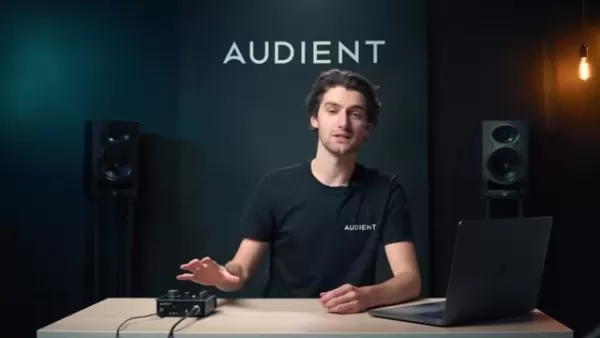
is a 2-in/2-out USB audio interface that delivers the audio quality of a large-format console in a portable, elegantly designed desktop unit. Built for musicians, producers, and audio engineers who demand top-tier sound in a compact form, the Audient iD4 MKII offers a comprehensive feature set ideal for home recording and mobile production. Whether you're recording vocals, instruments, or creating electronic music, the iD4 MKII provides the tools you need to capture professional-grade audio.
At its core, the Audient iD4 MKII includes Audient's renowned console microphone preamps, the same design used in their flagship ASP8024-HE Heritage Edition console. These preamps deliver ultra-low noise and distortion, combined with a hint of classic analog warmth, ensuring your recordings are clean, crisp, and full of character. Alongside the mic preamp, the iD4 MKII features a JFET instrument input, high-quality converters, and flexible monitoring options, creating a complete solution for your recording needs.
The Audient iD4 MKII also features a rugged all-metal construction, engineered to endure daily use. Its small footprint makes it highly portable, so you can take studio-quality sound with you anywhere. Combining professional features, outstanding sound quality, and durable design, the Audient iD4 MKII is the perfect audio interface for home studios and mobile recording setups.
The iD4 MKII’s capabilities help users enhance their recordings at every stage. Audient provides the essential functions required for a wide variety of recording scenarios.
Audient iD4 MKII and ARC Creative Software Suite
Maximizing Your Creative Potential
A standout aspect of the Audient iD4 MKII is the inclusion of the ARC creative software suite. This software bundle offers numerous features from the start. By registering your iD4 MKII, you gain access to a diverse collection of plugins, virtual instruments, and creative tools designed to improve your music production workflow.
Here’s what the ARC software suite includes:
DAW (Digital Audio Workstation): Cubase LE, included in the ARC creative software suite, provides a capable entry-level DAW, allowing you to record, edit, and mix your music immediately. Cubase LE comes with essential features for producing professional-sounding tracks, including MIDI sequencing, audio editing, and a variety of effects plugins.
Plugins and Effects: The ARC software suite contains a curated selection of industry-leading plugins and effects. These plugins offer extensive creative options, from classic analog emulations to modern digital processors. Experiment with different plugins to shape your sound and add character to your recordings.
Virtual Instruments: From synthesizers to sampled instruments, the ARC software suite offers a broad palette of sounds to spark your creativity. Use virtual instruments to build unique soundscapes, layer textures, and add depth to your compositions.
Utilities: The ARC software suite also includes a range of practical utilities to enhance your workflow and streamline production. These utilities include audio analysis tools, metering plugins, and more, providing valuable support for achieving professional results.
How to Use the Audient iD4 MKII
Setting Up Your Audient iD4 MKII
Connect the iD4 MKII to Your Computer: Use the included USB cable to connect the iD4 MKII to your computer. The iD4 MKII is USB bus-powered, so no external power supply is necessary.
Install the Drivers: Download and install the latest drivers from the Audient website to ensure optimal performance.
Connect Your Microphone or Instrument: Use an XLR cable to connect your microphone to the mic input on the rear panel. For instruments, connect using a 1/4" cable to the instrument input on the front panel.
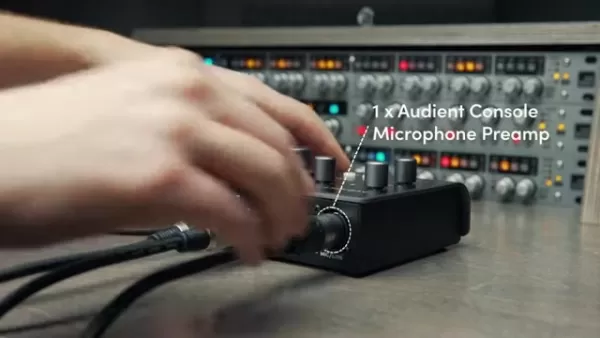
Connect Your Headphones or Studio Monitors: Connect your headphones to the headphone output on the side panel. For studio monitors, connect them to the line outputs on the rear panel.
Adjust Input Gain: Adjust the gain knobs for the mic and instrument inputs to achieve the desired signal level. Use the LED meters to monitor your input levels and prevent clipping.
Set Up Monitoring: Use the monitor mix knob to blend the direct input signal with playback from your computer. Adjust the balance to achieve the preferred monitoring mix.
Using ScrollControl
- Enable ScrollControl Mode: Press and hold the 'iD' button. The volume encoder will then control any parameter your mouse is hovering over in any application.
- Adjust Parameters: Hover your mouse cursor over the desired on-screen parameter (such as a fader in your DAW) and turn the volume knob on the iD4 MKII to adjust it.
- Switch Back to Volume Control: Press the 'iD' button again to return the volume encoder to its standard function.
Monitor Pan
- Enable Monitor Pan: Press and hold the 'iD' and Speaker buttons simultaneously.
- Rotate Main Knob: Rotate the main knob to pan your mic pre input and instrument input from left to right.
Pricing of the Audient iD4 MKII
Cost and Value
The Audient iD4 MKII offers outstanding value for its price. While prices can vary slightly by retailer and ongoing promotions, the Audient iD4 MKII is generally considered an affordable option in the high-quality audio interface market. Given its professional-grade components, including the Audient
Cons
ole Mic Preamps and high-quality converters, the iD4 MKII provides a cost-effective way to achieve studio-quality sound in your home recording setup.Moreover, purchasing the iD4 MKII gives you access to a free software suite, adding further value to your investment. This bundle includes popular DAWs, plugins, and virtual instruments, providing everything required to begin recording and producing music right away.
Advantages and Disadvantages of the Audient iD4 MKII
Pros
Outstanding sound quality with Audient
Cons
ole Mic PreampsVersatile JFET instrument input for guitars, basses, and synthesizers
High-quality converters for precise audio conversion
Dual headphone output for convenient collaboration
Intuitive monitor mix knob for low-latency monitoring
ScrollControl feature for efficient DAW control
iOS compatibility for mobile recording
Durable all-metal construction for reliable performance
Bundled software suite for immediate music production
Cons
Limited to 2 inputs, which may be insufficient for complex recording sessions
USB bus power can be restrictive in certain scenarios
Fewer physical controls compared to larger audio interfaces
Key Features of the Audient iD4 MKII
Audient Cons
ole Mic Preamp
Every Audient interface, including the iD4 MKII
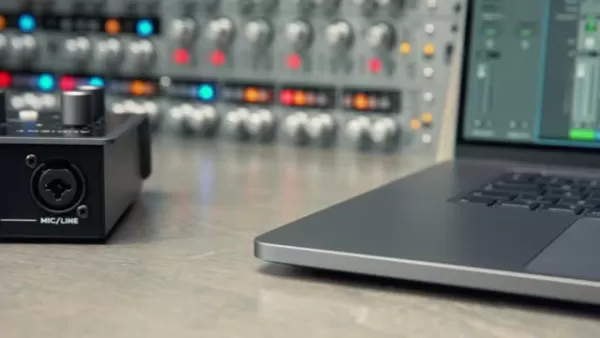
, includes the Audient
Cons
ole Mic Preamp, the same preamp design found in their acclaimed ASP8024 Heritage Edition console. Designed by David Dearden in the late 1990s, this preamp delivers ultra-low noise and low distortion audio with a touch of classic analog warmth, adding character to your recordings. The Audient Cons
ole Mic Preamp ensures clean, clear, and professional-sounding recordings, making it a standout feature of the iD4 MKII.JFET Instrument Input
In addition to the mic preamp, the iD4 MKII
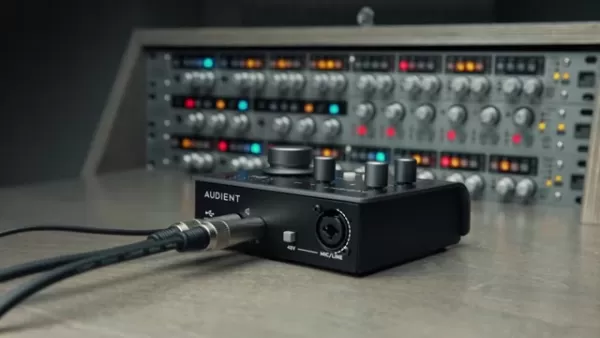
features a JFET instrument input on Channel 2, allowing you to record electric guitars, basses, and analog synths with clarity and warmth. The discrete DI circuit is designed to replicate the input stage of a classic valve amplifier, ensuring an accurate yet warm signal during recording. Whether you're sketching ideas or tracking a full guitar session, the iD4 MKII’s instrument input offers the perfect sonic foundation.
High-Quality Converters
High-quality converters
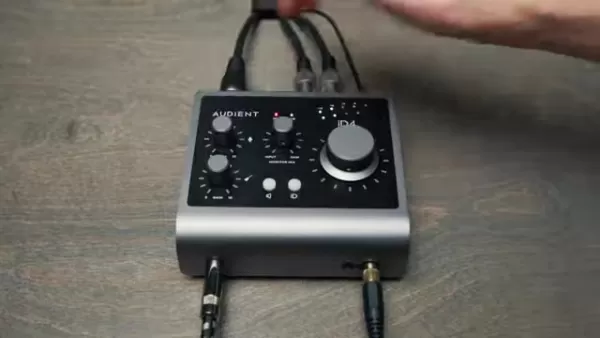
are essential for accurately hearing what you’re recording or mixing. The iD4 MKII's converters ensure you capture every detail of your audio on input and output, helping you make better creative decisions and elevate your recordings. With these converters, you can trust that what you hear is a true representation of your audio.
Dual Headphone Output
The Audient iD4 MKII includes a dual headphone output
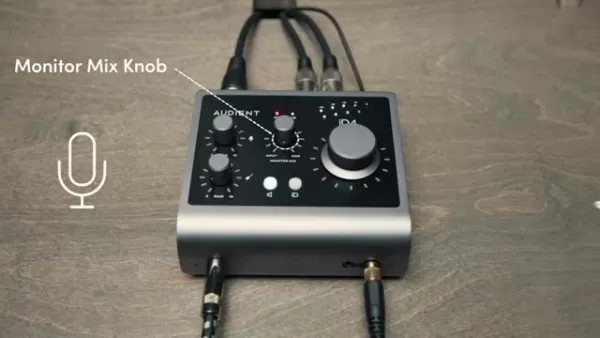
capable of driving headphones up to 600 Ohms, with both 1/4" and mini-jack connections. This is ideal for collaborating with other artists or when you need an adapter. The dual headphone output ensures everyone can monitor the recording session with clarity and ease.
Monitor Mix and Pan
Avoid latency issues when recording by using the iD4 MKII’s monitor mix knob
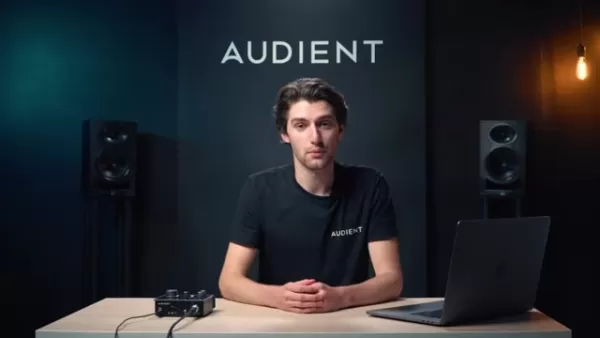
to quickly create and monitor a blend of your inputs and computer audio. Find the ideal balance and record your tracks smoothly. Additionally, the iD4 MKII’s monitor pan feature lets you pan both your mic pre input and instrument input from left to right, making it simple to create a balanced headphone mix that suits your preferences.
ScrollControl
With the iD4 MKII’s ScrollControl feature
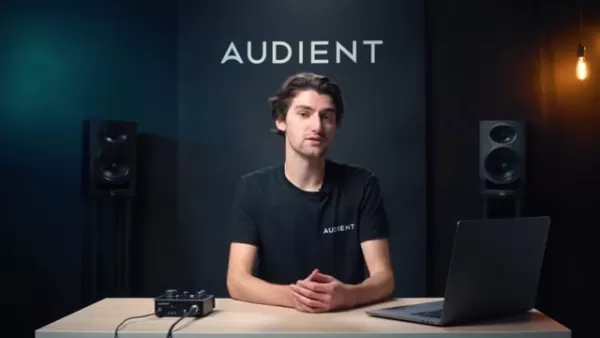
, you can turn the volume knob into a virtual scroll wheel and control various compatible on-screen parameters. Quickly adjust settings, move faders, or write automation without spending excessive time staring at a screen. This feature streamlines your workflow and keeps you focused on the music.
iOS Compatibility
The iD4 MKII
is compatible with iOS devices, making mobile recording simpler than ever. For newer iOS devices with USB-C connectivity, you can power the iD4 MKII directly from the device. For older models with lightning connectors, a camera adapter kit and a powered USB hub are all you need to start recording anywhere.
All-Metal Cons
truction
The Audient iD4 MKII is built to last, recognizing that modern producers need reliability. With its all-metal construction, it’s designed to withstand daily use, both at home and on the road. This durable design ensures your iD4 MKII will endure the demands of regular use, providing years of dependable performance.
Use Cases for the Audient iD4 MKII
Home Recording Studio
The Audient iD4 MKII is perfectly suited for home recording studios. Its high-quality mic preamps and instrument input allow you to record vocals, guitars, basses, and other instruments with exceptional clarity and warmth. The versatile monitoring options and low-latency performance make it easy to track and mix your projects in a comfortable and efficient home environment.
Mobile Recording
Thanks to its compact size and iOS compatibility, the Audient iD4 MKII is ideal for mobile recording. Whether you're capturing ideas on the go or recording live performances in the field, the iD4 MKII delivers studio-quality sound wherever you are. Its durable all-metal construction ensures it can handle the demands of travel.
Podcasting and Streaming
The Audient iD4 MKII is an excellent choice for podcasting and streaming. Its high-quality mic preamps ensure clear and professional-sounding vocals, while the versatile monitoring options let you hear yourself and your guests clearly. The durable construction and iOS compatibility make it easy to set up a professional podcasting or streaming setup anywhere.
Music Education
The Audient iD4 MKII is a valuable tool for music education. Its intuitive design and comprehensive features help students learn the basics of audio recording and production. With its high-quality sound and durable construction, the iD4 MKII offers a reliable and long-lasting platform for musical exploration.
Frequently Asked Questions
Does the Audient iD4 MKII support phantom power?
Yes, the Audient iD4 MKII provides true 48V phantom power over USB, ensuring your condenser microphones receive the power required for optimal performance. This feature is crucial for recording high-quality vocals and acoustic instruments with condenser microphones.
What is the maximum headphone impedance supported by the iD4 MKII?
The Audient iD4 MKII’s dual headphone output can drive headphones up to 600 Ohms. This high-power headphone output allows you to use a wide range of headphones, including high-end studio models, without sacrificing sound quality or volume.
What is the purpose of the monitor mix knob on the iD4 MKII?
The monitor mix knob on the Audient iD4 MKII lets you quickly create and monitor a blend of your inputs and computer audio. This feature enables low-latency monitoring, allowing you to hear yourself and your instruments in real-time without distracting delay. The monitor mix knob is essential for a comfortable and efficient recording experience.
Related Questions
What are the system requirements for the Audient iD4 MKII?
The Audient iD4 MKII is compatible with both Windows and macOS. For Windows, you need Windows 7 or later. For macOS, you need OS X 10.7.5 or later. The iD4 MKII also requires a USB 2.0 port or higher. Note that performance may vary based on your computer's specifications and the demands of your recording projects.
Can I use the Audient iD4 MKII with my iPad?
Yes, the Audient iD4 MKII is compatible with iOS devices. To connect the iD4 MKII to your iPad, you'll need a camera adapter kit and a powered USB hub. For newer iPads with USB-C connectivity, you can power the iD4 MKII directly from the device, making mobile recording even more convenient. This compatibility makes the iD4 MKII a versatile tool for on-the-go recording and production.
What software is included with the Audient iD4 MKII?
When you purchase the Audient iD4 MKII and register it on the Audient website, you gain access to a free suite of creative software. This bundle includes Cubase LE, several industry-leading plugins, and virtual instruments. This software package provides everything you need to start recording and producing music immediately, adding even more value to your purchase.
Related article
 Apple Smart Glasses Could Debut at WWDC27, Highlighting Privacy Protection
Bloomberg’s Mark Gurman reports that Apple’s smart glasses, codenamed N50, are slated for a WWDC27 debut in June 2027, with a retail launch expected in autumn 2027. Originally targeted for late this year and early 2027, the device’s release has been
Inside Details Exposed About Next-Gen Gemini: Strained Computing Power, Internal Teams Disagreed on Development Priorities and Resource Allocation
Reports indicate that the launch of Google’s highly anticipated next-generation Gemini model has been pushed back. Internal disagreements over development priorities and resource allocation, combined with limited computing capacity and complex approv
OpenAI Dismisses Growth Slowdown Concerns, Says Multiple Business Units Accelerating
In response to external scrutiny regarding decelerating sales growth and missed internal benchmarks, AI leader OpenAI issued a confident statement on Tuesday, April 28. The company clarified that its consumer products and enterprise services are adva
Related Special Topic Recommendations
Data Analysis
Apple Smart Glasses Could Debut at WWDC27, Highlighting Privacy Protection
Bloomberg’s Mark Gurman reports that Apple’s smart glasses, codenamed N50, are slated for a WWDC27 debut in June 2027, with a retail launch expected in autumn 2027. Originally targeted for late this year and early 2027, the device’s release has been
Inside Details Exposed About Next-Gen Gemini: Strained Computing Power, Internal Teams Disagreed on Development Priorities and Resource Allocation
Reports indicate that the launch of Google’s highly anticipated next-generation Gemini model has been pushed back. Internal disagreements over development priorities and resource allocation, combined with limited computing capacity and complex approv
OpenAI Dismisses Growth Slowdown Concerns, Says Multiple Business Units Accelerating
In response to external scrutiny regarding decelerating sales growth and missed internal benchmarks, AI leader OpenAI issued a confident statement on Tuesday, April 28. The company clarified that its consumer products and enterprise services are adva
Related Special Topic Recommendations
Data Analysis
 AI SQL Copilots for Revenue Dashboards, Funnel Analysis, and Product Metrics
2026 Latest Best AI SQL Copilots Ranked Top-Rated! XIX.AI curates a powerful game-changing collection for weekly updated real-world tests. These must-try tools help you generate accurate revenue dashboards, analyze sales funnels, and track product metrics swiftly, boosting productivity massively. Explore now to Discover your perfect tool for data-driven decision making! 238 characters
 9 tools
 xix.ai
Music composition
Best AI Melody Writing Tools for Song Drafts
xix.ai
Music composition
Best AI Melody Writing Tools for Song Drafts
2026 Latest Best Top-Rated AI Melody Writing Tools for Song Drafts! XIX.AI has curated a highly powerful game-changing collection that goes through rigorous real-world tests to deliver the best writing experience. You can find detailed free vs paid comparisons, accurate rankings, and must-try options designed to help you create stunning song drafts effortlessly and boost your creative productivity significantly. Explore now to discover your perfect tool!
8 tools
xix.ai
chatbot
Best AI Conversation Trainer Tools for Interview Practice
2026 Latest Best Top-rated AI Conversation Trainer Tools for Interview Practice are here on XIX.AI! This curated collection features powerful, game-changing tools that go through rigorous real-world tests to deliver accurate feedback. You’ll find a free vs paid comparison and detailed rankings to help you choose the must-try option that boosts your confidence and skills. Explore now to Discover your perfect tool for interview success!
12 tools
xix.ai
Design & Art
Best AI Style Transfer Tools for Creative Experiments
2026 Latest Best Top-rated AI Style Transfer Tools for Creative Experiments! XIX.AI has curated a powerful, game-changing collection of must-try tools that deliver exceptional results through real-world tests and rigorous rankings. These top solutions help creatives boost productivity significantly by accelerating content creation and unlocking endless creative possibilities. Explore now to discover your perfect tool and start creating today!
9 tools
xix.ai
Comic Creation
Best AI Dialogue Bubble Tools for Visual Storytelling
2026 Latest Best Top-Rated AI Dialogue Bubble Tools for Visual Storytelling are here on XIX.AI! This curated collection features powerful, game-changing tools that help creators boost productivity and overcome creative bottlenecks. Get a free vs paid comparison, see real-world tests, and check the latest rankings to find the must-try solutions perfect for crafting engaging visual narratives. Explore now to discover your ideal tool!
10 tools
xix.ai
Meeting Assistant
Top AI Meeting Summary Tools: Track Decisions and Follow-Ups Clearly
2026 Latest Top-Rated Best AI Meeting Summary Tools for Clear Decision Tracking and Effortless Follow-Ups. This curated list showcases powerful, game-changing solutions that boost productivity dramatically by automating meeting notes, identifying key action items, and streamlining team coordination across all projects. Get a free vs paid comparison along with real-world tests and weekly updated rankings to help you find the perfect tool. Explore now to unlock your AI edge!
9 tools
xix.ai

 Comments (1)
0/500
Comments (1)
0/500
![OliverPhillips]()
As a home studio enthusiast, I've been eyeing the iD4 MKII for a while. The preamps are supposedly top-notch, but I wonder if it's overkill for someone just starting out? The USB-C connectivity is nice though. Anyone compared it to the Focusrite Solo?
The Audient iD4 MKII is a compact and powerful 2-in/2-out audio interface that brings studio-quality sound to your home recording setup. Whether you're an experienced musician or just beginning your audio journey, the iD4 MKII includes a range of features to enhance your recording process. With its acclaimed Audient console microphone preamps, versatile instrument input, and intuitive monitoring options, this interface is built to support your creative workflow. The Audient iD4 MKII serves as a gateway to professional audio, making it an essential tool for any home studio.
Key Points
Key Features of the Audient iD4 MKII
Cons
ole Mic Preamps: Enjoy ultra-low noise and distortion with classic analog warmth.JFET Instrument Input: Record instruments with clarity and warmth, emulating the input stage of a classic valve amplifier.
High-Quality Converters: Deliver precise audio conversion for detailed recordings and mixes.
Dual Headphone Output: Power headphones up to 600 Ohms with both 1/4" and mini-jack connections.
Monitor Mix Knob: Blend input signals and computer audio for low-latency monitoring.
ScrollControl Feature: Transform the volume knob into a virtual scroll wheel for controlling your DAW.
iOS Compatibility: Record on the move with seamless integration for iOS devices.
Durable
Cons
truction: Benefit from reliable performance thanks to an all-metal build designed for daily use.Bundled Software: Get started with a free creative software package, including Cubase LE and industry-standard plugins.
Overview of the Audient iD4 MKII
What is the Audient iD4 MKII?
The Audient iD4 MKII
is a 2-in/2-out USB audio interface that delivers the audio quality of a large-format console in a portable, elegantly designed desktop unit. Built for musicians, producers, and audio engineers who demand top-tier sound in a compact form, the Audient iD4 MKII offers a comprehensive feature set ideal for home recording and mobile production. Whether you're recording vocals, instruments, or creating electronic music, the iD4 MKII provides the tools you need to capture professional-grade audio.
At its core, the Audient iD4 MKII includes Audient's renowned console microphone preamps, the same design used in their flagship ASP8024-HE Heritage Edition console. These preamps deliver ultra-low noise and distortion, combined with a hint of classic analog warmth, ensuring your recordings are clean, crisp, and full of character. Alongside the mic preamp, the iD4 MKII features a JFET instrument input, high-quality converters, and flexible monitoring options, creating a complete solution for your recording needs.
The Audient iD4 MKII also features a rugged all-metal construction, engineered to endure daily use. Its small footprint makes it highly portable, so you can take studio-quality sound with you anywhere. Combining professional features, outstanding sound quality, and durable design, the Audient iD4 MKII is the perfect audio interface for home studios and mobile recording setups.
The iD4 MKII’s capabilities help users enhance their recordings at every stage. Audient provides the essential functions required for a wide variety of recording scenarios.
Audient iD4 MKII and ARC Creative Software Suite
Maximizing Your Creative Potential
A standout aspect of the Audient iD4 MKII is the inclusion of the ARC creative software suite. This software bundle offers numerous features from the start. By registering your iD4 MKII, you gain access to a diverse collection of plugins, virtual instruments, and creative tools designed to improve your music production workflow.
Here’s what the ARC software suite includes:
DAW (Digital Audio Workstation): Cubase LE, included in the ARC creative software suite, provides a capable entry-level DAW, allowing you to record, edit, and mix your music immediately. Cubase LE comes with essential features for producing professional-sounding tracks, including MIDI sequencing, audio editing, and a variety of effects plugins.
Plugins and Effects: The ARC software suite contains a curated selection of industry-leading plugins and effects. These plugins offer extensive creative options, from classic analog emulations to modern digital processors. Experiment with different plugins to shape your sound and add character to your recordings.
Virtual Instruments: From synthesizers to sampled instruments, the ARC software suite offers a broad palette of sounds to spark your creativity. Use virtual instruments to build unique soundscapes, layer textures, and add depth to your compositions.
Utilities: The ARC software suite also includes a range of practical utilities to enhance your workflow and streamline production. These utilities include audio analysis tools, metering plugins, and more, providing valuable support for achieving professional results.
How to Use the Audient iD4 MKII
Setting Up Your Audient iD4 MKII
Connect the iD4 MKII to Your Computer: Use the included USB cable to connect the iD4 MKII to your computer. The iD4 MKII is USB bus-powered, so no external power supply is necessary.
Install the Drivers: Download and install the latest drivers from the Audient website to ensure optimal performance.
Connect Your Microphone or Instrument: Use an XLR cable to connect your microphone to the mic input on the rear panel. For instruments, connect using a 1/4" cable to the instrument input on the front panel.
Connect Your Headphones or Studio Monitors: Connect your headphones to the headphone output on the side panel. For studio monitors, connect them to the line outputs on the rear panel.
Adjust Input Gain: Adjust the gain knobs for the mic and instrument inputs to achieve the desired signal level. Use the LED meters to monitor your input levels and prevent clipping.
Set Up Monitoring: Use the monitor mix knob to blend the direct input signal with playback from your computer. Adjust the balance to achieve the preferred monitoring mix.
Using ScrollControl
- Enable ScrollControl Mode: Press and hold the 'iD' button. The volume encoder will then control any parameter your mouse is hovering over in any application.
- Adjust Parameters: Hover your mouse cursor over the desired on-screen parameter (such as a fader in your DAW) and turn the volume knob on the iD4 MKII to adjust it.
- Switch Back to Volume Control: Press the 'iD' button again to return the volume encoder to its standard function.
Monitor Pan
- Enable Monitor Pan: Press and hold the 'iD' and Speaker buttons simultaneously.
- Rotate Main Knob: Rotate the main knob to pan your mic pre input and instrument input from left to right.
Pricing of the Audient iD4 MKII
Cost and Value
The Audient iD4 MKII offers outstanding value for its price. While prices can vary slightly by retailer and ongoing promotions, the Audient iD4 MKII is generally considered an affordable option in the high-quality audio interface market. Given its professional-grade components, including the Audient
Cons
ole Mic Preamps and high-quality converters, the iD4 MKII provides a cost-effective way to achieve studio-quality sound in your home recording setup.Moreover, purchasing the iD4 MKII gives you access to a free software suite, adding further value to your investment. This bundle includes popular DAWs, plugins, and virtual instruments, providing everything required to begin recording and producing music right away.
Advantages and Disadvantages of the Audient iD4 MKII
Pros
Outstanding sound quality with Audient
Cons
ole Mic PreampsVersatile JFET instrument input for guitars, basses, and synthesizers
High-quality converters for precise audio conversion
Dual headphone output for convenient collaboration
Intuitive monitor mix knob for low-latency monitoring
ScrollControl feature for efficient DAW control
iOS compatibility for mobile recording
Durable all-metal construction for reliable performance
Bundled software suite for immediate music production
Cons
Limited to 2 inputs, which may be insufficient for complex recording sessions
USB bus power can be restrictive in certain scenarios
Fewer physical controls compared to larger audio interfaces
Key Features of the Audient iD4 MKII
Audient Cons
ole Mic Preamp
Every Audient interface, including the iD4 MKII
, includes the Audient
Cons
ole Mic Preamp, the same preamp design found in their acclaimed ASP8024 Heritage Edition console. Designed by David Dearden in the late 1990s, this preamp delivers ultra-low noise and low distortion audio with a touch of classic analog warmth, adding character to your recordings. The AudientCons
ole Mic Preamp ensures clean, clear, and professional-sounding recordings, making it a standout feature of the iD4 MKII.JFET Instrument Input
In addition to the mic preamp, the iD4 MKII
features a JFET instrument input on Channel 2, allowing you to record electric guitars, basses, and analog synths with clarity and warmth. The discrete DI circuit is designed to replicate the input stage of a classic valve amplifier, ensuring an accurate yet warm signal during recording. Whether you're sketching ideas or tracking a full guitar session, the iD4 MKII’s instrument input offers the perfect sonic foundation.
High-Quality Converters
High-quality converters
are essential for accurately hearing what you’re recording or mixing. The iD4 MKII's converters ensure you capture every detail of your audio on input and output, helping you make better creative decisions and elevate your recordings. With these converters, you can trust that what you hear is a true representation of your audio.
Dual Headphone Output
The Audient iD4 MKII includes a dual headphone output
capable of driving headphones up to 600 Ohms, with both 1/4" and mini-jack connections. This is ideal for collaborating with other artists or when you need an adapter. The dual headphone output ensures everyone can monitor the recording session with clarity and ease.
Monitor Mix and Pan
Avoid latency issues when recording by using the iD4 MKII’s monitor mix knob
to quickly create and monitor a blend of your inputs and computer audio. Find the ideal balance and record your tracks smoothly. Additionally, the iD4 MKII’s monitor pan feature lets you pan both your mic pre input and instrument input from left to right, making it simple to create a balanced headphone mix that suits your preferences.
ScrollControl
With the iD4 MKII’s ScrollControl feature
, you can turn the volume knob into a virtual scroll wheel and control various compatible on-screen parameters. Quickly adjust settings, move faders, or write automation without spending excessive time staring at a screen. This feature streamlines your workflow and keeps you focused on the music.
iOS Compatibility
The iD4 MKII
is compatible with iOS devices, making mobile recording simpler than ever. For newer iOS devices with USB-C connectivity, you can power the iD4 MKII directly from the device. For older models with lightning connectors, a camera adapter kit and a powered USB hub are all you need to start recording anywhere.
All-Metal Cons
truction
The Audient iD4 MKII is built to last, recognizing that modern producers need reliability. With its all-metal construction, it’s designed to withstand daily use, both at home and on the road. This durable design ensures your iD4 MKII will endure the demands of regular use, providing years of dependable performance.
Use Cases for the Audient iD4 MKII
Home Recording Studio
The Audient iD4 MKII is perfectly suited for home recording studios. Its high-quality mic preamps and instrument input allow you to record vocals, guitars, basses, and other instruments with exceptional clarity and warmth. The versatile monitoring options and low-latency performance make it easy to track and mix your projects in a comfortable and efficient home environment.
Mobile Recording
Thanks to its compact size and iOS compatibility, the Audient iD4 MKII is ideal for mobile recording. Whether you're capturing ideas on the go or recording live performances in the field, the iD4 MKII delivers studio-quality sound wherever you are. Its durable all-metal construction ensures it can handle the demands of travel.
Podcasting and Streaming
The Audient iD4 MKII is an excellent choice for podcasting and streaming. Its high-quality mic preamps ensure clear and professional-sounding vocals, while the versatile monitoring options let you hear yourself and your guests clearly. The durable construction and iOS compatibility make it easy to set up a professional podcasting or streaming setup anywhere.
Music Education
The Audient iD4 MKII is a valuable tool for music education. Its intuitive design and comprehensive features help students learn the basics of audio recording and production. With its high-quality sound and durable construction, the iD4 MKII offers a reliable and long-lasting platform for musical exploration.
Frequently Asked Questions
Does the Audient iD4 MKII support phantom power?
Yes, the Audient iD4 MKII provides true 48V phantom power over USB, ensuring your condenser microphones receive the power required for optimal performance. This feature is crucial for recording high-quality vocals and acoustic instruments with condenser microphones.
What is the maximum headphone impedance supported by the iD4 MKII?
The Audient iD4 MKII’s dual headphone output can drive headphones up to 600 Ohms. This high-power headphone output allows you to use a wide range of headphones, including high-end studio models, without sacrificing sound quality or volume.
What is the purpose of the monitor mix knob on the iD4 MKII?
The monitor mix knob on the Audient iD4 MKII lets you quickly create and monitor a blend of your inputs and computer audio. This feature enables low-latency monitoring, allowing you to hear yourself and your instruments in real-time without distracting delay. The monitor mix knob is essential for a comfortable and efficient recording experience.
Related Questions
What are the system requirements for the Audient iD4 MKII?
The Audient iD4 MKII is compatible with both Windows and macOS. For Windows, you need Windows 7 or later. For macOS, you need OS X 10.7.5 or later. The iD4 MKII also requires a USB 2.0 port or higher. Note that performance may vary based on your computer's specifications and the demands of your recording projects.
Can I use the Audient iD4 MKII with my iPad?
Yes, the Audient iD4 MKII is compatible with iOS devices. To connect the iD4 MKII to your iPad, you'll need a camera adapter kit and a powered USB hub. For newer iPads with USB-C connectivity, you can power the iD4 MKII directly from the device, making mobile recording even more convenient. This compatibility makes the iD4 MKII a versatile tool for on-the-go recording and production.
What software is included with the Audient iD4 MKII?
When you purchase the Audient iD4 MKII and register it on the Audient website, you gain access to a free suite of creative software. This bundle includes Cubase LE, several industry-leading plugins, and virtual instruments. This software package provides everything you need to start recording and producing music immediately, adding even more value to your purchase.








 Apple Smart Glasses Could Debut at WWDC27, Highlighting Privacy Protection
Bloomberg’s Mark Gurman reports that Apple’s smart glasses, codenamed N50, are slated for a WWDC27 debut in June 2027, with a retail launch expected in autumn 2027. Originally targeted for late this year and early 2027, the device’s release has been
Apple Smart Glasses Could Debut at WWDC27, Highlighting Privacy Protection
Bloomberg’s Mark Gurman reports that Apple’s smart glasses, codenamed N50, are slated for a WWDC27 debut in June 2027, with a retail launch expected in autumn 2027. Originally targeted for late this year and early 2027, the device’s release has been
 Inside Details Exposed About Next-Gen Gemini: Strained Computing Power, Internal Teams Disagreed on Development Priorities and Resource Allocation
Reports indicate that the launch of Google’s highly anticipated next-generation Gemini model has been pushed back. Internal disagreements over development priorities and resource allocation, combined with limited computing capacity and complex approv
Inside Details Exposed About Next-Gen Gemini: Strained Computing Power, Internal Teams Disagreed on Development Priorities and Resource Allocation
Reports indicate that the launch of Google’s highly anticipated next-generation Gemini model has been pushed back. Internal disagreements over development priorities and resource allocation, combined with limited computing capacity and complex approv
 OpenAI Dismisses Growth Slowdown Concerns, Says Multiple Business Units Accelerating
In response to external scrutiny regarding decelerating sales growth and missed internal benchmarks, AI leader OpenAI issued a confident statement on Tuesday, April 28. The company clarified that its consumer products and enterprise services are adva
OpenAI Dismisses Growth Slowdown Concerns, Says Multiple Business Units Accelerating
In response to external scrutiny regarding decelerating sales growth and missed internal benchmarks, AI leader OpenAI issued a confident statement on Tuesday, April 28. The company clarified that its consumer products and enterprise services are adva

2026 Latest Best AI SQL Copilots Ranked Top-Rated! XIX.AI curates a powerful game-changing collection for weekly updated real-world tests. These must-try tools help you generate accurate revenue dashboards, analyze sales funnels, and track product metrics swiftly, boosting productivity massively. Explore now to Discover your perfect tool for data-driven decision making! 238 characters
9 tools
xix.ai

2026 Latest Best Top-Rated AI Melody Writing Tools for Song Drafts! XIX.AI has curated a highly powerful game-changing collection that goes through rigorous real-world tests to deliver the best writing experience. You can find detailed free vs paid comparisons, accurate rankings, and must-try options designed to help you create stunning song drafts effortlessly and boost your creative productivity significantly. Explore now to discover your perfect tool!
8 tools
xix.ai

2026 Latest Best Top-rated AI Conversation Trainer Tools for Interview Practice are here on XIX.AI! This curated collection features powerful, game-changing tools that go through rigorous real-world tests to deliver accurate feedback. You’ll find a free vs paid comparison and detailed rankings to help you choose the must-try option that boosts your confidence and skills. Explore now to Discover your perfect tool for interview success!
12 tools
xix.ai

2026 Latest Best Top-rated AI Style Transfer Tools for Creative Experiments! XIX.AI has curated a powerful, game-changing collection of must-try tools that deliver exceptional results through real-world tests and rigorous rankings. These top solutions help creatives boost productivity significantly by accelerating content creation and unlocking endless creative possibilities. Explore now to discover your perfect tool and start creating today!
9 tools
xix.ai

2026 Latest Best Top-Rated AI Dialogue Bubble Tools for Visual Storytelling are here on XIX.AI! This curated collection features powerful, game-changing tools that help creators boost productivity and overcome creative bottlenecks. Get a free vs paid comparison, see real-world tests, and check the latest rankings to find the must-try solutions perfect for crafting engaging visual narratives. Explore now to discover your ideal tool!
10 tools
xix.ai

2026 Latest Top-Rated Best AI Meeting Summary Tools for Clear Decision Tracking and Effortless Follow-Ups. This curated list showcases powerful, game-changing solutions that boost productivity dramatically by automating meeting notes, identifying key action items, and streamlining team coordination across all projects. Get a free vs paid comparison along with real-world tests and weekly updated rankings to help you find the perfect tool. Explore now to unlock your AI edge!
9 tools
xix.ai

As a home studio enthusiast, I've been eyeing the iD4 MKII for a while. The preamps are supposedly top-notch, but I wonder if it's overkill for someone just starting out? The USB-C connectivity is nice though. Anyone compared it to the Focusrite Solo?












