


 Home
HomeAnimate AI Transforms Story-Driven Video Creation
Developing compelling, high-quality animated video content in today's fast-paced digital world can be challenging. Traditional animation workflows are frequently time-intensive, demand specialized skills, and can carry high costs. But imagine creating engaging animated series without the usual complications. That’s where Animate AI comes in—a revolutionary, AI-driven animation story video generator transforming how content creators, educators, and businesses produce videos. This all-in-one platform converts a few sentences into striking animated videos with consistent characters, professional voiceovers, and music in minutes. Let's explore further.
Key Points
Animate AI is a comprehensive AI-powered animation story video generator that streamlines animation production.
It creates full scripts, selects and designs characters, and generates detailed scene prompts based on a simple initial idea.
The AI maintains consistent character appearance and style across a whole animated series, preserving brand and narrative continuity.
Users can fully customize each stage, including scripts, prompts, character designs, and voiceovers.
Animate AI works in synergy with leading AI technologies such as ChatGPT, ElevenLabs, and Midjourney to deliver superior results.
It supports multiple languages, including English and Chinese, offering worldwide accessibility.
Tiered pricing options, including a free plan, make professional animation available to all.
Unleashing the Power of Animate AI
What is Animate AI?
Animate AI
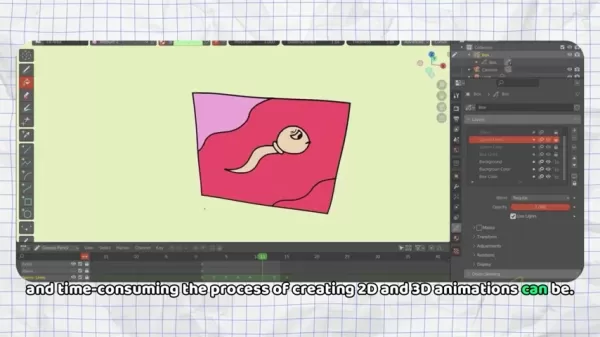
is a state-of-the-art platform using artificial intelligence to simplify and speed up animated story video production. As an all-in-one solution, it turns basic concepts into fully-developed animated video series. It manages every step from scriptwriting and character creation to voiceover production and scene animation, making it an excellent choice for anyone aiming to create captivating video content without needing deep technical knowledge or large budgets.
Its real power is in automating the most repetitive and demanding parts of animation. Visualize creating a professional-grade animated video in under two minutes, without any prior animation experience. This is what Animate AI offers, and it consistently delivers on that promise.
How Animate AI Simplifies Animation Creation
Conventional animation workflows are often highly complex, involving many stages and a team of specialized artists. Animate AI simplifies this by uniting all essential tools and functions in one easy-to-use environment. Here's the typical process:
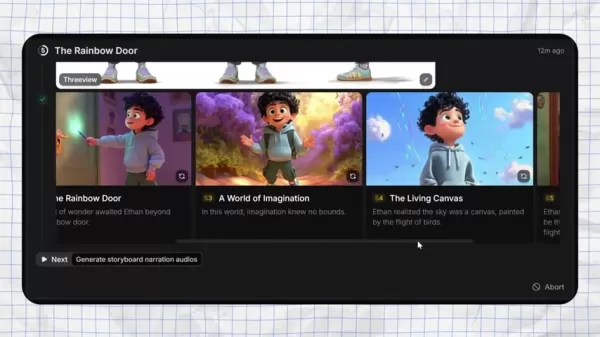
- Script Generation: Provide a brief summary of your story idea, and the AI will produce a complete script with dialogue and scene directions.
- Character Design: The AI automatically selects, names, and designs characters that fit your narrative, even generating character sheets for uniform use across episodes.
- Scene Prompting: For every scene in your story, the AI creates detailed prompts to ensure the visuals match the narrative flow.
- Voiceover Generation: Integrated AI produces natural-sounding voiceovers for characters, adding depth and engagement to your videos.
- Animation and Synthesis: Finally, the platform assembles all components into a complete, shareable animated video.
Additionally, every part of this process is editable and customizable, giving you total control over the final product.
Real-World Examples: Animate AI in Action
AI Animation Showcase: Compelling Stories
Here are video examples of sample animations created using Animate AI, including animated stories and movie trailers:
The Christmas Girl: A heartfelt story presented in a classic, elegant cartoon style. The scenes are vibrant and lifelike, capturing a rich Christmas atmosphere.
The Journey: A touching story set during wartime, reminding viewers to value peace and appreciate life in peaceful times.
*The Pumpkin Cat: A tale about a small cat assisting its neighbors through hard work, conveying a message of community and caring for others.
*Untitled: A movie trailer-style video emphasizing the importance of environmental protection.
Getting Started with Animate AI: A Step-by-Step Guide
Step 1: Sign Up and Access the Creation Page
First, visit the Animate AI website and register using your Google account. This will give you entry to the animation creation page. The interface is designed for simplicity, suitable even for complete beginners.
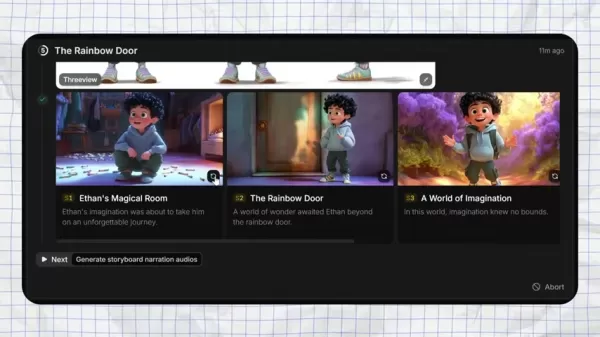
Step 2: Describe Your Story Idea
In the provided text field, describe your animation concept in plain language. Include details about characters, setting, and plot. The AI will expand on your idea and generate a complete narrative.

Step 3: Customize the Settings
Adjust the settings to your liking. Specify the number of scenes, visual aesthetic (Pixar or Disney), scene duration, and voiceover preferences. Try different combinations to find the best fit for your project.
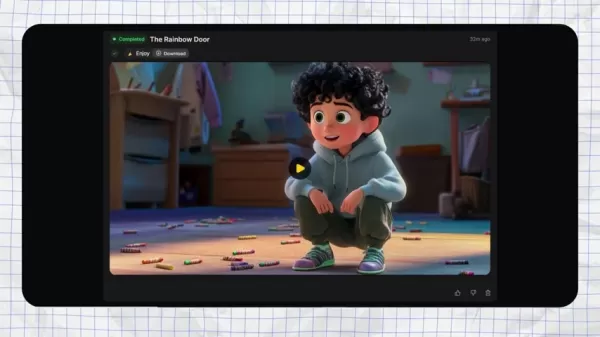
Step 4: Review and Approve the Generated Content
The AI will produce a script, character designs, and storyboards for your review. Examine each component and make edits as needed to ensure it matches your creative vision.
Step 5: Generate the Final Animation
Once you're happy with the script, characters, and storyboards, click 'Synthesize' to produce the final video. Animate AI handles the technical work, outputting a professional video ready for distribution.
Animate AI Pricing Plans
Choose the Plan That Fits Your Needs
Animate AI provides several pricing tiers to accommodate various needs and budgets. These include:
- Free Plan: Ideal for beginners, offering fundamental AI video series creation with 60 credits monthly.
- Standard Plan: Tailored for professional creators requiring more resources and speed, offering 500 credits per month for $29.99.
- Pro Plan: Designed for professionals needing extensive resources, premium support, and advanced features, including 2000 credits per month for $99.99.
- One-Time Credit Plans: For additional credits, one-time packages are available from 200 credits for $19.99 to 2000 credits for $99.99.
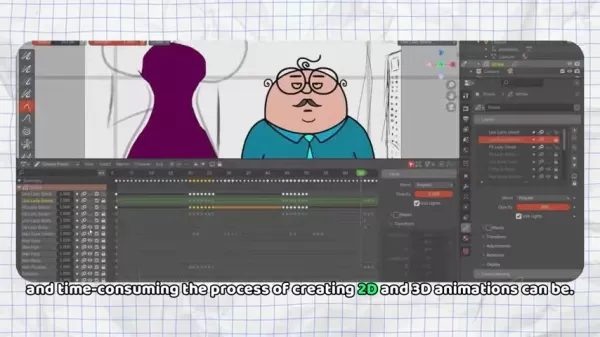
Here is a table summarizing the key elements of the pricing:
Weighing the Pros and Cons of Animate AI
Pros
AI-powered automation dramatically cuts down animation production time.
Maintains consistent character design throughout an entire video series.
Allows customization of scripts, prompts, and character appearances.
Integration with advanced AI tools increases output quality and workflow efficiency.
Affordable pricing tiers, including a no-cost option.
Cons
Some users might desire more detailed control over the animation process.
AI-generated content may not always perfectly match the creator’s original vision.
Dependence on third-party AI technologies introduces potential external dependencies.
The selection of available voice styles is currently limited.
Key Features of Animate AI
AI-Powered Storytelling
Animate AI excels at intelligent script generation. By understanding your core concept, the AI develops engaging stories with believable dialogue and well-rounded characters. This dramatically reduces the time and effort needed to build a solid narrative foundation.
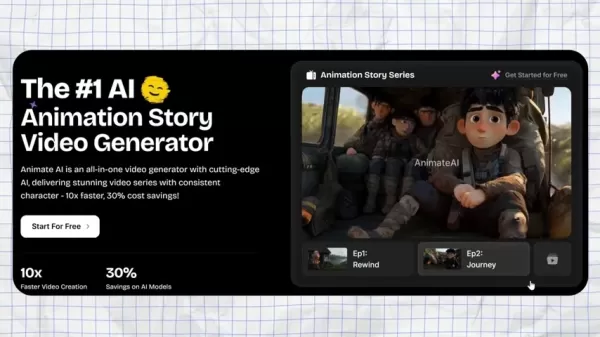
Consistent Character Generation
A major hurdle in serialized animation is keeping characters looking the same across episodes. Animate AI addresses this with its AI-based character generator, which ensures visual and personality consistency for all characters throughout the series.
Customizable Prompts and Scenes
While Animate AI automates much of the workflow, it also offers extensive customization. You can modify AI-generated scripts, prompts, and character models to fit your exact requirements. This flexibility guarantees your videos are truly original and reflect your creative goals.
Voiceover Integration
Adding voiceovers is seamless through Animate AI’s integration with ElevenLabs, enabling the creation of realistic, expressive character voices that improve the viewer’s experience.
AI Model Integration
Animate AI’s collaborations with tools like ChatGPT and Midjourney extend its functionality, enabling the creation of animated videos with music, text generation, visuals, and professional-grade voiceovers for a comprehensive video production workflow.
Who Can Benefit from Animate AI?
Content Creators
Animate AI enables content creators to produce polished animated videos quickly and simply, helping them attract and retain audiences with dynamic stories and graphics. The platform removes the barrier of costly software or expert knowledge, democratizing animation creation.
Educators
Educators can use Animate AI to build interesting and educational animated videos for students. These can clarify difficult topics, depict historical events, or simply make learning more interactive and fun. Its user-friendliness makes it a great asset for instructors at any level.
Businesses
Companies can use Animate AI to craft persuasive promotional videos, product demonstrations, and educational content. Animated material excels at grabbing attention and explaining complicated subjects clearly. With Animate AI, businesses can develop studio-quality video content affordably.
Animators
Using Animate AI, animators can generate storyboards, automate repetitive jobs, and concentrate on creative oversight and fine-tuning, leading to more efficient workflows and greater creative freedom.
Frequently Asked Questions About Animate AI
What is the cost of Animate AI?
Animate AI offers several payment models, including a free tier, monthly subscriptions, and one-time credit purchases.
What type of videos can I create using Animate AI?
Animate AI is specialized for creating animated explainer videos, instructional content, and marketing videos.
Does Animate AI provide support for languages other than English?
Yes, Animate AI currently supports English and Chinese, with plans to add more languages.
Dive Deeper: Related Questions About AI Animation
How does AI enhance the animation creation process?
AI improves animation by automating laborious and slow tasks like storyboarding, character design, and voiceover creation. It optimizes the workflow, lowers production expenses, and lets creators concentrate on the artistic side. For example, AI can interpret a script and automatically create a storyboard with recommended camera shots and scene layouts, saving animators significant manual effort. Likewise, AI-driven character design systems can produce diverse characters from user inputs, speeding up character development. In the end, AI makes animation more approachable, efficient, and budget-friendly.
Related article
 Apple Smart Glasses Could Debut at WWDC27, Highlighting Privacy Protection
Bloomberg’s Mark Gurman reports that Apple’s smart glasses, codenamed N50, are slated for a WWDC27 debut in June 2027, with a retail launch expected in autumn 2027. Originally targeted for late this year and early 2027, the device’s release has been
Inside Details Exposed About Next-Gen Gemini: Strained Computing Power, Internal Teams Disagreed on Development Priorities and Resource Allocation
Reports indicate that the launch of Google’s highly anticipated next-generation Gemini model has been pushed back. Internal disagreements over development priorities and resource allocation, combined with limited computing capacity and complex approv
OpenAI Dismisses Growth Slowdown Concerns, Says Multiple Business Units Accelerating
In response to external scrutiny regarding decelerating sales growth and missed internal benchmarks, AI leader OpenAI issued a confident statement on Tuesday, April 28. The company clarified that its consumer products and enterprise services are adva
Related Special Topic Recommendations
Data Analysis
Apple Smart Glasses Could Debut at WWDC27, Highlighting Privacy Protection
Bloomberg’s Mark Gurman reports that Apple’s smart glasses, codenamed N50, are slated for a WWDC27 debut in June 2027, with a retail launch expected in autumn 2027. Originally targeted for late this year and early 2027, the device’s release has been
Inside Details Exposed About Next-Gen Gemini: Strained Computing Power, Internal Teams Disagreed on Development Priorities and Resource Allocation
Reports indicate that the launch of Google’s highly anticipated next-generation Gemini model has been pushed back. Internal disagreements over development priorities and resource allocation, combined with limited computing capacity and complex approv
OpenAI Dismisses Growth Slowdown Concerns, Says Multiple Business Units Accelerating
In response to external scrutiny regarding decelerating sales growth and missed internal benchmarks, AI leader OpenAI issued a confident statement on Tuesday, April 28. The company clarified that its consumer products and enterprise services are adva
Related Special Topic Recommendations
Data Analysis
 AI SQL Copilots for Revenue Dashboards, Funnel Analysis, and Product Metrics
2026 Latest Best AI SQL Copilots Ranked Top-Rated! XIX.AI curates a powerful game-changing collection for weekly updated real-world tests. These must-try tools help you generate accurate revenue dashboards, analyze sales funnels, and track product metrics swiftly, boosting productivity massively. Explore now to Discover your perfect tool for data-driven decision making! 238 characters
 9 tools
 xix.ai
Music composition
Best AI Melody Writing Tools for Song Drafts
xix.ai
Music composition
Best AI Melody Writing Tools for Song Drafts
2026 Latest Best Top-Rated AI Melody Writing Tools for Song Drafts! XIX.AI has curated a highly powerful game-changing collection that goes through rigorous real-world tests to deliver the best writing experience. You can find detailed free vs paid comparisons, accurate rankings, and must-try options designed to help you create stunning song drafts effortlessly and boost your creative productivity significantly. Explore now to discover your perfect tool!
8 tools
xix.ai
chatbot
Best AI Conversation Trainer Tools for Interview Practice
2026 Latest Best Top-rated AI Conversation Trainer Tools for Interview Practice are here on XIX.AI! This curated collection features powerful, game-changing tools that go through rigorous real-world tests to deliver accurate feedback. You’ll find a free vs paid comparison and detailed rankings to help you choose the must-try option that boosts your confidence and skills. Explore now to Discover your perfect tool for interview success!
12 tools
xix.ai
Design & Art
Best AI Style Transfer Tools for Creative Experiments
2026 Latest Best Top-rated AI Style Transfer Tools for Creative Experiments! XIX.AI has curated a powerful, game-changing collection of must-try tools that deliver exceptional results through real-world tests and rigorous rankings. These top solutions help creatives boost productivity significantly by accelerating content creation and unlocking endless creative possibilities. Explore now to discover your perfect tool and start creating today!
9 tools
xix.ai
Comic Creation
Best AI Dialogue Bubble Tools for Visual Storytelling
2026 Latest Best Top-Rated AI Dialogue Bubble Tools for Visual Storytelling are here on XIX.AI! This curated collection features powerful, game-changing tools that help creators boost productivity and overcome creative bottlenecks. Get a free vs paid comparison, see real-world tests, and check the latest rankings to find the must-try solutions perfect for crafting engaging visual narratives. Explore now to discover your ideal tool!
10 tools
xix.ai
Meeting Assistant
Top AI Meeting Summary Tools: Track Decisions and Follow-Ups Clearly
2026 Latest Top-Rated Best AI Meeting Summary Tools for Clear Decision Tracking and Effortless Follow-Ups. This curated list showcases powerful, game-changing solutions that boost productivity dramatically by automating meeting notes, identifying key action items, and streamlining team coordination across all projects. Get a free vs paid comparison along with real-world tests and weekly updated rankings to help you find the perfect tool. Explore now to unlock your AI edge!
9 tools
xix.ai

 Comments (0)
0/500
Comments (0)
0/500
Developing compelling, high-quality animated video content in today's fast-paced digital world can be challenging. Traditional animation workflows are frequently time-intensive, demand specialized skills, and can carry high costs. But imagine creating engaging animated series without the usual complications. That’s where Animate AI comes in—a revolutionary, AI-driven animation story video generator transforming how content creators, educators, and businesses produce videos. This all-in-one platform converts a few sentences into striking animated videos with consistent characters, professional voiceovers, and music in minutes. Let's explore further.
Key Points
Animate AI is a comprehensive AI-powered animation story video generator that streamlines animation production.
It creates full scripts, selects and designs characters, and generates detailed scene prompts based on a simple initial idea.
The AI maintains consistent character appearance and style across a whole animated series, preserving brand and narrative continuity.
Users can fully customize each stage, including scripts, prompts, character designs, and voiceovers.
Animate AI works in synergy with leading AI technologies such as ChatGPT, ElevenLabs, and Midjourney to deliver superior results.
It supports multiple languages, including English and Chinese, offering worldwide accessibility.
Tiered pricing options, including a free plan, make professional animation available to all.
Unleashing the Power of Animate AI
What is Animate AI?
Animate AI
is a state-of-the-art platform using artificial intelligence to simplify and speed up animated story video production. As an all-in-one solution, it turns basic concepts into fully-developed animated video series. It manages every step from scriptwriting and character creation to voiceover production and scene animation, making it an excellent choice for anyone aiming to create captivating video content without needing deep technical knowledge or large budgets.
Its real power is in automating the most repetitive and demanding parts of animation. Visualize creating a professional-grade animated video in under two minutes, without any prior animation experience. This is what Animate AI offers, and it consistently delivers on that promise.
How Animate AI Simplifies Animation Creation
Conventional animation workflows are often highly complex, involving many stages and a team of specialized artists. Animate AI simplifies this by uniting all essential tools and functions in one easy-to-use environment. Here's the typical process:
- Script Generation: Provide a brief summary of your story idea, and the AI will produce a complete script with dialogue and scene directions.
- Character Design: The AI automatically selects, names, and designs characters that fit your narrative, even generating character sheets for uniform use across episodes.
- Scene Prompting: For every scene in your story, the AI creates detailed prompts to ensure the visuals match the narrative flow.
- Voiceover Generation: Integrated AI produces natural-sounding voiceovers for characters, adding depth and engagement to your videos.
- Animation and Synthesis: Finally, the platform assembles all components into a complete, shareable animated video.
Additionally, every part of this process is editable and customizable, giving you total control over the final product.
Real-World Examples: Animate AI in Action
AI Animation Showcase: Compelling Stories
Here are video examples of sample animations created using Animate AI, including animated stories and movie trailers:
The Christmas Girl: A heartfelt story presented in a classic, elegant cartoon style. The scenes are vibrant and lifelike, capturing a rich Christmas atmosphere.
The Journey: A touching story set during wartime, reminding viewers to value peace and appreciate life in peaceful times.
*The Pumpkin Cat: A tale about a small cat assisting its neighbors through hard work, conveying a message of community and caring for others.
*Untitled: A movie trailer-style video emphasizing the importance of environmental protection.
Getting Started with Animate AI: A Step-by-Step Guide
Step 1: Sign Up and Access the Creation Page
First, visit the Animate AI website and register using your Google account. This will give you entry to the animation creation page. The interface is designed for simplicity, suitable even for complete beginners.
Step 2: Describe Your Story Idea
In the provided text field, describe your animation concept in plain language. Include details about characters, setting, and plot. The AI will expand on your idea and generate a complete narrative.
Step 3: Customize the Settings
Adjust the settings to your liking. Specify the number of scenes, visual aesthetic (Pixar or Disney), scene duration, and voiceover preferences. Try different combinations to find the best fit for your project.
Step 4: Review and Approve the Generated Content
The AI will produce a script, character designs, and storyboards for your review. Examine each component and make edits as needed to ensure it matches your creative vision.
Step 5: Generate the Final Animation
Once you're happy with the script, characters, and storyboards, click 'Synthesize' to produce the final video. Animate AI handles the technical work, outputting a professional video ready for distribution.
Animate AI Pricing Plans
Choose the Plan That Fits Your Needs
Animate AI provides several pricing tiers to accommodate various needs and budgets. These include:
- Free Plan: Ideal for beginners, offering fundamental AI video series creation with 60 credits monthly.
- Standard Plan: Tailored for professional creators requiring more resources and speed, offering 500 credits per month for $29.99.
- Pro Plan: Designed for professionals needing extensive resources, premium support, and advanced features, including 2000 credits per month for $99.99.
- One-Time Credit Plans: For additional credits, one-time packages are available from 200 credits for $19.99 to 2000 credits for $99.99.
Here is a table summarizing the key elements of the pricing:
Weighing the Pros and Cons of Animate AI
Pros
AI-powered automation dramatically cuts down animation production time.
Maintains consistent character design throughout an entire video series.
Allows customization of scripts, prompts, and character appearances.
Integration with advanced AI tools increases output quality and workflow efficiency.
Affordable pricing tiers, including a no-cost option.
Cons
Some users might desire more detailed control over the animation process.
AI-generated content may not always perfectly match the creator’s original vision.
Dependence on third-party AI technologies introduces potential external dependencies.
The selection of available voice styles is currently limited.
Key Features of Animate AI
AI-Powered Storytelling
Animate AI excels at intelligent script generation. By understanding your core concept, the AI develops engaging stories with believable dialogue and well-rounded characters. This dramatically reduces the time and effort needed to build a solid narrative foundation.
Consistent Character Generation
A major hurdle in serialized animation is keeping characters looking the same across episodes. Animate AI addresses this with its AI-based character generator, which ensures visual and personality consistency for all characters throughout the series.
Customizable Prompts and Scenes
While Animate AI automates much of the workflow, it also offers extensive customization. You can modify AI-generated scripts, prompts, and character models to fit your exact requirements. This flexibility guarantees your videos are truly original and reflect your creative goals.
Voiceover Integration
Adding voiceovers is seamless through Animate AI’s integration with ElevenLabs, enabling the creation of realistic, expressive character voices that improve the viewer’s experience.
AI Model Integration
Animate AI’s collaborations with tools like ChatGPT and Midjourney extend its functionality, enabling the creation of animated videos with music, text generation, visuals, and professional-grade voiceovers for a comprehensive video production workflow.
Who Can Benefit from Animate AI?
Content Creators
Animate AI enables content creators to produce polished animated videos quickly and simply, helping them attract and retain audiences with dynamic stories and graphics. The platform removes the barrier of costly software or expert knowledge, democratizing animation creation.
Educators
Educators can use Animate AI to build interesting and educational animated videos for students. These can clarify difficult topics, depict historical events, or simply make learning more interactive and fun. Its user-friendliness makes it a great asset for instructors at any level.
Businesses
Companies can use Animate AI to craft persuasive promotional videos, product demonstrations, and educational content. Animated material excels at grabbing attention and explaining complicated subjects clearly. With Animate AI, businesses can develop studio-quality video content affordably.
Animators
Using Animate AI, animators can generate storyboards, automate repetitive jobs, and concentrate on creative oversight and fine-tuning, leading to more efficient workflows and greater creative freedom.
Frequently Asked Questions About Animate AI
What is the cost of Animate AI?
Animate AI offers several payment models, including a free tier, monthly subscriptions, and one-time credit purchases.
What type of videos can I create using Animate AI?
Animate AI is specialized for creating animated explainer videos, instructional content, and marketing videos.
Does Animate AI provide support for languages other than English?
Yes, Animate AI currently supports English and Chinese, with plans to add more languages.
Dive Deeper: Related Questions About AI Animation
How does AI enhance the animation creation process?
AI improves animation by automating laborious and slow tasks like storyboarding, character design, and voiceover creation. It optimizes the workflow, lowers production expenses, and lets creators concentrate on the artistic side. For example, AI can interpret a script and automatically create a storyboard with recommended camera shots and scene layouts, saving animators significant manual effort. Likewise, AI-driven character design systems can produce diverse characters from user inputs, speeding up character development. In the end, AI makes animation more approachable, efficient, and budget-friendly.








 Apple Smart Glasses Could Debut at WWDC27, Highlighting Privacy Protection
Bloomberg’s Mark Gurman reports that Apple’s smart glasses, codenamed N50, are slated for a WWDC27 debut in June 2027, with a retail launch expected in autumn 2027. Originally targeted for late this year and early 2027, the device’s release has been
Apple Smart Glasses Could Debut at WWDC27, Highlighting Privacy Protection
Bloomberg’s Mark Gurman reports that Apple’s smart glasses, codenamed N50, are slated for a WWDC27 debut in June 2027, with a retail launch expected in autumn 2027. Originally targeted for late this year and early 2027, the device’s release has been
 Inside Details Exposed About Next-Gen Gemini: Strained Computing Power, Internal Teams Disagreed on Development Priorities and Resource Allocation
Reports indicate that the launch of Google’s highly anticipated next-generation Gemini model has been pushed back. Internal disagreements over development priorities and resource allocation, combined with limited computing capacity and complex approv
Inside Details Exposed About Next-Gen Gemini: Strained Computing Power, Internal Teams Disagreed on Development Priorities and Resource Allocation
Reports indicate that the launch of Google’s highly anticipated next-generation Gemini model has been pushed back. Internal disagreements over development priorities and resource allocation, combined with limited computing capacity and complex approv
 OpenAI Dismisses Growth Slowdown Concerns, Says Multiple Business Units Accelerating
In response to external scrutiny regarding decelerating sales growth and missed internal benchmarks, AI leader OpenAI issued a confident statement on Tuesday, April 28. The company clarified that its consumer products and enterprise services are adva
OpenAI Dismisses Growth Slowdown Concerns, Says Multiple Business Units Accelerating
In response to external scrutiny regarding decelerating sales growth and missed internal benchmarks, AI leader OpenAI issued a confident statement on Tuesday, April 28. The company clarified that its consumer products and enterprise services are adva

2026 Latest Best AI SQL Copilots Ranked Top-Rated! XIX.AI curates a powerful game-changing collection for weekly updated real-world tests. These must-try tools help you generate accurate revenue dashboards, analyze sales funnels, and track product metrics swiftly, boosting productivity massively. Explore now to Discover your perfect tool for data-driven decision making! 238 characters
9 tools
xix.ai

2026 Latest Best Top-Rated AI Melody Writing Tools for Song Drafts! XIX.AI has curated a highly powerful game-changing collection that goes through rigorous real-world tests to deliver the best writing experience. You can find detailed free vs paid comparisons, accurate rankings, and must-try options designed to help you create stunning song drafts effortlessly and boost your creative productivity significantly. Explore now to discover your perfect tool!
8 tools
xix.ai

2026 Latest Best Top-rated AI Conversation Trainer Tools for Interview Practice are here on XIX.AI! This curated collection features powerful, game-changing tools that go through rigorous real-world tests to deliver accurate feedback. You’ll find a free vs paid comparison and detailed rankings to help you choose the must-try option that boosts your confidence and skills. Explore now to Discover your perfect tool for interview success!
12 tools
xix.ai

2026 Latest Best Top-rated AI Style Transfer Tools for Creative Experiments! XIX.AI has curated a powerful, game-changing collection of must-try tools that deliver exceptional results through real-world tests and rigorous rankings. These top solutions help creatives boost productivity significantly by accelerating content creation and unlocking endless creative possibilities. Explore now to discover your perfect tool and start creating today!
9 tools
xix.ai

2026 Latest Best Top-Rated AI Dialogue Bubble Tools for Visual Storytelling are here on XIX.AI! This curated collection features powerful, game-changing tools that help creators boost productivity and overcome creative bottlenecks. Get a free vs paid comparison, see real-world tests, and check the latest rankings to find the must-try solutions perfect for crafting engaging visual narratives. Explore now to discover your ideal tool!
10 tools
xix.ai

2026 Latest Top-Rated Best AI Meeting Summary Tools for Clear Decision Tracking and Effortless Follow-Ups. This curated list showcases powerful, game-changing solutions that boost productivity dramatically by automating meeting notes, identifying key action items, and streamlining team coordination across all projects. Get a free vs paid comparison along with real-world tests and weekly updated rankings to help you find the perfect tool. Explore now to unlock your AI edge!
9 tools
xix.ai












