


 Home
HomeAmazon's AI Image Generator Transforms E-commerce Advertising
In today's fast-moving e-commerce landscape, compelling visuals are essential. Amazon has launched a powerful new tool that enables sellers to produce engaging product images in seconds. This AI-powered image generator is set to transform how product advertisements are made, providing a quick and efficient way to boost product visibility and draw in more shoppers. We'll explore the features, capabilities, and potential benefits of this innovative solution.
Key Points
Amazon has launched a new AI-powered image generator for its advertising platform.
This tool allows sellers to generate product images within seconds.
The image generator is located within the Amazon Seller Central's Advertising section, under 'Creative Tools'.
To use the tool, sellers must provide a product ASIN and a descriptive prompt.
Users can choose from various themes, such as 'New Year's', to personalize the generated images.
While these images can improve product listings, their quality may not always be suitable as the primary image.
High-quality images are vital for attracting genuine customer interest and improving conversion rates.
Unveiling Amazon's AI Image Generator
What is Amazon's AI Image Generator?
Amazon recently introduced an innovative AI-powered image generator designed to simplify the creation of visual content for product ads. This tool helps sellers quickly produce high-quality images, potentially improving their product listings and reaching a broader audience. It streamlines the often complicated and time-intensive task of developing effective marketing visuals, making it accessible to businesses of all sizes.
Key Features and Benefits
- Speed and Efficiency: Generate images in seconds, saving time and resources compared to traditional methods.
- Accessibility: Easy to use for all sellers, regardless of their design or technical skills.
- Enhanced Product Listings: Boost visual appeal to increase engagement and conversions.
- Customization Options: Adapt images to specific themes and product features for better ad relevance.
The tool's goal is to offer a fast, budget-friendly way to create attractive advertisements that drive sales and improve customer interaction. Next, we'll look at how to access and use this transformative tool within Amazon Seller Central.
Accessing the AI Image Generator
Finding the AI Image Generator is simple. Just follow these steps in your Amazon Seller Central account:
Log into Seller Central: Sign in to your Amazon Seller Central account.
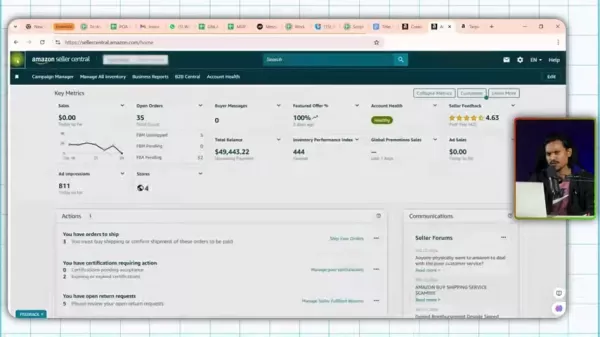
Navigate to Advertising: Select the 'Advertising' tab from the main menu.
Select Campaign Manager: Click on 'Campaign Manager' in the dropdown menu.
Find Creative Tools: In the campaign manager, locate 'Creative Tools' in the left-hand navigation panel. You may need to expand the menu to see all options.
Click Image Generator: Choose 'Image Generator' to open the AI tool.
Once you've accessed the Image Generator, you can start creating attractive product advertisements. The process is user-friendly and intuitive, allowing you to produce high-quality images with minimal effort.
Why Images Matter: A Visual Approach to E-Commerce Success
The Power of Visuals in E-Commerce
In e-commerce, high-quality images are crucial for effective product marketing.
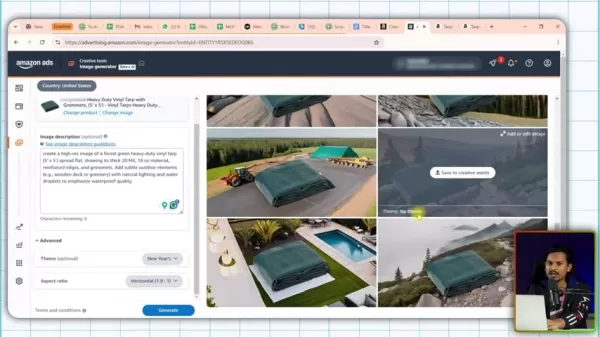
Online shoppers depend heavily on visuals to assess products, making images a key factor in their buying decisions. Clear, appealing images not only grab attention but also convey important details about a product's features, benefits, and potential uses.
Strategies for Optimizing Images
- High Resolution: Use sharp, clear images that remain detailed when zoomed in.
- Multiple Angles: Display the product from different perspectives to give customers a full view.
- Lifestyle Context: Show the product in real-life settings to help customers imagine using it.
- Highlight Key Features: Use infographics to emphasize important product details and advantages.
- Optimize for Mobile: Ensure images are mobile-friendly and load quickly on smaller screens.
The visual quality of your product listings can greatly influence click-through rates, conversions, and overall sales. By investing in well-optimized, high-quality images, sellers can create a more engaging and convincing shopping experience, leading to greater e-commerce success.
Quality vs. Quantity:
Attribute Professional Image AI Generated Image Image Quality High Medium to High SEO Performance Good Medium Cost to Create Higher Much lower Creation Time Days/Weeks Seconds
Step-by-Step Guide: Generating Images with Amazon's AI
Step 1: Adding Your Product
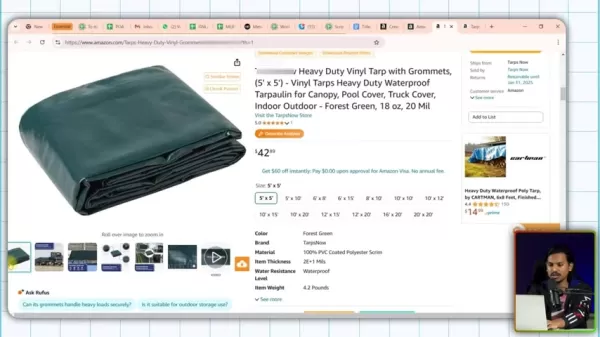
The first step in using the AI Image Generator is choosing the product you want to feature in your ad.
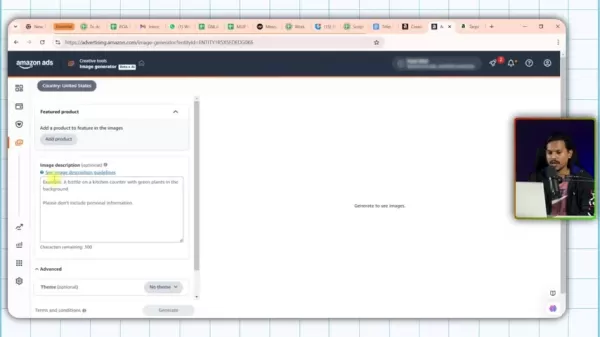
Here’s how to add your product:
- Click ‘Add Product’: In the Image Generator interface, select the ‘Add Product’ button.
- Enter Product ASIN: Input your product's Amazon Standard Identification Number (ASIN), a unique code for each Amazon product.
- Select Your Product: From the search results, pick the specific product you want to highlight.
- Save and Continue: Click ‘Save and Continue’ to confirm. Your product should now appear in the Image Generator preview.
Step 2: Crafting Your Image Description
A well-written image description or prompt is key to generating the visual results you want.
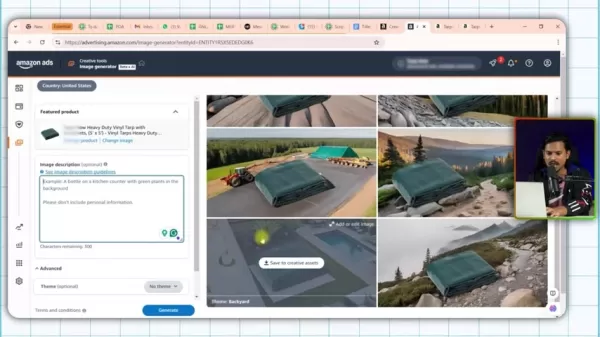
Follow these tips to create an effective description:
- Write a Detailed Description: In the 'Image Description' field, provide a specific prompt for the AI. Instead of a simple phrase like “a bottle on a kitchen counter,” try “a bottle on a kitchen counter with green plants in the background.”
- Use Descriptive Language: Include adjectives and adverbs to convey the exact look and mood you're aiming for. The more detailed your description, the better the AI can understand your vision.
- Add Context: Give context to help the AI visualize the scenario where your product is featured. More details lead to images that better match your expectations.
Image Description Guidelines from Amazon:
- Details: Describe the image you envision using descriptive words. For example, write 'Product placed in a living room on a table with palm trees in the corner and large windows in the background' instead of just 'Living room'.
- Context: Add context to improve image generation. For instance, write 'The product is being showcased on an e-commerce platform' rather than 'E-commerce'.
- Set the Tone: Use appropriate vocabulary to set the tone, such as 'A cheerful and colorful image' compared to 'The product is being showcased'.
- Experiment: Try different wording or phrasing until you get the image results you want.
Well-crafted prompts greatly affect the quality and relevance of the generated images. Spend time creating thoughtful, detailed descriptions to get the most out of the AI.
Step 3: Customizing Your Image with Themes
Amazon's AI Image Generator includes various themes to customize your images, helping you align ads with specific events, seasons, or styles.
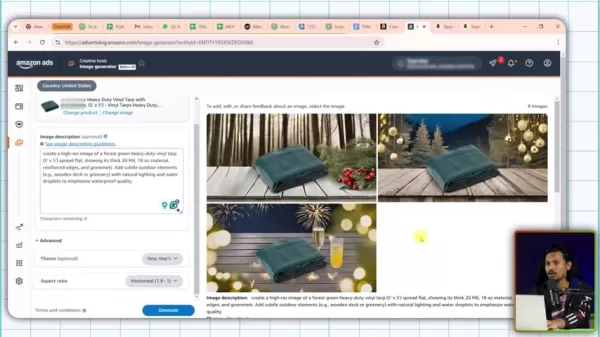
Here’s how to select a theme:
- Access the ‘Advanced’ Section: Expand the ‘Advanced’ section in the Image Generator interface.
- Choose a Theme: Click the 'Theme' dropdown to see available options, such as 'New Year's', 'Autumn', 'Beach', or 'Christmas'.
- Select Your Theme: Pick the theme that best fits your product and advertising objectives. Choosing 'New Year's', for example, adds festive, holiday-related elements to the image.
Selecting a theme can significantly improve the relevance and appeal of your product images, potentially attracting more attention and boosting conversions. Consider which themes best complement your product and marketing strategy.
Step 4: Generating and Reviewing Images
After adding your product, writing a description, and choosing a theme, you're ready to generate images.
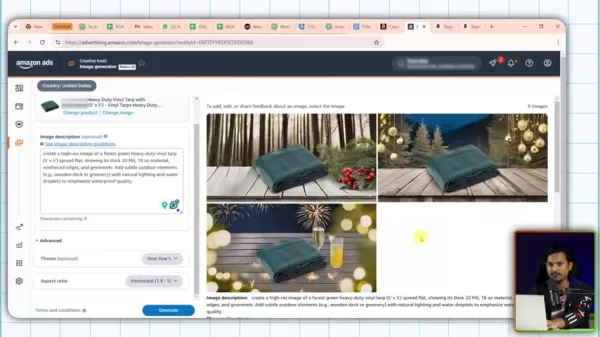
Follow these steps:
- Click ‘Generate’: Select the ‘Generate’ button at the bottom of the interface.
- Review the Generated Images: The AI will produce several image options based on your inputs. Review them to find the best match for your vision.
- Save or Edit: Save your preferred images to creative assets or make adjustments if needed. If the results aren't ideal, refine your description, theme, or settings and generate new options.
The more specific and thoughtful your inputs, the better the results. Review and adjust as necessary to achieve the visual impact you want.
Cost-Effectiveness
Value Proposition
A major advantage of Amazon's AI Image Generator is its potential to substantially lower advertising costs. By allowing sellers to create attractive images quickly and independently, it reduces the need for professional photography or design services, offering a budget-friendly way to enhance product listings.
The AI Image Generator is a valuable resource for creating compelling product ads, whether you're a small business with limited funds or a larger company aiming to optimize operations. Using this tool can lead to significant cost savings while maintaining or even enhancing the quality and impact of your visual content.
Evaluating the Pros and Cons
Pros
Speed of Image Generation: Create images in seconds, saving considerable time.
Cost-Effectiveness: Lowers the need for expensive professional photography or design.
Accessibility: User-friendly for sellers with any level of technical expertise.
Customization Options: Themes and detailed prompts enable personalized visuals.
Cons
Image Quality: Generated images may not always meet professional standards.
Competition: The quality may not be sufficient to outperform competitors.
Dependence on Prompts: Results depend heavily on the quality and detail of user inputs.
Limited Functionality: May lack advanced editing features available in professional software.
Key Features and Functionalities
Core Functionalities
Amazon’s AI Image Generator includes features that simplify and enhance the image creation process.
- AI-Driven Image Generation: The tool's main function is creating images from text descriptions and selected themes. The AI interprets the input to produce a range of visuals that fit the product and desired style.
- Theme Selection: Offers various themes to customize images, aligning them with specific seasons, events, or marketing campaigns. Options include festive holidays and professional lifestyle scenes.
- User-Friendly Interface: Integrated directly into Amazon Seller Central for a smooth, intuitive experience. The simple design reduces the learning curve and makes it easy for all sellers to use.
- Iterative Process: Allows sellers to regenerate images after adjusting descriptions and themes, enabling refinement until the desired result is achieved.
- Creative Asset Management: Lets you save generated images directly to creative assets in Amazon, making it easy to incorporate them into advertising campaigns.
These features combine to provide a versatile and accessible tool for creating appealing product ads. They help sellers maintain a strong visual presence and attract potential customers more effectively.
Diverse Use Cases for Amazon's AI Image Generator
Scenarios
Amazon's AI Image Generator can be used in many ways to improve product listings and advertising efforts.
Here are several use cases:
- Seasonal Promotions: Quickly create images for holiday sales, like Christmas or New Year's, to attract seasonal shoppers.
- Product Showcases: Generate lifestyle images that show the product in use, helping customers see how it fits into their daily lives.
- Advertising Campaigns: Design compelling visuals for Sponsored Products, Sponsored Brands, and Sponsored Display ads.
- A/B testing: Produce different image versions to test which ones your audience prefers.
- New Product Launches: Create high-quality images for new products, even before professional photos are available.
By using these diverse applications, sellers can maintain a dynamic and engaging visual presence, driving more traffic and sales. Now, let's consider some benefits for enhancing images.
Frequently Asked Questions
Where can I find Amazon's AI image generator?
The AI image generator is located in Amazon Seller Central, under Advertising > Campaign Manager > Creative Tools > Image Generator.
What information do I need to use the image generator?
You need a product ASIN (Amazon Standard Identification Number) and a description or prompt to guide the AI.
Can I use the AI-generated images as the main image for my product listing?
While you can use them, AI-generated images may not always meet the quality standards needed for primary product images. It's often better to use them as supplementary visuals.
Can I customize the generated images?
Yes, you can select themes like 'New Year's' or provide specific prompts to influence the image style.
Are the images good enough to beat my competitors?
While they provide a good starting point, AI-generated images may not always be high-quality enough to outperform competitors. It's important to review and refine them for the best results.
Related Questions
How do images influence customers?
Images play a critical role in online sales, especially on platforms like Amazon. Visuals capture attention and communicate information faster than text. High-quality, informative images can significantly boost conversion rates. While text aids SEO, images attract real people to your product.
What makes a good image?
Effective images should be high-resolution, clearly display the product, and highlight key features and benefits. Lifestyle images showing the product in use can also increase customer engagement.
What kind of images should I use for my Amazon listing?
For your Amazon listing, consider including these image types: Main images on a white background, Feature images highlighting special features, Infographic images detailing use cases and materials, Lifestyle images showing the product in real-life scenarios, and Sizing images displaying product dimensions.
Related article
 Anthropic Expands Claude AI Coding Tools to Japan in Push for Overseas Growth
Anthropic, a prominent U.S. artificial intelligence firm, is intensifying its global outreach. On Wednesday, the company hosted a major developer gathering, "Code with Claude," in Tokyo, drawing close to 500 software engineers. This initiative seeks
India’s Software Giant Cuts Hiring, Promises No Layoffs as AI Agents Scale Up
As artificial intelligence reshapes traditional labor-intensive business models, Tata Consultancy Services (TCS), a premier Indian software outsourcing firm, has unveiled its strategic response. During Tuesday’s annual general meeting, the chairman o
China Locks AI Models During Gaokam to Block Instant Homework Help
With the 2026 Gaokao fast approaching, rumors regarding the suspension of AI tools during the exam period have ignited intense online debate. In response to public concern, major AI platforms and educational apps have clarified their stance: rather t
Related Special Topic Recommendations
Design & Art
Anthropic Expands Claude AI Coding Tools to Japan in Push for Overseas Growth
Anthropic, a prominent U.S. artificial intelligence firm, is intensifying its global outreach. On Wednesday, the company hosted a major developer gathering, "Code with Claude," in Tokyo, drawing close to 500 software engineers. This initiative seeks
India’s Software Giant Cuts Hiring, Promises No Layoffs as AI Agents Scale Up
As artificial intelligence reshapes traditional labor-intensive business models, Tata Consultancy Services (TCS), a premier Indian software outsourcing firm, has unveiled its strategic response. During Tuesday’s annual general meeting, the chairman o
China Locks AI Models During Gaokam to Block Instant Homework Help
With the 2026 Gaokao fast approaching, rumors regarding the suspension of AI tools during the exam period have ignited intense online debate. In response to public concern, major AI platforms and educational apps have clarified their stance: rather t
Related Special Topic Recommendations
Design & Art
 Best AI Style Transfer Tools for Creative Experiments
2026 Latest Best Top-rated AI Style Transfer Tools for Creative Experiments! XIX.AI has curated a powerful, game-changing collection of must-try tools that deliver exceptional results through real-world tests and rigorous rankings. These top solutions help creatives boost productivity significantly by accelerating content creation and unlocking endless creative possibilities. Explore now to discover your perfect tool and start creating today!
 9 tools
 xix.ai
Comic Creation
Best AI Dialogue Bubble Tools for Visual Storytelling
xix.ai
Comic Creation
Best AI Dialogue Bubble Tools for Visual Storytelling
2026 Latest Best Top-Rated AI Dialogue Bubble Tools for Visual Storytelling are here on XIX.AI! This curated collection features powerful, game-changing tools that help creators boost productivity and overcome creative bottlenecks. Get a free vs paid comparison, see real-world tests, and check the latest rankings to find the must-try solutions perfect for crafting engaging visual narratives. Explore now to discover your ideal tool!
10 tools
xix.ai
Meeting Assistant
Top AI Meeting Summary Tools: Track Decisions and Follow-Ups Clearly
2026 Latest Top-Rated Best AI Meeting Summary Tools for Clear Decision Tracking and Effortless Follow-Ups. This curated list showcases powerful, game-changing solutions that boost productivity dramatically by automating meeting notes, identifying key action items, and streamlining team coordination across all projects. Get a free vs paid comparison along with real-world tests and weekly updated rankings to help you find the perfect tool. Explore now to unlock your AI edge!
9 tools
xix.ai
Data Analysis
Best AI Data Cleaning Tools: Fix Missing Values and Duplicates Fast
2026 Latest Best Top-rated AI Data Cleaning Tools for quick fixing of missing values and duplicates. This curated list showcases powerful, game-changing solutions that boost productivity significantly. Each option has undergone rigorous real-world tests to ensure reliability. Get a free vs paid comparison and discover the must-try tool that fits your needs best. Explore now at XIX.AI to Unlock your AI edge.
11 tools
xix.ai
Design & Art
Best AI Creative Ideation Tools for Artists: Break Through Visual Blocks
2026 Latest Best Top-Rated AI Creative Ideation Tools for Artists are curated by XIX.AI to help creators break through visual blocks and boost creativity instantly. These powerful game-changing tools offer real-world tests, detailed free vs paid comparison, and weekly updated rankings. Discover your perfect tool to accelerate content creation and unlock your AI edge today. Explore now!
14 tools
xix.ai
Music composition
AI Beat Makers for TikTok Background Tracks, Reels Audio, and Creator Promo Music
2026 Latest Best AI Beat Makers for TikTok Background Tracks, Reels Audio, and Creator Promo Music! XIX.AI has curated a top-rated list of powerful game-changing tools that go through real-world tests to deliver flawless music for every content need. You’ll find detailed free vs paid comparison data, weekly updated rankings, and must-try options to help you boost creativity and productivity. Explore now to discover your perfect tool!
11 tools
xix.ai

 Comments (2)
0/500
Comments (2)
0/500
![JerryMoore]()
아마존의 AI 이미지 생성기, 이커머스 광고를 완전히 뒤집다! 🤯 이제 판매자들이 수초 만에 매력적인 제품 이미지를 만들어낼 수 있다니, 디자인 비용 절감은 물론이고 마케팅 효율성이 극대화될 거라 기대됩니다. 하지만 너무 쉽게 퀄리티 높은 이미지가 쏟아지면 오히려 소비자 시력이 피로해질 수도 있지 않을까요? 😅 기술 발전이 좋은 건 맞지만, 진짜 '감동'을 주는 이미지는 여전히 인간의 손길이 필요하지 않을까 싶네요. 빠른 변화 속에서도 브랜드 고유의 정체성을 잃지 않는 균형이 중요할 것 같아요! 🛒✨
![MarkLopez]()
C’est génial de voir des outils aussi pratiques apparaître pour les vendeurs en ligne, mais je me demande si ces images générées par IA ne vont pas finir par diluer la qualité artistique des produits et rendre difficile pour le client de distinguer ce qui est authentique.
In today's fast-moving e-commerce landscape, compelling visuals are essential. Amazon has launched a powerful new tool that enables sellers to produce engaging product images in seconds. This AI-powered image generator is set to transform how product advertisements are made, providing a quick and efficient way to boost product visibility and draw in more shoppers. We'll explore the features, capabilities, and potential benefits of this innovative solution.
Key Points
Amazon has launched a new AI-powered image generator for its advertising platform.
This tool allows sellers to generate product images within seconds.
The image generator is located within the Amazon Seller Central's Advertising section, under 'Creative Tools'.
To use the tool, sellers must provide a product ASIN and a descriptive prompt.
Users can choose from various themes, such as 'New Year's', to personalize the generated images.
While these images can improve product listings, their quality may not always be suitable as the primary image.
High-quality images are vital for attracting genuine customer interest and improving conversion rates.
Unveiling Amazon's AI Image Generator
What is Amazon's AI Image Generator?
Amazon recently introduced an innovative AI-powered image generator designed to simplify the creation of visual content for product ads. This tool helps sellers quickly produce high-quality images, potentially improving their product listings and reaching a broader audience. It streamlines the often complicated and time-intensive task of developing effective marketing visuals, making it accessible to businesses of all sizes.
Key Features and Benefits
- Speed and Efficiency: Generate images in seconds, saving time and resources compared to traditional methods.
- Accessibility: Easy to use for all sellers, regardless of their design or technical skills.
- Enhanced Product Listings: Boost visual appeal to increase engagement and conversions.
- Customization Options: Adapt images to specific themes and product features for better ad relevance.
The tool's goal is to offer a fast, budget-friendly way to create attractive advertisements that drive sales and improve customer interaction. Next, we'll look at how to access and use this transformative tool within Amazon Seller Central.
Accessing the AI Image Generator
Finding the AI Image Generator is simple. Just follow these steps in your Amazon Seller Central account:
Log into Seller Central: Sign in to your Amazon Seller Central account.
Navigate to Advertising: Select the 'Advertising' tab from the main menu.
Select Campaign Manager: Click on 'Campaign Manager' in the dropdown menu.
Find Creative Tools: In the campaign manager, locate 'Creative Tools' in the left-hand navigation panel. You may need to expand the menu to see all options.
Click Image Generator: Choose 'Image Generator' to open the AI tool.
Once you've accessed the Image Generator, you can start creating attractive product advertisements. The process is user-friendly and intuitive, allowing you to produce high-quality images with minimal effort.
Why Images Matter: A Visual Approach to E-Commerce Success
The Power of Visuals in E-Commerce
In e-commerce, high-quality images are crucial for effective product marketing.
Online shoppers depend heavily on visuals to assess products, making images a key factor in their buying decisions. Clear, appealing images not only grab attention but also convey important details about a product's features, benefits, and potential uses.
Strategies for Optimizing Images
- High Resolution: Use sharp, clear images that remain detailed when zoomed in.
- Multiple Angles: Display the product from different perspectives to give customers a full view.
- Lifestyle Context: Show the product in real-life settings to help customers imagine using it.
- Highlight Key Features: Use infographics to emphasize important product details and advantages.
- Optimize for Mobile: Ensure images are mobile-friendly and load quickly on smaller screens.
The visual quality of your product listings can greatly influence click-through rates, conversions, and overall sales. By investing in well-optimized, high-quality images, sellers can create a more engaging and convincing shopping experience, leading to greater e-commerce success.
Quality vs. Quantity:
| Attribute | Professional Image | AI Generated Image |
|---|---|---|
| Image Quality | High | Medium to High |
| SEO Performance | Good | Medium |
| Cost to Create | Higher | Much lower |
| Creation Time | Days/Weeks | Seconds |
Step-by-Step Guide: Generating Images with Amazon's AI
Step 1: Adding Your Product
The first step in using the AI Image Generator is choosing the product you want to feature in your ad.
Here’s how to add your product:
- Click ‘Add Product’: In the Image Generator interface, select the ‘Add Product’ button.
- Enter Product ASIN: Input your product's Amazon Standard Identification Number (ASIN), a unique code for each Amazon product.
- Select Your Product: From the search results, pick the specific product you want to highlight.
- Save and Continue: Click ‘Save and Continue’ to confirm. Your product should now appear in the Image Generator preview.
Step 2: Crafting Your Image Description
A well-written image description or prompt is key to generating the visual results you want.
Follow these tips to create an effective description:
- Write a Detailed Description: In the 'Image Description' field, provide a specific prompt for the AI. Instead of a simple phrase like “a bottle on a kitchen counter,” try “a bottle on a kitchen counter with green plants in the background.”
- Use Descriptive Language: Include adjectives and adverbs to convey the exact look and mood you're aiming for. The more detailed your description, the better the AI can understand your vision.
- Add Context: Give context to help the AI visualize the scenario where your product is featured. More details lead to images that better match your expectations.
Image Description Guidelines from Amazon:
- Details: Describe the image you envision using descriptive words. For example, write 'Product placed in a living room on a table with palm trees in the corner and large windows in the background' instead of just 'Living room'.
- Context: Add context to improve image generation. For instance, write 'The product is being showcased on an e-commerce platform' rather than 'E-commerce'.
- Set the Tone: Use appropriate vocabulary to set the tone, such as 'A cheerful and colorful image' compared to 'The product is being showcased'.
- Experiment: Try different wording or phrasing until you get the image results you want.
Well-crafted prompts greatly affect the quality and relevance of the generated images. Spend time creating thoughtful, detailed descriptions to get the most out of the AI.
Step 3: Customizing Your Image with Themes
Amazon's AI Image Generator includes various themes to customize your images, helping you align ads with specific events, seasons, or styles.
Here’s how to select a theme:
- Access the ‘Advanced’ Section: Expand the ‘Advanced’ section in the Image Generator interface.
- Choose a Theme: Click the 'Theme' dropdown to see available options, such as 'New Year's', 'Autumn', 'Beach', or 'Christmas'.
- Select Your Theme: Pick the theme that best fits your product and advertising objectives. Choosing 'New Year's', for example, adds festive, holiday-related elements to the image.
Selecting a theme can significantly improve the relevance and appeal of your product images, potentially attracting more attention and boosting conversions. Consider which themes best complement your product and marketing strategy.
Step 4: Generating and Reviewing Images
After adding your product, writing a description, and choosing a theme, you're ready to generate images.
Follow these steps:
- Click ‘Generate’: Select the ‘Generate’ button at the bottom of the interface.
- Review the Generated Images: The AI will produce several image options based on your inputs. Review them to find the best match for your vision.
- Save or Edit: Save your preferred images to creative assets or make adjustments if needed. If the results aren't ideal, refine your description, theme, or settings and generate new options.
The more specific and thoughtful your inputs, the better the results. Review and adjust as necessary to achieve the visual impact you want.
Cost-Effectiveness
Value Proposition
A major advantage of Amazon's AI Image Generator is its potential to substantially lower advertising costs. By allowing sellers to create attractive images quickly and independently, it reduces the need for professional photography or design services, offering a budget-friendly way to enhance product listings.
The AI Image Generator is a valuable resource for creating compelling product ads, whether you're a small business with limited funds or a larger company aiming to optimize operations. Using this tool can lead to significant cost savings while maintaining or even enhancing the quality and impact of your visual content.
Evaluating the Pros and Cons
Pros
Speed of Image Generation: Create images in seconds, saving considerable time.
Cost-Effectiveness: Lowers the need for expensive professional photography or design.
Accessibility: User-friendly for sellers with any level of technical expertise.
Customization Options: Themes and detailed prompts enable personalized visuals.
Cons
Image Quality: Generated images may not always meet professional standards.
Competition: The quality may not be sufficient to outperform competitors.
Dependence on Prompts: Results depend heavily on the quality and detail of user inputs.
Limited Functionality: May lack advanced editing features available in professional software.
Key Features and Functionalities
Core Functionalities
Amazon’s AI Image Generator includes features that simplify and enhance the image creation process.
- AI-Driven Image Generation: The tool's main function is creating images from text descriptions and selected themes. The AI interprets the input to produce a range of visuals that fit the product and desired style.
- Theme Selection: Offers various themes to customize images, aligning them with specific seasons, events, or marketing campaigns. Options include festive holidays and professional lifestyle scenes.
- User-Friendly Interface: Integrated directly into Amazon Seller Central for a smooth, intuitive experience. The simple design reduces the learning curve and makes it easy for all sellers to use.
- Iterative Process: Allows sellers to regenerate images after adjusting descriptions and themes, enabling refinement until the desired result is achieved.
- Creative Asset Management: Lets you save generated images directly to creative assets in Amazon, making it easy to incorporate them into advertising campaigns.
These features combine to provide a versatile and accessible tool for creating appealing product ads. They help sellers maintain a strong visual presence and attract potential customers more effectively.
Diverse Use Cases for Amazon's AI Image Generator
Scenarios
Amazon's AI Image Generator can be used in many ways to improve product listings and advertising efforts.
Here are several use cases:
- Seasonal Promotions: Quickly create images for holiday sales, like Christmas or New Year's, to attract seasonal shoppers.
- Product Showcases: Generate lifestyle images that show the product in use, helping customers see how it fits into their daily lives.
- Advertising Campaigns: Design compelling visuals for Sponsored Products, Sponsored Brands, and Sponsored Display ads.
- A/B testing: Produce different image versions to test which ones your audience prefers.
- New Product Launches: Create high-quality images for new products, even before professional photos are available.
By using these diverse applications, sellers can maintain a dynamic and engaging visual presence, driving more traffic and sales. Now, let's consider some benefits for enhancing images.
Frequently Asked Questions
Where can I find Amazon's AI image generator?
The AI image generator is located in Amazon Seller Central, under Advertising > Campaign Manager > Creative Tools > Image Generator.
What information do I need to use the image generator?
You need a product ASIN (Amazon Standard Identification Number) and a description or prompt to guide the AI.
Can I use the AI-generated images as the main image for my product listing?
While you can use them, AI-generated images may not always meet the quality standards needed for primary product images. It's often better to use them as supplementary visuals.
Can I customize the generated images?
Yes, you can select themes like 'New Year's' or provide specific prompts to influence the image style.
Are the images good enough to beat my competitors?
While they provide a good starting point, AI-generated images may not always be high-quality enough to outperform competitors. It's important to review and refine them for the best results.
Related Questions
How do images influence customers?
Images play a critical role in online sales, especially on platforms like Amazon. Visuals capture attention and communicate information faster than text. High-quality, informative images can significantly boost conversion rates. While text aids SEO, images attract real people to your product.
What makes a good image?
Effective images should be high-resolution, clearly display the product, and highlight key features and benefits. Lifestyle images showing the product in use can also increase customer engagement.
What kind of images should I use for my Amazon listing?
For your Amazon listing, consider including these image types: Main images on a white background, Feature images highlighting special features, Infographic images detailing use cases and materials, Lifestyle images showing the product in real-life scenarios, and Sizing images displaying product dimensions.








 Anthropic Expands Claude AI Coding Tools to Japan in Push for Overseas Growth
Anthropic, a prominent U.S. artificial intelligence firm, is intensifying its global outreach. On Wednesday, the company hosted a major developer gathering, "Code with Claude," in Tokyo, drawing close to 500 software engineers. This initiative seeks
Anthropic Expands Claude AI Coding Tools to Japan in Push for Overseas Growth
Anthropic, a prominent U.S. artificial intelligence firm, is intensifying its global outreach. On Wednesday, the company hosted a major developer gathering, "Code with Claude," in Tokyo, drawing close to 500 software engineers. This initiative seeks
 India’s Software Giant Cuts Hiring, Promises No Layoffs as AI Agents Scale Up
As artificial intelligence reshapes traditional labor-intensive business models, Tata Consultancy Services (TCS), a premier Indian software outsourcing firm, has unveiled its strategic response. During Tuesday’s annual general meeting, the chairman o
India’s Software Giant Cuts Hiring, Promises No Layoffs as AI Agents Scale Up
As artificial intelligence reshapes traditional labor-intensive business models, Tata Consultancy Services (TCS), a premier Indian software outsourcing firm, has unveiled its strategic response. During Tuesday’s annual general meeting, the chairman o
 China Locks AI Models During Gaokam to Block Instant Homework Help
With the 2026 Gaokao fast approaching, rumors regarding the suspension of AI tools during the exam period have ignited intense online debate. In response to public concern, major AI platforms and educational apps have clarified their stance: rather t
China Locks AI Models During Gaokam to Block Instant Homework Help
With the 2026 Gaokao fast approaching, rumors regarding the suspension of AI tools during the exam period have ignited intense online debate. In response to public concern, major AI platforms and educational apps have clarified their stance: rather t

2026 Latest Best Top-rated AI Style Transfer Tools for Creative Experiments! XIX.AI has curated a powerful, game-changing collection of must-try tools that deliver exceptional results through real-world tests and rigorous rankings. These top solutions help creatives boost productivity significantly by accelerating content creation and unlocking endless creative possibilities. Explore now to discover your perfect tool and start creating today!
9 tools
xix.ai

2026 Latest Best Top-Rated AI Dialogue Bubble Tools for Visual Storytelling are here on XIX.AI! This curated collection features powerful, game-changing tools that help creators boost productivity and overcome creative bottlenecks. Get a free vs paid comparison, see real-world tests, and check the latest rankings to find the must-try solutions perfect for crafting engaging visual narratives. Explore now to discover your ideal tool!
10 tools
xix.ai

2026 Latest Top-Rated Best AI Meeting Summary Tools for Clear Decision Tracking and Effortless Follow-Ups. This curated list showcases powerful, game-changing solutions that boost productivity dramatically by automating meeting notes, identifying key action items, and streamlining team coordination across all projects. Get a free vs paid comparison along with real-world tests and weekly updated rankings to help you find the perfect tool. Explore now to unlock your AI edge!
9 tools
xix.ai

2026 Latest Best Top-rated AI Data Cleaning Tools for quick fixing of missing values and duplicates. This curated list showcases powerful, game-changing solutions that boost productivity significantly. Each option has undergone rigorous real-world tests to ensure reliability. Get a free vs paid comparison and discover the must-try tool that fits your needs best. Explore now at XIX.AI to Unlock your AI edge.
11 tools
xix.ai

2026 Latest Best Top-Rated AI Creative Ideation Tools for Artists are curated by XIX.AI to help creators break through visual blocks and boost creativity instantly. These powerful game-changing tools offer real-world tests, detailed free vs paid comparison, and weekly updated rankings. Discover your perfect tool to accelerate content creation and unlock your AI edge today. Explore now!
14 tools
xix.ai

2026 Latest Best AI Beat Makers for TikTok Background Tracks, Reels Audio, and Creator Promo Music! XIX.AI has curated a top-rated list of powerful game-changing tools that go through real-world tests to deliver flawless music for every content need. You’ll find detailed free vs paid comparison data, weekly updated rankings, and must-try options to help you boost creativity and productivity. Explore now to discover your perfect tool!
11 tools
xix.ai

아마존의 AI 이미지 생성기, 이커머스 광고를 완전히 뒤집다! 🤯 이제 판매자들이 수초 만에 매력적인 제품 이미지를 만들어낼 수 있다니, 디자인 비용 절감은 물론이고 마케팅 효율성이 극대화될 거라 기대됩니다. 하지만 너무 쉽게 퀄리티 높은 이미지가 쏟아지면 오히려 소비자 시력이 피로해질 수도 있지 않을까요? 😅 기술 발전이 좋은 건 맞지만, 진짜 '감동'을 주는 이미지는 여전히 인간의 손길이 필요하지 않을까 싶네요. 빠른 변화 속에서도 브랜드 고유의 정체성을 잃지 않는 균형이 중요할 것 같아요! 🛒✨
C’est génial de voir des outils aussi pratiques apparaître pour les vendeurs en ligne, mais je me demande si ces images générées par IA ne vont pas finir par diluer la qualité artistique des produits et rendre difficile pour le client de distinguer ce qui est authentique.












