


 Home
HomeStoryboarding Enhanced by AI: A Faster Path to Instructional Design
As instructional design continues to evolve, Artificial Intelligence (AI) is becoming a powerful asset for improving and streamlining the storyboarding process. This article explores the practical uses of AI in storyboarding, providing guidance on best practices, common mistakes, and effective integration strategies for learning design workflows. Whether you're an experienced instructional designer or just starting out, learning how AI can support storyboarding can boost both efficiency and innovation.
Key Points
AI can help with research and closing knowledge gaps, delivering valuable data for instructional design.
AI can produce summaries of long documents, making content curation faster and easier.
AI tools can support language and grammar checks, improving clarity and accuracy in learning materials.
AI can assist in creating assessments, offering varied and interactive evaluation options.
While AI brings many advantages, it's important to recognize its limitations and possible risks in storyboarding.
Instructional designers should use AI to complement their skills, not as a total replacement.
Adaptive learning uses AI and data analytics to tailor content to individual learner needs.
Challenges of using AI in design include content generation and adaptability & customization.
The Rise of AI in Instructional Design Storyboarding
What is Storyboarding in Instructional Design?
Storyboarding in instructional design is the method of creating a visual outline or blueprint for a learning experience. It maps out the order of content, interactions, and assessments that learners will encounter. Consider it the framework that supports the entire learning module. Historically, this process involves brainstorming sessions, careful planning, and a solid grasp of learning goals. It's a detailed task that calls for creativity, technical know-how, and a focus on the learner. This approach helps instructional designers see how content and interactions will flow, ensuring a unified and compelling learning journey. Now, artificial intelligence (AI) is entering the scene, offering to enhance and transform this vital part of course development.
The Core Benefits of Storyboarding:
- Clarity: A storyboard gives a clear and concise summary of the whole learning module.
- Engagement: By mapping out the learning journey, storyboarding supports the creation of more interactive and engaging content.
- Efficiency: A well-planned storyboard lowers the chance of expensive revisions and leads to a smoother development process.
- Alignment: It makes sure every part of the learning module supports the overall learning goals.
Collaboration: Storyboards act as a strong communication aid, improving teamwork among instructional designers, subject matter experts, and developers.
Storyboarding isn't just about sketching images; it's about designing a complete learning experience that meets different learner needs and preferences. It forms the foundation of successful instructional design, directing the development process from idea to execution.
As AI becomes more common in storyboarding, instructional designers can use these tools to boost their productivity, creativity, and overall impact. This shift is set to influence the future of learning design, making it more customized, flexible, and engaging for learners everywhere.
The Promise of AI: Enhancing Storyboarding Efficiency
Artificial intelligence (AI) provides many ways to improve efficiency in instructional design storyboarding. By automating tasks, offering data-based insights, and enabling quick prototyping, AI can greatly cut down the time and resources needed to build effective learning experiences.
1. Automating Repetitive Tasks:
A major way AI increases efficiency is by taking over repetitive jobs. AI-powered tools can manage routine work like:
- Content Summarization: AI can swiftly summarize long documents, articles, and reports, pulling out key details for storyboarding.
This lets instructional designers understand important points without spending hours reading through large amounts of material.
- Grammar and Language Checks: Making sure learning materials are free of grammar mistakes and language errors is essential. AI tools can automatically review content, highlighting possible issues and recommending fixes.
- Assessment Generation: Developing varied and interesting assessments can take a lot of time. AI can create quizzes, tests, and interactive activities based on learning goals and content, allowing designers to concentrate on more strategic work.
2. Data-Driven Insights:
AI can examine large datasets to offer useful insights that guide storyboarding choices. These insights include:
- Learner Analytics: AI can monitor learner behavior, preferences, and performance, helping designers see what's effective and what isn't. This information can shape the development of personalized learning paths and adaptive content.
- Content Optimization: AI can spot places where content isn't performing well or is confusing for learners. Designers can then use this input to adjust and improve the material for better engagement and retention.
- Gap Analysis: AI can help find gaps in current content or training programs. This enables designers to produce new materials that fill these gaps and provide a thorough learning experience.
3. Rapid Prototyping and Iteration:
AI allows for rapid prototyping, letting designers quickly build and test different storyboarding concepts. AI-powered tools can:
- Generate Visual Assets: AI can produce images, illustrations, and animations to add to storyboards, speeding up the visualization step.
- Simulate Learner Interactions: AI can mimic how learners might engage with content, helping designers find potential usability problems early.
- Facilitate Iterative Design: AI makes the iterative design process smoother by giving quick feedback and improvement ideas, letting designers continually refine their storyboards using data and insights.
By adopting AI, instructional designers can achieve new levels of efficiency, creativity, and impact in their work. These tools help automate routine tasks, provide data-based insights, and support rapid prototyping, leading to more engaging, personalized, and effective learning experiences.
Key AI Tools for Streamlining Storyboarding
Many AI tools are changing the storyboarding process, each providing distinct features to simplify instructional design. These tools help with different areas, from content creation to assessment development.
1. Wordtune
Functionality: Wordtune is an AI-driven writing assistant that helps users rewrite, rephrase, and polish their text. It offers ideas for enhancing clarity, tone, and overall writing quality.
This tool is especially helpful for instructional designers who need to create clear and concise learning materials.
Use Cases: Wordtune can help rewrite complicated ideas into simpler language, making sure content is easy to understand for all learners. It can also help in developing engaging and convincing stories to hold learners' interest.
2. CenariioVR
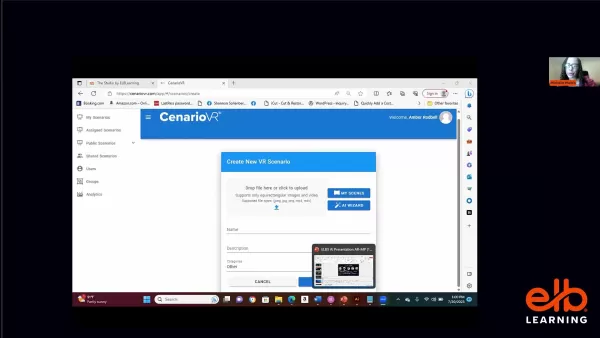
Functionality: CenariioVR is a platform for building virtual reality (VR) training scenarios. It lets instructional designers create immersive, interactive learning experiences without needing advanced coding skills.
Use Cases: Instructional designers can use CenariioVR to replicate real-life situations, giving learners practical experience in a secure and managed setting. This tool is perfect for training in areas like healthcare, manufacturing, and customer service.
3. Other Notable AI Tools
Jasper: Focuses on creating high-quality content for marketing, but is also helpful for instructional designers needing to build engaging stories and scenarios.
Murf.ai: Converts text into natural-sounding voiceovers, great for adding audio to learning modules and creating dynamic multimedia experiences.
Synthesia: Produces AI-generated videos from text, ideal for explaining complex topics or showing processes in an interesting visual style.
Pictory: Transforms long content into brief, shareable videos, useful for making previews or summaries of learning materials.
Otter.ai: Records audio in real-time, making it easier to review and summarize recorded lectures or meetings.
By using these AI tools, instructional designers can greatly increase their productivity and develop more engaging, personalized, and effective learning experiences. Each tool has unique strengths, so it's important to pick the right ones for your project's requirements.
Adaptive Learning and the Role of AI
Understanding Adaptive Learning
Adaptive learning is an educational method that uses AI and data analytics to customize instructional content, activities, and assessments according to individual learner needs, preferences, and progress. It shifts away from the standard uniform approach, providing a more personalized and efficient learning experience. By constantly tracking learner performance and modifying content as needed, adaptive learning makes sure every learner gets the appropriate level of difficulty and support.
Key Components of Adaptive Learning:
- Assessment: Adaptive learning systems start with an assessment to learn about the learner's current knowledge, skills, and learning style. This assessment can include diagnostic tests, quizzes, and interactive activities.
- Personalization: Using the assessment results, the system customizes the learning experience by adjusting content, activities, and assessments to fit the learner's specific needs and preferences. This could mean changing the difficulty, offering extra resources, or altering the content format.
- Adaptive Feedback: Adaptive learning systems give learners instant feedback on their performance, supporting them through the learning process. This feedback is personalized and useful, helping learners see their strengths and weaknesses and find areas to work on.
- Iterative Learning Paths: Adaptive learning systems build iterative learning paths where learners can move quickly through content they already know or get more practice in areas where they need help. This keeps learners both challenged and engaged.
- Continuous Adaptation: The system continually adjusts to the learner's progress, changing content and activities as necessary. This ensures the learning experience stays relevant and effective over time.
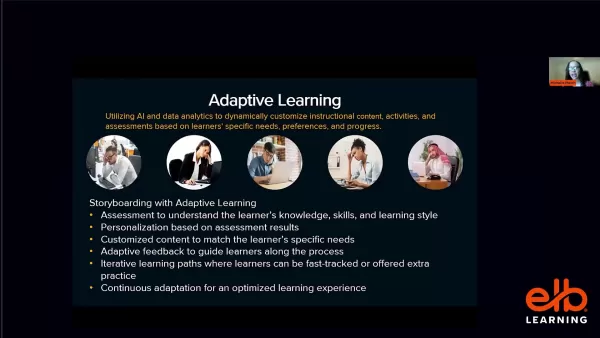
Adaptive learning uses AI and data analytics to build a more personalized, engaging, and effective learning experience. By constantly monitoring learner performance and adjusting content accordingly, it ensures each learner receives the right balance of challenge and support. This method has great potential to change the future of education and training.
Integrating AI into Your Storyboarding Workflow: A Practical Guide
Step 1: Identify Areas for AI Integration
Start by reviewing your current storyboarding workflow to find specific areas where AI can add the most value. This means locating tasks that are time-intensive, repetitive, or need lots of data analysis. For instance, if you spend a lot of time summarizing long documents, think about using an AI summarization tool. Or, if you have trouble creating varied assessment questions, look into AI-powered assessment generators.
Tasks Suitable for AI Integration:
- Content Summarization: AI can quickly pull key information from long documents, saving you time and effort.
- Grammar and Language Checks: AI can automatically review content for grammar and clarity, ensuring accuracy.
- Assessment Generation: AI can develop quizzes, tests, and interactive exercises based on learning objectives.
- Data Analysis: AI can examine learner data to offer insights into their needs, preferences, and performance.
- Visual Asset Creation: AI can generate images, illustrations, and animations to use in your storyboards.
By pinpointing these areas, you can direct your AI integration efforts to tasks where it will have the biggest effect. This focused approach makes sure you're getting the most from AI while reducing any possible workflow disruptions.
Step 2: Select the Right AI Tools
After you've found the areas for AI integration, the next step is to pick the right AI tools. Many tools are available, each with unique features and functions. Think about your specific needs, budget, and technical skills when choosing.
Factors to Consider When Choosing AI Tools:
- Functionality: Does the tool provide the specific capabilities you need, like content summarization, grammar checking, or assessment generation?
- Ease of Use: Is the tool user-friendly and simple to add to your existing workflow?
- Cost: Does the tool fit your budget? Consider both initial costs and ongoing subscription fees.
- Integration: Does the tool work well with your current tools and platforms?
- Support: Does the tool provide enough training and support to help you begin and solve any problems?
Before deciding, use free trials or demos to try different tools and see which ones suit you best.
Step 3: Train Yourself and Your Team
Using AI tools well requires proper training and support. Spend time learning how to use the tools effectively, and offer training to your team members too. This will ensure everyone has the skills and knowledge to use AI to its fullest.
Training Resources:
- Vendor Documentation: Most AI tools include detailed documentation, such as user guides, tutorials, and FAQs.
- Online Courses: Sites like Coursera, Udemy, and LinkedIn Learning provide courses on AI and machine learning, giving a better understanding of the technology.
- Workshops and Webinars: Join workshops and webinars to learn from experts and connect with other users.
- Internal Training Sessions: Hold internal training sessions to share knowledge and best practices within your team.
By investing in training, you can make sure everyone is at ease and confident using AI tools, leading to better integration and improved outcomes.
Step 4: Monitor and Evaluate
Once you've implemented AI tools, it's important to monitor and assess their performance. Track key metrics like content creation time, learner engagement, and learning outcomes. This will help you see if the tools are meeting expectations and find areas to improve.
Metrics to Track:
- Content Creation Time: How long does it take to create content with and without AI?
- Learner Engagement: Are learners more involved with content made using AI?
- Learning Outcomes: Are learners getting better results with AI-driven learning experiences?
- Cost Savings: Are you saving money by using AI tools?
- User Satisfaction: Are you and your team happy with the AI tools?
By monitoring and evaluating AI performance, you can make data-based decisions on how to improve your workflow and get the most from AI. This ongoing approach ensures you're always refining your processes and delivering better learning experiences.
Pricing of AI Tools for Storyboarding
Cost Considerations
The cost of using AI tools for storyboarding can differ a lot based on the tools you select and the scope of your use. Knowing the pricing models and options is key for budgeting and making smart choices.
Pricing Models:
- Subscription-Based: Many AI tools work on a subscription model, where you pay a regular fee (monthly or yearly) to use the tool. Subscription costs can change based on user count, features, and usage limits.
- Usage-Based: Some AI tools charge according to usage, like the number of content summaries made, grammar checks done, or data analyzed. This model can be budget-friendly for organizations with changing needs.
- One-Time Purchase: A few AI tools are available for a single payment, giving you a permanent license. This model can appeal to organizations that want to avoid ongoing subscription fees.
- Free Trials and Freemium: Many AI tools provide free trials or freemium versions, letting you test the tool before buying a subscription. This is a good way to check the tool's features and see if it fits your needs.
Cost Factors:
- Number of Users: More users usually mean higher costs.
- Features: Tools with more advanced features tend to be pricier.
- Usage Limits: Some tools set limits on usage, like the number of content summaries or grammar checks per month.
- Integration: Connecting AI tools with your current systems might involve extra costs.
- Support: Some vendors charge more for premium support services.
By carefully thinking about these pricing models and cost factors, you can make informed decisions about which AI tools to use and how to budget for them effectively.
AI in Storyboarding: Weighing the Advantages and Disadvantages
Pros
Improved efficiency and faster content creation.
Data-based insights for personalized learning experiences.
Automated tasks lighten the workload and allow more time for creative work.
Access to a broader set of tools and resources.
Better learning outcomes through adaptive content.
Cons
Possible over-dependence on AI and reduced human creativity.
Risk of producing generic or impersonal learning experiences.
Ethical issues related to data privacy and algorithm bias.
Cost and difficulty of implementing AI tools.
Need for continuous training and support to use AI effectively.
Core Features of AI-Powered Storyboarding Tools
Key Capabilities
AI-powered storyboarding tools provide a variety of features aimed at simplifying the instructional design process and enhancing learning experiences. These features generally fall into categories like content generation, data analysis, personalization, and automation.
1. Content Generation
- Content Summarization: AI can automatically summarize long documents, articles, and reports, extracting key points for storyboarding.
- Assessment Generation: AI can create quizzes, tests, and interactive activities based on learning goals and content.
- Visual Asset Creation: AI can generate images, illustrations, and animations to fill out storyboards.
2. Data Analysis
- Learner Analytics: AI can track learner behavior, preferences, and performance, helping designers understand what's effective and what isn't.
- Content Optimization: AI can identify where content isn't working well or is confusing for learners. Designers can then use this feedback to refine and improve the material for better engagement and retention.
- Gap Analysis: AI can help find gaps in existing content or training programs. This lets designers create new materials to address those gaps and ensure a complete learning experience.
3. Personalization
- Adaptive Learning Paths: AI can build personalized learning paths that adjust to individual learner needs and preferences.
- Content Recommendations: AI can suggest relevant content based on learner profiles and learning objectives.
- Personalized Feedback: AI can give learners immediate feedback on their performance, guiding them through the learning process.
4. Automation
- Automated Grammar and Language Checks: AI can automatically proofread content, ensuring it's clear and accurate.
- Automated Translation: AI can translate content into different languages, making it available to a worldwide audience.
- Automated Scheduling: AI can automate the scheduling of learning activities and assessments.
These core features can greatly improve the efficiency, effectiveness, and personalization of the storyboarding process, leading to better learning experiences for students.
Use Cases: Real-World Applications of AI in Storyboarding
Practical Applications
AI is being applied in different industries and educational environments to improve storyboarding and instructional design. Here are some real-world examples showing the practical uses of AI.
1. Corporate Training
- Scenario: A large company needs to train its staff on new software. They use AI to create interactive scenarios that mimic real-world situations, giving employees practical experience in a safe and controlled setting.
2. Higher Education
- Scenario: A university professor is teaching an online history course. They use AI to develop personalized learning paths for each student, customizing the content and activities to their individual needs and preferences.
3. Healthcare
- Scenario: A hospital needs to train its nurses on new medical procedures. They use AI to produce realistic simulations of patient scenarios, letting nurses practice their skills in a safe and controlled environment.
4. Government
- Scenario: A government agency needs to train its employees on new policies and rules. They use AI to build interactive modules that explain the policies clearly and engagingly.
5. Non-Profit Organizations
- Scenario: A non-profit organization needs to train volunteers on working with vulnerable groups. They use AI to create empathy-building simulations that help volunteers understand the challenges these groups face.
These examples show the flexibility of AI in storyboarding and instructional design. By using AI, organizations can develop more engaging, personalized, and effective learning experiences for their audiences.
Frequently Asked Questions (FAQ)
Will AI replace instructional designers?
No, AI is not meant to replace instructional designers. Instead, it's designed to enhance their abilities and simplify their workflow. AI can manage routine tasks, analyze data, and generate content, but it still needs human skill to ensure learning experiences are engaging, personalized, and effective. Instructional designers should use AI as a tool to boost their expertise and creativity, not as a substitute for them.
What are the ethical considerations when using AI in storyboarding?
When using AI in storyboarding, it's important to think about ethical issues like data privacy, algorithm bias, and job impact. Make sure learner data is safeguarded and used responsibly, and work to create fair and unbiased AI systems. Also, be aware of how AI might affect job roles and take action to reduce any negative effects.
How can I get started with AI in storyboarding?
To begin using AI in storyboarding, start by finding areas in your workflow where AI can add the most value. Then, research different AI tools and select those that match your needs and budget. Invest time in training yourself and your team on how to use the tools well, and keep tracking and evaluating their performance to make informed decisions about improving your workflow.
Related Questions
What are the challenges of using AI for design?
Using AI for design has its own challenges, mainly around content generation and adaptability and customization. AI often depends heavily on existing data, which may not always be applicable or specific to the unique needs of instructional courses. Since many courses are customized for particular client needs, AI's general approach to information can sometimes be insufficient. Also, building an AI system that can truly adjust to specific learner needs is very challenging. It requires substantial effort and cooperation between designers, developers, and subject matter experts to ensure that AI-generated content matches the course's goals and benefits each learner individually.
How does adaptive learning work?
Adaptive learning uses Artificial Intelligence (AI) and data analytics to dynamically customize instructional content, activities, and assessments based on learners' specific needs, preferences, and progress. It starts with an initial assessment to understand the learner’s current knowledge and learning style. Based on this assessment, the system personalizes the learning experience by tailoring the content and activities to the learner’s specific needs and preferences. Adaptive feedback guides learners through the process, giving immediate feedback on their performance, helping them recognize their strengths and weaknesses and identify areas for improvement. Iterative learning paths let learners move ahead quickly or get extra practice, keeping them challenged and engaged. Continuous adaptation ensures the learning experience stays relevant and effective over time, leading to an optimized learning experience.
Related article
 Stripe to Acquire OpenRouter as AI Model Routing Gains Momentum
Stripe has agreed to acquire OpenRouter, an AI model-routing platform that gives developers access to hundreds of models through a single interface. The deal adds model selection and routing to Stripe’s existing work around AI usage and token-based b
Former OpenAI Researcher Barrett Zoph Returns to Google to Support Gemini Development
Barret Zoph, who previously abruptly left and joined OpenAI due to a disagreement with Thinking Machines Lab CEO Miriam Mularati, has once again changed employers. Alphabet's Google announced that Zoph will return as Vice President of Research, bring
How Recursive Intelligence Raised $335M at $4B Valuation in 4 Months
The co-founders of startup Ricursive Intelligence seemed destined to be co-founders.Anna Goldie, CEO, and Azalia Mirhoseini, CTO, are so well-known in the AI community that they were among those AI engineers who “got those weird emails from Zuckerber
Related Special Topic Recommendations
Design & Art
Stripe to Acquire OpenRouter as AI Model Routing Gains Momentum
Stripe has agreed to acquire OpenRouter, an AI model-routing platform that gives developers access to hundreds of models through a single interface. The deal adds model selection and routing to Stripe’s existing work around AI usage and token-based b
Former OpenAI Researcher Barrett Zoph Returns to Google to Support Gemini Development
Barret Zoph, who previously abruptly left and joined OpenAI due to a disagreement with Thinking Machines Lab CEO Miriam Mularati, has once again changed employers. Alphabet's Google announced that Zoph will return as Vice President of Research, bring
How Recursive Intelligence Raised $335M at $4B Valuation in 4 Months
The co-founders of startup Ricursive Intelligence seemed destined to be co-founders.Anna Goldie, CEO, and Azalia Mirhoseini, CTO, are so well-known in the AI community that they were among those AI engineers who “got those weird emails from Zuckerber
Related Special Topic Recommendations
Design & Art
 Top AI Illustration Tools: Create Editorial Scenes and Cover Art Faster
2026 Latest Top-rated AI Illustration Tools: Our curated list features the best powerfully designed tools for creating stunning editorial scenes and eye-catching cover art quickly. Each option has gone through rigorous real-world tests, offering a free vs paid comparison to help you find the perfect match for your workflow. Try these must-try solutions today to unlock your AI edge and boost your creative productivity. Explore now at XIX.AI.
 10 tools
 xix.ai
Education and Learning
Top AI Tutors for Exam Prep: Practice Math, Science, and English
xix.ai
Education and Learning
Top AI Tutors for Exam Prep: Practice Math, Science, and English
2026 Latest Top-Rated Best AI Tutors for Exam Prep are here on XIX.AI! Our curated list features powerful game-changing tools that offer free vs paid comparison, real-world tests, and weekly updated rankings. They help boost your writing efficiency, simplify complex topic learning, and unlock your academic potential. Explore now to Discover your perfect exam prep tool and Start creating today to Unlock your AI edge!
10 tools
xix.ai
Finance
AI Budget Planning Tools for Personal Money Management
2026 Latest Best Top-Rated AI Budget Planning Tools for Personal Money Management are here on XIX.AI! This curated collection features powerful, game-changing solutions that help you conduct real-world tests, understand spending habits, and create personalized plans to boost productivity. Enjoy a free vs paid comparison along with detailed rankings. Must-try tools designed to simplify money management and unlock your AI edge. Explore now!
11 tools
xix.ai
Health & Wellness
AI Sleep Tracking Assistants: Improve Recovery with Better Bedtime Habits
2026 Latest Best Top-Rated AI Sleep Tracking Assistants curated for ultimate recovery. This fully updated weekly guide features powerful tools that deliver real-world tests, free vs paid comparison, and detailed rankings to help you find the must-try solution that boosts sleep quality and supports better bedtime habits. Explore now at XIX.AI to Unlock your AI edge.
10 tools
xix.ai
Data Analysis
AI SQL Copilots for Product and Revenue Analytics
2026 Latest Best Top-Rated AI SQL Copilots for Product and Revenue Analytics! XIX.AI has curated a powerful, game-changing collection of must-try tools that undergo real-world tests through weekly updated rankings. These tools help users boost productivity significantly by accelerating data analysis, streamlining complex queries, and generating accurate insights to drive smarter business decisions. Explore now to Discover your perfect tool for unlocking your AI edge!
14 tools
xix.ai
Education and Learning
Best AI Homework Helpers That Teach: Learn Concepts, Not Just Answers
2026 Latest Best Top-Rated AI Homework Helpers That Teach Core Concepts Not Just Answers Powerful Tools for Students Must-Try Curated List Weekly Updated Free vs Paid Comparison Real-World Tests Accurate Rankings to Help You Unlock Your Full Learning Potential Explore now to Discover your perfect tool for smarter studying.
10 tools
xix.ai

 Comments (0)
0/500
Comments (0)
0/500
As instructional design continues to evolve, Artificial Intelligence (AI) is becoming a powerful asset for improving and streamlining the storyboarding process. This article explores the practical uses of AI in storyboarding, providing guidance on best practices, common mistakes, and effective integration strategies for learning design workflows. Whether you're an experienced instructional designer or just starting out, learning how AI can support storyboarding can boost both efficiency and innovation.
Key Points
AI can help with research and closing knowledge gaps, delivering valuable data for instructional design.
AI can produce summaries of long documents, making content curation faster and easier.
AI tools can support language and grammar checks, improving clarity and accuracy in learning materials.
AI can assist in creating assessments, offering varied and interactive evaluation options.
While AI brings many advantages, it's important to recognize its limitations and possible risks in storyboarding.
Instructional designers should use AI to complement their skills, not as a total replacement.
Adaptive learning uses AI and data analytics to tailor content to individual learner needs.
Challenges of using AI in design include content generation and adaptability & customization.
The Rise of AI in Instructional Design Storyboarding
What is Storyboarding in Instructional Design?
Storyboarding in instructional design is the method of creating a visual outline or blueprint for a learning experience. It maps out the order of content, interactions, and assessments that learners will encounter. Consider it the framework that supports the entire learning module. Historically, this process involves brainstorming sessions, careful planning, and a solid grasp of learning goals. It's a detailed task that calls for creativity, technical know-how, and a focus on the learner. This approach helps instructional designers see how content and interactions will flow, ensuring a unified and compelling learning journey. Now, artificial intelligence (AI) is entering the scene, offering to enhance and transform this vital part of course development.
The Core Benefits of Storyboarding:
- Clarity: A storyboard gives a clear and concise summary of the whole learning module.
- Engagement: By mapping out the learning journey, storyboarding supports the creation of more interactive and engaging content.
- Efficiency: A well-planned storyboard lowers the chance of expensive revisions and leads to a smoother development process.
- Alignment: It makes sure every part of the learning module supports the overall learning goals.
Collaboration: Storyboards act as a strong communication aid, improving teamwork among instructional designers, subject matter experts, and developers.
Storyboarding isn't just about sketching images; it's about designing a complete learning experience that meets different learner needs and preferences. It forms the foundation of successful instructional design, directing the development process from idea to execution.
As AI becomes more common in storyboarding, instructional designers can use these tools to boost their productivity, creativity, and overall impact. This shift is set to influence the future of learning design, making it more customized, flexible, and engaging for learners everywhere.
The Promise of AI: Enhancing Storyboarding Efficiency
Artificial intelligence (AI) provides many ways to improve efficiency in instructional design storyboarding. By automating tasks, offering data-based insights, and enabling quick prototyping, AI can greatly cut down the time and resources needed to build effective learning experiences.
1. Automating Repetitive Tasks:
A major way AI increases efficiency is by taking over repetitive jobs. AI-powered tools can manage routine work like:
- Content Summarization: AI can swiftly summarize long documents, articles, and reports, pulling out key details for storyboarding.
This lets instructional designers understand important points without spending hours reading through large amounts of material.
- Grammar and Language Checks: Making sure learning materials are free of grammar mistakes and language errors is essential. AI tools can automatically review content, highlighting possible issues and recommending fixes.
- Assessment Generation: Developing varied and interesting assessments can take a lot of time. AI can create quizzes, tests, and interactive activities based on learning goals and content, allowing designers to concentrate on more strategic work.
2. Data-Driven Insights:
AI can examine large datasets to offer useful insights that guide storyboarding choices. These insights include:
- Learner Analytics: AI can monitor learner behavior, preferences, and performance, helping designers see what's effective and what isn't. This information can shape the development of personalized learning paths and adaptive content.
- Content Optimization: AI can spot places where content isn't performing well or is confusing for learners. Designers can then use this input to adjust and improve the material for better engagement and retention.
- Gap Analysis: AI can help find gaps in current content or training programs. This enables designers to produce new materials that fill these gaps and provide a thorough learning experience.
3. Rapid Prototyping and Iteration:
AI allows for rapid prototyping, letting designers quickly build and test different storyboarding concepts. AI-powered tools can:
- Generate Visual Assets: AI can produce images, illustrations, and animations to add to storyboards, speeding up the visualization step.
- Simulate Learner Interactions: AI can mimic how learners might engage with content, helping designers find potential usability problems early.
- Facilitate Iterative Design: AI makes the iterative design process smoother by giving quick feedback and improvement ideas, letting designers continually refine their storyboards using data and insights.
By adopting AI, instructional designers can achieve new levels of efficiency, creativity, and impact in their work. These tools help automate routine tasks, provide data-based insights, and support rapid prototyping, leading to more engaging, personalized, and effective learning experiences.
Key AI Tools for Streamlining Storyboarding
Many AI tools are changing the storyboarding process, each providing distinct features to simplify instructional design. These tools help with different areas, from content creation to assessment development.
1. Wordtune
Functionality: Wordtune is an AI-driven writing assistant that helps users rewrite, rephrase, and polish their text. It offers ideas for enhancing clarity, tone, and overall writing quality.
This tool is especially helpful for instructional designers who need to create clear and concise learning materials.
Use Cases: Wordtune can help rewrite complicated ideas into simpler language, making sure content is easy to understand for all learners. It can also help in developing engaging and convincing stories to hold learners' interest.
2. CenariioVR
Functionality: CenariioVR is a platform for building virtual reality (VR) training scenarios. It lets instructional designers create immersive, interactive learning experiences without needing advanced coding skills.
Use Cases: Instructional designers can use CenariioVR to replicate real-life situations, giving learners practical experience in a secure and managed setting. This tool is perfect for training in areas like healthcare, manufacturing, and customer service.
3. Other Notable AI Tools
Jasper: Focuses on creating high-quality content for marketing, but is also helpful for instructional designers needing to build engaging stories and scenarios.
Murf.ai: Converts text into natural-sounding voiceovers, great for adding audio to learning modules and creating dynamic multimedia experiences.
Synthesia: Produces AI-generated videos from text, ideal for explaining complex topics or showing processes in an interesting visual style.
Pictory: Transforms long content into brief, shareable videos, useful for making previews or summaries of learning materials.
Otter.ai: Records audio in real-time, making it easier to review and summarize recorded lectures or meetings.
By using these AI tools, instructional designers can greatly increase their productivity and develop more engaging, personalized, and effective learning experiences. Each tool has unique strengths, so it's important to pick the right ones for your project's requirements.
Adaptive Learning and the Role of AI
Understanding Adaptive Learning
Adaptive learning is an educational method that uses AI and data analytics to customize instructional content, activities, and assessments according to individual learner needs, preferences, and progress. It shifts away from the standard uniform approach, providing a more personalized and efficient learning experience. By constantly tracking learner performance and modifying content as needed, adaptive learning makes sure every learner gets the appropriate level of difficulty and support.
Key Components of Adaptive Learning:
- Assessment: Adaptive learning systems start with an assessment to learn about the learner's current knowledge, skills, and learning style. This assessment can include diagnostic tests, quizzes, and interactive activities.
- Personalization: Using the assessment results, the system customizes the learning experience by adjusting content, activities, and assessments to fit the learner's specific needs and preferences. This could mean changing the difficulty, offering extra resources, or altering the content format.
- Adaptive Feedback: Adaptive learning systems give learners instant feedback on their performance, supporting them through the learning process. This feedback is personalized and useful, helping learners see their strengths and weaknesses and find areas to work on.
- Iterative Learning Paths: Adaptive learning systems build iterative learning paths where learners can move quickly through content they already know or get more practice in areas where they need help. This keeps learners both challenged and engaged.
- Continuous Adaptation: The system continually adjusts to the learner's progress, changing content and activities as necessary. This ensures the learning experience stays relevant and effective over time.
Adaptive learning uses AI and data analytics to build a more personalized, engaging, and effective learning experience. By constantly monitoring learner performance and adjusting content accordingly, it ensures each learner receives the right balance of challenge and support. This method has great potential to change the future of education and training.
Integrating AI into Your Storyboarding Workflow: A Practical Guide
Step 1: Identify Areas for AI Integration
Start by reviewing your current storyboarding workflow to find specific areas where AI can add the most value. This means locating tasks that are time-intensive, repetitive, or need lots of data analysis. For instance, if you spend a lot of time summarizing long documents, think about using an AI summarization tool. Or, if you have trouble creating varied assessment questions, look into AI-powered assessment generators.
Tasks Suitable for AI Integration:
- Content Summarization: AI can quickly pull key information from long documents, saving you time and effort.
- Grammar and Language Checks: AI can automatically review content for grammar and clarity, ensuring accuracy.
- Assessment Generation: AI can develop quizzes, tests, and interactive exercises based on learning objectives.
- Data Analysis: AI can examine learner data to offer insights into their needs, preferences, and performance.
- Visual Asset Creation: AI can generate images, illustrations, and animations to use in your storyboards.
By pinpointing these areas, you can direct your AI integration efforts to tasks where it will have the biggest effect. This focused approach makes sure you're getting the most from AI while reducing any possible workflow disruptions.
Step 2: Select the Right AI Tools
After you've found the areas for AI integration, the next step is to pick the right AI tools. Many tools are available, each with unique features and functions. Think about your specific needs, budget, and technical skills when choosing.
Factors to Consider When Choosing AI Tools:
- Functionality: Does the tool provide the specific capabilities you need, like content summarization, grammar checking, or assessment generation?
- Ease of Use: Is the tool user-friendly and simple to add to your existing workflow?
- Cost: Does the tool fit your budget? Consider both initial costs and ongoing subscription fees.
- Integration: Does the tool work well with your current tools and platforms?
- Support: Does the tool provide enough training and support to help you begin and solve any problems?
Before deciding, use free trials or demos to try different tools and see which ones suit you best.
Step 3: Train Yourself and Your Team
Using AI tools well requires proper training and support. Spend time learning how to use the tools effectively, and offer training to your team members too. This will ensure everyone has the skills and knowledge to use AI to its fullest.
Training Resources:
- Vendor Documentation: Most AI tools include detailed documentation, such as user guides, tutorials, and FAQs.
- Online Courses: Sites like Coursera, Udemy, and LinkedIn Learning provide courses on AI and machine learning, giving a better understanding of the technology.
- Workshops and Webinars: Join workshops and webinars to learn from experts and connect with other users.
- Internal Training Sessions: Hold internal training sessions to share knowledge and best practices within your team.
By investing in training, you can make sure everyone is at ease and confident using AI tools, leading to better integration and improved outcomes.
Step 4: Monitor and Evaluate
Once you've implemented AI tools, it's important to monitor and assess their performance. Track key metrics like content creation time, learner engagement, and learning outcomes. This will help you see if the tools are meeting expectations and find areas to improve.
Metrics to Track:
- Content Creation Time: How long does it take to create content with and without AI?
- Learner Engagement: Are learners more involved with content made using AI?
- Learning Outcomes: Are learners getting better results with AI-driven learning experiences?
- Cost Savings: Are you saving money by using AI tools?
- User Satisfaction: Are you and your team happy with the AI tools?
By monitoring and evaluating AI performance, you can make data-based decisions on how to improve your workflow and get the most from AI. This ongoing approach ensures you're always refining your processes and delivering better learning experiences.
Pricing of AI Tools for Storyboarding
Cost Considerations
The cost of using AI tools for storyboarding can differ a lot based on the tools you select and the scope of your use. Knowing the pricing models and options is key for budgeting and making smart choices.
Pricing Models:
- Subscription-Based: Many AI tools work on a subscription model, where you pay a regular fee (monthly or yearly) to use the tool. Subscription costs can change based on user count, features, and usage limits.
- Usage-Based: Some AI tools charge according to usage, like the number of content summaries made, grammar checks done, or data analyzed. This model can be budget-friendly for organizations with changing needs.
- One-Time Purchase: A few AI tools are available for a single payment, giving you a permanent license. This model can appeal to organizations that want to avoid ongoing subscription fees.
- Free Trials and Freemium: Many AI tools provide free trials or freemium versions, letting you test the tool before buying a subscription. This is a good way to check the tool's features and see if it fits your needs.
Cost Factors:
- Number of Users: More users usually mean higher costs.
- Features: Tools with more advanced features tend to be pricier.
- Usage Limits: Some tools set limits on usage, like the number of content summaries or grammar checks per month.
- Integration: Connecting AI tools with your current systems might involve extra costs.
- Support: Some vendors charge more for premium support services.
By carefully thinking about these pricing models and cost factors, you can make informed decisions about which AI tools to use and how to budget for them effectively.
AI in Storyboarding: Weighing the Advantages and Disadvantages
Pros
Improved efficiency and faster content creation.
Data-based insights for personalized learning experiences.
Automated tasks lighten the workload and allow more time for creative work.
Access to a broader set of tools and resources.
Better learning outcomes through adaptive content.
Cons
Possible over-dependence on AI and reduced human creativity.
Risk of producing generic or impersonal learning experiences.
Ethical issues related to data privacy and algorithm bias.
Cost and difficulty of implementing AI tools.
Need for continuous training and support to use AI effectively.
Core Features of AI-Powered Storyboarding Tools
Key Capabilities
AI-powered storyboarding tools provide a variety of features aimed at simplifying the instructional design process and enhancing learning experiences. These features generally fall into categories like content generation, data analysis, personalization, and automation.
1. Content Generation
- Content Summarization: AI can automatically summarize long documents, articles, and reports, extracting key points for storyboarding.
- Assessment Generation: AI can create quizzes, tests, and interactive activities based on learning goals and content.
- Visual Asset Creation: AI can generate images, illustrations, and animations to fill out storyboards.
2. Data Analysis
- Learner Analytics: AI can track learner behavior, preferences, and performance, helping designers understand what's effective and what isn't.
- Content Optimization: AI can identify where content isn't working well or is confusing for learners. Designers can then use this feedback to refine and improve the material for better engagement and retention.
- Gap Analysis: AI can help find gaps in existing content or training programs. This lets designers create new materials to address those gaps and ensure a complete learning experience.
3. Personalization
- Adaptive Learning Paths: AI can build personalized learning paths that adjust to individual learner needs and preferences.
- Content Recommendations: AI can suggest relevant content based on learner profiles and learning objectives.
- Personalized Feedback: AI can give learners immediate feedback on their performance, guiding them through the learning process.
4. Automation
- Automated Grammar and Language Checks: AI can automatically proofread content, ensuring it's clear and accurate.
- Automated Translation: AI can translate content into different languages, making it available to a worldwide audience.
- Automated Scheduling: AI can automate the scheduling of learning activities and assessments.
These core features can greatly improve the efficiency, effectiveness, and personalization of the storyboarding process, leading to better learning experiences for students.
Use Cases: Real-World Applications of AI in Storyboarding
Practical Applications
AI is being applied in different industries and educational environments to improve storyboarding and instructional design. Here are some real-world examples showing the practical uses of AI.
1. Corporate Training
- Scenario: A large company needs to train its staff on new software. They use AI to create interactive scenarios that mimic real-world situations, giving employees practical experience in a safe and controlled setting.
2. Higher Education
- Scenario: A university professor is teaching an online history course. They use AI to develop personalized learning paths for each student, customizing the content and activities to their individual needs and preferences.
3. Healthcare
- Scenario: A hospital needs to train its nurses on new medical procedures. They use AI to produce realistic simulations of patient scenarios, letting nurses practice their skills in a safe and controlled environment.
4. Government
- Scenario: A government agency needs to train its employees on new policies and rules. They use AI to build interactive modules that explain the policies clearly and engagingly.
5. Non-Profit Organizations
- Scenario: A non-profit organization needs to train volunteers on working with vulnerable groups. They use AI to create empathy-building simulations that help volunteers understand the challenges these groups face.
These examples show the flexibility of AI in storyboarding and instructional design. By using AI, organizations can develop more engaging, personalized, and effective learning experiences for their audiences.
Frequently Asked Questions (FAQ)
Will AI replace instructional designers?
No, AI is not meant to replace instructional designers. Instead, it's designed to enhance their abilities and simplify their workflow. AI can manage routine tasks, analyze data, and generate content, but it still needs human skill to ensure learning experiences are engaging, personalized, and effective. Instructional designers should use AI as a tool to boost their expertise and creativity, not as a substitute for them.
What are the ethical considerations when using AI in storyboarding?
When using AI in storyboarding, it's important to think about ethical issues like data privacy, algorithm bias, and job impact. Make sure learner data is safeguarded and used responsibly, and work to create fair and unbiased AI systems. Also, be aware of how AI might affect job roles and take action to reduce any negative effects.
How can I get started with AI in storyboarding?
To begin using AI in storyboarding, start by finding areas in your workflow where AI can add the most value. Then, research different AI tools and select those that match your needs and budget. Invest time in training yourself and your team on how to use the tools well, and keep tracking and evaluating their performance to make informed decisions about improving your workflow.
Related Questions
What are the challenges of using AI for design?
Using AI for design has its own challenges, mainly around content generation and adaptability and customization. AI often depends heavily on existing data, which may not always be applicable or specific to the unique needs of instructional courses. Since many courses are customized for particular client needs, AI's general approach to information can sometimes be insufficient. Also, building an AI system that can truly adjust to specific learner needs is very challenging. It requires substantial effort and cooperation between designers, developers, and subject matter experts to ensure that AI-generated content matches the course's goals and benefits each learner individually.
How does adaptive learning work?
Adaptive learning uses Artificial Intelligence (AI) and data analytics to dynamically customize instructional content, activities, and assessments based on learners' specific needs, preferences, and progress. It starts with an initial assessment to understand the learner’s current knowledge and learning style. Based on this assessment, the system personalizes the learning experience by tailoring the content and activities to the learner’s specific needs and preferences. Adaptive feedback guides learners through the process, giving immediate feedback on their performance, helping them recognize their strengths and weaknesses and identify areas for improvement. Iterative learning paths let learners move ahead quickly or get extra practice, keeping them challenged and engaged. Continuous adaptation ensures the learning experience stays relevant and effective over time, leading to an optimized learning experience.








 Stripe to Acquire OpenRouter as AI Model Routing Gains Momentum
Stripe has agreed to acquire OpenRouter, an AI model-routing platform that gives developers access to hundreds of models through a single interface. The deal adds model selection and routing to Stripe’s existing work around AI usage and token-based b
Stripe to Acquire OpenRouter as AI Model Routing Gains Momentum
Stripe has agreed to acquire OpenRouter, an AI model-routing platform that gives developers access to hundreds of models through a single interface. The deal adds model selection and routing to Stripe’s existing work around AI usage and token-based b
 Former OpenAI Researcher Barrett Zoph Returns to Google to Support Gemini Development
Barret Zoph, who previously abruptly left and joined OpenAI due to a disagreement with Thinking Machines Lab CEO Miriam Mularati, has once again changed employers. Alphabet's Google announced that Zoph will return as Vice President of Research, bring
Former OpenAI Researcher Barrett Zoph Returns to Google to Support Gemini Development
Barret Zoph, who previously abruptly left and joined OpenAI due to a disagreement with Thinking Machines Lab CEO Miriam Mularati, has once again changed employers. Alphabet's Google announced that Zoph will return as Vice President of Research, bring
 How Recursive Intelligence Raised $335M at $4B Valuation in 4 Months
The co-founders of startup Ricursive Intelligence seemed destined to be co-founders.Anna Goldie, CEO, and Azalia Mirhoseini, CTO, are so well-known in the AI community that they were among those AI engineers who “got those weird emails from Zuckerber
How Recursive Intelligence Raised $335M at $4B Valuation in 4 Months
The co-founders of startup Ricursive Intelligence seemed destined to be co-founders.Anna Goldie, CEO, and Azalia Mirhoseini, CTO, are so well-known in the AI community that they were among those AI engineers who “got those weird emails from Zuckerber

2026 Latest Top-rated AI Illustration Tools: Our curated list features the best powerfully designed tools for creating stunning editorial scenes and eye-catching cover art quickly. Each option has gone through rigorous real-world tests, offering a free vs paid comparison to help you find the perfect match for your workflow. Try these must-try solutions today to unlock your AI edge and boost your creative productivity. Explore now at XIX.AI.
10 tools
xix.ai

2026 Latest Top-Rated Best AI Tutors for Exam Prep are here on XIX.AI! Our curated list features powerful game-changing tools that offer free vs paid comparison, real-world tests, and weekly updated rankings. They help boost your writing efficiency, simplify complex topic learning, and unlock your academic potential. Explore now to Discover your perfect exam prep tool and Start creating today to Unlock your AI edge!
10 tools
xix.ai

2026 Latest Best Top-Rated AI Budget Planning Tools for Personal Money Management are here on XIX.AI! This curated collection features powerful, game-changing solutions that help you conduct real-world tests, understand spending habits, and create personalized plans to boost productivity. Enjoy a free vs paid comparison along with detailed rankings. Must-try tools designed to simplify money management and unlock your AI edge. Explore now!
11 tools
xix.ai

2026 Latest Best Top-Rated AI Sleep Tracking Assistants curated for ultimate recovery. This fully updated weekly guide features powerful tools that deliver real-world tests, free vs paid comparison, and detailed rankings to help you find the must-try solution that boosts sleep quality and supports better bedtime habits. Explore now at XIX.AI to Unlock your AI edge.
10 tools
xix.ai

2026 Latest Best Top-Rated AI SQL Copilots for Product and Revenue Analytics! XIX.AI has curated a powerful, game-changing collection of must-try tools that undergo real-world tests through weekly updated rankings. These tools help users boost productivity significantly by accelerating data analysis, streamlining complex queries, and generating accurate insights to drive smarter business decisions. Explore now to Discover your perfect tool for unlocking your AI edge!
14 tools
xix.ai

2026 Latest Best Top-Rated AI Homework Helpers That Teach Core Concepts Not Just Answers Powerful Tools for Students Must-Try Curated List Weekly Updated Free vs Paid Comparison Real-World Tests Accurate Rankings to Help You Unlock Your Full Learning Potential Explore now to Discover your perfect tool for smarter studying.
10 tools
xix.ai












