


 Home
HomeN8N Platform Automates Stock Market Analysis with Advanced AI Tools
In the fast-moving world of financial markets, staying competitive demands advanced tools and timely intelligence. This guide walks you through creating an AI-driven financial analyst agent with N8N, a versatile workflow automation platform. Discover how to automate stock technical analysis, detect key candlestick patterns, and extract valuable investment insights—all through AI and smooth workflow automation. This method streamlines analytical tasks, allowing analysts to focus more on strategic decisions.
Key Points
Learn how to build an AI financial analyst using N8N.
Automate technical stock analysis for up-to-date insights.
Spot important candlestick patterns to inform your decisions.
Harness the Anthropic Claude 3.5 model for deeper analysis.
Integrate Telegram to receive real-time alerts and reports.
Use the CHART-IMG API to produce financial charts.
Customize prompts and analytical criteria to suit individual requirements.
Building an AI-Driven Technical Analysis Agent with N8N
What is Technical Analysis and Why Automate It?
Technical analysis is a technique for evaluating investments and spotting trading opportunities through the study of statistical trends—like price action and volume—drawn from market activity. This analysis sheds light on market sentiment, highlights trends, and can pinpoint likely entry and exit points for trades.
Performing technical analysis manually involves labor-intensive chart reviews, manual data entry, and substantial expertise. Automating the process with AI brings considerable benefits: it delivers fast, efficient insights, cuts down on human error, and boosts productivity. AI can scan vast amounts of data far quicker than a human. Platforms like N8N, designed for workflow automation, let you build an all-in-one AI system that automatically fetches data, generates analysis, and distributes it instantly.
Setting Up the N8N Workflow for AI Stock Analysis
Getting started requires designing an efficient N8N workflow. This section outlines the essential stages for building a robust technical analysis system. Each stage contributes to full automation, enabling you to obtain the latest stock analysis.
- Telegram Trigger:
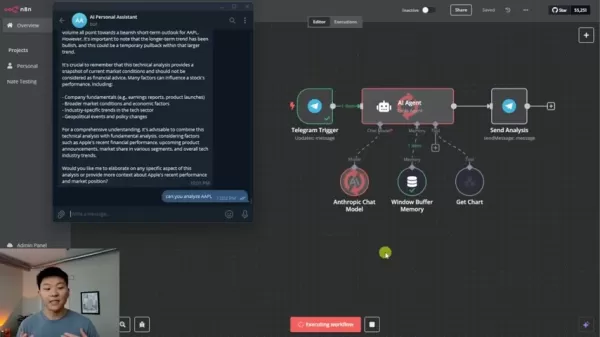
Begin with a Telegram trigger to monitor commands or queries sent to your bot. This component enables direct interaction with the agent from within Telegram.
- AI Agent (Tools Agent): This serves as the workflow’s core. It’s set up to blend AI models, memory, and tools for analysis. It accepts data from Telegram, processes it via AI, and returns results.
- Anthropic Chat Model: This refers to the Anthropic Claude 3.5 model. It interprets data, spots trends, and delivers concise summaries. It aids in decoding market signals.
- Window Buffer Memory: Utilize memory to store recent exchanges, maintaining context and enabling the agent to sustain conversations and recall earlier inputs.
- Get Chart Tool: Build a custom tool that fetches stock chart images featuring technical indicators through the CHART-IMG API. This tool takes a stock symbol and returns a chart visual.
Creating the Custom 'Get Chart' Tool in N8N
The 'Get Chart' tool is central to the AI workflow. This function obtains stock chart images with relevant technical indicators. It automates the tedious job of creating stock graphs. The tool accepts a stock ticker and returns a chart image that the AI Agent can analyze further.
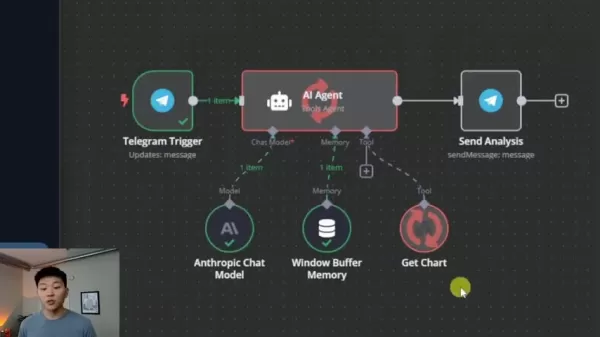
Here’s the basic procedure for constructing this crucial custom tool:
- Integrate CHART-IMG API: Connect to CHART-IMG's API to retrieve generated stock chart images.
- Configure HTTP Request: Set up an HTTP request node in N8N to send a POST call to CHART-IMG.
- Parameterize the Request: Adjust parameters for theme, interval, and ticker.
- Extract Image URL: Pull the URL from the JSON response.
- Returning the Chart: The chart’s URL is returned for viewing in Telegram.
Configuring the Prompt for the AI Agent
The prompt defines how the AI Agent behaves and analyzes information. It dictates the technical analysis instructions given to the agent. The prompt should clarify its role in offering market updates and reports.
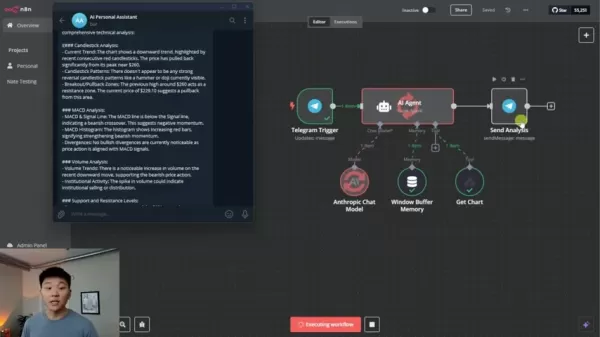
Use clear language instructing the AI agent to use the GetChart tool for technical analysis. The tool processes data output in markdown format, which should be noted in the prompt so the agent is prepared to work with it.
Key elements of this prompt include:
- Context: States that the agent specializes in financial markets and analysis. Its role is to supply useful data-backed information.
- Instructions: Guides the AI to be informative and helpful, avoiding biased investment advice—analyzing chart and ticker requests, retrieving data, and showing charts when asked.
- Tools: Specifies that the "GetChart" tool must be used to fetch stock chart images for users.
Implementing the N8N Workflow for Financial Analysis
This section covers the practical steps for implementing the financial analysis workflow in N8N. First, employ a Telegram trigger to start the workflow, allowing interaction via Telegram messages. To control the AI agent, configure it to use the models and tools defined in the prompt, ensuring proper responses based on technical data.
For responses, you need the Telegram Chat ID. By accurately referencing it in the response node, you retrieve the latest replies while establishing a natural conversational flow.
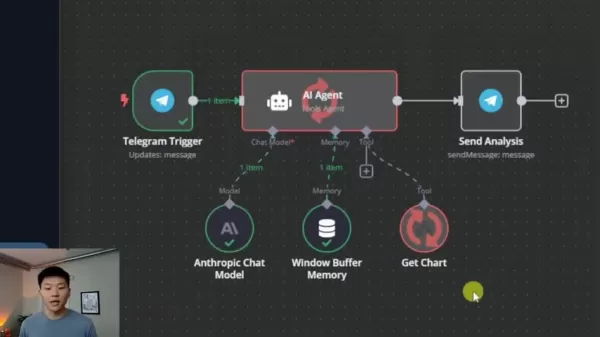
For deeper analysis, use the Anthropic Claude 3.5 model to interpret data, identify market patterns, and share insights into a stock's prospects.
This setup results in a system delivering detailed technical analysis with current data.
Testing and Refining the AI Financial Analyst Agent
Testing is a crucial phase in developing any automated system. Once the build is complete, you can prompt the AI agent. It should retrieve stock prices, analyze major indicators, and provide perceptive commentary.
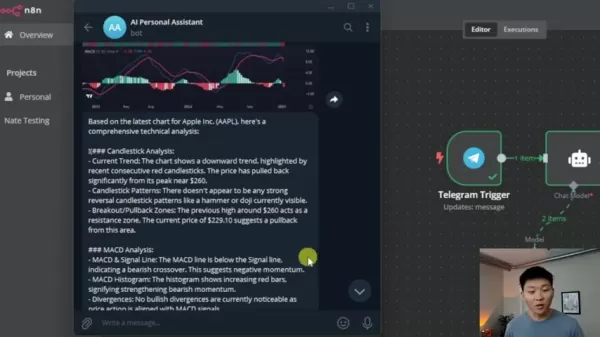
It is vital to verify that data fetched by the CHART-IMG API displays correctly. The quality of AI-generated insights requires ongoing evaluation to ensure the agent produces clear, accurate, and relevant analysis. This ensures the agent responds appropriately to requests while maintaining effectiveness.
Advanced Prompt Engineering Tips
Tailoring AI Responses for User Understanding
Craft AI agent prompts that adjust the detail level to match user preferences. Users can choose from different levels so information is tailored to their expertise. This flexibility improves engagement and understanding.
- Set Tone: Define the ideal tone to match the workflow with specific audiences, enhancing relatability. This is especially helpful when the agent serves varied user expectations, as personalization can increase the agent’s effectiveness.
- Adaptive Learning: Provide ongoing training and feedback to the AI model for precise responses. This keeps the AI aligned with trustworthy financial analysis and current market strategies.
How to Use the AI Financial Analyst Agent
Initiating Analysis via Telegram
- Open Telegram: Launch Telegram on your device.
- Access Your AI Assistant: Find your AI Financial Assistant bot in your Telegram contacts. Start a conversation by sending a message.
- Request Stock Analysis: Enter a message asking for technical analysis. A sample command: "Can you analyze AAPL?"
- Receive Analysis: Obtain the technical analysis directly in the chat.
Interpreting the Analysis
Review Chart: The first element is the stock chart. Examine recent price movements to understand trends and spot patterns.
Candlestick Analysis: The agent will explain key aspects like support and resistance levels to help identify potential entry and exit opportunities.
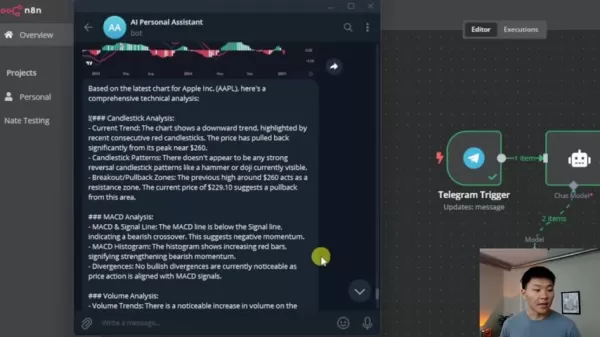
MACD and Volume Analysis: Check MACD line positions, divergence signals, and general volume trends.
Key Takeaways: This offers actionable guidance on possible buy, sell, and hold strategies.
Cost Considerations
Understanding N8N's Pricing Model
You can self-host N8N, which helps manage expenses. When self-hosting, you manage hosting costs but avoid platform fees from a hosted N8N service.
With complex AI workflows, usage of Anthropic’s Claude API can lead to extra charges. By optimizing workflow efficiency and minimizing prompt usage, users can control costs.
Advantages and Disadvantages
Pros
Saves time and money.
Better decision-making.
High analytical performance
Enhanced Scalability
Cons
The models carry an inherent risk of inaccuracies and hallucinations.
Maintaining the model requires continuous updates to stay current.
Possible data security vulnerabilities
Key Features of the AI Financial Analyst Agent
The Powerful Features to automate
Automated Data Retrieval: The workflow automatically pulls data from multiple financial sources to deliver timely and accurate analysis.
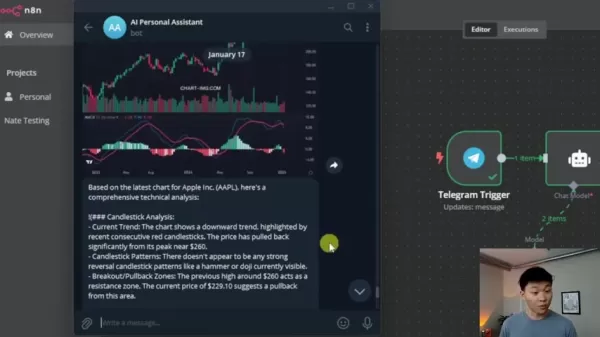
Candlestick Pattern Recognition: The agent excels at spotting key candlestick formations and explains their significance.
Customizable Prompts: Tailor prompts so the AI agent delivers insights according to your preferences.
Integration with Telegram: Telegram integration enables receiving analysis on mobile or desktop devices.
Use Cases for the AI Financial Analyst Agent
Enhancing Investment Strategies
- Real-Time Analysis: Investors get timely stock market insights, helping them make quick decisions about opening or closing positions.
- Algorithmic Trading: The AI Agent can be embedded in algorithmic trading setups for automated technical analysis.
- Portfolio Monitoring: The AI model tracks the portfolio to offer insights and risk assessments.
FAQ
What are the AI models that can be leveraged in N8N?
N8N supports various AI models, and Anthropic's Claude 3.5 is particularly suited for advanced analysis. These models allow for more sophisticated and personalized technical analysis.
How can I ensure the accuracy of the AI-driven analysis?
To ensure accuracy, train your model on dependable financial data sources, provide consistent feedback to guide the model, and conduct regular validations. Reliable financial insights depend on timely and correct information, so these steps help uphold the credibility of financial recommendations.
Can I customize the analytical parameters used by the AI Agent?
Yes. Customizable prompts allow you to adjust variables, metrics, and data inputs. This lets you fine-tune the workflow according to your risk tolerance and trading approach.
Related Questions
How do I scale my AI-powered technical analysis agent to handle multiple stocks?
To ensure your AI agent efficiently handles numerous stocks, use N8N's batch processing tools to maintain optimal workload and data flow. Storing a knowledge base in a vector database can enhance its efficiency and allow it to process information from many sources. With careful process design, you can handle large data volumes without introducing significant problems.
Related article
 How Fintech Companies Achieve Strong Return on Investment by Leveraging Data
A solid foundation of integrated data is essential for boosting return on investment in fintech marketing efforts. Credit: Getty ImagesStephen Williams, CEO of Marketing Evolution, explains why unified data represents a crucial missing element for fi
Bain forecasts US$100 billion SaaS market in agentic AI automation
Bain & Company has estimated a $100 billion market in the U.S. for SaaS companies leveraging agentic AI. The firm said this market stems from automating coordination tasks within enterprise systems.This estimate comes from the second installment in B
Kakao Mobility outlines Level 4 autonomous driving roadmap for physical AI
Kakao Mobility is planning to develop Level 4 autonomous driving technologies internally as part of its physical AI strategy.
At the 2026 World IT Show conference in Seoul's COEX, Kim Jin-kyu — vice president and head of Kakao Mobility's Physical AI
Related Special Topic Recommendations
chatbot
How Fintech Companies Achieve Strong Return on Investment by Leveraging Data
A solid foundation of integrated data is essential for boosting return on investment in fintech marketing efforts. Credit: Getty ImagesStephen Williams, CEO of Marketing Evolution, explains why unified data represents a crucial missing element for fi
Bain forecasts US$100 billion SaaS market in agentic AI automation
Bain & Company has estimated a $100 billion market in the U.S. for SaaS companies leveraging agentic AI. The firm said this market stems from automating coordination tasks within enterprise systems.This estimate comes from the second installment in B
Kakao Mobility outlines Level 4 autonomous driving roadmap for physical AI
Kakao Mobility is planning to develop Level 4 autonomous driving technologies internally as part of its physical AI strategy.
At the 2026 World IT Show conference in Seoul's COEX, Kim Jin-kyu — vice president and head of Kakao Mobility's Physical AI
Related Special Topic Recommendations
chatbot
 Best AI Roleplay Chat Apps for Language Practice, Interview Prep, and Daily Fluency
2026 Latest Best Top-rated AI Roleplay Chat Apps for Language Practice, Interview Prep, and Daily Fluency! XIX.AI curates a powerful game-changing collection that offers free vs paid comparison, real-world tests, and updated rankings weekly. These must-try tools help you boost writing skills, overcome fluency challenges, and improve communication efficiency across all daily scenarios. Explore now to discover your perfect tool for language growth!
 10 tools
 xix.ai
Music composition
AI Stem Separation Tools for Remix Production, Sampling Prep, and Karaoke Masters
xix.ai
Music composition
AI Stem Separation Tools for Remix Production, Sampling Prep, and Karaoke Masters
2026 Latest Best Top-rated AI Stem Separation Tools Curated for Remix Production, Sampling Prep, and Karaoke Masters. These powerful game-changing tools offer real-world tests to deliver precise audio isolation, boosting productivity significantly. XIX.AI provides a weekly updated free vs paid comparison guide to help you find the must-try solution that suits your needs. Explore now to unlock your AI edge.
8 tools
xix.ai
Data Analysis
AI SQL Copilots for Revenue Dashboards, Funnel Analysis, and Product Metrics
2026 Latest Best AI SQL Copilots Ranked Top-Rated! XIX.AI curates a powerful game-changing collection for weekly updated real-world tests. These must-try tools help you generate accurate revenue dashboards, analyze sales funnels, and track product metrics swiftly, boosting productivity massively. Explore now to Discover your perfect tool for data-driven decision making! 238 characters
9 tools
xix.ai
Music composition
Best AI Melody Writing Tools for Song Drafts
2026 Latest Best Top-Rated AI Melody Writing Tools for Song Drafts! XIX.AI has curated a highly powerful game-changing collection that goes through rigorous real-world tests to deliver the best writing experience. You can find detailed free vs paid comparisons, accurate rankings, and must-try options designed to help you create stunning song drafts effortlessly and boost your creative productivity significantly. Explore now to discover your perfect tool!
8 tools
xix.ai
chatbot
Best AI Conversation Trainer Tools for Interview Practice
2026 Latest Best Top-rated AI Conversation Trainer Tools for Interview Practice are here on XIX.AI! This curated collection features powerful, game-changing tools that go through rigorous real-world tests to deliver accurate feedback. You’ll find a free vs paid comparison and detailed rankings to help you choose the must-try option that boosts your confidence and skills. Explore now to Discover your perfect tool for interview success!
12 tools
xix.ai
Design & Art
Best AI Style Transfer Tools for Creative Experiments
2026 Latest Best Top-rated AI Style Transfer Tools for Creative Experiments! XIX.AI has curated a powerful, game-changing collection of must-try tools that deliver exceptional results through real-world tests and rigorous rankings. These top solutions help creatives boost productivity significantly by accelerating content creation and unlocking endless creative possibilities. Explore now to discover your perfect tool and start creating today!
9 tools
xix.ai

 Comments (3)
0/500
Comments (3)
0/500
![GeorgeMartinez]()
N8Nで株式分析を自動化?AIエージェント構築ガイドか。金融市場のスピードについていくのは大変そうだね。自動化は便利だけど、AIの判断が間違ったらどうするの?リスク管理はしっかりしてるか確認が必要だ。興味深い試みだけど、実用化にはまだ課題がありそう。
![EricLopez]()
I was totally shocked when I saw how N8N could handle stock market data analysis so smoothly, it’s like giving finance workers a super-powered sidekick for their tasks 😲
![MarkSanchez]()
這篇文章介紹的AI工具整合方式挺有意思的,把N8N用在金融分析上,感覺比傳統的Excel或手動爬資料有效率多了。不過實際用起來,數據源的準確性和延遲問題會不會是個坑啊?🤔 有人實際部署過類似的流程嗎?
In the fast-moving world of financial markets, staying competitive demands advanced tools and timely intelligence. This guide walks you through creating an AI-driven financial analyst agent with N8N, a versatile workflow automation platform. Discover how to automate stock technical analysis, detect key candlestick patterns, and extract valuable investment insights—all through AI and smooth workflow automation. This method streamlines analytical tasks, allowing analysts to focus more on strategic decisions.
Key Points
Learn how to build an AI financial analyst using N8N.
Automate technical stock analysis for up-to-date insights.
Spot important candlestick patterns to inform your decisions.
Harness the Anthropic Claude 3.5 model for deeper analysis.
Integrate Telegram to receive real-time alerts and reports.
Use the CHART-IMG API to produce financial charts.
Customize prompts and analytical criteria to suit individual requirements.
Building an AI-Driven Technical Analysis Agent with N8N
What is Technical Analysis and Why Automate It?
Technical analysis is a technique for evaluating investments and spotting trading opportunities through the study of statistical trends—like price action and volume—drawn from market activity. This analysis sheds light on market sentiment, highlights trends, and can pinpoint likely entry and exit points for trades.
Performing technical analysis manually involves labor-intensive chart reviews, manual data entry, and substantial expertise. Automating the process with AI brings considerable benefits: it delivers fast, efficient insights, cuts down on human error, and boosts productivity. AI can scan vast amounts of data far quicker than a human. Platforms like N8N, designed for workflow automation, let you build an all-in-one AI system that automatically fetches data, generates analysis, and distributes it instantly.
Setting Up the N8N Workflow for AI Stock Analysis
Getting started requires designing an efficient N8N workflow. This section outlines the essential stages for building a robust technical analysis system. Each stage contributes to full automation, enabling you to obtain the latest stock analysis.
- Telegram Trigger:
Begin with a Telegram trigger to monitor commands or queries sent to your bot. This component enables direct interaction with the agent from within Telegram.
- AI Agent (Tools Agent): This serves as the workflow’s core. It’s set up to blend AI models, memory, and tools for analysis. It accepts data from Telegram, processes it via AI, and returns results.
- Anthropic Chat Model: This refers to the Anthropic Claude 3.5 model. It interprets data, spots trends, and delivers concise summaries. It aids in decoding market signals.
- Window Buffer Memory: Utilize memory to store recent exchanges, maintaining context and enabling the agent to sustain conversations and recall earlier inputs.
- Get Chart Tool: Build a custom tool that fetches stock chart images featuring technical indicators through the CHART-IMG API. This tool takes a stock symbol and returns a chart visual.
Creating the Custom 'Get Chart' Tool in N8N
The 'Get Chart' tool is central to the AI workflow. This function obtains stock chart images with relevant technical indicators. It automates the tedious job of creating stock graphs. The tool accepts a stock ticker and returns a chart image that the AI Agent can analyze further.
Here’s the basic procedure for constructing this crucial custom tool:
- Integrate CHART-IMG API: Connect to CHART-IMG's API to retrieve generated stock chart images.
- Configure HTTP Request: Set up an HTTP request node in N8N to send a POST call to CHART-IMG.
- Parameterize the Request: Adjust parameters for theme, interval, and ticker.
- Extract Image URL: Pull the URL from the JSON response.
- Returning the Chart: The chart’s URL is returned for viewing in Telegram.
Configuring the Prompt for the AI Agent
The prompt defines how the AI Agent behaves and analyzes information. It dictates the technical analysis instructions given to the agent. The prompt should clarify its role in offering market updates and reports.
Use clear language instructing the AI agent to use the GetChart tool for technical analysis. The tool processes data output in markdown format, which should be noted in the prompt so the agent is prepared to work with it.
Key elements of this prompt include:
- Context: States that the agent specializes in financial markets and analysis. Its role is to supply useful data-backed information.
- Instructions: Guides the AI to be informative and helpful, avoiding biased investment advice—analyzing chart and ticker requests, retrieving data, and showing charts when asked.
- Tools: Specifies that the "GetChart" tool must be used to fetch stock chart images for users.
Implementing the N8N Workflow for Financial Analysis
This section covers the practical steps for implementing the financial analysis workflow in N8N. First, employ a Telegram trigger to start the workflow, allowing interaction via Telegram messages. To control the AI agent, configure it to use the models and tools defined in the prompt, ensuring proper responses based on technical data.
For responses, you need the Telegram Chat ID. By accurately referencing it in the response node, you retrieve the latest replies while establishing a natural conversational flow.
For deeper analysis, use the Anthropic Claude 3.5 model to interpret data, identify market patterns, and share insights into a stock's prospects.
This setup results in a system delivering detailed technical analysis with current data.
Testing and Refining the AI Financial Analyst Agent
Testing is a crucial phase in developing any automated system. Once the build is complete, you can prompt the AI agent. It should retrieve stock prices, analyze major indicators, and provide perceptive commentary.
It is vital to verify that data fetched by the CHART-IMG API displays correctly. The quality of AI-generated insights requires ongoing evaluation to ensure the agent produces clear, accurate, and relevant analysis. This ensures the agent responds appropriately to requests while maintaining effectiveness.
Advanced Prompt Engineering Tips
Tailoring AI Responses for User Understanding
Craft AI agent prompts that adjust the detail level to match user preferences. Users can choose from different levels so information is tailored to their expertise. This flexibility improves engagement and understanding.
- Set Tone: Define the ideal tone to match the workflow with specific audiences, enhancing relatability. This is especially helpful when the agent serves varied user expectations, as personalization can increase the agent’s effectiveness.
- Adaptive Learning: Provide ongoing training and feedback to the AI model for precise responses. This keeps the AI aligned with trustworthy financial analysis and current market strategies.
How to Use the AI Financial Analyst Agent
Initiating Analysis via Telegram
- Open Telegram: Launch Telegram on your device.
- Access Your AI Assistant: Find your AI Financial Assistant bot in your Telegram contacts. Start a conversation by sending a message.
- Request Stock Analysis: Enter a message asking for technical analysis. A sample command: "Can you analyze AAPL?"
- Receive Analysis: Obtain the technical analysis directly in the chat.
Interpreting the Analysis
Review Chart: The first element is the stock chart. Examine recent price movements to understand trends and spot patterns.
Candlestick Analysis: The agent will explain key aspects like support and resistance levels to help identify potential entry and exit opportunities.
MACD and Volume Analysis: Check MACD line positions, divergence signals, and general volume trends.
Key Takeaways: This offers actionable guidance on possible buy, sell, and hold strategies.
Cost Considerations
Understanding N8N's Pricing Model
You can self-host N8N, which helps manage expenses. When self-hosting, you manage hosting costs but avoid platform fees from a hosted N8N service.
With complex AI workflows, usage of Anthropic’s Claude API can lead to extra charges. By optimizing workflow efficiency and minimizing prompt usage, users can control costs.
Advantages and Disadvantages
Pros
Saves time and money.
Better decision-making.
High analytical performance
Enhanced Scalability
Cons
The models carry an inherent risk of inaccuracies and hallucinations.
Maintaining the model requires continuous updates to stay current.
Possible data security vulnerabilities
Key Features of the AI Financial Analyst Agent
The Powerful Features to automate
Automated Data Retrieval: The workflow automatically pulls data from multiple financial sources to deliver timely and accurate analysis.
Candlestick Pattern Recognition: The agent excels at spotting key candlestick formations and explains their significance.
Customizable Prompts: Tailor prompts so the AI agent delivers insights according to your preferences.
Integration with Telegram: Telegram integration enables receiving analysis on mobile or desktop devices.
Use Cases for the AI Financial Analyst Agent
Enhancing Investment Strategies
- Real-Time Analysis: Investors get timely stock market insights, helping them make quick decisions about opening or closing positions.
- Algorithmic Trading: The AI Agent can be embedded in algorithmic trading setups for automated technical analysis.
- Portfolio Monitoring: The AI model tracks the portfolio to offer insights and risk assessments.
FAQ
What are the AI models that can be leveraged in N8N?
N8N supports various AI models, and Anthropic's Claude 3.5 is particularly suited for advanced analysis. These models allow for more sophisticated and personalized technical analysis.
How can I ensure the accuracy of the AI-driven analysis?
To ensure accuracy, train your model on dependable financial data sources, provide consistent feedback to guide the model, and conduct regular validations. Reliable financial insights depend on timely and correct information, so these steps help uphold the credibility of financial recommendations.
Can I customize the analytical parameters used by the AI Agent?
Yes. Customizable prompts allow you to adjust variables, metrics, and data inputs. This lets you fine-tune the workflow according to your risk tolerance and trading approach.
Related Questions
How do I scale my AI-powered technical analysis agent to handle multiple stocks?
To ensure your AI agent efficiently handles numerous stocks, use N8N's batch processing tools to maintain optimal workload and data flow. Storing a knowledge base in a vector database can enhance its efficiency and allow it to process information from many sources. With careful process design, you can handle large data volumes without introducing significant problems.








 How Fintech Companies Achieve Strong Return on Investment by Leveraging Data
A solid foundation of integrated data is essential for boosting return on investment in fintech marketing efforts. Credit: Getty ImagesStephen Williams, CEO of Marketing Evolution, explains why unified data represents a crucial missing element for fi
Bain forecasts US$100 billion SaaS market in agentic AI automation
Bain & Company has estimated a $100 billion market in the U.S. for SaaS companies leveraging agentic AI. The firm said this market stems from automating coordination tasks within enterprise systems.This estimate comes from the second installment in B
Kakao Mobility outlines Level 4 autonomous driving roadmap for physical AI
Kakao Mobility is planning to develop Level 4 autonomous driving technologies internally as part of its physical AI strategy.
At the 2026 World IT Show conference in Seoul's COEX, Kim Jin-kyu — vice president and head of Kakao Mobility's Physical AI
How Fintech Companies Achieve Strong Return on Investment by Leveraging Data
A solid foundation of integrated data is essential for boosting return on investment in fintech marketing efforts. Credit: Getty ImagesStephen Williams, CEO of Marketing Evolution, explains why unified data represents a crucial missing element for fi
Bain forecasts US$100 billion SaaS market in agentic AI automation
Bain & Company has estimated a $100 billion market in the U.S. for SaaS companies leveraging agentic AI. The firm said this market stems from automating coordination tasks within enterprise systems.This estimate comes from the second installment in B
Kakao Mobility outlines Level 4 autonomous driving roadmap for physical AI
Kakao Mobility is planning to develop Level 4 autonomous driving technologies internally as part of its physical AI strategy.
At the 2026 World IT Show conference in Seoul's COEX, Kim Jin-kyu — vice president and head of Kakao Mobility's Physical AI

2026 Latest Best Top-rated AI Roleplay Chat Apps for Language Practice, Interview Prep, and Daily Fluency! XIX.AI curates a powerful game-changing collection that offers free vs paid comparison, real-world tests, and updated rankings weekly. These must-try tools help you boost writing skills, overcome fluency challenges, and improve communication efficiency across all daily scenarios. Explore now to discover your perfect tool for language growth!
10 tools
xix.ai

2026 Latest Best Top-rated AI Stem Separation Tools Curated for Remix Production, Sampling Prep, and Karaoke Masters. These powerful game-changing tools offer real-world tests to deliver precise audio isolation, boosting productivity significantly. XIX.AI provides a weekly updated free vs paid comparison guide to help you find the must-try solution that suits your needs. Explore now to unlock your AI edge.
8 tools
xix.ai

2026 Latest Best AI SQL Copilots Ranked Top-Rated! XIX.AI curates a powerful game-changing collection for weekly updated real-world tests. These must-try tools help you generate accurate revenue dashboards, analyze sales funnels, and track product metrics swiftly, boosting productivity massively. Explore now to Discover your perfect tool for data-driven decision making! 238 characters
9 tools
xix.ai

2026 Latest Best Top-Rated AI Melody Writing Tools for Song Drafts! XIX.AI has curated a highly powerful game-changing collection that goes through rigorous real-world tests to deliver the best writing experience. You can find detailed free vs paid comparisons, accurate rankings, and must-try options designed to help you create stunning song drafts effortlessly and boost your creative productivity significantly. Explore now to discover your perfect tool!
8 tools
xix.ai

2026 Latest Best Top-rated AI Conversation Trainer Tools for Interview Practice are here on XIX.AI! This curated collection features powerful, game-changing tools that go through rigorous real-world tests to deliver accurate feedback. You’ll find a free vs paid comparison and detailed rankings to help you choose the must-try option that boosts your confidence and skills. Explore now to Discover your perfect tool for interview success!
12 tools
xix.ai

2026 Latest Best Top-rated AI Style Transfer Tools for Creative Experiments! XIX.AI has curated a powerful, game-changing collection of must-try tools that deliver exceptional results through real-world tests and rigorous rankings. These top solutions help creatives boost productivity significantly by accelerating content creation and unlocking endless creative possibilities. Explore now to discover your perfect tool and start creating today!
9 tools
xix.ai

N8Nで株式分析を自動化?AIエージェント構築ガイドか。金融市場のスピードについていくのは大変そうだね。自動化は便利だけど、AIの判断が間違ったらどうするの?リスク管理はしっかりしてるか確認が必要だ。興味深い試みだけど、実用化にはまだ課題がありそう。
I was totally shocked when I saw how N8N could handle stock market data analysis so smoothly, it’s like giving finance workers a super-powered sidekick for their tasks 😲
這篇文章介紹的AI工具整合方式挺有意思的,把N8N用在金融分析上,感覺比傳統的Excel或手動爬資料有效率多了。不過實際用起來,數據源的準確性和延遲問題會不會是個坑啊?🤔 有人實際部署過類似的流程嗎?












