


 Home
HomeAnthropic's Claude AI Analyzes and Generates Color Palettes
In the world of creative design, color is a powerful tool for evoking emotions, establishing mood, and building brand identity. Yet, the process of choosing and harmonizing colors can be complex and laborious. The emergence of artificial intelligence has dramatically simplified this task. This article explores the innovative application of Anthropic's Claude, a sophisticated AI model, for analyzing and extracting color schemes from images, revolutionizing the creative process for designers, artists, and creative professionals.
Key Points
Anthropic's Claude is a large language model (LLM) capable of analyzing color palettes.
The 'INSANE' prompt enables the efficient extraction of color palettes complete with hex codes.
Claude produces visual representations (artifacts) of color palettes for straightforward human comprehension.
A workflow using the 'CA' prompt allows for multiple image analyses within a single session.
The process helps develop a keener eye for color through repeated exposure to curated palettes.
Understanding Claude AI and Color Palette Analysis
What is Claude by Anthropic?
Claude is a large language model (LLM) created by Anthropic, a company dedicated to developing dependable and understandable AI systems. Like other leading LLMs such as ChatGPT, Claude is skilled at comprehending and producing human-like text. It sets itself apart through a strong focus on safety, ethical considerations, and a conversational style. In creative fields, Claude's capacity to analyze and interpret visual data, including images, creates new opportunities for design and art direction. It is important to highlight that Claude uses code within chat to generate visual outputs, giving it a unique advantage in managing visual projects.
One practical use is pulling color palettes from images. Color palette analysis involves pinpointing the main colors in a picture and forming a cohesive color set suitable for diverse design projects like branding, web design, or interior decorating. Historically, this required manual selection and tweaking, which could be subjective and slow. AI-driven tools like Claude offer a more objective, efficient, and data-informed method.
The Importance of Color Palettes in Design
Color palettes are crucial in design for multiple reasons:
- Brand Identity: Colors help shape a brand's character and ensure a uniform visual identity.
- Emotional Impact: Various colors trigger different feelings and can shape how audiences interpret a design.
- Visual Harmony: Well-selected color combinations foster balance and aesthetic appeal.
In fashion and editorial contexts, color schemes are vital for producing unified and striking visuals. Studying and recreating effective color combinations from editorial photographs can offer immense inspiration and direction for designers and art directors. Tools like Claude AI equip creatives to explore color subtleties more deeply and uncover new creative avenues.
Streamlining Color Palette Extraction with Claude: A Step-by-Step Guide
The 'INSANE' Prompt: A Game Changer
Central to Claude's color analysis ability is a meticulously designed prompt that prompts precise and aesthetically pleasing outcomes. Known as the 'INSANE' prompt, it directs Claude to:
- Analyze the photo: Scrutinize the image to identify its primary colors.
- Create a color palette with hex codes: Develop a set of hex codes that faithfully represent the image's dominant colors.
- Create a visual Artifact: Generate a visual depiction of the color palette, showing the colors as squares alongside their hex codes.
- Ensure human readability: Display the visual artifact in a manner that is clear and accessible for people.
By offering explicit and detailed directions, the 'INSANE' prompt guarantees that Claude produces high-fidelity color palettes that are both accurate and visually clear.
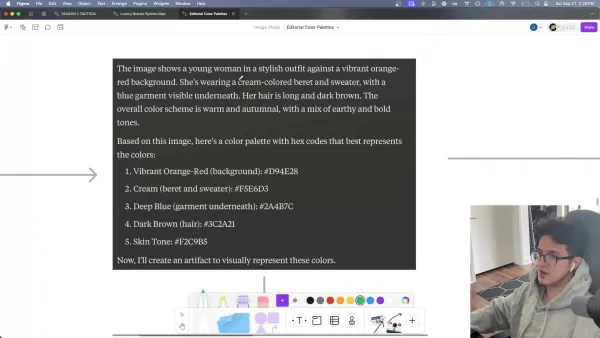
The prompt reads:
Analyze this photo and then create a color palette with hex codes that best represents the colors in the photo.After you generate the hex codes, create an artifact with the colors displayed in squares with the ACTUAL COLORS associated with the codes. Create a visual representation that is easy for a human to see and understand.
This prompt is configured to execute code in the chat, resulting in what Claude calls an artifact—a rendered visual depiction of the code.
Analyzing Single Photos with the 'INSANE' Prompt
To analyze a single image with the 'INSANE' prompt, adhere to these steps:
- Access Claude AI: Go to the Claude AI platform (claude.ai) and set up a free account.
- Upload the image: Upload the editorial photograph you wish to analyze.
- Enter the 'INSANE' prompt: Input or copy the 'INSANE' prompt into the chat interface.
- Run the analysis: Send the message and allow Claude to process the image.
Claude will then provide a comprehensive analysis of the photo, including a description, a color palette with hex codes, and a visual representation of the palette. This visual output can be easily exported for future applications.
For example, analyzing a Ralph Lauren campaign image of Winter from Aespa results in a palette that includes the vibrant orange-red background, cream beret and sweater, deep blue garment, dark brown hair, and skin tone.
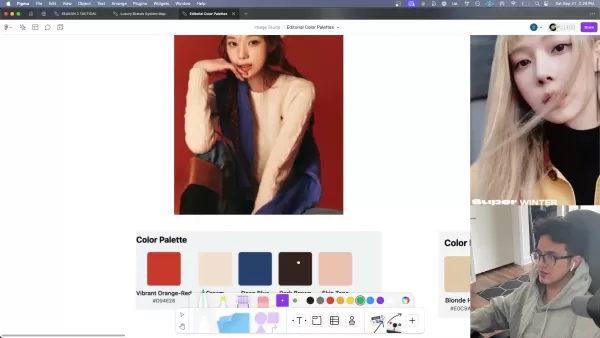
This extracted color scheme offers a starting point for crafting designs that mirror the original photo's aesthetic.
Analyzing Multiple Photos: The 'CA' Workflow
To efficiently analyze several images in one session, you can adopt a workflow that utilizes Claude's capability to retain and apply instructions. This method involves establishing a quick command, 'CA' (Color Analysis), and employing it to start each subsequent analysis.
- Define the 'CA' command: After the initial analysis using the 'INSANE' prompt, tell Claude you will now call the process 'CA'. For instance, state:
That was perfect. Now I will refer to our workflow as "CA" for Color Analysis.
- Instruct Claude on workflow usage: Once the workflow is defined, provide a concise instruction covering all necessary steps.
To save time, I will give you a photo and say "CA:". Then you will proceed with the analysis and artifact creation. Are you ready?
Claude will confirm its understanding of your workflow. From then on, simply upload a photo and type "CA:". Claude will conduct the color analysis and provide the corresponding code.
This method considerably cuts down on typing for each image analysis, enabling you to swiftly accumulate a collection of color palettes.
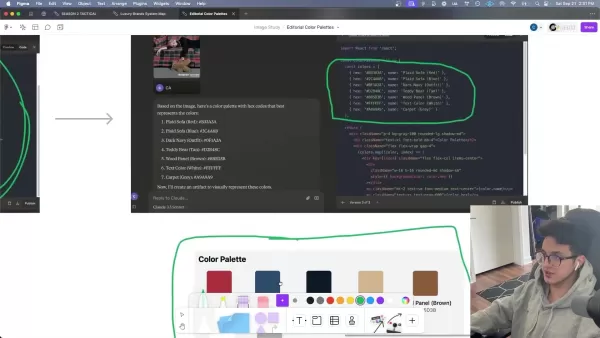
Each image is rapidly converted into a high-quality color palette and functional code.
Workflow Demonstration: Winter from Aespa Editorial Photos
To demonstrate the 'CA' workflow, consider a set of editorial photos featuring Winter from Aespa in Ralph Lauren attire. By uploading each photo and entering 'CA:', Claude produces a distinct color palette that reflects the image's spirit. For instance:
- A photo with blonde hair yields a palette encompassing blonde hair, skin tone, black (top), brown (jacket), and grey background.
- A photo of Winter on a plaid couch with a teddy bear features colors from the plaid sofa, navy outfit, teddy bear tan, wood panel, and grey carpet.
- A photo of Winter in black and denim generates a palette with black jacket, light blue shirt, denim blue jeans, silver (belt buckle), skin tone, and white (text/background).

This workflow permits fast and uniform extraction of color schemes from numerous images, supplying designers and art directors with a valuable source of inspiration and reference.
Using Claude to Develop Your Eye for Color
Building Your Color Library
Claude is highly effective for assembling a color palette library. After finishing the color analysis as described, the subsequent step is to save both the image and its palette to a tool like Figma. Once you have a catalog of palettes, you will have abundant choices for future projects. Regularly reviewing these palettes can also serve as a continual source of creative inspiration.
Claude AI for Color Palette Analysis: Pros and Cons
Pros
Quick and precise extraction of color palettes from images
Produces visual artifacts that are easily understood
Simplifies the process of analyzing numerous photos in one go
Improves the user's perception of color harmony and relationships
Cons
Depends on a well-structured prompt for best outcomes
Might need some technical familiarity to understand the generated code
Over-reliance on AI could potentially hinder human intuition and creativity
Possible biases in color interpretation due to the model's training data
FAQ
What is Anthropic?
Anthropic is an AI safety and research organization focused on creating reliable, interpretable, and controllable AI systems.
What is Claude AI?
Claude is a modern AI assistant designed for task management, accessible through conversational prompts.
What is a color palette?
In visual design, a color palette refers to a coordinated set of colors applied consistently across various elements.
What do hex codes do?
Hex color codes specify colors using hexadecimal values. Each code is a hex triplet, representing the intensity of three base colors.
Related Questions
How can AI enhance creative direction and art direction?
AI is reshaping creative and art direction by offering capabilities for:Automated Analysis: Detecting design trends, color patterns, and visual themes from extensive data collections.Personalized Recommendations: Delivering customized suggestions aligned with user tastes and project needs.Creative Support: Generating design alternatives, mock-ups, and prototypes to experiment with new concepts.Workflow Efficiency: Automating routine tasks so creative professionals can concentrate on strategic decision-making.By integrating AI, creative and art directors can enhance their output, achieve greater efficiency, and maintain a competitive edge in a fast-changing field.
Related article
 Stripe to Acquire OpenRouter as AI Model Routing Gains Momentum
Stripe has agreed to acquire OpenRouter, an AI model-routing platform that gives developers access to hundreds of models through a single interface. The deal adds model selection and routing to Stripe’s existing work around AI usage and token-based b
Former OpenAI Researcher Barrett Zoph Returns to Google to Support Gemini Development
Barret Zoph, who previously abruptly left and joined OpenAI due to a disagreement with Thinking Machines Lab CEO Miriam Mularati, has once again changed employers. Alphabet's Google announced that Zoph will return as Vice President of Research, bring
How Recursive Intelligence Raised $335M at $4B Valuation in 4 Months
The co-founders of startup Ricursive Intelligence seemed destined to be co-founders.Anna Goldie, CEO, and Azalia Mirhoseini, CTO, are so well-known in the AI community that they were among those AI engineers who “got those weird emails from Zuckerber
Related Special Topic Recommendations
Design & Art
Stripe to Acquire OpenRouter as AI Model Routing Gains Momentum
Stripe has agreed to acquire OpenRouter, an AI model-routing platform that gives developers access to hundreds of models through a single interface. The deal adds model selection and routing to Stripe’s existing work around AI usage and token-based b
Former OpenAI Researcher Barrett Zoph Returns to Google to Support Gemini Development
Barret Zoph, who previously abruptly left and joined OpenAI due to a disagreement with Thinking Machines Lab CEO Miriam Mularati, has once again changed employers. Alphabet's Google announced that Zoph will return as Vice President of Research, bring
How Recursive Intelligence Raised $335M at $4B Valuation in 4 Months
The co-founders of startup Ricursive Intelligence seemed destined to be co-founders.Anna Goldie, CEO, and Azalia Mirhoseini, CTO, are so well-known in the AI community that they were among those AI engineers who “got those weird emails from Zuckerber
Related Special Topic Recommendations
Design & Art
 Top AI Illustration Tools: Create Editorial Scenes and Cover Art Faster
2026 Latest Top-rated AI Illustration Tools: Our curated list features the best powerfully designed tools for creating stunning editorial scenes and eye-catching cover art quickly. Each option has gone through rigorous real-world tests, offering a free vs paid comparison to help you find the perfect match for your workflow. Try these must-try solutions today to unlock your AI edge and boost your creative productivity. Explore now at XIX.AI.
 10 tools
 xix.ai
Education and Learning
Top AI Tutors for Exam Prep: Practice Math, Science, and English
xix.ai
Education and Learning
Top AI Tutors for Exam Prep: Practice Math, Science, and English
2026 Latest Top-Rated Best AI Tutors for Exam Prep are here on XIX.AI! Our curated list features powerful game-changing tools that offer free vs paid comparison, real-world tests, and weekly updated rankings. They help boost your writing efficiency, simplify complex topic learning, and unlock your academic potential. Explore now to Discover your perfect exam prep tool and Start creating today to Unlock your AI edge!
10 tools
xix.ai
Finance
AI Budget Planning Tools for Personal Money Management
2026 Latest Best Top-Rated AI Budget Planning Tools for Personal Money Management are here on XIX.AI! This curated collection features powerful, game-changing solutions that help you conduct real-world tests, understand spending habits, and create personalized plans to boost productivity. Enjoy a free vs paid comparison along with detailed rankings. Must-try tools designed to simplify money management and unlock your AI edge. Explore now!
11 tools
xix.ai
Health & Wellness
AI Sleep Tracking Assistants: Improve Recovery with Better Bedtime Habits
2026 Latest Best Top-Rated AI Sleep Tracking Assistants curated for ultimate recovery. This fully updated weekly guide features powerful tools that deliver real-world tests, free vs paid comparison, and detailed rankings to help you find the must-try solution that boosts sleep quality and supports better bedtime habits. Explore now at XIX.AI to Unlock your AI edge.
10 tools
xix.ai
Data Analysis
AI SQL Copilots for Product and Revenue Analytics
2026 Latest Best Top-Rated AI SQL Copilots for Product and Revenue Analytics! XIX.AI has curated a powerful, game-changing collection of must-try tools that undergo real-world tests through weekly updated rankings. These tools help users boost productivity significantly by accelerating data analysis, streamlining complex queries, and generating accurate insights to drive smarter business decisions. Explore now to Discover your perfect tool for unlocking your AI edge!
14 tools
xix.ai
Education and Learning
Best AI Homework Helpers That Teach: Learn Concepts, Not Just Answers
2026 Latest Best Top-Rated AI Homework Helpers That Teach Core Concepts Not Just Answers Powerful Tools for Students Must-Try Curated List Weekly Updated Free vs Paid Comparison Real-World Tests Accurate Rankings to Help You Unlock Your Full Learning Potential Explore now to Discover your perfect tool for smarter studying.
10 tools
xix.ai

 Comments (3)
0/500
Comments (3)
0/500
![AlbertWalker]()
Wait, so Claude can generate color palettes now? Sure, the article makes it sound revolutionary, but let's be real — I've seen enough random hex codes thrown at me by various tools that look like a toddler's finger painting. Unless it can explain why I should pair neon green with dusty rose for my startup's logo, I'm staying skeptical. 😅
![BruceGonzalez]()
Клауд от Anthropic в дизайне? Интересно, но не заменит ли это полностью работу дизайнеров? 🤔 Технологии развиваются так быстро, что начинаешь волноваться о будущем творческих профессий. Хотя для быстрых проектов, наверное, удобно.
![HarryPerez]()
Никогда бы не подумал, что нейросети могут так уверенно работать с цветами! В статье про Claude хорошо описано, как ИИ помогает дизайнерам - уже представляет, как такие модели могут анализировать рекламные плакаты или подбирать оттенки под настроение текста. Интересно, приведёт ли такой подход к усреднению визуалов 🤔
In the world of creative design, color is a powerful tool for evoking emotions, establishing mood, and building brand identity. Yet, the process of choosing and harmonizing colors can be complex and laborious. The emergence of artificial intelligence has dramatically simplified this task. This article explores the innovative application of Anthropic's Claude, a sophisticated AI model, for analyzing and extracting color schemes from images, revolutionizing the creative process for designers, artists, and creative professionals.
Key Points
Anthropic's Claude is a large language model (LLM) capable of analyzing color palettes.
The 'INSANE' prompt enables the efficient extraction of color palettes complete with hex codes.
Claude produces visual representations (artifacts) of color palettes for straightforward human comprehension.
A workflow using the 'CA' prompt allows for multiple image analyses within a single session.
The process helps develop a keener eye for color through repeated exposure to curated palettes.
Understanding Claude AI and Color Palette Analysis
What is Claude by Anthropic?
Claude is a large language model (LLM) created by Anthropic, a company dedicated to developing dependable and understandable AI systems. Like other leading LLMs such as ChatGPT, Claude is skilled at comprehending and producing human-like text. It sets itself apart through a strong focus on safety, ethical considerations, and a conversational style. In creative fields, Claude's capacity to analyze and interpret visual data, including images, creates new opportunities for design and art direction. It is important to highlight that Claude uses code within chat to generate visual outputs, giving it a unique advantage in managing visual projects.
One practical use is pulling color palettes from images. Color palette analysis involves pinpointing the main colors in a picture and forming a cohesive color set suitable for diverse design projects like branding, web design, or interior decorating. Historically, this required manual selection and tweaking, which could be subjective and slow. AI-driven tools like Claude offer a more objective, efficient, and data-informed method.
The Importance of Color Palettes in Design
Color palettes are crucial in design for multiple reasons:
- Brand Identity: Colors help shape a brand's character and ensure a uniform visual identity.
- Emotional Impact: Various colors trigger different feelings and can shape how audiences interpret a design.
- Visual Harmony: Well-selected color combinations foster balance and aesthetic appeal.
In fashion and editorial contexts, color schemes are vital for producing unified and striking visuals. Studying and recreating effective color combinations from editorial photographs can offer immense inspiration and direction for designers and art directors. Tools like Claude AI equip creatives to explore color subtleties more deeply and uncover new creative avenues.
Streamlining Color Palette Extraction with Claude: A Step-by-Step Guide
The 'INSANE' Prompt: A Game Changer
Central to Claude's color analysis ability is a meticulously designed prompt that prompts precise and aesthetically pleasing outcomes. Known as the 'INSANE' prompt, it directs Claude to:
- Analyze the photo: Scrutinize the image to identify its primary colors.
- Create a color palette with hex codes: Develop a set of hex codes that faithfully represent the image's dominant colors.
- Create a visual Artifact: Generate a visual depiction of the color palette, showing the colors as squares alongside their hex codes.
- Ensure human readability: Display the visual artifact in a manner that is clear and accessible for people.
By offering explicit and detailed directions, the 'INSANE' prompt guarantees that Claude produces high-fidelity color palettes that are both accurate and visually clear.
The prompt reads:
Analyze this photo and then create a color palette with hex codes that best represents the colors in the photo.After you generate the hex codes, create an artifact with the colors displayed in squares with the ACTUAL COLORS associated with the codes. Create a visual representation that is easy for a human to see and understand.
This prompt is configured to execute code in the chat, resulting in what Claude calls an artifact—a rendered visual depiction of the code.
Analyzing Single Photos with the 'INSANE' Prompt
To analyze a single image with the 'INSANE' prompt, adhere to these steps:
- Access Claude AI: Go to the Claude AI platform (claude.ai) and set up a free account.
- Upload the image: Upload the editorial photograph you wish to analyze.
- Enter the 'INSANE' prompt: Input or copy the 'INSANE' prompt into the chat interface.
- Run the analysis: Send the message and allow Claude to process the image.
Claude will then provide a comprehensive analysis of the photo, including a description, a color palette with hex codes, and a visual representation of the palette. This visual output can be easily exported for future applications.
For example, analyzing a Ralph Lauren campaign image of Winter from Aespa results in a palette that includes the vibrant orange-red background, cream beret and sweater, deep blue garment, dark brown hair, and skin tone.
This extracted color scheme offers a starting point for crafting designs that mirror the original photo's aesthetic.
Analyzing Multiple Photos: The 'CA' Workflow
To efficiently analyze several images in one session, you can adopt a workflow that utilizes Claude's capability to retain and apply instructions. This method involves establishing a quick command, 'CA' (Color Analysis), and employing it to start each subsequent analysis.
- Define the 'CA' command: After the initial analysis using the 'INSANE' prompt, tell Claude you will now call the process 'CA'. For instance, state:
That was perfect. Now I will refer to our workflow as "CA" for Color Analysis.
- Instruct Claude on workflow usage: Once the workflow is defined, provide a concise instruction covering all necessary steps.
To save time, I will give you a photo and say "CA:". Then you will proceed with the analysis and artifact creation. Are you ready?
Claude will confirm its understanding of your workflow. From then on, simply upload a photo and type "CA:". Claude will conduct the color analysis and provide the corresponding code.
This method considerably cuts down on typing for each image analysis, enabling you to swiftly accumulate a collection of color palettes.
Each image is rapidly converted into a high-quality color palette and functional code.
Workflow Demonstration: Winter from Aespa Editorial Photos
To demonstrate the 'CA' workflow, consider a set of editorial photos featuring Winter from Aespa in Ralph Lauren attire. By uploading each photo and entering 'CA:', Claude produces a distinct color palette that reflects the image's spirit. For instance:
- A photo with blonde hair yields a palette encompassing blonde hair, skin tone, black (top), brown (jacket), and grey background.
- A photo of Winter on a plaid couch with a teddy bear features colors from the plaid sofa, navy outfit, teddy bear tan, wood panel, and grey carpet.
- A photo of Winter in black and denim generates a palette with black jacket, light blue shirt, denim blue jeans, silver (belt buckle), skin tone, and white (text/background).
This workflow permits fast and uniform extraction of color schemes from numerous images, supplying designers and art directors with a valuable source of inspiration and reference.
Using Claude to Develop Your Eye for Color
Building Your Color Library
Claude is highly effective for assembling a color palette library. After finishing the color analysis as described, the subsequent step is to save both the image and its palette to a tool like Figma. Once you have a catalog of palettes, you will have abundant choices for future projects. Regularly reviewing these palettes can also serve as a continual source of creative inspiration.
Claude AI for Color Palette Analysis: Pros and Cons
Pros
Quick and precise extraction of color palettes from images
Produces visual artifacts that are easily understood
Simplifies the process of analyzing numerous photos in one go
Improves the user's perception of color harmony and relationships
Cons
Depends on a well-structured prompt for best outcomes
Might need some technical familiarity to understand the generated code
Over-reliance on AI could potentially hinder human intuition and creativity
Possible biases in color interpretation due to the model's training data
FAQ
What is Anthropic?
Anthropic is an AI safety and research organization focused on creating reliable, interpretable, and controllable AI systems.
What is Claude AI?
Claude is a modern AI assistant designed for task management, accessible through conversational prompts.
What is a color palette?
In visual design, a color palette refers to a coordinated set of colors applied consistently across various elements.
What do hex codes do?
Hex color codes specify colors using hexadecimal values. Each code is a hex triplet, representing the intensity of three base colors.
Related Questions
How can AI enhance creative direction and art direction?
AI is reshaping creative and art direction by offering capabilities for:Automated Analysis: Detecting design trends, color patterns, and visual themes from extensive data collections.Personalized Recommendations: Delivering customized suggestions aligned with user tastes and project needs.Creative Support: Generating design alternatives, mock-ups, and prototypes to experiment with new concepts.Workflow Efficiency: Automating routine tasks so creative professionals can concentrate on strategic decision-making.By integrating AI, creative and art directors can enhance their output, achieve greater efficiency, and maintain a competitive edge in a fast-changing field.








 Stripe to Acquire OpenRouter as AI Model Routing Gains Momentum
Stripe has agreed to acquire OpenRouter, an AI model-routing platform that gives developers access to hundreds of models through a single interface. The deal adds model selection and routing to Stripe’s existing work around AI usage and token-based b
Stripe to Acquire OpenRouter as AI Model Routing Gains Momentum
Stripe has agreed to acquire OpenRouter, an AI model-routing platform that gives developers access to hundreds of models through a single interface. The deal adds model selection and routing to Stripe’s existing work around AI usage and token-based b
 Former OpenAI Researcher Barrett Zoph Returns to Google to Support Gemini Development
Barret Zoph, who previously abruptly left and joined OpenAI due to a disagreement with Thinking Machines Lab CEO Miriam Mularati, has once again changed employers. Alphabet's Google announced that Zoph will return as Vice President of Research, bring
Former OpenAI Researcher Barrett Zoph Returns to Google to Support Gemini Development
Barret Zoph, who previously abruptly left and joined OpenAI due to a disagreement with Thinking Machines Lab CEO Miriam Mularati, has once again changed employers. Alphabet's Google announced that Zoph will return as Vice President of Research, bring
 How Recursive Intelligence Raised $335M at $4B Valuation in 4 Months
The co-founders of startup Ricursive Intelligence seemed destined to be co-founders.Anna Goldie, CEO, and Azalia Mirhoseini, CTO, are so well-known in the AI community that they were among those AI engineers who “got those weird emails from Zuckerber
How Recursive Intelligence Raised $335M at $4B Valuation in 4 Months
The co-founders of startup Ricursive Intelligence seemed destined to be co-founders.Anna Goldie, CEO, and Azalia Mirhoseini, CTO, are so well-known in the AI community that they were among those AI engineers who “got those weird emails from Zuckerber

2026 Latest Top-rated AI Illustration Tools: Our curated list features the best powerfully designed tools for creating stunning editorial scenes and eye-catching cover art quickly. Each option has gone through rigorous real-world tests, offering a free vs paid comparison to help you find the perfect match for your workflow. Try these must-try solutions today to unlock your AI edge and boost your creative productivity. Explore now at XIX.AI.
10 tools
xix.ai

2026 Latest Top-Rated Best AI Tutors for Exam Prep are here on XIX.AI! Our curated list features powerful game-changing tools that offer free vs paid comparison, real-world tests, and weekly updated rankings. They help boost your writing efficiency, simplify complex topic learning, and unlock your academic potential. Explore now to Discover your perfect exam prep tool and Start creating today to Unlock your AI edge!
10 tools
xix.ai

2026 Latest Best Top-Rated AI Budget Planning Tools for Personal Money Management are here on XIX.AI! This curated collection features powerful, game-changing solutions that help you conduct real-world tests, understand spending habits, and create personalized plans to boost productivity. Enjoy a free vs paid comparison along with detailed rankings. Must-try tools designed to simplify money management and unlock your AI edge. Explore now!
11 tools
xix.ai

2026 Latest Best Top-Rated AI Sleep Tracking Assistants curated for ultimate recovery. This fully updated weekly guide features powerful tools that deliver real-world tests, free vs paid comparison, and detailed rankings to help you find the must-try solution that boosts sleep quality and supports better bedtime habits. Explore now at XIX.AI to Unlock your AI edge.
10 tools
xix.ai

2026 Latest Best Top-Rated AI SQL Copilots for Product and Revenue Analytics! XIX.AI has curated a powerful, game-changing collection of must-try tools that undergo real-world tests through weekly updated rankings. These tools help users boost productivity significantly by accelerating data analysis, streamlining complex queries, and generating accurate insights to drive smarter business decisions. Explore now to Discover your perfect tool for unlocking your AI edge!
14 tools
xix.ai

2026 Latest Best Top-Rated AI Homework Helpers That Teach Core Concepts Not Just Answers Powerful Tools for Students Must-Try Curated List Weekly Updated Free vs Paid Comparison Real-World Tests Accurate Rankings to Help You Unlock Your Full Learning Potential Explore now to Discover your perfect tool for smarter studying.
10 tools
xix.ai

Wait, so Claude can generate color palettes now? Sure, the article makes it sound revolutionary, but let's be real — I've seen enough random hex codes thrown at me by various tools that look like a toddler's finger painting. Unless it can explain why I should pair neon green with dusty rose for my startup's logo, I'm staying skeptical. 😅
Клауд от Anthropic в дизайне? Интересно, но не заменит ли это полностью работу дизайнеров? 🤔 Технологии развиваются так быстро, что начинаешь волноваться о будущем творческих профессий. Хотя для быстрых проектов, наверное, удобно.
Никогда бы не подумал, что нейросети могут так уверенно работать с цветами! В статье про Claude хорошо описано, как ИИ помогает дизайнерам - уже представляет, как такие модели могут анализировать рекламные плакаты или подбирать оттенки под настроение текста. Интересно, приведёт ли такой подход к усреднению визуалов 🤔












