


 Home
HomeHow to earn $38,000/month with AI Bible storytelling? 2025 blueprint
In today's digital era, AI is transforming content creation, unlocking new opportunities for innovation and revenue. A standout example is the growing trend of AI-generated Bible stories on YouTube. This article explores how anyone can enter this profitable niche, crafting educational and engaging content by harnessing AI. We'll walk through a proven method that's delivering substantial monthly income for creators, turning simple narratives into a thriving online venture. Ready to learn how to get your slice of the pie?
Key Points
Anonymous YouTube channels are attracting millions of views with AI-powered Bible stories.
Educational Bible content can achieve CPM rates well above the YouTube average.
AI tools dramatically reduce the resources required for scripting, voiceovers, and video production.
AniEraser is a useful tool for watermark removal.
CapCut makes video editing straightforward with its intuitive features.
Leonardo AI offers free animated visual generation.
The Rise of AI-Generated Bible Stories
The Untapped Potential of a Niche Market
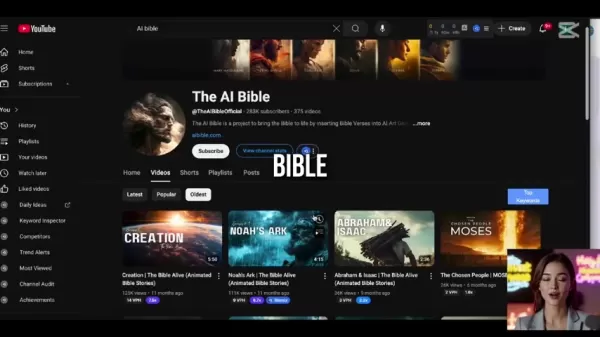
The digital audience craves compelling content, especially where education meets spirituality. Enter AI-generated Bible stories, a niche market pulling in massive viewership and impressive revenue. One example is an anonymous YouTube channel that accumulated over 51 million views in just 11 months by posting AI-generated Bible stories. This showcases the power of AI-driven content to engage viewers and build passive income streams. The channel, 'The AI Bible,' taps into the demand for accessible and captivating religious narratives, using AI to bring these stories to life.
Monetizing Faith-Based Content: A Closer Look
The monetization potential is clear from channels like 'The AI Bible,' which earned over $8,000 last month from AI-powered storytelling. This shows how simple tales can become profitable digital enterprises. Further proof comes from another YouTube channel, 'Power of the WORD,' which boasts 36 million views and generates over $38,000 monthly. This success is driven by the high CPM (Cost Per Mille) linked to educational content, particularly in the Bible and religious domain.
CPM: Understanding the Revenue Multiplier
Grasping CPM is key to maximizing YouTube earnings. While the average YouTube CPM might top out around $4, educational content, especially Bible-related material, can command $10-$12 CPM or higher. Advertisers are willing to pay more to reach audiences interested in educational and spiritual topics, making this a highly attractive niche. This gap can triple revenue compared to channels with lower CPMs. Understanding this often-overlooked detail is crucial for unlocking the full earning potential of AI-generated Bible stories.
Crafting Your Own AI-Powered Bible Story Channel
Step 1: Script Your Bible Story with ChatGPT
The first step in building a successful AI Bible stories channel is writing engaging scripts. While you could hire scriptwriters on platforms like Fiverr or Upwork

, AI provides a faster and more affordable alternative. ChatGPT is an excellent tool for producing biblically accurate story scripts.
To use ChatGPT effectively, try this prompt:
List 15 of the most popular Bible stories
ChatGPT will output a structured list of well-known Bible stories. For this guide, we'll focus on Moses parting the Red Sea. Next, use a second prompt to craft a compelling video script:
Imagine you are an experienced scriptwriter tasked with creating a 1 to 2-minute video transcript in plain English that narrates the Bible story (Moses Parts the Red Sea). Write it in an easy-to-digest, engaging way for a general audience. Ensure the story is captivating, with a clear beginning, middle, and end. Highlight key events and lessons, and keep the tone approachable and relatable to make the story accessible to those unfamiliar with it.
By combining these prompts, you can generate a complete video script with visuals, narration, and scene descriptions. This foundational step prepares the story for AI-enhanced production.
Step 2: Turn Narration into Voiceover with 11 Labs
With your script ready, the next step is producing a professional voiceover. ElevenLabs lets you create studio-quality voiceovers in seconds without expensive gear or a recording studio. This AI tool converts text into natural-sounding speech.
To begin:
Sign up for a free ElevenLabs account.
Navigate to the 'Voice' section and apply the necessary filters.
Choose languages such as English.
Click ‘apply filter’ and browse for a voice you prefer.
Use the extracted narration from your video script as the voiceover text.
Note that you can copy and paste up to 500 characters at a time. The tool generates voices that sound natural and human-like, which is vital for high-quality videos. This method ensures you have premium audio to complement your video.
Step 3: Generate Animated Visuals with Leonardo AI
Next, focus on visuals. Use Leonardo AI to animate your text, creating scenes that will later be brought to life.
Start by crafting prompts for your scenes in sequence. Imagine you're a prompt designer, generating each scene in order.
Once done, go to Leonardo AI. You can select any model for your story's look, but for this example, choose cinematic kino and perform a quick regeneration. Then, generate the scene artwork.
While Leonardo AI has a motion feature, let's explore the pro tip mentioned in this article.
Step 4: Turning images into motion with HaiLuo
After creating animated visuals for all scenes, use a tool to add motion to the images. This is where HaiLuo comes in.
To animate your images, follow these steps:
Upload your image to HaiLuo.

Generate the next scene using ChatGPT (as described earlier) for more specific prompts.
Paste the image prompt into HaiLuo
Click generate.
Your scenes will be ready!
Step 5: Edit and Upload with CapCut
With visuals and voiceovers prepared, the final step is assembling everything into a polished video using CapCut.
CapCut provides a user-friendly interface for editing, adding transitions, captions, and background music.
- Import your animated video clips and voice audio.
- Edit the audio to smooth out any pauses.
- Add transitions between clips to enhance appeal.
- Include captions by clicking auto-captions.
- Adjust caption placement and edit the font.
Finally, add a free soundtrack to give your video extra flair. Then export the video for upload on TikTok or YouTube! You can use Upbeat Beat to find free soundtracks. A pro tip is to lower the soundtrack volume so it doesn't overpower the narration. This adds depth, drama, and polish to your video.
Practical How-To Tips for Success
Use High-Quality Visuals
Quality is crucial for attracting viewers and boosting engagement. Ensure your AI-generated visuals are high-resolution and visually appealing. Experiment with different art styles and prompts to find the ideal aesthetic for your channel. High-quality visuals improve the viewing experience and increase the perceived value of your content.
Optimize for YouTube SEO
Keyword research is essential for YouTube success. Identify relevant keywords related to Bible stories, education, AI, and animation. Incorporate these into your video titles, descriptions, and tags to improve search visibility. Optimizing for YouTube SEO helps your content reach a broader audience.
Engage with Your Audience
Building a community is key to long-term success. Respond to comments, ask questions, and encourage interaction. Create polls or quizzes related to your videos to boost viewer engagement. Fostering a sense of community cultivates loyal viewers and supports channel growth.
Analyze and Adapt
Regularly review your YouTube analytics to see what works and what doesn't. Focus on metrics like watch time, audience retention, and engagement rates. Use these insights to adjust your content strategy, refine scripts, and optimize visuals. Continuous analysis and adaptation are vital for maximizing your channel's performance.
Tools and Resources: Pricing and Accessibility
Free and Paid Options: Balancing Cost and Quality
Many AI tools offer free and paid plans, allowing you to balance cost and quality. ChatGPT, ElevenLabs, and Leonardo AI all have free tiers suitable for beginners. As your channel grows, consider upgrading to paid plans for advanced features, higher-quality outputs, and increased limits. Here's a quick pricing breakdown:
Pricing Breakdown Table
Remember that all these tools offer free versions; here's a look at their paid plans.
ChatGPT
ChatGPT has one paid plan, ChatGPT Plus, for $20/month. This provides faster responses, priority access to new features, and reliable access even during peak times.
ElevenLabs
ElevenLabs has more complex pricing, so let's break it down.
Plan Price Character Limit/Month Features Free$010,000Basic voice generation, limited voicesStarter$530,000Higher character limits and commercial usage rights.Creator$22100,000High-quality voice cloning, more voicesIndependent Publisher$99500,000Faster regeneration speeds and access to Voice Library ProBusiness$3302,000,000Ultra-low latency, dedicated customer supportLeonardo AI
Lastly, here are the pricing tiers for Leonardo AI!
Plan Price Credit Limit/Month Features Free$0150Basic image creationApprentice$10850Faster image generation and access to base modelsArtisan$302500Faster speeds and longer queuesMaestro$606000Fastest image creation speeds and priority supportPros and Cons of Using AI for Bible Storytelling
Pros
Improved efficiency and faster content creation
Lower costs compared to traditional methods
Ability to produce content at scale
Access to a wider audience through engaging visuals and narration
Potential for high CPM and significant revenue
Cons
Concerns about authenticity and theological accuracy
Risk of AI misinterpreting or misrepresenting biblical themes
Need for careful review and editing to ensure quality
Over-reliance on AI may stifle human creativity
Ethical considerations regarding AI's role in religious storytelling
Core AI Features That Will Impact Your Bible Content
ChatGPT
Let's delve deeper into these AI applications. ChatGPT's ability to generate biblically accurate storylines helps create trustworthy content. While AI accuracy can sometimes be an issue, it's less problematic here since ChatGPT bases its content on factual sources, aiding in the creation of factually correct AI Bible videos.
Eleven Labs
This tool gives your script a polished sound that draws listeners in. When creating videos, ensure your AI-generated voiceover sounds natural, high-quality, and appealing. With these traits, ElevenLabs helps you sound professional, not robotic.
Leonardo AI
If you want aesthetically pleasing videos with diverse styles, this app is for you! The AI offers numerous options for image quality and aesthetics, allowing you to match visuals to your script, sound, and story. You can also regenerate images and make minor edits to better fit the desired look.
HaiLuo
Finally, using HaiLuo adds motion to your images, preventing them from looking static. While still images can work, subtle animations and movement enhance viewer engagement. This slight motion can elevate the quality of your final product, contributing to its success.
Unlocking AI for Bible Stories: Use Cases Across YouTube
Channel: “The AI Bible”
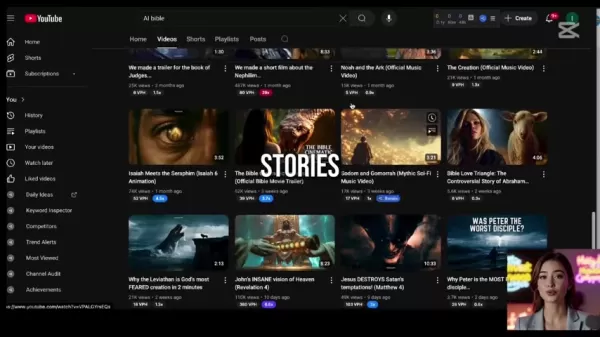
The anonymous YouTube channel “The AI Bible” uses AI-generated images to bring the Bible to life. It has nearly 300K subscribers and over 370 videos to date! Popular videos include animated Bible stories like creation, Noah's ark, and Moses parting the Red Sea.
Channel: “The Power of the Word”
The Power of the Word is another successful channel with almost 500k subscribers, focusing on biblical teachings. Founded in 2024, it earns over $38,000 monthly from its stories. The channel specializes in animated Bible stories for general audiences.
Frequently Asked Questions
What are the legal considerations when using AI-generated Bible stories?
Check the copyright policies of AI tools to avoid legal issues with generated content. As long as the video is for personal use, you likely won't encounter problems. Also, ensure any music or audio used has appropriate rights to prevent future copyright claims.
How can I ensure the biblical accuracy of AI-generated content?
Select AI tools known for accuracy and always review the generated content. The last thing you want is to publish inaccurate information inadvertently.
What are the best ways to promote my AI-generated Bible story channel?
Promote your videos wherever possible on social media. Seize every opportunity to share your content. Well-optimized and search-friendly videos may take time to gain traction, so be patient.
Related Questions
How does AI change Bible Translation?
AI technologies are increasingly used to analyze ancient texts, helping linguists understand and convey biblical meanings more accurately and efficiently. This leads to improved precision, faster translation processes, and easier adaptation into multiple languages.
What are the AI tools used for theology?
Many tools, like those mentioned here, assist in theological studies. For example, AI can generate diverse scholarly perspectives or fact-check resources, interpretations, and textual authenticity. AI saves significant time compared to manual methods, allowing deeper engagement with study materials.
Related article
 Stripe to Acquire OpenRouter as AI Model Routing Gains Momentum
Stripe has agreed to acquire OpenRouter, an AI model-routing platform that gives developers access to hundreds of models through a single interface. The deal adds model selection and routing to Stripe’s existing work around AI usage and token-based b
Former OpenAI Researcher Barrett Zoph Returns to Google to Support Gemini Development
Barret Zoph, who previously abruptly left and joined OpenAI due to a disagreement with Thinking Machines Lab CEO Miriam Mularati, has once again changed employers. Alphabet's Google announced that Zoph will return as Vice President of Research, bring
How Recursive Intelligence Raised $335M at $4B Valuation in 4 Months
The co-founders of startup Ricursive Intelligence seemed destined to be co-founders.Anna Goldie, CEO, and Azalia Mirhoseini, CTO, are so well-known in the AI community that they were among those AI engineers who “got those weird emails from Zuckerber
Related Special Topic Recommendations
Design & Art
Stripe to Acquire OpenRouter as AI Model Routing Gains Momentum
Stripe has agreed to acquire OpenRouter, an AI model-routing platform that gives developers access to hundreds of models through a single interface. The deal adds model selection and routing to Stripe’s existing work around AI usage and token-based b
Former OpenAI Researcher Barrett Zoph Returns to Google to Support Gemini Development
Barret Zoph, who previously abruptly left and joined OpenAI due to a disagreement with Thinking Machines Lab CEO Miriam Mularati, has once again changed employers. Alphabet's Google announced that Zoph will return as Vice President of Research, bring
How Recursive Intelligence Raised $335M at $4B Valuation in 4 Months
The co-founders of startup Ricursive Intelligence seemed destined to be co-founders.Anna Goldie, CEO, and Azalia Mirhoseini, CTO, are so well-known in the AI community that they were among those AI engineers who “got those weird emails from Zuckerber
Related Special Topic Recommendations
Design & Art
 Top AI Illustration Tools: Create Editorial Scenes and Cover Art Faster
2026 Latest Top-rated AI Illustration Tools: Our curated list features the best powerfully designed tools for creating stunning editorial scenes and eye-catching cover art quickly. Each option has gone through rigorous real-world tests, offering a free vs paid comparison to help you find the perfect match for your workflow. Try these must-try solutions today to unlock your AI edge and boost your creative productivity. Explore now at XIX.AI.
 10 tools
 xix.ai
Education and Learning
Top AI Tutors for Exam Prep: Practice Math, Science, and English
xix.ai
Education and Learning
Top AI Tutors for Exam Prep: Practice Math, Science, and English
2026 Latest Top-Rated Best AI Tutors for Exam Prep are here on XIX.AI! Our curated list features powerful game-changing tools that offer free vs paid comparison, real-world tests, and weekly updated rankings. They help boost your writing efficiency, simplify complex topic learning, and unlock your academic potential. Explore now to Discover your perfect exam prep tool and Start creating today to Unlock your AI edge!
10 tools
xix.ai
Finance
AI Budget Planning Tools for Personal Money Management
2026 Latest Best Top-Rated AI Budget Planning Tools for Personal Money Management are here on XIX.AI! This curated collection features powerful, game-changing solutions that help you conduct real-world tests, understand spending habits, and create personalized plans to boost productivity. Enjoy a free vs paid comparison along with detailed rankings. Must-try tools designed to simplify money management and unlock your AI edge. Explore now!
11 tools
xix.ai
Health & Wellness
AI Sleep Tracking Assistants: Improve Recovery with Better Bedtime Habits
2026 Latest Best Top-Rated AI Sleep Tracking Assistants curated for ultimate recovery. This fully updated weekly guide features powerful tools that deliver real-world tests, free vs paid comparison, and detailed rankings to help you find the must-try solution that boosts sleep quality and supports better bedtime habits. Explore now at XIX.AI to Unlock your AI edge.
10 tools
xix.ai
Data Analysis
AI SQL Copilots for Product and Revenue Analytics
2026 Latest Best Top-Rated AI SQL Copilots for Product and Revenue Analytics! XIX.AI has curated a powerful, game-changing collection of must-try tools that undergo real-world tests through weekly updated rankings. These tools help users boost productivity significantly by accelerating data analysis, streamlining complex queries, and generating accurate insights to drive smarter business decisions. Explore now to Discover your perfect tool for unlocking your AI edge!
14 tools
xix.ai
Education and Learning
Best AI Homework Helpers That Teach: Learn Concepts, Not Just Answers
2026 Latest Best Top-Rated AI Homework Helpers That Teach Core Concepts Not Just Answers Powerful Tools for Students Must-Try Curated List Weekly Updated Free vs Paid Comparison Real-World Tests Accurate Rankings to Help You Unlock Your Full Learning Potential Explore now to Discover your perfect tool for smarter studying.
10 tools
xix.ai

 Comments (1)
0/500
Comments (1)
0/500
![AlbertGonzalez]()
這篇文章提到的AI聖經故事趨勢真有趣!用AI創作內容確實能開拓新市場,不過我好奇這種模式的可持續性如何?會不會很快就有版權爭議啊?🤔 有人試過類似方法嗎?
In today's digital era, AI is transforming content creation, unlocking new opportunities for innovation and revenue. A standout example is the growing trend of AI-generated Bible stories on YouTube. This article explores how anyone can enter this profitable niche, crafting educational and engaging content by harnessing AI. We'll walk through a proven method that's delivering substantial monthly income for creators, turning simple narratives into a thriving online venture. Ready to learn how to get your slice of the pie?
Key Points
Anonymous YouTube channels are attracting millions of views with AI-powered Bible stories.
Educational Bible content can achieve CPM rates well above the YouTube average.
AI tools dramatically reduce the resources required for scripting, voiceovers, and video production.
AniEraser is a useful tool for watermark removal.
CapCut makes video editing straightforward with its intuitive features.
Leonardo AI offers free animated visual generation.
The Rise of AI-Generated Bible Stories
The Untapped Potential of a Niche Market
The digital audience craves compelling content, especially where education meets spirituality. Enter AI-generated Bible stories, a niche market pulling in massive viewership and impressive revenue. One example is an anonymous YouTube channel that accumulated over 51 million views in just 11 months by posting AI-generated Bible stories. This showcases the power of AI-driven content to engage viewers and build passive income streams. The channel, 'The AI Bible,' taps into the demand for accessible and captivating religious narratives, using AI to bring these stories to life.
Monetizing Faith-Based Content: A Closer Look
The monetization potential is clear from channels like 'The AI Bible,' which earned over $8,000 last month from AI-powered storytelling. This shows how simple tales can become profitable digital enterprises. Further proof comes from another YouTube channel, 'Power of the WORD,' which boasts 36 million views and generates over $38,000 monthly. This success is driven by the high CPM (Cost Per Mille) linked to educational content, particularly in the Bible and religious domain.
CPM: Understanding the Revenue Multiplier
Grasping CPM is key to maximizing YouTube earnings. While the average YouTube CPM might top out around $4, educational content, especially Bible-related material, can command $10-$12 CPM or higher. Advertisers are willing to pay more to reach audiences interested in educational and spiritual topics, making this a highly attractive niche. This gap can triple revenue compared to channels with lower CPMs. Understanding this often-overlooked detail is crucial for unlocking the full earning potential of AI-generated Bible stories.
Crafting Your Own AI-Powered Bible Story Channel
Step 1: Script Your Bible Story with ChatGPT
The first step in building a successful AI Bible stories channel is writing engaging scripts. While you could hire scriptwriters on platforms like Fiverr or Upwork
, AI provides a faster and more affordable alternative. ChatGPT is an excellent tool for producing biblically accurate story scripts.
To use ChatGPT effectively, try this prompt:
List 15 of the most popular Bible stories
ChatGPT will output a structured list of well-known Bible stories. For this guide, we'll focus on Moses parting the Red Sea. Next, use a second prompt to craft a compelling video script:
Imagine you are an experienced scriptwriter tasked with creating a 1 to 2-minute video transcript in plain English that narrates the Bible story (Moses Parts the Red Sea). Write it in an easy-to-digest, engaging way for a general audience. Ensure the story is captivating, with a clear beginning, middle, and end. Highlight key events and lessons, and keep the tone approachable and relatable to make the story accessible to those unfamiliar with it.
By combining these prompts, you can generate a complete video script with visuals, narration, and scene descriptions. This foundational step prepares the story for AI-enhanced production.
Step 2: Turn Narration into Voiceover with 11 Labs
With your script ready, the next step is producing a professional voiceover. ElevenLabs lets you create studio-quality voiceovers in seconds without expensive gear or a recording studio. This AI tool converts text into natural-sounding speech.
To begin:
Sign up for a free ElevenLabs account.
Navigate to the 'Voice' section and apply the necessary filters.
Choose languages such as English.
Click ‘apply filter’ and browse for a voice you prefer.
Use the extracted narration from your video script as the voiceover text.
Note that you can copy and paste up to 500 characters at a time. The tool generates voices that sound natural and human-like, which is vital for high-quality videos. This method ensures you have premium audio to complement your video.
Step 3: Generate Animated Visuals with Leonardo AI
Next, focus on visuals. Use Leonardo AI to animate your text, creating scenes that will later be brought to life.
Start by crafting prompts for your scenes in sequence. Imagine you're a prompt designer, generating each scene in order.
Once done, go to Leonardo AI. You can select any model for your story's look, but for this example, choose cinematic kino and perform a quick regeneration. Then, generate the scene artwork.
While Leonardo AI has a motion feature, let's explore the pro tip mentioned in this article.
Step 4: Turning images into motion with HaiLuo
After creating animated visuals for all scenes, use a tool to add motion to the images. This is where HaiLuo comes in.
To animate your images, follow these steps:
Upload your image to HaiLuo.
Generate the next scene using ChatGPT (as described earlier) for more specific prompts.
Paste the image prompt into HaiLuo
Click generate.
Your scenes will be ready!
Step 5: Edit and Upload with CapCut
With visuals and voiceovers prepared, the final step is assembling everything into a polished video using CapCut.
CapCut provides a user-friendly interface for editing, adding transitions, captions, and background music.
- Import your animated video clips and voice audio.
- Edit the audio to smooth out any pauses.
- Add transitions between clips to enhance appeal.
- Include captions by clicking auto-captions.
- Adjust caption placement and edit the font.
Finally, add a free soundtrack to give your video extra flair. Then export the video for upload on TikTok or YouTube! You can use Upbeat Beat to find free soundtracks. A pro tip is to lower the soundtrack volume so it doesn't overpower the narration. This adds depth, drama, and polish to your video.
Practical How-To Tips for Success
Use High-Quality Visuals
Quality is crucial for attracting viewers and boosting engagement. Ensure your AI-generated visuals are high-resolution and visually appealing. Experiment with different art styles and prompts to find the ideal aesthetic for your channel. High-quality visuals improve the viewing experience and increase the perceived value of your content.
Optimize for YouTube SEO
Keyword research is essential for YouTube success. Identify relevant keywords related to Bible stories, education, AI, and animation. Incorporate these into your video titles, descriptions, and tags to improve search visibility. Optimizing for YouTube SEO helps your content reach a broader audience.
Engage with Your Audience
Building a community is key to long-term success. Respond to comments, ask questions, and encourage interaction. Create polls or quizzes related to your videos to boost viewer engagement. Fostering a sense of community cultivates loyal viewers and supports channel growth.
Analyze and Adapt
Regularly review your YouTube analytics to see what works and what doesn't. Focus on metrics like watch time, audience retention, and engagement rates. Use these insights to adjust your content strategy, refine scripts, and optimize visuals. Continuous analysis and adaptation are vital for maximizing your channel's performance.
Tools and Resources: Pricing and Accessibility
Free and Paid Options: Balancing Cost and Quality
Many AI tools offer free and paid plans, allowing you to balance cost and quality. ChatGPT, ElevenLabs, and Leonardo AI all have free tiers suitable for beginners. As your channel grows, consider upgrading to paid plans for advanced features, higher-quality outputs, and increased limits. Here's a quick pricing breakdown:
Pricing Breakdown Table
Remember that all these tools offer free versions; here's a look at their paid plans.
ChatGPT
ChatGPT has one paid plan, ChatGPT Plus, for $20/month. This provides faster responses, priority access to new features, and reliable access even during peak times.
ElevenLabs
ElevenLabs has more complex pricing, so let's break it down.
Leonardo AI
Lastly, here are the pricing tiers for Leonardo AI!
Pros and Cons of Using AI for Bible Storytelling
Pros
Improved efficiency and faster content creation
Lower costs compared to traditional methods
Ability to produce content at scale
Access to a wider audience through engaging visuals and narration
Potential for high CPM and significant revenue
Cons
Concerns about authenticity and theological accuracy
Risk of AI misinterpreting or misrepresenting biblical themes
Need for careful review and editing to ensure quality
Over-reliance on AI may stifle human creativity
Ethical considerations regarding AI's role in religious storytelling
Core AI Features That Will Impact Your Bible Content
ChatGPT
Let's delve deeper into these AI applications. ChatGPT's ability to generate biblically accurate storylines helps create trustworthy content. While AI accuracy can sometimes be an issue, it's less problematic here since ChatGPT bases its content on factual sources, aiding in the creation of factually correct AI Bible videos.
Eleven Labs
This tool gives your script a polished sound that draws listeners in. When creating videos, ensure your AI-generated voiceover sounds natural, high-quality, and appealing. With these traits, ElevenLabs helps you sound professional, not robotic.
Leonardo AI
If you want aesthetically pleasing videos with diverse styles, this app is for you! The AI offers numerous options for image quality and aesthetics, allowing you to match visuals to your script, sound, and story. You can also regenerate images and make minor edits to better fit the desired look.
HaiLuo
Finally, using HaiLuo adds motion to your images, preventing them from looking static. While still images can work, subtle animations and movement enhance viewer engagement. This slight motion can elevate the quality of your final product, contributing to its success.
Unlocking AI for Bible Stories: Use Cases Across YouTube
Channel: “The AI Bible”
The anonymous YouTube channel “The AI Bible” uses AI-generated images to bring the Bible to life. It has nearly 300K subscribers and over 370 videos to date! Popular videos include animated Bible stories like creation, Noah's ark, and Moses parting the Red Sea.
Channel: “The Power of the Word”
The Power of the Word is another successful channel with almost 500k subscribers, focusing on biblical teachings. Founded in 2024, it earns over $38,000 monthly from its stories. The channel specializes in animated Bible stories for general audiences.
Frequently Asked Questions
What are the legal considerations when using AI-generated Bible stories?
Check the copyright policies of AI tools to avoid legal issues with generated content. As long as the video is for personal use, you likely won't encounter problems. Also, ensure any music or audio used has appropriate rights to prevent future copyright claims.
How can I ensure the biblical accuracy of AI-generated content?
Select AI tools known for accuracy and always review the generated content. The last thing you want is to publish inaccurate information inadvertently.
What are the best ways to promote my AI-generated Bible story channel?
Promote your videos wherever possible on social media. Seize every opportunity to share your content. Well-optimized and search-friendly videos may take time to gain traction, so be patient.
Related Questions
How does AI change Bible Translation?
AI technologies are increasingly used to analyze ancient texts, helping linguists understand and convey biblical meanings more accurately and efficiently. This leads to improved precision, faster translation processes, and easier adaptation into multiple languages.
What are the AI tools used for theology?
Many tools, like those mentioned here, assist in theological studies. For example, AI can generate diverse scholarly perspectives or fact-check resources, interpretations, and textual authenticity. AI saves significant time compared to manual methods, allowing deeper engagement with study materials.








 Stripe to Acquire OpenRouter as AI Model Routing Gains Momentum
Stripe has agreed to acquire OpenRouter, an AI model-routing platform that gives developers access to hundreds of models through a single interface. The deal adds model selection and routing to Stripe’s existing work around AI usage and token-based b
Stripe to Acquire OpenRouter as AI Model Routing Gains Momentum
Stripe has agreed to acquire OpenRouter, an AI model-routing platform that gives developers access to hundreds of models through a single interface. The deal adds model selection and routing to Stripe’s existing work around AI usage and token-based b
 Former OpenAI Researcher Barrett Zoph Returns to Google to Support Gemini Development
Barret Zoph, who previously abruptly left and joined OpenAI due to a disagreement with Thinking Machines Lab CEO Miriam Mularati, has once again changed employers. Alphabet's Google announced that Zoph will return as Vice President of Research, bring
Former OpenAI Researcher Barrett Zoph Returns to Google to Support Gemini Development
Barret Zoph, who previously abruptly left and joined OpenAI due to a disagreement with Thinking Machines Lab CEO Miriam Mularati, has once again changed employers. Alphabet's Google announced that Zoph will return as Vice President of Research, bring
 How Recursive Intelligence Raised $335M at $4B Valuation in 4 Months
The co-founders of startup Ricursive Intelligence seemed destined to be co-founders.Anna Goldie, CEO, and Azalia Mirhoseini, CTO, are so well-known in the AI community that they were among those AI engineers who “got those weird emails from Zuckerber
How Recursive Intelligence Raised $335M at $4B Valuation in 4 Months
The co-founders of startup Ricursive Intelligence seemed destined to be co-founders.Anna Goldie, CEO, and Azalia Mirhoseini, CTO, are so well-known in the AI community that they were among those AI engineers who “got those weird emails from Zuckerber

2026 Latest Top-rated AI Illustration Tools: Our curated list features the best powerfully designed tools for creating stunning editorial scenes and eye-catching cover art quickly. Each option has gone through rigorous real-world tests, offering a free vs paid comparison to help you find the perfect match for your workflow. Try these must-try solutions today to unlock your AI edge and boost your creative productivity. Explore now at XIX.AI.
10 tools
xix.ai

2026 Latest Top-Rated Best AI Tutors for Exam Prep are here on XIX.AI! Our curated list features powerful game-changing tools that offer free vs paid comparison, real-world tests, and weekly updated rankings. They help boost your writing efficiency, simplify complex topic learning, and unlock your academic potential. Explore now to Discover your perfect exam prep tool and Start creating today to Unlock your AI edge!
10 tools
xix.ai

2026 Latest Best Top-Rated AI Budget Planning Tools for Personal Money Management are here on XIX.AI! This curated collection features powerful, game-changing solutions that help you conduct real-world tests, understand spending habits, and create personalized plans to boost productivity. Enjoy a free vs paid comparison along with detailed rankings. Must-try tools designed to simplify money management and unlock your AI edge. Explore now!
11 tools
xix.ai

2026 Latest Best Top-Rated AI Sleep Tracking Assistants curated for ultimate recovery. This fully updated weekly guide features powerful tools that deliver real-world tests, free vs paid comparison, and detailed rankings to help you find the must-try solution that boosts sleep quality and supports better bedtime habits. Explore now at XIX.AI to Unlock your AI edge.
10 tools
xix.ai

2026 Latest Best Top-Rated AI SQL Copilots for Product and Revenue Analytics! XIX.AI has curated a powerful, game-changing collection of must-try tools that undergo real-world tests through weekly updated rankings. These tools help users boost productivity significantly by accelerating data analysis, streamlining complex queries, and generating accurate insights to drive smarter business decisions. Explore now to Discover your perfect tool for unlocking your AI edge!
14 tools
xix.ai

2026 Latest Best Top-Rated AI Homework Helpers That Teach Core Concepts Not Just Answers Powerful Tools for Students Must-Try Curated List Weekly Updated Free vs Paid Comparison Real-World Tests Accurate Rankings to Help You Unlock Your Full Learning Potential Explore now to Discover your perfect tool for smarter studying.
10 tools
xix.ai

這篇文章提到的AI聖經故事趨勢真有趣!用AI創作內容確實能開拓新市場,不過我好奇這種模式的可持續性如何?會不會很快就有版權爭議啊?🤔 有人試過類似方法嗎?












