


 Home
HomeAI Voice Synthesis: Creating Unique and Realistic Voices Made Simple
The quality and distinctiveness of a voice are often critical to producing compelling audio content. Advances in AI technology now make generating realistic synthetic voices accessible to creators. This guide explores how to use platforms like ElevenLabs to craft unique AI voices, covering customization, editing techniques, and adding emotional expression to maximize audience connection. Learn how to utilize AI to enhance your content creation workflow.
Key Points
Designing unique AI voices through custom voice creation.
Using the ElevenLabs platform to generate and personalize AI voices.
Modifying settings for gender, age, accent, and accent strength to achieve specific vocal traits.
Editing AI-generated speech to improve realism and human-like qualities.
Incorporating emotion into AI voices to build a stronger audience connection.
Optimizing voice parameters for stability, similarity, and style exaggeration.
Leveraging AI voice generators for content creation and monetization opportunities.
Crafting a Unique AI Voice
The Importance of a Unique AI Voice
In a saturated digital world, a distinctive voice is essential for capturing attention. Standard AI voices frequently lack the subtlety and emotional depth required to truly engage an audience.

Developing a unique AI voice helps you establish a strong brand identity and create content that resonates more profoundly with listeners. A custom voice is also less susceptible to monetization restrictions since it avoids the generic sound of widely available options. By adjusting various parameters and experimenting with settings, you can produce a truly one-of-a-kind voice. This ensures your content maintains its originality and avoids appearing generic, which is especially advantageous for creators building a loyal following and a memorable presence in their niche. Ultimately, the pursuit of a unique AI voice is about developing a distinctive brand sound that distinguishes your content from the competition, thereby boosting its appeal and engagement.
Introducing ElevenLabs: Your AI Voice Solution
ElevenLabs emerges as a powerful platform for creating custom AI voices. Its user-friendly interface and sophisticated features enable creators to design synthetic voices from the ground up, clone existing voices with permission, and finely adjust various parameters to achieve the perfect sound. With ElevenLabs, you have full control over your AI voice's characteristics, ensuring it aligns with your brand and content objectives.

The platform provides robust voice design tools, allowing you to modify attributes like gender, age, accent, and accent strength to create genuinely unique voices. Whether you need a youthful, energetic tone or a mature, authoritative sound, ElevenLabs offers the capabilities to realize your vision. Furthermore, ElevenLabs emphasizes user privacy and security, guaranteeing that only you can access the voices you create. This level of control and confidentiality makes it a trusted choice for creators looking to harness AI for voice generation. By combining advanced technology, an intuitive interface, and a commitment to data security, ElevenLabs provides everything needed to produce captivating audio content that grabs and holds audience attention.
Advanced Editing Techniques for Realistic AI Voices
Post-Production Enhancement
Achieving a natural-sounding AI voice often involves post-production refinement. This process uses audio editing software to fine-tune elements of the generated audio, such as applying noise reduction, equalization, and compression. Noise removal cleans up unwanted background sounds, enhancing vocal clarity. Equalization adjusts the frequency balance for a more natural and well-rounded tone. Compression evens out the dynamic range, resulting in a more consistent and professional sound. Mastering these post-production methods allows you to elevate a basic AI voice into a polished performance that engages your listeners.
Adding Emotional Nuance
Infusing emotional nuance remains a significant challenge in AI voice generation. While AI models can produce speech, they often miss the subtle intonations and expressions that convey feeling. To address this, manually edit the AI audio to incorporate pauses, pitch variations, and volume changes. These subtle tweaks can inject life into the voice, making it sound more human and relatable. Also, experiment with AI voice models specifically trained to express emotions like joy, sorrow, or excitement. By blending manual editing with advanced AI models, you can create voices that connect with your audience on an emotional level.
Step-by-Step Guide to Creating an AI Voice with ElevenLabs
Step 1: Accessing VoiceLab
Start by going to the VoiceLab section in your ElevenLabs account. This toolkit is specifically for creating new synthetic voices or cloning existing ones (with proper authorization). Select the option to 'Add Generative or Cloned Voice' to begin. VoiceLab is the central workspace for all voice creation and customization activities on the platform, offering the tools and options needed to build the ideal AI voice for your projects. Its intuitive design is suitable for both newcomers and experienced users, streamlining the process so you can concentrate on producing high-quality audio.
Step 2: Configuring Voice Settings
Within the voice type settings, choose 'Voice Design'.
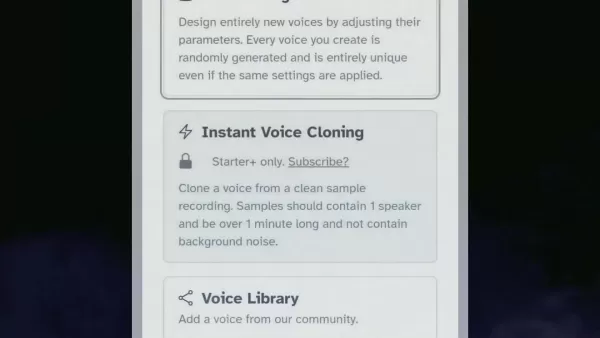
This option lets you build entirely new voices by manipulating various parameters. Configure settings such as gender (Male/Female), age (Young/Adult/Old), accent (American/British/etc.), and accent strength. For a natural result, try an accent strength between 60% and 65%. These settings define the core characteristics of your AI voice, allowing you to tailor it to your brand and target audience. Precise control ensures your voice effectively communicates your intended message.
Step 3: Generate and Refine Your Voice
After setting the parameters, generate your voice. Initial results might not be perfect, so persist and tweak the settings until you achieve your ideal voice.

This iterative approach is crucial for crafting a voice that matches your vision. Experiment with different setting combinations, listen carefully to each result, and make small adjustments until you attain the desired tone and style. Don't hesitate to explore unconventional settings to discover unique and compelling voice options.
Step 4: Inputting Your Script
Once satisfied with your voice, enter your script into the Text-to-Speech tool.
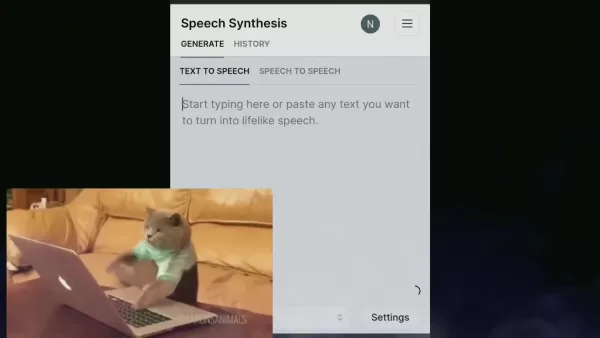
Choose your newly created voice from your available voice library. This is where your custom voice comes to life, transforming written text into spoken audio with the unique qualities you designed. The interface allows for seamless integration into your workflow, enabling quick audio file generation for your projects.
Step 5: Adjusting Voice Settings for Realism
Before generating the final audio, adjust parameters like stability, similarity, and style exaggeration.
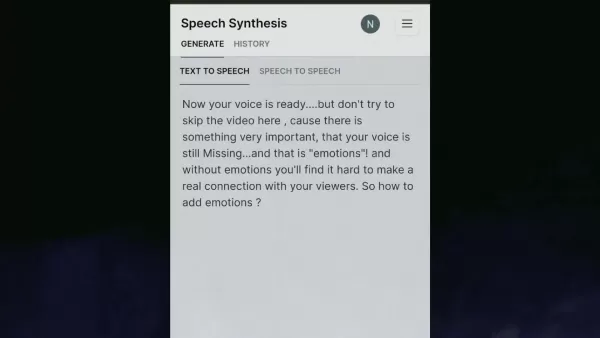
Higher stability ensures consistent delivery, while similarity adjustments control how closely the AI mimics a target voice. Style exaggeration adds expressiveness and emotion, enhancing the human-like quality. Experiment with these settings to find the right balance between natural sound and engaging expression.
Step 6: Generate Speech
Click 'Generate Speech' to convert your script into an audio file using your custom AI voice. Listen to the output and make any final tweaks to achieve the best possible result. This final step brings your work to fruition. Review the audio to ensure it meets your standards. If needed, further refine the settings or script. This attention to detail and iterative process will help you create high-quality, engaging audio content.
ElevenLabs Pricing
Overview of ElevenLabs Plans
ElevenLabs provides a tiered pricing structure to suit various users, from enthusiasts to professional creators. Understanding these plans is key to selecting the one that fits your budget and usage requirements. Each tier offers different features and usage limits, allowing you to customize your experience.
Free Plan
The Free plan is an excellent way to start, offering a limited monthly character quota and access to basic voices. It's ideal for exploring the platform's capabilities and experimenting with AI voice generation without a financial commitment. While limited, it provides a valuable opportunity to see if the platform meets your needs.
Starter Plan
The Starter plan is suited for users needing more characters and features. It includes higher character limits and access to a broader voice selection, making it a good fit for smaller projects and creators requiring greater flexibility. This plan also offers more customization options for fine-tuning voices.
Creator Plan
Designed for serious content creators, the Creator plan provides significantly higher character limits, commercial usage rights, and access to advanced features like Voice Cloning.
This plan is perfect for professionals who depend on AI voice generation for their business and need maximum control. Commercial rights allow you to use voices in projects like advertising and e-learning. Voice cloning enables the creation of personalized voices.
Independent Publisher and Business Plans
These plans cater to larger organizations and publishers, offering custom character limits, priority support, and dedicated account management. They are designed for high-volume content creation needs, providing scalable, reliable solutions and personalized assistance to help achieve business objectives.
Pros and Cons of Using AI Voice Generators
Pros
More cost-effective than hiring professional voice actors.
Easily scalable for producing large volumes of content.
Highly customizable to create distinct and unique voices.
Available around the clock without scheduling limitations.
Cons
Can lack the full emotional range and nuance of a human performer.
Often requires careful editing and adjustment to sound realistic.
Raises ethical considerations regarding voice cloning and consent.
Relies on technology and a stable internet connection.
Key Features of ElevenLabs for AI Voice Creation
Voice Cloning
Voice Cloning allows you to create an AI voice that closely mimics a real person's voice. This is valuable for personalizing content or creating voices for characters. The technology analyzes the unique qualities of a target voice and replicates them. It's important to always obtain explicit permission from the individual whose voice is being cloned.
Voice Design
Voice Design gives you the power to create entirely new synthetic voices by adjusting parameters like gender, age, accent, and strength. This feature provides precise control over the voice's character, enabling you to build a voice that perfectly matches your brand and content needs.
Text-to-Speech
Text-to-Speech converts written text into spoken audio using your selected AI voice. This is fundamental for creating audiobooks, podcasts, voiceovers, and other audio content from text. The platform supports multiple languages and accents, and offers customization for pronunciation and pacing.
Customization Options
Customization Options include fine-tuning parameters like stability, similarity, and style exaggeration to enhance the realism and emotional impact of your AI voices. Experimenting with these settings helps you find the ideal balance, creating voices that are engaging and sound remarkably natural.
Diverse Use Cases for AI Voice Generation
Content Creation
AI voice generation is extremely useful for producing engaging audio content like podcasts, audiobooks, and voiceovers. It allows creators to generate high-quality audio without investing in expensive recording equipment or hiring voice actors, offering flexibility, scalability, and cost-efficiency.
Marketing and Advertising
Utilize AI voices in marketing campaigns to create personalized advertisements and promotional content. AI voices can deliver consistent brand messaging across different platforms, strengthening brand identity and customer engagement. They also allow for quick production of large volumes of audio.
E-Learning
Enhance e-learning modules with AI-generated narration, providing students with clear and engaging audio lessons. Customizable AI voices can align with the course's tone, creating captivating educational experiences. They also allow for easy updates to course materials.
Accessibility
Improve accessibility for visually impaired users by converting text into audio. AI voices can deliver clear, natural-sounding readings of websites, documents, and other text-based content, creating personalized listening experiences and enabling the conversion of large text volumes efficiently.
Frequently Asked Questions About AI Voice Generation
Is it legal to clone someone's voice using AI?
Cloning a person's voice with AI is legal only if you have their explicit permission. Doing so without consent can lead to legal issues concerning privacy and intellectual property rights. It is crucial to obtain proper authorization and be transparent with your audience about the use of AI voices.
Can AI-generated voices be used for commercial purposes?
Yes, AI-generated voices can be used commercially, but this depends on the specific terms of service of the AI platform. Some platforms require a commercial license, while others permit commercial use with certain conditions. Always review the licensing agreements to ensure you are compliant.
Related Questions About ElevanLabs
How can I improve the quality of AI-generated voices?
Improving AI voice quality involves several steps. Start with high-quality, well-punctuated input text. Then, experiment with different voice models and settings to find the best match for your content. Finally, consider post-processing the audio to enhance clarity and realism through techniques like noise reduction.
What are the ethical considerations when using AI voice technology?
Key ethical considerations include obtaining consent for voice cloning, being transparent about the use of AI voices in your content, and avoiding the creation of misleading or deceptive material. Respecting individual rights and privacy is paramount for responsible use of the technology.
Related article
 Apple Smart Glasses Could Debut at WWDC27, Highlighting Privacy Protection
Bloomberg’s Mark Gurman reports that Apple’s smart glasses, codenamed N50, are slated for a WWDC27 debut in June 2027, with a retail launch expected in autumn 2027. Originally targeted for late this year and early 2027, the device’s release has been
Inside Details Exposed About Next-Gen Gemini: Strained Computing Power, Internal Teams Disagreed on Development Priorities and Resource Allocation
Reports indicate that the launch of Google’s highly anticipated next-generation Gemini model has been pushed back. Internal disagreements over development priorities and resource allocation, combined with limited computing capacity and complex approv
OpenAI Dismisses Growth Slowdown Concerns, Says Multiple Business Units Accelerating
In response to external scrutiny regarding decelerating sales growth and missed internal benchmarks, AI leader OpenAI issued a confident statement on Tuesday, April 28. The company clarified that its consumer products and enterprise services are adva
Related Special Topic Recommendations
Music composition
Apple Smart Glasses Could Debut at WWDC27, Highlighting Privacy Protection
Bloomberg’s Mark Gurman reports that Apple’s smart glasses, codenamed N50, are slated for a WWDC27 debut in June 2027, with a retail launch expected in autumn 2027. Originally targeted for late this year and early 2027, the device’s release has been
Inside Details Exposed About Next-Gen Gemini: Strained Computing Power, Internal Teams Disagreed on Development Priorities and Resource Allocation
Reports indicate that the launch of Google’s highly anticipated next-generation Gemini model has been pushed back. Internal disagreements over development priorities and resource allocation, combined with limited computing capacity and complex approv
OpenAI Dismisses Growth Slowdown Concerns, Says Multiple Business Units Accelerating
In response to external scrutiny regarding decelerating sales growth and missed internal benchmarks, AI leader OpenAI issued a confident statement on Tuesday, April 28. The company clarified that its consumer products and enterprise services are adva
Related Special Topic Recommendations
Music composition
 Best AI Melody Writing Tools for Song Drafts
2026 Latest Best Top-Rated AI Melody Writing Tools for Song Drafts! XIX.AI has curated a highly powerful game-changing collection that goes through rigorous real-world tests to deliver the best writing experience. You can find detailed free vs paid comparisons, accurate rankings, and must-try options designed to help you create stunning song drafts effortlessly and boost your creative productivity significantly. Explore now to discover your perfect tool!
 8 tools
 xix.ai
chatbot
Best AI Conversation Trainer Tools for Interview Practice
xix.ai
chatbot
Best AI Conversation Trainer Tools for Interview Practice
2026 Latest Best Top-rated AI Conversation Trainer Tools for Interview Practice are here on XIX.AI! This curated collection features powerful, game-changing tools that go through rigorous real-world tests to deliver accurate feedback. You’ll find a free vs paid comparison and detailed rankings to help you choose the must-try option that boosts your confidence and skills. Explore now to Discover your perfect tool for interview success!
12 tools
xix.ai
Design & Art
Best AI Style Transfer Tools for Creative Experiments
2026 Latest Best Top-rated AI Style Transfer Tools for Creative Experiments! XIX.AI has curated a powerful, game-changing collection of must-try tools that deliver exceptional results through real-world tests and rigorous rankings. These top solutions help creatives boost productivity significantly by accelerating content creation and unlocking endless creative possibilities. Explore now to discover your perfect tool and start creating today!
9 tools
xix.ai
Comic Creation
Best AI Dialogue Bubble Tools for Visual Storytelling
2026 Latest Best Top-Rated AI Dialogue Bubble Tools for Visual Storytelling are here on XIX.AI! This curated collection features powerful, game-changing tools that help creators boost productivity and overcome creative bottlenecks. Get a free vs paid comparison, see real-world tests, and check the latest rankings to find the must-try solutions perfect for crafting engaging visual narratives. Explore now to discover your ideal tool!
10 tools
xix.ai
Meeting Assistant
Top AI Meeting Summary Tools: Track Decisions and Follow-Ups Clearly
2026 Latest Top-Rated Best AI Meeting Summary Tools for Clear Decision Tracking and Effortless Follow-Ups. This curated list showcases powerful, game-changing solutions that boost productivity dramatically by automating meeting notes, identifying key action items, and streamlining team coordination across all projects. Get a free vs paid comparison along with real-world tests and weekly updated rankings to help you find the perfect tool. Explore now to unlock your AI edge!
9 tools
xix.ai
Data Analysis
Best AI Data Cleaning Tools: Fix Missing Values and Duplicates Fast
2026 Latest Best Top-rated AI Data Cleaning Tools for quick fixing of missing values and duplicates. This curated list showcases powerful, game-changing solutions that boost productivity significantly. Each option has undergone rigorous real-world tests to ensure reliability. Get a free vs paid comparison and discover the must-try tool that fits your needs best. Explore now at XIX.AI to Unlock your AI edge.
11 tools
xix.ai

 Comments (0)
0/500
Comments (0)
0/500
The quality and distinctiveness of a voice are often critical to producing compelling audio content. Advances in AI technology now make generating realistic synthetic voices accessible to creators. This guide explores how to use platforms like ElevenLabs to craft unique AI voices, covering customization, editing techniques, and adding emotional expression to maximize audience connection. Learn how to utilize AI to enhance your content creation workflow.
Key Points
Designing unique AI voices through custom voice creation.
Using the ElevenLabs platform to generate and personalize AI voices.
Modifying settings for gender, age, accent, and accent strength to achieve specific vocal traits.
Editing AI-generated speech to improve realism and human-like qualities.
Incorporating emotion into AI voices to build a stronger audience connection.
Optimizing voice parameters for stability, similarity, and style exaggeration.
Leveraging AI voice generators for content creation and monetization opportunities.
Crafting a Unique AI Voice
The Importance of a Unique AI Voice
In a saturated digital world, a distinctive voice is essential for capturing attention. Standard AI voices frequently lack the subtlety and emotional depth required to truly engage an audience.
Developing a unique AI voice helps you establish a strong brand identity and create content that resonates more profoundly with listeners. A custom voice is also less susceptible to monetization restrictions since it avoids the generic sound of widely available options. By adjusting various parameters and experimenting with settings, you can produce a truly one-of-a-kind voice. This ensures your content maintains its originality and avoids appearing generic, which is especially advantageous for creators building a loyal following and a memorable presence in their niche. Ultimately, the pursuit of a unique AI voice is about developing a distinctive brand sound that distinguishes your content from the competition, thereby boosting its appeal and engagement.
Introducing ElevenLabs: Your AI Voice Solution
ElevenLabs emerges as a powerful platform for creating custom AI voices. Its user-friendly interface and sophisticated features enable creators to design synthetic voices from the ground up, clone existing voices with permission, and finely adjust various parameters to achieve the perfect sound. With ElevenLabs, you have full control over your AI voice's characteristics, ensuring it aligns with your brand and content objectives.
The platform provides robust voice design tools, allowing you to modify attributes like gender, age, accent, and accent strength to create genuinely unique voices. Whether you need a youthful, energetic tone or a mature, authoritative sound, ElevenLabs offers the capabilities to realize your vision. Furthermore, ElevenLabs emphasizes user privacy and security, guaranteeing that only you can access the voices you create. This level of control and confidentiality makes it a trusted choice for creators looking to harness AI for voice generation. By combining advanced technology, an intuitive interface, and a commitment to data security, ElevenLabs provides everything needed to produce captivating audio content that grabs and holds audience attention.
Advanced Editing Techniques for Realistic AI Voices
Post-Production Enhancement
Achieving a natural-sounding AI voice often involves post-production refinement. This process uses audio editing software to fine-tune elements of the generated audio, such as applying noise reduction, equalization, and compression. Noise removal cleans up unwanted background sounds, enhancing vocal clarity. Equalization adjusts the frequency balance for a more natural and well-rounded tone. Compression evens out the dynamic range, resulting in a more consistent and professional sound. Mastering these post-production methods allows you to elevate a basic AI voice into a polished performance that engages your listeners.
Adding Emotional Nuance
Infusing emotional nuance remains a significant challenge in AI voice generation. While AI models can produce speech, they often miss the subtle intonations and expressions that convey feeling. To address this, manually edit the AI audio to incorporate pauses, pitch variations, and volume changes. These subtle tweaks can inject life into the voice, making it sound more human and relatable. Also, experiment with AI voice models specifically trained to express emotions like joy, sorrow, or excitement. By blending manual editing with advanced AI models, you can create voices that connect with your audience on an emotional level.
Step-by-Step Guide to Creating an AI Voice with ElevenLabs
Step 1: Accessing VoiceLab
Start by going to the VoiceLab section in your ElevenLabs account. This toolkit is specifically for creating new synthetic voices or cloning existing ones (with proper authorization). Select the option to 'Add Generative or Cloned Voice' to begin. VoiceLab is the central workspace for all voice creation and customization activities on the platform, offering the tools and options needed to build the ideal AI voice for your projects. Its intuitive design is suitable for both newcomers and experienced users, streamlining the process so you can concentrate on producing high-quality audio.
Step 2: Configuring Voice Settings
Within the voice type settings, choose 'Voice Design'.
This option lets you build entirely new voices by manipulating various parameters. Configure settings such as gender (Male/Female), age (Young/Adult/Old), accent (American/British/etc.), and accent strength. For a natural result, try an accent strength between 60% and 65%. These settings define the core characteristics of your AI voice, allowing you to tailor it to your brand and target audience. Precise control ensures your voice effectively communicates your intended message.
Step 3: Generate and Refine Your Voice
After setting the parameters, generate your voice. Initial results might not be perfect, so persist and tweak the settings until you achieve your ideal voice.
This iterative approach is crucial for crafting a voice that matches your vision. Experiment with different setting combinations, listen carefully to each result, and make small adjustments until you attain the desired tone and style. Don't hesitate to explore unconventional settings to discover unique and compelling voice options.
Step 4: Inputting Your Script
Once satisfied with your voice, enter your script into the Text-to-Speech tool.
Choose your newly created voice from your available voice library. This is where your custom voice comes to life, transforming written text into spoken audio with the unique qualities you designed. The interface allows for seamless integration into your workflow, enabling quick audio file generation for your projects.
Step 5: Adjusting Voice Settings for Realism
Before generating the final audio, adjust parameters like stability, similarity, and style exaggeration.
Higher stability ensures consistent delivery, while similarity adjustments control how closely the AI mimics a target voice. Style exaggeration adds expressiveness and emotion, enhancing the human-like quality. Experiment with these settings to find the right balance between natural sound and engaging expression.
Step 6: Generate Speech
Click 'Generate Speech' to convert your script into an audio file using your custom AI voice. Listen to the output and make any final tweaks to achieve the best possible result. This final step brings your work to fruition. Review the audio to ensure it meets your standards. If needed, further refine the settings or script. This attention to detail and iterative process will help you create high-quality, engaging audio content.
ElevenLabs Pricing
Overview of ElevenLabs Plans
ElevenLabs provides a tiered pricing structure to suit various users, from enthusiasts to professional creators. Understanding these plans is key to selecting the one that fits your budget and usage requirements. Each tier offers different features and usage limits, allowing you to customize your experience.
Free Plan
The Free plan is an excellent way to start, offering a limited monthly character quota and access to basic voices. It's ideal for exploring the platform's capabilities and experimenting with AI voice generation without a financial commitment. While limited, it provides a valuable opportunity to see if the platform meets your needs.
Starter Plan
The Starter plan is suited for users needing more characters and features. It includes higher character limits and access to a broader voice selection, making it a good fit for smaller projects and creators requiring greater flexibility. This plan also offers more customization options for fine-tuning voices.
Creator Plan
Designed for serious content creators, the Creator plan provides significantly higher character limits, commercial usage rights, and access to advanced features like Voice Cloning.
This plan is perfect for professionals who depend on AI voice generation for their business and need maximum control. Commercial rights allow you to use voices in projects like advertising and e-learning. Voice cloning enables the creation of personalized voices.
Independent Publisher and Business Plans
These plans cater to larger organizations and publishers, offering custom character limits, priority support, and dedicated account management. They are designed for high-volume content creation needs, providing scalable, reliable solutions and personalized assistance to help achieve business objectives.
Pros and Cons of Using AI Voice Generators
Pros
More cost-effective than hiring professional voice actors.
Easily scalable for producing large volumes of content.
Highly customizable to create distinct and unique voices.
Available around the clock without scheduling limitations.
Cons
Can lack the full emotional range and nuance of a human performer.
Often requires careful editing and adjustment to sound realistic.
Raises ethical considerations regarding voice cloning and consent.
Relies on technology and a stable internet connection.
Key Features of ElevenLabs for AI Voice Creation
Voice Cloning
Voice Cloning allows you to create an AI voice that closely mimics a real person's voice. This is valuable for personalizing content or creating voices for characters. The technology analyzes the unique qualities of a target voice and replicates them. It's important to always obtain explicit permission from the individual whose voice is being cloned.
Voice Design
Voice Design gives you the power to create entirely new synthetic voices by adjusting parameters like gender, age, accent, and strength. This feature provides precise control over the voice's character, enabling you to build a voice that perfectly matches your brand and content needs.
Text-to-Speech
Text-to-Speech converts written text into spoken audio using your selected AI voice. This is fundamental for creating audiobooks, podcasts, voiceovers, and other audio content from text. The platform supports multiple languages and accents, and offers customization for pronunciation and pacing.
Customization Options
Customization Options include fine-tuning parameters like stability, similarity, and style exaggeration to enhance the realism and emotional impact of your AI voices. Experimenting with these settings helps you find the ideal balance, creating voices that are engaging and sound remarkably natural.
Diverse Use Cases for AI Voice Generation
Content Creation
AI voice generation is extremely useful for producing engaging audio content like podcasts, audiobooks, and voiceovers. It allows creators to generate high-quality audio without investing in expensive recording equipment or hiring voice actors, offering flexibility, scalability, and cost-efficiency.
Marketing and Advertising
Utilize AI voices in marketing campaigns to create personalized advertisements and promotional content. AI voices can deliver consistent brand messaging across different platforms, strengthening brand identity and customer engagement. They also allow for quick production of large volumes of audio.
E-Learning
Enhance e-learning modules with AI-generated narration, providing students with clear and engaging audio lessons. Customizable AI voices can align with the course's tone, creating captivating educational experiences. They also allow for easy updates to course materials.
Accessibility
Improve accessibility for visually impaired users by converting text into audio. AI voices can deliver clear, natural-sounding readings of websites, documents, and other text-based content, creating personalized listening experiences and enabling the conversion of large text volumes efficiently.
Frequently Asked Questions About AI Voice Generation
Is it legal to clone someone's voice using AI?
Cloning a person's voice with AI is legal only if you have their explicit permission. Doing so without consent can lead to legal issues concerning privacy and intellectual property rights. It is crucial to obtain proper authorization and be transparent with your audience about the use of AI voices.
Can AI-generated voices be used for commercial purposes?
Yes, AI-generated voices can be used commercially, but this depends on the specific terms of service of the AI platform. Some platforms require a commercial license, while others permit commercial use with certain conditions. Always review the licensing agreements to ensure you are compliant.
Related Questions About ElevanLabs
How can I improve the quality of AI-generated voices?
Improving AI voice quality involves several steps. Start with high-quality, well-punctuated input text. Then, experiment with different voice models and settings to find the best match for your content. Finally, consider post-processing the audio to enhance clarity and realism through techniques like noise reduction.
What are the ethical considerations when using AI voice technology?
Key ethical considerations include obtaining consent for voice cloning, being transparent about the use of AI voices in your content, and avoiding the creation of misleading or deceptive material. Respecting individual rights and privacy is paramount for responsible use of the technology.








 Apple Smart Glasses Could Debut at WWDC27, Highlighting Privacy Protection
Bloomberg’s Mark Gurman reports that Apple’s smart glasses, codenamed N50, are slated for a WWDC27 debut in June 2027, with a retail launch expected in autumn 2027. Originally targeted for late this year and early 2027, the device’s release has been
Apple Smart Glasses Could Debut at WWDC27, Highlighting Privacy Protection
Bloomberg’s Mark Gurman reports that Apple’s smart glasses, codenamed N50, are slated for a WWDC27 debut in June 2027, with a retail launch expected in autumn 2027. Originally targeted for late this year and early 2027, the device’s release has been
 Inside Details Exposed About Next-Gen Gemini: Strained Computing Power, Internal Teams Disagreed on Development Priorities and Resource Allocation
Reports indicate that the launch of Google’s highly anticipated next-generation Gemini model has been pushed back. Internal disagreements over development priorities and resource allocation, combined with limited computing capacity and complex approv
Inside Details Exposed About Next-Gen Gemini: Strained Computing Power, Internal Teams Disagreed on Development Priorities and Resource Allocation
Reports indicate that the launch of Google’s highly anticipated next-generation Gemini model has been pushed back. Internal disagreements over development priorities and resource allocation, combined with limited computing capacity and complex approv
 OpenAI Dismisses Growth Slowdown Concerns, Says Multiple Business Units Accelerating
In response to external scrutiny regarding decelerating sales growth and missed internal benchmarks, AI leader OpenAI issued a confident statement on Tuesday, April 28. The company clarified that its consumer products and enterprise services are adva
OpenAI Dismisses Growth Slowdown Concerns, Says Multiple Business Units Accelerating
In response to external scrutiny regarding decelerating sales growth and missed internal benchmarks, AI leader OpenAI issued a confident statement on Tuesday, April 28. The company clarified that its consumer products and enterprise services are adva

2026 Latest Best Top-Rated AI Melody Writing Tools for Song Drafts! XIX.AI has curated a highly powerful game-changing collection that goes through rigorous real-world tests to deliver the best writing experience. You can find detailed free vs paid comparisons, accurate rankings, and must-try options designed to help you create stunning song drafts effortlessly and boost your creative productivity significantly. Explore now to discover your perfect tool!
8 tools
xix.ai

2026 Latest Best Top-rated AI Conversation Trainer Tools for Interview Practice are here on XIX.AI! This curated collection features powerful, game-changing tools that go through rigorous real-world tests to deliver accurate feedback. You’ll find a free vs paid comparison and detailed rankings to help you choose the must-try option that boosts your confidence and skills. Explore now to Discover your perfect tool for interview success!
12 tools
xix.ai

2026 Latest Best Top-rated AI Style Transfer Tools for Creative Experiments! XIX.AI has curated a powerful, game-changing collection of must-try tools that deliver exceptional results through real-world tests and rigorous rankings. These top solutions help creatives boost productivity significantly by accelerating content creation and unlocking endless creative possibilities. Explore now to discover your perfect tool and start creating today!
9 tools
xix.ai

2026 Latest Best Top-Rated AI Dialogue Bubble Tools for Visual Storytelling are here on XIX.AI! This curated collection features powerful, game-changing tools that help creators boost productivity and overcome creative bottlenecks. Get a free vs paid comparison, see real-world tests, and check the latest rankings to find the must-try solutions perfect for crafting engaging visual narratives. Explore now to discover your ideal tool!
10 tools
xix.ai

2026 Latest Top-Rated Best AI Meeting Summary Tools for Clear Decision Tracking and Effortless Follow-Ups. This curated list showcases powerful, game-changing solutions that boost productivity dramatically by automating meeting notes, identifying key action items, and streamlining team coordination across all projects. Get a free vs paid comparison along with real-world tests and weekly updated rankings to help you find the perfect tool. Explore now to unlock your AI edge!
9 tools
xix.ai

2026 Latest Best Top-rated AI Data Cleaning Tools for quick fixing of missing values and duplicates. This curated list showcases powerful, game-changing solutions that boost productivity significantly. Each option has undergone rigorous real-world tests to ensure reliability. Get a free vs paid comparison and discover the must-try tool that fits your needs best. Explore now at XIX.AI to Unlock your AI edge.
11 tools
xix.ai












