


 Home
HomeHow to speed up AI video editing workflow with Podcastle in 2026?
In today's fast-paced digital world, video content is king. But let's be honest: video editing can be incredibly time-consuming. Imagine if you could dramatically accelerate your workflow and produce compelling videos in a fraction of the usual time. Podcastle delivers exactly that with its suite of AI-powered tools. From eliminating background noise to correcting eye contact, Podcastle makes professional video editing accessible and efficient for creators of all levels.
Key Points
Podcastle uses AI to drastically cut down video editing time.
AI Noise Reduction removes unwanted background sounds while preserving audio clarity.
AI Eye Contact Correction helps speakers appear to look directly at the viewer, boosting engagement.
AI Video Enhancement elevates visual quality with cinematic blur effects.
AI Voice Cloning lets you fix spoken errors without needing to re-record entire segments.
The Smart Layout feature simplifies editing for remote podcast recordings.
Automated subtitle generation powered by AI improves content accessibility.
Podcastle combines recording, editing, and publishing into a single, integrated platform.
Revolutionize Your Video Editing with AI
The Power of AI in Video Editing
Traditionally, video editing has been a labor-intensive task, demanding hours of detailed work. AI is transforming this landscape by automating routine tasks, allowing creators to devote more energy to the creative side of content production. Podcastle stands at the forefront of this shift, offering an all-in-one platform built to streamline your entire video editing process.
Podcastle is more than just a video editor; it's a complete content creation ecosystem that enables you to record, edit with AI assistance, and publish—all within the same environment. This seamless integration saves substantial time, helping you produce high-quality videos more efficiently than ever.
Here’s a closer look at how Podcastle's AI tools can upgrade your video editing workflow:
- AI-Powered Efficiency: Cut editing time by up to seven times using Podcastle's intelligent automation.
- Enhanced Content Quality: Elevate the audio and visual appeal of your videos with AI-driven improvements.
- Accessibility: Broaden your audience with automatically generated, accurate subtitles.
- Seamless Workflow: Handle the entire content creation process from one unified platform.
Podcastle: An All-in-One Content Creation Solution
What sets Podcastle apart is its unified approach to content creation. From recording your initial footage to applying final edits and publishing, every step happens within Podcastle. This eliminates the need to switch between different apps, saving time and reducing complexity.
One of Podcastle's biggest advantages is its ability to record, edit using AI, and publish all in one place. This integrated method not only speeds up production but also lowers the learning curve that comes with using multiple software tools.
Podcastle is an essential tool for:
- Content Creators: Streamline video production while enhancing overall quality.
- Podcasters: Create engaging video podcasts with intuitive, AI-assisted editing.
- Marketing Professionals: Produce compelling video content for campaigns quickly.
- Educators: Develop polished educational videos with minimal effort.
With Podcastle, you can focus on what truly matters: creating content that connects with your audience.
Podcastle vs. Adobe Premiere Pro
Podcastle and Premiere Pro
When choosing a video editing tool, creators often compare all-in-one platforms with professional software known for its power and customization. Podcastle and Adobe Premiere Pro sit on opposite ends of this spectrum, each catering to different needs and skill levels. Below, we break down a feature-by-feature comparison to help you decide which tool is best for your projects.
Here's how they compare:
Feature Podcastle Adobe Premiere Pro AI EditingRobust AI-powered tools (noise reduction, eye contact correction)Limited; often requires third-party pluginsAll-in-One PlatformYes; includes recording, editing, and publishingNo; mainly an editing applicationSubtitle GenerationBuilt-in AI-powered subtitle creationManual process or reliant on pluginsWorkflow IntegrationSmooth, unified workflow within one appOften requires using multiple Adobe apps for a full workflowBeginner FriendlinessExcellent for beginners; easy to learnSteep learning curve; suited for professionalsPricingSubscription-based and affordableSubscription-based and more expensiveEditing Videos Faster: A Podcastle Tutorial
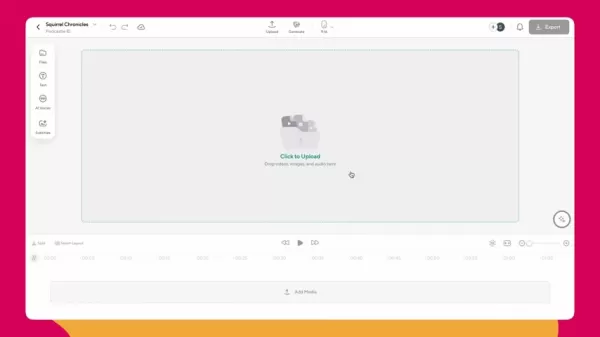
Step 1: Uploading Your Recording
Start by uploading the recording you want to edit. This can be a raw video file, a podcast recording, or any video content that needs polishing. The platform supports a wide range of video formats, so importing your footage is straightforward.
Pro Tip: For best results with Podcastle's AI tools, ensure your original recording has clear audio and video.
Step 2: Removing Background Noise with AI Noise Reduction
Background noise can distract viewers from your message. Podcastle's AI Noise Reduction tool effectively removes these unwanted sounds without degrading your audio quality. This feature alone can significantly improve the viewer's experience.
To use this tool:
Click the "AI Assistant" button located in the bottom right corner.
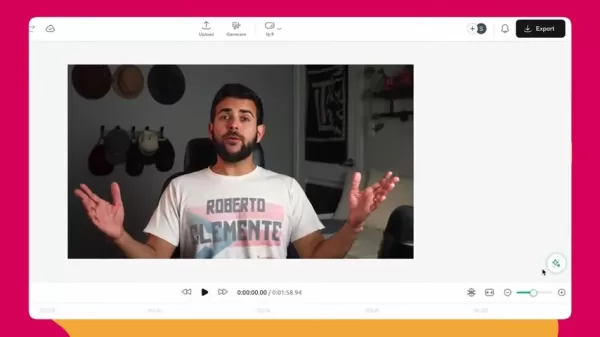
Choose "Noise Reduction".
Click "Apply". Podcastle will then process your audio to eliminate background distractions.
You can also select auto leveling to balance and normalize sound levels for consistent volume.
Result: Clean, crisp audio that keeps your audience focused on your content. A task that could take 10 minutes in Premiere Pro is completed in just 4 seconds with Podcastle.
Step 3: Correcting Eye Contact with AI
It can be difficult to maintain eye contact with the camera when reading from a script. Podcastle's AI Eye Contact Correction tool simulates natural eye contact, making it seem as though the speaker is looking directly at the viewer.
To use this tool:
- Click the "AI Assistant" button.
- Select "Eye Contact". Podcastle will adjust the speaker's gaze to appear focused on the camera.
Result: A more engaging and personal connection with your audience. This process is far quicker and easier compared to other editing platforms.

Step 4: Enhancing Video Quality with AI Video Enhance and Cinematic Blur
Improving your video's visual appeal can make a big difference in its impact. Podcastle offers AI Video Enhance and Cinematic Blur tools to help you achieve a professional look.
To use these tools:
- Click the "AI Assistant" button.
- Select "AI Video Enhance" and "Cinematic Blur". These features work together to boost production value and give your video a polished, cinematic feel.
Result: A visually impressive video that captures and retains viewer attention.
Step 5: Correcting Mistakes with AI Voice Clone
Every content creator makes mistakes, and noticing an error after recording is common. Podcastle's AI Voice Clone offers a simple solution, allowing you to correct spoken errors without re-recording entire sections.
To use this tool:
- Click the "AI Voices" button.
- Select "Create Voice" and record a sample so Podcastle can replicate your vocal tone.
- Go to the Generate tab, type your correction, and drag the generated audio to the desired point in your timeline.
Result: You can fix mistakes seamlessly, avoiding the need for a full re-record.
Step 6: Editing Remote Podcast with AI Smart Layout Feature
Podcastle's Smart Layout feature is built to simplify editing, especially for remote podcast recordings where participants are recorded separately.
To use this tool:
Upload two separate recordings from a conversation between two people.
Click Smart Layout in the bottom left corner.
Choose your preferred spacing and dynamic speaker view, then click Apply.
Result: Podcastle automatically switches between speakers based on who is talking, creating a dynamic, professionally edited conversation.
Step 7: Adding Subtitles with AI
Subtitles make your content more accessible and can boost viewer engagement. Podcastle's AI-powered subtitle tool automates this process.
To use this tool:
- Click the "Subtitles" button on the left-hand sidebar.
- Select the clips you want to subtitle.
- Pick a subtitle style and click "Generate". Podcastle will transcribe the audio and create synchronized subtitles.
Result: Automatically generated subtitles that enhance accessibility and keep viewers engaged.
Step 8: Publishing Your Video
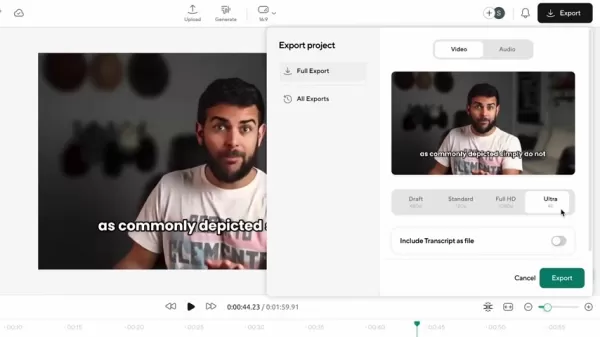
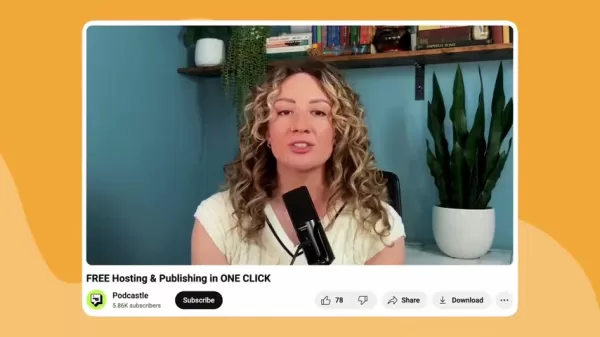
Once editing is complete, Podcastle lets you publish your video directly to platforms like YouTube, or for podcasts, to all major podcast directories.
- Click "Export".
- Choose your preferred settings.
- For YouTube videos, select "Export" in 4K and then upload the file to YouTube.
- For podcasts, refer to the "Fastest Way to Upload on All Your Favorite Podcast Platforms" guide for detailed distribution steps.
Podcastle Pricing
Podcastle Pro
Unlock Podcastle's full capabilities with a Podcastle Pro subscription. This plan offers advanced features and resources to elevate your video editing results.
Use a promo code to get 50% off your first month of Podcastle Pro.
Podcastle: Advantages and Disadvantages
Pros
Significant time savings thanks to AI-powered editing tools.
All-in-one platform covering recording, editing, and publishing.
User-friendly interface ideal for beginners.
Improved content quality through AI enhancements.
Easy, automated subtitle generation for greater accessibility.
Cons
Subscription model may not fit all budgets.
AI tools offer less customization compared to professional software.
Requires a stable internet connection as it is cloud-based.
Core Features of Podcastle
AI-Powered Video Editing
Podcastle's main strength is its suite of AI-driven editing tools. These features automate time-consuming tasks like noise reduction, eye contact correction, and video enhancement.
All-in-One Content Creation Platform
Podcastle offers a unified workspace for recording, editing, and publishing video content. This integrated approach simplifies the entire production process.
Smart Layout
The Smart Layout feature automatically switches between speakers when you upload separate recordings of a conversation, ideal for remote podcast editing.
Voice Clone
With Voice Clone, you can replicate your voice to make corrections easily, eliminating the need to re-record entire segments.
AI-Powered Subtitle Generation
Generate accurate subtitles effortlessly using Podcastle's AI. This feature helps make your content more accessible and engaging for diverse audiences.
Use Cases for Podcastle
Video Podcasts
Create compelling video podcasts using Podcastle's AI editing suite. Enhance audio clarity, correct eye contact, and improve visuals for a professional end product.
Marketing Videos
Produce high-impact marketing videos quickly. Leverage AI to boost video quality and create visually appealing content that drives engagement and results.
Educational Content
Develop polished educational videos with minimal effort. Use Podcastle to add subtitles, clean up audio, and enhance visuals for an effective learning experience.
Frequently Asked Questions
What is Podcastle?
Podcastle is an all-in-one content creation platform that enables users to record, edit using AI, and publish videos and podcasts from a single interface. It is designed to simplify and speed up the content creation process.
How does Podcastle use AI to speed up video editing?
Podcastle employs AI to automate repetitive editing tasks such as noise reduction, eye contact adjustment, and video enhancement. These intelligent tools cut down editing time significantly while raising the quality of your content.
Can I use Podcastle for podcasting?
Absolutely. Podcastle is well-suited for podcasting. You can record, edit, and publish your podcasts directly through the platform. It also includes podcast-specific features like the AI Smart Layout for editing remote interviews.
Is Podcastle suitable for beginners?
Yes, Podcastle is built with beginners in mind. Its intuitive interface and AI-assisted tools allow users with little to no technical expertise to create high-quality videos and podcasts.
What are the system requirements for using Podcastle?
Since Podcastle is cloud-based, you can access it from any device with an internet connection and a modern web browser. No software installation is required.
Related Questions
What other AI tools can I use to improve my video editing workflow?
While Podcastle provides a comprehensive set of AI tools, several other platforms can also enhance your video editing workflow. Consider these options:Descript: An audio and video editor that uses AI transcription, allowing you to edit content by modifying the text transcript.RunwayML: A platform offering diverse AI tools for video, including object removal, style transfer, and motion tracking.Topaz Video Enhance AI: Specializes in upscaling video resolution and improving overall video quality.Pictory AI: An AI service that converts long-form videos into short, engaging clips optimized for social media. Exploring these tools can further optimize and diversify your editing process.
Related article
 Stripe to Acquire OpenRouter as AI Model Routing Gains Momentum
Stripe has agreed to acquire OpenRouter, an AI model-routing platform that gives developers access to hundreds of models through a single interface. The deal adds model selection and routing to Stripe’s existing work around AI usage and token-based b
Former OpenAI Researcher Barrett Zoph Returns to Google to Support Gemini Development
Barret Zoph, who previously abruptly left and joined OpenAI due to a disagreement with Thinking Machines Lab CEO Miriam Mularati, has once again changed employers. Alphabet's Google announced that Zoph will return as Vice President of Research, bring
How Recursive Intelligence Raised $335M at $4B Valuation in 4 Months
The co-founders of startup Ricursive Intelligence seemed destined to be co-founders.Anna Goldie, CEO, and Azalia Mirhoseini, CTO, are so well-known in the AI community that they were among those AI engineers who “got those weird emails from Zuckerber
Related Special Topic Recommendations
Design & Art
Stripe to Acquire OpenRouter as AI Model Routing Gains Momentum
Stripe has agreed to acquire OpenRouter, an AI model-routing platform that gives developers access to hundreds of models through a single interface. The deal adds model selection and routing to Stripe’s existing work around AI usage and token-based b
Former OpenAI Researcher Barrett Zoph Returns to Google to Support Gemini Development
Barret Zoph, who previously abruptly left and joined OpenAI due to a disagreement with Thinking Machines Lab CEO Miriam Mularati, has once again changed employers. Alphabet's Google announced that Zoph will return as Vice President of Research, bring
How Recursive Intelligence Raised $335M at $4B Valuation in 4 Months
The co-founders of startup Ricursive Intelligence seemed destined to be co-founders.Anna Goldie, CEO, and Azalia Mirhoseini, CTO, are so well-known in the AI community that they were among those AI engineers who “got those weird emails from Zuckerber
Related Special Topic Recommendations
Design & Art
 Top AI Illustration Tools: Create Editorial Scenes and Cover Art Faster
2026 Latest Top-rated AI Illustration Tools: Our curated list features the best powerfully designed tools for creating stunning editorial scenes and eye-catching cover art quickly. Each option has gone through rigorous real-world tests, offering a free vs paid comparison to help you find the perfect match for your workflow. Try these must-try solutions today to unlock your AI edge and boost your creative productivity. Explore now at XIX.AI.
 10 tools
 xix.ai
Education and Learning
Top AI Tutors for Exam Prep: Practice Math, Science, and English
xix.ai
Education and Learning
Top AI Tutors for Exam Prep: Practice Math, Science, and English
2026 Latest Top-Rated Best AI Tutors for Exam Prep are here on XIX.AI! Our curated list features powerful game-changing tools that offer free vs paid comparison, real-world tests, and weekly updated rankings. They help boost your writing efficiency, simplify complex topic learning, and unlock your academic potential. Explore now to Discover your perfect exam prep tool and Start creating today to Unlock your AI edge!
10 tools
xix.ai
Finance
AI Budget Planning Tools for Personal Money Management
2026 Latest Best Top-Rated AI Budget Planning Tools for Personal Money Management are here on XIX.AI! This curated collection features powerful, game-changing solutions that help you conduct real-world tests, understand spending habits, and create personalized plans to boost productivity. Enjoy a free vs paid comparison along with detailed rankings. Must-try tools designed to simplify money management and unlock your AI edge. Explore now!
11 tools
xix.ai
Health & Wellness
AI Sleep Tracking Assistants: Improve Recovery with Better Bedtime Habits
2026 Latest Best Top-Rated AI Sleep Tracking Assistants curated for ultimate recovery. This fully updated weekly guide features powerful tools that deliver real-world tests, free vs paid comparison, and detailed rankings to help you find the must-try solution that boosts sleep quality and supports better bedtime habits. Explore now at XIX.AI to Unlock your AI edge.
10 tools
xix.ai
Data Analysis
AI SQL Copilots for Product and Revenue Analytics
2026 Latest Best Top-Rated AI SQL Copilots for Product and Revenue Analytics! XIX.AI has curated a powerful, game-changing collection of must-try tools that undergo real-world tests through weekly updated rankings. These tools help users boost productivity significantly by accelerating data analysis, streamlining complex queries, and generating accurate insights to drive smarter business decisions. Explore now to Discover your perfect tool for unlocking your AI edge!
14 tools
xix.ai
Education and Learning
Best AI Homework Helpers That Teach: Learn Concepts, Not Just Answers
2026 Latest Best Top-Rated AI Homework Helpers That Teach Core Concepts Not Just Answers Powerful Tools for Students Must-Try Curated List Weekly Updated Free vs Paid Comparison Real-World Tests Accurate Rankings to Help You Unlock Your Full Learning Potential Explore now to Discover your perfect tool for smarter studying.
10 tools
xix.ai

 Comments (1)
0/500
Comments (1)
0/500
![HaroldHarris]()
I've tried so many AI editing tools, but most are just glorified filters. Podcastle actually sounds like it could save real time. 2026 can't come soon enough! 😅
In today's fast-paced digital world, video content is king. But let's be honest: video editing can be incredibly time-consuming. Imagine if you could dramatically accelerate your workflow and produce compelling videos in a fraction of the usual time. Podcastle delivers exactly that with its suite of AI-powered tools. From eliminating background noise to correcting eye contact, Podcastle makes professional video editing accessible and efficient for creators of all levels.
Key Points
Podcastle uses AI to drastically cut down video editing time.
AI Noise Reduction removes unwanted background sounds while preserving audio clarity.
AI Eye Contact Correction helps speakers appear to look directly at the viewer, boosting engagement.
AI Video Enhancement elevates visual quality with cinematic blur effects.
AI Voice Cloning lets you fix spoken errors without needing to re-record entire segments.
The Smart Layout feature simplifies editing for remote podcast recordings.
Automated subtitle generation powered by AI improves content accessibility.
Podcastle combines recording, editing, and publishing into a single, integrated platform.
Revolutionize Your Video Editing with AI
The Power of AI in Video Editing
Traditionally, video editing has been a labor-intensive task, demanding hours of detailed work. AI is transforming this landscape by automating routine tasks, allowing creators to devote more energy to the creative side of content production. Podcastle stands at the forefront of this shift, offering an all-in-one platform built to streamline your entire video editing process.
Podcastle is more than just a video editor; it's a complete content creation ecosystem that enables you to record, edit with AI assistance, and publish—all within the same environment. This seamless integration saves substantial time, helping you produce high-quality videos more efficiently than ever.
Here’s a closer look at how Podcastle's AI tools can upgrade your video editing workflow:
- AI-Powered Efficiency: Cut editing time by up to seven times using Podcastle's intelligent automation.
- Enhanced Content Quality: Elevate the audio and visual appeal of your videos with AI-driven improvements.
- Accessibility: Broaden your audience with automatically generated, accurate subtitles.
- Seamless Workflow: Handle the entire content creation process from one unified platform.
Podcastle: An All-in-One Content Creation Solution
What sets Podcastle apart is its unified approach to content creation. From recording your initial footage to applying final edits and publishing, every step happens within Podcastle. This eliminates the need to switch between different apps, saving time and reducing complexity.
One of Podcastle's biggest advantages is its ability to record, edit using AI, and publish all in one place. This integrated method not only speeds up production but also lowers the learning curve that comes with using multiple software tools.
Podcastle is an essential tool for:
- Content Creators: Streamline video production while enhancing overall quality.
- Podcasters: Create engaging video podcasts with intuitive, AI-assisted editing.
- Marketing Professionals: Produce compelling video content for campaigns quickly.
- Educators: Develop polished educational videos with minimal effort.
With Podcastle, you can focus on what truly matters: creating content that connects with your audience.
Podcastle vs. Adobe Premiere Pro
Podcastle and Premiere Pro
When choosing a video editing tool, creators often compare all-in-one platforms with professional software known for its power and customization. Podcastle and Adobe Premiere Pro sit on opposite ends of this spectrum, each catering to different needs and skill levels. Below, we break down a feature-by-feature comparison to help you decide which tool is best for your projects.
Here's how they compare:
Editing Videos Faster: A Podcastle Tutorial
Step 1: Uploading Your Recording
Start by uploading the recording you want to edit. This can be a raw video file, a podcast recording, or any video content that needs polishing. The platform supports a wide range of video formats, so importing your footage is straightforward.
Pro Tip: For best results with Podcastle's AI tools, ensure your original recording has clear audio and video.
Step 2: Removing Background Noise with AI Noise Reduction
Background noise can distract viewers from your message. Podcastle's AI Noise Reduction tool effectively removes these unwanted sounds without degrading your audio quality. This feature alone can significantly improve the viewer's experience.
To use this tool:
Click the "AI Assistant" button located in the bottom right corner.
Choose "Noise Reduction".
Click "Apply". Podcastle will then process your audio to eliminate background distractions.
You can also select auto leveling to balance and normalize sound levels for consistent volume.
Result: Clean, crisp audio that keeps your audience focused on your content. A task that could take 10 minutes in Premiere Pro is completed in just 4 seconds with Podcastle.
Step 3: Correcting Eye Contact with AI
It can be difficult to maintain eye contact with the camera when reading from a script. Podcastle's AI Eye Contact Correction tool simulates natural eye contact, making it seem as though the speaker is looking directly at the viewer.
To use this tool:
- Click the "AI Assistant" button.
- Select "Eye Contact". Podcastle will adjust the speaker's gaze to appear focused on the camera.
Result: A more engaging and personal connection with your audience. This process is far quicker and easier compared to other editing platforms.
Step 4: Enhancing Video Quality with AI Video Enhance and Cinematic Blur
Improving your video's visual appeal can make a big difference in its impact. Podcastle offers AI Video Enhance and Cinematic Blur tools to help you achieve a professional look.
To use these tools:
- Click the "AI Assistant" button.
- Select "AI Video Enhance" and "Cinematic Blur". These features work together to boost production value and give your video a polished, cinematic feel.
Result: A visually impressive video that captures and retains viewer attention.
Step 5: Correcting Mistakes with AI Voice Clone
Every content creator makes mistakes, and noticing an error after recording is common. Podcastle's AI Voice Clone offers a simple solution, allowing you to correct spoken errors without re-recording entire sections.
To use this tool:
- Click the "AI Voices" button.
- Select "Create Voice" and record a sample so Podcastle can replicate your vocal tone.
- Go to the Generate tab, type your correction, and drag the generated audio to the desired point in your timeline.
Result: You can fix mistakes seamlessly, avoiding the need for a full re-record.
Step 6: Editing Remote Podcast with AI Smart Layout Feature
Podcastle's Smart Layout feature is built to simplify editing, especially for remote podcast recordings where participants are recorded separately.
To use this tool:
Upload two separate recordings from a conversation between two people.
Click Smart Layout in the bottom left corner.
Choose your preferred spacing and dynamic speaker view, then click Apply.
Result: Podcastle automatically switches between speakers based on who is talking, creating a dynamic, professionally edited conversation.
Step 7: Adding Subtitles with AI
Subtitles make your content more accessible and can boost viewer engagement. Podcastle's AI-powered subtitle tool automates this process.
To use this tool:
- Click the "Subtitles" button on the left-hand sidebar.
- Select the clips you want to subtitle.
- Pick a subtitle style and click "Generate". Podcastle will transcribe the audio and create synchronized subtitles.
Result: Automatically generated subtitles that enhance accessibility and keep viewers engaged.
Step 8: Publishing Your Video
Once editing is complete, Podcastle lets you publish your video directly to platforms like YouTube, or for podcasts, to all major podcast directories.
- Click "Export".
- Choose your preferred settings.
- For YouTube videos, select "Export" in 4K and then upload the file to YouTube.
- For podcasts, refer to the "Fastest Way to Upload on All Your Favorite Podcast Platforms" guide for detailed distribution steps.
Podcastle Pricing
Podcastle Pro
Unlock Podcastle's full capabilities with a Podcastle Pro subscription. This plan offers advanced features and resources to elevate your video editing results.
Use a promo code to get 50% off your first month of Podcastle Pro.
Podcastle: Advantages and Disadvantages
Pros
Significant time savings thanks to AI-powered editing tools.
All-in-one platform covering recording, editing, and publishing.
User-friendly interface ideal for beginners.
Improved content quality through AI enhancements.
Easy, automated subtitle generation for greater accessibility.
Cons
Subscription model may not fit all budgets.
AI tools offer less customization compared to professional software.
Requires a stable internet connection as it is cloud-based.
Core Features of Podcastle
AI-Powered Video Editing
Podcastle's main strength is its suite of AI-driven editing tools. These features automate time-consuming tasks like noise reduction, eye contact correction, and video enhancement.
All-in-One Content Creation Platform
Podcastle offers a unified workspace for recording, editing, and publishing video content. This integrated approach simplifies the entire production process.
Smart Layout
The Smart Layout feature automatically switches between speakers when you upload separate recordings of a conversation, ideal for remote podcast editing.
Voice Clone
With Voice Clone, you can replicate your voice to make corrections easily, eliminating the need to re-record entire segments.
AI-Powered Subtitle Generation
Generate accurate subtitles effortlessly using Podcastle's AI. This feature helps make your content more accessible and engaging for diverse audiences.
Use Cases for Podcastle
Video Podcasts
Create compelling video podcasts using Podcastle's AI editing suite. Enhance audio clarity, correct eye contact, and improve visuals for a professional end product.
Marketing Videos
Produce high-impact marketing videos quickly. Leverage AI to boost video quality and create visually appealing content that drives engagement and results.
Educational Content
Develop polished educational videos with minimal effort. Use Podcastle to add subtitles, clean up audio, and enhance visuals for an effective learning experience.
Frequently Asked Questions
What is Podcastle?
Podcastle is an all-in-one content creation platform that enables users to record, edit using AI, and publish videos and podcasts from a single interface. It is designed to simplify and speed up the content creation process.
How does Podcastle use AI to speed up video editing?
Podcastle employs AI to automate repetitive editing tasks such as noise reduction, eye contact adjustment, and video enhancement. These intelligent tools cut down editing time significantly while raising the quality of your content.
Can I use Podcastle for podcasting?
Absolutely. Podcastle is well-suited for podcasting. You can record, edit, and publish your podcasts directly through the platform. It also includes podcast-specific features like the AI Smart Layout for editing remote interviews.
Is Podcastle suitable for beginners?
Yes, Podcastle is built with beginners in mind. Its intuitive interface and AI-assisted tools allow users with little to no technical expertise to create high-quality videos and podcasts.
What are the system requirements for using Podcastle?
Since Podcastle is cloud-based, you can access it from any device with an internet connection and a modern web browser. No software installation is required.
Related Questions
What other AI tools can I use to improve my video editing workflow?
While Podcastle provides a comprehensive set of AI tools, several other platforms can also enhance your video editing workflow. Consider these options:Descript: An audio and video editor that uses AI transcription, allowing you to edit content by modifying the text transcript.RunwayML: A platform offering diverse AI tools for video, including object removal, style transfer, and motion tracking.Topaz Video Enhance AI: Specializes in upscaling video resolution and improving overall video quality.Pictory AI: An AI service that converts long-form videos into short, engaging clips optimized for social media. Exploring these tools can further optimize and diversify your editing process.








 Stripe to Acquire OpenRouter as AI Model Routing Gains Momentum
Stripe has agreed to acquire OpenRouter, an AI model-routing platform that gives developers access to hundreds of models through a single interface. The deal adds model selection and routing to Stripe’s existing work around AI usage and token-based b
Stripe to Acquire OpenRouter as AI Model Routing Gains Momentum
Stripe has agreed to acquire OpenRouter, an AI model-routing platform that gives developers access to hundreds of models through a single interface. The deal adds model selection and routing to Stripe’s existing work around AI usage and token-based b
 Former OpenAI Researcher Barrett Zoph Returns to Google to Support Gemini Development
Barret Zoph, who previously abruptly left and joined OpenAI due to a disagreement with Thinking Machines Lab CEO Miriam Mularati, has once again changed employers. Alphabet's Google announced that Zoph will return as Vice President of Research, bring
Former OpenAI Researcher Barrett Zoph Returns to Google to Support Gemini Development
Barret Zoph, who previously abruptly left and joined OpenAI due to a disagreement with Thinking Machines Lab CEO Miriam Mularati, has once again changed employers. Alphabet's Google announced that Zoph will return as Vice President of Research, bring
 How Recursive Intelligence Raised $335M at $4B Valuation in 4 Months
The co-founders of startup Ricursive Intelligence seemed destined to be co-founders.Anna Goldie, CEO, and Azalia Mirhoseini, CTO, are so well-known in the AI community that they were among those AI engineers who “got those weird emails from Zuckerber
How Recursive Intelligence Raised $335M at $4B Valuation in 4 Months
The co-founders of startup Ricursive Intelligence seemed destined to be co-founders.Anna Goldie, CEO, and Azalia Mirhoseini, CTO, are so well-known in the AI community that they were among those AI engineers who “got those weird emails from Zuckerber

2026 Latest Top-rated AI Illustration Tools: Our curated list features the best powerfully designed tools for creating stunning editorial scenes and eye-catching cover art quickly. Each option has gone through rigorous real-world tests, offering a free vs paid comparison to help you find the perfect match for your workflow. Try these must-try solutions today to unlock your AI edge and boost your creative productivity. Explore now at XIX.AI.
10 tools
xix.ai

2026 Latest Top-Rated Best AI Tutors for Exam Prep are here on XIX.AI! Our curated list features powerful game-changing tools that offer free vs paid comparison, real-world tests, and weekly updated rankings. They help boost your writing efficiency, simplify complex topic learning, and unlock your academic potential. Explore now to Discover your perfect exam prep tool and Start creating today to Unlock your AI edge!
10 tools
xix.ai

2026 Latest Best Top-Rated AI Budget Planning Tools for Personal Money Management are here on XIX.AI! This curated collection features powerful, game-changing solutions that help you conduct real-world tests, understand spending habits, and create personalized plans to boost productivity. Enjoy a free vs paid comparison along with detailed rankings. Must-try tools designed to simplify money management and unlock your AI edge. Explore now!
11 tools
xix.ai

2026 Latest Best Top-Rated AI Sleep Tracking Assistants curated for ultimate recovery. This fully updated weekly guide features powerful tools that deliver real-world tests, free vs paid comparison, and detailed rankings to help you find the must-try solution that boosts sleep quality and supports better bedtime habits. Explore now at XIX.AI to Unlock your AI edge.
10 tools
xix.ai

2026 Latest Best Top-Rated AI SQL Copilots for Product and Revenue Analytics! XIX.AI has curated a powerful, game-changing collection of must-try tools that undergo real-world tests through weekly updated rankings. These tools help users boost productivity significantly by accelerating data analysis, streamlining complex queries, and generating accurate insights to drive smarter business decisions. Explore now to Discover your perfect tool for unlocking your AI edge!
14 tools
xix.ai

2026 Latest Best Top-Rated AI Homework Helpers That Teach Core Concepts Not Just Answers Powerful Tools for Students Must-Try Curated List Weekly Updated Free vs Paid Comparison Real-World Tests Accurate Rankings to Help You Unlock Your Full Learning Potential Explore now to Discover your perfect tool for smarter studying.
10 tools
xix.ai

I've tried so many AI editing tools, but most are just glorified filters. Podcastle actually sounds like it could save real time. 2026 can't come soon enough! 😅












