


 Home
HomeAI Transforms Photos Into Kissing Videos With Ease
Want to bring your still photos to life by transforming them into engaging videos, or even create heartwarming 'kissing videos' by blending images? This innovative technique is simpler than you'd imagine. Our comprehensive guide walks you through merging photos creatively, particularly for crafting distinctive video content. Learn step-by-step instructions from using apps like PixelLab for photo blending to harnessing AI-powered video generation tools. Ideal for producing personalized social media content or meaningful keepsakes, this approach lets you convert cherished memories into captivating video stories.
Key Points
Blend images seamlessly with PixelLab: Fuse personal photos creatively for unique combinations.
Optimize image dimensions for video: Ensure perfect aspect ratios for smooth video playback.
Harness AI video generation platforms: Utilize tools like Hailuo AI to automate video creation effortlessly.
Craft realistic kissing videos: Transform static images into lifelike animated scenes.
Produce compelling content effortlessly: Create dynamic videos without advanced editing expertise.
Merging Photos for Video Creation: A Step-by-Step Guide
Combining Photos Using PixelLab
Begin your creative process by merging selected photos in PixelLab. This versatile editing app simplifies photo blending - first, launch PixelLab on your mobile device (install it if needed). To prepare your images for video conversion, access the settings via the three-dot menu in the top-right corner
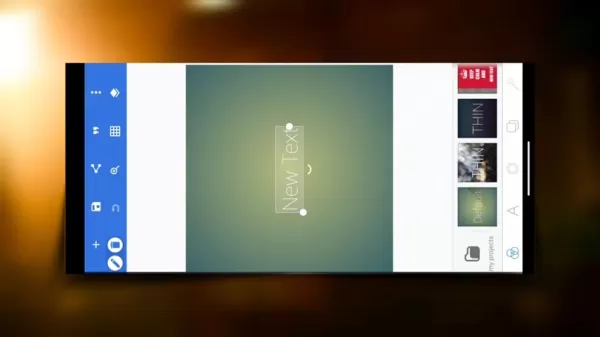
Select "Image Size" and choose "YouTube thumbnail" for optimal video dimensions. Remove default text elements, then use the import function to add your photos. Carefully crop and position each image for proper alignment - this crucial step ensures natural transitions in your final video.
Refine your composition by softening edges between photos using the eraser tool. Save your masterpiece in ultra resolution for maximum quality through the top-menu save option. This expertly blended image becomes the foundation for your video transformation.
Turning Your Merged Image into a Video with Hailuo AI
With your composite image ready, navigate to Hailuo AI's website through your preferred browser

New users can quickly register using Google authentication. Select the "Image to Video" function from the main interface, then upload your PixelLab creation. The magic happens when you input descriptive prompts - "Couple kissing" works well, though alternatives include:
- Romantic lip kiss
- Passionate embrace
- Tender forehead kiss
- Affectionate hug kiss
After selecting your preferred prompt, initiate generation with the purple button. Processing times vary depending on server load, but once complete, download your video immediately using the top-menu option.
Troubleshooting Tips for AI Video Generation
Addressing Nighttime Slowness
AI platforms often experience performance dips during high-traffic evening hours. For faster processing, consider generating videos during morning hours when server demand typically decreases. Additionally, optimize upload speeds by compressing unnecessarily large image files before submission.
Advantages and Disadvantages of AI Photo-to-Video Conversion
Pros
User-Friendly Interface: Intuitive workflows make video creation accessible.
Rapid Production: Generate videos quicker than traditional editing methods.
Creative Freedom: Endless possibilities for imaginative photo combinations.
Budget-Friendly: Affordable solutions for casual creators.
Cons
Quality Limitations: May not satisfy professional production standards.
Algorithm Dependence: Results vary based on AI interpretation.
Customization Constraints: Limited fine-tuning capabilities.
Data Privacy: Consider implications of uploading personal images.
Frequently Asked Questions
Can I create videos with different scenarios using this method?
Absolutely! The versatility of PixelLab and Hailuo AI supports countless scenarios. Simply modify your source images and prompts to depict various emotions, interactions, or settings.
Is this method suitable for creating professional-quality videos?
While perfect for personal projects and social content, this approach may lack the polish required for professional productions. Broadcast-quality videos generally necessitate advanced editing suites and expert techniques.
Related Questions
Are there other AI video creation tools similar to Hailuo AI?
Certainly! The market offers various AI video platforms like Synthesia, Lumen5, and Pictory, each providing unique features including branded templates, text animations, and audio integration.
How can I improve the quality of the videos generated by AI?
Start with crisp, high-resolution source images and experiment with detailed prompts. Post-production editing can enhance color grading and sharpness. Remember - concise videos typically render better than lengthy ones.
Related article
 Stripe to Acquire OpenRouter as AI Model Routing Gains Momentum
Stripe has agreed to acquire OpenRouter, an AI model-routing platform that gives developers access to hundreds of models through a single interface. The deal adds model selection and routing to Stripe’s existing work around AI usage and token-based b
Former OpenAI Researcher Barrett Zoph Returns to Google to Support Gemini Development
Barret Zoph, who previously abruptly left and joined OpenAI due to a disagreement with Thinking Machines Lab CEO Miriam Mularati, has once again changed employers. Alphabet's Google announced that Zoph will return as Vice President of Research, bring
How Recursive Intelligence Raised $335M at $4B Valuation in 4 Months
The co-founders of startup Ricursive Intelligence seemed destined to be co-founders.Anna Goldie, CEO, and Azalia Mirhoseini, CTO, are so well-known in the AI community that they were among those AI engineers who “got those weird emails from Zuckerber
Related Special Topic Recommendations
Design & Art
Stripe to Acquire OpenRouter as AI Model Routing Gains Momentum
Stripe has agreed to acquire OpenRouter, an AI model-routing platform that gives developers access to hundreds of models through a single interface. The deal adds model selection and routing to Stripe’s existing work around AI usage and token-based b
Former OpenAI Researcher Barrett Zoph Returns to Google to Support Gemini Development
Barret Zoph, who previously abruptly left and joined OpenAI due to a disagreement with Thinking Machines Lab CEO Miriam Mularati, has once again changed employers. Alphabet's Google announced that Zoph will return as Vice President of Research, bring
How Recursive Intelligence Raised $335M at $4B Valuation in 4 Months
The co-founders of startup Ricursive Intelligence seemed destined to be co-founders.Anna Goldie, CEO, and Azalia Mirhoseini, CTO, are so well-known in the AI community that they were among those AI engineers who “got those weird emails from Zuckerber
Related Special Topic Recommendations
Design & Art
 Top AI Illustration Tools: Create Editorial Scenes and Cover Art Faster
2026 Latest Top-rated AI Illustration Tools: Our curated list features the best powerfully designed tools for creating stunning editorial scenes and eye-catching cover art quickly. Each option has gone through rigorous real-world tests, offering a free vs paid comparison to help you find the perfect match for your workflow. Try these must-try solutions today to unlock your AI edge and boost your creative productivity. Explore now at XIX.AI.
 10 tools
 xix.ai
Education and Learning
Top AI Tutors for Exam Prep: Practice Math, Science, and English
xix.ai
Education and Learning
Top AI Tutors for Exam Prep: Practice Math, Science, and English
2026 Latest Top-Rated Best AI Tutors for Exam Prep are here on XIX.AI! Our curated list features powerful game-changing tools that offer free vs paid comparison, real-world tests, and weekly updated rankings. They help boost your writing efficiency, simplify complex topic learning, and unlock your academic potential. Explore now to Discover your perfect exam prep tool and Start creating today to Unlock your AI edge!
10 tools
xix.ai
Finance
AI Budget Planning Tools for Personal Money Management
2026 Latest Best Top-Rated AI Budget Planning Tools for Personal Money Management are here on XIX.AI! This curated collection features powerful, game-changing solutions that help you conduct real-world tests, understand spending habits, and create personalized plans to boost productivity. Enjoy a free vs paid comparison along with detailed rankings. Must-try tools designed to simplify money management and unlock your AI edge. Explore now!
11 tools
xix.ai
Health & Wellness
AI Sleep Tracking Assistants: Improve Recovery with Better Bedtime Habits
2026 Latest Best Top-Rated AI Sleep Tracking Assistants curated for ultimate recovery. This fully updated weekly guide features powerful tools that deliver real-world tests, free vs paid comparison, and detailed rankings to help you find the must-try solution that boosts sleep quality and supports better bedtime habits. Explore now at XIX.AI to Unlock your AI edge.
10 tools
xix.ai
Data Analysis
AI SQL Copilots for Product and Revenue Analytics
2026 Latest Best Top-Rated AI SQL Copilots for Product and Revenue Analytics! XIX.AI has curated a powerful, game-changing collection of must-try tools that undergo real-world tests through weekly updated rankings. These tools help users boost productivity significantly by accelerating data analysis, streamlining complex queries, and generating accurate insights to drive smarter business decisions. Explore now to Discover your perfect tool for unlocking your AI edge!
14 tools
xix.ai
Education and Learning
Best AI Homework Helpers That Teach: Learn Concepts, Not Just Answers
2026 Latest Best Top-Rated AI Homework Helpers That Teach Core Concepts Not Just Answers Powerful Tools for Students Must-Try Curated List Weekly Updated Free vs Paid Comparison Real-World Tests Accurate Rankings to Help You Unlock Your Full Learning Potential Explore now to Discover your perfect tool for smarter studying.
10 tools
xix.ai

 Comments (1)
0/500
Comments (1)
0/500
![EmmaJohnson]()
AIで写真をキス映像に変換?技術の進歩はすごいけど、プライバシーや同意の問題ももっと議論すべきだと思う😅 このチュートリアルは確かに面白そうだけど、家族の写真で試すのはちょっと抵抗あるな…
Want to bring your still photos to life by transforming them into engaging videos, or even create heartwarming 'kissing videos' by blending images? This innovative technique is simpler than you'd imagine. Our comprehensive guide walks you through merging photos creatively, particularly for crafting distinctive video content. Learn step-by-step instructions from using apps like PixelLab for photo blending to harnessing AI-powered video generation tools. Ideal for producing personalized social media content or meaningful keepsakes, this approach lets you convert cherished memories into captivating video stories.
Key Points
Blend images seamlessly with PixelLab: Fuse personal photos creatively for unique combinations.
Optimize image dimensions for video: Ensure perfect aspect ratios for smooth video playback.
Harness AI video generation platforms: Utilize tools like Hailuo AI to automate video creation effortlessly.
Craft realistic kissing videos: Transform static images into lifelike animated scenes.
Produce compelling content effortlessly: Create dynamic videos without advanced editing expertise.
Merging Photos for Video Creation: A Step-by-Step Guide
Combining Photos Using PixelLab
Begin your creative process by merging selected photos in PixelLab. This versatile editing app simplifies photo blending - first, launch PixelLab on your mobile device (install it if needed). To prepare your images for video conversion, access the settings via the three-dot menu in the top-right corner
Select "Image Size" and choose "YouTube thumbnail" for optimal video dimensions. Remove default text elements, then use the import function to add your photos. Carefully crop and position each image for proper alignment - this crucial step ensures natural transitions in your final video.
Refine your composition by softening edges between photos using the eraser tool. Save your masterpiece in ultra resolution for maximum quality through the top-menu save option. This expertly blended image becomes the foundation for your video transformation.
Turning Your Merged Image into a Video with Hailuo AI
With your composite image ready, navigate to Hailuo AI's website through your preferred browser
New users can quickly register using Google authentication. Select the "Image to Video" function from the main interface, then upload your PixelLab creation. The magic happens when you input descriptive prompts - "Couple kissing" works well, though alternatives include:
- Romantic lip kiss
- Passionate embrace
- Tender forehead kiss
- Affectionate hug kiss
After selecting your preferred prompt, initiate generation with the purple button. Processing times vary depending on server load, but once complete, download your video immediately using the top-menu option.
Troubleshooting Tips for AI Video Generation
Addressing Nighttime Slowness
AI platforms often experience performance dips during high-traffic evening hours. For faster processing, consider generating videos during morning hours when server demand typically decreases. Additionally, optimize upload speeds by compressing unnecessarily large image files before submission.
Advantages and Disadvantages of AI Photo-to-Video Conversion
Pros
User-Friendly Interface: Intuitive workflows make video creation accessible.
Rapid Production: Generate videos quicker than traditional editing methods.
Creative Freedom: Endless possibilities for imaginative photo combinations.
Budget-Friendly: Affordable solutions for casual creators.
Cons
Quality Limitations: May not satisfy professional production standards.
Algorithm Dependence: Results vary based on AI interpretation.
Customization Constraints: Limited fine-tuning capabilities.
Data Privacy: Consider implications of uploading personal images.
Frequently Asked Questions
Can I create videos with different scenarios using this method?
Absolutely! The versatility of PixelLab and Hailuo AI supports countless scenarios. Simply modify your source images and prompts to depict various emotions, interactions, or settings.
Is this method suitable for creating professional-quality videos?
While perfect for personal projects and social content, this approach may lack the polish required for professional productions. Broadcast-quality videos generally necessitate advanced editing suites and expert techniques.
Related Questions
Are there other AI video creation tools similar to Hailuo AI?
Certainly! The market offers various AI video platforms like Synthesia, Lumen5, and Pictory, each providing unique features including branded templates, text animations, and audio integration.
How can I improve the quality of the videos generated by AI?
Start with crisp, high-resolution source images and experiment with detailed prompts. Post-production editing can enhance color grading and sharpness. Remember - concise videos typically render better than lengthy ones.








 Stripe to Acquire OpenRouter as AI Model Routing Gains Momentum
Stripe has agreed to acquire OpenRouter, an AI model-routing platform that gives developers access to hundreds of models through a single interface. The deal adds model selection and routing to Stripe’s existing work around AI usage and token-based b
Stripe to Acquire OpenRouter as AI Model Routing Gains Momentum
Stripe has agreed to acquire OpenRouter, an AI model-routing platform that gives developers access to hundreds of models through a single interface. The deal adds model selection and routing to Stripe’s existing work around AI usage and token-based b
 Former OpenAI Researcher Barrett Zoph Returns to Google to Support Gemini Development
Barret Zoph, who previously abruptly left and joined OpenAI due to a disagreement with Thinking Machines Lab CEO Miriam Mularati, has once again changed employers. Alphabet's Google announced that Zoph will return as Vice President of Research, bring
Former OpenAI Researcher Barrett Zoph Returns to Google to Support Gemini Development
Barret Zoph, who previously abruptly left and joined OpenAI due to a disagreement with Thinking Machines Lab CEO Miriam Mularati, has once again changed employers. Alphabet's Google announced that Zoph will return as Vice President of Research, bring
 How Recursive Intelligence Raised $335M at $4B Valuation in 4 Months
The co-founders of startup Ricursive Intelligence seemed destined to be co-founders.Anna Goldie, CEO, and Azalia Mirhoseini, CTO, are so well-known in the AI community that they were among those AI engineers who “got those weird emails from Zuckerber
How Recursive Intelligence Raised $335M at $4B Valuation in 4 Months
The co-founders of startup Ricursive Intelligence seemed destined to be co-founders.Anna Goldie, CEO, and Azalia Mirhoseini, CTO, are so well-known in the AI community that they were among those AI engineers who “got those weird emails from Zuckerber

2026 Latest Top-rated AI Illustration Tools: Our curated list features the best powerfully designed tools for creating stunning editorial scenes and eye-catching cover art quickly. Each option has gone through rigorous real-world tests, offering a free vs paid comparison to help you find the perfect match for your workflow. Try these must-try solutions today to unlock your AI edge and boost your creative productivity. Explore now at XIX.AI.
10 tools
xix.ai

2026 Latest Top-Rated Best AI Tutors for Exam Prep are here on XIX.AI! Our curated list features powerful game-changing tools that offer free vs paid comparison, real-world tests, and weekly updated rankings. They help boost your writing efficiency, simplify complex topic learning, and unlock your academic potential. Explore now to Discover your perfect exam prep tool and Start creating today to Unlock your AI edge!
10 tools
xix.ai

2026 Latest Best Top-Rated AI Budget Planning Tools for Personal Money Management are here on XIX.AI! This curated collection features powerful, game-changing solutions that help you conduct real-world tests, understand spending habits, and create personalized plans to boost productivity. Enjoy a free vs paid comparison along with detailed rankings. Must-try tools designed to simplify money management and unlock your AI edge. Explore now!
11 tools
xix.ai

2026 Latest Best Top-Rated AI Sleep Tracking Assistants curated for ultimate recovery. This fully updated weekly guide features powerful tools that deliver real-world tests, free vs paid comparison, and detailed rankings to help you find the must-try solution that boosts sleep quality and supports better bedtime habits. Explore now at XIX.AI to Unlock your AI edge.
10 tools
xix.ai

2026 Latest Best Top-Rated AI SQL Copilots for Product and Revenue Analytics! XIX.AI has curated a powerful, game-changing collection of must-try tools that undergo real-world tests through weekly updated rankings. These tools help users boost productivity significantly by accelerating data analysis, streamlining complex queries, and generating accurate insights to drive smarter business decisions. Explore now to Discover your perfect tool for unlocking your AI edge!
14 tools
xix.ai

2026 Latest Best Top-Rated AI Homework Helpers That Teach Core Concepts Not Just Answers Powerful Tools for Students Must-Try Curated List Weekly Updated Free vs Paid Comparison Real-World Tests Accurate Rankings to Help You Unlock Your Full Learning Potential Explore now to Discover your perfect tool for smarter studying.
10 tools
xix.ai

AIで写真をキス映像に変換?技術の進歩はすごいけど、プライバシーや同意の問題ももっと議論すべきだと思う😅 このチュートリアルは確かに面白そうだけど、家族の写真で試すのはちょっと抵抗あるな…












