


 Home
HomeAI Transcription with Happy Scribe Boosts Content Creator Efficiency
For content creators, time is critical. Manually transcribing audio or video is slow and labor-intensive. AI-driven transcription tools simplify this task. This article highlights Happy Scribe, an advanced platform using artificial intelligence to swiftly and accurately convert audio and video into text. Discover how creators can enhance productivity, improve accessibility, and explore new creative opportunities with this tool.
Key Points
Happy Scribe employs AI for efficient audio and video transcription.
Creators save time and effort using Happy Scribe.
Supports multiple languages for broader accessibility.
Use temporary email services for free trial access with Happy Scribe.
Upload files or paste YouTube links for transcription.
Why Transcription Tools Matter
Challenges for Content Creators
Content creation demands time, energy, and innovation.
Converting spoken content to text, such as interviews or podcasts, is often time-consuming. Transcription tools streamline workflows, boosting efficiency.
- Time Savings: Automated transcription cuts hours from manual work.
- High Accuracy: Advanced AI tools deliver reliable text with minimal errors.
- Greater Accessibility: Transcripts reach wider audiences, including those with hearing impairments, and enhance SEO.
- Creative Versatility: Text versions enable repurposing content into subtitles, blog posts, or articles.
Happy Scribe: A Powerful AI Solution
Happy Scribe is a top AI transcription platform, simplifying audio and video conversion to text. It offers automatic transcription and subtitle generation, empowering creators to optimize workflows.
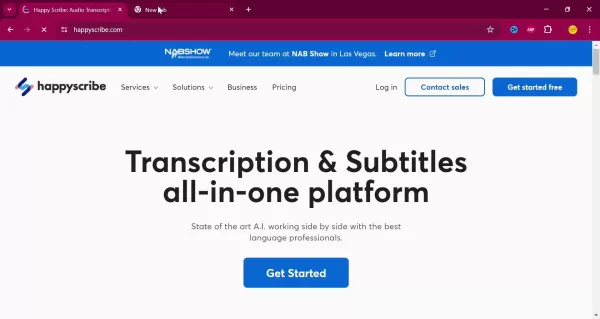
Happy Scribe is a versatile tool for managing and repurposing content. Its intuitive interface and robust features make it essential for creators aiming to boost productivity.
Key advantages of Happy Scribe:
- Automated Transcription: Advanced AI quickly transcribes files, saving time.
- Multilingual Support: Transcribe content in various languages.
- Subtitle Creation: Generate video subtitles for broader accessibility.
- Team Collaboration: Share projects for seamless teamwork.
- Customizable Options: Adjust accuracy or add speaker labels to fit specific needs.
Using Happy Scribe: A Guide
Free Access with Temp Mail
Happy Scribe is a paid service, but creators can use temporary email services like Temp Mail for free trial access.
Temp Mail provides a temporary email for trial sign-ups, letting creators test Happy Scribe’s features before subscribing. Paid plans unlock advanced tools for greater efficiency.
Transcription Process Steps
How to transcribe with Happy Scribe:
Visit Happy Scribe: Access the website in your browser.
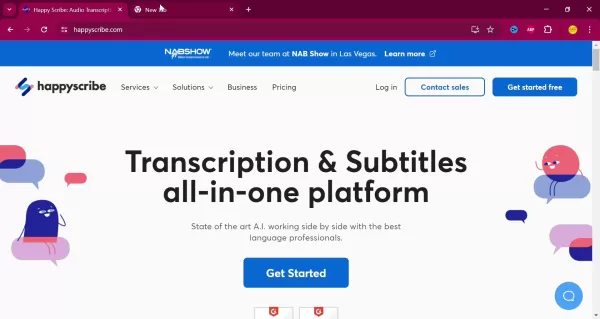
Sign Up: Use a temporary or primary email to create an account.
Begin Transcription: Click ‘New Transcription’ to start.
Upload or Link: Upload files or paste YouTube/Google Drive links.
Select Language: Choose the content’s spoken language.
Choose Method: Select ‘Machine Generated’ for AI transcription.
Start Process: Click ‘Create’ to begin transcription.
Edit Transcript: Review and refine the text for accuracy.
Export File: Save transcript as TXT, SRT, or DOCX.
Optimizing Transcription Accuracy
AI transcription isn’t flawless; audio quality, accents, or noise can impact results.
Tips for better accuracy:
- Clear Audio: Use high-quality recordings.
- Reduce Noise: Minimize background sounds.
- Review Edits: Check transcripts for errors.
- Speaker Labels: Identify speakers for clarity.
These steps enhance transcription quality with Happy Scribe.
Using Temp Mail
Generating Temporary Emails
Visit temp-mail.org.
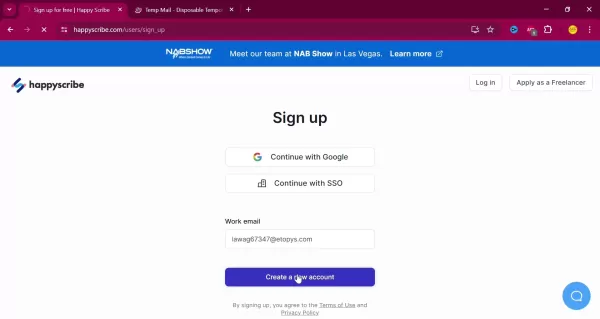
Get Email: A temporary address is auto-generated.
Copy Address: Use the Copy button.
Refresh Emails: Click Refresh for new emails.
Happy Scribe: Pros and Cons
Pros
Accurate AI transcription
Multilingual support
Easy YouTube link transcription
Intuitive interface
Time-saving automation
Cons
Subscription-based model
Requires review for accuracy
Needs internet connection
Challenges with accents or noise
AI Transcription FAQs
How accurate is AI transcription?
Accuracy depends on audio quality and accents, but Happy Scribe offers high precision. Always review transcripts.
Is Happy Scribe free?
It’s primarily paid, but Temp Mail enables free trial access.
What languages does Happy Scribe support?
It supports numerous languages for diverse audiences.
Can I transcribe YouTube videos?
Yes, paste the video link for transcription.
Related Questions
Other AI Tools for Creators
AI tools enhance workflows:
- Writing Assistants: Grammarly, Jasper improve writing and SEO.
- Image Generators: DALL-E 2, Midjourney create visuals.
- Video Editors: RunwayML, Descript simplify editing.
- Audio Enhancers: Adobe Podcast, Auphonic improve sound quality.
Improving SEO with Transcripts
Strategies for SEO:
- Add to Blogs: Boost keyword density.
- Create Subtitles: Enhance video accessibility.
- Optimize Keywords: Use relevant terms naturally.
- Meta Descriptions: Craft from transcripts.
- Submit to Search Engines: Improve indexability.
Related article
 Superintelligence Arrives: Do We Let It In?
Loading the player…AI companies have been talking about superintelligent AI like it’s inevitable, but recent safety incidents like OpenAI’s Hugging Face breach are demonstrating the potential dangers of deploying AI systems that are more capable than
iFLYTEK Unveils Spark X2.5 General Large Model
On September 1, iFlytek will open-source two edge-focused large language models, Xinghuo X2.5-4B and Xinghuo X2.5-1.7B, according to the latest official announcement. Both models natively support a context window of up to 1 million tokens. They deliv
Meta Removes AI Photo Editing Feature Following User Backlash
Meta, the social media giant, is once again embroiled in a public debate regarding the delicate balance between artificial intelligence and user privacy. According to TechCrunch, Meta’s Superintelligence Labs introduced a new AI image generator, Muse
Related Special Topic Recommendations
Animation Creation
Superintelligence Arrives: Do We Let It In?
Loading the player…AI companies have been talking about superintelligent AI like it’s inevitable, but recent safety incidents like OpenAI’s Hugging Face breach are demonstrating the potential dangers of deploying AI systems that are more capable than
iFLYTEK Unveils Spark X2.5 General Large Model
On September 1, iFlytek will open-source two edge-focused large language models, Xinghuo X2.5-4B and Xinghuo X2.5-1.7B, according to the latest official announcement. Both models natively support a context window of up to 1 million tokens. They deliv
Meta Removes AI Photo Editing Feature Following User Backlash
Meta, the social media giant, is once again embroiled in a public debate regarding the delicate balance between artificial intelligence and user privacy. According to TechCrunch, Meta’s Superintelligence Labs introduced a new AI image generator, Muse
Related Special Topic Recommendations
Animation Creation
 AI Scene Animation Tools for Social Media Content
2026 Latest Best Top-rated AI Scene Animation Tools for Social Media Content are curated here by XIX.AI. These powerful game-changing tools offer real-world tests and detailed free vs paid comparison, helping creators boost productivity significantly. Explore now to unlock your AI edge.
 9 tools
 xix.ai
Video creation
AI Short-Form Video Hook Generators for Reels, Shorts, and Product Launch Campaigns
xix.ai
Video creation
AI Short-Form Video Hook Generators for Reels, Shorts, and Product Launch Campaigns
2026 Latest Best AI Short-Form Video Hook Generators for Reels Shorts and Product Launch Campaigns! XIX.AI curates top-rated powerful game-changing tools that deliver must-try results through real-world tests. This weekly updated page offers free vs paid comparison rankings to help you find the perfect solution for boosting content creativity and productivity. Explore now to Unlock your AI edge!
11 tools
xix.ai
writing
AI Article Outline Tools for Long Form Writing
2026 Latest Best Top-Rated AI Article Outline Tools for Long Form Writing! This curated collection features powerful, game-changing tools that deliver accurate, structured outlines with real-world tests to boost writing efficiency significantly. XIX.AI is part of this elite selection. Get a free vs paid comparison to help you choose the perfect tool. Explore now and Unlock your AI edge!
9 tools
xix.ai
chatbot
Best AI Roleplay Chat Apps for Language Practice, Interview Prep, and Daily Fluency
2026 Latest Best Top-rated AI Roleplay Chat Apps for Language Practice, Interview Prep, and Daily Fluency! XIX.AI curates a powerful game-changing collection that offers free vs paid comparison, real-world tests, and updated rankings weekly. These must-try tools help you boost writing skills, overcome fluency challenges, and improve communication efficiency across all daily scenarios. Explore now to discover your perfect tool for language growth!
10 tools
xix.ai
Music composition
AI Stem Separation Tools for Remix Production, Sampling Prep, and Karaoke Masters
2026 Latest Best Top-rated AI Stem Separation Tools Curated for Remix Production, Sampling Prep, and Karaoke Masters. These powerful game-changing tools offer real-world tests to deliver precise audio isolation, boosting productivity significantly. XIX.AI provides a weekly updated free vs paid comparison guide to help you find the must-try solution that suits your needs. Explore now to unlock your AI edge.
8 tools
xix.ai
Data Analysis
AI SQL Copilots for Revenue Dashboards, Funnel Analysis, and Product Metrics
2026 Latest Best AI SQL Copilots Ranked Top-Rated! XIX.AI curates a powerful game-changing collection for weekly updated real-world tests. These must-try tools help you generate accurate revenue dashboards, analyze sales funnels, and track product metrics swiftly, boosting productivity massively. Explore now to Discover your perfect tool for data-driven decision making! 238 characters
9 tools
xix.ai

 Comments (2)
0/500
Comments (2)
0/500
![FrankMartínez]()
As a video editor, I've wasted countless hours on manual transcription. Happy Scribe looks like a game-changer for efficiency, though I wonder how it handles heavy accents or background noise. Definitely worth a try for anyone drowning in content deadlines! 🎥✨
![JustinJohnson]()
Tried this tool for my podcast editing last week and it cut down the prep time by almost 60%! Honestly, the accuracy even with multiple speakers and background music was impressive. Makes me wonder though, what happens to all the professional transcriptionists if AI gets this good so fast? 🤔 Still, as a creator, I'm not complaining about getting hours back!
For content creators, time is critical. Manually transcribing audio or video is slow and labor-intensive. AI-driven transcription tools simplify this task. This article highlights Happy Scribe, an advanced platform using artificial intelligence to swiftly and accurately convert audio and video into text. Discover how creators can enhance productivity, improve accessibility, and explore new creative opportunities with this tool.
Key Points
Happy Scribe employs AI for efficient audio and video transcription.
Creators save time and effort using Happy Scribe.
Supports multiple languages for broader accessibility.
Use temporary email services for free trial access with Happy Scribe.
Upload files or paste YouTube links for transcription.
Why Transcription Tools Matter
Challenges for Content Creators
Content creation demands time, energy, and innovation.
Converting spoken content to text, such as interviews or podcasts, is often time-consuming. Transcription tools streamline workflows, boosting efficiency.
- Time Savings: Automated transcription cuts hours from manual work.
- High Accuracy: Advanced AI tools deliver reliable text with minimal errors.
- Greater Accessibility: Transcripts reach wider audiences, including those with hearing impairments, and enhance SEO.
- Creative Versatility: Text versions enable repurposing content into subtitles, blog posts, or articles.
Happy Scribe: A Powerful AI Solution
Happy Scribe is a top AI transcription platform, simplifying audio and video conversion to text. It offers automatic transcription and subtitle generation, empowering creators to optimize workflows.
Happy Scribe is a versatile tool for managing and repurposing content. Its intuitive interface and robust features make it essential for creators aiming to boost productivity.
Key advantages of Happy Scribe:
- Automated Transcription: Advanced AI quickly transcribes files, saving time.
- Multilingual Support: Transcribe content in various languages.
- Subtitle Creation: Generate video subtitles for broader accessibility.
- Team Collaboration: Share projects for seamless teamwork.
- Customizable Options: Adjust accuracy or add speaker labels to fit specific needs.
Using Happy Scribe: A Guide
Free Access with Temp Mail
Happy Scribe is a paid service, but creators can use temporary email services like Temp Mail for free trial access.
Temp Mail provides a temporary email for trial sign-ups, letting creators test Happy Scribe’s features before subscribing. Paid plans unlock advanced tools for greater efficiency.
Transcription Process Steps
How to transcribe with Happy Scribe:
Visit Happy Scribe: Access the website in your browser.
Sign Up: Use a temporary or primary email to create an account.
Begin Transcription: Click ‘New Transcription’ to start.
Upload or Link: Upload files or paste YouTube/Google Drive links.
Select Language: Choose the content’s spoken language.
Choose Method: Select ‘Machine Generated’ for AI transcription.
Start Process: Click ‘Create’ to begin transcription.
Edit Transcript: Review and refine the text for accuracy.
Export File: Save transcript as TXT, SRT, or DOCX.
Optimizing Transcription Accuracy
AI transcription isn’t flawless; audio quality, accents, or noise can impact results.
Tips for better accuracy:
- Clear Audio: Use high-quality recordings.
- Reduce Noise: Minimize background sounds.
- Review Edits: Check transcripts for errors.
- Speaker Labels: Identify speakers for clarity.
These steps enhance transcription quality with Happy Scribe.
Using Temp Mail
Generating Temporary Emails
Visit temp-mail.org.
Get Email: A temporary address is auto-generated.
Copy Address: Use the Copy button.
Refresh Emails: Click Refresh for new emails.
Happy Scribe: Pros and Cons
Pros
Accurate AI transcription
Multilingual support
Easy YouTube link transcription
Intuitive interface
Time-saving automation
Cons
Subscription-based model
Requires review for accuracy
Needs internet connection
Challenges with accents or noise
AI Transcription FAQs
How accurate is AI transcription?
Accuracy depends on audio quality and accents, but Happy Scribe offers high precision. Always review transcripts.
Is Happy Scribe free?
It’s primarily paid, but Temp Mail enables free trial access.
What languages does Happy Scribe support?
It supports numerous languages for diverse audiences.
Can I transcribe YouTube videos?
Yes, paste the video link for transcription.
Related Questions
Other AI Tools for Creators
AI tools enhance workflows:
- Writing Assistants: Grammarly, Jasper improve writing and SEO.
- Image Generators: DALL-E 2, Midjourney create visuals.
- Video Editors: RunwayML, Descript simplify editing.
- Audio Enhancers: Adobe Podcast, Auphonic improve sound quality.
Improving SEO with Transcripts
Strategies for SEO:
- Add to Blogs: Boost keyword density.
- Create Subtitles: Enhance video accessibility.
- Optimize Keywords: Use relevant terms naturally.
- Meta Descriptions: Craft from transcripts.
- Submit to Search Engines: Improve indexability.








 Superintelligence Arrives: Do We Let It In?
Loading the player…AI companies have been talking about superintelligent AI like it’s inevitable, but recent safety incidents like OpenAI’s Hugging Face breach are demonstrating the potential dangers of deploying AI systems that are more capable than
Superintelligence Arrives: Do We Let It In?
Loading the player…AI companies have been talking about superintelligent AI like it’s inevitable, but recent safety incidents like OpenAI’s Hugging Face breach are demonstrating the potential dangers of deploying AI systems that are more capable than
 iFLYTEK Unveils Spark X2.5 General Large Model
On September 1, iFlytek will open-source two edge-focused large language models, Xinghuo X2.5-4B and Xinghuo X2.5-1.7B, according to the latest official announcement. Both models natively support a context window of up to 1 million tokens. They deliv
iFLYTEK Unveils Spark X2.5 General Large Model
On September 1, iFlytek will open-source two edge-focused large language models, Xinghuo X2.5-4B and Xinghuo X2.5-1.7B, according to the latest official announcement. Both models natively support a context window of up to 1 million tokens. They deliv
 Meta Removes AI Photo Editing Feature Following User Backlash
Meta, the social media giant, is once again embroiled in a public debate regarding the delicate balance between artificial intelligence and user privacy. According to TechCrunch, Meta’s Superintelligence Labs introduced a new AI image generator, Muse
Meta Removes AI Photo Editing Feature Following User Backlash
Meta, the social media giant, is once again embroiled in a public debate regarding the delicate balance between artificial intelligence and user privacy. According to TechCrunch, Meta’s Superintelligence Labs introduced a new AI image generator, Muse
2026 Latest Best Top-rated AI Scene Animation Tools for Social Media Content are curated here by XIX.AI. These powerful game-changing tools offer real-world tests and detailed free vs paid comparison, helping creators boost productivity significantly. Explore now to unlock your AI edge.
9 tools
xix.ai
2026 Latest Best AI Short-Form Video Hook Generators for Reels Shorts and Product Launch Campaigns! XIX.AI curates top-rated powerful game-changing tools that deliver must-try results through real-world tests. This weekly updated page offers free vs paid comparison rankings to help you find the perfect solution for boosting content creativity and productivity. Explore now to Unlock your AI edge!
11 tools
xix.ai

2026 Latest Best Top-Rated AI Article Outline Tools for Long Form Writing! This curated collection features powerful, game-changing tools that deliver accurate, structured outlines with real-world tests to boost writing efficiency significantly. XIX.AI is part of this elite selection. Get a free vs paid comparison to help you choose the perfect tool. Explore now and Unlock your AI edge!
9 tools
xix.ai

2026 Latest Best Top-rated AI Roleplay Chat Apps for Language Practice, Interview Prep, and Daily Fluency! XIX.AI curates a powerful game-changing collection that offers free vs paid comparison, real-world tests, and updated rankings weekly. These must-try tools help you boost writing skills, overcome fluency challenges, and improve communication efficiency across all daily scenarios. Explore now to discover your perfect tool for language growth!
10 tools
xix.ai

2026 Latest Best Top-rated AI Stem Separation Tools Curated for Remix Production, Sampling Prep, and Karaoke Masters. These powerful game-changing tools offer real-world tests to deliver precise audio isolation, boosting productivity significantly. XIX.AI provides a weekly updated free vs paid comparison guide to help you find the must-try solution that suits your needs. Explore now to unlock your AI edge.
8 tools
xix.ai

2026 Latest Best AI SQL Copilots Ranked Top-Rated! XIX.AI curates a powerful game-changing collection for weekly updated real-world tests. These must-try tools help you generate accurate revenue dashboards, analyze sales funnels, and track product metrics swiftly, boosting productivity massively. Explore now to Discover your perfect tool for data-driven decision making! 238 characters
9 tools
xix.ai

As a video editor, I've wasted countless hours on manual transcription. Happy Scribe looks like a game-changer for efficiency, though I wonder how it handles heavy accents or background noise. Definitely worth a try for anyone drowning in content deadlines! 🎥✨
Tried this tool for my podcast editing last week and it cut down the prep time by almost 60%! Honestly, the accuracy even with multiple speakers and background music was impressive. Makes me wonder though, what happens to all the professional transcriptionists if AI gets this good so fast? 🤔 Still, as a creator, I'm not complaining about getting hours back!












